dalben
Members
-
Joined
-
Last visited
Everything posted by dalben
-
Thanks. That worked. My world now has Peegs !
-
In \binhex-minecraftbedrockserver\minecraft\resource_packs\ I have: Directory: Z:\binhex-minecraftbedrockserver\minecraft\resource_packs Mode LastWriteTime Length Name ---- ------------- ------ ---- d----- 13/4/2020 23:09 chemistry d----- 13/4/2020 23:09 vanilla -a---- 26/4/2020 17:20 86334885 Fuserealismv1.1.8.zip -a---- 26/4/2020 17:16 328143 Peegs.zip The contents of Z:\binhex-minecraftbedrockserver\minecraft\valid_known_packs.json contains: { "file_system" : "RawPath", "from_disk" : true, "hashes" : [ "YQrplf18wEDMbrJ/Iga1e9MNP2/xHkE2E7jmJCR4EhE=" ], "path" : "resource_packs/Peegs.zip", "uuid" : "c5f509ab-77a8-4abe-a18a-befaa5c949ee", "version" : "0.0.1" }, { "file_system" : "RawPath", "from_disk" : true, "hashes" : [ "tMNKXPdxyz6VR+QEfegJh9B7OAfRpYdrAzgRcMA1EvI=" ], "path" : "resource_packs/Fuserealismv1.1.8.zip", "uuid" : "bc2a0bc9-e3a2-4702-9319-d4d3231dfdbc", "version" : "0.0.1" } ] In my \\tdm\cache\appdata\binhex-minecraftbedrockserver\minecraft\worlds\The Garden directory I have the following: Directory: Z:\binhex-minecraftbedrockserver\minecraft\worlds\The Garden Mode LastWriteTime Length Name ---- ------------- ------ ---- d----- 1/5/2020 15:52 db d----- 26/4/2020 17:23 resource_packs ------ 1/5/2020 15:52 2069 level.dat ------ 1/5/2020 15:52 2069 level.dat_old ------ 1/5/2020 15:52 10 levelname.txt -a---- 26/4/2020 17:47 168 world_resource_packs.json Directory: Z:\binhex-minecraftbedrockserver\minecraft\worlds\The Garden\resource_packs Mode LastWriteTime Length Name ---- ------------- ------ ---- -a---- 26/4/2020 17:20 86334885 Fuserealismv1.1.8.zip -a---- 26/4/2020 17:16 328143 Peegs.zip The contents of Z:\binhex-minecraftbedrockserver\minecraft\worlds\The Garden\resource_packs\world_resource_packs.json is: [ { "pack_id" : "c5f509ab-77a8-4abe-a18a-befaa5c949ee", "version" : [ 0, 0, 1 ] } { "pack_id" : "bc2a0bc9-e3a2-4702-9319-d4d3231dfdbc", "version" : [ 0, 0, 1 ] } ] Let me know if you see anything obvious I've got wrong there. Server restarted multiple times. No errors in the Logfiles
-
As yes, 1.14 sorry. I'll keep playing around and see what I can find. Am I right the only log available is the docker log?
-
I stuggled with the texture packs. No errors that I can see but nothing available to download or being forced to download when I start. Is it possible it's a versioning issue. The texture packs say 1.5 and my server is running 1.4 ?
-
Yeah, it was. They all are. After much fiddling and reinstalling etc, I got everything back up again. I need to create the proxy hosts as publicly available and pull down the cert in that setup. Once the cert is applied and all is running, I then change the security from Public to Access group. Save that and all is good.
-
I was changing some IPs and ran into all sorts of problems with ngix letsencrypt. Without changing anything, if I request a new cert I get the following error message: nginx: [emerg] unexpected ";" in /data/nginx/proxy_host/18.conf:46 [nginx] starting... 18.conf in this case is the proxy host I was trying to renew. Line 46 has the following: # Access checks must... ; It seems to be missing the 'satisfy any' string be foe the semi-colon. If I manually add the satisy any, so it looks like this: # Access checks must... satisy any; it start's the renewal, goes a fair bit further until it throws this error: Duplicate relation "access_list" in a relation expression. You should use "a.[b, c]" instead of "[a.b, a.c]". This will cause an error in objection 2.0 [4/25/2020] [10:18:33 PM] [Nginx ] › ℹ info Reloading Nginx [4/25/2020] [10:18:33 PM] [SSL ] › ℹ info Requesting Let'sEncrypt certificates for Cert #61: nb.rdkl.me [4/25/2020] [10:18:36 PM] [Express ] › ⚠ warning Command failed: /usr/sbin/nginx -t nginx: [emerg] unexpected ";" in /data/nginx/proxy_host/18.conf:46 nginx: configuration file /etc/nginx/nginx.conf test failed [4/25/2020] [10:18:36 PM] [Express ] › ⚠ warning Command failed: /usr/sbin/nginx -t nginx: [emerg] unexpected ";" in /data/nginx/proxy_host/18.conf:46 nginx: configuration file /etc/nginx/nginx.conf test failed At that point if I reload 18.conf, the satisfy any has been removed and the solitary semi-colon throws the error. Any ideas? At this point I can't touch any working proxy-host config as doing so will break it.
-
In my \appdata\binhex-minecraftbedrockserver\minecraft folder I have a 1.2Gb file called bedrock_server_realms.debug. Does anyone know what it is? Can I delete it without fear? Having an extension of debug I'm assuming I can kill it. Last modified over 10 days ago.
-
A strange one I think. If I stop the docker service (in an attempt to enable "Host access to custom networks:"), when I hit Apply, the two paths come up as red (not valid). If I try and re-enter the paths there it can't find cache. In this state the only way to get the docker service running again is stopping the array, editing docker.cfg, setting DOCKER_ENABLED to yes and restarting the array. Any ideas on who to resolve this? Also, any tips on how to enable host access to custom networks direct from the docker.cfg file? Some screen shots. All running: Service Stopped: Hitting Apply after changing a setting, or even just enabling again:
-
I tried ShellOverride settings and am now getting a different error: FOMon Jan 06 2020 21:37:28nzbToSickBeard: KeyError: (3, 8) INFOMon Jan 06 2020 21:37:28nzbToSickBeard: time_left = PYTHON_EOL[(major, minor)] - now INFOMon Jan 06 2020 21:37:28nzbToSickBeard: File "/config/ppscripts/nzbToMedia/eol.py", line 62, in lifetime INFOMon Jan 06 2020 21:37:28nzbToSickBeard: days_left = lifetime(version) INFOMon Jan 06 2020 21:37:28nzbToSickBeard: File "/config/ppscripts/nzbToMedia/eol.py", line 111, in raise_for_status INFOMon Jan 06 2020 21:37:28nzbToSickBeard: raise_for_status(version, grace_period) INFOMon Jan 06 2020 21:37:28nzbToSickBeard: File "/config/ppscripts/nzbToMedia/eol.py", line 91, in check INFOMon Jan 06 2020 21:37:28nzbToSickBeard: eol.check() Not sure where to go from here Edit: Got it working, just needed to download the latest nzbtomedia script.
-
As above, I just didn't have the option to do that with this container nor the lsio container. By installing the official plex container it all came good and the option was there. I've now run this and the lsio container over the appdata directory the official container created and they now both work fine. Maybe it was just my setup. Anyway, all good now.
-
It was the same behavior from the webgui on the server. My servername never appeared at the top left above the content. I have it up now, but with the official container from Plex. I tried the linuxserver plex container and had the same behavior as this binhex one. I then installed the official plex container and it finally showed me where I could add media. The only difference between the 3 dockers that I could see was the official one made you "claim" your server. Not sure if that matters or not but I'm up.
-
No, never used Plex before so there's no doubt I'm doing something stupid. Always used Kodi but Santa dropped off a Smart TV early that has a Plex app so I thought I'd give it a go. I see the following from the Web interface (http://my.server.ip:32400/web/) and from the Windows client I've installed (screen shot below). I can't see where I can add my media to Plex.

-
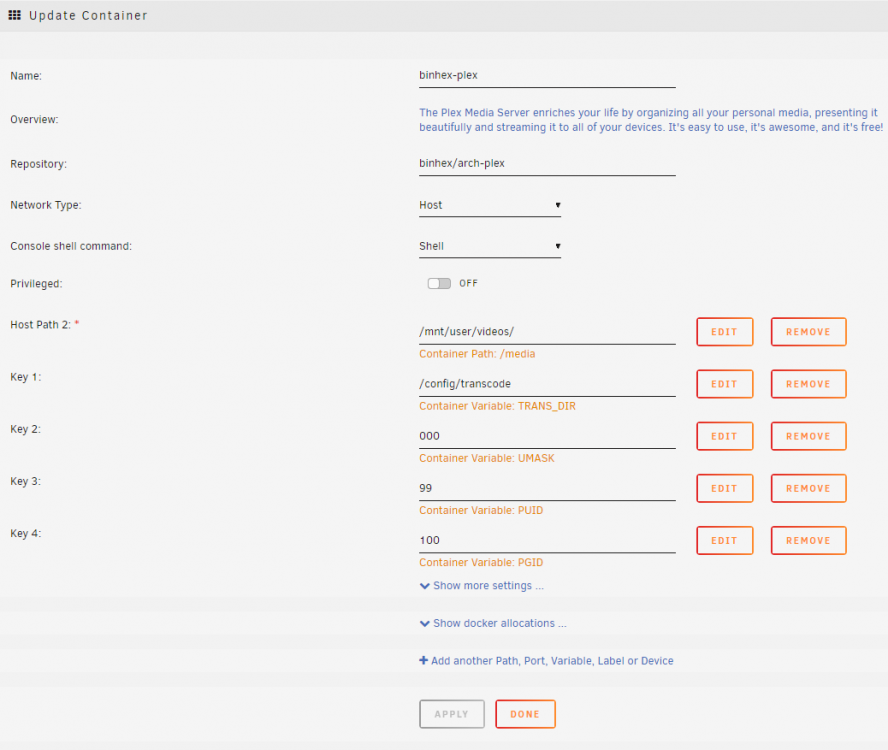
I'm pobviously missing something so basic a that I feel like a fool asking this question. I've installed the docker, fired it up, all seems to be running, no obvious errors in the log files. When I go to the WebGui and click on My media I get the following: Add your media to Plex Organize, beautify, stream, and share your personal collection of movies, TV, music, and photos anywhere, on all your devices. To get started, download our free Plex Media Server software on the device where you store your media. I'm running the container so obviously I have PMS running. I have an account registered on Plex but I haven't subscribed to any service which require payment yet. I wanted to see how it goes with my devices before doing that. Attached is the PMS log and below the docker config screen shot. I know there's something obvious and basic I'm missing, but I don't know what. Plex Media Server.log
-
Just a quick note to anyone that might be going to the Ubiquiti forums for support, they don't support the controllers running in Containers and will stop offering support even if the issue is obviously not container related. Best not mention you run the controller in a container if you go there looking for help.
-
User Groups
-
Is anyone else seeing issues with looking up show/episode details in Medusa through TVDB? Not sure if it's a local issue on my install or a wider issue with the latest update.
-
Can this implementation of Letsencrypt be used to manage certs for external (outside of the home LAN) websites? Use case, I have a few domains hosted externally with a webhost who makes it difficult to get letsencrypt going. They prefer to sell you a cert. If there was a way to issue and renew the certs for these external sites from this docker it would be great. I did look at https://sslforfree.com for the external sites. That works fine but there is no auto-renewal facility.
-
Just to double check, this sets up a server for the Java version of Minecraft? It's what my kids keep bugging me for.
-
When there are multiple dockers to update, the first status message for each docker being updated writes to the very first line of the status window. If it helps I'm on Windows 10 and using Chrome Version 77.0.3865.120 (Official Build) (64-bit)
-
My monthly Parity Check kicked off in the wee hours this morning. At around 6am I needed to pause it for about 5 mins then resumed. I noticed the stats at the end of the parity check display as if the check only started when I resumed, not from the start.
-
My monthly Parity Check kicked off in the wee hours this morning. At around 6am I needed to pause it for about 5 mins then resumed. I noticed the stats at the end of the parity check display as if the check only started when I resumed, not from the start.
-
I'm running 6.8 rc4. Latest version of Nerdpack. It shows utempter-1.1.6-x86_64-2.txz has an update ready. When I update it I get utempter-1.1.6 package missing! Not sure what it's used for and everything seems to work fine but the OCD in my is getting worked up over the failure to update. Any suggestions?
-
OK, fixed now. In a moment of spring cleaning I stripped back a lot of old files and stuff from my flash drive. It dropped in the default syslinux.cfg file. That in turn had over written the change I made to make the nct6775 driver available: append initrd=/bzroot acpi_enforce_resources=lax
-
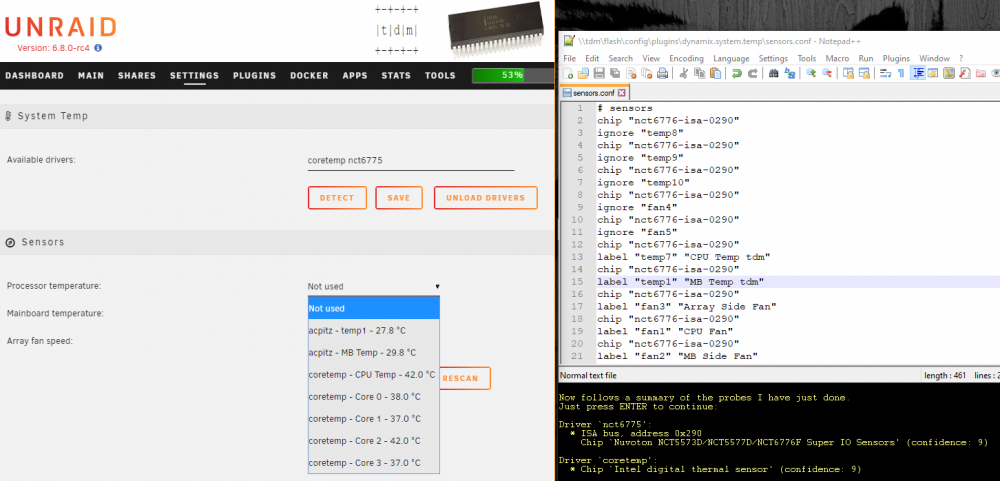
Thanks for that. I'll roll back to rc3 and see if that makes a difference. UPDATE: OK, something is amiss but I have no idea where to start looking: sensors-detect output: Driver `nct6775': * ISA bus, address 0x290 Chip `Nuvoton NCT5573D/NCT5577D/NCT6776F Super IO Sensors' (confidence: 9) Driver `coretemp': * Chip `Intel digital thermal sensor' (confidence: 9) sensors output: root@tdm:~# sensors acpitz-acpi-0 Adapter: ACPI interface temp1: +27.8°C (crit = +99.0°C) MB Temp: +29.8°C (crit = +99.0°C) coretemp-isa-0000 Adapter: ISA adapter CPU Temp: +39.0°C (high = +80.0°C, crit = +98.0°C) Core 0: +37.0°C (high = +80.0°C, crit = +98.0°C) Core 1: +35.0°C (high = +80.0°C, crit = +98.0°C) Core 2: +39.0°C (high = +80.0°C, crit = +98.0°C) Core 3: +36.0°C (high = +80.0°C, crit = +98.0°C) modprobe coretemp nct6775 is my go file and I've run it a couple more times. with no change to the discrepancy between sensors-detect and sensors
-
The 6.8 series seems to have broken the System Temp plugin for my system. It was working fine with 6.7. Sensors-detect still finds the sensor chip and driver required, the nct6776. Found `Nuvoton NCT5573D/NCT5577D/NCT6776F Super IO Sensors' Success! (address 0x290, driver `nct6775') But it seems the sensors.conf file in the plugin directory isn't being read. as only the coretemp probes are available.