





jbartlett
Community Developer
-
Joined
-
Last visited
Everything posted by jbartlett
-
Nyghthawk & MMW - please update the Docker app and pull up the app. Scroll down to the bottom of the page below the Rescan buttons are located and click on "Create Debug File". This will create a file located in the <appdata>/DiskSpeed directory to email me at [email protected]
-
Beta 2c pushed Added additional Mushkin model cleanup Added Port Number for the drives on the Home Screen Added troubleshooting debug file logic Keep drive edits after rescanning the controllers
-
Onboard SATA controllers aren't being detected. I'll add code to pack up the saved data files so I can see exactly what you see and troubleshoot.
-
Do you have a 3rd controller that the three missing drives are attached to? If so, what is it?
-
Nope, sure isn't proper behavior. The storage.json file is recreated every time the system is scanned and oldstorage.json is created if I need to preserve any data but it should be saving the drive configuration in a save directory under <appdata>/DiskSpeed/Instances/local/driveinfo for the drive in a file named "config.json" which doesn't seem to be always created. I'll look into it.
-
Check your Docker setup to see if Local Storage is defined and the directory location contains files. This is a sign that it's not saving data to the appdata share and the changes are being stored in the Docker container itself which is lost whenever you update the application via Docker Update.
-
I won't be able to correct these. It's displaying what the OS is reporting. Likely the PCI ID database for the the controller is wrong in the master PCI ID list.
-
Beta 2b pushed Change Vendor to Muskin if the model starts with "MKN" - Muskin drives identify as Toshiba. Change Vendor to Crucial if the model starts with "MTFD" - drive Vendor not given Change Vendor to OCZ if the vendor starts with "OCZ-" Change Vendor to "Samsung" if model string starts with "Samsung" - some drives report as "Western Digital" Added Model RegEx "CT[0-9]{3,}(B|M)[A-Z]?[0-9]{2,}SSD" to identify Crucial drives Added Mushkin model cleanup Added Plextor model cleanup
-
All of the images came from the same source Though some vendors were nice enough to have presentation media to use.
-
That seems to be the case for all Mushkin drives. I added logic to beta 2a (pushed) to change the Vendor to Mushkin if the model starts with MKN.
-
Correct. I have 16 drive models identified that aren't in my database.
-
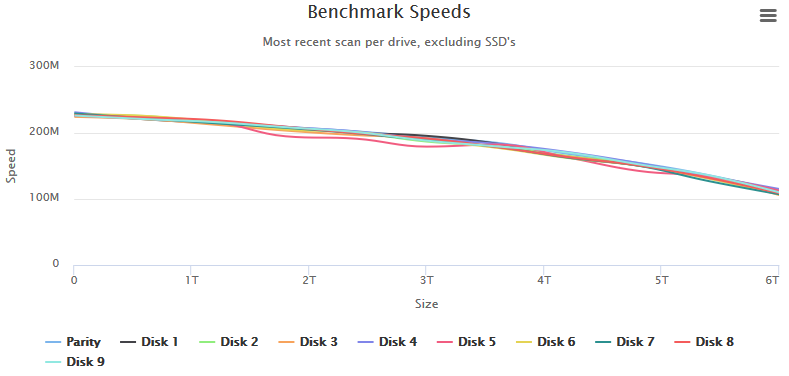
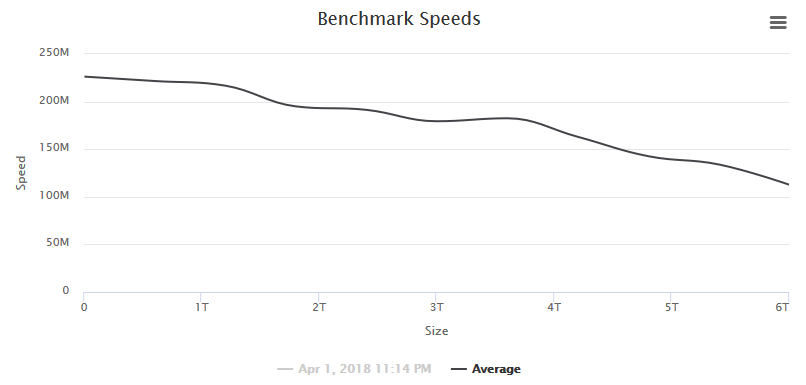
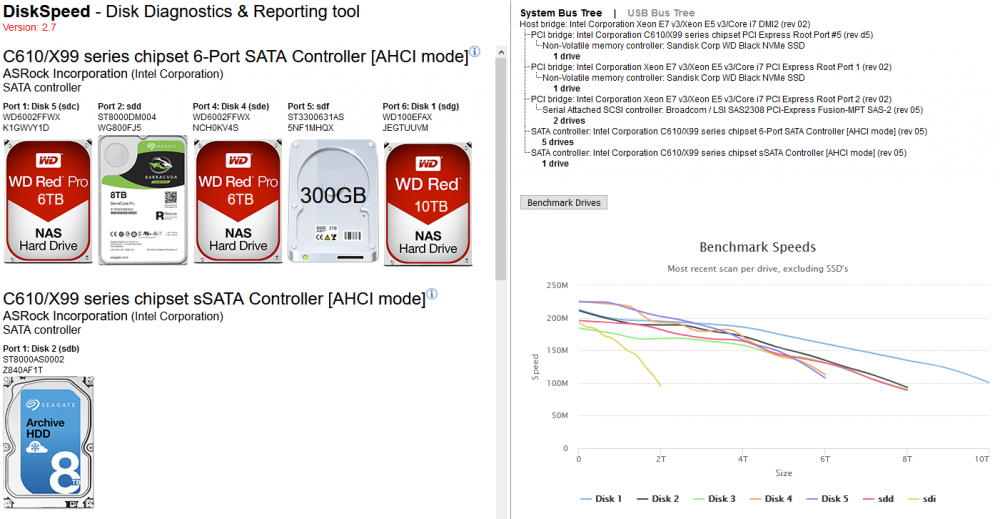
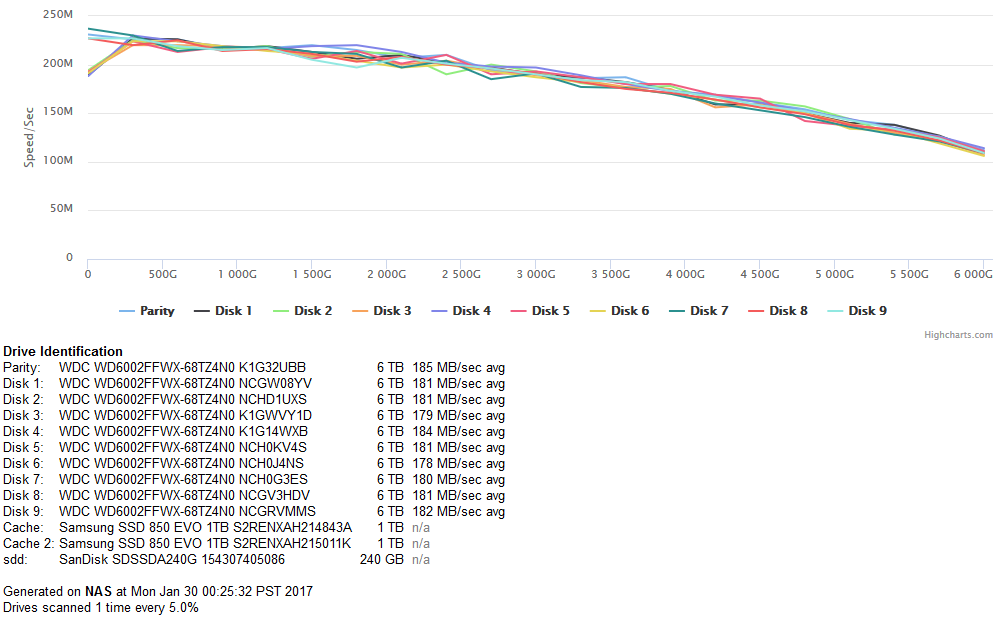
When I tested this utility against my production server, I noticed that I had a drive going wonky on me. I couldn't even test it at first because it kept tripping the SpeedGap detection in which the minimum & maximum speed over 15 seconds was too great - a sign of disk activity or in my case, a drive giving very inconsistent read speeds. I had to add logic to disable the SpeedGap detection to even be able to fully test the drive. In this case, the drives are all the same make & revision and their curve should be nearly identical but Disk 5 stands out. Viewing Drive 5 by itself, I can see it's curve is not normal. Spinners should have a steady decline over the entire range of the drive. I'll be retiring this drive from my main server and using it for platter heat map test where the entire drive is read and a heatmap of the read speeds given.
-
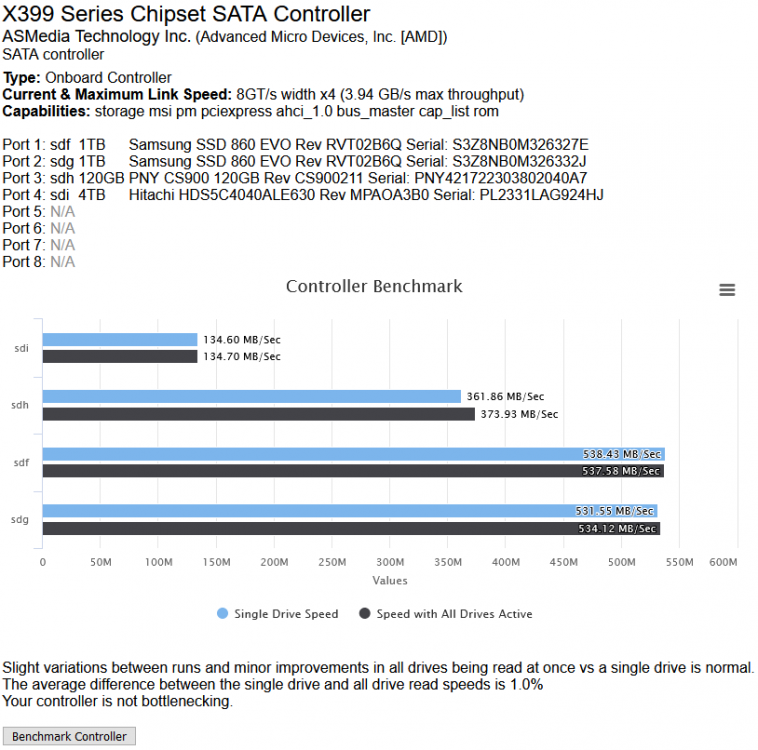
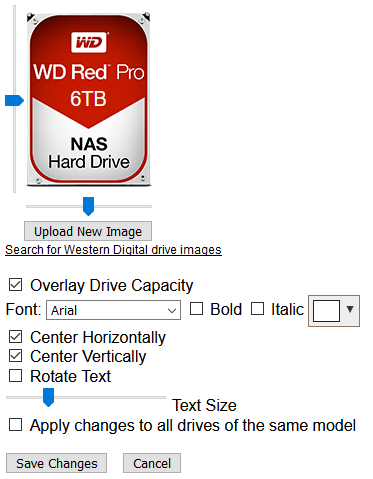
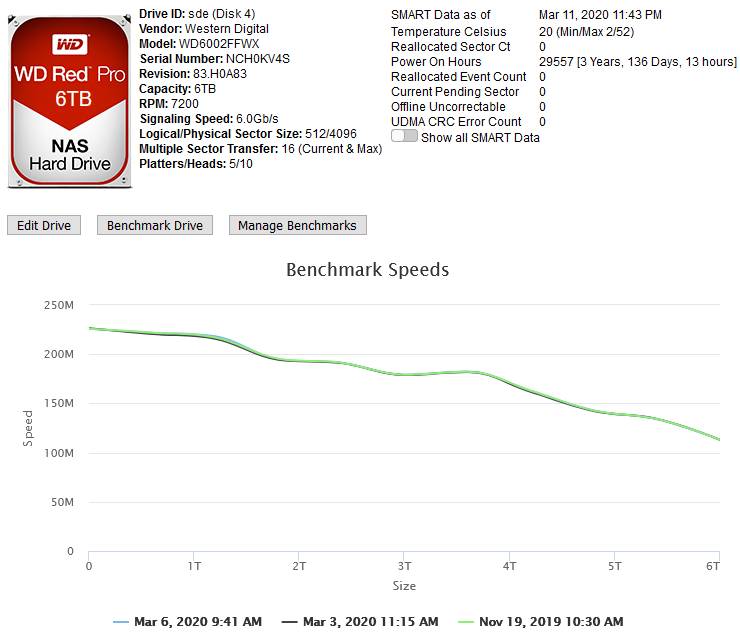
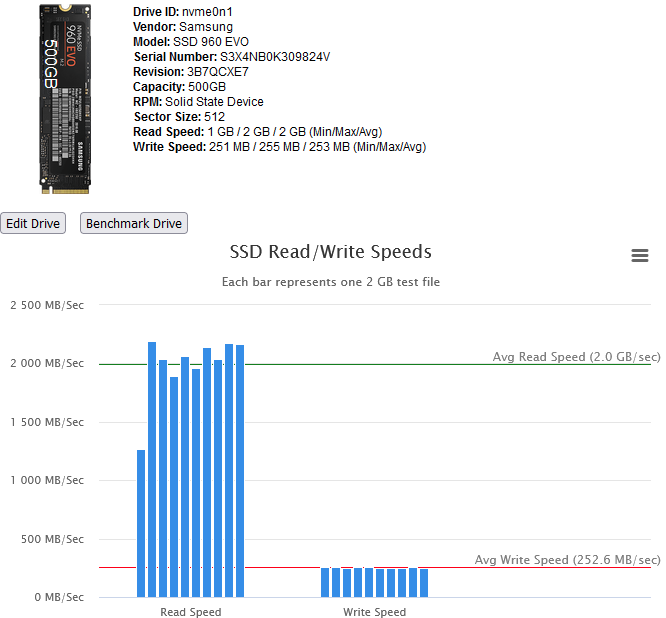
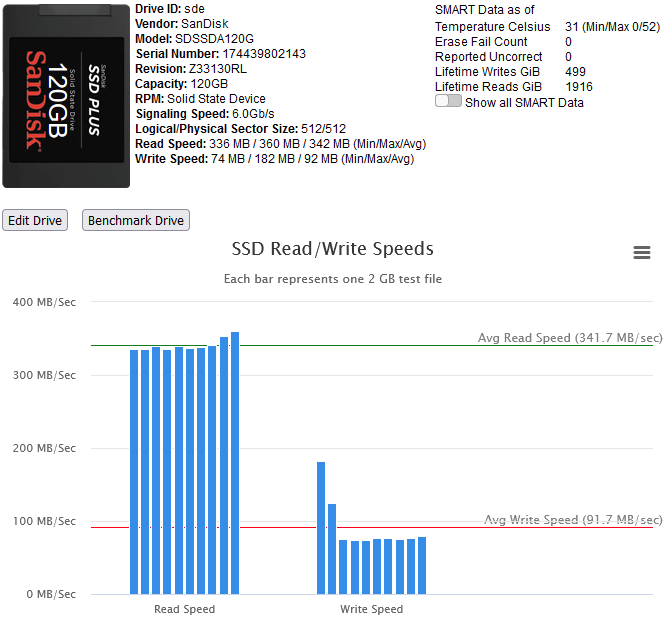
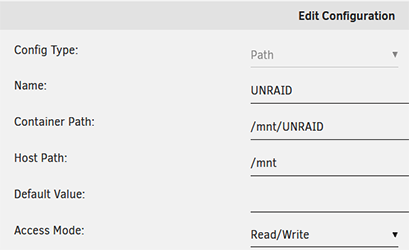
This Docker Application will let you view your storage controllers & the drives attached to them and perform Benchmarks on both. Controller Benchmarks helps to identify if the drives attached to it will potentially exceed the capacity of the controller if they were all fully being read from at the same time (such as during a Parity check). Drive Benchmarks lets you monitor the performance over time to look for desegregation or unexpected slow areas while getting a clean SMART report. Installation Via the Community Application: Search for "DiskSpeed" Manual Installation (The Community Applications plugin is having issues currently, here's a work around for now) Save the attached "my-DiskSpeed.xml" file to your NAS under \\tower\flash\config\plugins\dockerMan\templates-user View the Docker tab in your unRAID Administrator , click on "Add Container" Under "Select a template", pick "my-DiskSpeed" The defaults should work as-is unless you have port 18888 already in use. If so, change the Web Port & WebUI settings to a new port number. The Docker will create a directory called "DiskSpeed" in your appdata directory to hold persistent data. Note: Privileged mode is required so that the application can see the controllers & drives on the host OS. This docker will use up to 512MB of RAM. RAM optimization will happen in a later BETA. Running View the Docker tab in your unRAID Administrator and click on the icon next to "DiskSpeed" and select WebUI. Drive Images As of this December 2022, the Hard Drive Database (HDDB) has 3,000+ drive models in 70+ brands. If you have one or more drives that do not have a predefined image in the HDDB, you have a couple options available - wait for me to add the image which will be displayed after you click "Rescan Controllers" or you can add the drive yourself by editing it and uploading a drive image for it. You can view drive images in the HDDB to see if there's an image that'll fit your drive and optionally upload it so others can benefit. Controller & Drive Identification Issues Some drives, notably SSD's, do not reveal the Vendor correctly or at all. If you view the Drive information and it has the same value for the vendor as the model or an incorrect or missing Vendor, please inform me so that I can manually add the drive to the database or add code to handle it. If you have a controller that is not detected, please notify me. Benchmarking Drives Disk Drives with platters are benchmarked by reading the drive at certain percentages for 15 seconds and averages the speed for each second except for the first 2 seconds which tends to trend high. Since drives can be accessed while testing, if a min/max read speed exceeds a threshold, the test is re-performed with an increasing threshold to account for drives with bad areas. Solid State drives are benchmarked by writing large files to the device and then reading them back. In order to benchmark SSD's, they must be mounted in UNRAID and a mapping configured in the DiskSpeed Docker settings. You must restart the DiskSpeed app after mounting a device for it to be detected. For other Docker installations, an example is -v '/mnt':'/mnt/Host':'rw' if you have all your SSD's mounted under /mnt. You may need more than one volume parameter if they are mounted in different areas. Contributing to the Hard Drive Database If you have a drive that doesn't have information in the Hard Drive Database other than the model or you've performed benchmark tests, a button will be displayed at the bottom of the page labeled "Upload Drive & Benchmark Data to the Hard Drive Database". The HDDB will display information given up by the OS for the drives and the average speed graphs for comparison. Application Errors If you get an error message, please post the error here and the steps you took to cause it to happen. There will be a long string of java diagnostics after the error message (java stack) that you do not need to include, just the error message details. If you can't get past the Scanning Hardware screen, change the URL from http://[ip]:[port]/ScanControllers.cfm to http://[ip]:[port]/isolated/CreateDebugInfo.cfm and hit enter. Note: The unRAID diagnostic file doesn't provide any help. If submitting a diagnostic file, please use the link at the bottom of the controllers in the Diskspeed GUI. Home Screen (click top label to return to this screen) Controller Information Drive Information While the system cache is bypassed when benchmarking, some devices have a built-in cache that ignores cache bypass commands. An initial high write speed that quickly levels out is a sign of such as shown below. Drive Editor my-DiskSpeed.xml
-
unRAID: Cheaper than Qnap unRAID: One OS to rule them all, one OS to find them, One OS to bring them all and in the 50TB bind them. unRAID: More fun than a JBOD array with a failed drive unRAID: Turning PC's into NAS devices since 2005
-
Looks nifty. Open air is nice but I have a dust problem. My Corsair Cosmo II case along with all the hard drives makes for a good thief deterrent as it's 75 lbs
-
I've got this docker working against Plex that's running in a Windows 10 VM. To make this work, you need to create a SMB link in UNRAID but it'll need Windows credentials with password to work without any user interaction. Create a new local/limited account in Windows which for this example I'll use "readonly" with "readonlypw" as the password. Add a network share on the "\Plex Media Server\Logs" directory and assign read only access to the new "readonly" account you created. I used "plexlogs" as the share name. Now things are set up to create the SMB share in UNRAID. First, create a directory to host the link: mkdir /var/log/plex Now mount the share (replace IP to match your Windows Server, best to use a static IP) mount -t cifs //192.168.1.xxx/plexlogs /var/log/plex --verbose -o user=readonly,password=readonlypw That's it! Adding the mkdir & mount commands to your go file will set things up on reboot.
-
I took the stripes as being drives with the green one the Parity. But the person out there who doesn't know the system wouldn't think that.
-
Too big file size wise to implement via the GUI so you'll need to drop it in \\nas\flash\config\plugins\dynamix as "banner.png"

-
I've got 10 of the WD Red Pro 6TB drives in my rig, 1 parity 9 data. No problem.
-
I've been going through my mountain of retired hard drives and using the plugin to see what's on them, get what I need, if any, then zeroing them out. I found a NTFS partitioned drive with the label "Server (IDE)". The label reported by the UNRAID OS is "Server\\x20\\x28IDE\\x29". After mounting & sharing with this plugin, the shared path is "Server_\134x28IDE\134x29" which is an invalid Windows network path due to the backslashes.
-
It's logical to have at least one security patch upgrade on the existing stable release when the next release includes a kernel subversion bump (4.1 to 4.4).
-
To play Devil's Advocate, I'd like to give a reason for creating 6.1.10: 6.2 runs a new version of the kernel and some of the stock OS commands returns data in a different format than the same command in 6.1.x. Programs that expect data to exist in a certain spot from these modified commands are now broken under 6.2. My disk speed script in my sig doesn't function under 6.2 for example but does for every version from 5.0 to 6.1.9 One advantage to UNRAID is it's versatility. There are many released scripts & plugins available but who knows how many custom scripts are out there that people have written/acquired for their own use that may be broken under 6.2 forcing them to roll back if they're critical to them.
-
This ... is AMAZING
-
I'd try a manual scan and specify rages on the far edges.
-
What are the drives? I'd doubt the problem is with them since they're all scoring nearly the same assuming they did better previously.





