chris_netsmart
Members
-
Joined
-
Last visited
Everything posted by chris_netsmart
-
thanks BinHEx I think that at the moment I have it as Sonnarr / Radarr / Jackett >> DeulgeVPN >> ( out ) I will recheck and post back.
-
Then which sites do you use. As i am thinking about moving my vpn target to a differance location and re try
-
So i am guesting that you also don't use sonarr or radarr.
-
The problem is that i got through delugeVPN.
-
I just had a look at my Jackett and I discovered that at the torrent sites that I have linked to are Error out with the following error. Request to https://corsaro.red/api/latests failed (Error Forbidden) - The page is protected by an Cloudflare reCaptcha. The page is in aggressive DDoS mitigation mode or your IP might be blacklisted (e.g. in case of shared VPN IPs). There's no easy way of making it usable with Jackett. is there a way to resolve this ?
-
this might be nothing but I was poking around my deluge and Sonarr connections and I came upon the following that if I run curl ifconfig.me with the console of delugevpn then I get my VPN IP Address "France" but if I run the same command on sonar or my unraid then I get my external IP Address. I have check my Sonarr and other dockers with this video to make sure that my proxy is right, but I am not a 100% that all my traffic is going through the VPN, when I am searching for films or TV.s or am I just being paranoid https://www.youtube.com/watch?v=2MNqonB86ec
-
Have yoy tried your vpn via your desktop application VPN ?
-
I would take two. How are you going to deal with international shipping as i live in the UK
-
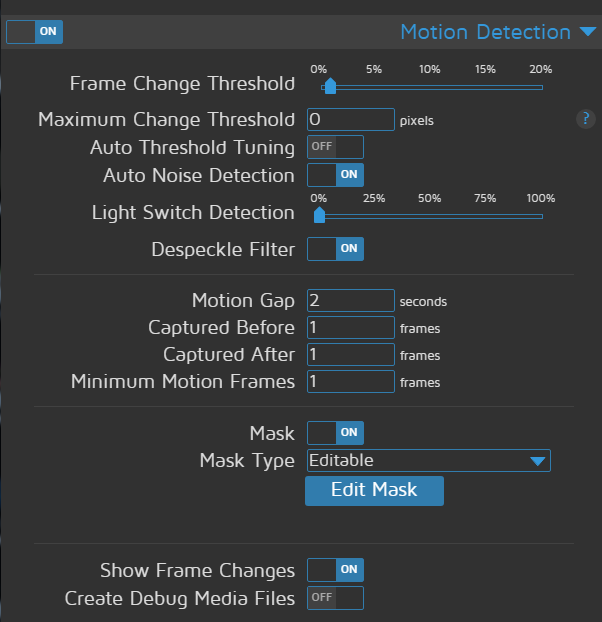
quick question. I have my montioneye running now for about 4 weeks and so far it is working as I would like it to do, but there is on thing that I haven't worked out and I don't know if it is design thing. that when it captors something it is only saving it in 9 sec chucks, or less which is a pain, I have copy a screen shot of my settings in the hope that someone can see my mistake. any ideals on why ?
-
What happens if you turn off your VM. Do you still have the same issue ?
-
@aartr thanks for the link, at long last I have a working monition eye
-
I just tried that am I got the following error PS. I have moved my config files off from the cache as I found this was eating through my SSD. so at the moment I am testing moment as slow working out the best solution to move them back, to prevent the SSD being eating through.

-
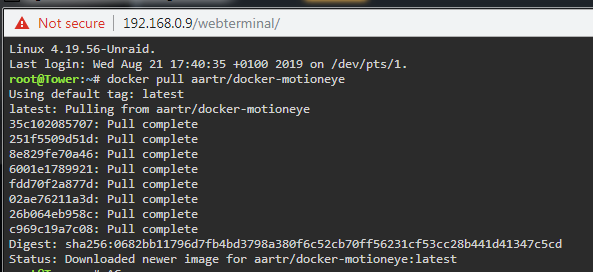
Thanks for the update. I would just like to confirm that all i have to do is open a terminal and cut and paste in the command, reminding to change the repoaitory. Update: Ok I take a chance and I run the following command within a terminal docker pull aartr/docker-monitioneye which gave me this but I am still getting the spinning icon, when I go within monition eye and not a Cam Feed
-
what version of Dev are you using as i see that there is a update to 78.0.3887.7
-
Welcome to the fourm, and i hope that you get as much satifaction from unraid as i have.
-
Happy birthday Unraid. I am a home user. Whom is loving your OS. The best funtion of Unraid for me is the ease and simple disign of the OS that allow you to upgrade your storage or add docker funtions.
-
yes I am. and when I look at it via Explorer I am gettign a grey screen. and for me, your fix " chrome://flags/#enable-lazy-image-loading " didn't work for me.
-
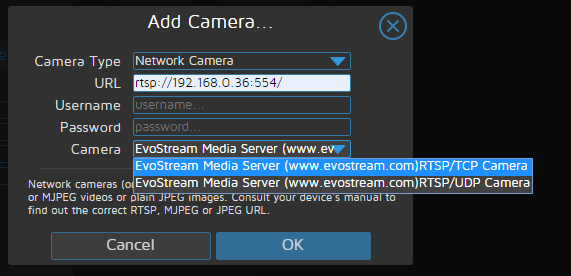
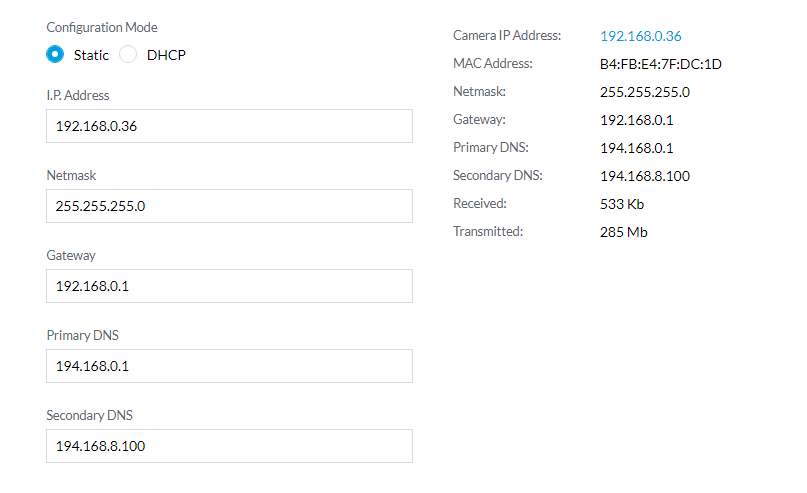
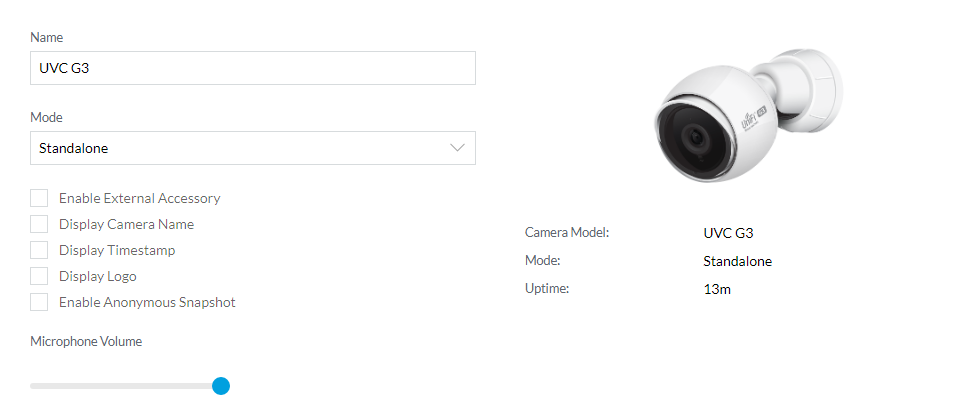
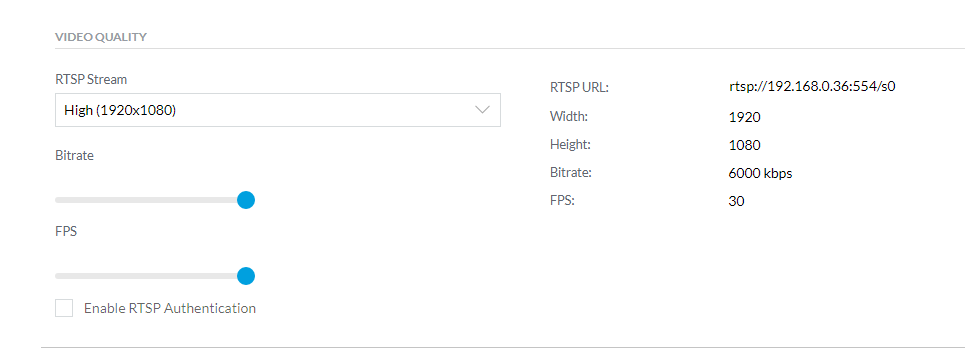
I have been having a bit of an issues with MonitionEye that it is not showing the Stream from my IP Cam I have been able to set up my Unifi cam with no issues, and set it to standalone. fixing it's IP address then I when to monition Eye and install the Docker, using all the default, then I tried to add the Unifi Cam, but here is where I am getting the problem. as I have gone through the steps to step up the connection I have tried both EvonStream and each time I am getting this the pain in the ass is that I had this working, and then I packed it all away as I have builders around and I didn't want anything to get damage. here are my Cam settings before anyone say, I know that my Enable RTSP Authentication is turn off, this is for testing only and I will turn it back on, once I get a feed from the cam. can anyone help me work out why I am not getting a stream image within MonitionEye

-
thanks that makes it much easier to understand. I will try it this weekend,
-
@Benson thanks for the post, I think I get the ideal. basically we are doing the following steps move over Unraid Hard drivers and USB Flash Drive into new case Install a blank hard drive for Proxmox Install Proxmox onto new blank hard drive download Unraid VM ISO file Create VM for UNraid add USB Flash Drive and Hard drivers from old Unraid make USB pen drive the boot drive ? - Need to look at the software power up VM once Unraid is up and running then add Hard drives to Unraid and start array. if this wrong then please point it out, and again thanks for your help.
-
thanks @Benson Dump question but, but I just want to make sure that I am reading this read HBA = host bus adapter and PVE = Proxmox. and is the setting up of the passthrough (IOMMU) easy to do ?
-
reading through the posts, I am liking the ideal of hosting my UNRAID within Proxmox. but I didn't see the following question answer, or if there are then I missed them regarding the spin down of HD's I like at @s.Oliver say, by passing through the SATA Controller, but does this work and allow the HD's to spin down. ? if I build the Promox environment and I have a Unraid Server environment, will I be able to transfer over my Unraid HD's as easy as moving over the HD's. Adding them to a VM UNraid guest and power up the guest and then set up Unraid as normal. ? I see posted that people mentioning " plopkexec " to fool Unraid, in making it think that it has a USB flash drive plug in, I see that uldise posted a link to a ISO. my question is. how to you install it ? I am still at the research stage so any advice would be appreciative.
-
Which i have been using. I will keep an eye out for an up dated version of the thin clinted
-
I am not sure on how to find my current version. But i do know is that i am running the lastest version. But i might be 2.0.3. If the thin clint has not been update. Then is there a differance way to manage deluge from my desktop.
-
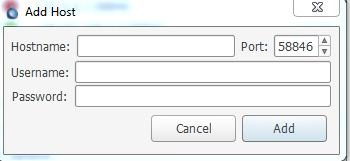
it has been some time when I had to post something in relalating to my deulge as I have found it a great docker, but I just discovered the following and I am having issues getting it to work again. back in 14 Jan 19, I was trying to set up a client collection with Deluge so that I can add torrents to my docker via my workstation, and after a bit of working out I finile got it working with a bit of help from @THF13 who posted which I did and all worked fine, but at the beginning of the month when I try to remove access my deluge via my client connection I discovered at the connection was showing a red cycle and not a green one I have recheck my settings and I can see that I have the above referance in my auth file. and when I type in my my details, and I still getting the red cycle, is there something I am missing