





chris_netsmart
Members
-
Joined
-
Last visited
Everything posted by chris_netsmart
-
I have been using HB for some time and I am loving it, but I have discovered that, at the moment it is see's a text, Image or Subtitle file then it trys to convert it and deletes the file. so am I right that if I do the following then if it see's a txt, image or subtitle file then it will just move it to the destination. I have highlighted my Modification in red. CONVERTED_FILE="$1" SOURCE_FILE="$2" PRESET="$3" echo "pre-conversion: Output File = $CONVERTED_FILE" echo "pre-conversion: Source File = $SOURCE_FILE" echo "pre-conversion: Preset = $PRESET" EXTENSION="$(echo "${SOURCE_FILE##*.}" | tr '[:upper:]' '[:lower:]')" case "$EXTENSION" in avi|mp4) # Nothing to do. Allow conversion of known video files. echo "pre-conversion: allowing file conversion." ;; mkv|srt|jpeg|txt) # Do not convert MKVs. Move the file to its final destination. EXTENSION="$(echo "${CONVERTED_FILE##*.}" | tr '[:upper:]' '[:lower:]')" if [ "$EXTENSION" = "mkv";"srt";"jpeg";"txt"; ]; then echo "pre-conversion: file conversion not required, moving file." mkdir -p "$(dirname "$CONVERTED_FILE")" mv "$SOURCE_FILE" "$CONVERTED_FILE" else echo "ERROR: Destination file has unexpected extension '$EXTENSION'." fi ;; *) # Remove unknown files. echo "pre-conversion: preventing file conversion by removing file." rm "$SOURCE_FILE"
-
thanks for the post.
-
I know this is a old post sorry, but I have been reading up on moving my Raid and I have found a few sites that talk about it, and I would like to confirm a few things. I am happy about the parts @Frank1940 posted above, but I found this posting https://www.spxlabs.com/blog/2018/6/15/move-existing-unraid-disks-to-a-new-server, and they are talking about clearing the cache. but no telling you how. the only thing I can think about is moving out is the cache is my work that is label to go to a unraid like Users folder or works folder, but what about the appdata folder ?. do I need to do anything with this folder ?
-
Upgrade this morning. No problem so far. Thank unraid.
-
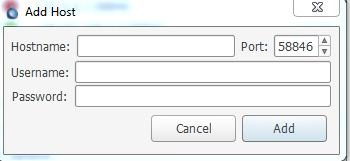
Hi all I just log onto my windows deluge, and I discovered that I have loss all my connect to my delugevpn. so I delete and then re-tried to enter in my details for the account hostname = Server IP username = pi password = deluge but when I and check my listed connections I am getting a red cycle. I know that my deluge is running as I am able to web onto the client. any ideals what might have happened.
-
I have the same issue. And mine unraid sounds like a jet engine all the time.
-
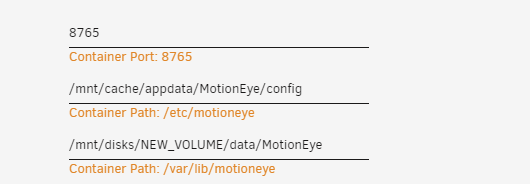
Ok, now I am confused. I have a external USB which I want to point my motioneye to, and I have read about setting disks to Slave. and I right that to do this all I have to do is the following then using the /mnt/cache to /mnt/disks/share UPDATE: ok I was being blond. I found the option after a lot of reading and looking around, if anyone is trying to find it, I found it by: Click on the Advance Tap, then choosing the Container Path I want to change to RW:SLAVE click on Edit and within here you will see the option to change it.
-
this might have been answer, if so then I am sorry, but I am trying to do the following. I have Motion eye installed and then having the Video clips being saved to my RAID or Cache, I would like to point it to a external USB drive. so I have plug in my USB drive, (sdg) and when I go and try to point my Motion eye docker to the USB, I see that it is noting showing up, as all I can see is my raid Hard Drivers. so do I have to manual type in the path ?
-
just update my system with no issues. Loving the new Dashboard.
-
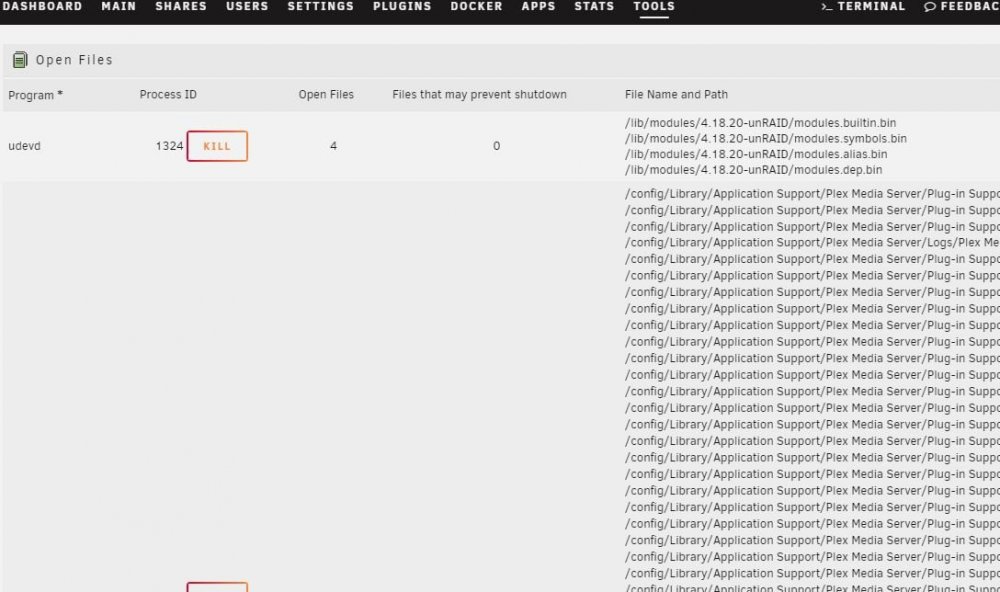
I have tried Open Files, and I personal find that does not show me what files are being access when my Disk 2 and Disk 4 are spinning up. I think I have tracked this down, and it is PLEX. I think it is when it does it automatic library scan. also was on the topic. my Open Files plugin, is no shown on the Main page, and I have to go into the plugins tab and click on the application which gives me the following information. this is normal
-
I have the same issues that out of my raid 2 out of 5 spin up for no reason. In the hope to help. The dockers that i am running are. Plex, deluge, jackett, sonnar, Radarr. With my testing i am leaning towards plex.
-
I don't upload. Only download as i use public sites. Have you spoken to your upload site, aa they might be limiting the speed
-
Have you check the PIA speed connection, as i have discoveres tha my UK connection is running at 3mbs when i am connection.
-
I have been looking at this docker as a working solution for myself as I am looking at installing some IP POE Security Camera. I have looked around and I can't see any suggests for what type of Camera are best for this docker. so can anyone suggest any good Outside IP POE Camera with will work Edit: would the following be a good ideal. UBIQUITI Networks UVC-G3 1080p UniFi Indoor/Outdoor IP Video Camera with Infrared NETGEAR 5-Port Gigabit Ethernet Unmanaged PoE Switch (GS305P)
-
thanks that did the trick
-
Can you please give me an example as my level of coding in shell is zero. And the above code was giving to me.
-
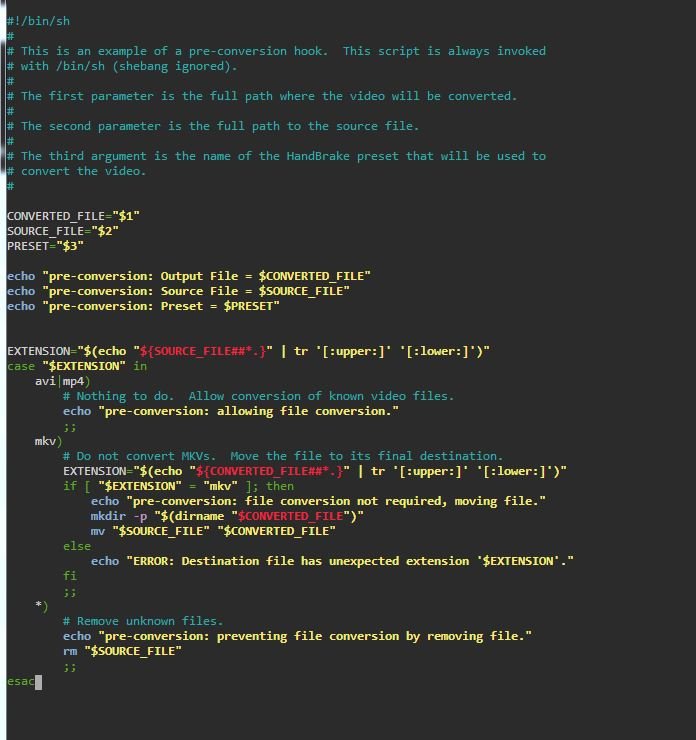
I have checked my code and it is the same as the above, but I am still getting that error :-(
-
I have Plex Media Server by plexinc installed and all is working fine, but this morning I had a message that there is a update available for Plex. when I click on it I get a DEB file, but I am not sure what to do with it, can someone informed me on the right procedure to update my Plex.
-
thanks for the reply. but I am sad to report that I am still getting an error pre-conversion: Preset = myh264 /config/hooks/pre_conversion.sh: line 43: syntax error: unexpected newline (expecting ")") [autovideoconverter] Pre-conversion hook exited with 2
-
Djoss.
-
@Communuity Developer one question. I just added the code to my pre_conversion.sh file and kicked off a converestion. was looking at the log file I saw this this error going through /config/hooks/pre_conversion.sh: line 44: syntax error: unexpected end of file (expecting ";;") is it something I need to be concern about. as I have had a look at the code, and with my very limited knowledge of coding this looks ok.
-
@Community Developer thanks for the code. I will give it a try.
-
thanks for the advice, I have looked at the pre_conversion.sh.example file and I can't make head or tails of it, I have also tried to find examples or tutorial on it, but I can't. can you please point me to a good source of information on how to use the hooks.
-
You can see the progress in the container's log. On the Docker page, click the icon in the last column. are we talking about the Activity Icon ? yes some of the files that I am download are MKV files which when Handbrake try's to convert are failing, and I would like to excluded them, also any NFO, Jpegs, Gifs, Txt, Thumbnails etc. only files like AVI, Mp4,
-
Opps sorry, typeO. yes I did mean MKV.


