





goinsnoopin
Members
-
Joined
-
Last visited
Everything posted by goinsnoopin
-
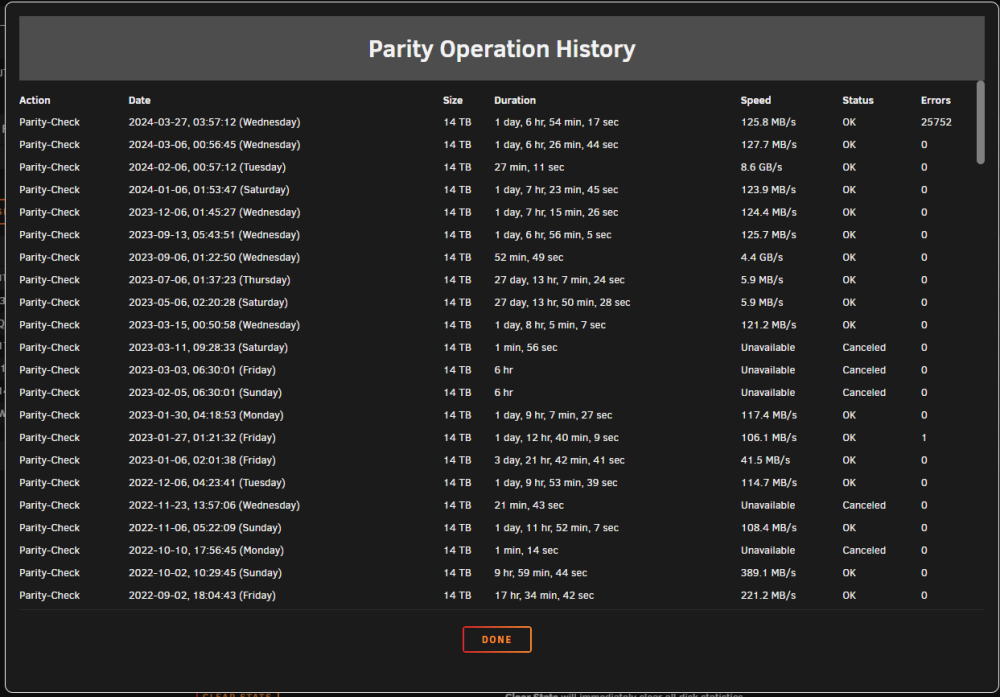
@trurl Parity Check completed and I got an email when it finished indicating that there were 0 errors?? I have attached a current diagnostics. I also attached a screenshot of the parity history that shows the zero errors and the sync errors that were corrected. There was also a second email that read as follows...(what is error code -4 listed after the sync errors): Event: Unraid Status Subject: Notice [TOWER] - array health report [PASS] Description: Array has 9 disks (including parity & pools) Importance: normal Parity - WDC_WD140EDGZ-11B2DA2_3GKH2J1F (sdk) - active 32 C [OK] Parity 2 - WDC_WD140EDFZ-11A0VA0_9LG37YDA (sdm) - active 32 C [OK] Disk 1 - WDC_WD120EMFZ-11A6JA0_QGKYB4RT (sdc) - active 32 C [OK] Disk 2 - WDC_WD20EFRX-68EUZN0_WD-WMC4M1062491 (sdf) - standby [OK] Disk 3 - WDC_WD40EFRX-68N32N0_WD-WCC7K4PLUR7A (sdi) - active 28 C [OK] Disk 4 - WDC_WD30EFRX-68EUZN0_WD-WCC4NEUA5L20 (sdd) - standby [OK] Disk 5 - WDC_WD30EFRX-68EUZN0_WD-WMC4N0M6V0HC (sdj) - standby [OK] Disk 6 - WDC_WD40EFRX-68N32N0_WD-WCC7K3PZZ7Y7 (sdh) - standby [OK] Cache - Samsung_SSD_860_EVO_500GB_S598NJ0NA53226M (sde) - active 37 C [OK] Last check incomplete on Tue 26 Mar 2024 06:30:01 AM EDT (yesterday), finding 25752 errors. Error code: -4 tower-diagnostics-20240327-1952.zip
-
I realize that, and have the settings so it does a shutdown with 5 minutes remaining on battery. I think the issue was server was brough back up after utility power was on for an hour...ups settings did their shutdown again with 5 minutes remaining on ups. This cycle repeated itself a couple times. If I was home, I just would have left the server off. Any suggestions...should I cancel parity check? It will start again at midnight.
-
Yes, just double checked history...monthly parity checks for the last year have been 0. I saw that in the logs and was concerned as well. It was an ice storm and the power came on and off several times in a 5 hour window. So its possible the UPS battery ran down on first outage and got minimal charge before the next outage. Unfortunately I was not home so I am going by what my kids told me. Dan
-
During storm we lost power. I have a UPS, but for some reason did not shut unraid down cleanly like it has in the past. On reboot this triggered a parity check. My parity check runs over several days due to the hours I restrict this activity. It is currently at 90% or so complete and there are 25,752 sync errors. Monthly on my scheduled parity checks, I set the corrections to No...not sure what the settings are from an unclean shutdown. Logs are attached. Any suggestions on how to proceed? Should I cancel balance of the parity check? tower-diagnostics-20240326-1000.zip
-
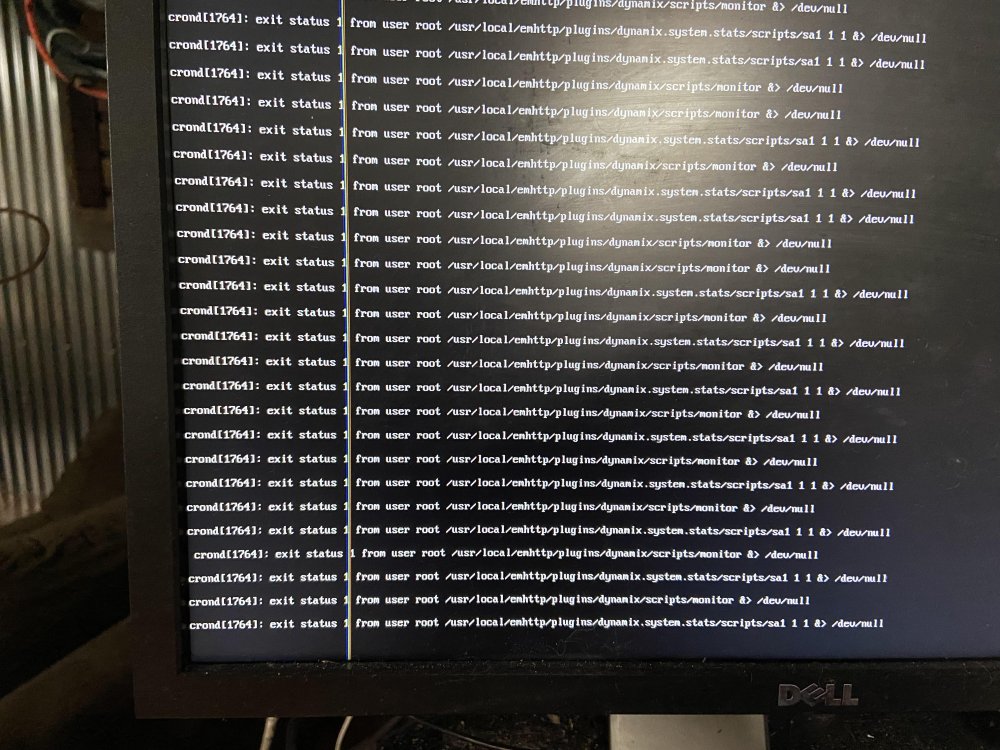
JorgeB Attached is my syslog...this was started on 10/25/23 after a crash I experienced earlier in that day. The snipet above from from line 126 to line 746. Then after line 746 was the reboot. I took a picture of my monitor when the system was crashed....see below. Obviously with the crash being random, I am unable to run and capture a diagnostic that covers the crash event...so I ran one right now for your reference and attached it. Thanks, Dan tower-diagnostics-20231028-0928.zip syslog.txt
-
I upgraded to 6.12.4 a couple of weeks ago and my server has gone unresponsive several times a week. I just enabled syslog server in an attempt to get the errors that proceed a crash. Here is what I got on the last crash: Oct 26 19:01:06 Tower nginx: 2023/10/26 19:01:06 [alert] 9931#9931: worker process 7606 exited on signal 6 Oct 26 19:02:14 Tower monitor: Stop running nchan processes Please note there were 600 or so nginx errors basically every second before this one….just omitting to keep this concise. Does anyone have any suggestions on how to proceed? Right now I am considering downgrading to the last 6.11.X release….as I never had issues with it.
-
Thanks for the opinions. I backed up my flash drive, deleted previous and successfully upgraded to 6.11.5.
-
So I registered Unraid back in 2009 and I am still using the 2GB Lexar firefly usb thumbdrive that was recommended way back then. I am on 6.11.1 and just tried updating to 6.11.5 and I can't upgrade as there is not enough free room on the USB flash drive. It looks like this is because old versions are kept on the flash drive. Back in June, I purchased a Samsung Bar Plus 64 GB thumbdrive to have on hand should I ever need to replace the original Lexar. So I am looking for opinions...should I try and figure out what I can delete off my old flash drive or migrate to the spare I have on hand?
-
The issue is not with this palette...it is all palettes...installing new or updating. I have gotten some help from the nodered github. Here is the issue as I understand it....link does not work within the nodered container and starting with nodered 3.0.1-1 they moved the location of cache to inside the /data path. Here is the link to the github issue I raised with nodered...has some info that may be helpful: github issue
-
Update to post above: I rolled my docker tag from latest to the 3.0.1 release of about a month ago and all functions as it is supposed to. The releases 3.0.1-1 (23 days ago) and 3.0.2 (16 days ago) I get the error above. For now I am staying rolled back to 3.0.1 release.
-
I have been using this container successfully for over a year. I am getting an error when I attempt to update a palette. Please note that all three palette's give the same error...just with specifics for each palette. Here is the excerpt from the logs for one example: 51 verbose type system 52 verbose stack FetchError: Invalid response body while trying to fetch https://registry.npmjs.org/node-red-contrib-power-monitor: ENOSYS: function not implemented, link '/data/.npm/_cacache/tmp/536b9d89' -> '/data/.npm/_cacache/content-v2/sha512/ca/78/ecf9ea9e429677649e945a71808de04bdb7c3b007549b9a2b8c1e2f24153a034816fdb11649d9265afe902d0c1d845c02ac702ae46967c08ebb58bc2ca53' 52 verbose stack at /usr/local/lib/node_modules/npm/node_modules/minipass-fetch/lib/body.js:168:15 52 verbose stack at async RegistryFetcher.packument (/usr/local/lib/node_modules/npm/node_modules/pacote/lib/registry.js:99:25) 52 verbose stack at async RegistryFetcher.manifest (/usr/local/lib/node_modules/npm/node_modules/pacote/lib/registry.js:124:23) 52 verbose stack at async Arborist.[nodeFromEdge] (/usr/local/lib/node_modules/npm/node_modules/@npmcli/arborist/lib/arborist/build-ideal-tree.js:1108:19) 52 verbose stack at async Arborist.[buildDepStep] (/usr/local/lib/node_modules/npm/node_modules/@npmcli/arborist/lib/arborist/build-ideal-tree.js:976:11) 52 verbose stack at async Arborist.buildIdealTree (/usr/local/lib/node_modules/npm/node_modules/@npmcli/arborist/lib/arborist/build-ideal-tree.js:218:7) 52 verbose stack at async Promise.all (index 1) 52 verbose stack at async Arborist.reify (/usr/local/lib/node_modules/npm/node_modules/@npmcli/arborist/lib/arborist/reify.js:153:5) 52 verbose stack at async Install.exec (/usr/local/lib/node_modules/npm/lib/commands/install.js:156:5) 52 verbose stack at async module.exports (/usr/local/lib/node_modules/npm/lib/cli.js:78:5) 53 verbose cwd /data 54 verbose Linux 5.15.46-Unraid 55 verbose node v16.16.0 56 verbose npm v8.11.0 57 error code ENOSYS 58 error syscall link 59 error path /data/.npm/_cacache/tmp/536b9d89 60 error dest /data/.npm/_cacache/content-v2/sha512/ca/78/ecf9ea9e429677649e945a71808de04bdb7c3b007549b9a2b8c1e2f24153a034816fdb11649d9265afe902d0c1d845c02ac702ae46967c08ebb58bc2ca53 61 error errno ENOSYS 62 error Invalid response body while trying to fetch https://registry.npmjs.org/node-red-contrib-power-monitor: ENOSYS: function not implemented, link '/data/.npm/_cacache/tmp/536b9d89' -> '/data/.npm/_cacache/content-v2/sha512/ca/78/ecf9ea9e429677649e945a71808de04bdb7c3b007549b9a2b8c1e2f24153a034816fdb11649d9265afe902d0c1d845c02ac702ae46967c08ebb58bc2ca53' 63 verbose exit 1 64 timing npm Completed in 3896ms 65 verbose unfinished npm timer reify 1661012682451 66 verbose unfinished npm timer reify:loadTrees 1661012682455 67 verbose code 1 68 error A complete log of this run can be found in: 68 error /data/.npm/_logs/2022-08-20T16_24_42_307Z-debug-0.log I cleared my browser cache and have tried from a second browser (chrome is primary...tried from firefox also). Any help would be greatly appreciated! Dan
-
I have a windows 10 vm, and the other day performance became terrible…basically unresponsive. I shutdown Unraid and Unraid did not boot up. I pulled the flash drive made a backup without issue on a standalone pc then ran chkdsk and it said it needed to be repaired. I repaired and Unraid booted fine. The VM still had terrible performance. I used a backup image of a clean win 10 install created a new VM and everything was fine for last day or so. This new VM now has issues. I have attached diagnostics. Recently upgraded to 6.10.2. Would love for someone with more experience to take a look at my logs and see if anything jumps out as being an issue. Thanks, Dan tower-diagnostics-20220608-1029.zip
-
The nodered docker keeps crashing on me. If I restart it, it runs for a day or so. I have deleted the container image and reinstalled and the outcome is the same. Here is the log....any suggestions? 0 info it worked if it ends with ok 1 verbose cli [ '/usr/local/bin/node', 1 verbose cli '/usr/local/bin/npm', 1 verbose cli 'start', 1 verbose cli '--cache', 1 verbose cli '/data/.npm', 1 verbose cli '--', 1 verbose cli '--userDir', 1 verbose cli '/data' ] 2 info using [email protected] 3 info using [email protected] 4 verbose config Skipping project config: /usr/src/node-red/.npmrc. (matches userconfig) 5 verbose run-script [ 'prestart', 'start', 'poststart' ] 6 info lifecycle [email protected]~prestart: [email protected] 7 info lifecycle [email protected]~start: [email protected] 8 verbose lifecycle [email protected]~start: unsafe-perm in lifecycle true 9 verbose lifecycle [email protected]~start: PATH: /usr/local/lib/node_modules/npm/node_modules/npm-lifecycle/node-gyp-bin:/usr/src/node-red/node_modules/.bin:/usr/lo> 10 verbose lifecycle [email protected]~start: CWD: /usr/src/node-red 11 silly lifecycle [email protected]~start: Args: [ '-c', 11 silly lifecycle 'node $NODE_OPTIONS node_modules/node-red/red.js $FLOWS "--userDir" "/data"' ] 12 silly lifecycle [email protected]~start: Returned: code: 1 signal: null 13 info lifecycle [email protected]~start: Failed to exec start script 14 verbose stack Error: [email protected] start: `node $NODE_OPTIONS node_modules/node-red/red.js $FLOWS "--userDir" "/data"` 14 verbose stack Exit status 1 14 verbose stack at EventEmitter.<anonymous> (/usr/local/lib/node_modules/npm/node_modules/npm-lifecycle/index.js:332:16) 14 verbose stack at EventEmitter.emit (events.js:198:13) 14 verbose stack at ChildProcess.<anonymous> (/usr/local/lib/node_modules/npm/node_modules/npm-lifecycle/lib/spawn.js:55:14) 14 verbose stack at ChildProcess.emit (events.js:198:13) 14 verbose stack at maybeClose (internal/child_process.js:982:16) 14 verbose stack at Process.ChildProcess._handle.onexit (internal/child_process.js:259:5) 15 verbose pkgid [email protected] 16 verbose cwd /usr/src/node-red 17 verbose Linux 4.19.107-Unraid 18 verbose argv "/usr/local/bin/node" "/usr/local/bin/npm" "start" "--cache" "/data/.npm" "--" "--userDir" "/data" 19 verbose node v10.22.1 20 verbose npm v6.14.6 21 error code ELIFECYCLE 22 error errno 1 23 error [email protected] start: `node $NODE_OPTIONS node_modules/node-red/red.js $FLOWS "--userDir" "/data"` 23 error Exit status 1 24 error Failed at the [email protected] start script. 24 error This is probably not a problem with npm. There is likely additional logging output above. 25 verbose exit [ 1, true ]
-
I just installed this docker and was having the same issue as chris_netsmart. Went to Shinobi's website and read their installation instructions. Discovered if you login to the console of this docker and perform the following that you will be able to login with the docker's default username and password. I was then able to create my own username/password. Wondering if there is something wrong with the template that is not inserting the values that we define at docker install/creation. Set up Superuser Access Rename super.sample.json to super.json. Run the following command inside the Shinobi directory with terminal. Passwords are saved as MD5 strings. You only need to do this step once. cp super.sample.json super.json Login at http://your.shinobi.video/super. Username : [email protected] Password : admin You should now be able to manage accounts Here is the direct link for the above....go to account management section: https://shinobi.video/docs/start
-
I have the binhex delugevpn, sonarr and radarr Dockers installed. When I turn the proxy on in sonarr and/or radarr and point it to the privoxy that is installed as part of the delugevpn docker...the indexers test successful then 15 minutes or so later they fail and the the indexer gets disabled until I test it again. In sonarr proxy is on and using http(s) with unraid ip and privoxy port. Any suggestions?
-
@cheesemarathon I just tried your bitwarden docker...after installing I could not get the webui to come up. I checked the logs then the port mappings... everything looked good...then I opened the advanced settings in the docker and it looks like you have a typo I the port number for the webui....once I corrected this to match your mapping all is well.
-
Spants, I am looking to use the MQTT docker with the letsencrypt reverse proxy. My goal was to use my domain name mqtt.MYDOMAINNAME.com for MQTT messages for cell phones for location detection and other devices that are not on my local lan. I have been having difficulty getting this to work...clients are failing to connect. I may have a bust in my letsencrypt config. While investigating this, I came across this website: http://frankfurtlovesyou.com/posts/mqtt-bridge-with-mosquitto-and-nginx.html Just wondering how you handle MQTT when you are not on your local lan. I am trying to avoid a port forward as I feel reverse proxy is safer. Any thoughts? Thanks, Dan
-
Any suggestions on how to integrate Piwigo and COPS dockers to the reverse proxy? Thanks, Dan
-
Those html5 templates are awesome...thanks for the recommendation. Just curious...what are you using to edit them? Do you have a recommended freeware html editor....or are you just using a text editor such as Notepad++ Thanks, Dan
-
Has anyone configured their default file for the COPS calibre docker? If so I would like suggestions on what to try. I got several other dockers working based on suggestions in this thread. Here is what I tried: location ^~ /cops { auth_basic "Restricted"; auth_basic_user_file /config/nginx/.htpasswd; include /config/nginx/proxy.conf; proxy_pass http://192.168.0.50:85; } This is all new to me and the confusing part is the URLBase changes. I see how some dockers like sonarr and htpc manager have settings within the docker....but others don't so I am not sure what to do. Also how are most people using this..for example do you create an index.html page with links to each of your web interfaces to the dockers you are trying to reach? If so do you keep the "landing" page open to the public and then when you click the link to the docker...then it goes to https??? The reason I am asking is that I would like to have www.mydomain.com be open to the public with a link to a public photo gallery (using an unraid docker...haven't picked one yet) and then have some other page with hyperlinks to my hidden docker management tools. Thanks in advance for any help you can provide. Dan
-
Since the docker upgrade, I have not been able to get the webgui or proxy up and running. Like the other poster if I disable the VPN the webgui runs. I am using PIA and my local lan is 192.168.0.0/24. I turned debugging on and attached is my log with passwords and username blanked out. Any suggestions? delugevpnlog.txt
-
I want to convert my license from windows 7 to windows 10 before tomorrow's deadline. My plan is to type in the product key from my current windows 7 vm into a brand new clean install of windows 10. So I know you have 30 days to revert...but my question is what will happen to my existing windows 7 VM. Will I be able to boot it up? The reason I am asking is that it makes a difference in how I go about backing up anything critical in this windows 7 VM. Thanks, Dan
-
What about the chip set emulation? I assume this could cause issues with Microsoft activation. I know i440fx is more mature and Q35 is a more modern design. I also recall limetech's recommendation was i440fx for Windows VMs What are most people using? Since I have 6 licenses of win7 and only need 3 VMs should I do 3 of each when upgrading to Windows 10 in an attempt to future proof?
-
Do you need to install win 7 first? I was under the impression that the current win 10 ISO allowed you to enter a win 7 product key. Here is a reference link from Microsoft:. https://support.microsoft.com/en-us/help/12440/windows-10-activation Thanks for all the info so far!
-
I am glad this topic came up. With the windows 10 free upgrade looming I am not sure what to do. I am new to using VMs and currently have two running Win7 Pro and an unauthorized Win10 VM (test driving it) both of these VMs were created in 6.1.9 and use the default seabios and i440x that was recommended in 6.1.9. I just upgraded to Unraid 6.2 RC2 and everything went smooth. The driver for the upgrade of unraid was to get to a position where I have VMs that have been created in 6.2 with OVMF as that is going to be the default going forward and to be able to leverage the free upgrade to windows 10 as it seems to work better for the kids PC games. From reading the forums it is my understanding that making a change from seabios to ovmf or i440x to q35 is going to trigger MS authentication issues. My kids are just getting into PC gaming and at this point I don't have a feel for the best configuration...I get the feeling Win10 is better for gaming and I also get the impression that I better lock down my VM configuration...i.e. number of CPUS, memory etc as that can also create MS authentication issues. I currently have seven (6) Win7 Pro 64 licenses. The maximum number of windows VMs that I anticipate running is 3. Any recommendations on how many I should upgrade to Win10 or CPU/memory assignments to give me the most flexibility? Any thoughts would be greatly appreciated! Dan



