Solutions
-
Frank1940's post in Unraid boots to black screen was marked as the answerI would start by looking at the CMOS battery on the MB. Replace and make sure that you reset the BIOS to its defaults.
-
Frank1940's post in Server not getting DHCP address after hardware swap was marked as the answerI am not an expert on the latest state of the various NIC drivers relative to when they were incorporated in the Linux Kernel. You are running Unraid 6.12.10 in the trial license and Unraid v6.9.2 for second diagnostics in the post above this one.
What I would do is to pull the flash drive (that does not work) from the server.
Plug it into your PC. Make a copy/backup of that drive. (Safety first!!!)
Download 6.12.10 from Unraid https://docs.unraid.net/unraid-os/download_list/
Unzip that download. Copy all the Files in the root of the zip file that begin with bz (bz*) to the root of your boot drive. Eject the drive from your PC.
Test and see if this fixes the problem.
-
Frank1940's post in File permissions in a share used by Deluge Docker was marked as the answerLook in the settings for the Docker and see if there are container variables named PUID (set to 99) and PGID (set to 100)
If there is a UMASK container variable set it to 000 or 0000 (the number zero...)
One more thing. If this does not work, you should be posting the problem in the Support thread for the particular Docker container that you are using. (There can be problems with containers that are not specifically intended for use with Unraid if they write directly to the array...)
You can also look at the permissions of a file that you have permission issues with the following command (Run the GUI Terminal):
ls -al /mnt/user/{remainder-of-path-to-the-file-with-issue}
You can take a screen shot of the output to post up if you have question...
-
Frank1940's post in Sync errors every time I run parity check, RAM is passes memtest. was marked as the answerHad a little time and looked at the SMART reports. Summary below:
Disk7 has no report. (is there a Disk7 installed?)
Disk1 has errors-- recently...
Disk 9 has errors-- old.
Disk10 has errors-- old.
I am no expert on interpreting SMART errors, I defer that to @JorgeB, but I would looking to run the short SMART tests on these disks as starter.
-
Frank1940's post in Server dropping from 1G connection to 100Mb connection was marked as the answerTry a new cable. All eight wires are used to provide 1Gb/s. Only four wires are necessary for 100Mb/s.
Also check the sockets for bent pins.
-
Frank1940's post in How to access unraid shared folders in linux? was marked as the answerAnd here:
https://forums.unraid.net/topic/150414-mounting-an-unraid-share-in-ubuntu-linux/
-
Frank1940's post in USB flash drive went read only while traveling - can I leave it for 3 weeks? was marked as the answerI have two very simple Unraid setups--- Basically a NAS with a couple of Dockers on each and a few plugins installed. I am getting about 30 writes per day to the boot drive with about 400 reads per day from it on both servers.
I hope you have a current backup of the boot drive. You can do this from the webGUI if you have access to it.
If the server is working, I would just continue to use it. But do not apply any updates to the server, plugins, Dockers or VMs until after you have fixed the issues from the boot drive. You will probably have a parity rebuild when you reboot/restart the server because Unraid can't update the 'flag' on the boot drive that says the server did a clean shutdown. So be prepared for that!
-
Frank1940's post in Can i change the "new permissions"? was marked as the answerAs I remember from 40+ years when I took a introductory course to UNIX, we had to change permissions on any file that we wanted to be executable. That include both Shell files and compiled C programs. (Yes, we actually compiled the "Hello Word" program in C!) So it is not a recent invocation that files by default do not have the execute bit set.
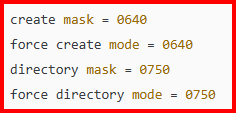
You mention that you want to New Permissions script to retain (basically) the current permissions on the files. When it was designed, its intend was to set the permissions to 777 for directories and 666 for Files as well as setting the owner to 'nobody' and the group to 'users'. Furthermore, when it was first released, it was only intended to be used once when a major version upgrade to Unraid required that all the permissions, owner and group had to be changed for all of the files and directories.
What has happened is that rogue Dockers, VMs (and even users) sometimes use different permissions owners and groups and these permissions can break the way Unraid is intended to work. It was found that the New Permissions script could quickly fix these problems and so it remained a part of the Unraid.
If you require for some reason that you require non-standard permissions on certain files, you are just going to have to avoid running those scripts on the Shares that contain the files. (Beyond my comprehension why you would need execute permissions on file that are being stored in data array)
-
Frank1940's post in How Long Does It Take to Complete a Memtest86+ Test? was marked as the answerThe test never stops/completes. It will run forever if you allow it! In the past, I have seen recommendations to allow it to run for 24 hours if you suspect that you have a RAM problem. (A single failure means that you have bad RAM and you need to determine which stick is defective!)
-
Frank1940's post in Cache vs Array when downloading was marked as the answerYou have found the exact reason that a cache drive was added to Unraid in the first place. There is no way around this slow-writing problem when writing directly to the array. (I did a quick calculation and you are getting a 1TB of data every 3 hours...)
You can speed things up a bit by enabling "Turbo-Write". See here:
https://forums.unraid.net/topic/50397-turbo-write/
I recall reading the other day, that there many be some additional relief for delays caused by FUSE when we get to Linux kernel 6.20 but there will still be the physical limitations imposed by head movements and rotation delays of hard drives.
-
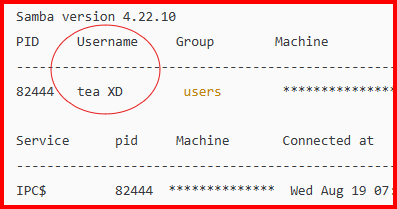
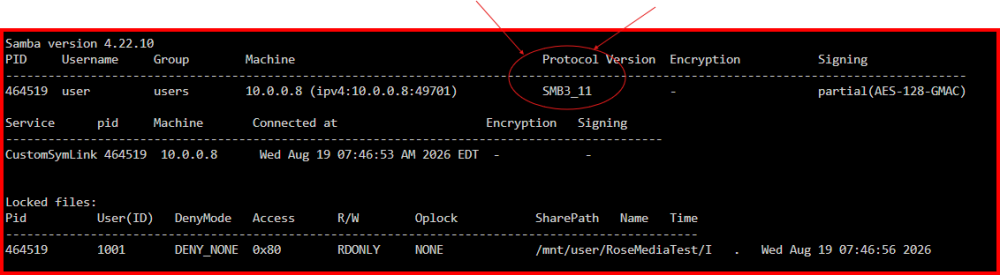
Frank1940's post in Can’t access my SMB via Windows 11 was marked as the answerThe connection is 'broken' is always broken when the client is shutdown.
As I understand, the client and the server do a handshake operation the first time that the client tries to connect to the server. (Note that this first contact could be setting up a 'mapped' Windows drive...) Be sure that you read that post from LimeTech back on 2013 about the login handshaking that goes on.
SMB has its roots back in Windows for Workgroups which was introduced back in the early 1990's. At that time, SMB was intended to link together a few computers in small engineering groups who wanted to share data without restrictions among their group. (My first experience using it was with 10 base 2 cards and RG-58 cabling.) It has evolved over the last thirty years into the basic standard networking protocol for the Governments and businesses. And this has resulted in it becoming a prime target for every hacker in the world. So security is now the watchword for SMB. The goal of SMB is now to ensure that only verified authorized users ever gain access to a SMB server. If you as a user don't qualify in even the smallest detail, SMB is going to deny you access.
-
Frank1940's post in ***Solved*** Windows PC "refused to connect" to Tower was marked as the answerWhat is your PC running? (most of the time, this problem is on the PC side of the equation!)
I realized that this appears to be a failure to access the Unraid GUI using a Web Browser.
Try using the GUI boot option in the Unraid boot menu. Then go to the Settings >>> Management Access There look at the "Use SSL/TLS:" setting and the "Local access URLs:" info. Turn on the help for both of these. (Clicking on the 'label' will display the 'Help' for each...)
-
Frank1940's post in Cannot access Shares from any Win11 pc after replacing Cache disk - Ping OK, access to Tower GUI ok was marked as the answerJust looked at your smb-extra.conf file....
[global] security = USER guest account = nobody public = yes guest ok = yes map to guest = bad user max protocol = SMB2_02
That last line can give you problems as WIN11 has turned off SMBv1 support.
-
Frank1940's post in unraid does not ask for login and password on the new computer was marked as the answerYes!
IF you use Secure, this will be the case. But read-only allows files to be copied. And anyone who gains access to your LAN via WiFi also has access. (I have been told in the past, that hacking into a WiFi network is not that difficult...)
If you use Private, You can set up a special Share Access user for visitors with a password. You then assign the privileges on each share that you want for your visitors. (Your choices are 'No access', 'Read-only', or 'read-write'.) But, again, read-only does allow for copying of files BUT the big difference is that if you give the Log-in info to a visitor, you probably have more trust in them. Of course, this means that you have to setup the Share Access user on the server and give out the login and password information to your visitors. (BTW, you can have several visitors all using the same 'visitor' share-access user account logged on at the same time. Unraid 'knows' that they are on separate devices and uses that info in processing requests!)
IF you want more information about setting up SMB on Windows and Unraid, read the PDF files in the first post of this thread:
https://forums.unraid.net/topic/110580-security-is-not-a-dirty-word-unraid-windows-10-smb-setup/
-
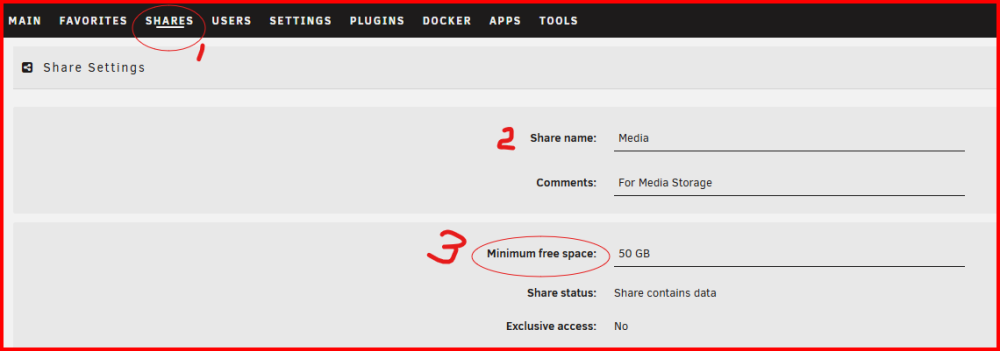
Frank1940's post in Copying 3TB of data to a share (14TB array) says "not enough space" after less than 500GB copied was marked as the answerTry changing this to this:
As pick a value of "Minimum free space:" that is about 25% larger than the biggest file you will ever copy to that share. (Your current setting of 458GB is probably about 8X larger than it need be.)
-
Frank1940's post in Migration - New hardware & Case - Help! was marked as the answerThat is what the diagnostics are indicating.
You mean your original boot drive is still plugged to the first server. If so, move it over. Make a backup on your PC as you make the move. (Doing so will virtually guarantee that you will never need it!)
You can actually plug that original boot drive into new server and boot up with it. That what many of us have done when changing out hardware. Unraid is very hardware agnostic. (Until you get to VMs and Dockers that pass a hardware device through to.
JUST remember to never, never agree to a prompt to format a disk until you are sure that you are prepared to lose all the data on that disk. Intel to AMD conversions can have a vew more issues-- particularly the earlier versions of the Ryzen chip set.
-
Frank1940's post in Unable to access unraid after modifying router gateway installed in docker was marked as the answerI would start by attaching a monitor and keyboard to your server. Restart the server. (Quick push on power button should result in a clean shutdown. Long push will force a unclean shutdown...) During the restart, pick one of the GUI options from Unraid's boot menu.
You should now be able to 'fix' the Docker container.
-
Frank1940's post in Share decreased after moving files between disks was marked as the answerIF you turn on the help (or click on the 'Split Level', you will get this:
-
Frank1940's post in Unable to access Undraid shares via Windows Explorer was marked as the answerSee here:
If this doesn't work, you might want to try setting things up so that you are not fighting the security measures that both MS, Linux and Unraid are trying to implement to protect user data. Read the first post in this thread and the attached PDF:
https://forums.unraid.net/topic/110580-security-is-not-a-dirty-word-unraid-windows-10-smb-setup/
Granted that it takes some time to set things up but you will then not be playing wack-a-mole with trying to bypass security enhancements.
-
Frank1940's post in v6.5 - Switched internet to AT&T Fiber, Can No Longer Connect to Server was marked as the answerShutdown the server gracefully by pushing the power button for about one second. Pull the flash drive after shutdown.
Plug it into your PC. Delete the /config/network.cfg file and plug it back into the server and reboot.
You will have to login use the server name as you will have an new IP address assigned by your new modem/router. You can look at the router GUI interface to find this address.
-
Frank1940's post in SMB, Samba, "Windows cannot access" / "check spelling", disappearing shares in Windows Explorer was marked as the answerI download your Diagnostics. Are you exporting many of your shares as 'Yes-Hidden'? (I am not familiar with the code for hidden SMB shares but I don't recognize that code in the diagnostics...) If you are, un-hide them until you have everything working! (Linux is case-sensitive and that make a big problem for most windows users!!!)
-
Frank1940's post in udma crc error count is 1 was marked as the answerNo. A UDMA error is a communication error between the drive and the MB.
The connection is serial data transmission and it has a CRC check code embedded. The error message indicates that the transmitted CRC code did not match the code calculated by the receiving device. The data block is then re-transmitted until the codes match. So there is no hard error that would result in data loss!
Most of the time (when there are hundreds of errors in a very short period of time), replacement of the SATA data cable with checks to make sure that the SATA connectors are fully seated is the standard procedure. In your case, you can click on that error icon (can't remember if it is right-or-left click) and acknowledge the error. You will be notified if it happens again. (I had one disk with 1823 CRC errors on it for over two years and the count never increased after that initial burst. I did replace it when I needed more storage space a few months ago.)
-
Frank1940's post in Read/Write User on UnRAID has permission to some sub-folders on a share but not others (unraid version 6.9.2) (SOLVED) was marked as the answerI suspect the problem is on the server with the Linux permissions to those folders that she is having the problems with. There are a couple of approaches that you could try.
IF you want to investigate and troubleshoot the problem, use the GUI terminal (the icon on the right side of the GUI Taskbar). Type the following command:
ls -alh /mnt/user Look at the listing. You should see something like this:
Column 1 is the permissions d = directory; r = read; w= write; x = execute; (a ' -' in place of the 'd' Indicates a simple file)
The permission letter is means the permission is on. a - means the permission is off.
The first block of rwx is for the owner, the second group is for group, and the third group is for others.
Column 2 is the owner
Column 3 the group
Column 4 is the name of the resource. (Partially obscured..)
Hit the <up-arrow> key and the command will reappear. add a / and the name of the share that the problem folder is in and hit <Enter>.
Repeat until you get down to the directory/folder with the issue and look at the permissions. These are the permissions that we expect to find for directories and files in a Share.
(Quick explanation. When you setup your wife as a Shares Access user, that means that she automatically becomes a member of the group 'users' and she actually gains access to directories and files through the group permissions.)
IF you just want to fix it. Run the New Permissions tool in the TOOLS tab. Run it on the Share with the problem.
If this does not fix it, come back with what you are seeing when you us the ls command.
EDIT:: Linux is case-sensitive so you must type all Linux commands, resource names and parameters using the proper case!
-
Frank1940's post in Problem with my thumb drive was marked as the answerGo to the BIOS during startup. Look to set up the boot order so that the BIOS actually looks for your thumb drive and make it the first device that it tries to boot from. Sorry but every BIOS is different so I can't give more specified instructions...
-
Frank1940's post in router not seeing ethernet connected to tower was marked as the answerConnect a monitor and keyboard to your server. Now boot up the server. At the bottom of the monitor screen just above the login prompt, you will see your IP address. Write it down.
Now login using root and your Unraid password.
Then enter this command:
diagnostics
Note where the file is saved. Then push the power button for about one second and the server will power down.
Pull the flash drive and upload the diagnostics file in your next post.
Now look at that IP address and compare to the base IP address of your new router-- Not the Internet IP address. The first three groups of numbers should be identical. (If they are not that is probably where your problem is.)