Solutions
-
Frank1940's post in How can we make a scratch disk share? was marked as the answerHave a look at the Appdata Backup plugin. I believe it will do what you want. If you have questions, ask them in the Support Thread.
-
Frank1940's post in [6.11.5] Unable to access Unraid from a particular PC was marked as the answerI am running out of thoughts on your problem. Can you ping the other computers on your LAN from the Win10 computer in question? Can the other computers ping the Win10 Computer? Can the Unraid server ping the WIN10 Computer? Can the Unraid server ping the other Computers on the network? Can the Win10 computer ping 1.1.1.1? (That is the Cloudflare DNS server?)
Is everything plugged into that new router? Or do you have a switch in your network? (IF you do have a switch. power cycle it.)
You haven't placed something onto a 'Guest' Network type environment?
Could the router be defective?
-
Frank1940's post in Can't access to SMB since 6.12.3 was marked as the answerYou never replied to many of my questions.
One thing I will suggest is that you add the following to your Settings >>> SMB > >> SMB Extras
[global] domain master = no preferred master = yes os level = 255
This will cause your Unraid server to become the Local Master for the SMB network. This will work best if your Unraid server is on 24-7. (It can take up to an hour for the SMB network to become fully function/stable once it is started! Having a permanent always-on Local Master will eliminate this problem.)
Second thing. It is not a a requirement that you access a SMB server using its 'Name'. The IP address is perfectly acceptable practice. If you do this, be sure that you reserve that address on your router for your server. (Sorry, not able to provide any instructions on how-to-do this as very router is different!) Many routers will use the MAC address of your NIC and assign this address if you server requests a IP address via DHCP. Otherwise, you will have to assign a static IP address in the Network Settings.
While I was writing this, @dlandon posted up about network issues. Do you really need a IPv6 address? Many need only an IPv4 address. If you don't need it, don't enable it.
-
Frank1940's post in there is some ssh keys in my /boot/config/ssh/, Has my system been cracked was marked as the answerIn Settings >>> System Management when you turn the 'Help' on (the icon of the right side of GUI), you will see this bit of information:
As I understand this, it says that the SSH is 'on by default' and the keys will be generated automatically if they are not found. So if you do not want SSH keys generated, You need to set 'Use SSH:' to "No". You could then delete the keys.
-
Frank1940's post in build unraid server? was marked as the answerYes. Just don't assign the parity drive until you have finished the copy. (When you do assign a drives to be parity and start the array, Unraid will imediately begin to built parity on that drive. It takes about two hours per TB of the capacity of the parity drive.) I would recommend that you maintain those old plex drives as a backup until you have parity built on your Unraid server.
-
Frank1940's post in Parity check starts after every reboot. was marked as the answerSee this post:
https://forums.unraid.net/topic/142116-unraid-os-version-6123-available/#comment-1284043
It might be your problem. As I recall, many people had this issue with the6.12.2 version on any reboot situation. (My limited experience suggests that it was fixed in 6.12.3.)
-
Frank1940's post in 6.12.3 - bzfirmware Checksum error was marked as the answerThe error message that you saw was the result of the checksum on one of the system data files NOT matching the expected sum stored in the checksum file on your root drive.
I would suggest that you try to upgrade again. (If you are a bit paranoid, make a backup of your flash drive first. MAIN, then click blue 'Flash' in the "Boot Device" section. You will see in the "Flash Device Settings" section, the 'FLASH BACKUP' button.)
If it fails again, post back with a complete diagnostics file. Get this after you upgrade to version 6.12.3 but before you reboot your server.
-
Frank1940's post in Is my LSI HBA card broken? was marked as the answerGet a RMA from vendor and return. (I am surprised you even plugged this into your MB!) Good Luck
-
Frank1940's post in Network keep switching to 100mbps was marked as the answerI had a quick note at your Diagnostics file and found this in the ifconfig.txt file in the /system folder:
Notice the number of 'RX' errors. I check five other Diagnostics files from five other different servers and found zero 'RX' errors. I would first try another port on the switch. If your cable is a quality cable and after changing ports, you still have speed drops, I would be looking for a new NIC board.
BTW, you can look at the this ifconfig report any time you want by opening up the GUI terminal (the >_ icon on the right side of the GUI toolbar) and typing the following on the command line:
ifconfig
EDIT: I would start checking and recording the error numbers over the next few days. Perhaps, there is some type of pattern...
-
Frank1940's post in Intel I219-V stuck at 100Mbps was marked as the answerLook into the RJ-45 socket on the MB and make sure that none of the pins looked bent
-
Frank1940's post in Upgrading drives in a Raid 6 was marked as the answerYou should see a performance increase due the 7200RPM vs 5400RPM...
This is what I would do:
======================
I would replace one of the two parity drives first. If that goes successfully with any issues or errors, I would do the second parity drive and one of the data drives. Put that data drive on the shelf after you remove and leave it there as an emergency backup.
Then do two more of the data drives. Again, put the drives directly on the shelf.
Do the final data drive. Put the drive on the shelf.
Now use the server for at least a month to make sure there are no drive issues. Be sure to setup the notifications and a periodic non-correcting parity check. After the second non-correcting parity check that finishes without an error, you can decide what to do with those 3TB drives.
=======================
This advice is a combination of the paranoid approach and the optimistic approach. Doing the one parity drive will verify that is not any problems with any other disk in the array. (If a problem crops up with only one disk, the parity replacement will still finish correctly. Obviously, the disk with a problem will have to be the next one to be addressed!)
Doing two disks at a time will significantly shorten the time required. It will require twelve to sixteen hours for each rebuild cycle.
I hope I am not preaching to the choir but I feel I should make you (and anyone else reading this thread) aware that dual parity in itself is not a backup for the only copy of irreplaceable data. See here for a discussion about that subject:
https://forums.unraid.net/topic/130726-unraid-os-version-6113-available/page/5/#comment-1206692
-
Frank1940's post in Boot from Unraid USB stick failes every second reboot was marked as the answerI would unplug that USB-Hub and see if the problem still happens.
-
Frank1940's post in Chormium Download Location was marked as the answerI am assuming that you are using one of the Chromium Dockers. You should be asking this question in the 'Support' thread for the particular Docker that you are using. (You can find this Support thread by left-clicking on the Icon for that Docker on the DOCKER tab.)
-
Frank1940's post in Strange problems after replacing dead router. was marked as the answerThat will be a good start. That will put everything on the same subnet. You should also read the manual and find out how to assign your server's IP address as a reserved static IP address on the router.
EDIT: That will probably fix everything. It sounds like you have a standard consumer router and most of them will allow for DNS redirection. If you have problems not be able to connect to My Server, come back and ask for more help.
-
Frank1940's post in Moving to larger disks on the array was marked as the answerI would only replace one of the 8TB data disks. Leave the other two 8TB drives with all of the their data intact. (These two drives will now become the 8TB data drives that you want.) This will reduce the time required by (roughly) a factor of three!
Then just add the other two 14TB drives as new drives.
If you want your drives in specific physical slots in the case, you can shut the server down and physically move the disks to those slots. (Unraid tracks disks using the serial number of the disk.) There is no reason to have the three 14TB drives to be in SATA port arrangement as shown in 'end goal' configuration except to satisfy an OCD compulsion.
Personally, IF I were doing it, I would just add the 14TB parity and two of the 14TB drives as new data drives. I would put the fourth 14TB drive on the shelf as a spare in case of a disk failure or until I needed the extra storage space.
-
Frank1940's post in Reiserfs to XFS Conversion - Keep Old Disk was marked as the answerI have make a screen capture of the part that is confusing IF you don't read it very carefully!
Notice that I connected the action required for each disk if the condition specified is found. At the point Disk 10 should be formatted as XFS and Disk 11 should still be formatted as ReiserFS. As I recall, at the time when these instructions were written there were earlier versions of Unraid where the disk format on the actual drive was not properly detected. (There still may be folks running those versions, so the instruction has never been changed. ) Do the check and if it is correct, go on to the next step.
PS---- I actually made up a table for each action step in this procedure with the proper disk number or disk serial number for each step. As I finished each step, I checked it off. I also made a printout of the instructions as I work best from printed copy rather than reading from a screen. This procedure can take days to complete some steps and knowing where you are can prevent mental stupidity.
-
Frank1940's post in [6.11.5] This USB Flash boot device has been blacklisted was marked as the answerGrasping at a straw here. Shut the server down. Unplug that Flash Drive and plug it into a USB port on the back of the server (preferably a USB2 port).
-
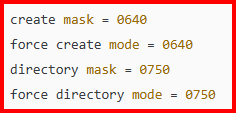
Frank1940's post in No Access to Protected SMB Shares was marked as the answerThose three ticks are your problem. The permissions should be as shown below:
You have to have rwx permissions for both group and other for SMB to work properly.
I would suggest that you install the Docker Safe New Perms plugin and run it. Then check to see that the permissions have been fixed. (I have no clue as to what might have changed these permissions...)
-
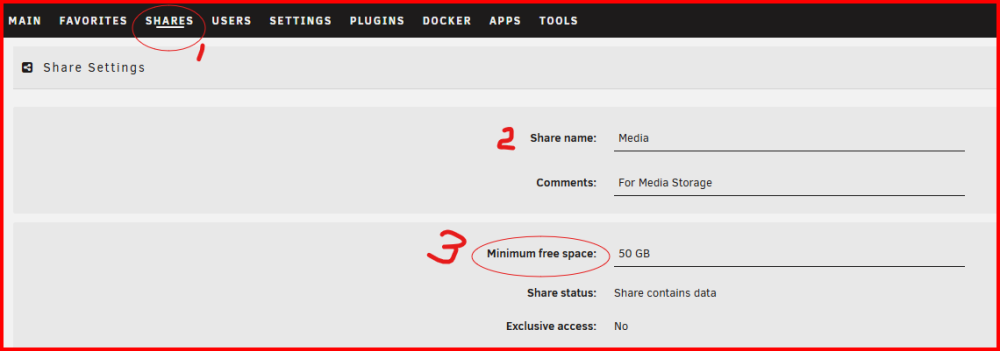
Frank1940's post in Full Tower with 21TB free was marked as the answerYou must set a value for this variable for every share on your server to prevent the problem you have just encountered.
If you don't, Unraid does not 'know' the size of the file (in advance) you are attempting to write. IF there is not enough disk space for a file, the write will fail. (In this case, I have set 50GB because I know I will will be writing computer image files to this share and I further know that they will be smaller than that value.)
-
Frank1940's post in Replaced Motherboard/CPU but now cannot access shares from any PC? was marked as the answerThis almost sounds like the time for the SMB network to settle down onto a stable configuration. See here for times:
https://learn.microsoft.com/en-us/previous-versions/windows/it-pro/windows-server-2003/cc737661(v=ws.10)?redirectedfrom=MSDN
This is why it is so important to have only one computer (preferably on 24-7) designated to be the Local Master. Your Unraid server should be the first choice for this duty.
My first modem was a 300baud AT&T modem (can't remember the model) but it was not even dial-up. You had to have a telephone attached to it and hand dial the number. When the connection was established, you then hung up the phone! The first one that I had with built-in dialing was a 1200 baud one.
-
Frank1940's post in Network drivers are hard was marked as the answerI looked over your diagnostics file and it appears that your new (?) NIC card is being recognized and the driver installed. What I would suggest now is that you shut your server down properly. (A quick push of the power switch should do that. It will take about a minute or two.) Then pull the Flash driver from the server and put it in your PC. Open up the Flash Drive and enter the /config folder/directory. Rename these two files network.cfg and network-rules.cfg by adding .OLD to the end of each file name. Eject the flash drive and put it back in the server and start it up. (During the boot process those two files will be regenerated since they were found missing.) Hopefully that will fix it
-
Frank1940's post in Broken mp4 video file was marked as the answerIF that old disk had the file with the data problem in that file (Regardless of how the file was corrupted) and parity was totally rebuilt for any reason, rebuilding that disk from parity would have restored the corrupted file to the new disk. Remember what rebuilding parity does. When parity is rebuilt, (1) all of the data disks are read byte-by-byte, (2) a new parity information is calculated, and (3) that results of that calculation are written to the parity disk. (Having said that allow me to say that if a parity error is found during a non-correcting parity check, the standard recommendation to check the logs and SMART data for any possible reason for the error. If none is found, then a parity rebuilt is that proper action. This recommendation is based on the assumption in the next paragraph about data corruption on Hard Disks.)
What we don't know is where and when that file was corrupted. The HD manufacturers have a lot of proprietary error detecting and error correcting software to prevent it from happening on the hard disk. I am one of the folks who believe that a HD will always return the exact data that was originally written to it or it returns an error code. I am convinced that any error that corrupts data occurs when the data in some place besides on the HD.
The statements in the previous two paragraphs have logic flaws in them. There are folks who believe in "bit-rot" (which I consider to be folk lore) but I can not completely rule it out as I have never seen that any HD manufacturer software code have been audited/analyzed to guarantee that silent errors might not slip thorough undetected and what the probability of such an occurrence from happening IF the algorithms might allow such situation.
With regard to something like your wedding video, might I suggest that you consider multiple backup on several different media materials if its retention is of prime concern to you. Consider using not only that USB drive and a hard drive in a parity protected server, but also consider using burning the files to DVD and uploading them to the cloud. Consider an off-site storage for one (or more) of your physical copies in case you have a natural or man-made disaster at your home.
Be careful of the storage conditions. I have writable DVDs that are over ten years old that are still playable but they are stored at room temperature in a dark environment. Do a bit of research on media life and ideal storage conditions for any storage media that you use.
Nothing can guarantee that you won't lose critical files but you can minimize the risks. Test that each copy is readable when you make it and periodically test that it is still readable. Make new copies on new media as time passes. (Thing about the problem of trying to find a floppy disk reader today...)
-
Frank1940's post in UNRAID FOR NEWBIE was marked as the answerFrom the manual: ( https://wiki.unraid.net/Articles/Getting_Started#Assigning_Devices_to_the_Array_and_Pool.28s.29 )
SSDs may work over the short haul but not for long periods of time for the reason stated.
Have you found this setting?
As a general rule, You should only use the boot drive for the storage of the the basic Unraid installation software. The experience of of Unraid users is that USB flash drives usually have a very limited life if subjected to multiple write cycles. (Your Unraid key is tied to the unique GUID registration code of that particular UBS flash drive.) If you want to use a flash drive for storage, investigate the use of the Unassigned Devices plugin which is designed for this purpose. (No, this plugin will not make USB flash drives last longer! 😏 )
As a side note, Unraid is installed on a 'RAM' disk from scratch every time the system is booted up. After the bootup is completed, Unraid virtually ignores the flash drive until the system is shutdown. At this point, Unraid writes a flag to a file indicating a 'proper' shutdown has happened.
-
Frank1940's post in Windows 10 Explorer 'Windows cannot access \\UNRAID-01' (SMB v1 Enabled) was marked as the answerNot an uncommon problem. One thing to consider is that Windows 10 (and 11) versions now prevent (by default) establishing a connection to a server using 'Guest' type credentials. You have to have a credential (login) to access a server. (Count on SMB to be inconsistent in its behavior...) Plus, MS wants to prevent you from using SMBv1---Period!
One thing I would suggest is to stop trying to stop fighting MS. Embrace their want/need to bring some semblance of security to SMB. Look at the first post this thread and set things up to make Windows happier with what you are doing:
https://forums.unraid.net/topic/110580-security-is-not-a-dirty-word-unraid-windows-10-smb-setup/#comment-1009109
By the way, the only real reason to use SMBv1 is if you have a piece of hardware so old (media boxes for the 2010 era) that they don't support SMBv2. I know that the 'Network' section of Windows Explorer does not get populated when you turn off SMBv1 but that is what the 'Network Neighborhood' is for. (It also appears that the Network section Of Windows Explorer is populated with the Unraid servers when the Credential Manager establishes its 'login' to the Unraid servers as the Windows boots up--- at least that is my experience.)
One more thing--- I now suspect that MS now considers Peer-to-Peer networking to the 'natural child' of SMB. They want you to use the Windows Server software and Active Directory (AD). And I believe you need a degree/certificate from MS to be able to set up this type of Network!
-
Frank1940's post in New Flash Drive Recommendation?? was marked as the answerLook for a USB flash drive from a name-brand manufacturer that actually manufactures its own memory chips. Purchase the drive from a trusted source. (Make that you are actually buying that trusted source as places like Amazon rent out 'store space' on their site. Apparently, there are a fair number of counterfeit USB drives in the marketplace!) Get a physically large one as possible for maximum heat dissipation. Remember that its size should be 32GB or smaller. (There are ways to use larger drives but they are really hacks.) There no need for the speed of a USB3 flash drive as Unraid only loads about 1GB of data at boot time and then basically ignores the flash drive unless there are software or user configuration updates, and USB2 drives tend to run cooler. (Plus, with some MBs, there are problems with the boot drive being 'lost' when plugged into USB3 ports.)