





SpencerJ
Administrators
-
Joined
Everything posted by SpencerJ
-
Do you want to change your Unraid forum Display Name? Please contact support! -Spencer
-
Hello there, What email did you use? I have not seen any emails sent via the one you are using here. Cheers, Spencer
-
There is also a German lang forum here: https://forums.unraid.net/forum/76-german-deutsch/ 🙂
-
Big thanks to the Selfhosted Podcast for having @jonp on to talk about the past, present and future of Unraid. This is the place to argue about the pronunciation of ZFS and to let us know what you think of the pod! 8/25 Update: After receiving some feedback and seeing some misconceptions about future licensing expressed, we wanted to set the record straight: The Unraid community is the single most important thing to us at Lime Technology and we take all customer concerns seriously. We wanted to clarify a point about future subscription offerings mentioned on this podcast: Any future subscription offerings will be for new Unraid products and services separate from our current core OS licenses and will not affect current users. Your Unraid license will still include all future upgrades and features and you will still be able to purchase licenses for a one-time fee. Thank you very much for your passionate and enthusiastic support. If you have any questions or comments about this podcast or future Unraid offerings, we will do our best to answer what we can here. https://unraid.net/blog/the-past-present-and-future-of-unraid-on-the-selfhosted-podcast
-
Hello @ikiwi, Sure- feel free to email me @ [email protected], you can create a new thread here with questions or I can hope on skype or zoom or whatever messenger you prefer.
-
Great! I shared your blog on twitter and https://www.reddit.com/r/unRAID/ Cheers
-
Olá @agarkauskas e bem-vindo! O iSCSI está em obras 🙂 Thanks for stopping by!
-
-
Would you mind creating your own thread for this question? You will likely get better results 🙂 Thanks
-
Having any trouble setting up an Unraid Capture, Encoding, and Streaming Server? Are you a twitch streamer who uses Unraid? Let us know here! https://unraid.net/blog/unraid-capture-encoding-and-streaming-server
-
Thank you @bonienl 👍🍻
-
Thanks. @bonienl- Can you take a look and see if these sections are supposed to be this way? If not, I will search for the appropriate section and make sure these get translated.
-
屏幕截图? Thanks, will fix once screenshot is shown.
-
Bienvenue @Chronos28
-
For any questions on word/phrase context, please let me know and I can provide further details! If you know any other languages, German, Dutch, French, Spanish Arabic and Chinese translations are also complete and the files can be found here: https://github.com/unraid Please let me know if you have any questions at all. -Spencer
-
Here is the Unraid Russian language Github repo: https://github.com/unraid/lang-ru_RU Instructions for translating and making Pull Requests are located here: https://github.com/unraid/lang-ru_RU/blob/master/README.md tl;dr= There are sixteen main text files included in this repository, each with their own section of translations: translations.txt -- these are general translations and loaded each time helptext.txt -- these are all help text sections and loaded each time dashboard.txt -- these are translations for the dashboard section main.txt -- these are translations for the main section shares.txt -- these are translations for the shares section users.txt -- these are translations for the users section settings.txt -- these are translations for the settings section plugins.txt -- these are translations for the plugins section docker.txt -- these are translations for the docker section vms.txt -- these are translations for the vms section tools.txt -- these are translations for the tools section javascript.txt -- these are translations for javascript scripts scripts.txt -- these are translations for local scripts apps.txt -- these are translations for the CA section (in Community Apps folder) ca_settings -- these are translations for the CA settings (in Community Apps folder) javascript.ca.txt-- these are translations for the CA javascript (in Community Apps folder) Removing a particular file, means no translations will be available for that section and the GUI will display text in original English. There are also other folders from third party app/plugin/container developers. TRANSLATIONS Each text file contains regular text strings stored in UTF-8 format with linux line-endings. Use a text editor which supports UTF-8 and linux format, like notepad++ The content of each text file is separated into two parts PART 1 These are single line entries which are in the format: original English text=translated Foreign text Only modify the text after the equal sign(=) and leave the original English text at the left untouched. Removing a line or omitting a translation after the equal sign, results in the GUI displaying this line with the original English text. The translated text may have 'special characters', such as slashes, parenthesis or brackets which are not included in the key text, but which are used to display text accordingly. E.g. Options see Help=Options (see Help) The characters * and ** are used to display text in italics and bold respectively. E.g. Array must be Stopped to change=Array must be **Stopped** to change It is recommended to make translations per section, that is one file at the time, and verify the correctness of the translations in the GUI before proceeding with the next section. Keep in mind the length of the translations and try to make them similar length as the original text and avoid space issues in the GUI. PART 2 These are multi line entries used to translate multiple lines at once. Multi line translations have a unique opening and closing tag: :unique_tag_name_plug: - unique opening tag used for any multi line text section :end - closing tag Do not remove or alter these tags and only translate the text between the opening and closing tags! HELP TEXT All help text of the GUI is stored in a single file helptext.txt. This file has multiple help text sections. Each section is enclosed by a unique opening tag and corresponding closing tag. :unique_tag_name_help: - unique opening tag used for a help text section :end - corresponding closing tag Do not remove or alter these tags and only translate the text between the opening and closing tags! Be aware that Markdown styling syntax is used, this must be preserved. LOCAL TESTING Once the translations are complete and you want to test locally the (intermediate) results, the text files need to be zipped into a single ZIP file. Give the ZIP file the name of your language, e.g. French.zip. In the GUI go to: Tools -> webGUI -> Language (switch to Developer view) By default only the English language is installed (built-in) Choose the ZIP file you have created earlier as the source file If the language name is recognized, it will be automatically selected, otherwise chose the name of the language from the dropdown menu to install. Click on "Upload" will add your translations to the GUI under the selected language name NOTE: If your language is not available from the dropdown menu, please make a request here. Now your language is available for local testing! In the GUI go to: Settings -> Display Settings -> Language Select the preferred language from the dropdown menu. Note that only the available language choices are displayed here.
-
No problem. Let me know when you have them and I'll be sure to tag you.
-
@Un1Q and @muwahhid- are you on Twitter or reddit? I will spread the word about your blog. Thanks!
-
ICYMI: The Arabic language pack is also now available in Community Apps! https://unraid.net/blog/unraid-6-9-multi-language-support
-
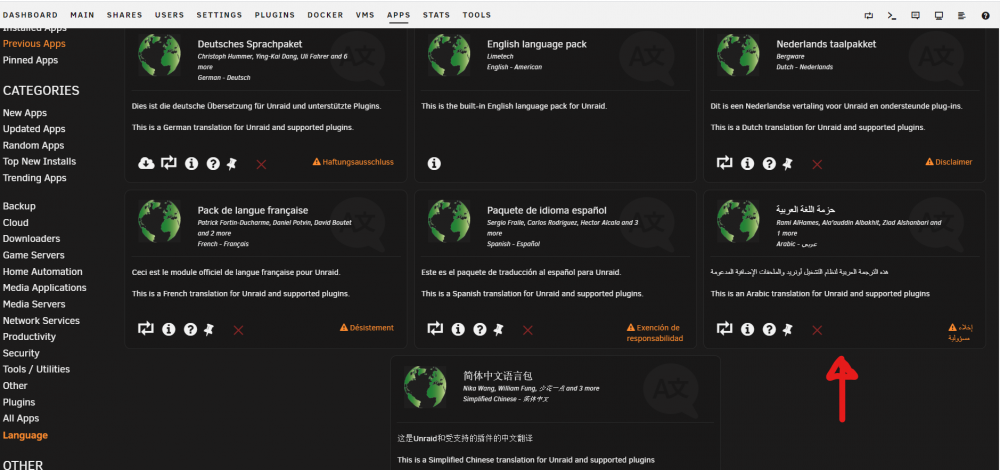
مرحبا The Arabic language pack is now available for Unraid in Community Applications. To install, please go to the Apps tab and search for Arabic, or click on the "Language" section on the lefthand navigation bar and you will find Arabic available! Big thanks to @albakhit, @Zyzto and the rest of the Arabic team for all of the hard work! 🙂
-
🙏👍
-
Chinese is now available! Go to the Apps tab (assuming you have Community Apps installed) and search for "Chinese" or click on the "Language" section on the left and you can download the language pack. There is also a new forum here: https://forums.unraid.net/forum/88-chinese-简体中文/
-
Voilà la troisième (et dernière) partie https://www.presse-citron.net/tutoriel-comment-creer-un-nas-maison-avec-des-composants-pc-et-unraid-partie-3/
-
The Simplified Chinese Translation is maintained in a public Github repository. If you would like to inform us of any errors and/or participate in translation corrections, please write a post here and tag @SpencerJ https://github.com/unraid/lang-zh_CN 我们在这一 公开的 Github 仓库 中维护简体中文翻译。如果您想要告知我们任何错误和/或参与到翻译校正中来,请在此处回帖,并附上这一标记: @SpencerJ 。 Thank you!
-
Great! Please reach out to me.



