theryno
Members
-
Joined
-
Last visited
-
@iannecj I have the same card (GTX 960) and am having the same error 43. I tried the KVM "patch" from @JorgeB but to no avail. Is there anything else you did to get your card to work on Windows 10? Note, I do have built-in graphics on my motherboard (ASPEED) as well. Do you have your IOMMU grouped for the GTX card? When I tried to group them (before I tried the KVM "patch") I wasn't able to boot the VM at all. Just threw an error and crashed.
-
I just installed Trilium and loving it so far. However I can not seem to get it to work with Nginx Proxy Manager. It seems to work 2 or 3 mins at a time then I get a 502 Bad Gateway. Then another 2 to 3 mins it starts working again. Very strange behavior. This error pops up when it stops working: Error when calling PUT notes/VD1VrJbAP1DY/title: error - <html> <head><title>502 Bad Gateway</title></head> <body> <center><h1>502 Bad Gateway</h1></center> <hr><center>openresty</center> </body> </html> <!-- a padding to disable MSIE and Chrome friendly error page --> <!-- a padding to disable MSIE and Chrome friendly error page --> <!-- a padding to disable MSIE and Chrome friendly error page --> <!-- a padding to disable MSIE and Chrome friendly error page --> <!-- a padding to disable MSIE and Chrome friendly error page --> <!-- a padding to disable MSIE and Chrome friendly error page --> I have tried with and without "Websocket Support". Has anyone gotten Trilium to work with Nginx Proxy Manager?
-
So it seems like a reboot fixed the problem. Thank you for the help!
-
Not sure when this happened as its been a few months since I have installed any new dockers but when I go to install a new docker I get the error: docker: Error response from daemon: error while creating mount source path '/mnt/user/appdata/portainer-ce': mkdir /mnt/user/appdata/portainer-ce: input/output error. All my other dockers are running fine and I can even update them so not sure whats going on here. I am on the latest Unraid version 6.11.5 I have included the diagnostic files for reference. stocks-unraid-diagnostics-20230331-1953.zip
-
Had this very same problem on version 6.11.5 and was banging my head against the wall for hours till I found this thread. Thank you!!!
-
I have an XCP-NG/Xen Server running with about 10 CentOS 7 (FreePBX) VM's. I want to run those VM's on my Unraid server disks so I setup a new share and made sure "NFS" was on and available on my network. I then went to Xen Server and setup a new NFS storage and right away Xen connected to the new share/storage. I started to move one VM to the new share/storage and after about 5% I got an error "VDI_COPY_FAILED(End_of_file)". Tried a few other VM's with the same error. Has anyone successfully setup an Unraid server connected to an XCP-NG/Xen Server as a storage for their VM's?
-
Same here....did you figure out how to make the first account?
-
Created a tutorial HERE for anyone interested in how to get Mastodon working on Unraid.
-
I created a tutorial HERE on how to get Mastodon setup on Unraid for anyone interested.
-
Same here...did you figure this out?
-
@patm95 Same issue here....did you ever figure this out?
-
Also looking for some help with this container. Anyone have a walkthrough?
-
Thanks for creating this docker! Been waiting on it for a while. Anyway Im trying to get the SMB remotes to work for backups on the same unraid server but cant seem to get it right. Im running the docker on a custom network at a static IP. I see in the notes to give the docker "Privileged" rights but when I do that all I get is a white screen that says "cannot get /". When I uncheck "Privileged" I can get back to the GUI. Also, when I check "Host access to custom networks" under the unraid docker settings I am able to successfully connect to the SMB share (according to Xen) but as soon as I run a backup I get the error "status_access_denied (0xc0000022) : {access denied} a process has requested access to an object but has not been granted those access rights." I tried running the docker as a bridge network and changing the http port to 82 (Since unraid uses 80) but the port did not seem to change. I wasnt able to get tp the GUI. Any idea of what I may be doing wrong to get the SMB backups to work with local unraid storage?
-
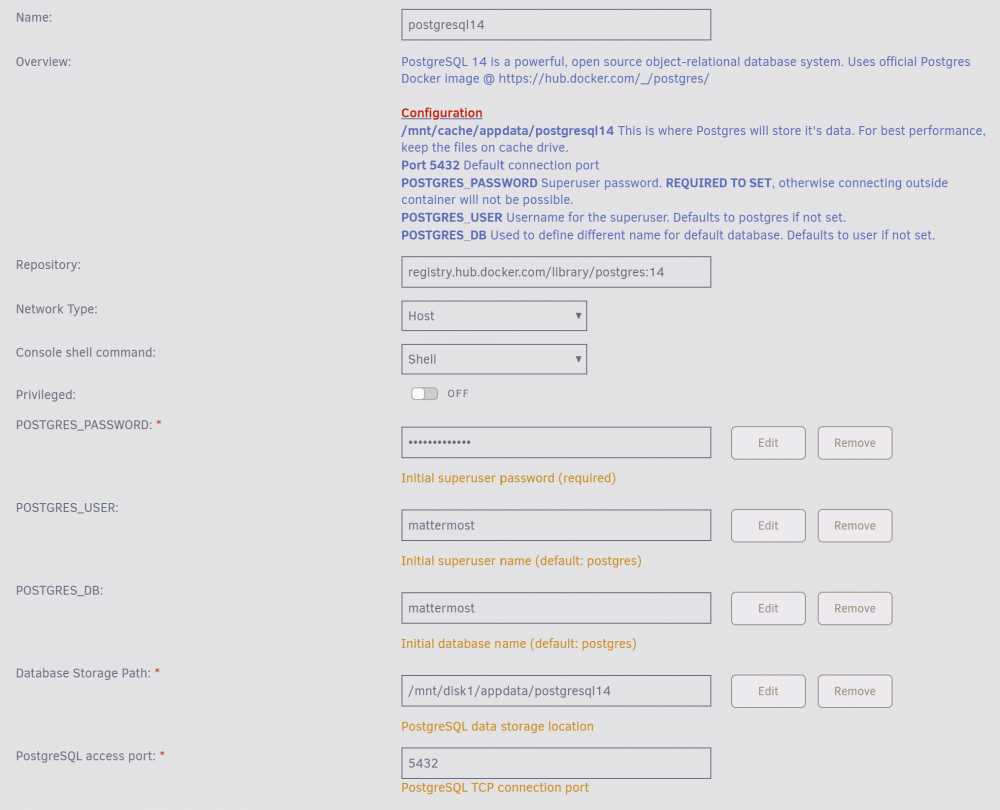
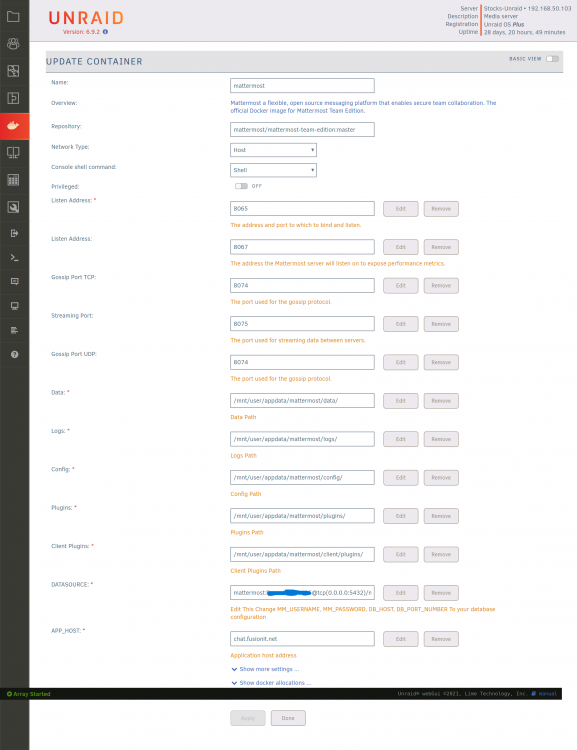
Has anyone successfully installed the Mattermost docker? If so I need some guidance. I can not get the database to connect. Im sure Im just missing something glaringly obvious. Here are my setups: Postgresql Config: Mattermost Config: Mattermost DATASOURCE Line: mattermost:myPassword@tcp(192.168.50.103:5432)/mattermost?charset=utf8mb4,utf8&readTimeout=30s&writeTimeout=30s Mattermost log error: {"timestamp":"2022-03-26 13:15:00.358 -04:00","level":"error","msg":"Failed to ping DB","caller":"sqlstore/store.go:228","error":"context deadline exceeded","retrying in seconds":10} Any help would be greatly appreciated!