





xrqp
Members
-
Joined
-
Last visited
Everything posted by xrqp
-
deleted accidental double post
-
The solution at that post is So it does have to be mapped at both the container and the app, with an extra requirement that "music" is not used used for mapping both locations. In the above example, could it work if it was changed to: 1. music 2/ > /music 2. music (Blu-ray)/ > /music (Blu-ray) ?
-
MULTIPLE FILE LOCATIONS FOR MUSIC With this container, can you add multiple file locations for music? Do you have to add them in both 1) the container mappings and 2) in the app mappings? In this paragraph, I am showing the mappings as they appear in Windows file viewer, where Z: is my Unraid Tower. I am currently mapping both app and container using a relatively direct share "Z:\music\". I want to add another location, less direct, in a different share called "data" like this "Z:\data\media\music". Can I do that, and if I can, do I need to add it to both the app and the container mappings? Thanks.
-
HOW TO KNOW IF AN UPDATE OCCURS In Roon Remote go to Settings/About (which is near the bottom of settings list) there is a section for Remote and another for Core. Both have a gear icon (settings) you need to click, then change to "ask before installing any updates". So I did that today and will report back if core updates go well or not in the future. I am not sure if I had a successful core update yet. The remote update went well today from build 77x to 783, but it is the core update that is the concern. But so far it is all working for about a month. I realized today, in order for me to know when an update occurs, I have to do this setting.
-
Does this trash-guides, work good in conjunction with the binhex unraid docker containers for nzbget, sonarr, radarr, lidarr? https://trash-guides.info/Misc/how-to-set-up-hardlinks-and-atomic-moves/#unraid In the guide he used containers by "ghcr.io/hotio", but I hope it works with binhex's too. Anything to add for people using that guide with binhex containers? How important do you think it is to use hardlinks? My guess is that it is fairly important. It's been difficult for me to get it all to work correct, and that was the first guide that seemed more complete than other guides on the subject, and that uses all 4 containers and more. I followed spaceinvader videos for paths, and when i got to using radarr it did not work and i did not understand it well. I hoped using trash-guides I could just copy it and not have to fully understand it.
-
In Unraid, or in UD, can we merge partitions without losing data? Or can it merge partitions and wipe clean only one partition?
-
Because I do not understand those scripts. I don't speak Linux. Maybe I should try harder. Another docker option with GUI is LuckyBackup. Does anyone use it, or something with GUI?
-
RE: Backup of some folders in unraid array to unassigned hard drives: My unraid is at home. As a backup stategy, I am thinking after backing up certain folders in the array to the UD drives, I would remove the UD drives and take them to store at my work place. I was thinking a full backup once a year, and incremental backups every 3 months. Should I use urbackup docker? Or do it from Windows 10 using Macrium Reflect? Or other recommendation? Thanks.
-
It is 2021. Do we still need Dynamix TRIM for SSD's?
-
It was, but that was when I had the wrong paths (everything went to RAM only) and it locked up and crashed, never really doing a build. Now that I fixed it, I do not see the nags yet. After my library and analysis is done, I will do a backup, then try update, and report back here.
-
Subject: Updating I read most containers (BinHex or LinuxIO) say do not update thru the app, but instead update through the Docker tab in Unraid where at the bottom is a button to Update. But I think you all say, this container is different and I can update thru the app (in other words, when it nags to update, I can click "update all" on the Roon remote control app on ipad). Is this correct? I now have Roon Remote on my ipad (v1.8 build 756) and on my win10 (v1.8 build 763). And already it is nagging me to update every time I start the app, and I cannot figure out what build number it is trying to update to. I am scared to update generally, and even more so while it is building library.
-
Edit: Deleted post. I made a stupid mistake on the paths but fixed it now.
-
I ran my core in Windows 10 for a year, then I created a backup lately. Now I installed this container and assigned it as the core, then tried to restore that backup (when it asked me to sign in, I click "restore backup"). But the restoration of the backup fails. Can I do this? Are there any tricks?
-
I must have been looking at a very old help document about Unraid and ReiserFS. My array disks do show xfs.
-
THANKS! I will try it. I was born unRaidy.
-
I searched this topic for "undelete" and could not find it. I must have made a search error as this seems impossible that no one has requested undelete. I recall when it was added to Windows due to large demand. A great feature I would gladly allocate disk space for. I do see people asking if there is an undelete feature, but not in the Feature Request topic. I see: "There are no known undelete tools for the Reiser file system, which the unRAID system uses for each data drive. However, there are techniques that can be used to recover files." Reiser needs to do better. I thought it only needs to do a Move To Trashcan in the background, instead of delete.
-
deleted post. I got it to work by re-doing my HDHomerun tuner.
-
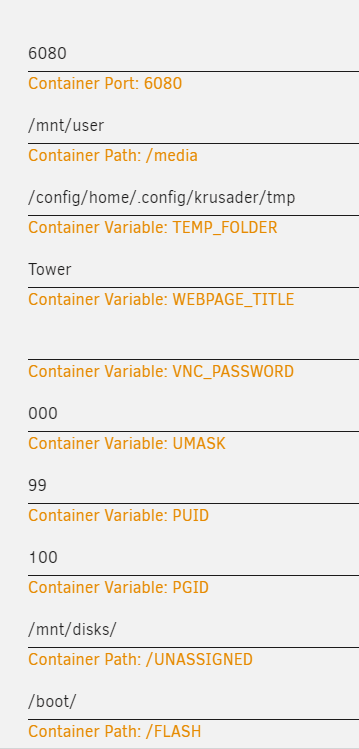
Great explanation. I had not thought to treat Krusader like a VM or container. I understand it now, and i can see how to figure out things on my own better now. I was interested to see yours shows the "default value" is "/mnt/user". Mine did not show it. But then i toggled the basic view to advanced view, and then it showed it. Thanks!
-
Thanks for the concern and caution. What a great and kind community. I am aware of that caution. It was interesting that in Krusader, Root/media shows all my physical disks, and logical user shares, and cache drive. Root/mnt there is nothing (which puzzles me). Krusader help told me to use "Edit - Calculate occupied space" to see the amount of bytes in folders, so I was able to solve a problem with an unexpected full cache, and I could see what caused it and so now I know how to fix it. Excellent. I assume this is one of the best ways to browse the cache drive. It is also interesting that Krusader shows all kinds of folders that are strange to me, and I never see otherwise . Brings up many questions in my mind, but I assume it is not urgent for me to understand. I fairly understand all the folders in Root/media.
-
If anybody installs this Roon container, then later does the next Roon update (update to ver 1.8 planned for Feb. 9, 2021) , please report back here if it worked.
-
Thanks! Why do they use the word "media"? I though it was referring to media like movies and music and tv shows. Does it mean media, like disk media, and ssd ( physical data storage devices)?
-
Maybe start a new thread with just that?
-
I was interested in the same thing. I don't know how to "setup host paths of Unraid to see them in krusader". In krusader my user shares show up in "media" and do not show in "mnt". I guess cause I did this container setup for Krusader: I tried to follow spaceinvader video. I don't know if I did it right. Probably the wrong place to post this. I was trying to see the folder "mnt/cache/appdata/binhex-sonarr" like the way I see folders in Windows. And same for "mnt/user/Downloads".
-
So, to install Roon Server as an Unraid docker container, I only need to read the top of page 1, sections: ================ To find the roon docker ================ ================ Install setup Roon docker ================ and optionally section: ================ Get it working on yer phone ================ And I can ignore after ================ DEPRECIATED ================ ? If correct, great! So short and sweet. Is xthursdayx the same person as steefdebruijn?
-
I have been away from this thread for about a year. Have you worked it out, how to run Roon in a docker in Unraid, and be able to do Roon updates, and it still works? About a year ago, I gave up, and put the Roon server on my Windows 10 machine, and I start my Windows 10 machine every time I want to run Roon (ike once a day), and it has to work hard for 4 minutes before I can use Roon, and I don't know if it continues to work hard after. If you, or anyone has not figured this out yet, I was going to try a Windows 10 VM on Unraid machine, then install Roon on the VM. Thanks for all your work.
