





blaine07
Members
-
Joined
-
Last visited
Everything posted by blaine07
-
192.168.1.5 is Unraid, yes. 192.168.1.3 is a internal Nginx Proxy Manager instance.
-
{"reqId":"hfhVeMUcEufWb4p8BKMJ","level":3,"time":"2025-02-19T23:55:22+00:00","remoteAddr":"192.168.1.5","user":"--","app":"PHP","method":"GET","url":"/apps/richdocuments/settings/fonts.json","message":"session_start(): Redis connection not available at /app/www/public/lib/private/Session/Internal.php#198","userAgent":"COOLWSD HTTP Agent 24.04.12.3","version":"30.0.6.2","data":{"app":"PHP"}} {"reqId":"hfhVeMUcEufWb4p8BKMJ","level":3,"time":"2025-02-19T23:55:22+00:00","remoteAddr":"192.168.1.5","user":"--","app":"PHP","method":"GET","url":"/apps/richdocuments/settings/fonts.json","message":"session_start(): Failed to read session data: redis (path: tcp://192.168.1.5:6384?auth=Waffles2021&) at /app/www/public/lib/private/Session/Internal.php#198","userAgent":"COOLWSD HTTP Agent 24.04.12.3","version":"30.0.6.2","data":{"app":"PHP"}} {"reqId":"hfhVeMUcEufWb4p8BKMJ","level":3,"time":"2025-02-19T23:55:22+00:00","remoteAddr":"192.168.1.5","user":"--","app":"PHP","method":"GET","url":"/apps/richdocuments/settings/fonts.json","message":"session_start(): Redis connection not available at /app/www/public/lib/private/Session/Internal.php#198","userAgent":"COOLWSD HTTP Agent 24.04.12.3","version":"30.0.6.2","data":{"app":"PHP"}} {"reqId":"hfhVeMUcEufWb4p8BKMJ","level":3,"time":"2025-02-19T23:55:22+00:00","remoteAddr":"192.168.1.5","user":"--","app":"PHP","method":"GET","url":"/apps/richdocuments/settings/fonts.json","message":"session_start(): Redis connection not available at /app/www/public/lib/private/Session/Internal.php#198","userAgent":"COOLWSD HTTP Agent 24.04.12.3","version":"30.0.6.2","data":{"app":"PHP"}} {"reqId":"hfhVeMUcEufWb4p8BKMJ","level":3,"time":"2025-02-19T23:55:22+00:00","remoteAddr":"192.168.1.5","user":"--","app":"PHP","method":"GET","url":"/apps/richdocuments/settings/fonts.json","message":"session_start(): Failed to read session data: redis (path: tcp://192.168.1.5:6384?auth=Waffles2021&) at /app/www/public/lib/private/Session/Internal.php#198","userAgent":"COOLWSD HTTP Agent 24.04.12.3","version":"30.0.6.2","data":{"app":"PHP"}} {"reqId":"REE2DUgWaE87NoNSkoDK","level":3,"time":"2025-02-19T23:56:23+00:00","remoteAddr":"192.168.1.5","user":"--","app":"PHP","method":"GET","url":"/apps/richdocuments/settings/fonts.json","message":"session_start(): Redis connection not available at /app/www/public/lib/private/Session/Internal.php#198","userAgent":"COOLWSD HTTP Agent 24.04.12.3","version":"30.0.6.2","data":{"app":"PHP"}} {"reqId":"REE2DUgWaE87NoNSkoDK","level":3,"time":"2025-02-19T23:56:23+00:00","remoteAddr":"192.168.1.5","user":"--","app":"PHP","method":"GET","url":"/apps/richdocuments/settings/fonts.json","message":"session_start(): Redis connection not available at /app/www/public/lib/private/Session/Internal.php#198","userAgent":"COOLWSD HTTP Agent 24.04.12.3","version":"30.0.6.2","data":{"app":"PHP"}} {"reqId":"REE2DUgWaE87NoNSkoDK","level":3,"time":"2025-02-19T23:56:23+00:00","remoteAddr":"192.168.1.5","user":"--","app":"PHP","method":"GET","url":"/apps/richdocuments/settings/fonts.json","message":"session_start(): Failed to read session data: redis (path: tcp://192.168.1.5:6384?auth=XXXXXXXX&) at /app/www/public/lib/private/Session/Internal.php#198","userAgent":"COOLWSD HTTP Agent 24.04.12.3","version":"30.0.6.2","data":{"app":"PHP"}} {"reqId":"REE2DUgWaE87NoNSkoDK","level":3,"time":"2025-02-19T23:56:23+00:00","remoteAddr":"192.168.1.5","user":"--","app":"PHP","method":"GET","url":"/apps/richdocuments/settings/fonts.json","message":"session_start(): Redis connection not available at /app/www/public/lib/private/Session/Internal.php#198","userAgent":"COOLWSD HTTP Agent 24.04.12.3","version":"30.0.6.2","data":{"app":"PHP"}} {"reqId":"REE2DUgWaE87NoNSkoDK","level":3,"time":"2025-02-19T23:56:23+00:00","remoteAddr":"192.168.1.5","user":"--","app":"PHP","method":"GET","url":"/apps/richdocuments/settings/fonts.json","message":"session_start(): Redis connection not available at /app/www/public/lib/private/Session/Internal.php#198","userAgent":"COOLWSD HTTP Agent 24.04.12.3","version":"30.0.6.2","data":{"app":"PHP"}} {"reqId":"REE2DUgWaE87NoNSkoDK","level":3,"time":"2025-02-19T23:56:23+00:00","remoteAddr":"192.168.1.5","user":"--","app":"PHP","method":"GET","url":"/apps/richdocuments/settings/fonts.json","message":"session_start(): Failed to read session data: redis (path: tcp://192.168.1.5:6384?auth=XXXXXX&) at /app/www/public/lib/private/Session/Internal.php#198","userAgent":"COOLWSD HTTP Agent 24.04.12.3","version":"30.0.6.2","data":{"app":"PHP"}} At a skim it appears ENTIRE thing is this over and over to tune of 4.95 MB. I am sure you're 100% right; something stupid on my part; just no idea what that is. No idea why it's still "trying to connect to redis" when we removed that from config.php though. I'll try OCC maintenance repair; nothing to lose at this point as far as I can tell; its broke LOL. Maintenance Repair: root@Tower:~# docker exec -it mcdnc occ maintenance:mode --on Maintenance mode enabled root@Tower:~# docker exec -it mcdnc occ maintenance:repair Nextcloud is in maintenance mode, no apps are loaded. Commands provided by apps are unavailable. - Repair MySQL collation - Not a mysql database -> nothing to do - Clean tags and favorites - 0 tags of deleted users have been removed. - 0 tags for delete files have been removed. - 0 tag entries for deleted tags have been removed. - 0 tags with no entries have been removed. - Repair invalid shares - Move .step file of updater to backup location - Add move avatar background job - Repair step already executed - Add preview cleanup background jobs - Migrate oauth2_clients table to nextcloud schema - Update the oauth2_access_tokens table schema. - Update the oauth2_clients table schema. - Delete clients (and their related access tokens) with the redirect_uri starting with oc:// or ending with * - Repair language codes - Add log rotate job - Clear frontend caches - Image cache cleared - JS cache cleared - Clear every generated avatar - Add preview background cleanup job - Queue a one-time job to cleanup old backups of the updater - Cleanup invalid photocache files for carddav - Add background job to cleanup login flow v2 tokens - Remove potentially over exposing share links - No need to remove link shares. - Clear access cache of projects - Reset generated avatar flag - Keep legacy encryption enabled - Check encryption key format - Remove old dashboard app config data - Add job to cleanup the bruteforce entries - Queue a one-time job to check for user uploaded certificates - Repair DAV shares - Add background job to set the lookup server share state for users - Add token cleanup job - Clean up abandoned apps - Add possibly missing system config - Add AI tasks cleanup jobs - Queue a job to generate metadata - migrate lazy config values - Cache logo dimension to fix size in emails on Outlook - Theming is not used to provide a logo - Remove legacy ".ocdata" file - Add cleanup-deleted-users background job - AppAPI Daemons configuration GPU params update - Daemons configuration GPU params updated: 0 - Upgrading Circles App - Fix component of birthday calendars - 2 birthday calendars updated. - Regenerating birthday calendars to use new icons and fix old birthday events without year - Repair step already executed - Fix broken values of calendar objects 0 [->--------------------------] - Registering building of calendar search index as background job - Repair step already executed - Register building of social profile search index as background job - Registering background jobs to update cache for webcal calendars - Added 0 background jobs to update webcal calendars - Registering building of calendar reminder index as background job - Repair step already executed - Clean up orphan event and contact data - 0 events without a calendar have been cleaned up - 0 properties without an events have been cleaned up - 0 changes without a calendar have been cleaned up - 0 cached events without a calendar subscription have been cleaned up - 0 changes without a calendar subscription have been cleaned up - 0 contacts without an addressbook have been cleaned up - 0 properties without a contact have been cleaned up - 0 changes without an addressbook have been cleaned up - Remove activity entries of private events - Removed 0 activity entries - Clean up old calendar subscriptions from deleted users that were not cleaned-up 0 [----->----------------------] - 0 calendar subscriptions without an user have been cleaned up - Remove invalid object properties - 0 invalid object properties removed. - Fix the share type of guest shares when migrating from ownCloud - Copy the share password into the dedicated column - Set existing shares as accepted - Clean up meta table - Show a hint about the new editor to existing users - Update OAuth token expiration times - init metadata - Switches from default updater server to the customer one if a valid subscription is available - Repair step already executed - Force-reset all Text document sessions - Initialize migration of background images from dashboard to theming app - Add background job to check for backup codes - Populating added database structures for workflows root@Tower:~# docker exec -it mcdnc occ maintenance:mode --off Maintenance mode disabled No idea what else to do. :shrug: EDIT: Each FAILED login generates 30 LINES in the nextcloud.log file by the way. Just the above I shared over and over and over. EDIT 2: changed log level to "0" and when I go to login: {"reqId":"SQA6CjaJgk0aifoFlfeG","level":0,"time":"2025-02-20T00:21:49+00:00","remoteAddr":"192.168.1.5","user":"--","app":"no app in context","method":"GET","url":"/login?direct=1&user=Xxxxxx","message":"The loading of lazy AppConfig values have been requested","userAgent":"Mozilla/5.0 (Windows NT 10.0; Win64; x64) AppleWebKit/537.36 (KHTML, like Gecko) Chrome/133.0.0.0 Safari/537.36","version":"30.0.6.2","exception":{"Exception":"RuntimeException","Message":"ignorable exception","Code":0,"Trace":[{"file":"/app/www/public/lib/private/AppConfig.php","line":1180,"function":"loadConfig","class":"OC\\AppConfig","type":"->"},{"file":"/app/www/public/lib/private/AppConfig.php","line":100,"function":"loadConfigAll","class":"OC\\AppConfig","type":"->"},{"file":"/app/www/public/lib/private/AllConfig.php","line":169,"function":"getKeys","class":"OC\\AppConfig","type":"->"},{"file":"/app/www/public/lib/private/Security/Bruteforce/Throttler.php","line":95,"function":"getAppKeys","class":"OC\\AllConfig","type":"->"},{"file":"/app/www/public/lib/private/Security/Bruteforce/Throttler.php","line":175,"function":"isBypassListed","class":"OC\\Security\\Bruteforce\\Throttler","type":"->"},{"file":"/app/www/public/lib/private/Security/Bruteforce/Throttler.php","line":192,"function":"getAttempts","class":"OC\\Security\\Bruteforce\\Throttler","type":"->"},{"file":"/app/www/public/core/Controller/LoginController.php","line":151,"function":"getDelay","class":"OC\\Security\\Bruteforce\\Throttler","type":"->"},{"file":"/app/www/public/lib/private/AppFramework/Http/Dispatcher.php","line":208,"function":"showLoginForm","class":"OC\\Core\\Controller\\LoginController","type":"->"},{"file":"/app/www/public/lib/private/AppFramework/Http/Dispatcher.php","line":114,"function":"executeController","class":"OC\\AppFramework\\Http\\Dispatcher","type":"->"},{"file":"/app/www/public/lib/private/AppFramework/App.php","line":161,"function":"dispatch","class":"OC\\AppFramework\\Http\\Dispatcher","type":"->"},{"file":"/app/www/public/lib/private/Route/Router.php","line":302,"function":"main","class":"OC\\AppFramework\\App","type":"::"},{"file":"/app/www/public/lib/base.php","line":1003,"function":"match","class":"OC\\Route\\Router","type":"->"},{"file":"/app/www/public/index.php","line":24,"function":"handleRequest","class":"OC","type":"::"}],"File":"/app/www/public/lib/private/AppConfig.php","Line":1194,"message":"The loading of lazy AppConfig values have been requested","exception":{},"CustomMessage":"The loading of lazy AppConfig values have been requested"}}
-
root@Tower:~# docker exec -it mcdnc occ check root@Tower:~# docker exec -it mcdnc occ setupchecks dav: ✓ DAV system address book: No outstanding DAV system address book sync. network: ✓ WebDAV endpoint: Your web server is properly set up to allow file synchronization over WebDAV. ✓ Data directory protected ✓ Internet connectivity ✓ JavaScript source map support ✓ JavaScript modules support ✓ OCS provider resolving ✓ .well-known URLs: Your server is correctly configured to serve `.well-known` URLs. ✓ Font file loading system: ⚠ Errors in the log: 4482 errors in the logs since February 12, 2025, 4:55:30 AM ✓ Allowed admin IP ranges: Admin IP filtering isn’t applied. ℹ Brute-force Throttle: Your remote address could not be determined. ✓ Cron errors: The last cron job ran without errors. ✓ Cron last run: Last background job execution ran seconds ago. ✓ Debug mode: Debug mode is disabled. ✓ File locking ✓ Maintenance window start: Maintenance window to execute heavy background jobs is between 19:00 UTC and 1:00 UTC ✓ Memcache: Configured ✓ Mimetype migrations available: None ✓ Architecture: 64-bit ✓ Temporary space available: Temporary directory is correctly configured: - 589.2 GiB available in /tmp (PHP temporary directory) ✓ Push service: Free push service notifications: ✓ Push notifications - Fair use policy security: ✓ App directories owner: App directories have the correct owner "abc" ✓ Old administration imported certificates ✓ Code integrity: No altered files ℹ Forwarded for headers: Your remote address could not be determined. ✓ HTTPS access and URLs: You are accessing your instance over a secure connection, and your instance is generating secure URLs. ✓ Old server-side-encryption: Disabled ✓ PHP version: You are currently running PHP 8.3.17. ✓ Random generator: Secure ✓ HTTP headers: Your server is correctly configured to send security headers. database: ✓ Database missing columns: None ✓ Database missing indices: None ✓ Database missing primary keys: None ✓ Database pending bigint migrations: None ✓ MySQL Unicode support: You are not using MySQL ✓ Scheduling objects table size: Scheduling objects table size is within acceptable range. ✓ Database version: 14.16 (Debian 14.16-1.pgdg120+1) ✓ Database transaction isolation level: Read committed config: ✓ Default phone region: US ✓ Email test: Email test was successfully sent ✓ Overwrite CLI URL: The "overwrite.cli.url" option in your config.php is set to "https://xxx.xxx.net" which is a correct URL. Suggested URL is "https://localhost". ✓ Configuration file access rights: Nextcloud configuration file is writable php: ✓ PHP default charset: UTF-8 ✓ PHP set_time_limit: The function is available. ✓ Freetype: Supported ✓ PHP getenv ✓ PHP memory limit: ? ✓ PHP modules ✓ PHP opcache: Checking from CLI, OPcache checks have been skipped. ✓ PHP "output_buffering" option: Disabled ✓ PHP Imagick module occ check did nothing? See above.
-
But why is it even looking at Redis when we commented it out? Definitely did and have restarted container with redis removed from config. Not that it changes anything but I have 2-3 instances of redis; they all have overcommitment error. My other nextcloud instance works fine with an instance of redis configured identically sans ports. Only difference between this nextcloud and other instance is one was using MariaDB; this broken one was use postgresql
-
Yeah not sure why that would be there? What is proper syntax to remove and try without? I know you guys mention formatting of config.php not being borked.
-
With Redis Disabled I just don't understand why it's trying to look at it... {"reqId":"M4g4yC5FDQYshxPQ0xdn","level":3,"time":"2025-02-18T18:23:36+00:00","remoteAddr":"192.168.1.5","user":"--","app":"PHP","method":"GET","url":"/csrftoken","message":"session_start(): Failed to read session data: redis (path: tcp://192.168.1.5:6384?auth=XXXXXXXXXX&) at /app/www/public/lib/private/Session/Internal.php#198","userAgent":"Mozilla/5.0 (Windows NT 10.0; Win64; x64) AppleWebKit/537.36 (KHTML, like Gecko) Chrome/133.0.0.0 Safari/537.36","version":"30.0.6.2","data":{"app":"PHP"}} {"reqId":"M4g4yC5FDQYshxPQ0xdn","level":3,"time":"2025-02-18T18:23:36+00:00","remoteAddr":"192.168.1.5","user":"--","app":"PHP","method":"GET","url":"/csrftoken","message":"session_start(): Redis connection not available at /app/www/public/lib/private/Session/Internal.php#198","userAgent":"Mozilla/5.0 (Windows NT 10.0; Win64; x64) AppleWebKit/537.36 (KHTML, like Gecko) Chrome/133.0.0.0 Safari/537.36","version":"30.0.6.2","data":{"app":"PHP"}} {"reqId":"M4g4yC5FDQYshxPQ0xdn","level":3,"time":"2025-02-18T18:23:36+00:00","remoteAddr":"192.168.1.5","user":"--","app":"PHP","method":"GET","url":"/csrftoken","message":"session_start(): Failed to read session data: redis (path: tcp://192.168.1.5:6384?auth=XXXXXXXXXX&) at /app/www/public/lib/private/Session/Internal.php#198","userAgent":"Mozilla/5.0 (Windows NT 10.0; Win64; x64) AppleWebKit/537.36 (KHTML, like Gecko) Chrome/133.0.0.0 Safari/537.36","version":"30.0.6.2","data":{"app":"PHP"}} {"reqId":"duxO5AbIWUizS181R1jX","level":3,"time":"2025-02-18T18:23:59+00:00","remoteAddr":"192.168.1.5","user":"--","app":"PHP","method":"GET","url":"/apps/richdocuments/settings/fonts.json","message":"session_start(): Redis connection not available at /app/www/public/lib/private/Session/Internal.php#198","userAgent":"COOLWSD HTTP Agent 24.04.12.3","version":"30.0.6.2","data":{"app":"PHP"}} {"reqId":"duxO5AbIWUizS181R1jX","level":3,"time":"2025-02-18T18:23:59+00:00","remoteAddr":"192.168.1.5","user":"--","app":"PHP","method":"GET","url":"/apps/richdocuments/settings/fonts.json","message":"session_start(): Redis connection not available at /app/www/public/lib/private/Session/Internal.php#198","userAgent":"COOLWSD HTTP Agent 24.04.12.3","version":"30.0.6.2","data":{"app":"PHP"}} {"reqId":"duxO5AbIWUizS181R1jX","level":3,"time":"2025-02-18T18:23:59+00:00","remoteAddr":"192.168.1.5","user":"--","app":"PHP","method":"GET","url":"/apps/richdocuments/settings/fonts.json","message":"session_start(): Failed to read session data: redis (path: tcp://192.168.1.5:6384?auth=XXXXXXXXXX&) at /app/www/public/lib/private/Session/Internal.php#198","userAgent":"COOLWSD HTTP Agent 24.04.12.3","version":"30.0.6.2","data":{"app":"PHP"}} {"reqId":"duxO5AbIWUizS181R1jX","level":3,"time":"2025-02-18T18:23:59+00:00","remoteAddr":"192.168.1.5","user":"--","app":"PHP","method":"GET","url":"/apps/richdocuments/settings/fonts.json","message":"session_start(): Redis connection not available at /app/www/public/lib/private/Session/Internal.php#198","userAgent":"COOLWSD HTTP Agent 24.04.12.3","version":"30.0.6.2","data":{"app":"PHP"}} {"reqId":"duxO5AbIWUizS181R1jX","level":3,"time":"2025-02-18T18:23:59+00:00","remoteAddr":"192.168.1.5","user":"--","app":"PHP","method":"GET","url":"/apps/richdocuments/settings/fonts.json","message":"session_start(): Redis connection not available at /app/www/public/lib/private/Session/Internal.php#198","userAgent":"COOLWSD HTTP Agent 24.04.12.3","version":"30.0.6.2","data":{"app":"PHP"}} {"reqId":"duxO5AbIWUizS181R1jX","level":3,"time":"2025-02-18T18:23:59+00:00","remoteAddr":"192.168.1.5","user":"--","app":"PHP","method":"GET","url":"/apps/richdocuments/settings/fonts.json","message":"session_start(): Failed to read session data: redis (path: tcp://192.168.1.5:6384?auth=XXXXXXXXXX&) at /app/www/public/lib/private/Session/Internal.php#198","userAgent":"COOLWSD HTTP Agent 24.04.12.3","version":"30.0.6.2","data":{"app":"PHP"}}
-
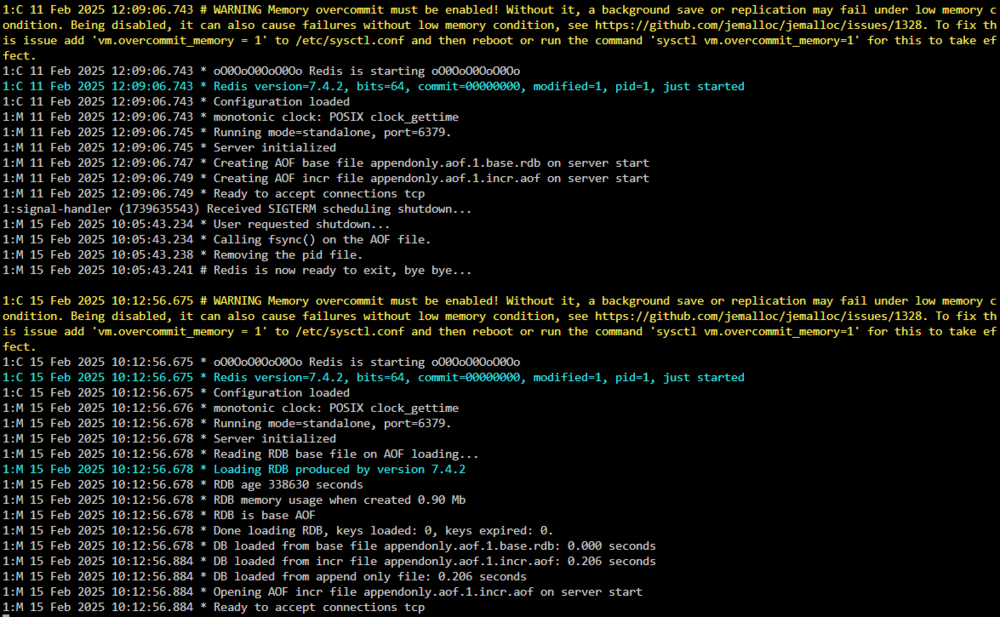
Well, I have a login screen back BUT still can't get past that - just reloads login page on credential submission. EDIT: Also weird, I can access files for the instance in the Nextcloud APP since it was never logged out - just can't login to the Nextcloud instance in any browser/anywhere else. Edit EDIT: Still seeing this in logs, too: Redis(which it shouldn't even be looking at as removed from config.php?):

-
Yeah, will give this a go; REDIS container has a update too... Let me try both again.
-
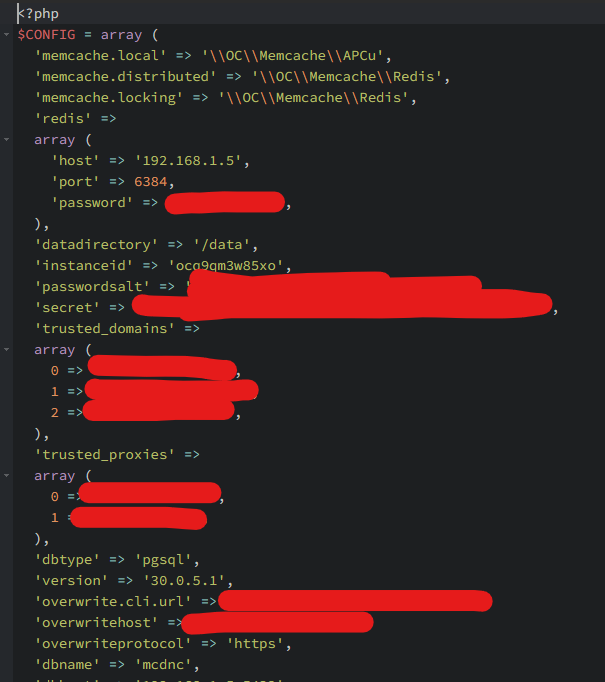
Once I removed the REIDS stuff it added bottom few lines? CONFIG-MCDNC.php
-
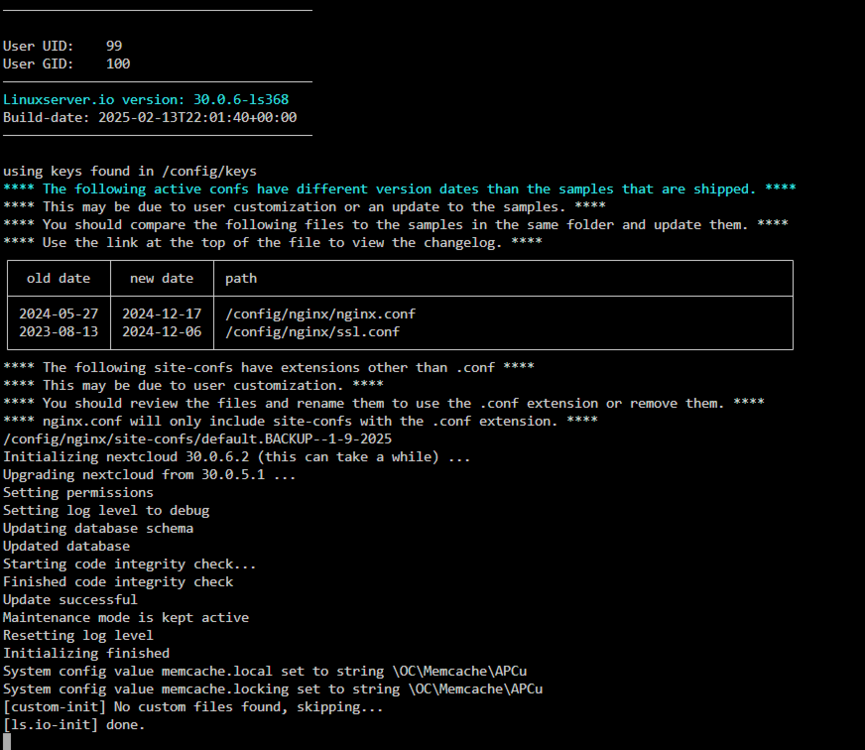
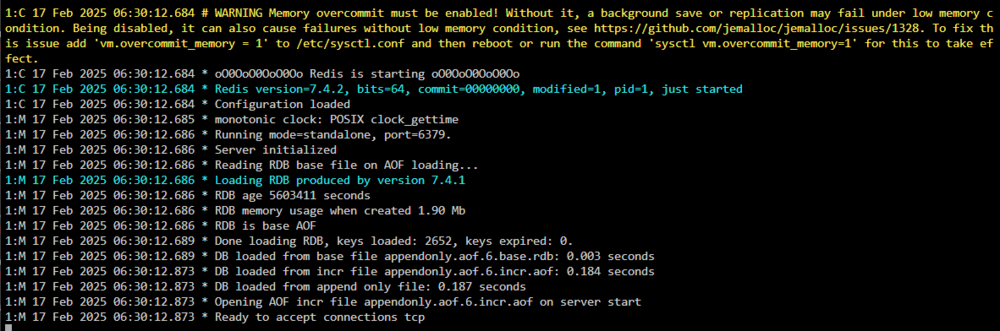
Well, I made it this far disabling above as you said: I now get this: It appears it didn't turn maintenance mode off though? Turning maintenance mode off gets me to the same "Internal Server Error" page. You mentioned Redis Docker Log - but I don't see that it even has one unless you mean this?(I had restarted it at 0630): Now I as still stuck though; stuck on Internal Server Error page. Not sure what other log to look at within Nextcloud or what to do next.

-
Yes on redis; it's available and always has been - changed nothing about it. Collabora is a separate container?: How can I comment out Redis? It was also said my issue was possibly related to this; but unsure if this could've caused reddit woes? https://help.nextcloud.com/t/issue-with-ai-features-in-version-30-0-6-please-hold-off-on-updating/217465
-
{"reqId":"CaWDAYx217F082cMaa7q","level":3,"time":"2025-02-15T15:36:12+00:00","remoteAddr":"192.168.1.5","user":"--","app":"PHP","method":"GET","url":"/apps/richdocuments/settings/fonts.json","message":"session_start(): Redis connection not available at /app/www/public/lib/private/Session/Internal.php#198","userAgent":"COOLWSD HTTP Agent 24.04.12.3","version":"30.0.6.2","data":{"app":"PHP"}} {"reqId":"CaWDAYx217F082cMaa7q","level":3,"time":"2025-02-15T15:36:12+00:00","remoteAddr":"192.168.1.5","user":"--","app":"PHP","method":"GET","url":"/apps/richdocuments/settings/fonts.json","message":"session_start(): Redis connection not available at /app/www/public/lib/private/Session/Internal.php#198","userAgent":"COOLWSD HTTP Agent 24.04.12.3","version":"30.0.6.2","data":{"app":"PHP"}} {"reqId":"CaWDAYx217F082cMaa7q","level":3,"time":"2025-02-15T15:36:12+00:00","remoteAddr":"192.168.1.5","user":"--","app":"PHP","method":"GET","url":"/apps/richdocuments/settings/fonts.json","message":"session_start(): Failed to read session data: redis (path: tcp://192.168.1.5:6384?auth=Waffles2021&) at /app/www/public/lib/private/Session/Internal.php#198","userAgent":"COOLWSD HTTP Agent 24.04.12.3","version":"30.0.6.2","data":{"app":"PHP"}} {"reqId":"CaWDAYx217F082cMaa7q","level":3,"time":"2025-02-15T15:36:12+00:00","remoteAddr":"192.168.1.5","user":"--","app":"PHP","method":"GET","url":"/apps/richdocuments/settings/fonts.json","message":"session_start(): Redis connection not available at /app/www/public/lib/private/Session/Internal.php#198","userAgent":"COOLWSD HTTP Agent 24.04.12.3","version":"30.0.6.2","data":{"app":"PHP"}} {"reqId":"CaWDAYx217F082cMaa7q","level":3,"time":"2025-02-15T15:36:12+00:00","remoteAddr":"192.168.1.5","user":"--","app":"PHP","method":"GET","url":"/apps/richdocuments/settings/fonts.json","message":"session_start(): Redis connection not available at /app/www/public/lib/private/Session/Internal.php#198","userAgent":"COOLWSD HTTP Agent 24.04.12.3","version":"30.0.6.2","data":{"app":"PHP"}} {"reqId":"CaWDAYx217F082cMaa7q","level":3,"time":"2025-02-15T15:36:12+00:00","remoteAddr":"192.168.1.5","user":"--","app":"PHP","method":"GET","url":"/apps/richdocuments/settings/fonts.json","message":"session_start(): Failed to read session data: redis (path: tcp://192.168.1.5:6384?auth=Waffles2021&) at /app/www/public/lib/private/Session/Internal.php#198","userAgent":"COOLWSD HTTP Agent 24.04.12.3","version":"30.0.6.2","data":{"app":"PHP"}} {"reqId":"mgA7eh7f65vW9z2zKkp1","level":3,"time":"2025-02-15T15:37:12+00:00","remoteAddr":"192.168.1.5","user":"--","app":"PHP","method":"GET","url":"/apps/richdocuments/settings/fonts.json","message":"session_start(): Redis connection not available at /app/www/public/lib/private/Session/Internal.php#198","userAgent":"COOLWSD HTTP Agent 24.04.12.3","version":"30.0.6.2","data":{"app":"PHP"}} {"reqId":"mgA7eh7f65vW9z2zKkp1","level":3,"time":"2025-02-15T15:37:12+00:00","remoteAddr":"192.168.1.5","user":"--","app":"PHP","method":"GET","url":"/apps/richdocuments/settings/fonts.json","message":"session_start(): Redis connection not available at /app/www/public/lib/private/Session/Internal.php#198","userAgent":"COOLWSD HTTP Agent 24.04.12.3","version":"30.0.6.2","data":{"app":"PHP"}} {"reqId":"mgA7eh7f65vW9z2zKkp1","level":3,"time":"2025-02-15T15:37:12+00:00","remoteAddr":"192.168.1.5","user":"--","app":"PHP","method":"GET","url":"/apps/richdocuments/settings/fonts.json","message":"session_start(): Failed to read session data: redis (path: tcp://192.168.1.5:6384?auth=Waffles2021&) at /app/www/public/lib/private/Session/Internal.php#198","userAgent":"COOLWSD HTTP Agent 24.04.12.3","version":"30.0.6.2","data":{"app":"PHP"}} {"reqId":"mgA7eh7f65vW9z2zKkp1","level":3,"time":"2025-02-15T15:37:12+00:00","remoteAddr":"192.168.1.5","user":"--","app":"PHP","method":"GET","url":"/apps/richdocuments/settings/fonts.json","message":"session_start(): Redis connection not available at /app/www/public/lib/private/Session/Internal.php#198","userAgent":"COOLWSD HTTP Agent 24.04.12.3","version":"30.0.6.2","data":{"app":"PHP"}} {"reqId":"mgA7eh7f65vW9z2zKkp1","level":3,"time":"2025-02-15T15:37:12+00:00","remoteAddr":"192.168.1.5","user":"--","app":"PHP","method":"GET","url":"/apps/richdocuments/settings/fonts.json","message":"session_start(): Redis connection not available at /app/www/public/lib/private/Session/Internal.php#198","userAgent":"COOLWSD HTTP Agent 24.04.12.3","version":"30.0.6.2","data":{"app":"PHP"}} {"reqId":"mgA7eh7f65vW9z2zKkp1","level":3,"time":"2025-02-15T15:37:12+00:00","remoteAddr":"192.168.1.5","user":"--","app":"PHP","method":"GET","url":"/apps/richdocuments/settings/fonts.json","message":"session_start(): Failed to read session data: redis (path: tcp://192.168.1.5:6384?auth=Waffles2021&) at /app/www/public/lib/private/Session/Internal.php#198","userAgent":"COOLWSD HTTP Agent 24.04.12.3","version":"30.0.6.2","data":{"app":"PHP"}} Redis I think recently updated; maybe this is related to being unable to login?
-
I upgraded a instance to 30.0.6 and I can't login at all... Not sure where to begin or what to look at at all.
-
https://github.com/pglombardo/PasswordPusher/issues/3037
-
Always Chrome; occasionally Safari on iPhone.
-
Unraid 7 and at time just docker tab I believe. Don’t recall leaving any other windows open on other devices. Not that I recall anyways.
-
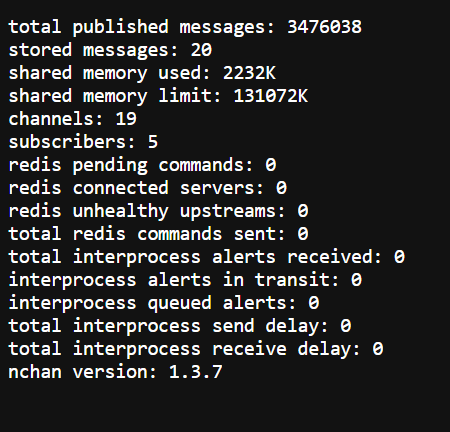
Is this what it shouldn't look like?:
-
Awesome; can’t wait. I did set this up on a container to play with. Dead simple, worked perfect - sounds like new plugin will make it even easier! We appreciate you! (I really need to look into what changes were made with Unraid 7 and Tailscale, too, as I upgraded to 7 a few evenings ago)
-
Well, this is genius! Don't need this at moment but I am sure I'll need it soon - THANK YOU!
-
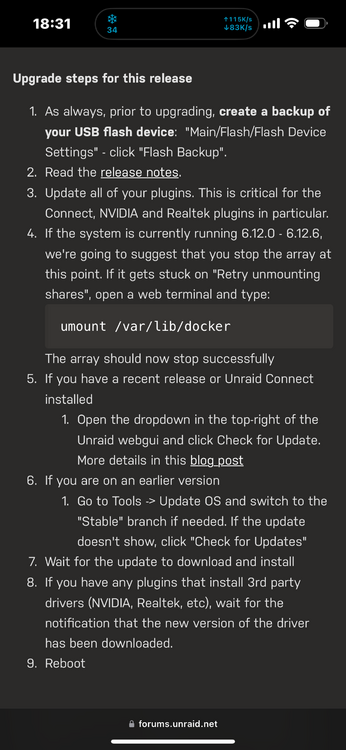
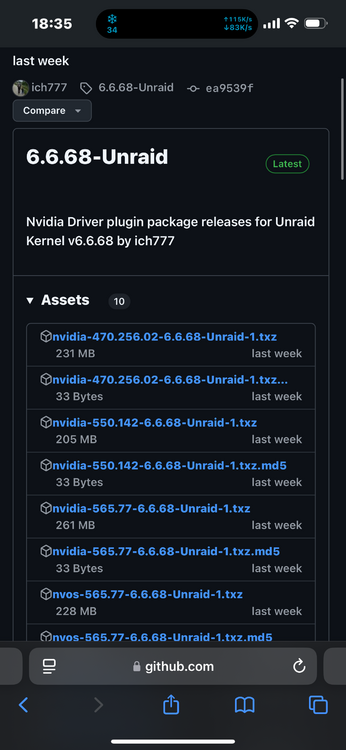
Pardon my ignorance— I have never upgraded Unraid since I began using Nvidia card in server. The Unraid upgrade instructions for V7 mention making sure this plugin is updated BUT if I look at it right this plugin already supports latest Unraid kernel v6.6.68 which is what is used in Unraid 7? Anything else I need to be thinking of before I upgrade server in relation to Nvidia plugin?
-
Could that have indeed been cause for my container freezing or no? Thank you!
-
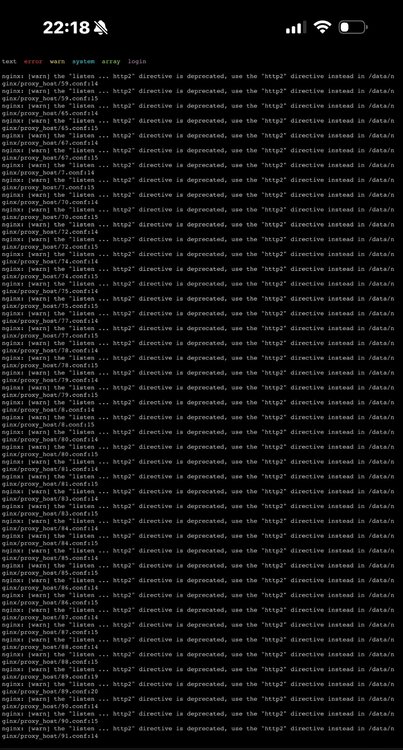
This evening Nginx Proxy Manager hung up. Log was full of this so unsure if it’s the cause? What can I do or do I need to change where to remove this error from spamming the log?
-
Can someone show me a example or how to to do a "bind mount" for Filestash so that I can add local storage, please? Nevermind; figured it out; i dumb.
-
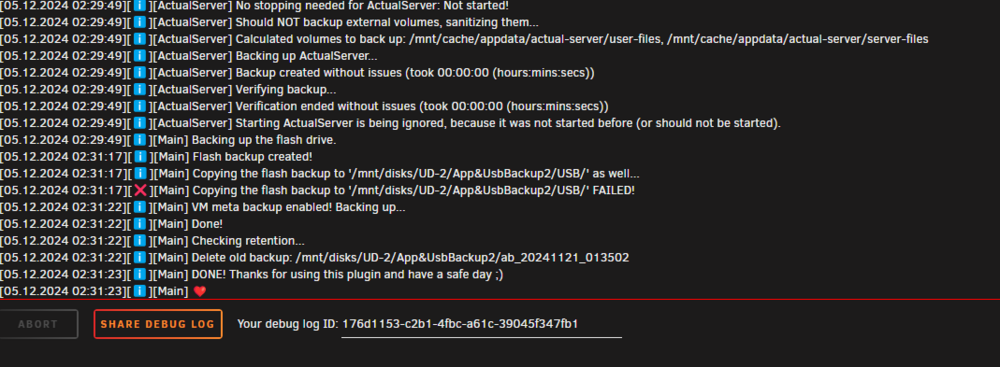
So if you remember my server was often crashing backing up USB stick - today USB stick backup just FAILED and I was able to get a log.. Does this perhaps tell you anything useful? 176d1153-c2b1-4fbc-a61c-39045f347fb1
-
Did successfully backup, and even not crash Unraid, after having applied your above script. Backing up took a bit less time since I was successfully able to exclude backing up some things that didn't need to be. What has to be/needs to be modified about your script above so that I can use "user scripts" to apply it at "array start"? I feel like it has to have something else with your code to run it at array start in user scripts? Thank you for the temp fix, i sure appreciate it !


