





greenflash24
Members
-
Joined
-
Last visited
-
For me it is also still not working when trying to creating a new backup on a new share. It also fails with the message that it can't create the disk image (Also on macOS 26.2 and Unraid 7.2.3, Backup to a btrfs formatted SSD pool, without array mover). For the sake of curiosity I wanted to narrow down the issue to either the Unraid side, or the Mac side. Therefore, as a test, I used my raspberry pi as a backup target with the following docker container which contains Samba 4.22.6 already configured for the use with TimeMachine: mbentley/timemachine:smb In this case the backup worked just fine without any issues. So the issue must be either on Samba's side with the newer versions, or on Unraid's side. @JorgeB Did you also test a new backup from scratch (e.g. with a new TM share), or did you only try incremental backups to a previous existing share?
-
Samba 4.23.4 was released on December 12, 2025. This patch release should include the final fix for the TimeMachine issues. Now we need an update procedure for upgrading Samba in Unraid 7.2.2 or we need to wait for a version upgrade from @limetech .
-
I am also affected by this bug on macOS Tahoe 26.1 with Unraid 7.2.2. @limetech Is there a way to manually upgrade Samba to the 4.23.3 version in Unraid, so that the issue is resolved, or must we wait for a upcoming release?
-
Would you be able to share a source on this? I would imagine that the use of `aes-256-gcm` is pretty safe to use.
-
Definitely native zfs encryption support, so I can migrate my encrypted zfs pools from truenas to unraid.
-
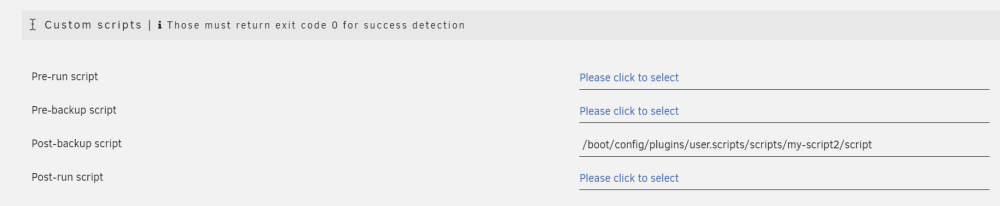
Hi, i am trying to run a Post-backup script (from the User-Scripts plugin), but the backup failed, because the script does not exists, which is not true, see: [01.01.2024 03:29:34][❌][Main] /boot/config/plugins/user.scripts/scripts/my-script2/script is not existing! Skipping! root@server:~# file /boot/config/plugins/user.scripts/scripts/my-script2/script /boot/config/plugins/user.scripts/scripts/my-script2/script: Bourne-Again shell script, ASCII text executable root@Home-Server:~# ls -la /boot/config/plugins/user.scripts/scripts/my-script2/script -rw------- 1 root root 229 Dec 30 18:32 /boot/config/plugins/user.scripts/scripts/my-script2/script Am I doing anything wrong with my configuration?
-
That's very unfortunate.
-
Is there currently any way for using an existing zfs pool with native zfs encryption as an Unraid pool, or does it have to be formatted? If not, is Unraid planning to add support for native zfs encryption?
-
For me the Send Notifications On Update? option is still not respected in the latest version. I have set this option to NO, as a don't want to receive notifications on each container update, but i still get these notifications.
-
Thanks for your reply! Now I wonder, how it is encrypted... 🤔 With the password of the Unraid root account? Or with the main array password? Hopefully not with some sort of a universal master password...
-
@dlandon If I set the password for my LUKS encrypted device in the unassigned devices settings page, will the password itself be stored unencrypted on the flash drive (where the other unassigned devices config resides) or is it stored on the encrypted main Unraid array? How does this mechanism function? In short: Is it safe to set the password through the unassigned devices settings page? I could not find an answer in this thread already, nor documentation.
-
My Seagate Exos X16 has also such a high Command_Timeout number, see: The Unraid Dashboard shows this as an Error: I am not sure how I have to interpret this data? Should I replace this drive, or is this an false error message?


-
I am getting the following error since a while now, I have reported it already but it wasn't fixed yet. Has anybody looked into this yet? It only appears when using this plugin, if I uninstall it, this warning message goes away. (See screenshot below) Also It is only shown when the array is stopped (and thus the Docker Service is also stopped). Then I see the following warning message at the bottom edege of the Unraid Dashboard: Warning: stream_socket_client(): unable to connect to unix:///var/run/docker.sock (No such file or directory) in /usr/local/emhttp/plugins/dynamix.docker.manager/include/DockerClient.php on line 712 Couldn't create socket: [2] No such file or directory Warning: Invalid argument supplied for foreach() in /usr/local/emhttp/plugins/dynamix.docker.manager/include/DockerClient.php on line 898 After the array is started the warining message goes away. Do i have to worry about this warning? I would think this is a false positive, as the docker service is not started yet, as the array is also not started at this moment. So can i ignore it? I have first noticed this warning in 6.9.2 (with the original Docker-Folders-Plugin), but it is still persistent in 6.11.5 with latest Docker-Folders-Plugin. See also:
.thumb.png.de5a9f873000eb9979e0e38d9ba0d608.png)
-
Can we get the zfs built-in encryption for zfs-only pools, or will these disks still be encrypted via LUKS? As far as I know the currently available btrfs-pools are using LUKS. But the zfs built-in encryption would allow for different encryption settings for each dataset.
-
This could be potentially related to the issue i have described in the following post: (maybe this thread is related to your issue.)



.png.016c376c7ea485456b824e7a84362635.png)