Everything posted by frodr
-
Thanks for feedback. Diagnostics in the first post. But it lists only from the restart. The server is liquid cooled. max temp on cpus I seen 60C. Max working temp is +90C according to Intel.. Max temp on motherboard is not listed by Asus, the reboot is at about 55C. // Frode
-
I have been trying to solve this problem intensively for a week. But no luck. Before I through out the motherboard, I have one question: Is there an Unraid setting which restarts the PC when reached a certain temperature?
-
Syslog says: 06:08:08 Maxx root: mcelog: warning: 8 bytes ignored in each record Jun 7 06:08:08 Maxx root: mcelog: consider an update
-
Hi, I was asked to install mcelog (already installed) and post diagnostics here. I hope someone can shred some light on what is going on. // frode maxx-diagnostics-20210607-1051.zip
-
Emby Server do not render HDR, but faded colors. With both Apple TV, and LG app on the tele. "Enable HDR tone mapping" is suggested by some on the Emby forum, but no such setting inside Emby Server. Any ideas?
-
Innside the docker, many listings with "no exec". Trying to remove them with: mount -o remount,rw,exec / : -> access denied? Happy for any help. I totally useless in CLI. Cheers,
-
I was running the commands: findmnt -l | grep noexec mount | grep noexec but no listings. Can the reason for Plex not playing the file and log says: Jobs: Exec of /config/Library/Application Support/Plex Media Server/Codecs/EasyAudioEncoder-1165-linux-x86_64/EasyAudioEncoder/EasyAudioEncoder failed. (13) be something else?
-
Thanks for the info. It happens only with a few files and not others from the same folder. Is this to be expected?
-
You ware right, only an error in the description. Thanks you so much for "holding my hand" with this problem. It is people like you who make unRAID and the unRAID community so very special. Thanks again. I buy you a beer or three. Edit: Eth: Effective speed: 44.44 MH/s; at pool: 44.44 MH/s
-
Ran "New Permissions" tool, and now do the docker start without "--runtime=nvidia" in Extra Parameters. Not able to open WebGUI and no GPU prosesses. (With Extra Parameters -> "Server error") Log file: [0mNo CUDA driver found OpenCL driver version: 20.20-1089974-ubuntu-20.04 [91mNo avaiable GPUs for mining. Please check your drivers and/or hardware. [0m
-
Yes. And FaH.
-
The docker image ran full a few days ago due to incorrect nzbget paths. I fixed the paths, and changed the docker file to 120GB. Maybe I should delete and rebuild the docker image file?
-
I removed the "--runtime=nvidia", and the "Server error" disappeared, but is do not start. The log file says: Project: PhoenixMiner 5.5c Author: lnxd Base: Ubuntu 20.04 Driver: amdgpu-pro-20.20-1098277 / AMDGPU-Pro Driver v20.20 Target: Unraid 6.9.0 - 6.9.1 Wallet: 0x23B9ab2B75943Be63857AA8768Aedce1BB75eD91 Pool: eu1.ethermine.org:4444 Starting PhoenixMiner 5.5c with the following arguments: -pool eu1.ethermine.org:4444 -wal 0x23B9ab2B75943Be63857AA8768Aedce1BB75eD91.x -tt 70 -tstop 85 -tstart 80 -cdm 1 -cdmport 5450 Phoenix Miner 5.5c Linux/gcc - Release build -------------------------------------------- [0mNo CUDA driver found OpenCL driver version: 20.20-1089974-ubuntu-20.04 [91mNo avaiable GPUs for mining. Please check your drivers and/or hardware. [0m Yes, server is restarted many time. But to be sure I tested with a new restart.
-
Saving a setting is fine, starting the docker: Nothing in the log file. Edit: I have removed the /dev/dri entry. Can it be something related to the GPU/GPU driver. I having a strange transcoding error. From Plex log file: Jobs: Exec of /config/Library/Application Support/Plex Media Server/Codecs/EasyAudioEncoder-1165-linux-x86_64/EasyAudioEncoder/EasyAudioEncoder failed. (13)

-
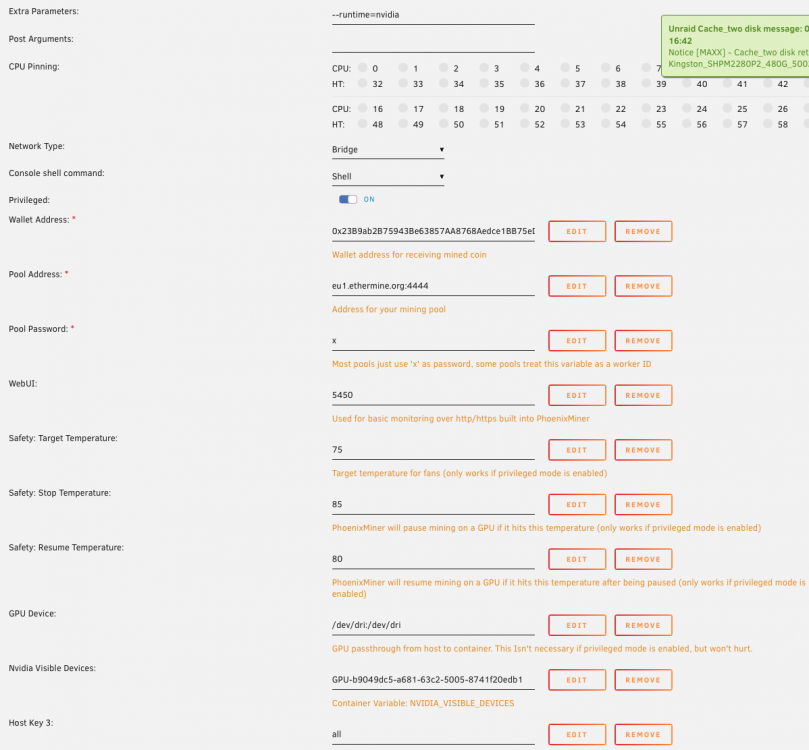
I tried without and with it. Error message with the setup below (and not in the log file): Also, Server error when removing the line "GPU Device"

-
I have problem playing some files, and get this error in the logs: Jobs: Exec of /config/Library/Application Support/Plex Media Server/Codecs/EasyAudioEncoder-1165-linux-x86_64/EasyAudioEncoder/EasyAudioEncoder failed. (13) Anyone experience the same?
-
Thanks, looking forward to it. Did you forget to include your prosentage fee in the docker setup? I think it is fair that the one supporting the docker image have a possibility for compensation. The server is fine, and quite strong. Watercooled. If I only can get hold of a 3080/90 GPU, I will not pay overprice.
-
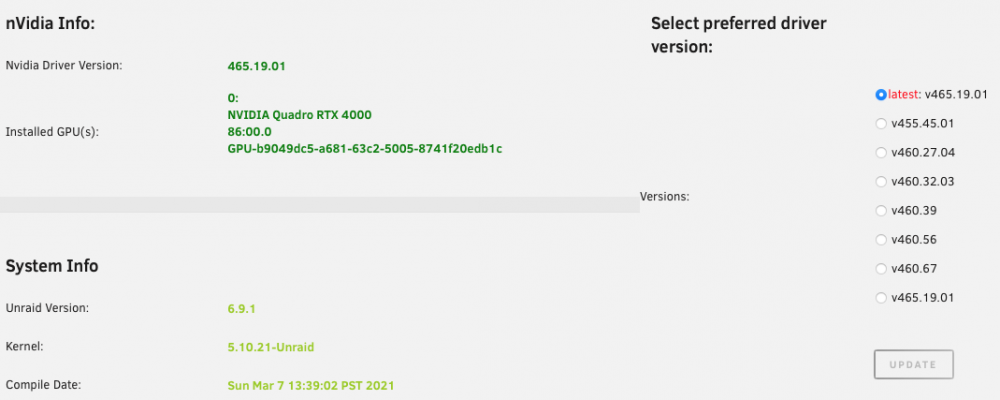
Removing -amd, it only popped in again. I removed the whole line. The log says it can't find the Nvidia drivers. But the GPU runs fine with Plex, etc. [0mNo CUDA driver found OpenCL driver version: 20.20-1089974-ubuntu-20.04 [91mNo avaiable GPUs for mining. Please check your drivers and/or hardware. [0m
-
I have a Nvidia GPU with Unraid drivers. How should it be set up?

-
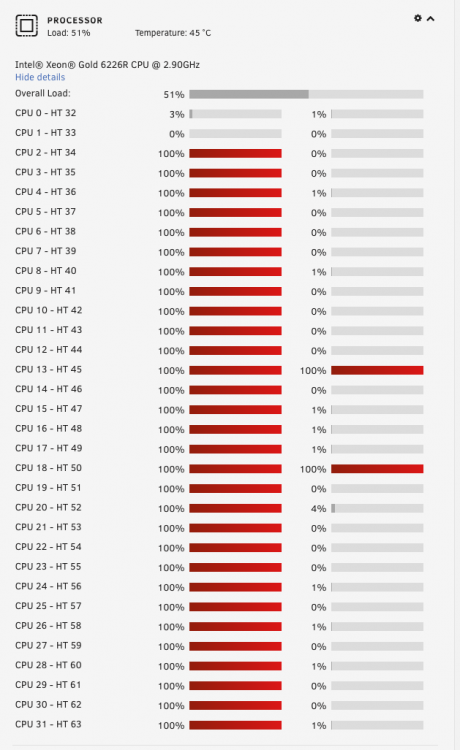
The dockers is utilising only the first core. Is this as expected? I have more power to put and water cooling to support it.
-
Thanks a lot. I changed the worker name. Do you plan to add Unraid Niviida driver support in the docker?
-
OK.
-
Yes, and no. In general yes, but if the docker or dockers setup is causing transactions not to happened, it's a no.
-
Thanks. Will mined coins automatic go to wallet? How ofter is the wallet credited?
-
Thanks Inxd. Memory: After checking Privileged mode no memory error message. What about: [2021-04-02 15:09:55.139] msr FAILED TO APPLY MSR MOD, HASHRATE WILL BE LOW Is it running correctly now? I have added Wallet address in the setup, will mined coin go automatic in the wallet? XMRig log2.rtf