





Everything posted by frodr
-
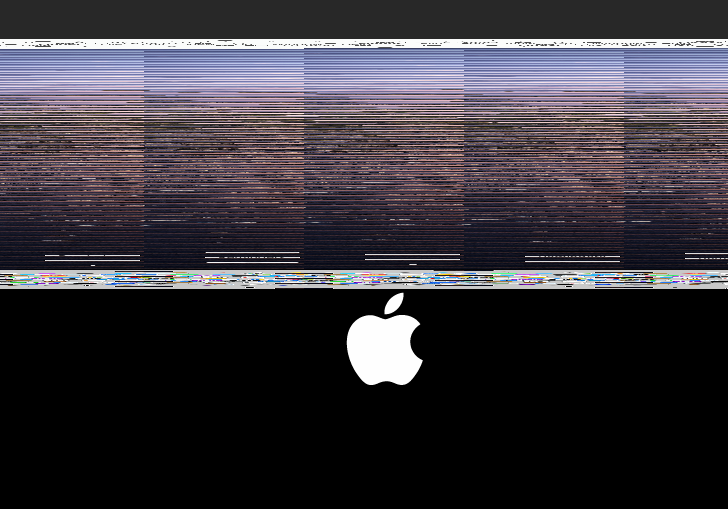
I was able to get the RX 580 back when making a new kvm. Still, vnc on the same new kvm have that distorted screen. // Frode

-
Passthrough GPU and new kvm issues. After passthrough of the AMD GPU to a Windows kvm for testing, the MacOS kvm no longer see the AMD GPU. It used to work fine before. The MacOS kvm starts fine with AMD passthrough, but no GPU visible. Tried to enabling graphics and sound device in VFIO-PCI Config, no change. Then I kind of gave up, deleted the kvm and ran Macinabox from the beginning. First startup with Disk Utility showed the disk from the deleted kvm. And another with the same name + "Data" ending. First start up was fine. Second startup after cpu pinning etc. I had this screen: Connecting with RealVNC (installed at first startup) was fine, but just 800x600 resolution. Passing through AMD GPU, the kvm started fine but no visible GPU. Sorry for a long post. I have two question: 1) How to install a fresh macOS Catalina Macinabox without old files luring in the system? 2) Is there a way to reset the AMD Card? Says graphics is reset compatible. Cheers, Frode Asus C621E Sage/BMC | dual Xeon Silver 4116 | Samsung 4 x 32GB DDR4-2933 RDIMM | 4 x Corsair Force MP510 (960GB) NvME ssd on Asus Hyper M.2 Card V2 l | 4 x WD and Seagate hdd l Sapphire Pulse Radeon RX 580 8GB as Mac WS l ASUS GeForce RTX 2080 Ti ROG Strix Advance in gaming kvm l Quadro RTX4000 for Plex docker l Samsung 970 Pro in M.2 port for gaming kvm l Asmedia PCIe USB card Catalina in a box xml.rtf maxx-diagnostics-20200228-1404.zip
-
time I move the cache drives. 4 cache drives sit on Asus Hyper M.2 V2 PCIe card. When I moved this card from PCIe slot to another, I get this error this message. Yes, I have set the Asus card was moved to, to 4x4x4x4. This time did a startup with it. I restartet the server, all 4 drives was there, only one in the cache pool. Trying to add the 3 drives, I was warned that they would be deleted. Then I restartet with all drives in the cache pool without starting the Array. When restarted the error message occurred. This tend to happened every time I move the Asus Card. maxx-diagnostics-20200226-0053.zip Happy for any help. Cheers, Frode Asus C621E Sage/BMC | dual Xeon Silver 4116 | Samsung 4 x 32GB DDR4-2933 RDIMM | 4 x Corsair Force MP510 (960GB) NvME ssd on Asus Hyper M.2 Card V2 l | 4 x WD and Seagate hdd l Sapphire Pulse Radeon RX 580 8GB l Samsung 970 Pro in M.2 port l Asmedia PCIe USB card
-
Do I understand it correctly that the procedure for an unmountable cache drive is to backup the data on the ssd, then format it and copy the data back? Why isn't it possible to rebuild the ssd when running Raid? Cheers, Frode
-
Thank you very much. Its working.
-
Hi, Great docker container and video. Everything worked fine until I changed cpu pinning and memory, then this black screen. Xml mods done. Log: 2019-10-29 19:01:00.009+0000: Domain id=9 is tainted: high-privileges 2019-10-29 19:01:00.009+0000: Domain id=9 is tainted: custom-argv 2019-10-29 19:01:00.009+0000: Domain id=9 is tainted: host-cpu <domain type='kvm' xmlns:qemu='http://libvirt.org/schemas/domain/qemu/1.0'> <name>MacinaboxCatalina</name> <uuid>18c0c596-a5fe-45f5-ae00-6a86497a4b3f</uuid> <description>MacOS Catalina</description> <metadata> <vmtemplate xmlns="unraid" name="Windows 10" icon="catalina.png" os="Catalina"/> </metadata> <memory unit='KiB'>8388608</memory> <currentMemory unit='KiB'>8388608</currentMemory> <memoryBacking> <nosharepages/> </memoryBacking> <vcpu placement='static'>8</vcpu> <cputune> <vcpupin vcpu='0' cpuset='6'/> <vcpupin vcpu='1' cpuset='30'/> <vcpupin vcpu='2' cpuset='7'/> <vcpupin vcpu='3' cpuset='31'/> <vcpupin vcpu='4' cpuset='8'/> <vcpupin vcpu='5' cpuset='32'/> <vcpupin vcpu='6' cpuset='9'/> <vcpupin vcpu='7' cpuset='33'/> </cputune> <os> <type arch='x86_64' machine='pc-q35-3.1'>hvm</type> <loader readonly='yes' type='pflash'>/usr/share/qemu/ovmf-x64/OVMF_CODE-pure-efi.fd</loader> <nvram>/etc/libvirt/qemu/nvram/18c0c596-a5fe-45f5-ae00-6a86497a4b3f_VARS-pure-efi.fd</nvram> </os> <features> <acpi/> <apic/> </features> <cpu mode='host-passthrough' check='none'/> <clock offset='utc'> <timer name='rtc' tickpolicy='catchup'/> <timer name='pit' tickpolicy='delay'/> <timer name='hpet' present='no'/> </clock> <on_poweroff>destroy</on_poweroff> <on_reboot>restart</on_reboot> <on_crash>restart</on_crash> <devices> <emulator>/usr/local/sbin/qemu</emulator> <disk type='file' device='disk'> <driver name='qemu' type='qcow2' cache='writeback'/> <source file='/mnt/user/domains/MacinaboxCatalina/Clover.qcow2'/> <target dev='hdc' bus='sata'/> <boot order='1'/> <address type='drive' controller='0' bus='0' target='0' unit='2'/> </disk> <disk type='file' device='disk'> <driver name='qemu' type='raw' cache='writeback'/> <source file='/mnt/user/domains/MacinaboxCatalina/Catalina-install.img'/> <target dev='hdd' bus='sata'/> <address type='drive' controller='0' bus='0' target='0' unit='3'/> </disk> <disk type='file' device='disk'> <driver name='qemu' type='raw' cache='writeback'/> <source file='/mnt/user/domains/MacinaboxCatalina/macos_disk.img'/> <target dev='hde' bus='sata'/> <address type='drive' controller='0' bus='0' target='0' unit='4'/> </disk> <controller type='sata' index='0'> <address type='pci' domain='0x0000' bus='0x00' slot='0x1f' function='0x2'/> </controller> <controller type='pci' index='0' model='pcie-root'/> <controller type='pci' index='1' model='pcie-root-port'> <model name='pcie-root-port'/> <target chassis='1' port='0x10'/> <address type='pci' domain='0x0000' bus='0x00' slot='0x02' function='0x0' multifunction='on'/> </controller> <controller type='pci' index='2' model='pcie-root-port'> <model name='pcie-root-port'/> <target chassis='2' port='0x11'/> <address type='pci' domain='0x0000' bus='0x00' slot='0x02' function='0x1'/> </controller> <controller type='pci' index='3' model='pcie-root-port'> <model name='pcie-root-port'/> <target chassis='3' port='0x12'/> <address type='pci' domain='0x0000' bus='0x00' slot='0x02' function='0x2'/> </controller> <controller type='pci' index='4' model='pcie-root-port'> <model name='pcie-root-port'/> <target chassis='4' port='0x13'/> <address type='pci' domain='0x0000' bus='0x00' slot='0x02' function='0x3'/> </controller> <controller type='virtio-serial' index='0'> <address type='pci' domain='0x0000' bus='0x02' slot='0x00' function='0x0'/> </controller> <controller type='usb' index='0' model='ich9-ehci1'> <address type='pci' domain='0x0000' bus='0x00' slot='0x07' function='0x7'/> </controller> <controller type='usb' index='0' model='ich9-uhci1'> <master startport='0'/> <address type='pci' domain='0x0000' bus='0x00' slot='0x07' function='0x0' multifunction='on'/> </controller> <controller type='usb' index='0' model='ich9-uhci2'> <master startport='2'/> <address type='pci' domain='0x0000' bus='0x00' slot='0x07' function='0x1'/> </controller> <controller type='usb' index='0' model='ich9-uhci3'> <master startport='4'/> <address type='pci' domain='0x0000' bus='0x00' slot='0x07' function='0x2'/> </controller> <interface type='bridge'> <mac address='52:54:00:46:2e:4b'/> <source bridge='br0'/> <model type='e1000-82545em'/> <address type='pci' domain='0x0000' bus='0x01' slot='0x00' function='0x0'/> </interface> <serial type='pty'> <target type='isa-serial' port='0'> <model name='isa-serial'/> </target> </serial> <console type='pty'> <target type='serial' port='0'/> </console> <channel type='unix'> <target type='virtio' name='org.qemu.guest_agent.0'/> <address type='virtio-serial' controller='0' bus='0' port='1'/> </channel> <input type='tablet' bus='usb'> <address type='usb' bus='0' port='1'/> </input> <input type='mouse' bus='ps2'/> <input type='keyboard' bus='ps2'/> <graphics type='vnc' port='-1' autoport='yes' websocket='-1' listen='0.0.0.0' keymap='en-us'> <listen type='address' address='0.0.0.0'/> </graphics> <video> <model type='qxl' ram='65536' vram='65536' vgamem='16384' heads='1' primary='yes'/> <address type='pci' domain='0x0000' bus='0x00' slot='0x01' function='0x0'/> </video> <memballoon model='virtio'> <address type='pci' domain='0x0000' bus='0x03' slot='0x00' function='0x0'/> </memballoon> </devices> <qemu:commandline> <qemu:arg value='-usb'/> <qemu:arg value='-device'/> <qemu:arg value='usb-kbd,bus=usb-bus.0'/> <qemu:arg value='-device'/> <qemu:arg value='isa-applesmc,osk=gone'/> <qemu:arg value='-smbios'/> <qemu:arg value='type=2'/> <qemu:arg value='-cpu'/> <qemu:arg value='Penryn,kvm=on,vendor=GenuineIntel,+invtsc,vmware-cpuid-freq=on,+pcid,+ssse3,+sse4.2,+popcnt,+avx,+aes,+xsave,+xsaveopt,check'/> </qemu:commandline> </domain>

-
A small info from my side. After de-pinning binhex-Plex docker, transcoding works better. Now running 5 x 4K streams transcoded to 1080P/12Mbps incl. texting at the same time works fine. Cheers, Supermicro X11DAI-N, version 1.02 | AMI 3.1 | dual Xeon Silver 4116 | 64 MB RAM | 4 x WD SSD in RAID 10 Cache l Unraid 6.72 l Quadro RTX4000 for Plex docker l GTX 1070 for MacOS kvm
-
It was not possible to register a new AppleID account either.
-
The kvm runs fine with 12 cores and Nvidia gpu. But I can not log into my Apple ID account. I changed the serial number in Clover, that didn't fix it. Any ideas? Cheers, Frode
-
Thanks you very much. Late night (as we say about 3:30am in Norway) support. // Frode
-
It starts after removing <topology sockets='1' cores='4' threads='2'/> What does that mean? // Frode
-
A bit embarrassing...."topology line"????? // Frode
-
Hi, I have set up a High Sierra as guided by SIO. 4 cores works fine, but higher No. Cores don't work. It then loops in the startup sequence. Happy to get some advise. Cheers, Frode Supermicro X11DAI-N, version 1.02 | AMI 3.1 | dual Xeon Silver 4116 | 64 MB RAM | RAID 10 Cache
-
Up,,,,,,

-
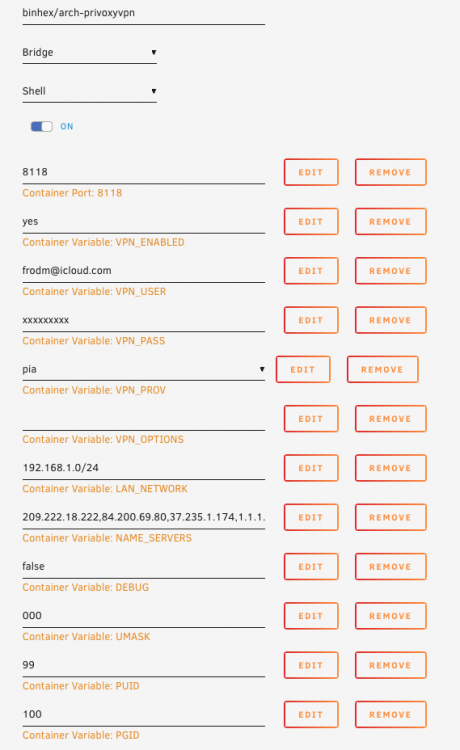
Hi, I am troubling getting the docker up and running. I have copied the crt and ovpn files from Vypr to the openvpn folder. Happy for any ideas? Cheers, Frode vpn.rtf
-
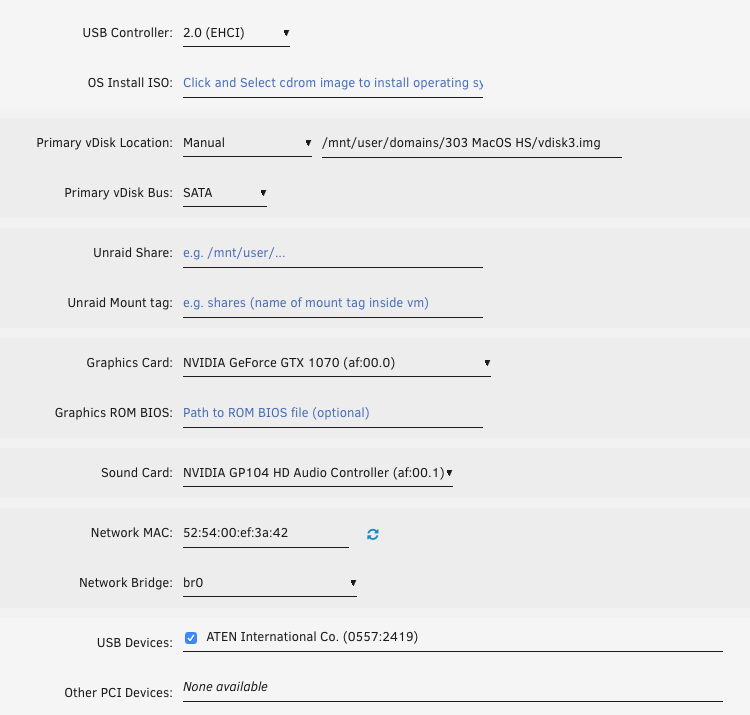
I was able to get the cloned MacOS vm up and running with Mac a flashed Nvidia GTX1070 GPU. How to passthru USB devices? I see no option on "Other PCI Devices". Ticking "ATEN ........" did not change anything. Cheers, Frode
-
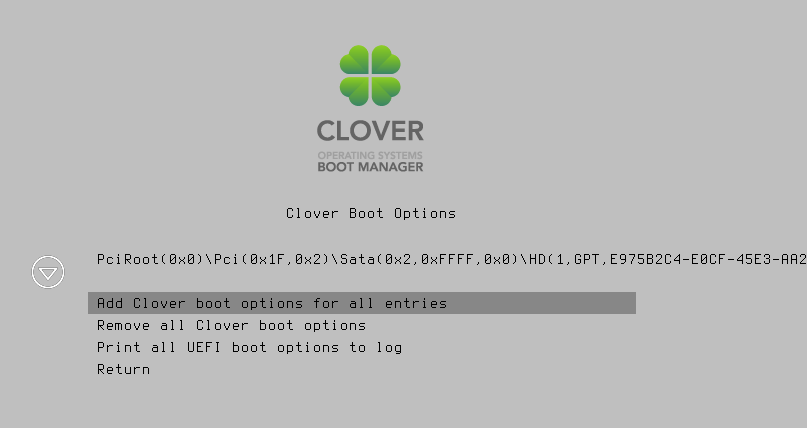
It keep restarting in loops. When going into Clover boot options it hangs, see picture. Verbose mode, is that choosen within Clover or just command+v? Nothing happened with command+v.
-
I am trying to clone a MacOS HS set up after SIO`s instructions. This is how I do it: - Adding Linux template, keeping all as is except memory,vDisk Bus set to SATA and no start up. - Deleting the vdisk inside the new VM folder. - Copying all the files inside the folder of my current MacOS HS VM to the new folder VM. - Changing the disk path to the vdisk copied. - Copying the xml file of current VM to the new VM, but keeping: Name of the new VM uuid nvram Mac adress The new Vm starts into the clover, but when trying to start VM the Apple logo appears in the mid/left side and it goes back to clover startup In the second attempt is stops and the Apple logo changes to a kind of a stop sign. Any ideas?
-
80-85 is fine, but 35GB/s when another is running at 3x-
-
Hi, Backup fra unRaid cache drive to a Nas in my cabled network gave about 35MB/s transfer speed. Is that the transfer speed to expect? When doing backup from/to the same shares with Acronis True Image run on a VM is was about 100MB/s. // Frode
-
Thanks. Is it the same with NFS shares as well?
-
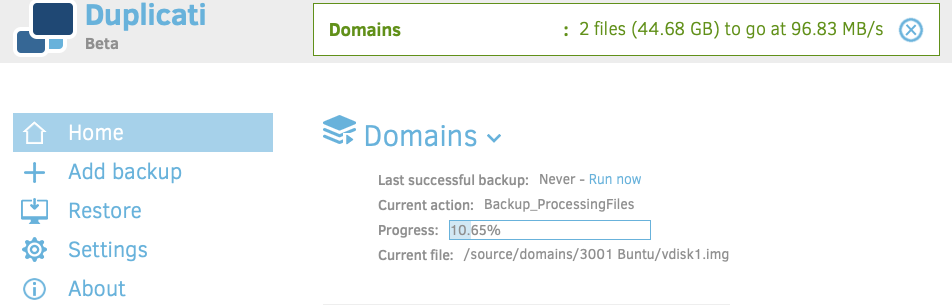
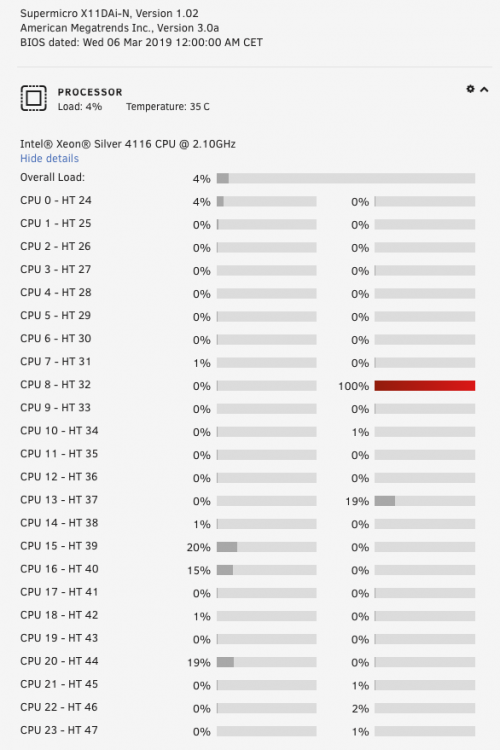
Hi, I have problems getting duplicati to run. Setup is fine, destination is a smb share from a Nas. I backing up a vdisk (not running) to this destination. It runs to about 10%, then it stops. At that point I am able to move around inside the duplicati WebGui. Ending the duplicati WebGui browser tap, it is not possible to reconnect (from the duplicati docker). Restarting or stopping the duplicati docker is not possible. The only way to end the duplicati docker is to restart the server. Then I am able to start and connect to duplicati. Starting the backup job the % counts up to where it first stopped, and there it hangs again. When hanging one processor thread is running constant at 100%. Some pics and logs are attached. Hoping for some good advices. // Frode Edit: Restart of the server from unRain WebGui is not working after the duplicati job run. Graceful shutdown from IPMI not working, only hard shut down. maxx-diagnostics-20190521-1354.zip

-
Yes. Yes. Pushing the "Load shares" button not shares are available, and not possible to type. Not pushing the "Load shares" button, instead typing the share name and then add without pushing "Load shares" is possible. Then pushed the button "Mount". Then it the button shows "Mounting" and stays there until I move to another area of the Server. I then get a question from Safari if I want to store the password. Just ignoring that, going back to Main. And hola, now the share on the Nas is mounted. So ignoring "Load servers" and "Load shares" buttons did the trick. A bit confusing I have to say. Thank you very much for the help. Cheers, Frode
-
I only have one subnet on my router. 192.168.1.10, as Qnap NAS, is set up smb/Workgroup, not AD. The Nas is fully available to other computers. With Goodsync I have made smb sync between the Nas and the unRaid server. After typing 192.168.1.10 only and push the "search for servers" button, nothing happens. Well, a small "blink", that's all. Adding user/pass and then push Load shares, no shares is visible. Please see attached video for how I do it. Router is restarted. Screen Recording 2019-05-20 at 21.59.03.mov
-
Sorry. maxx-diagnostics-20190520-1832.zip



