KptnKMan
Members
-
Joined
-
Last visited
Everything posted by KptnKMan
-
Cool, another AMD Ryzen user, and damn that's a nice motherboad. I considered it myself but I went for the TUF GAMING X570-PLUS instead. I've been gathering evidence that AMD platform users need to do a few more hoops than Intel users, so definitely follow everything I did that worked for me. Also, I updated my summary comment with a link and details of the Rebar UserScript that I use to set my ReBar size, I'd recommend you check this out and do the same. Best of luck.
-
Yeah, I wouldn't expect that you would need to apply the patch for unraid 6.12, because to my understanding it should already be in the kernel 6.1. The patch was built on an earlier kernel 5.19.17, with kernel 6.1 additions, so that sounds like a bad idea. I also would not recommend trying to run the custom compiled kernel under unraid 6.12, I suspect you'll have a bad time. I think you do need to make sure that you have followed all the other requirements/steps I summarised in an earlier comment in this thread, that should give you a decent baseline for cmparison. I mean here, as far as I can tell this is still the best summary to make this work: Interesting that you're using an Intel Arc GPU, I've read a lot that those GPUs definitely benefit from ReBar. I'd say in theory it should work if you set the appropriate parameters, so check the summary linked above. Are you running an Intel or AMD CPU/Motherboard platform? In particular, what CPU and motherboard are you running your Arc A770 on? Let us know how you get on.
-
Hi @Skitals I took another look at the kernel patch you linked earlier. As far as I can tell, this patch is present in kernel 6.1 since v6.1-rc1 which is now present in unraid 6.12. So I wanted to ask, on the surface do you know if there would be any obvious reason that this wouldn't be present, or not work in unraid 6.12? Also, I'm yet to test 6.12 so I haven't personally verified any issues of missing ReBar in unraid 6.12 using kernel 6.1. @jonathanselye can you confirm and describe what you've done to test on unraid 6.12, what hardware you use, and what your exact results were?
-
Oh damn, it was released yesterday, I can see that now. I guess I'll get around to testing that at some point. Well, @jonathanselye can you at least tell us more about what you are doing, what you are running, and EXACTLY what you've encountered? So far you've made very clear that it doesn't work, but we can't mind read so have literally no idea what could be wrong.
-
I haven't tested 6.12 yet (waiting for stable release) but my understanding is that with unraid 6.12 being native on kernel 6.1, this should already be implemented and not need to use the custom kernel. You will still need to do all the other modifications that I listed earlier for convenience, to my understanding. If anyone has tested this on the latest RC release, perhaps they can shed more light on if that is the case?
-
I'm really glad this worked for you! 😁
-
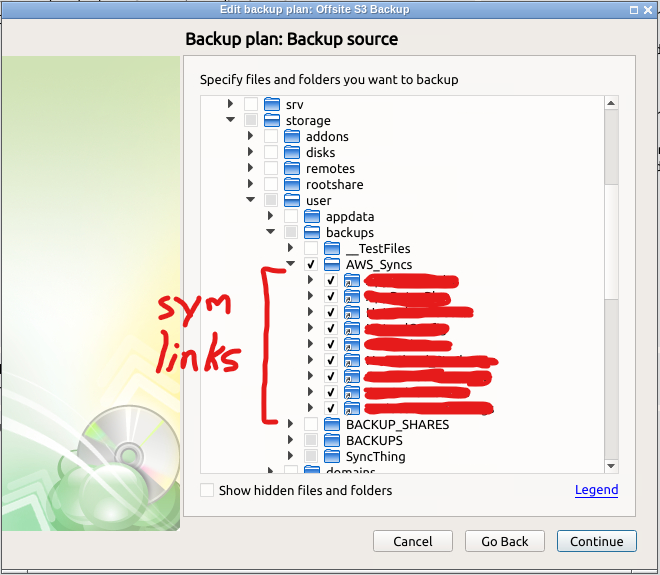
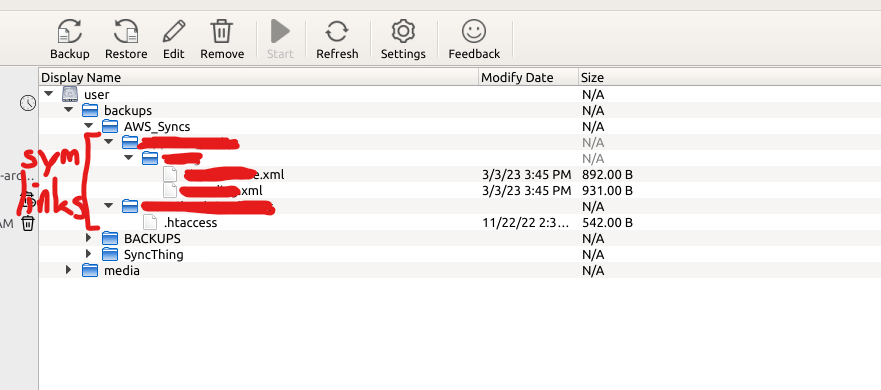
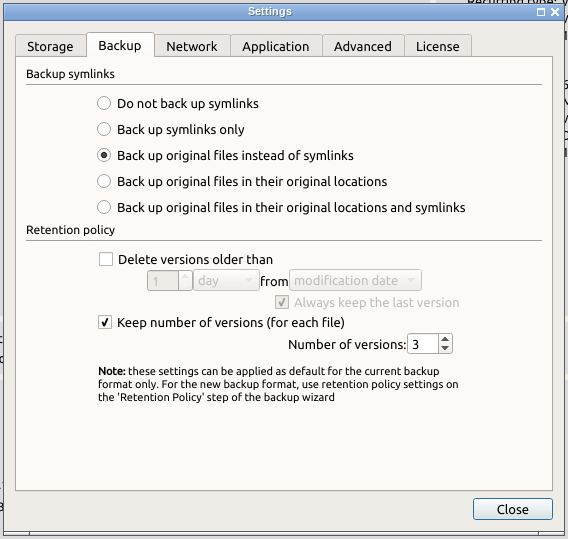
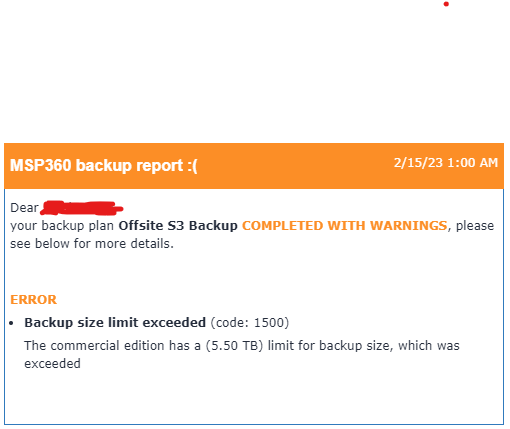
Hi guys, I reported the problems I'm having a few posts ago back in mid-February, but I'm still having issues. I was encountering an error code 1500 reporting that my backups are over 5.5TB, even though they are not. I seem to have noticed that its not backing up my symlinked directories though, even though Cloudberry claims it supports symlinks. I have a few symlinked directories that get updated regularly via a backup script, the script locally copies files from remote servers and updates the dir symlink to the backup of "latest". In my server is a single directory called "AWS_Syncs" that I symlink other dirs under (No remote or inaccessible links) so that they can be updated and backed up transparently under a single dir. I have docker mapped my host /mnt to containers /storage dir, is this correct? Should I be mapping unraid host /mnt to container /mnt instead? When I setup my backup, I can browse the symlinked dirs, and select anything I need, which for me is everything. However, I think Cloudberry is having trouble at the time of backup because when looking at backups I cannot see anything being backed up from these dirs: Is there a permissions issue, even though they seem to be accessible? Maybe there is a set of permissions or access that Cloudberry is looking for? I've played with the "Backup Symlinks" setting, and have not had any success yet. Anyone have ideas?
-
Hey @N3z maybe can help, but would also be good if you can post your full specs because it helps understand specific hardware issues. Stuff like what's in my signature or others have posted here, you should especially indicate what GPU and CPU/platform you're using. Anyway, I see you're on AMD with a 4070Ti. Here is the checklist that I figured would be important: I highlighted maybe where you need to look for issues, if you have everything else done? If you're actually booting the new patched kernel (I found that for AMD the new kernel is a must), and everything else is in place then you need to create a userscript to run "At Startup of Array" that does the unbind. At least that's what I do, and seems to work.
-
Chrome mainly, but Edge is become/becoming my browser of choice. I'm procrastinating on the switch.
-
Hmm, I wonder if this is related to my AMD Ryzen configuration? I've noticed some differences when using an AMD Ryzen setup, but honestly its been pretty great for 99% of the time I've had it. This kernel patch allowed me to properly pass the black EFI bootup screen and get in-VM ReBAR support. Before, I could only pass through my 3090 by booting Legacy BIOS on host. Posting in case it changes in future: CPU: Ryzen 9 5950x Mobo: ASUS TUF GAMING X570-PLUS (WI-FI) Memory: 128GB (4x32GB) Kingston Unbuffered ECC PC4-25600 DDR4-3200 GPU: Gigabyte RTX3090 Turbo 24G Storage: 1x980 Pro 1TB NVME (Cache+VMs), 1x970 EVO Plus 1TB NVME (VMs), 860 EVO 256GB SSD (VMs), 840 EVO 1TB SSD (VMs), 2x WD Red 8TB (Parity), 6x WD Red 8TB (Storage). Networking: 10Gbit with Mellanox ConnectX-3 Dual-port NIC, 1Gbit with onboard Realtek L8200A.
-
An update from my side, I've tested this multiple times now. The custom ReBAR-enabled firmware is definitely necesarry for me, I've tried booting from the standard kernel enough times. When I boot standard, booting my 3090-attached VM, I get a black screen with nothing but a blinking text cursor on the screen. I've tried this a few many times now, and can confirm it. What hardware are you using? Can you list out your servers specs and unraid version?
-
Actually, this is a great idea and something I've wondered about. I understand that there is some dependency on the array because libvert.img and ISO files are are located by default on the array, for example. Is it even feasable within unraid to decouple docker/kvm from the disk array (Especially with the idea of multiple arrays)?
-
That would seem to be a VERY dangerous option to implement. May not be something that gets used often either, I don't know how many people would regularly reset and wipe all disks.
-
You may want to look into running Kubernetes VMs across your 3 nodes for this, or I'm not sure, if its possible to run K8s on the Unraid systems themselves. K8s-on-Unraid-host might be something to aim for perhaps, if Unraid itself could be a K8s worker node. That would bring some interesting high-availability scenarios.
-
Please GUI enhancements for VM control, like PCIe control, ReBAR control, PCIe Address management, more VM properties, control over more things without needing to edit XML directly, which gets wiped out if GUI interface is applied anytime after XML changes. Would be the most amazing thing. I already have nightly working running VM snapshots via script and VM Backup plugin. Furthermore, there is already a working Appdata Backup plugin, these things are already available with existing plugins. Array/share data backups are easy in script (I did it personally already).
-
No, my backups in S3 are definitely not above 5.5TB, but Cloudberry reports that I'm exceeding the limit. This was an issue I experienced last year, and saw in this thread that it was fixed in an update, and when I updated to the new container it seemed fixed. I saw that a consistency check was performed (I can't find where to initiate this manually) and a full backup (followed by 2 incrementals of around 5.5GB the following weeks) was made halfway through January 2023. But now again the same issue has returned. I believe it's related to this comment: I'm not really sure why this is happening, my last full backup was 430GB, and I have 3 others of 381GB, 327GB, and 230GB in S3. So the 5.5TB is certainly not exceeded, but this issue has made my backup routine really unpredictable. I believe I have everything setup properly, so not sure why its behaving like this. Does this make more sense?
-
Hi, can someone please help? I understood this issue was solved in the version update, I had a single good backup a few weeks ago, and it was and has now returned. I'm backing upto S3, have the latest container, version in container is 4.0.2.402. Can anyone help please?
-
You can download the kernel in this same thread, and follow the checklist in my summarised post, you don't need to wait until a new kernel. Also, another user reported that you may not need the 6.1 kernel, but I have not had the time to confirm that as yet. But as it is, yes you need the kernel patch and xml changes.
-
I don't know if anyone in this thread is still waiting, but another thread with a backported kernel 6.1 patch made ReBAR work for me on my primary setup. Link here to what I did to get it working, hopefully this can be added to UnRAID in the future, I'm super stoked about it.
-
Is anyone using the latest drivers still experiencing the locking issue? I'm considering it again, and wondering if there's any success.
-
That's interesting, I've been following the ReBAR issue for some time now, trying to make it work on my setup. From what I've seen, Intel CPU/chipset platforms seem to have a much easier time getting this to work, my understanding is that kernel support is a big factor with it. Until now I've been getting the black screen issue on my passthrough 3090 no matter what I've tried until now, I should try to test without the custom kernel and see if the extra VM extensions are the ticket to getting that working.
-
@Trozmagon what hardware are you running? Just wondering, because I've noticed some AMD Ryzen systems have trouble.
-
Looks like I figured it out, I had left out the steps to add the extra lines to my Win11 VM, which enabled 64GB ReBAR support. So looks like the checklist to enable this: - Host BIOS Enable ReBAR support - Host BIOS Enable 4G Decoding - Enable & Boot Custom Kernel syslinux configuration (near beginning of this thread) - Boot Unraid in UEFI Mode - VM must use UEFI BIOS - VM must have the top line of XML from <domain type='kvm'> to: <domain type='kvm' xmlns:qemu='http://libvirt.org/schemas/domain/qemu/1.0'> - VM must have added the following (after the </device> line, before the </domain> line): <qemu:commandline> <qemu:arg value='-fw_cfg'/> <qemu:arg value='opt/ovmf/X-PciMmio64Mb,string=65536'/> </qemu:commandline> After that, looks like everything worked for me as well. I'm just summarising this for anyone looking for a complete idea. I'll be testing performance over the next weeks as well to see if I'm seeing any improvement. This is great, exactly what I've been waiting for! EDIT for completeness: There is a last step, that I have implemented and can confirm works, which is the bind/unbind UserScript in this comment: Specific details of the script is in the linked^ comment, but this script sets the Bar size. I would highly recommend setting this up in a userscript, and set it to run "At Startup of Array": This works for my setup, but your mileage may vary.

-
What platform are you using? I'm also getting the lockup/freezing issue, my details in my signature.
-
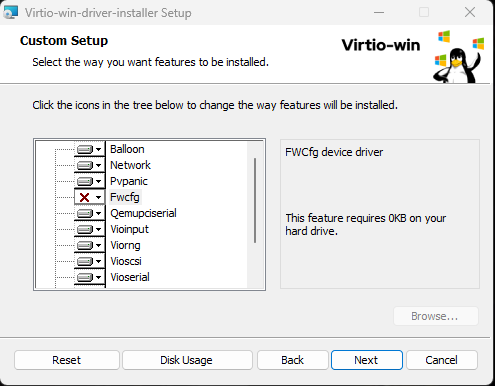
I'm testing Virtiofs on my main Win11 VM, and having quite some success, but with a few caveats. Firstly, while installing the latest virtio drivers, my VM IMMEDIATELY CRASHES. I found through lots of trial and crashes that if I leave "Fwcfg" DISABLED, the install finishes. Disabling it allows install of updated drivers, sets up services, and does not crash the VM. What is this Fwcfg, can anyone shed some light on that? Secondly, I'm trying to setup 2 virtiofs disks, but only 1 appears as the Z: drive If I setup 2 drives, only the second appears as Z: when the VM boots. In this example, I setup "vdata1" and "vdata2": Thirdly, the virtiofs is always set as Z: I cannot find or see any way to reassign the drive letter, or indeed use multiple drive letters. Is there a way to change the assigned drive?