adminmat
Members
-
Joined
-
Last visited
Everything posted by adminmat
-
Bumping this back up.
-
I've been using Wireguard successfully for a while. I can connect to all the devices on my local network while I'm away. Recently noticed I can't access several Docker containers, on the local network while I'm away from my house and connected to my unRAID server via Wireguard RTA... while some containers I can reach. For example: I can access an Agent DVR container by navigation to the ip addrsss / port (192.168.60.80:8090) but I can not access the Firefox, Plex, Tautulli containers using their IP address and port. They all are on custom networks (br0.60). I tried IPvaln and MACvlan. Tried "Host access to custom networks." Same result. Here are the networks I'm allowing for this WG peer: AllowedIPs=10.253.0.1/32, 192.168.10.0/24, 192.168.60.0/24, 192.168.100.0/24, 0.0.0.0/0 Note: I can connect to all these containers using IP address when I'm on the same local network not using a VPN. Thoughts? tower-diagnostics-20231019-1354.zip
-
Bumping up. Any ideas ?
-
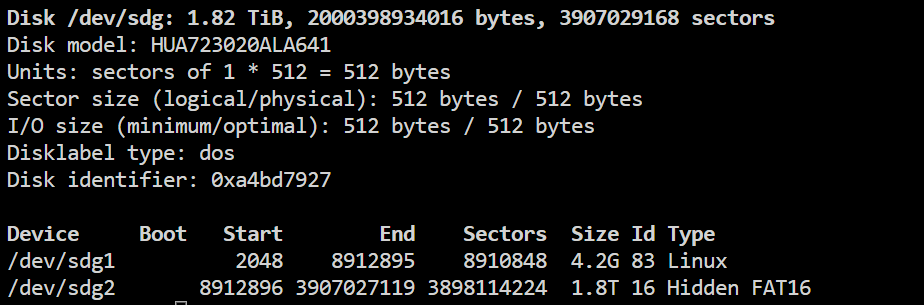
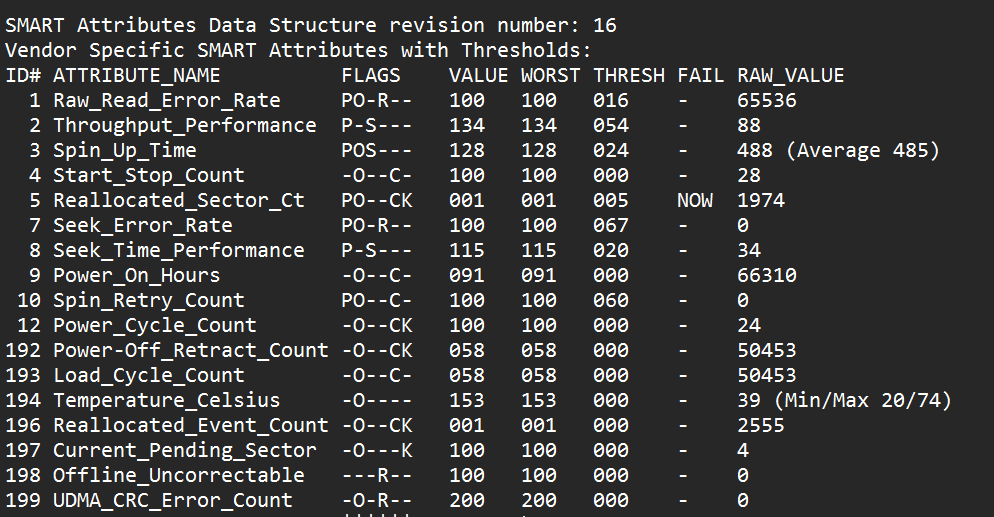
I'm trying to mount an HDD to pull pull some old footage from a failed CCTV DVR. I need to mount sdg2. It's reporting to be a Hidden FAT16 partition type. I've tried: mount -t vfat /dev/sdg2 /mnt/disks/dvr-HDD and get this error: mount: /mnt/disks/dvr-HDD: wrong fs type, bad option, bad superblock on /dev/sdg2, missing codepage or helper program, or other error. dmesg(1) may have more information after failed mount system call. Also tried: mount -t msdos /dev/sdg2 /mnt/disks/dvr-HDD and get the same error. Disk may be bad. Any ideas? Thanks. Update: Well, looks like it's failing but can i still mount? lol
-
For now I'm just excluding Krusaider from the backup. Since it's not necessary anyway. Just wanted to pass this along.
-
I got a error when it was verifying the tar for Krusaider. "tar verification failed! More output available inside debuglog" Not that I really need to back up my Krusaider instance..... Thoughts? attaching log ab.debug.log
-
Problem solved. I will speak softly and positively to my HDDs from now on 😆
-
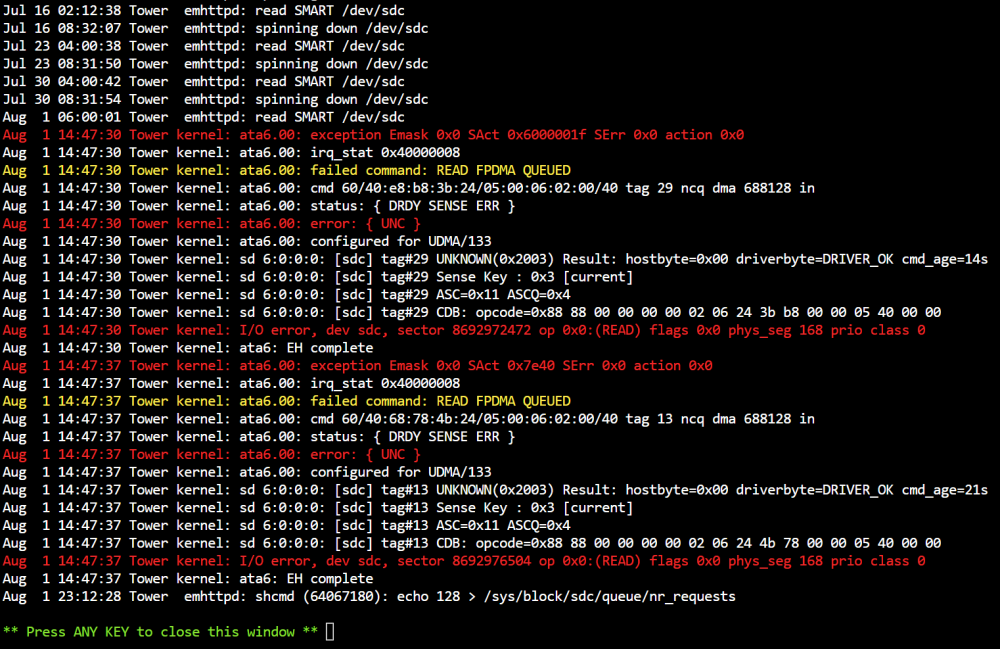
Swapped the SATA cable. Ran a parity check that completed with no errors. I should be good for a while then, right? I was opening and closing a cabinet the server sits on during the last parity check. That jostling could have caused it?
-
Ok so I'll change the cables and check everything physically. Then run another Extended test? Should I reboot?
-
I ran the Extended SMART test before I posted this thread. Here is the report. Thanks.
-
If anyone has a guide on how to diagnose this issue I'd appreciate. Is this in the unRAID manual? Is this a cable issue? Is there a way to tell if the data is corrupted?
-
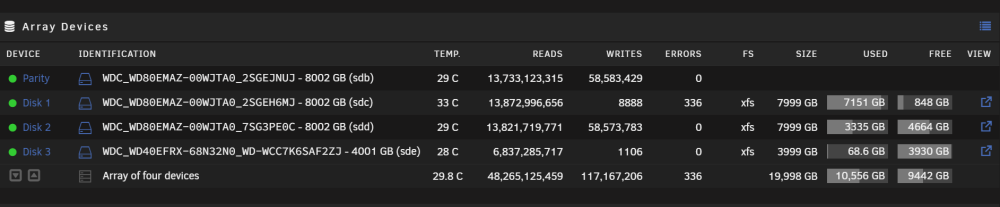
Hello, I got an email alert about disk read errors that popped up during a Parity check. Shows 336 errors on one disk. I'm not sure what this means exactly and if I should replace this disk. (Disk 1) I know this question comes up a lot but I don't really see a thread with a solution / conclusion. Thanks for the guidance I just ran an Extended SMART test on the disk and am attaching my Diagnostics.
-
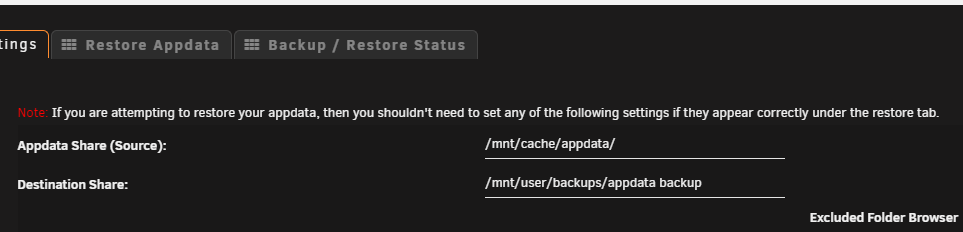
Does it matter if you use a Disk location for the Appdata Share Source? ie. /mnt/cache/appdata/ while using a Share as a Destination? ie. /mnt/user/backups/appdata-backup I know this practice is bad for moving data across the array.
-
One you install the Docker Update Patch plugin what do I need to do next? I don't see any settings for this plugin. Nothing under Settings > Scheduler, Auto Update Applications, Docker and nothing mentioning it under the Tools tab. Thanks.
-
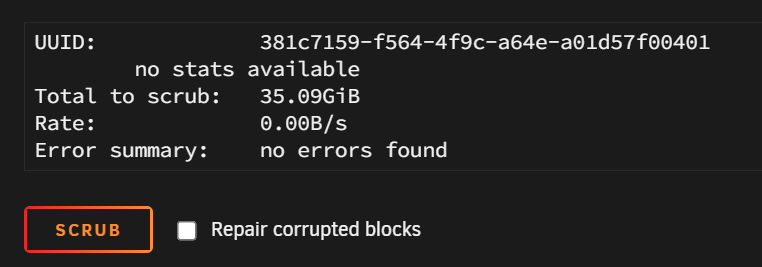
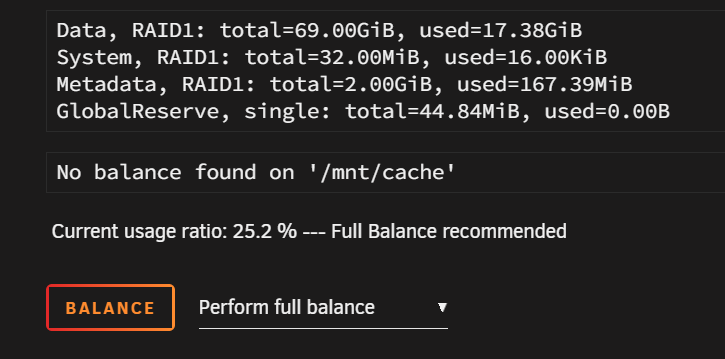
I'm running two NVMe drives (BTRFS) in RAID1 for my main Cache pool. I just came across the option to schedule "Balance" and "Scrub". Is this something I should be doing regularly? I've not used this before. Searching for this answers provides wildly varying opinions.
-
Did you mean Discord?
-
SOLVED I'm still struggling with getting rid of errors: Your web server is not properly set up to resolve "/.well-known/webfinger". Your web server is not properly set up to resolve "/.well-known/nodeinfo". Based on advice in this thread I've deleted files default AND default.config from /mnt/user/appdata/nextcloud/nginx/site-confs/ I then clear browser cache, restart the container and when logging into NC i get "502 Bad Gateway - nginx/1.20.2" So I copied the default.config file (i had a backup) back into the directory and I can access Nextcloud again. But still have the errors. So the config file that is being recreated has a conflict. Is there any updated way to fix these errors? I'm on NC 25.0.2 latest container. SOLVED - - I had to delete the nginx.conf file in /mnt/user/appdata/nextcloud/nginx/ as well. Then restart the container and errors are gone.
-
Ok I had to first delete the contents from the /root/.ssh/known_keyhosts file. Then after running the command above I'm no longer getting the errors. Thanks.
-
I'm SSHing to a remote Raspian OS server over Wireguard. I'm getting theses same errors when Rsync'ing to the remote server. Do I need to replace any of the command test? I tried this command replacing the TARGET_HOST part with the SSH address of my other server. i.e. [email protected] but I get this output in unRAID's CLI: getaddrinfo [email protected]: Name or service not known getaddrinfo [email protected]: Name or service not known getaddrinfo [email protected]: Name or service not known getaddrinfo [email protected]: Name or service not known getaddrinfo [email protected]: Name or service not known Any ideas?
-
Thanks. So I pulled the FANA fan which was running at 100% no matter what I tried. Not sure if it's due to being a higher speed Noctua fan so I ordered a slower Noctua. Seems I got it sorted for now. Much quieter. Barely audible.
-
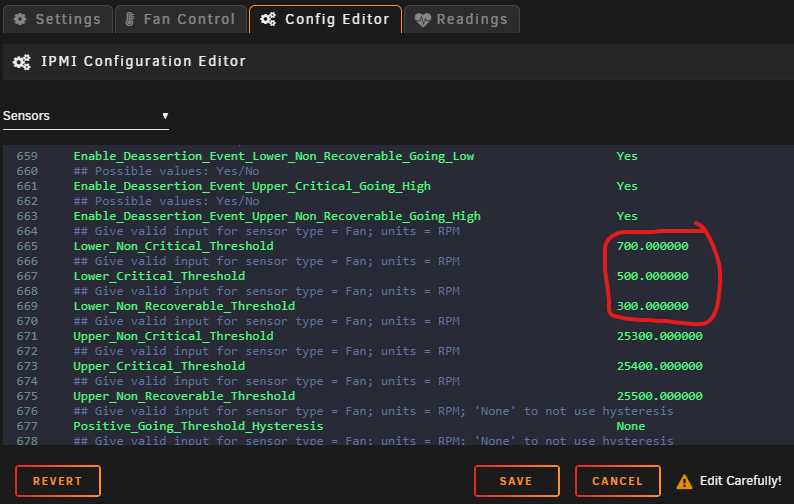
Dumb question about configuring thresholds on x10 Supermicro. The developer, Dmacias says to change/lower thresholds in the config editor. If I make these changes is it overriding my BMS settings? Does it permanently change the BMS settings? How to I set it back to default if I break it?
-
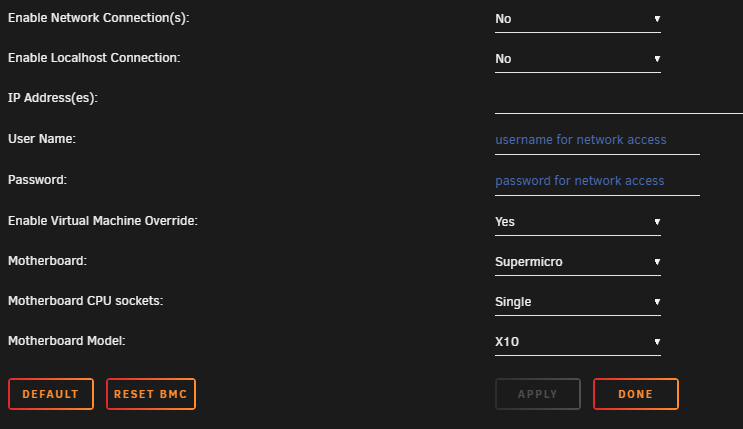
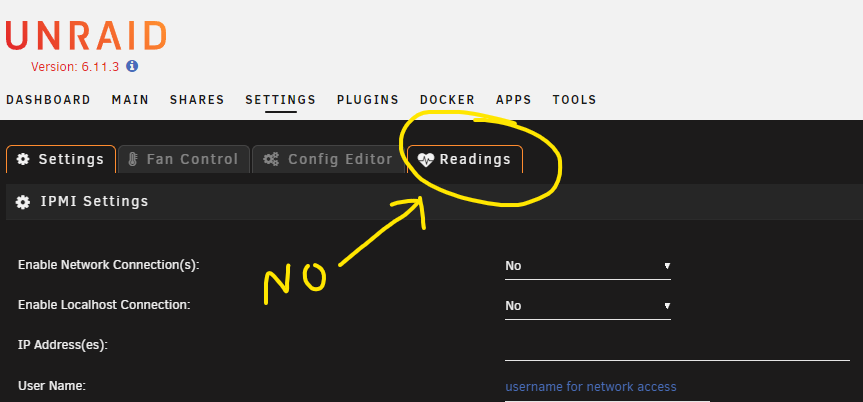
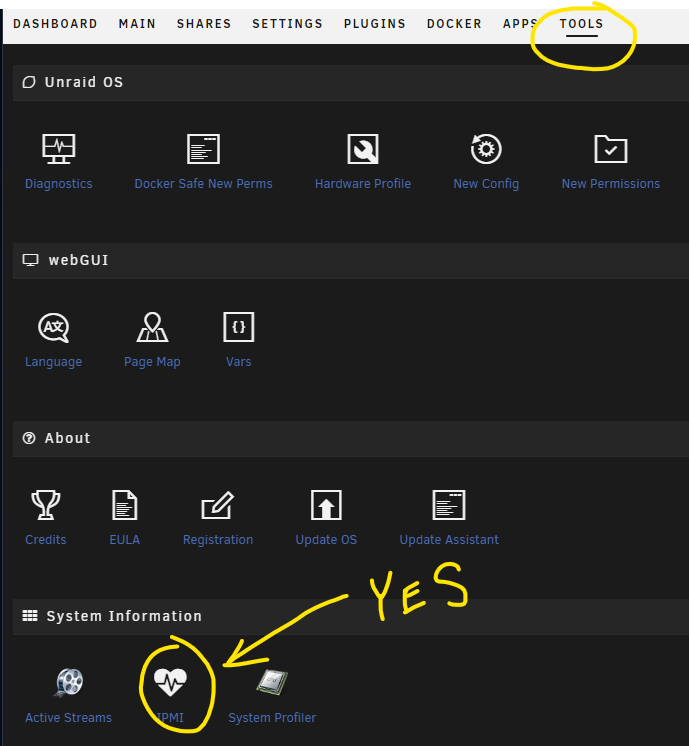
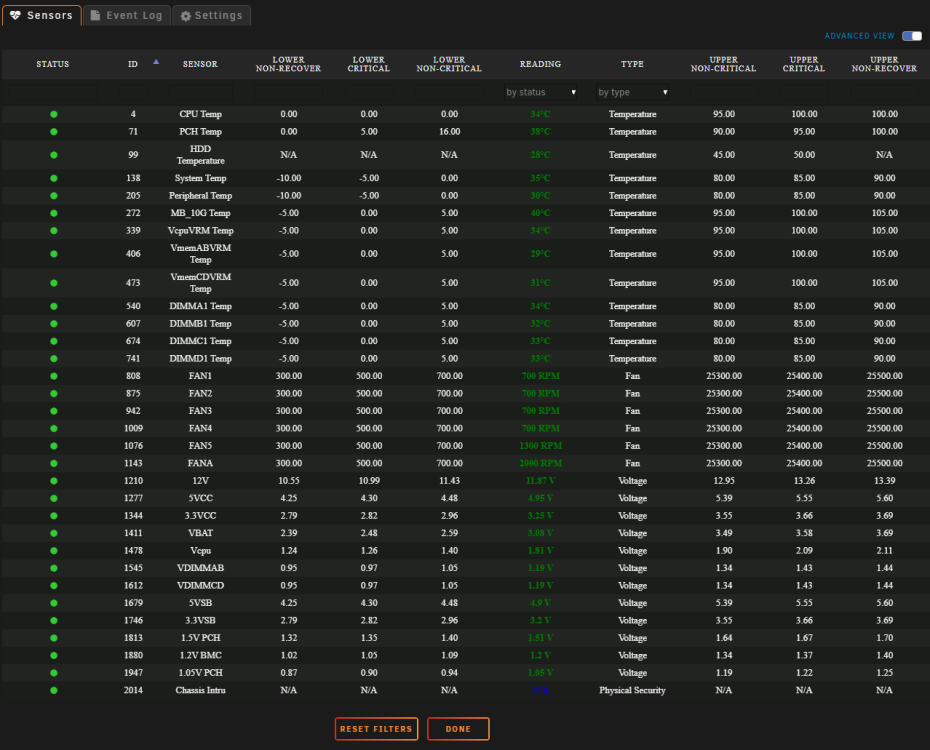
So I got the sensors to show and the fan controls working again. Now I can't explain why but I have to leave Enable Network / LocalhostConnections set to No. And leave the IP address username/pw blank. If I enable this is will no longer show my sensors or operate the fan controls. (Maybe I'm misunderstanding what these first 5 setting do) Then, no matter the settings if you click on Readings nothing happens. That tab doesn't open. You have to go to the Tools tab and at the bottom click on IPMI. Then it shows all my sensors, fans etc. Hope this helps. Now I just need to figure out how to set the thresholds lower. I have to keep my fans (mostly Noctua) at about 700 RPM or Supermicro starts to spool up the fans into panic mode.
-
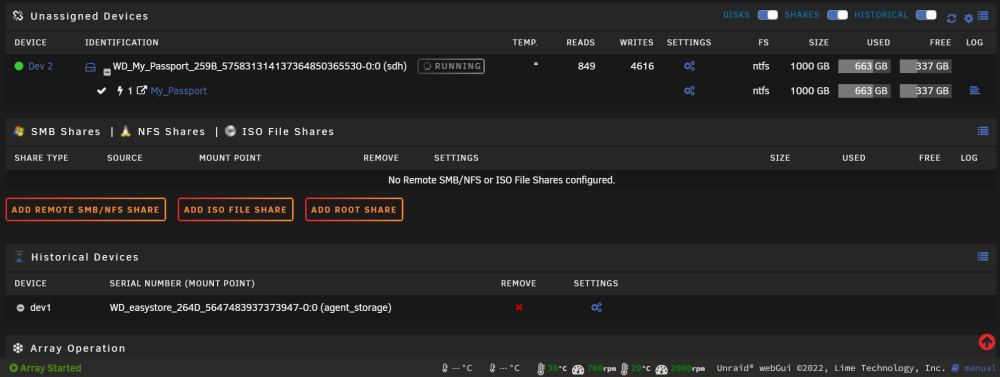
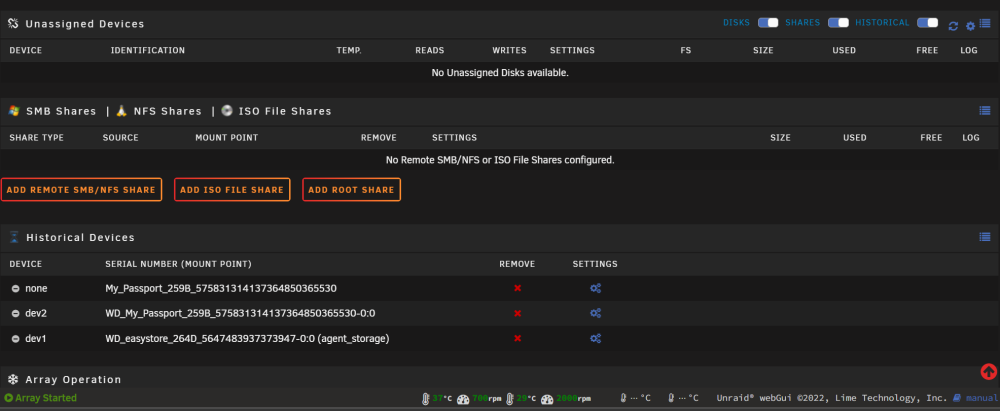
Hello, one of my Unassigned Drives shows up twice under Historical Devices when it's not mounted. When mounted it does not show up at all under Historical Devices. Should I click the red X next to one of these devices under HD? If so which one? Any idea why this happened? This is a USB external drive that runs a script that backs up my Backup share. The script shows up under the settings for both of these devices. Passport drive while mounted: Passport drive when not mounted (showing in Historical Devices twice. 'Dev2' and 'none'.
-
Hey @Hoopster just wanted to follow up on this. I installed WG using Wundertech's guide that you linked. Had it up and running as intended but on the first update (to the Pi OS) it pulled a bunch of unstable packages. (Most guides for Raspberry Pi OS were made prior to Wireguard being built into the new kernel release. Debian 11?) It took about 40 minutes to pull down all the packages and I noticed many stated "unstable." Anyhow. Found this post on a RasPi forum that states you no longer need to install the additional supporting packages and you just install WG via sudo apt install wireguard. Add your config file and that's it. Done. Now everything works as intended except I lose my local SSH connection when I connect the Wireguard tunnel back to my unRAID server.. Still working on how to solve that.
-
Is there a way to import a config file from another Wireguard server into unRAID? I am using a Raspberry Pi in another state. I want to connect it to my Wireguard unRAID server. How to I import the config into unRAID? I would just set up the Raspberry Pi as a client but it seems there are no supported ways to do this at the moment. Thanks.