





wirenut
Members
-
Joined
-
Last visited
Everything posted by wirenut
-
After the latest update to the container, the labels are showing again for me. After the latest update, labels are showing again for me.
-
Parity check completed without errors. Reboot and all came up as expected. Hopefully i am past this now. Dual parity really helped in this situation, and the fact that the failed disc was able to be rebuilt before crashing. Thanks for the assist @JorgeB
-
The 4TB disk rebuild completed without error. Currently running a non-correcting parity check to validate.
-
jumped the gun on my solution. After a reboot disc 10 had read errors and the reallocated sector count was high and climbing. stopped array and am currently rebuilding to an old spare 4TB drive i was saving for another build. diagnostics is from shutdown of array... tower-diagnostics-20261004-1208.zip
-
Rebuild completed without error. Thanks.
-
just to update i fixed the file system errors maint mode and smart tests and stats are good. I have now started a data rebuild. fingers crossed.
-
Had to change the fans in my norco ss-500 drive cages. Got everything back together and the array booted up fine. Started a parity check and discs 6 -10 (they are all in the same cage) showed read errors and before could stop it discs 9 & 10 went red. grabbed a diagnostics (attached) and shutdown. Reseated the cables to the cage and I believe the molex power connecter wasn't seated all the way. Restarted server hoping it might be well but 9&10 are still showing red with unmountable or no file system error. Can i get the discs to go green again or do i need to rebuild them from dual parity? Please help. tower-diagnostics-20261003-1806.zip
-
Yes! Working as normal. Thanks!!
-
yep, verified when i got home. replacement disk rebuilding. Thanks!
-
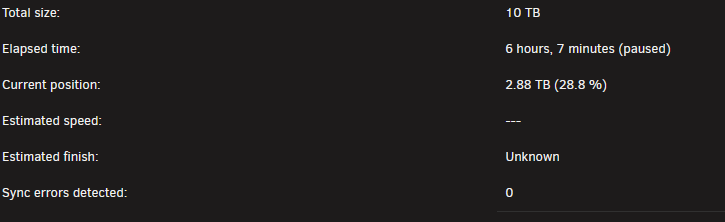
Monthly parity check stated as scheduled this morning. 12:20 pm email notification came as expected and result was pass. 4 minutes later received email notification that disk 6 has 442 read errors. Logged in remotely as I'm at work and see the they are now 44,158 and climbing. Paused parity check and created this post for advice. tower-diagnostics-20260930-1258.zip
-
No guarantees here, but If you went to Settings -> Network Settings in Unraid and manually set the DNS Servers to the ones listed and it still fails, try setting DNS server 2 to 1.1.1.1 or 8.8.8.8 and see if that helps.
-
Yes, you need to change/verify the boot order in your bios for your internal boot drive to be 1st. Keep in mind you will still need to leave your USB drive for license verification. If you move your license to TPM, and your internal boot drive is successful, you should then be able to remove the USB and use it for something else.
-
7.2.6 to 7.2.7 update went smoothly for me. All seems well. Thanks!
-
an update to 'fix common problems' v2026.05.16 solved the issue with a couple steps. update fix common problems and scan again. mark warning as ignore and scan again. unmark ignore warning and scan again. This is what worked for me.
-
fix common problems reports this to me this morning: The plugin dynamix.password.validator.plg is not known to Community Applications and is possibly incompatible with your server. Want to get this sorted prior to 7.3 update. Is this depreciated or something else? Currently running unraid v7.2.6
-
👍 Good advise. I mean unraid is trustworthy right? Otherwise we wouldn't be using it right?
-
Update. 24 hours and all is well. Thanks.
-
Recently my top share folder MEDIA, and some of the sub folders of media (movies and tv shows) are showing up on my cache drive empty. I run the mover and they go away for a while and then return again. I have identified Bazarr as the culprit, is this now expected behavior since the last update, prior to this update, this was not happening. SEE HERE: https://forums.unraid.net/topic/196410-empty-share-folders-showing-on-cache-drive/#comment-1600996
-
Well just wanted to update that I figured out what is causing my issue. It is Bazarr docker container. Do not know yet what it is doing to cause this behavior.
-
This would be a recent change in behavior, but agree could be possible since my regular dockers are set to auto update. Also, still getting my head around how "pools" work If this turns out to be the case @Frank1940 , I will definitely share what the culprit program that is behaving responsibly is. 😊 This doesn't seem to be causing any other issues right now other than I have to see empty folders on the cache drive when I look. UGH! For now I guess that I'll just have to accept this as expected behavior. I'll keep an eye on things and either get used to it, or report back again if something erroneous comes up. Thanks for the time and input!
-
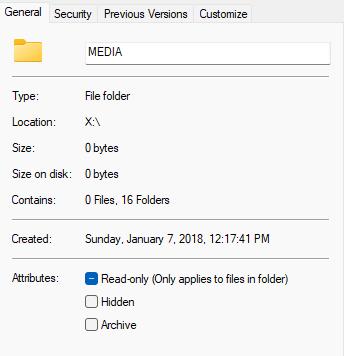
only one folder named MEDIA. Been that way since I originally set up unraid in 2012. using unraid file manager shows same result. folders there, but empty. from parent directory:

-
cache is network mapped to drive x: from my windows computer. Opening each from there they show no files. hidden files is enable in windows. Also, doing a right click properties in windows show this:
-
Recently my top share folder MEDIA, and some of the sub folders of media are showing up on my cache drive empty. I run the mover and they go away for a while and then return again. Behavior I am used to is only would see if there was something waiting for the mover to copy to the array, and then it would only be the MEDIA folder and the pertinent subfolder containing the file(s). An AI deep dive search says this could be expected behavior do to how fuse works, but I figured if this was the case, it would have shown up long ago. I have made no configuration changes recently other than changing monthly parity check date, and i have also recently added and been playing with a new WIN11 VM, which isn't running currently. I am not using the mover tuning plugin. Sync files in windows is turned off. i have rebooted the server and the window computer twice each, no change. Is this expected behavior now with ver.7 or do I have something goofy goin on? tower-diagnostics-20260110-1052.zip
-
Can confirm same issue using Chrome on my android device. Button dims and does nothing. Went to tools / update OS / and it works fine.
-
It's not reporting an issue. It's reporting a comment to let you know what happened. Run fix common problems scan one more time and those comments will disappear and it should report no issues found.



