





Stiibun
Members
-
Joined
-
Last visited
Everything posted by Stiibun
-
OK found the culprit, well half and half anyways. It's one of the LAN ports and using another working cable doesn't solve it. So for I unplugged that port and will check the BIOS settings.
-
Migrated from my old Gigabyte H370M D3H GSM with a i3-9100 to a new motherboard a Supermicro H11SSL-i with AMD EPUC 7551p still using the same HBA IBM M1015 and the same cables connected to the backplane as when the Gigabyte motherboard was installed. But now after booting I see in the syslog a lot of "kernel: pcieport 0000:00:01.5: PME: Spurious native interrupt!" warnings. What could be causing this? Off course diagnostics are attached here for further inspection. Mar 14 15:35:16 Firefly kernel: pcieport 0000:00:01.5: PME: Spurious native interrupt! Mar 14 15:35:24 Firefly kernel: pcieport 0000:00:01.5: PME: Spurious native interrupt! Mar 14 15:35:31 Firefly kernel: pcieport 0000:00:01.5: PME: Spurious native interrupt! Mar 14 15:35:39 Firefly kernel: pcieport 0000:00:01.5: PME: Spurious native interrupt! Mar 14 15:35:46 Firefly kernel: pcieport 0000:00:01.5: PME: Spurious native interrupt! Mar 14 15:35:54 Firefly kernel: pcieport 0000:00:01.5: PME: Spurious native interrupt! firefly-diagnostics-20260314-1531.zip
-
@JorgeB , parity check finished without any errors this time. Included diagnostics after it was finished. firefly-diagnostics-20260211-0853.zip
-
Thanks @JorgeB , just started another parity check now. Will take its sweet time, last 3 days. I'll revisit this thread with the results when it's done. Should I worry about the "Number of Hardware Resets" numbers in the SMART report?
-
Yes it did show as completed and the server went to sleep last night which it did not the previous night when the SMART test was still running.
-
New diagnostics and SMART report for the disk in question. The "Read Recovery Attempts" didn't raise since last check, but the "Number of Hardware Resets" raise with 1 from 16 to 17 since Friday, should I be concerned about this and what could cause this? firefly-smart-20260208-1556.zipfirefly-diagnostics-20260208-1556.zip
-
Currently running a SMART extended self-test on that Parity 2 disk, it's at 40% so will take a while to complete.
-
Yes it was indeed Parity 2 (/dev/sdh) how gave the error/warning. Seems in the SMART reported it has an elevated value for "Number of Reported Uncorrectable Errors". Hope this disk isn't going bad. First thought it was the Seagate Ironwolf disk (/dev/sdc) as it has some command timeout issues, but these have not gone up for good amount of time. Diagnostics attached here. firefly-diagnostics-20260206-2042.zip
-
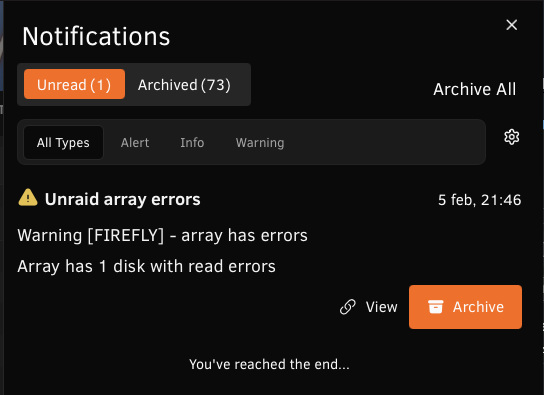
This week a parity check was running on my Unraid server and during this suddenly an error was show that the array had read errors. But when I checked the syslog I see it logs that error for a non-existing disk. Feb 5 21:45:57 Firefly kernel: md: disk29 read error, sector=29157647288 Feb 5 21:45:57 Firefly kernel: md: disk29 read error, sector=29157647296 Feb 5 21:45:57 Firefly kernel: md: disk29 read error, sector=29157647304 Feb 5 21:45:57 Firefly kernel: md: disk29 read error, sector=29157647312 Is this an error someone has seen before especially with a disk which doesn't exist in my system? Could this due to my HBA going a bit crazy at some time during the parity check? Or maybe some other explanation why this is logged for a disk number not in my system.
-
Send you a private message over on the Belgian forum. There are some options from Germany which should work.
-
@spants , and which one do you recommend to use these days?
-
@Teshiburu, did you go with that motherboard in the end or did you opt for something else? As I’m at the beginning of planning a new build and your requirements look very similar to mine I wonder what you ended up with.
-
Can confirm this behaviour on 6.12.6 with the latest plugin version installed (2023.12.24) in both Google Chrome 120.0.6099.129 and Safari 17.2
-
Not a biggie, but the support link when clicked from the container points to the old forums (https://unraid.net/forum/index.php?topic=45812.0) instead of the current URL. No idea who can adjust this, or maybe it's changed now but i have the container installed eons ago 😉
-
@dius, yes that's also what i did, updating Nextcloud in the command line.
-
Well this is awkward. Just updated to the latest version of the Nextcloud container, but now i'm getting this error in Unraid version: 6.11.5 This version of Nextcloud is not compatible with > PHP 8.0. You are currently running 8.1.16. Anyone also noticed/experienced this? Guess i should go back to 25.0.3 instead of the current 25.0.4 version. [edit]Ah, i see this is already been reported above[/edit]
-
@Linguafoeda, i don't see why that would be a problem.
-
Excellent tutorial as always. Though i'm stuck at the part to install the EFI files on the volumes where macOS is installed, in my case High Sierra, as in Opencore Configurator i simply don't see the EFI partitions for where High Sierra is installed. Has anyone else run into this issue, and was able to solve it?
-
Ich habe einige andere BIOS-Optionen ausprobiert, z. B. "Other PCI devices"* auf "Legacy" anstelle von "UEFI" und "Max Link Speed" auf "PCI Gen 1" und "PCI Gen 2" anstelle von "Auto", aber keine dieser Optionen hat geholfen. *aus dem Gigabyte H370M D3H GSM Handbuch Allows you to select whether to enable the UEFI or Legacy option ROM for the PCI device controller other than the LAN, storage device, and graphics controllers.
-
Ja, dies war eine gebrauchte Karte, die wahrscheinlich von einem Server gezogen wurde und ein Jahr Garantie hat. Mein MB ist ein Gigabyte H370M D3H GSM, und ich habe die Karte auch in einem anderen Steckplatz ausprobiert. Schließlich habe ich eine Windows to Go-Festplatte eingestellt und den Server von dort gebootet, aber auch hier scheint die Karte nicht erkannt zu werden. Es wurde versucht, nach Windows-Treibern für die D3045-Karte zu suchen, aber keine gefunden. Meine Kenntnisse über Windows sind begrenzt, so dass mir möglicherweise etwas fehlt, aber ich habe den gesamten Device Manager durchgesehen und keine Hardware ohne Treiber gesehen. Was lustig ist (oder nich), ist wenn ein Ethernet-Kabel eingesteckt wird, werden LEDs am Port und auch an meinem Switch angezeigt, aber dort wird es nur bei 10 FDX auf der Switch-Seite angezeigt.
-
Vielen Dank an beide. Ich habe meine Karte von einem deutschen eBay-Verkäufer bekommen. Leider habe ich momentan keinen anderen PC zur Hand, um die Karte auszuprobieren. Ich habe von einem Live Ubuntu USB-Stick gebootet, aber auch hier wurde die Karte nicht angezeigt. Wird versuchen, jemanden zu finden, der einen anderen Computer hat, um die Karte auszuprobieren.
-
Haben Sie bereits eine Quad-Port-Netzwerkkarte in Ihren Server integriert? Ich habe die von Ford Prefect vorgeschlagene Fujitsu D3045-Netzwerkkarte, aber diese Karte wird auf meinem Gigabyte-Mobo nicht erkannt.
-
Looks like a Grafana panel ... and probably is.
-
Energy cost is something to think about yes 🙃 Nowhere nearly have the build you’re aiming for, but in my case I was curious to what kind of wattage my build pulled out of the wall. Well I was surprised it was actually not bad at all, in regular usage between 24 and 44 Watt depending on what is currently running. And in sleep mode, which is during the most part of the work week the server consumes 3 Watt.
-
Forget what I said, put in the wrong memory (64 GB sticks instead of 8 GB) 🙂 pcp now says 680W with 20 disks, mobo, CPU’s and memory so that seems save.

