





Meldrak
Members
-
Joined
-
Last visited
Everything posted by Meldrak
-
So issue is on my side, I made a wrong typo in my new iptable script run at startup Sorry for the inconvenience.
-
the root of all share in my case \\192.168.1.30\ that show all directories the issue is in networking I guess because I found another issues can't access to UNRAID by SSH and WIREGUARD, all my network devices can't send logs to syslog webUI is reachable, and docker (nextcloud, calibreweb, vaultwarden, cloudflared) are reachable from LAN and outside all other docker exept Plex are also reachable from LAN all was working fine before update
-
So not exactly the same issue, all networks share are unreachable from the root I tried to add a new share but still unreachable, I activated smbv1, the same And all my 3 device are on the same network
-
just updated to 7.2.4 and have excatly the same issue no access from windows11, android or fedora so I dis a rollback in 7.2.3 and it does not resolve de issue mnas-diagnostics-20260302_2219.zip
-
I can't get webhookd working, can't change default port, can't stop service ... root@MNAS:~# webhookd stop time=2025-05-22T16:16:33.702+02:00 level=INFO msg="server started" addr=:8080 time=2025-05-22T16:16:33.702+02:00 level=ERROR msg="unable to start the server" addr=:8080 err="listen tcp :8080: bind: address already in use" root@MNAS:~# webhookd restart time=2025-05-22T16:16:48.395+02:00 level=INFO msg="server started" addr=:8080 time=2025-05-22T16:16:48.395+02:00 level=ERROR msg="unable to start the server" addr=:8080 err="listen tcp :8080: bind: address already in use" root@MNAS:~# more /mnt/user/appdata/webhookd/webhookd.env WHD_HOOK_SCRIPTS=/mnt/user/appdata/webhookd/scripts WHD_HOOK_DEFAULT_EXT=.sh WHD_LISTEN_ADDR=:8888 WHD_LOG_LEVEL=info
-
Hi It's the NUT plugin, I think is act as a local server my config is basic on it


-
Hello, newcomer to this plugins I have some suggestions I use NUT plugin instead of native UPS, so no information about remaining power could you add support of this plugin? Add an option to hide VMs tab, Vm is disable on my system (maybe usefull for user docker too) Add a tab for plugin usercripts, not editing but just "run in background" and "logs" Thanks for the app
-
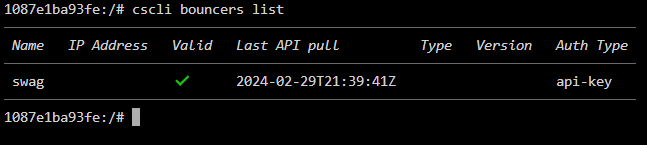
Hello, same for me, it doesn't work. I have about 80 ip that have been block by crowdsec and these IP continue to log in my access.log I tried a manual ban from one of my IP and I still get access to my servers I'm also surprised to not see the bouncer Ip adress and version API pull works once at docker startup and after it never change on crowdsec dashboard the bouncer appears offline after one day help is welcome
-
is rsa key still supported for authentication? because I have in my logs userauth_pubkey: signature algorithm ssh-rsa not in PubkeyAcceptedAlgorithms [preauth] I tried to add PubkeyAcceptedKeyTypes +ssh-rsa in sshd_config, but sill no ssh-rsa after root@MNAS:/boot/config/ssh# sshd -T | grep -i ssh-rsa root@MNAS:/boot/config/ssh# root@MNAS:/boot/config/ssh# ssh -Q PubkeyAcceptedAlgorithms | grep ssh-rsa ssh-rsa [email protected]
-
Hi, Could be very usefull to add a option to the UPS settings for executing a script at a specific battery level
-
Hello, with 1.7 version of AutoFan nvme disk is autoexcluded or not reconized From system logs: Sep 25 11:54:07 MNAS autofan: autofan process ID 1049 started, To terminate it, type: autofan -q -c /sys/devices/platform/nct6775.656/hwmon/hwmon3/pwm1 -f /sys/devices/platform/nct6775.656/hwmon/hwmon3/fan1_input Sep 25 11:54:07 MNAS autofan: autofan excluding drives sdc,sdb,sde,sdd from max temp calculations Sep 25 11:54:12 MNAS autofan: Highest disk temp is 0C, adjusting fan speed from: FULL (100% @ 1324rpm) to: OFF (0% @ 665rpm) From disk logs: Sep 17 09:32:57 MNAS kernel: nvme0n1: p1 Sep 17 09:32:57 MNAS kernel: BTRFS: device fsid 7bcb808e-6f15-413d-a924-10609a522dc7 devid 1 transid 1251964 /dev/nvme0n1p1 scanned by udevd (564) Sep 17 09:34:09 MNAS emhttpd: Seagate_IronWolf510_ZP480NM30001-2S9301_7PJ008XA (nvme0n1) 512 937703088 Sep 23 18:51:24 MNAS autofan: autofan excluding drives sdc,sdb,sde,sdd,nvme0n1 from max temp calculations
-
Hello Usefull utility thanks, WOL is working fine I didn't manage to get SOL working with this docker (sol is working if called manually) I try to change the RWSOLS_SLEEP_CMD variable but not better
-
Solved for me too after switching to zerossl
-
Hi, What version should be the latest with this image? My updater says 21.0.4 up to date, is it normal to not have the 22.x?
-
Hi, Maybe same issue for me, all docker change network about 40 times per day, so docker network is lost for about 3 seconds Aug 29 16:38:48 MNAS kernel: eth0: renamed from vethc37474d Aug 29 16:38:48 MNAS kernel: IPv6: ADDRCONF(NETDEV_CHANGE): vethe47692b: link becomes ready Aug 29 16:38:48 MNAS kernel: docker0: port 1(vethe47692b) entered blocking state Aug 29 16:38:48 MNAS kernel: docker0: port 1(vethe47692b) entered forwarding state Aug 29 16:39:02 MNAS kernel: docker0: port 1(vethe47692b) entered disabled state in some docker I can see errors too 2021/08/29 16:38:49.681624 [info] error handling UDP packet: dns: buffer size too small 2021/08/29 16:38:52.682049 [info] error handling UDP packet: dns: buffer size too small this issue appear 2 weeks ago and don't find anything to resolve it
-
I did some little changes to my script, and now data persist on containers restarts and on interfaces name changes Before running my script as a CRON job (every day is a good choice), you'll need to setup the plugin once with interfaces you'd like to show To persist on array reboot, you'll also need to run script after docker finish starting all containers https://github.com/Meldrak/user-scripts/blob/main/networkstats
-
Yes the network device name change on reboot or docker update My script just fill the docker name to the veth device in the config file It doesn't auto select the device you want to track, you need to select it in your plugin and hit save I updated the script in previous post to delete the old entry if there's one
-
Hello, I manage to autofill Alias with a script for container in $(docker ps --format '{{.ID}}'); do veth="" networkmode=$(docker inspect -f "{{.HostConfig.NetworkMode}}" $container) name=$(docker ps --filter "id=$container" --format "{{.Names}}") if [ "$networkmode" == "host" ]; then veth="host" elif [ "$networkmode" == "br0" ]; then veth="br0" else pid=$(docker inspect --format '{{.State.Pid}}' "$container") ifindex=$(nsenter -t $pid -n ip link | sed -n -e 's/.*eth0@if\([0-9]*\):.*/\1/p') if [ -z "$ifindex" ]; then veth="not found" else veth=$(ip -o link | grep ^$ifindex | sed -n -e 's/.*\(veth[[:alnum:]]*\).*/\1/p') fi fi if [[ "$veth" = "veth"* ]]; then echo $container : $name : $veth sed -i "/$name/d" /boot/config/plugins/networkstats/networkstats.cfg sed -i "/alias-$veth/d" /boot/config/plugins/networkstats/networkstats.cfg echo "alias-"$veth"="\"$name\" >> /boot/config/plugins/networkstats/networkstats.cfg fi done
-
Finally this issue only occur if Unraid Interface is set to French Companion seems to works only with English language
-
Hi, With last Unraid update I had an issue, Array is always shown as stopped (but started in real) I also have this error in log when using Companion Mar 18 14:04:18 MNAS webGUI: Successful login user root from 192.168.1.100 Mar 18 14:04:18 MNAS root: error: /main: missing csrf_token Mar 18 14:04:18 MNAS nginx: 2021/03/18 14:04:18 [error] 11120#11120: *730432 FastCGI sent in stderr: "Primary script unknown" while reading response header from upstream, client: 192.168.1.100, server: , request: "POST /plugins/dynamix.system.temp/include/SystemTemp.php HTTP/1.1", upstream: "fastcgi://unix:/var/run/php5-fpm.sock:", host: "192.168.1.253" Mar 18 14:04:18 MNAS nginx: 2021/03/18 14:04:18 [error] 11120#11120: *730432 FastCGI sent in stderr: "Primary script unknown" while reading response header from upstream, client: 192.168.1.100, server: , request: "GET /plugins/gpustat/gpustatus.php HTTP/1.1", upstream: "fastcgi://unix:/var/run/php5-fpm.sock:", host: "192.168.1.253"
-
It's a web browser issue !! Works fine with Firefox not with Edge
-
Hi, It does not work for URL with credentials, page is showing but can't login to my server I think its a normal behavior ? or is there any tips for that ? I do not want to set my server passwordless
-
My operator router does not allow adding ip route, so I can't do this config to get access to all my equipements If I add the static route in my dockers containers it works, but it's not persistent to update or reboot Is there a way add route as parameter in docker? I didn't find it. Or is there another solution I could apply?



