





SohailS
Members
-
Joined
-
Last visited
Everything posted by SohailS
-
I have a failed drive I dont actually know why its got an x and says contents are emulated. I have plenty of space on it and wondered if i can remove it all together? whats the best process for this? how would the data be moved to the other drives as it shows as desabled?
-
I am trying to get invoiceninja working with my reverse proxy NPM. i created a cname in cloudflare and a proxy host in NPM but it wont work has anyone got this working?
-
from what i understand all i need to do is delete my original installation and keep the config file upon loading the new template the config file will be adjusted automatically?
-
I'm trying to enable iommu in this board the asus wrx80e-sage what are those settings? You say there are a few?
-
Thanks for the info yes I have the HikVision I was wondering what is this for? output_args: record: preset-record-generic-audio-aac I now have it working with ffmpeg encoding my stream to aac
-
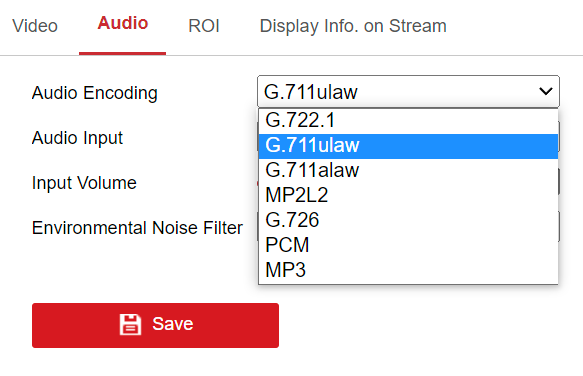
I am trying to get audio working in the latest release. my camera does not support AAC which is the best option to choose?
-
I have just recently upgraded my board to this one and the links above no longer work are was hoping that someone could tell me what the 6 pin ATX12V_1 is for?
-
Sorry to dig this up but wanted to say that im using the same motherboard the Asus X99-WS/IPMI and adding pcie_aspm=off worked for me. but im curious to know what the error is? i checked in my BIOS and ASPM is already off
-
Thanks for digging this out it worked
-
Thanks I will do so
-
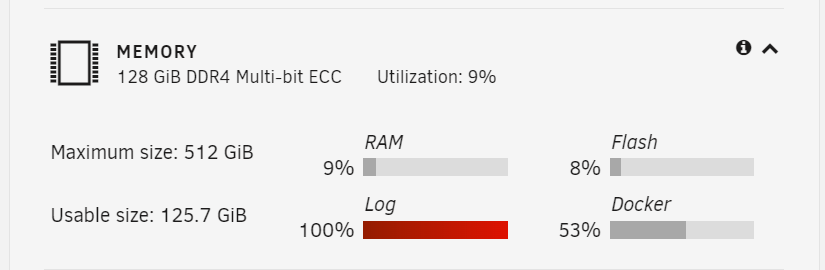
I have upgraded my servers Motherboard, CPU and RAM. when i booted back up everything appears to be working fine. however I have noticed my logs are full what can be causing this? jarvis-diagnostics-20230311-2307.zip
-
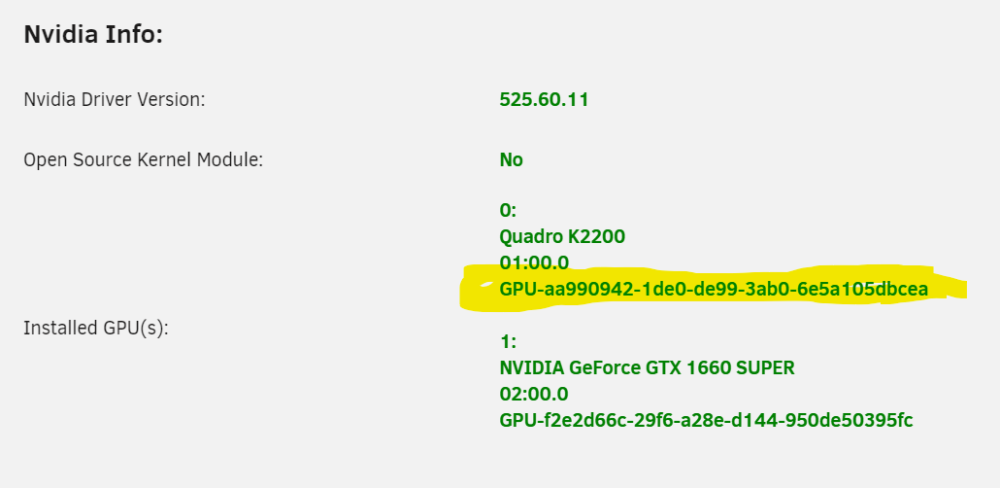
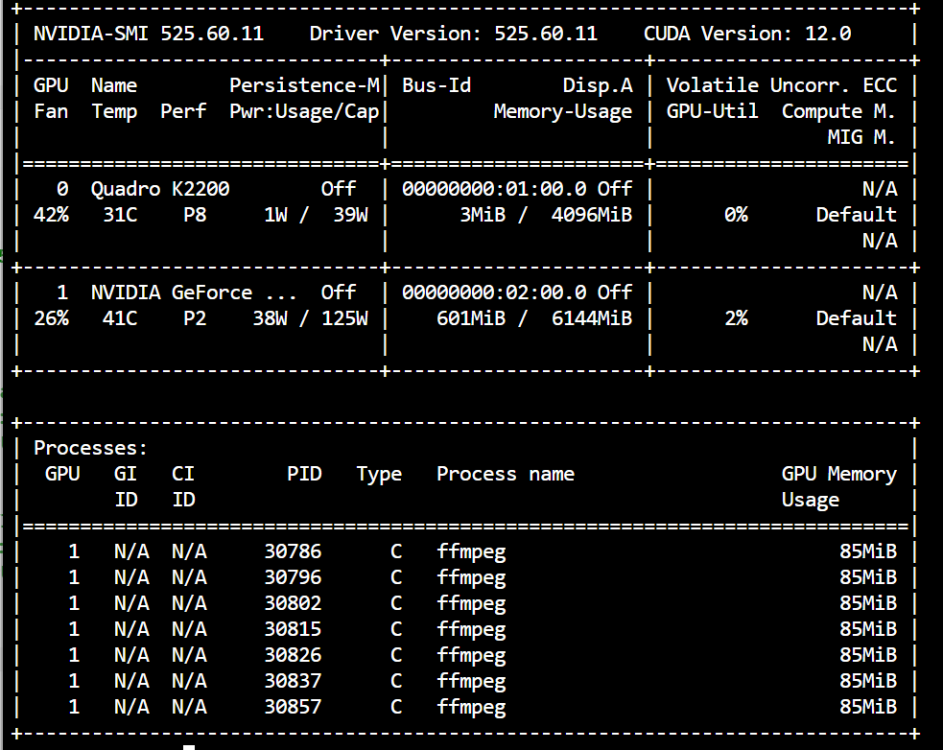
so after getting everything up and running I have added another GPU into my server to use with a VM. so i have changed the config of my docker I have added the below and then the following two parameters I have added the correct ID for the GPU but for some reason its using the other GPU what have i done wrong?


-
in that case mine is the same about 20% cpu makes me happy to know its all working correctly
-
Thanks for the info suppose something is better then nothing I have a coral for my detection so i guess its the best it will get
-
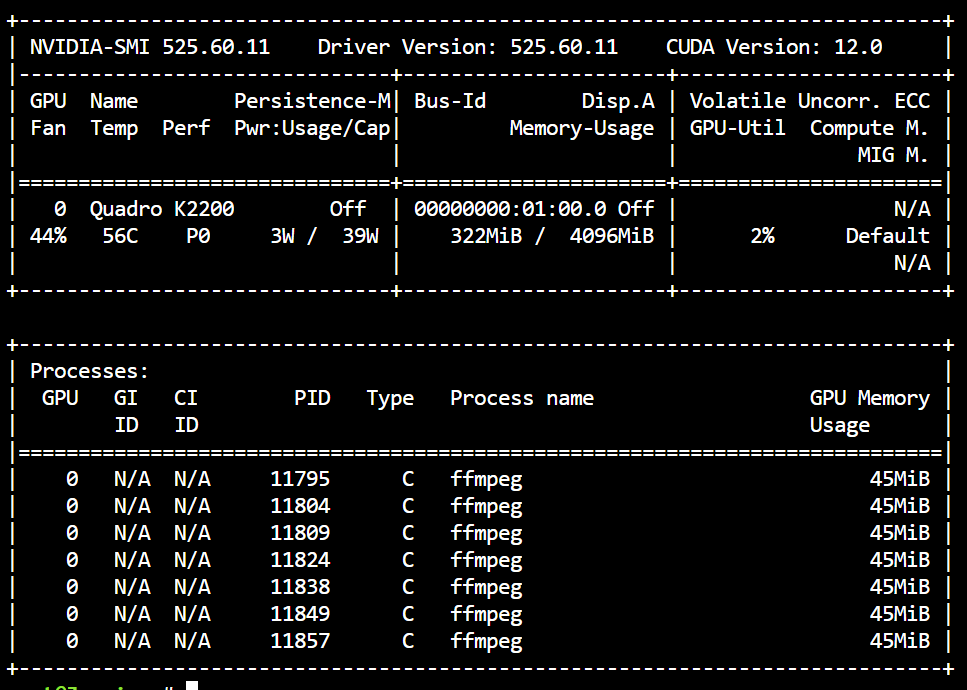
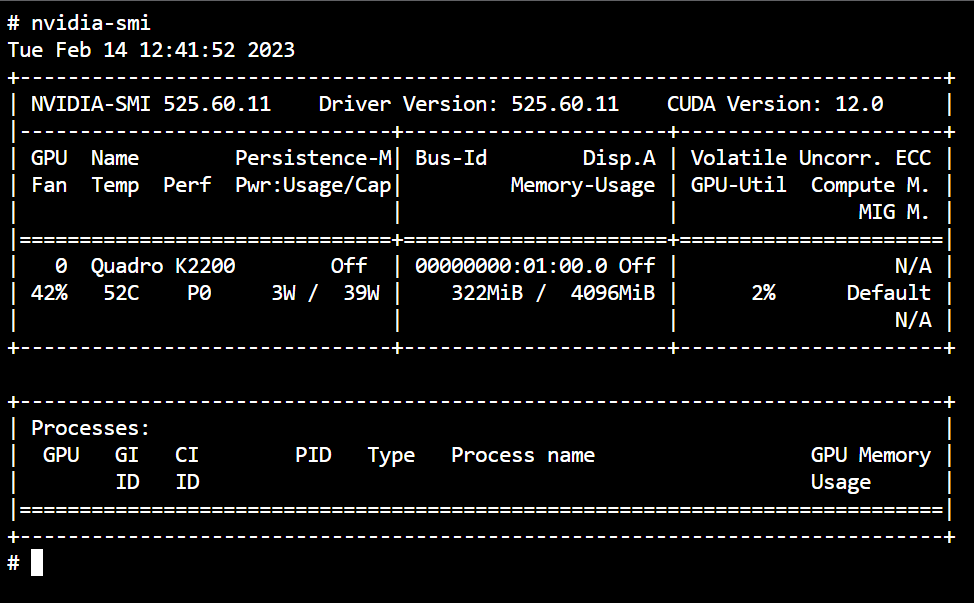
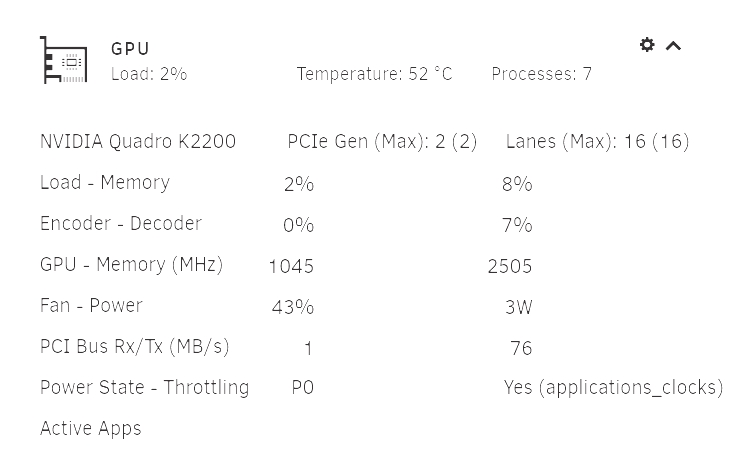
you are right i was looking in the container. looking at unraid it is using it I think i was expecting it to stop using CPU but for some reason its still using CPU too.
-
ok so added the below line ffmpeg: hwaccel_args: -c:v h264_cuvid however its still not using it this is from the container but my dashboard on Unraid reports some activity but my CPU usage has not dropped.
-
Im going to say no. what needs to change?
-
I am trying to use my NVIDIA GPU i have in my system its a old K2200 but thought its dormant so may as wel put it to use. I have changed my container and removed the Intel/AMD GPU mapping and then added extra parameter --gpus all. this does not seem to use the GPU what have I done wrong?
-
Hi, I have installed this container and seem to be getting some errors in the Log. what can this be? 1659882243: Error: Permission denied. 1659884044: Error: Permission denied. 1659885845: Error: Permission denied. 1659887646: Error: Permission denied. 1659889447: Error: Permission denied. 1659891248: Error: Permission denied. 1659893049: Error: Permission denied. 1659894850: Error: Permission denied. 1659896651: Error: Permission denied. 1659898452: Error: Permission denied. 1659900253: Error: Permission denied. 1659902054: Error: Permission denied. 1659903855: Error: Permission denied. 1659905656: Error: Permission denied. 1659907457: Error: Permission denied. 1659909258: Error: Permission denied. 1659911059: Error: Permission denied. 1659912860: Error: Permission denied. 1659914661: Error: Permission denied. 1659916462: Error: Permission denied. 1659918263: Error: Permission denied. 1659920064: Error: Permission denied. 1659921865: Error: Permission denied. 1659923666: Error: Permission denied. 1659925467: Error: Permission denied. 1659927268: Error: Permission denied. 1659929069: Error: Permission denied. 1659930870: Error: Permission denied. 1659932671: Error: Permission denied. 1659934472: Error: Permission denied. 1659936273: Error: Permission denied. 1659938074: Error: Permission denied. 1659939875: Error: Permission denied. 1659941676: Error: Permission denied. 1659943477: Error: Permission denied. 1659945278: Error: Permission denied. 1659947079: Error: Permission denied. 1659948880: Error: Permission denied. 1659950681: Error: Permission denied. 1659952482: Error: Permission denied. 1659954283: Error: Permission denied. 1659956084: Error: Permission denied. 1659957885: Error: Permission denied. 1659959686: Error: Permission denied. 1659961487: Error: Permission denied. 1659963288: Error: Permission denied. 1659965089: Error: Permission denied. 1659966890: Error: Permission denied. 1659968691: Error: Permission denied. 1659970492: Error: Permission denied. 1659972293: Error: Permission denied. 1659974094: Error: Permission denied. 1659975895: Error: Permission denied. 1659977696: Error: Permission denied. 1659979497: Error: Permission denied. 1659981298: Error: Permission denied. 1659983099: Error: Permission denied. 1659984900: Error: Permission denied. 1659986701: Error: Permission denied. 1659988502: Error: Permission denied. 1659990303: Error: Permission denied. 1659992104: Error: Permission denied. 1659993905: Error: Permission denied. 1659995706: Error: Permission denied. 1659997507: Error: Permission denied. 1659999308: Error: Permission denied. 1660001109: Error: Permission denied. 1660002910: Error: Permission denied. 1660004711: Error: Permission denied. 1660006512: Error: Permission denied. 1660008313: Error: Permission denied. 1660010114: Error: Permission denied. 1660011915: Error: Permission denied. 1660013716: Error: Permission denied. 1660015517: Error: Permission denied. 1660017318: Error: Permission denied. 1660019119: Error: Permission denied. 1660020920: Error: Permission denied. 1660022721: Error: Permission denied. 1660024522: Error: Permission denied. 1660026323: Error: Permission denied. 1660028124: Error: Permission denied. 1660029925: Error: Permission denied. 1660031726: Error: Permission denied. 1660033527: Error: Permission denied. 1660035328: Error: Permission denied. 1660037129: Error: Permission denied. 1660038930: Error: Permission denied. 1660040731: Error: Permission denied. 1660042532: Error: Permission denied.
-
I have been through all of the troubleshooting steps and just cant get it working again. is their any guidance you can provide?
-
for some reason my docker has stopped farming its been a couple of days now but im not sure why. when i check the block chain tab it says the below Exception from 'show' Traceback (most recent call last): File "/chia-blockchain/chia/cmds/show.py", line 41, in show_async blockchain_state = await client.get_blockchain_state() File "/chia-blockchain/chia/rpc/full_node_rpc_client.py", line 27, in get_blockchain_state response = await self.fetch("get_blockchain_state", {}) File "/chia-blockchain/chia/rpc/rpc_client.py", line 49, in fetch raise ValueError(res_json) ValueError: {'error': "b'\\xd7\\x80\\xd2,z\\x87\\xc9\\xe0\\x1d\\x98\\xb4\\x9a\\t\\x10\\xf6p\\x1c;\\x95\\x01WA1k?\\xda\\x04.]{\\x81\\xd2'", 'success': False} anyone know whats happened? I haven't even touched it just leave it to do its thing
-
Excellent thanks think i got it
-
Are there any instructions on how to do this? I am looking to set up a cross platform server
-
this maybe my issue. even though I have the - before the EFI my BIOS still sees the UEFI boot partition and not the Legacy. again i can still boot the legacy if I force boot to it from the F8 Boot Menu
-
if i have disabled UEFI in UNRAID and it adds the - to the EFI folder should my motherboard not even see it in the BIOS? as it still sees it as an option



