Maddeen
Members
-
Joined
-
Last visited
Everything posted by Maddeen
-
@KptnKMan thank you very much. I wasn't sure if my first decision for this board is right - but after your review, I'll definitely go with the TUF - but without WiFi, because I dont have a usecase for that 😜 I selected the TUF over others because of the following reasons - X570 Chipset to be able to use latest Ryzen - 8x SATA - No PCI-E lane sharing. Last bullet point wasn't as easy as I thought. I was kind of shocked when I found out that the majority of the boards (even the more expensive) share PCI-E lanes or - even worse - share m.2 with SATA. Do you use any 10Gb NIC and have a recommendation too? And please - if you need to made any special "moves" to get the thermal sensor running - please write it down here 😝
-
@ShortBusHero - thats why I set up a specific "inbox" folder. I can't copy any files to the queue folder, too. I guess that the queue file is NOT proposed to be an inbox folder. It's - what it sounds like - a queue - not an inbox. Maybe its used for the OCR when uploading a bunch of files and queueing those for the ocr function. So just create another folder e.g. "in" - set it up in the appdata config file and I'm pretty sure that you ready to use Here's my papermerge.conf.py MEDIA_DIR = "/data/media" STATIC_DIR = "/app/papermerge/static" MEDIA_URL = "/media/" STATIC_URL = "/static/" IMPORTER_DIR = "/data/in" IMPORTER_URL = "/in/" LANGUAGE_CODE = "de-DE" OCR_DEFAULT_LANGUAGE = "deu" OCR_LANGUAGES = { "deu": "Deutsch", } @blaine07 my timestamps are also not correct. current time of my MacMini = 17:54 time in the papermerge log = 15:54 time in console (unraid and docker) after the command "date" = Tue Oct 13 17:54:36 CEST 2020 That "exact 2 hours difference" thing seems to be a well known problem when googling that .. some kind of UTC (Linux standard) in addition to another time zone (Berlin +1 hours ) AND the european day light saving zone (+1 hour) ...
-
And I can confirm, that my mentioned bug with a constant 100% CPU load is gone, too! Nice work!
-
Hi - can anything else cause this error? We (trurl and I) talked months ago - I replaced the SATA cable - fine for 3-7 parity checks. Now it starts counting again - always 1 error count per parity check. I can't belive that the new cable cause this error again.
-
@KptnKMan May I ask you for a quick review of that board? Did you ran into any problems? (beside this here with the temp monitor) Or do you got useful tips/hints for better bios settings or an unproblematic unRAID installation? I'm planing to send my i7 6700 in his well earned retirement and the ASUS TUF GAMING X570-PLUS is one of my two options. I don't need the WiFi model but as far as I researched all other specs are totally identical. Thank you for any information.
-
That wasn't a complaint - I'll wait - but I just want to understand it - thats why I'm asking. For me it's not logic Because at first - I don't know why you talking about 600MB if - as seen in my log above - the german tesseract comes within 1,5MB of extra storage. And yes - this is englisch speeking forum - but as far as I found out, papermerge comes by default with all languages and the default language was german (because Eugen is a german developer) So (for me - a not-developer) it sounds easier to just transist a software to a docker without any changes instead of customizing a product by cutting out default features/settings. But no need to explain that --- you're the devs and you do whatever you like - fine for me! I'll join your discord - thanks for this. May be some one will ran into the same issues in the future.
-
Mhhh .. isn't the cleanest solution always a full integration instead of providing a mod? Eugen (the dev of papermerge) works in germany and by default he's providing papermerge with both languages. So imho this docker is a mod - because it dont provide the default files and must be "change" May be @linuxserver.io can bring some light in here? Why do you not provide papermerge "as it is" with both languages and make this detour with a docker (only englisch) and an extra mod for the docker, to bring features (german) that are by default integrated? I can't understand that - but I honestly doesnt have any clue about dockers And - additionally - your docker seems to have a bug. As soon as I add a file, the CPU is firing up (100%) to make the ocr analyzis - fine. But in my case this 100% CPU load will never stop - I need to stop the whole docker - after a restart everythings fine. I have tested for about 2 hours --- constantly 100%. That can't be correct. Due to my job, ocr analyzis and extraction is my daily business (Abbyy, Kofax, Tesseract too) and a single page must be (ocr) analyzed and fully extracted within seconds (with my i7 6700 - even if the docker is pinned to two cores only). Can I provide you anything so that you can fix it? Thanks you in advance.
-
hell no -- so easy -- 🙈🤣 Seems to work, because now it says "OCR = GERMAN" (see screen) I'll verify that with some documents containing special german chars like Ü-Ä-Ö 😜 Due to my absolutly knowledge-less please let me please ask another question - if the solution is just easy as you describe it, why there's a need for a "mod" instead of wrapping the needed tesserac ocr files (1540kb of data as said in the shell log below) directly in the docker container providing all users a simple language switch? And ... I get some (maybe?) errors when running the shell command - as you can see here. Anything to worry about? # apt-get install tesseract-ocr-deu Reading package lists... Done Building dependency tree Reading state information... Done The following NEW packages will be installed: tesseract-ocr-deu 0 upgraded, 1 newly installed, 0 to remove and 1 not upgraded. Need to get 745 kB of archives. After this operation, 1540 kB of additional disk space will be used. Get:1 http://archive.ubuntu.com/ubuntu focal/universe amd64 tesseract-ocr-deu all 1:4.00~git30-7274cfa-1 [745 kB] Fetched 745 kB in 0s (3742 kB/s) perl: warning: Setting locale failed. perl: warning: Please check that your locale settings: LANGUAGE = "en_US.UTF-8", LC_ALL = (unset), LANG = "en_US.UTF-8" are supported and installed on your system. perl: warning: Falling back to the standard locale ("C"). debconf: unable to initialize frontend: Dialog debconf: (No usable dialog-like program is installed, so the dialog based frontend cannot be used. at /usr/share/perl5/Debconf/FrontEnd/Dialog.pm line 76, <> line 1.) debconf: falling back to frontend: Readline debconf: unable to initialize frontend: Readline debconf: (Can't locate Term/ReadLine.pm in @INC (you may need to install the Term::ReadLine module) (@INC contains: /etc/perl /usr/local/lib/x86_64-linux-gnu/perl/5.30.0 /usr/local/share/perl/5.30.0 /usr/lib/x86_64-linux-gnu/perl5/5.30 /usr/share/perl5 /usr/lib/x86_64-linux-gnu/perl/5.30 /usr/share/perl/5.30 /usr/local/lib/site_perl /usr/lib/x86_64-linux-gnu/perl-base) at /usr/share/perl5/Debconf/FrontEnd/Readline.pm line 7, <> line 1.) debconf: falling back to frontend: Teletype Selecting previously unselected package tesseract-ocr-deu. (Reading database ... 10584 files and directories currently installed.) Preparing to unpack .../tesseract-ocr-deu_1%3a4.00~git30-7274cfa-1_all.deb ... Unpacking tesseract-ocr-deu (1:4.00~git30-7274cfa-1) ... Setting up tesseract-ocr-deu (1:4.00~git30-7274cfa-1) ...

-
@b0mb - mhhh that sounds good, but how I get to docker shell?!? Sorry - I'm relatively new to unraid AND docker as well... 🙈 German interface changed successfully - thanks for that, too!!
-
Thanks - that worked! So I can test while I'm waiting for german language and OCR.
-
@saarg thanks for your reply. Your first reply had implicit for me that you already build that necessary mod. Then I'll have to wait to use paperwork - no problem.
-
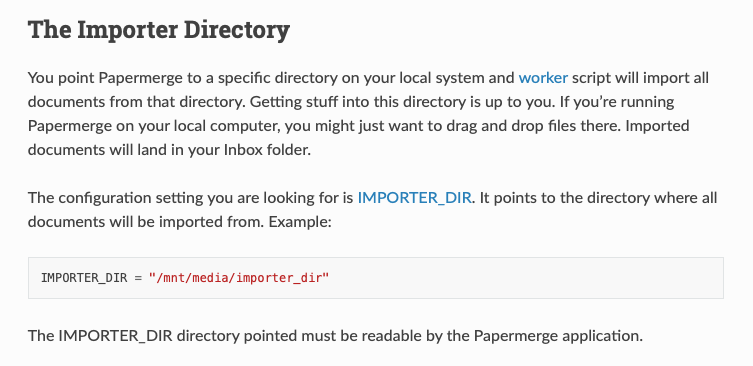
I'm also interested to get this docker in german. But I can't find any readme. And at the project site at docker it says "There're no mods available for this container" Additionally - I don't understand how to use a docker mod. May be you can write some sentences to describe exactly how to do this to get german settings and OCR language. I just found some hint that it just need this command - but how and where does that need to set up? user/endpoint:tag And I'm searching for a solution to define the "Input" folder. I found this in the documentation, but I'm not able to set it for the docker container. @blaine07 can you please describe step by step what you've done? I already see the "queue" folder within the root of the folder set up at "data path" - along with the folders media and static. But I cant upload any file into the queue folder - nor in any other. Thank you for your help-
-
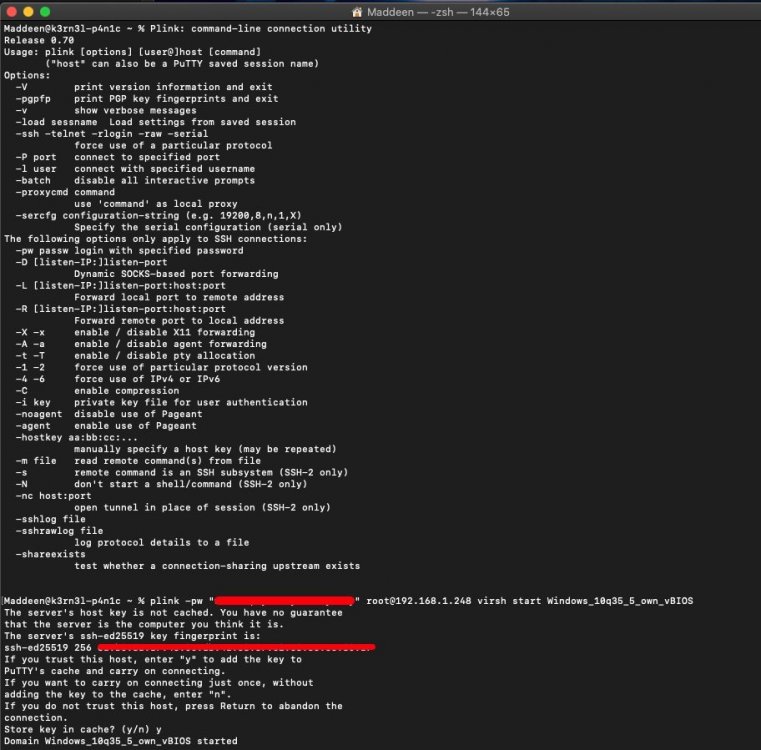
I got it ... just need to enter "plink" in the cli instead of "putty" - the typical ?help information appeared If I match your commands plink -pw <unraid root password> root@<unraid IP> virsh start <Name of VM> with my credentials .... magic happens Now I just need to find a way to wrap this command in an Automator script or a shortcut to start that command with a simple double click without seeing the terminal window appear Thanks again for you help. As soon as I got a solution I'll make a short summarized guide/documentation for other MacOS users out there
-
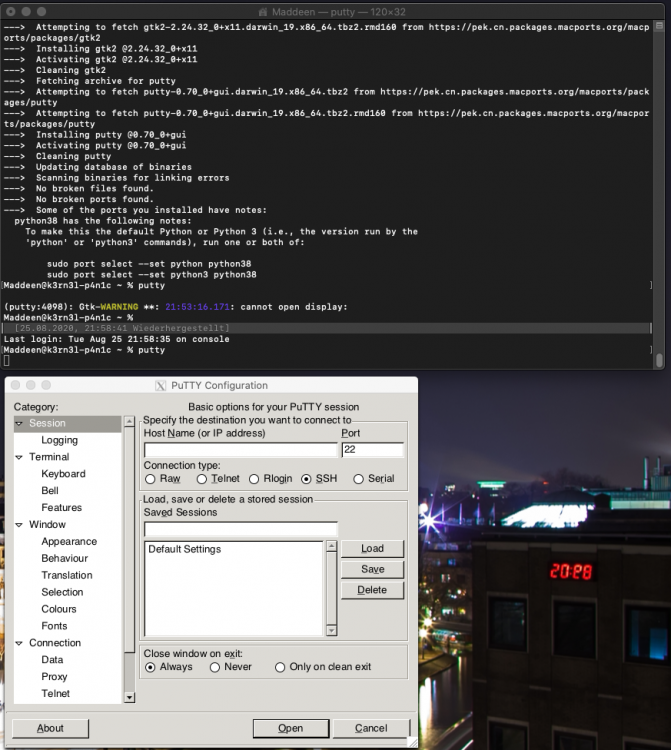
@jonathanm - thanks. The good news - I managed to install it. But know I need your assistance again hoping that the linux adaption is likely the macport. After installation I can run the command "putty" .. but it just opens the typical putty GUI (see Screen) But how about using the command plink as you described above?
-
@testdasiok - the commands themself works as predicted. But now I got another problem. Due that I'm a MacOS user I can't get "sshpass" to work. So I can't build a cli command like sshpass -p "password" ssh -o StrictHostKeyChecking=no root@YOUR_IP_ADRESS I need to have a passwordless login via ssh-key. Normally this wouldn't be a problem for me - I set this up on my Raspberry with no struggles - but on Raspberry it was quite easy. Copy pub-key to the PI - ready! But the manual I found HERE in the forum, is outdated (Unraid 6.8 and above does not allow executing scripts from the flash (/boot) drive) and nobody have updated this for a current solution Is it possible that I just copy the id_rsa.pub (generated on my mac) to the folder /boot/config/ssh/ - reboot - and everythings fine? UPDATE: @jonathanm - thanks for this hint. I dont saw it when I wrote the lines above. I'll try it and give a feedback asap UPDATE2: @jonathanm - sadly putty is a windows software and not be available for mac So the question above is still applies
-
Thanks - works flawless. I`ll try to build a simple Automator script and give a feedback. Process should be very simple like.... open terminal app (hided) ssh into server virsh start <Name of VM>
-
Hi everybody, just want to ask if theres a lightweight way to start / stop a vm. Maybe with a CLI command that can be packed within a automator script or an app or something more efficent? The way via webGUI is ok, but maybe there is an even more efficient way... because first you need to start the browser, than you have to login in unRAID and then you can start the VM. But imho there should be better way - similiar to WoL-Apps... yes, it`s also possible to fire up a wake on LAN package via CLI command running a CLI, loggin in and so on ... but a simple (double)click on an app-icon is even better Thanks for any hint. Have a nice sunday
-
Thanks @lotetreemedia for this quick and easy guide. HW transcoding works flawless with my hardware (i7 6700 + ASUS HERO VIII)
-
As a victim of this behavior I'll vote for this feature. The cache pool becomes - imho - completely useless if unraid performs an array-auto-start with a missing cache drive - resulting in a complete data loss. For now I'll follow Johnnies advise to deactivate array-auto-start - but that can only be a workaround - not a solution!
-
Same „unknown device“ here but running on an i7 6700. Sadly I’m not able to decrypt this information, too! 🙈😜 where should I go to „list all devices“ ?
-
Is anything planed to fix this? I also get this error but I cant switch to i440 because my VM with AMD VEGA wont boot anymore. I need to stay at Q35 -- but daily reboots are very sad to get my VM working again.
-
@bonienl - it seems that this does the trick for me. (see log) I'll validate this within the next days to be sure that my server is going to sleep reliably and will give an update here. If I can validate this, it would be nice (for others) if you extend your help description of the parameter "Device activity monitoring" with a short note, that in case of troubles users should try "counters only". Thanks again - update follows. Jun 3 00:03:26 UNRAID s3_sleep: All monitored HDDs are spun down Jun 3 00:03:26 UNRAID s3_sleep: Extra delay period running: 0 minute(s) Jun 3 00:03:26 UNRAID s3_sleep: Check TCP/SSH/TTY/IP activity Jun 3 00:03:26 UNRAID s3_sleep: Communication state is idle Jun 3 00:03:26 UNRAID s3_sleep: Enter sleep state now Jun 3 00:03:26 UNRAID kernel: PM: suspend entry (deep) Jun 3 00:03:26 UNRAID kernel: PM: Syncing filesystems ... done. Jun 3 10:00:10 UNRAID kernel: Freezing user space processes ... (elapsed 0.001 seconds) done. Jun 3 10:00:10 UNRAID kernel: OOM killer disabled. Jun 3 10:00:10 UNRAID kernel: Freezing remaining freezable tasks ... (elapsed 0.000 seconds) done. Jun 3 10:00:10 UNRAID kernel: Suspending console(s) (use no_console_suspend to debug) Updates: Jun 4th -> going to sleep at 00:03 - wake up at 10:00 - verified ✔️ Jun 5th -> going to sleep at 00:03 - wake up at 10:00 - verified ✔️ Jun 6th -> going to sleep at 00:03 - wake up at 09:50 due to manual WOL - verified ✔️ Jun 7th -> going to sleep at 00:03 - wake up at 10:00 - verified ✔️ Jun 8th -> going to sleep at 00:03 - wake up at 10:00 - verified ✔️ @bonienl - as you can see in my updates, I happily can verify that changing the setting to "counters only" is the solution. So it appreciatly you can change the help note and add the information that changing to counters only will solve problems with the sleep Thanks and have a nice day.
-
@bonienl can you please help me? It seems that no one other than you can solve it. Your addon keeps telling me about disk activity - but there is none? As you can see HERE or HERE the WebGui shows all drives spun down, but your plugin seems to not recordnize it correctly. I also installed the "file activity plugin" for more informations, but that also sees no disk activity. Thank you very much.
-
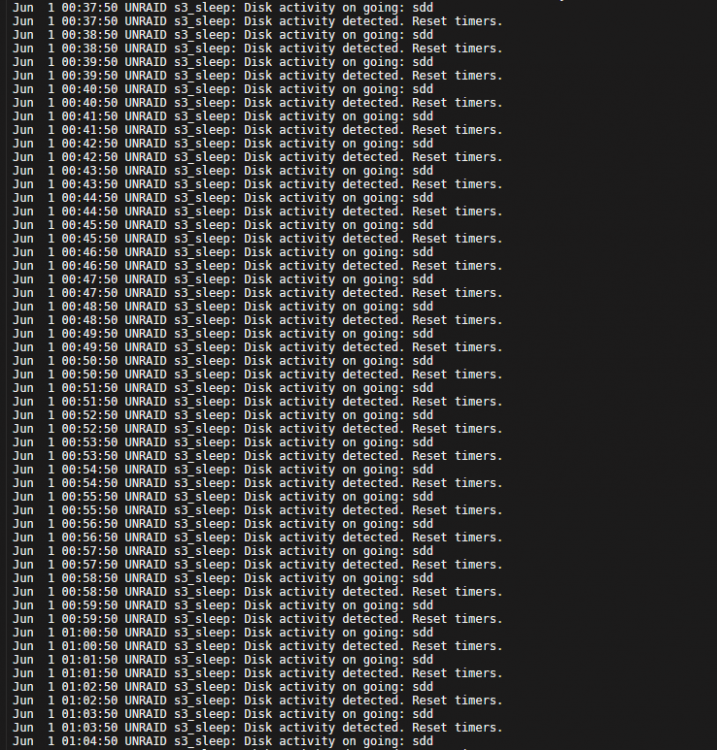
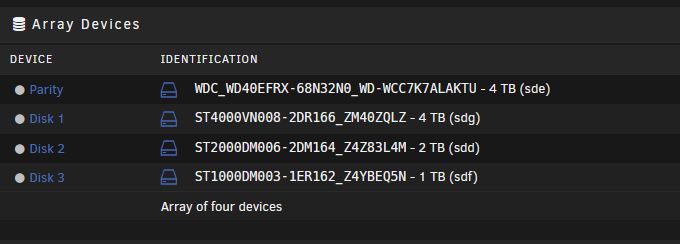
@LSL1337 did you found another log (or file) execpt the one in the UI. I try to figure out why one of my disk got constanly disk activity. In the UI (see screenshot #1) the plugin stopps logging disk activity at about 21:00 ... but the sleep plugin keeps telling me, that there is disk activity?! (Screenshot #2) And - what really crashes my brain - even NOW all disks seems to be spun down correctly in the UI. (Screenshot #3)

-
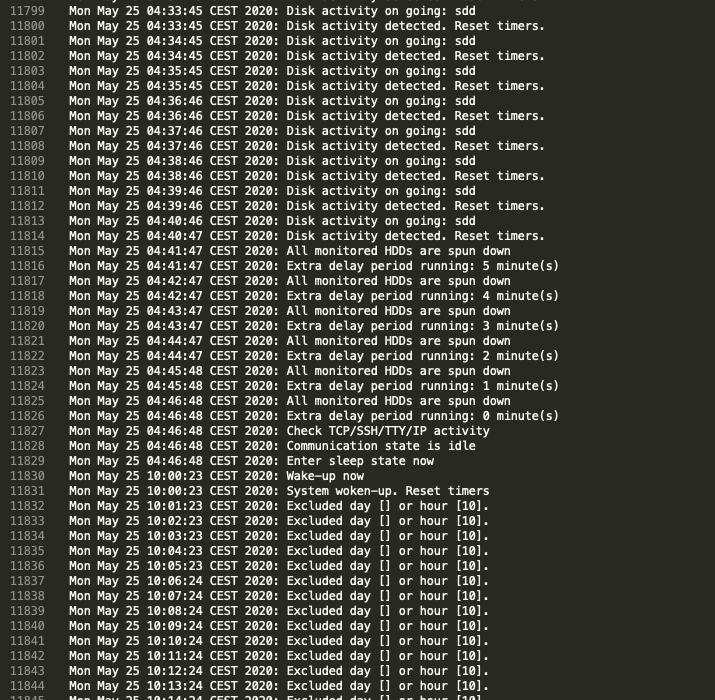
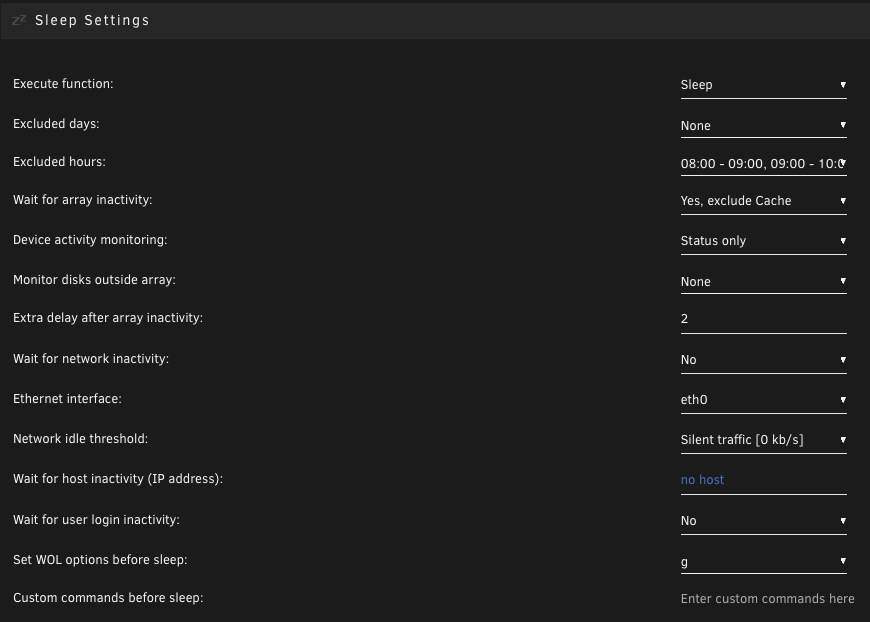
Anybody got a clue about my problem? HERE In the night from sunday to monday it went to sleep from 04:43 to 10:00. (see screenshot attached) Again it doesnt work correctly - because it should be go to sleep at around 00:01 due to my settings. And in the night from monday to today it completely ignored my settings again. 😡 Sorry for this (maybe) provocative question - but Is that plugin just simply unstable and/or unRaid not able to set the correct status of the hdd and I have to deal with it. I just ask because in over 25 years I never got such problems on ANY other device or OS setting up such a basic function like sleep. Windows goes to sleep, macOS goes to sleep, Playstation goes to sleep, QNAP /Synology goes to sleep - only unRaid cant handle such a basic thing? I even reduced the settings to make it as simple as possible. Just by time and activity. (see screenshot attached) No setup to network devices or something - but even this dont work. It can't be any user driven activity - because I'm always the last one going to bed - no one is doing anything in my network because everybody is sleeping. It's very frustrating to fail on this nobrainer (for at least it just works on any other hardware/OS) But the information "Disk activity on going: sdd" is useless if there is no hint what causes this.