





Espressomatic
Members
-
Joined
-
Last visited
Everything posted by Espressomatic
-
If that's true, I don't know how. Is it made 100% by different developers than work on PVE? Because PVE is, without reservation, one of the worst server-based applications I have ever had the displeasure of using. It's 100% garbage and I have to restrain myself from getting much more descriptive. If I never have cause to install it nor access its UI ever again, I'll be very content. I had given up on anything PVE except for one single small system that was to be dedicated to nothing by Home Assistant VM and a few LXCs for platforms that tie directly to Home Assistant and/or Homekit, like Scrypted, MQTT, etc. Had everything installed (using scripts because that's the only way to use PVE) and the whole system crashed after some time while I was working in Scrypted. Unraid has never crashed and brought down my entire server since I first set it up in 2018. So, that one simple system with only a single NVME drive in it, is also going Unraid, just to host the one VM. As for backup... I was planning to set up Borg, which also has a number of clients for various (other) platforms.
-
Want to bring down an entire network? Crap out a file server? Then simply forget to escape one or more entities when manually editing XML or other formatted config files. 🤣 Don't ask how many hours it took to figure out why my wireless APs and other systems on my LAN weren't getting DHCP leases from pfSense. Uuuugh. I suppose another way is, don't use characters that need escaping in text fields.
-
This is still not possible in 7 betas, so I'm not sure what the other replies were about. "Stopping the Array" (Array Operations -> Stop) means stopping all Unraid services and shares, including VM and Docker, not just the pool of disks known as the "array." It makes no difference where data is stored for VM or Docker, because Stopping brings those services down completely. That is, when it works. Recently this has been hit or miss in testing - stopping will typically hang up forever, unable to bring the shares down after taking down the other services. I hope that the entire list of buttons/functions under Array Operations goes away, and that specific functions are moved to more relevant pages/tabs ion the UI. Like Shut down, Reboot and Sleep going into a power menu/button (and they're already on the main dashboard). Spin up/down moved to the disk sections/tabs along with Move. I've split my services and functions of my old server onto multiple different machines, so I never have to use the start/stop buttons. My apps/services system has no array-type pool and is all solid-state ZFS. My NAS system has no docker nor VM and is mostly spinners in ZFS. Routing/DHCP, Firewall and DNS has its own mini system and as of tomorrow Home Automation on its own system too.
-
No. Snapshots are not backups. Kind of in the same way that a mistress is not a backup of a wife. That said, I plan to use 3rd party backup software which will hopefully also take care of the VMs. (instead of making manual copies like I have been now)
-
Especially considering there's a set of preferences that control notifications. Maybe instead of a banner, a notification conforming to those already able to be controlled, might be more appropriate. Earlier this year it seemed like any day I opened the Unraid UI there was a banner at the top of the screen telling me that an update to Unassigned Devices was available. I already had automatic updates enabled, but whatever the frequency of the updates, they still weren't often nor quick enough to prevent a banner from showing up. Don't get me wrong, it's an annoyance, but I'm not trying to disparage or downplay the usefulness of the tools that pop these up, like CA and UD. They're great. And these annoyances don't come close to degrading the UI to the point where I'd abandon the platform or anything like that. If I wanted a terrible and next-to-unusable UI, I'd hook myself up with a Proxmox-Portainer masochist sandwich.
-
Blocking it is the only way. Third party contributions are one of the main things that make Unraid great. They're also responsible for a lot of the inconsistent UI and putting things onto the screen that can't be managed nor controlled by the customer. If I wanted banners (for 10 seconds, 1 second, whatever), I'd enable them. The thought that anyone believes "it's not a big deal" is preposterous. Having to use an ad-blocker to manage the UI is a bit ridiculous. Love Unraid, recommend it always, but the #1 thing it needs right now is a major UI overhaul and strict design guidelines to be followed by all third party sw that taps into it. As far as removing Plugins and Docker tabs (mentioned back in 2022), I'd rather see the CA (Apps) tab removed. When I go to the Docker tab, there can be a place there to browse a docker repo (apps) and only dockers. When I go to Plugins, there can be a place there to browse a plugins repo. That makes a lot mroe sense and is much easier to manage (cleanly). I absolutely never use any submenu of the CA tab - and haven't in 6+ years.
-
I'd love to see this as well, but for different reasons - I've had the same Kingston USB key in use since 2018 and it's had zero issues, so stability isn't an issue for me personally. I'm thinking more of removing friction for installation and testing, with a goal of increasing sales and market share. Booting from any disk would make Unraid more attractive to a lot of people considering a move from another platform or testing multiple platforms at one time. see a lot of folks complaining about the USB key before having ever trying Unraid - installing to any media, would likely get them to try an install, easily spinning up a VM without having to pass a USB port before installing. More people trying leads to more people buying - which is good for everyone.
-
Nothing wrong with my Windows systems. Then again, in 30 years I've never installed any anti-virus or security software on any machine. I wonder if Crowdstrike is going to survive this. I guess it depends on whether they're operating on baseball rules and are allowed 3 strikes. 🤣
-
Hardware RAID = never for this use. Anything happens to a drive and it's all dead. Anything happens to any part of the raid card/board and it's all dead. Use Unraid or MergerFS if you want to concatenate multiple drives. With Unraid, XFS format, with Merger, anything you want, including NTFS. My new backup system is a ReadyNAS business pro 6-bay case in which I've replaced the motherboard and customized the backplane - it runs Unraid. That gives me the option of mixed disk array or all-same 6-drive ZFS.
-
Will do, I'm not one to look a gift horse in the mouth - just more curious if something was going to come along to bite me in the ass when I least expected it. It's already been the opposite of fun around here because I took it on myself to rebuild all the hardware on my main server, split off all VM and apps to a second brand new system, all while building 3 more mini systems on non-name mainboards for OPNSense, Home Assistant on Proxmox and a backup NAS which will be the 3rd Unraid box. Thankfully everything Unraid has generally gone smoothly. There's already been multiple hardware swaps, soldering to make custom connectors, fan swaps and later this weekend I'll be doing an SPI flash to the HA system to recover it from a bricked BIOS. Ufgh.
-
That dumpster fire can disappear off the face of the planet and I wouldn't have even noticed. 🤣 I need Kubernetes as much as I need another hole in my head. And if I were deploying for enterprise, none of the solutions mentioned, including TrueNAS, would be on a long list, let alone short.
-
This is like asking if Linux, the backbone of the OS, is in danger of disappearing. DOCKER. Not going anywhere. Install anything you want from anywhere, you don't need it to be listed in Unraid's Community App Store (repository). But let me assure you that Unraid's community is the biggest and most development oriented around. No other platform has this level of customer engagement and contribution. You can keep looking forever at other solutions like TrueNAS Scale (the only other platform that approaches what Unraid does, but with cluster support - but it also ONLY supports ZFS), Proxmox (primarily VM management with the worst UI anyone has ever deployed in the past 20 years), some desktop or server linux (like Debian or Ubuntu, Fedora Server, etc.) with Docker installed and then deploying Portainer (Docker management, but trying to give Proxmox a run for their money on abysmal design), Open Media Vault (OMFG), RockNAS (ugh, BTRFS only, bloody useless), etc. Take a month, take two, take two years. Short summary Nothing does it all as easily or with the versatility of Unraid. If you need what Unraid does, there's nothing else out there worth wasting a second on. If you DON'T need what Unraid does, and only need to deploy containers, then spin up some distro and put CasaOS on top of it to deploy them. Or Yacht, which is super easy and clean, but not eye-candy filled like CasaOS.
-
I'd love to see the whole STOP/START Array (System) feature go away entirely and replaced with individual prompts/warnings about specific pools as you mention above. Only take down what needs to be taken down for the change to be made. Keep the ability to take down specific pools or the actual disk array pool (if it's defined/used) without affecting the rest of the system. Maybe when/if the legacy array becomes a type of pool. As far as the items on this specific poll however, Web UI is far and away my #1. Multiple Arrays seems to already be on the books, mentioned to be coming in an upcoming 7.x release.
-
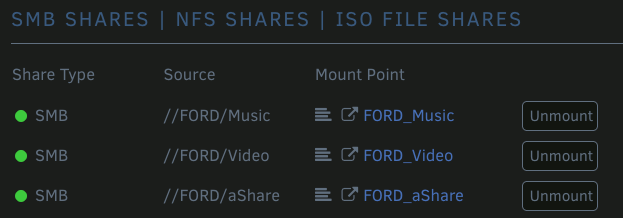
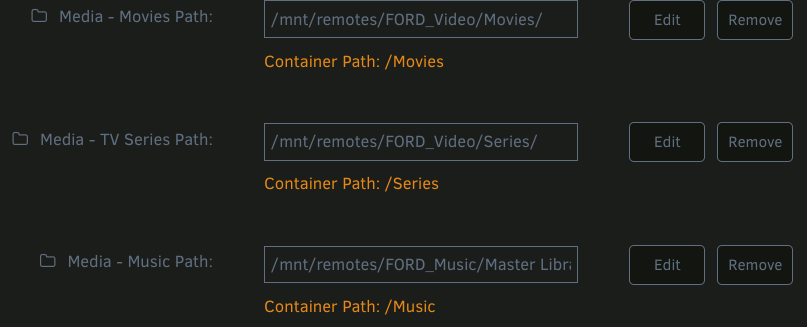
[7.0.0-beta.2] Plex can't see Unassigned Remote Shares mounted R/W-Slave This isn't in the form of a bug report, as it's more of an inquiry as I have no idea whether it's supposed to work this way or not... I've mounted shares from my Unraid NAS* (system 1) via SMB on a new Unraid apps server (system 2) with UD And then put them into the Plex docker config replacing the original local paths. Everything worked as expected - yay! However, FIx Common Problems reported that those remote shares should have the SLAVE option selected. I edited them to use the Slave R/W as instructed, but then the shares no longer work, and Plex can't see them. Going into Plex to "add path" for example I can't even see a "movies" path in the root displayed. Setting back to R/W without Slave and everything works again, and I can also see "movies" and other expected paths in Plex if I go to a file browser like "add path" to library. Does anyone have any insight on this? I've never tried remote shares this way back on 6.12 or earlier, so I have nothing to compare against. *My systems are named after characters in The Hitchhiker's Guide to the Galaxy - not car brands.

-
This isn't in the form of a bug report, as it's more of an inquiry as I have no idea whether it's supposed to work this way or not... As I set up a new system for Docker/VM, I mounted my original NAS shares from another system using UD and then put them into the Plex docker config replacing the original local paths. Everything worked as expected - yay! However, FIx Common Problems reported that those remote shares should have the SLAVE option selected. I edited them to use the Slave R/W as instructed, but now, the shares no longer worked and Plex couldn't see them. Going into Plex to "add path" for example I can't even see a "movies" path in the root displayed. Setting back to R/W without Slave and everything works again, and I can also see "movies" and other expected paths in Plex if I go to a file browser like "add path" to library. Does anyone have any insight on this? I've never tried remote shares this way back on 6.12 or earlier, so I have nothing to compare against.
-
I've switched all my shares to SMB from NFS now that I've stopped using the array and moved them to a ZFS Pool. Every one is Exclusive and no longer goes through FUSE. Instant directory listings and maxing out 1GbE network at the moment.
-
If it weren't for power failures, I'd have perpetual uptime. I've never had Unraid hang or crash out. UPS backed by large 12v gel-cells is going to help fix that soon enough.
-
The only drives I've had fail on me in the past 5+ years have all been Seagate. That didn't stop me from buying a few 14TB Seagates over the past year. The last two 14TB have been WD however (5 total of those now).
-
You want something simpler than PHP to write in? Anything easier would have to be AI doing all the work. PHP is like taking the easy part of every language out there and blending it together to make it all even easier. It's like barely more difficult than chicken-scratch pseudo-code. If you can get your share to EXCLUSIVE, then it's already there. As long as SMB isn't going through FUSE, I max out my 1GbE network. We'll see how it does on 10GbE within the next few weeks. I have all my shares as Exclusive now (all on ZFS pool) so I finally switched back to SMB from NFS which I'd been using for the past 4 years from my Macs.
-
There's no Starter perpetual license. The perpetual automatically offers unlimited drives. BUT, it's a good idea, IMO. Here's what's current: Layout and emphasis on above mine. You have 2 subscription options (which are phenomenal) and one Lifetime/Perpetual option. IMO, the above is good enough, but I can see room to attract some buyers with a 4-prong offering. How about this? Just an idea. I'd also suggest renaming "Starter" to something more catchy, like maybe "Sixer" - anyway, time for some sun and beverages, server work go nappy.
-
Yes, please.
-
This was the only thing I was able to do to see Ethernet and have it Connected in the Mac VM. Otherwise, without any manual edits, only a serial port is ever displayed 7.0.0-beta.1 doesn't ever list "e1000-82545em" as available, just "e1000" - and manually changing to that doesn't make Ethernet show up. If you make the changes above, but use "e1000" instead, Ethernet will show up, but will be disconnected with no way to make it work. Macinabox most definitely doesn't work properly in 7.0.0-beta.1 and likely 6.12.10 either. No matter what oddball setting you leave for interface, running the helper script always says it's correct. Your network type was already correct. Network has not been changed. But it does always seem to revert to Virtio-Net - which doesn't work in MacOS to show any Ethernet support.
-
Description While editing a VM, clicking its icon to change it creates a pop-up showing all the icons currently available on the boot drive to assign to the VM. Normally the icons are arranged in a grid within the window, which can scroll down to reveal more icons. In 7.0.0-beta.1 the contents appear in a single horizontal line and disappear off the right side of the window. The window can be scrolled to the right which allows selecting other icons. This is what it looks like in the current beta And this is what it looks like in 6.12.10 Expectation Expected to see a grid of icons as in previous releases. Steps to reproduce Open VM Management tab Click on any VM to edit Click on the VM icon at the top of the window The pop-up icon list will appear Regression Looks as expected in 6.12.10 as displayed in attached screen shot above
-
I'm having an issue where (most) VM vdisk files won't boot and instead go straight to UEFI shell when I try to import into 7-beta - this is by creating a new VM and using the prervious vdisk. In my testing, this has affected VMs for Fedora Server 40, Debian 12 and MacOS. Strangely, it doesn't affect my Home Assistant vdisk.
-
Summary When a VM is created using OVMF BIOS and the primary vdisk is pointed at a pre-made qcow2 file, it will fail to boot and dump you to UEFI shell. This is both for qcow2 files made in Unraid and previously working, or those downloaded or migrated from other environments (like Proxmox) The issue was described in another thread here: This matches exactly the issue I'm seeing and reporting in this thread, including creating initial VMs within Unraid instead of importing from other products. Description If you create a VM in Unraid using install media iso with OVMF BIOS (default for many selections like Debian and Fedora), you can then recreate the VM with the same settings, without install media, point it to the verified working vidsk, and it'll no longer work. Selecting SeaBIOS when creating the VM will correctly boot the vdisk file. Here's the XML from two VMs. One still working, and the other I just broke with the steps above. Working one is Fedora, broken one is Debian. XML looks pretty much identical other than ids and "disconnected" on the non-working for guest agent connection. Steps to reproduce - short method (pre-made vdisk download) Download Fedora Server 40 qcow2 vdisk file here: https://fedoraproject.org/server/download Copy/save qcow2 file to desired host file path (such as /mnt/users/domains/fedora/vdisk.qcow2) Create new VM in Unraid, select Fedora as type Specify Primary vdisk as MANUAL and point to the above qcow2 file Press Create button at the bottom to create and start the VM Open VNC VM Console Note EFI Shell instead of the vdisk booting Steps to reproduce - long method (all Unraid) Download install ISO media for Fedora Server 40 and/or Debian 12 Create new VM Select Fedora Select the install media ISO from where it's stored Press Create VM button at bottom of UI Proceed through setup using the VNC console Reboot once setup is complete and verify the vdisk is booting Create a second VM, this time Debian 12 Select install media ISO from where it's stored Press Create VM button at bottom of UI Proceed through setup using the VNC console Reboot once setup is complete and verify the vdisk is booting Both VMs are working at this point Stop both of them and remove the install ISO from each - restart and confirm still working Both VMs are working at this point Stop the Debian VM and remove/delete it - do NOT delete the vdisk file Create a new VM, select Debian as type Specify Primary vdisk as MANUAL and point to the vdisk qcow2 file you were just using Press Create button at the bottom to create and start the VM Open VNC VM Console Note EFI Shell instead of the vdisk booting Try selecting STOP VM from Unraid The VM instance will not stop Compare XML of Fedora and Debian VMs (samples included below) Fedora working <?xml version='1.0' encoding='UTF-8'?> <domain type='kvm' id='13'> <name>Fedora</name> <uuid>ae05b20a-155b-71d3-a0f9-3f7bc1292789</uuid> <metadata> <vmtemplate xmlns="unraid" name="Fedora" icon="fedora.png" os="fedora" webui="" storage="default"/> </metadata> <memory unit='KiB'>4194304</memory> <currentMemory unit='KiB'>4194304</currentMemory> <memoryBacking> <nosharepages/> </memoryBacking> <vcpu placement='static'>1</vcpu> <cputune> <vcpupin vcpu='0' cpuset='0'/> </cputune> <resource> <partition>/machine</partition> </resource> <os> <type arch='x86_64' machine='pc-q35-8.2'>hvm</type> <loader readonly='yes' type='pflash'>/usr/share/qemu/ovmf-x64/OVMF_CODE-pure-efi.fd</loader> <nvram>/etc/libvirt/qemu/nvram/ae05b20a-155b-71d3-a0f9-3f7bc1292789_VARS-pure-efi.fd</nvram> </os> <features> <acpi/> <apic/> </features> <cpu mode='host-passthrough' check='none' migratable='on'> <topology sockets='1' dies='1' cores='1' threads='1'/> <cache mode='passthrough'/> </cpu> <clock offset='utc'> <timer name='hpet' present='no'/> <timer name='hypervclock' present='no'/> <timer name='pit' tickpolicy='delay'/> <timer name='rtc' tickpolicy='catchup'/> </clock> <on_poweroff>destroy</on_poweroff> <on_reboot>restart</on_reboot> <on_crash>restart</on_crash> <devices> <emulator>/usr/local/sbin/qemu</emulator> <disk type='file' device='disk'> <driver name='qemu' type='qcow2' cache='writeback'/> <source file='/mnt/user/vm_hosts/Fedora/vdisk1.qcow2' index='1'/> <backingStore/> <target dev='hdc' bus='virtio'/> <serial>vdisk1</serial> <boot order='1'/> <alias name='virtio-disk2'/> <address type='pci' domain='0x0000' bus='0x03' slot='0x00' function='0x0'/> </disk> <controller type='sata' index='0'> <alias name='ide'/> <address type='pci' domain='0x0000' bus='0x00' slot='0x1f' function='0x2'/> </controller> <controller type='pci' index='0' model='pcie-root'> <alias name='pcie.0'/> </controller> <controller type='pci' index='1' model='pcie-root-port'> <model name='pcie-root-port'/> <target chassis='1' port='0x10'/> <alias name='pci.1'/> <address type='pci' domain='0x0000' bus='0x00' slot='0x02' function='0x0' multifunction='on'/> </controller> <controller type='pci' index='2' model='pcie-root-port'> <model name='pcie-root-port'/> <target chassis='2' port='0x11'/> <alias name='pci.2'/> <address type='pci' domain='0x0000' bus='0x00' slot='0x02' function='0x1'/> </controller> <controller type='pci' index='3' model='pcie-root-port'> <model name='pcie-root-port'/> <target chassis='3' port='0x12'/> <alias name='pci.3'/> <address type='pci' domain='0x0000' bus='0x00' slot='0x02' function='0x2'/> </controller> <controller type='pci' index='4' model='pcie-root-port'> <model name='pcie-root-port'/> <target chassis='4' port='0x13'/> <alias name='pci.4'/> <address type='pci' domain='0x0000' bus='0x00' slot='0x02' function='0x3'/> </controller> <controller type='pci' index='5' model='pcie-root-port'> <model name='pcie-root-port'/> <target chassis='5' port='0x14'/> <alias name='pci.5'/> <address type='pci' domain='0x0000' bus='0x00' slot='0x02' function='0x4'/> </controller> <controller type='virtio-serial' index='0'> <alias name='virtio-serial0'/> <address type='pci' domain='0x0000' bus='0x02' slot='0x00' function='0x0'/> </controller> <controller type='usb' index='0' model='ich9-ehci1'> <alias name='usb'/> <address type='pci' domain='0x0000' bus='0x00' slot='0x07' function='0x7'/> </controller> <controller type='usb' index='0' model='ich9-uhci1'> <alias name='usb'/> <master startport='0'/> <address type='pci' domain='0x0000' bus='0x00' slot='0x07' function='0x0' multifunction='on'/> </controller> <controller type='usb' index='0' model='ich9-uhci2'> <alias name='usb'/> <master startport='2'/> <address type='pci' domain='0x0000' bus='0x00' slot='0x07' function='0x1'/> </controller> <controller type='usb' index='0' model='ich9-uhci3'> <alias name='usb'/> <master startport='4'/> <address type='pci' domain='0x0000' bus='0x00' slot='0x07' function='0x2'/> </controller> <interface type='bridge'> <mac address='52:54:00:f3:61:90'/> <source bridge='br0'/> <target dev='vnet12'/> <model type='virtio-net'/> <alias name='net0'/> <address type='pci' domain='0x0000' bus='0x01' slot='0x00' function='0x0'/> </interface> <serial type='pty'> <source path='/dev/pts/1'/> <target type='isa-serial' port='0'> <model name='isa-serial'/> </target> <alias name='serial0'/> </serial> <console type='pty' tty='/dev/pts/1'> <source path='/dev/pts/1'/> <target type='serial' port='0'/> <alias name='serial0'/> </console> <channel type='unix'> <source mode='bind' path='/run/libvirt/qemu/channel/13-Fedora/org.qemu.guest_agent.0'/> <target type='virtio' name='org.qemu.guest_agent.0' state='connected'/> <alias name='channel0'/> <address type='virtio-serial' controller='0' bus='0' port='1'/> </channel> <input type='tablet' bus='usb'> <alias name='input0'/> <address type='usb' bus='0' port='1'/> </input> <input type='mouse' bus='ps2'> <alias name='input1'/> </input> <input type='keyboard' bus='ps2'> <alias name='input2'/> </input> <graphics type='vnc' port='5901' autoport='yes' websocket='5701' listen='0.0.0.0' sharePolicy='ignore'> <listen type='address' address='0.0.0.0'/> </graphics> <audio id='1' type='none'/> <video> <model type='qxl' ram='65536' vram='65536' vgamem='16384' heads='1' primary='yes'/> <alias name='video0'/> <address type='pci' domain='0x0000' bus='0x00' slot='0x01' function='0x0'/> </video> <watchdog model='itco' action='reset'> <alias name='watchdog0'/> </watchdog> <memballoon model='virtio'> <alias name='balloon0'/> <address type='pci' domain='0x0000' bus='0x04' slot='0x00' function='0x0'/> </memballoon> </devices> <seclabel type='dynamic' model='dac' relabel='yes'> <label>+0:+100</label> <imagelabel>+0:+100</imagelabel> </seclabel> </domain> Debian not working after recreating and pointing to existing qcow2 file <?xml version='1.0' encoding='UTF-8'?> <domain type='kvm' id='15'> <name>Debian</name> <uuid>9512924f-3e97-3821-9dc0-9a17cb6ebc48</uuid> <metadata> <vmtemplate xmlns="unraid" name="Debian" icon="debian.png" os="debian" webui="" storage="default"/> </metadata> <memory unit='KiB'>1048576</memory> <currentMemory unit='KiB'>1048576</currentMemory> <memoryBacking> <nosharepages/> </memoryBacking> <vcpu placement='static'>1</vcpu> <cputune> <vcpupin vcpu='0' cpuset='0'/> </cputune> <resource> <partition>/machine</partition> </resource> <os> <type arch='x86_64' machine='pc-q35-8.2'>hvm</type> <loader readonly='yes' type='pflash'>/usr/share/qemu/ovmf-x64/OVMF_CODE-pure-efi.fd</loader> <nvram>/etc/libvirt/qemu/nvram/9512924f-3e97-3821-9dc0-9a17cb6ebc48_VARS-pure-efi.fd</nvram> </os> <features> <acpi/> <apic/> </features> <cpu mode='host-passthrough' check='none' migratable='on'> <topology sockets='1' dies='1' cores='1' threads='1'/> <cache mode='passthrough'/> </cpu> <clock offset='utc'> <timer name='hpet' present='no'/> <timer name='hypervclock' present='no'/> <timer name='pit' tickpolicy='delay'/> <timer name='rtc' tickpolicy='catchup'/> </clock> <on_poweroff>destroy</on_poweroff> <on_reboot>restart</on_reboot> <on_crash>restart</on_crash> <devices> <emulator>/usr/local/sbin/qemu</emulator> <disk type='file' device='disk'> <driver name='qemu' type='qcow2' cache='writeback'/> <source file='/mnt/user/vm_hosts/Debian/vdisk1.qcow2' index='1'/> <backingStore/> <target dev='hdc' bus='virtio'/> <serial>vdisk1</serial> <boot order='1'/> <alias name='virtio-disk2'/> <address type='pci' domain='0x0000' bus='0x03' slot='0x00' function='0x0'/> </disk> <controller type='sata' index='0'> <alias name='ide'/> <address type='pci' domain='0x0000' bus='0x00' slot='0x1f' function='0x2'/> </controller> <controller type='pci' index='0' model='pcie-root'> <alias name='pcie.0'/> </controller> <controller type='pci' index='1' model='pcie-root-port'> <model name='pcie-root-port'/> <target chassis='1' port='0x10'/> <alias name='pci.1'/> <address type='pci' domain='0x0000' bus='0x00' slot='0x02' function='0x0' multifunction='on'/> </controller> <controller type='pci' index='2' model='pcie-root-port'> <model name='pcie-root-port'/> <target chassis='2' port='0x11'/> <alias name='pci.2'/> <address type='pci' domain='0x0000' bus='0x00' slot='0x02' function='0x1'/> </controller> <controller type='pci' index='3' model='pcie-root-port'> <model name='pcie-root-port'/> <target chassis='3' port='0x12'/> <alias name='pci.3'/> <address type='pci' domain='0x0000' bus='0x00' slot='0x02' function='0x2'/> </controller> <controller type='pci' index='4' model='pcie-root-port'> <model name='pcie-root-port'/> <target chassis='4' port='0x13'/> <alias name='pci.4'/> <address type='pci' domain='0x0000' bus='0x00' slot='0x02' function='0x3'/> </controller> <controller type='pci' index='5' model='pcie-root-port'> <model name='pcie-root-port'/> <target chassis='5' port='0x14'/> <alias name='pci.5'/> <address type='pci' domain='0x0000' bus='0x00' slot='0x02' function='0x4'/> </controller> <controller type='virtio-serial' index='0'> <alias name='virtio-serial0'/> <address type='pci' domain='0x0000' bus='0x02' slot='0x00' function='0x0'/> </controller> <controller type='usb' index='0' model='ich9-ehci1'> <alias name='usb'/> <address type='pci' domain='0x0000' bus='0x00' slot='0x07' function='0x7'/> </controller> <controller type='usb' index='0' model='ich9-uhci1'> <alias name='usb'/> <master startport='0'/> <address type='pci' domain='0x0000' bus='0x00' slot='0x07' function='0x0' multifunction='on'/> </controller> <controller type='usb' index='0' model='ich9-uhci2'> <alias name='usb'/> <master startport='2'/> <address type='pci' domain='0x0000' bus='0x00' slot='0x07' function='0x1'/> </controller> <controller type='usb' index='0' model='ich9-uhci3'> <alias name='usb'/> <master startport='4'/> <address type='pci' domain='0x0000' bus='0x00' slot='0x07' function='0x2'/> </controller> <interface type='bridge'> <mac address='52:54:00:c3:bc:1c'/> <source bridge='br0'/> <target dev='vnet14'/> <model type='virtio-net'/> <alias name='net0'/> <address type='pci' domain='0x0000' bus='0x01' slot='0x00' function='0x0'/> </interface> <serial type='pty'> <source path='/dev/pts/2'/> <target type='isa-serial' port='0'> <model name='isa-serial'/> </target> <alias name='serial0'/> </serial> <console type='pty' tty='/dev/pts/2'> <source path='/dev/pts/2'/> <target type='serial' port='0'/> <alias name='serial0'/> </console> <channel type='unix'> <source mode='bind' path='/run/libvirt/qemu/channel/15-Debian/org.qemu.guest_agent.0'/> <target type='virtio' name='org.qemu.guest_agent.0' state='connected'/> <alias name='channel0'/> <address type='virtio-serial' controller='0' bus='0' port='1'/> </channel> <input type='tablet' bus='usb'> <alias name='input0'/> <address type='usb' bus='0' port='1'/> </input> <input type='mouse' bus='ps2'> <alias name='input1'/> </input> <input type='keyboard' bus='ps2'> <alias name='input2'/> </input> <graphics type='vnc' port='5902' autoport='yes' websocket='5702' listen='0.0.0.0' sharePolicy='ignore'> <listen type='address' address='0.0.0.0'/> </graphics> <audio id='1' type='none'/> <video> <model type='qxl' ram='65536' vram='65536' vgamem='16384' heads='1' primary='yes'/> <alias name='video0'/> <address type='pci' domain='0x0000' bus='0x00' slot='0x01' function='0x0'/> </video> <watchdog model='itco' action='reset'> <alias name='watchdog0'/> </watchdog> <memballoon model='virtio'> <alias name='balloon0'/> <address type='pci' domain='0x0000' bus='0x04' slot='0x00' function='0x0'/> </memballoon> </devices> <seclabel type='dynamic' model='dac' relabel='yes'> <label>+0:+100</label> <imagelabel>+0:+100</imagelabel> </seclabel> </domain>




