doesntaffect
Members
-
Joined
-
Last visited
Everything posted by doesntaffect
-
Verkaufe wegen Upgrade das Board, die CPU und den CPU Kühler aus dieser Config: Die Config hat wie zu lesen ist das neuste Bios/BMC Firmware und läuft seit Tag 1 tadellos, ohne irgendwelche Macken. Ggfs. könnte der Speicher ebenfalls erworben werden, obwohl ich hier vor habe diesen in der neuen Config einzusetzen. Macht gerne Angebote, stellt Fragen Der Versand kann gegen Ende der kommenden Woche erfolgen.
-
It should do the trick. No Watercooling for the CPU? I'd probably go with the Supermicro or Asus as 2nd option. I'd use the 4 M.2 on the Supermicro for a 4x512GB, or 4x1TB Cache Raid 1+0 and add a 4x M.2 Risercard and add 4x2 - 4 TB NVMEs for the VMs, depending on your needs. PNY XLR8 CS3140 2TB For example, which could also serve as great fast cache drive.
-
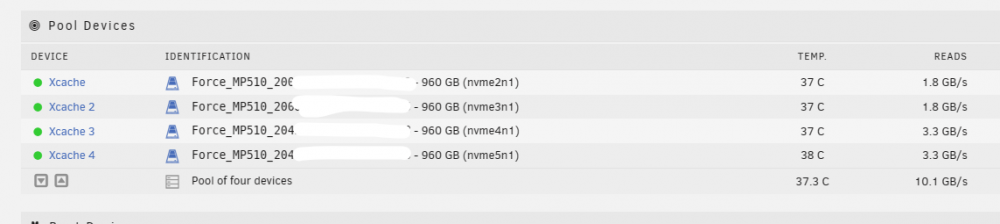
4x 960G in Raid 0+1, see shot below during a full scrub. No issues at all.
-
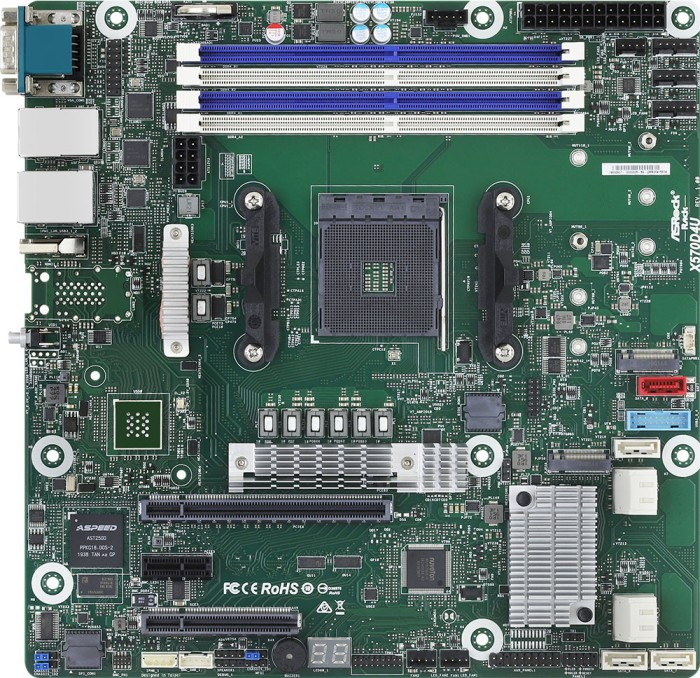
Hi folks, I am bit stuck with my reseach. I am using an Asrockrack X570D4U Board and want to install WIFI/BT to get Airdrop, Handover for my virtual Hackintosh working. The standard for such cases seems to be the Fenvi T919 which I would like to use (or any other option that will work OOB on this config) Unfortunately, the board does not provide USB 2.0 header (only 1x USB 3.0), which the Fenvi card requires for BT, so I was wondering what other solutions could work. I am also limited in terms of PCIe slots. The board has a x16 (x8 Fallback if x8 slot is used), one PCI x1 and another x8 slot. My planned card config: GPU in x16, WIFI/BT in x1 and NVME adapter in the x8 port at the bottom. I also mailed the Asrock support to understand if I can plug in other cards than M.2 SSDs into the 2 onboard M.2 slots. Answer is pending. Any advise on which hardware I should buy in this case?
-
everything cool, but the cabling What are the avg hdd temps?
-
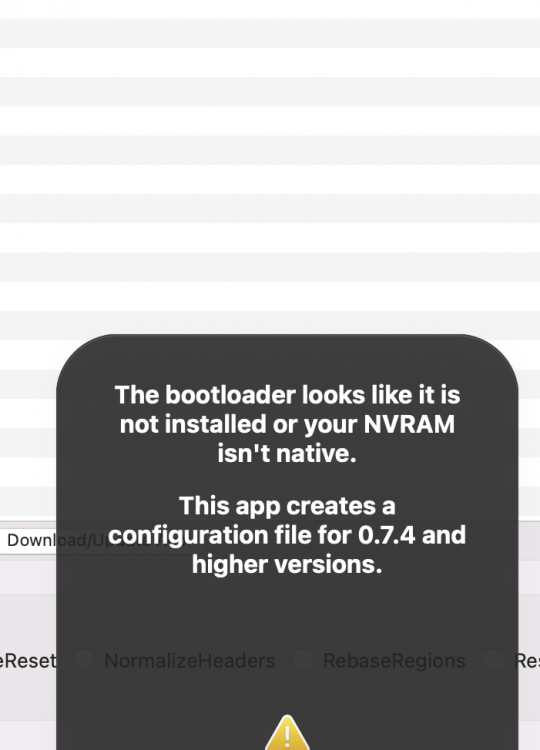
How do I do that? Within OC or within the Boatmenu? With other VMs I have seen a boot menu entry to reset the NVRAM but this one does not show this option, even though I set the flag in OC (the right one?) OC also throws this error when I start it and load the config I am using. Is this connected to the issue above? I am using OC 2.52.0.1

-
Thought I did that, changed value to German. Will check with Propertree in the morning.
-
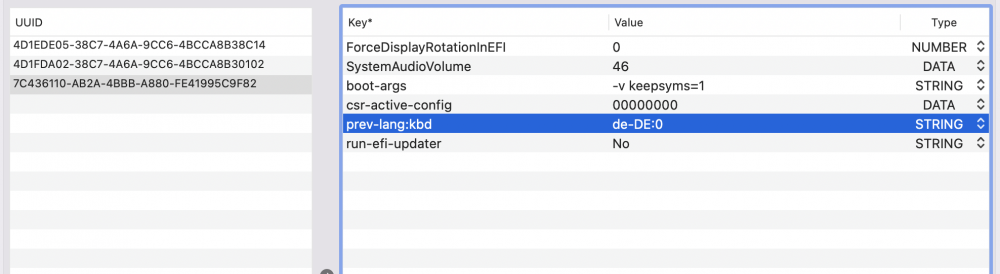
I am getting there, slowly. Using a BigSur Recovery Image which I build, based on Opencore 075. GPU and M.2 Passthrough seem to work well. However, seems like I cannot get the Installation language to switch to ENG or German, even though I changed the String (Which is the right one I think). I am using Opencore configurator atm. Any advise? My Russian is a bit rusty, ENG/GER would be nice.
-
@ghost82 How do I apply this fix to an existing docker, to get back to being able to install BigSur?
-
Do you have any insights if @SpaceInvaderOne plans to update this for Monterey?
-
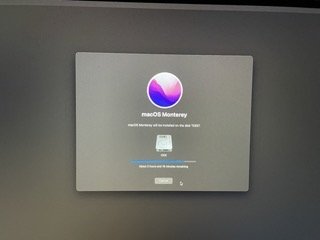
I made the effort to check if my GPU is the issue. Removed all OSX VMs and Macinabox completely incl. templates, appdata and reinstalled it. Created a Macinabox BigSur VM and attached my GPU to it. Had boot problems again but then found out that the GPU wants to sit on BUS 0x03, else it will not work. The other days I allways moved the GPU to 0x04 or 0x05. So for whatever reason I changed the Bus for the NIC and could keep the GPU on 0x03. So I fixed that and changed the NIC to Vmxnet. Booted into Recovery Mode to install BigSur, formatted the Vdisk (M2 SSD to test later), started installation and now Monterey is being installed - from a BigSur'inabox Recovery?!? Even if this gets to the end, I assume I need to apply the Kepler Patch to get the GT710 working. So I am not sure since all the try and error during last days wasn't easy, but that Bus 0x03 (and Vmxnet on 0x06) allowed it to boot immediately and repeatedly. Installation finished, rebooted a few times and then after a final long scroll of text went back to boot menu, and that's it. OSX does not start, I assume because it would require further patching?
-
the answer is simple - because I don't know better. I am reading through the dortania guide and get stuck again, translating this to virtualization. I understand that this guide is for bare metal installations. So my interpretation is that I somehow need to fake/spoof hardware for OSX - And there I am simply lost.
-
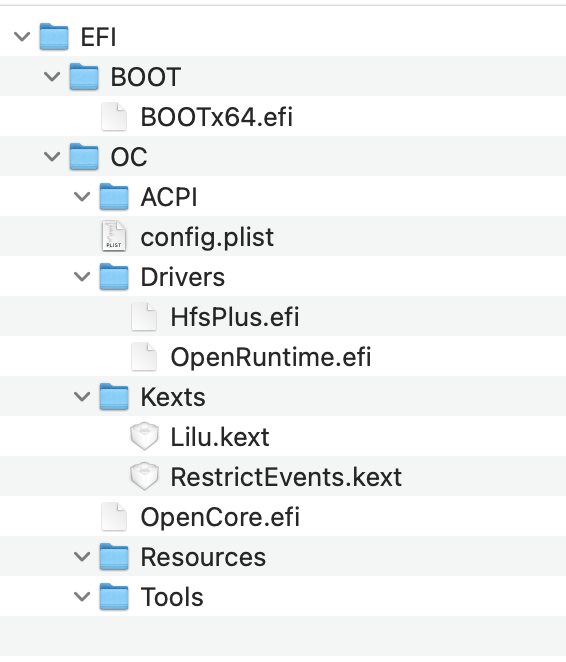
Well, another evening with this. Created empty 16 GB Image Flashed installer to image via: sudo /Applications/Install\ macOS\ Monterey.app/Contents/Resources/createinstallmedia --volume /Volumes/monterey-new Set up EFI structure with Opencore 0.7.5 files; copied Bootx64, OpenCore.efi, removed all other .kext / .aml files Renamed .dmg to .img, copied to /isos/osx Adapted VM xml <type arch='x86_64' machine='pc-q35-6.0'>hvm</type> and changed path to new image Booted VM, no option to install OSX, only to reset NVRAM.
-
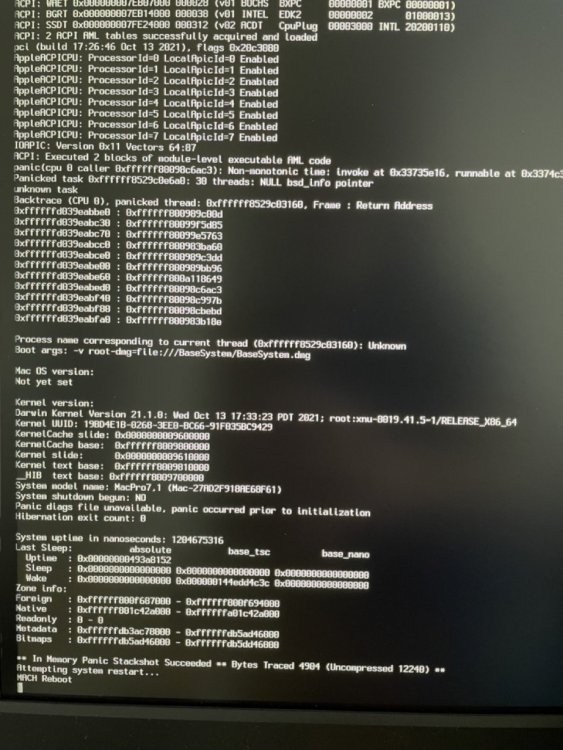
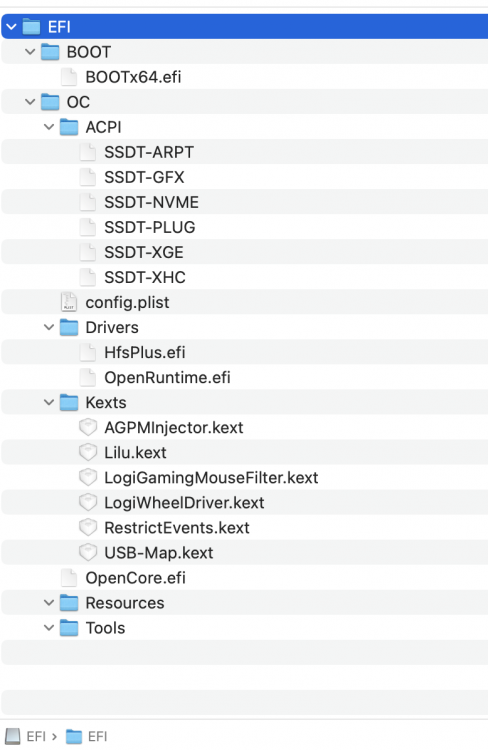
Tried that and didn't really help anything. Reverted changes, deleted image and re-build it from scratch. VM is throwing kernel panics when it boots, before it gets anywhere near to the OS installer. <?xml version='1.0' encoding='UTF-8'?> <domain type='kvm' xmlns:qemu='http://libvirt.org/schemas/domain/qemu/1.0'> <name>OSXVM</name> <uuid>4xxxxxxxxxxxxxxxxxxxxx</uuid> <metadata> <vmtemplate xmlns="unraid" name="FreeBSD" icon="freebsd.png" os="freebsd"/> </metadata> <memory unit='KiB'>8388608</memory> <currentMemory unit='KiB'>8388608</currentMemory> <memoryBacking> <nosharepages/> </memoryBacking> <vcpu placement='static'>8</vcpu> <cputune> <vcpupin vcpu='0' cpuset='3'/> <vcpupin vcpu='1' cpuset='15'/> <vcpupin vcpu='2' cpuset='5'/> <vcpupin vcpu='3' cpuset='17'/> <vcpupin vcpu='4' cpuset='7'/> <vcpupin vcpu='5' cpuset='19'/> <vcpupin vcpu='6' cpuset='9'/> <vcpupin vcpu='7' cpuset='21'/> </cputune> <os> <type arch='x86_64' machine='pc-q35-5.1'>hvm</type> <loader readonly='yes' type='pflash'>/usr/share/qemu/ovmf-x64/OVMF_CODE-pure-efi.fd</loader> <nvram>/etc/libvirt/qemu/nvram/xxxxxxxxxxxxxxxxxxxxxxxx_VARS-pure-efi.fd</nvram> </os> <features> <acpi/> <apic/> </features> <cpu mode='host-passthrough' check='none' migratable='on'> <cache mode='passthrough'/> <feature policy='require' name='topoext'/> </cpu> <clock offset='localtime'> <timer name='rtc' tickpolicy='catchup'/> <timer name='pit' tickpolicy='delay'/> <timer name='hpet' present='no'/> </clock> <on_poweroff>destroy</on_poweroff> <on_reboot>restart</on_reboot> <on_crash>restart</on_crash> <devices> <emulator>/usr/local/sbin/qemu</emulator> <disk type='file' device='disk'> <driver name='qemu' type='raw' cache='writeback'/> <source file='/mnt/user/isos/osx/monterey-install.img'/> <target dev='hdc' bus='sata'/> <boot order='1'/> <address type='drive' controller='0' bus='0' target='0' unit='2'/> </disk> <controller type='pci' index='0' model='pcie-root'/> <controller type='pci' index='1' model='pcie-root-port'> <model name='pcie-root-port'/> <target chassis='1' port='0x8'/> <address type='pci' domain='0x0000' bus='0x00' slot='0x01' function='0x0' multifunction='on'/> </controller> <controller type='pci' index='2' model='pcie-root-port'> <model name='pcie-root-port'/> <target chassis='2' port='0x9'/> <address type='pci' domain='0x0000' bus='0x00' slot='0x01' function='0x1'/> </controller> <controller type='pci' index='3' model='pcie-root-port'> <model name='pcie-root-port'/> <target chassis='3' port='0xa'/> <address type='pci' domain='0x0000' bus='0x00' slot='0x01' function='0x2'/> </controller> <controller type='pci' index='4' model='pcie-root-port'> <model name='pcie-root-port'/> <target chassis='4' port='0xb'/> <address type='pci' domain='0x0000' bus='0x00' slot='0x01' function='0x3'/> </controller> <controller type='pci' index='5' model='pcie-root-port'> <model name='pcie-root-port'/> <target chassis='5' port='0xc'/> <address type='pci' domain='0x0000' bus='0x00' slot='0x01' function='0x4'/> </controller> <controller type='pci' index='6' model='pcie-root-port'> <model name='pcie-root-port'/> <target chassis='6' port='0xd'/> <address type='pci' domain='0x0000' bus='0x00' slot='0x01' function='0x5'/> </controller> <controller type='virtio-serial' index='0'> <address type='pci' domain='0x0000' bus='0x02' slot='0x00' function='0x0'/> </controller> <controller type='sata' index='0'> <address type='pci' domain='0x0000' bus='0x00' slot='0x1f' function='0x2'/> </controller> <controller type='usb' index='0' model='ich9-ehci1'> <address type='pci' domain='0x0000' bus='0x00' slot='0x07' function='0x7'/> </controller> <controller type='usb' index='0' model='ich9-uhci1'> <master startport='0'/> <address type='pci' domain='0x0000' bus='0x00' slot='0x07' function='0x0' multifunction='on'/> </controller> <controller type='usb' index='0' model='ich9-uhci2'> <master startport='2'/> <address type='pci' domain='0x0000' bus='0x00' slot='0x07' function='0x1'/> </controller> <controller type='usb' index='0' model='ich9-uhci3'> <master startport='4'/> <address type='pci' domain='0x0000' bus='0x00' slot='0x07' function='0x2'/> </controller> <interface type='bridge'> <mac address='52:54:00:e9:9d:1e'/> <source bridge='br0'/> <model type='virtio-net'/> <address type='pci' domain='0x0000' bus='0x01' slot='0x00' function='0x0'/> </interface> <serial type='pty'> <target type='isa-serial' port='0'> <model name='isa-serial'/> </target> </serial> <console type='pty'> <target type='serial' port='0'/> </console> <channel type='unix'> <target type='virtio' name='org.qemu.guest_agent.0'/> <address type='virtio-serial' controller='0' bus='0' port='1'/> </channel> <input type='mouse' bus='ps2'/> <input type='keyboard' bus='ps2'/> <audio id='1' type='none'/> <hostdev mode='subsystem' type='pci' managed='yes'> <driver name='vfio'/> <source> <address domain='0x0000' bus='0x25' slot='0x00' function='0x0'/> </source> <rom file='/mnt/user/isos/vbios/gt710.rom'/> <address type='pci' domain='0x0000' bus='0x03' slot='0x00' function='0x0' multifunction='on'/> </hostdev> <hostdev mode='subsystem' type='pci' managed='yes'> <driver name='vfio'/> <source> <address domain='0x0000' bus='0x25' slot='0x00' function='0x1'/> </source> <address type='pci' domain='0x0000' bus='0x03' slot='0x00' function='0x1'/> </hostdev> <hostdev mode='subsystem' type='pci' managed='yes'> <driver name='vfio'/> <source> <address domain='0x0000' bus='0x23' slot='0x00' function='0x0'/> </source> <address type='pci' domain='0x0000' bus='0x04' slot='0x00' function='0x0'/> </hostdev> <hostdev mode='subsystem' type='usb' managed='no'> <source> <vendor id='0x17ef'/> <product id='0x6039'/> </source> <address type='usb' bus='0' port='1'/> </hostdev> <hostdev mode='subsystem' type='usb' managed='no'> <source> <vendor id='0x1a2c'/> <product id='0x0e24'/> </source> <address type='usb' bus='0' port='2'/> </hostdev> <memballoon model='none'/> </devices> <qemu:commandline> <qemu:arg value='-device'/> <qemu:arg value='isa-applesmc,osk=xxxxxxxxxxxxxx(c)xxxxxxxxxxx'/> <qemu:arg value='-smbios'/> <qemu:arg value='type=2'/> <qemu:arg value='-cpu'/> <qemu:arg value='host,vendor=GenuineIntel,+invtsc,kvm=on'/> </qemu:commandline> </domain> EFI: VFIO Log: Loading config from /boot/config/vfio-pci.cfg BIND=0000:23:00.0|126f:2262 --- Processing 0000:23:00.0 126f:2262 Vendor:Device 126f:2262 found at 0000:23:00.0 IOMMU group members (sans bridges): /sys/bus/pci/devices/0000:23:00.0/iommu_group/devices/0000:23:00.0 Binding... Successfully bound the device 126f:2262 at 0000:23:00.0 to vfio-pci --- vfio-pci binding complete Devices listed in /sys/bus/pci/drivers/vfio-pci: lrwxrwxrwx 1 root root 0 Oct 31 21:29 0000:23:00.0 -> ../../../../devices/pci0000:00/0000:00:01.2/0000:20:00.0/0000:21:01.0/0000:23:00.0 I don't get why I could get into the OS installer and 3hrs later I cannot.
-
I will try that. The installer didn’t allow to format the disk with a GUID partition table, hence no way forward. I couldn’t change the filesystem to APFS.
-
I made some progress this morning and can get the Monterey installer started and also to recognize a passed through SSD. I used this guide to start over: https://github.com/osx86-ijb/Hackinabox/, however made few adjustments. I am using an image as installer, not a USB stick. I pass through a 512GB M.2 SSD, USB Keyboard and Mouse, and the GT710 GPU The Opencore version is 0.71 as I can see on the boot screen and I am using the EFI folder from that guide on GitHub. Now my issue - The SSD is recognized as external, hence cannot be used to install. I came across this post: https://www.reddit.com/r/hackintosh/comments/f0cc4t/internal_drives_shown_as_external_opencore_amd/ Question: How to I need to adjust OpenCore to recognize the passed through SSD as internal? Do I need the NVMEfix.kext?
-
Well, it could be frustrating However, I'd say this is just a lack of hackintosh knowledge at my end which can be addressed by learning and a more step by step approach. So it seems to be not a technical issue, but just a lack of knowing all the twists and tiny steps in-between the steps. All the guides, howtos in the www can become confusing as they often require background knowledge of how to deal with Apple drivers, kexts, AMLs, EFIs etc. With Windows you just insert a stick or DVD and install straight forward, same with many linux distros. This topic is different, much more difficult and less hardware agnostic. This is no criticism, just a reflection about my zero-progress. So far I read following guides: https://pastebin.com/RtgNHqac https://github.com/Pavo-IM/Hackinabox Both seems to address macOS on Unraid and though the guides are comprehensive, they require additional knowledge at least on my end. ... to be continued
-
Seems to be impossible for me to get this running. I adjusted the VMs xml and used the config.plist with my kext and my system info. No chance. Maybe I stick with a BigSur Macinabox and try to install that on a NVME and passthrough the GPU.
-
Making little progress, and still stuck I created the image like described above Mounted it and then mounted the EFI Copied my EFI folder into the empty EFI of the image Copied the edited image with the new EFI structure to my UnRaid host Adapted the XML code you shared above and pasted it into the VMs XML; removed the USB stick code I used earlier Started the VM, and the picture is same as last night. The boot process gets stuck I attached the opencore logs from the image's EFI folder and also the VM's XML and the config.plist - Can you guys have a look? Can there be something wrong with my CPU core mapping in the config.plist or am I missing a kext? I am also using an HDMI / USB over IP extender and use a USB 3.0 port on the UnRaid host which I extend through my desk in another room. In that room I have a USB Keyboard and Bluetooth "dongled" mouse connected. The two USB entries in the XML are for both KB/Mouse. I also haven't passed through a NVME SSD at this stage since I want to get the installation dialog going first. If that's a problem, please let me know. Thanks MacPro_vm.xml opencore-2021-10-31-133627.txt opencore-2021-10-31-133713.txt opencore-2021-10-31-133810.txt opencore-2021-10-31-133846.txt opencore-2021-10-31-133934.txt config.plist
-
Thank you both, I'll try that later today and report back. Amazing support!
-
See this thread, a serious config.
-
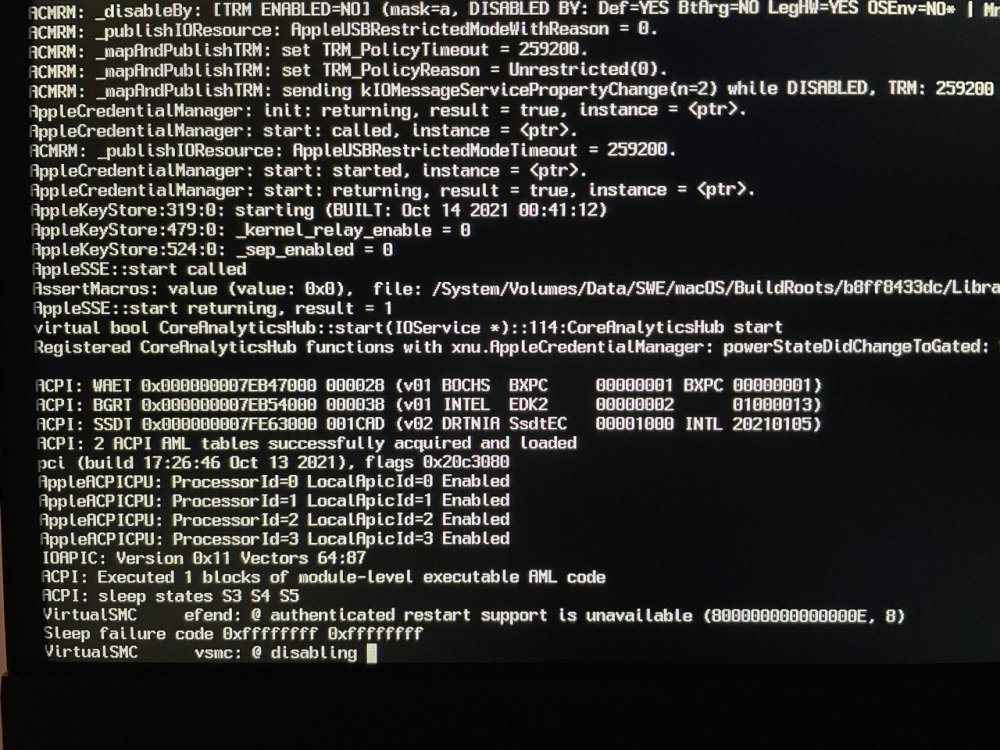
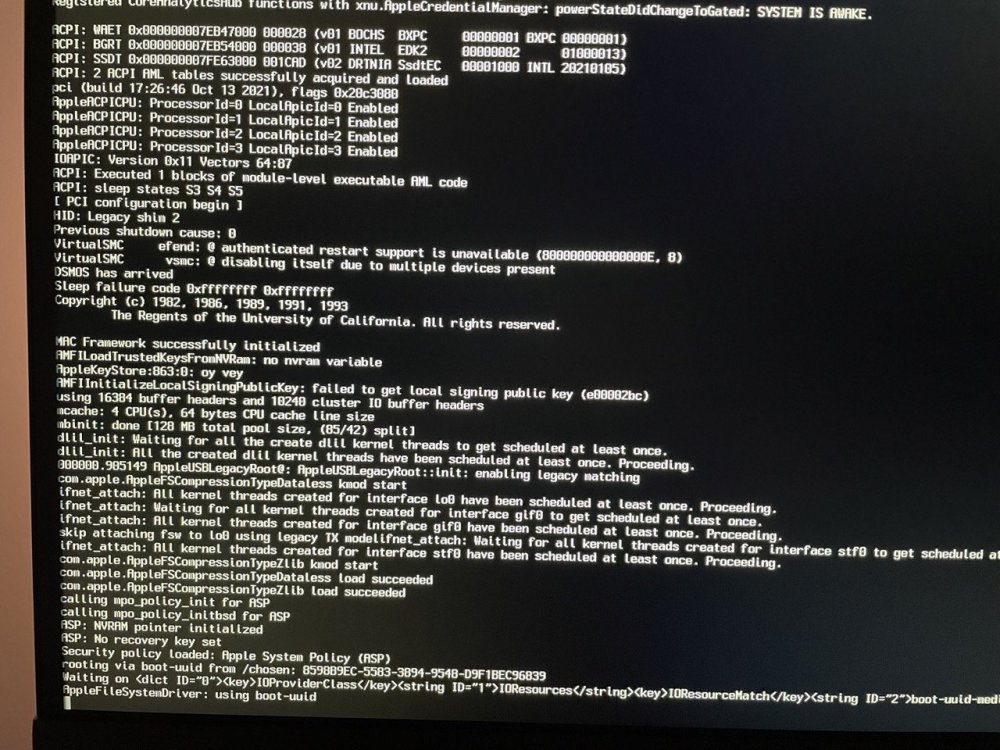
I got a new VM to boot from a Monterey stick I created using the dortania guide and a MacBook Pro. However, boot process always stops here: A reboot went a bit further, but then also stuck. Any advise? I'll check google meanwhile.
-
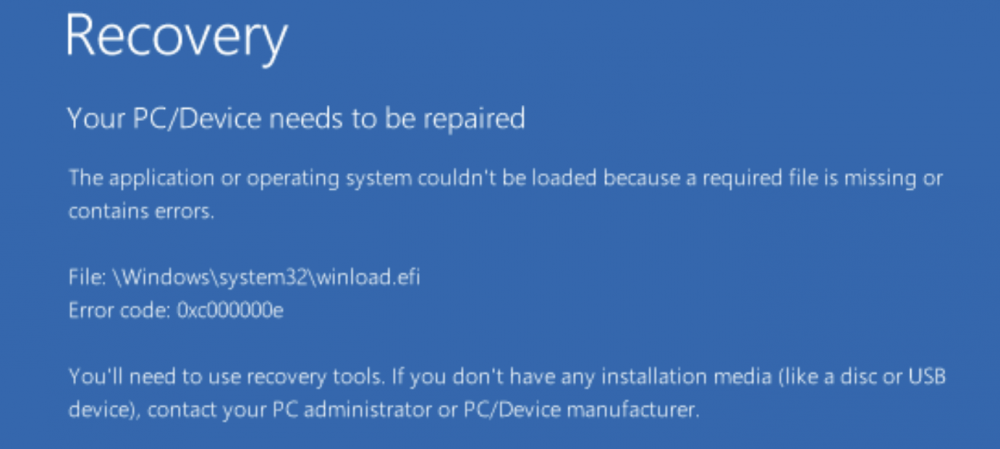
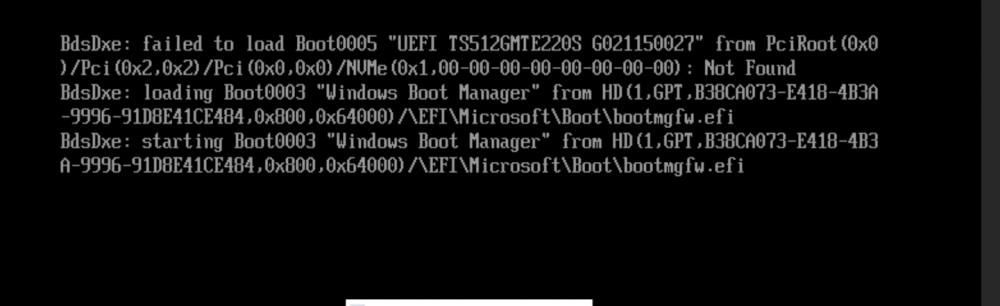
Thank you! Your hint pointed me to this thread, and the boot order change in the XML did the trick. Had to add that tag to the NVME and change it for the Windows ISO and the clover disk to 2 and 3. Now VM boots fine without the need to got to EFI. Lets see if this also works for an Build update and reboot. Upgrade to 22489 Insider Build went fine. However, reading the screen prompt below, I understand that the NVME is actually not the boot device ("not found") but the VM boots from another disk. Any advise? Or am I misinterpreting this? My XML looks like this, NVME disk is at the bottom: <?xml version='1.0' encoding='UTF-8'?> <domain type='kvm'> <name>Windows 11</name> <uuid>removed</uuid> <metadata> <vmtemplate xmlns="unraid" name="Windows 11" icon="windows11.png" os="windowstpm"/> </metadata> <memory unit='KiB'>8388608</memory> <currentMemory unit='KiB'>8388608</currentMemory> <memoryBacking> <nosharepages/> </memoryBacking> <vcpu placement='static'>8</vcpu> <cputune> <vcpupin vcpu='0' cpuset='5'/> <vcpupin vcpu='1' cpuset='17'/> <vcpupin vcpu='2' cpuset='7'/> <vcpupin vcpu='3' cpuset='19'/> <vcpupin vcpu='4' cpuset='9'/> <vcpupin vcpu='5' cpuset='21'/> <vcpupin vcpu='6' cpuset='11'/> <vcpupin vcpu='7' cpuset='23'/> </cputune> <os> <type arch='x86_64' machine='pc-q35-6.1'>hvm</type> <loader readonly='yes' type='pflash'>/usr/share/qemu/ovmf-x64/OVMF_CODE-pure-efi-tpm.fd</loader> <nvram>/etc/libvirt/qemu/nvram/xxxxxxxxxxxxxxxxxxxxxxxxxxxxxxxxx_VARS-pure-efi-tpm.fd</nvram> </os> <features> <acpi/> <apic/> <hyperv> <relaxed state='on'/> <vapic state='on'/> <spinlocks state='on' retries='8191'/> <vendor_id state='on' value='none'/> </hyperv> </features> <cpu mode='host-passthrough' check='none' migratable='on'> <topology sockets='1' dies='1' cores='4' threads='2'/> <cache mode='passthrough'/> <feature policy='require' name='topoext'/> </cpu> <clock offset='localtime'> <timer name='hypervclock' present='yes'/> <timer name='hpet' present='no'/> </clock> <on_poweroff>destroy</on_poweroff> <on_reboot>restart</on_reboot> <on_crash>restart</on_crash> <devices> <emulator>/usr/local/sbin/qemu</emulator> <disk type='file' device='cdrom'> <driver name='qemu' type='raw'/> <source file='/mnt/user/isos/Windows/22489.1000.x64-EN.ISO'/> <target dev='hda' bus='sata'/> <readonly/> <boot order='3'/> <address type='drive' controller='0' bus='0' target='0' unit='0'/> </disk> <disk type='file' device='cdrom'> <driver name='qemu' type='raw'/> <source file='/mnt/user/isos/virtio-win-0.1.208-1.iso'/> <target dev='hdb' bus='sata'/> <readonly/> <address type='drive' controller='0' bus='0' target='0' unit='1'/> </disk> <disk type='file' device='disk'> <driver name='qemu' type='raw' cache='writeback'/> <source file='/mnt/user/isos/bootloader/spaces_win_clover.img'/> <target dev='hdc' bus='sata'/> <boot order='2'/> <address type='drive' controller='0' bus='0' target='0' unit='2'/> </disk> <controller type='usb' index='0' model='ich9-ehci1'> <address type='pci' domain='0x0000' bus='0x00' slot='0x07' function='0x7'/> </controller> <controller type='usb' index='0' model='ich9-uhci1'> <master startport='0'/> <address type='pci' domain='0x0000' bus='0x00' slot='0x07' function='0x0' multifunction='on'/> </controller> <controller type='usb' index='0' model='ich9-uhci2'> <master startport='2'/> <address type='pci' domain='0x0000' bus='0x00' slot='0x07' function='0x1'/> </controller> <controller type='usb' index='0' model='ich9-uhci3'> <master startport='4'/> <address type='pci' domain='0x0000' bus='0x00' slot='0x07' function='0x2'/> </controller> <controller type='pci' index='0' model='pcie-root'/> <controller type='pci' index='1' model='pcie-root-port'> <model name='pcie-root-port'/> <target chassis='1' port='0x10'/> <address type='pci' domain='0x0000' bus='0x00' slot='0x02' function='0x0' multifunction='on'/> </controller> <controller type='pci' index='2' model='pcie-root-port'> <model name='pcie-root-port'/> <target chassis='2' port='0x11'/> <address type='pci' domain='0x0000' bus='0x00' slot='0x02' function='0x1'/> </controller> <controller type='pci' index='3' model='pcie-root-port'> <model name='pcie-root-port'/> <target chassis='3' port='0x12'/> <address type='pci' domain='0x0000' bus='0x00' slot='0x02' function='0x2'/> </controller> <controller type='pci' index='4' model='pcie-root-port'> <model name='pcie-root-port'/> <target chassis='4' port='0x13'/> <address type='pci' domain='0x0000' bus='0x00' slot='0x02' function='0x3'/> </controller> <controller type='pci' index='5' model='pcie-root-port'> <model name='pcie-root-port'/> <target chassis='5' port='0x14'/> <address type='pci' domain='0x0000' bus='0x00' slot='0x02' function='0x4'/> </controller> <controller type='virtio-serial' index='0'> <address type='pci' domain='0x0000' bus='0x02' slot='0x00' function='0x0'/> </controller> <controller type='sata' index='0'> <address type='pci' domain='0x0000' bus='0x00' slot='0x1f' function='0x2'/> </controller> <interface type='bridge'> <mac address='52:54:00:aa:4b:12'/> <source bridge='br0'/> <model type='virtio-net'/> <address type='pci' domain='0x0000' bus='0x01' slot='0x00' function='0x0'/> </interface> <serial type='pty'> <target type='isa-serial' port='0'> <model name='isa-serial'/> </target> </serial> <console type='pty'> <target type='serial' port='0'/> </console> <channel type='unix'> <target type='virtio' name='org.qemu.guest_agent.0'/> <address type='virtio-serial' controller='0' bus='0' port='1'/> </channel> <input type='tablet' bus='usb'> <address type='usb' bus='0' port='1'/> </input> <input type='mouse' bus='ps2'/> <input type='keyboard' bus='ps2'/> <tpm model='tpm-tis'> <backend type='emulator' version='2.0' persistent_state='yes'/> </tpm> <graphics type='vnc' port='-1' autoport='yes' websocket='-1' listen='0.0.0.0' keymap='de'> <listen type='address' address='0.0.0.0'/> </graphics> <audio id='1' type='none'/> <video> <model type='qxl' ram='65536' vram='65536' vgamem='16384' heads='1' primary='yes'/> <address type='pci' domain='0x0000' bus='0x00' slot='0x01' function='0x0'/> </video> <hostdev mode='subsystem' type='pci' managed='yes'> <driver name='vfio'/> <source> <address domain='0x0000' bus='0x01' slot='0x00' function='0x0'/> </source> <boot order='1'/> <address type='pci' domain='0x0000' bus='0x03' slot='0x00' function='0x0'/> </hostdev> <memballoon model='none'/> </devices> </domain>
-
Hast Du eine GPU an das OSX durchgereicht? Wenn Du so einen Adapter in den HDMI port steckst solltest Du in der Lage sein die Auflösung zu ändern. Damit wird ein Display simuliert.
-
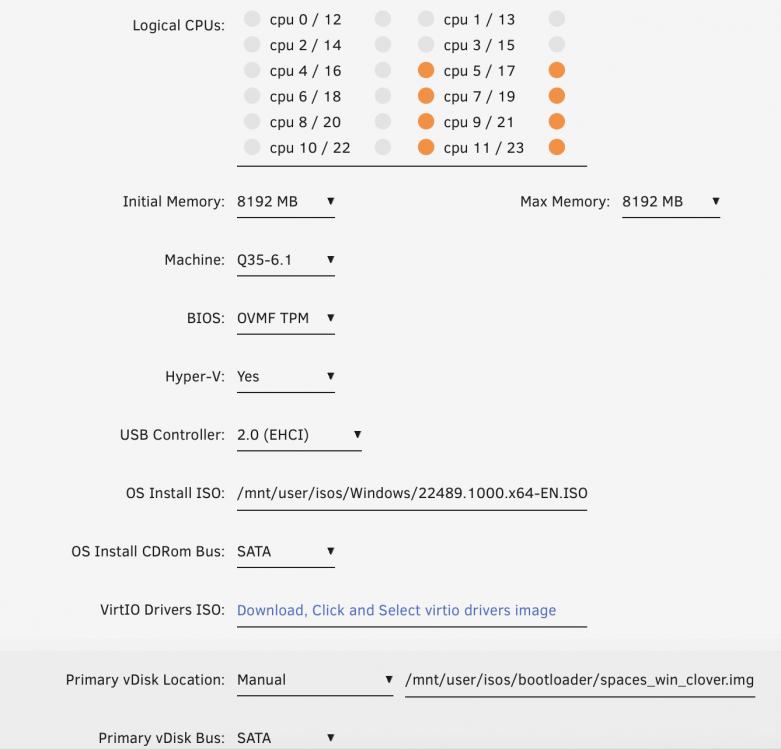
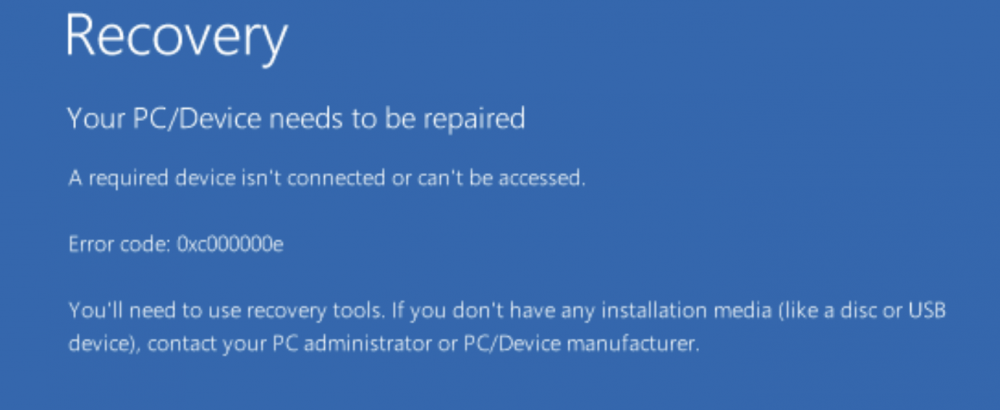
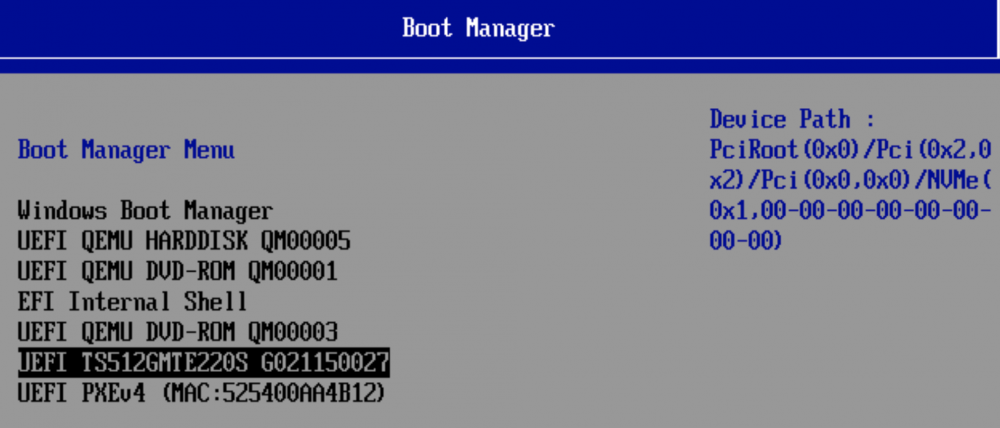
I upgraded to 6.10RC2 (link has been shared here in the forum) and wanted to make use of the Windows 11 support for the VMs. Created a new VM and picked OVMF TPM for Bios and Q35-6.1 for machine. Used Spaceinvaders clover boot loader image for Windows and switched bus to Sata I can boot into the VM and see both NVME and the QEMU bootloader disk. However every restart gives an error at first, which I need to correct by choosing the NVME as primary boot device in the "BIOS" / EFI settings. Screen after starting the VM: Screen after pressing return: The NVME I choose in the "BIOS" / EFI: How can I make this stick, so the VM will always boot straight into Windows 11?