






bmartino1
Members
-
Joined
-
Last visited
Everything posted by bmartino1
-
If I were to guess as I will go back and double check this. This was a change when they updated the webui for the network settings. I know iproute2 was also updated... I didn't want to reparse the inet.rc script unraid uses as its a giant mess... I agree with you I just double checked my own output and also noticed 0.0.0.0 and the ff:ff:ff:ff etc... ATM My understanding is, to Why Unraid bridges (br0, br1, shim-br0) don’t show a broadcast anymore: Unraid’s bridges are managed by rc.inet1 (Slackware’s legacy init script) and now rely on iproute2 semantics rather than legacy ifconfig semantics. In this newer mode: The broadcast is derived implicitly from the CIDR prefix (e.g. /23 → .1.255). The brd field is omitted unless explicitly configured. ifconfiga legacy wrapper around obsolete ioctl calls displays 0.0.0.0 when the kernel doesn’t store an explicit broadcast value. So nothing’s brokenifconfig just doesn’t know what to show. the application doesn't call nor use it as the device nic auto calculates it off the netmask and ip gateway sub set. as I'm curious I'll share some other kernel linux check commands: You can confirm the kernel is computing the right broadcast internally with: cat /proc/net/fib_trie | grep 192.168.0 Example root@The-Borg:~# cat /proc/net/fib_trie | grep 192.168.0 +-- 192.168.0.0/20 3 0 5 +-- 192.168.0.0/16 2 0 2 +-- 192.168.0.0/16 2 0 2 root@The-Borg:~# and/or with iprout2 application is defaulting to a calculation with the route rules to get the actual broadcast its using: ip route get 192.168.1.255 Example as i'm using 192.168.201.x/24 root@The-Borg:~# ip route get 192.168.201.255 broadcast 192.168.201.255 dev br0 table local src 192.168.201.100 uid 0 cache <local,brd> root@The-Borg:~# so using the Linux kernel commands checks ? so now the questions is Why the line brd ff:ff:ff:ff:ff:ff appears? I assume That’s the Ethernet-layer broadcast MAC address, not IPv6 / ipv4. All bridges and NICs naturally carry a link-layer broadcast entry (ff:ff:ff:ff:ff:ff). IPv4 broadcast (192.168.1.255) and Ethernet broadcast (ff:ff:ff:ff:ff:ff) are distinct but related: the IP broadcast frame is sent using the Ethernet broadcast destination. So, the “broadcast is there” ... just at L2, which is enough for ARP and DHCP to work. I have to go find the relase notes. Form memory, This was Starting around kernel 6.6 and net-tools 2.10, Slackware/Unraid switched to iproute2 as the authoritative tool... ifconfig is still present for compatibility, but it now reads data through the rtnetlink interface, which omits default broadcast fields..
-
but as you did get a successful claim you need to docker stop then wait for the stop and docker start plex once more. then go to: http://192.168.1.167:32400/web then go to the plex web server. as your Preference XML should have some new plex claim data.

-
did you stop start the docker? Weird that you didn't get a plex library setup by goin to http://192.168.1.167:32400/web However you should be able to login to your account. then in the plex server at the ples UI go to settings (may not be there if its not calimed.) So acount login at top right. Go to the wrench (settings) In the tab at the left General there you can force a Plex account login and claim calim by login into the plex account. (soemtiems needed due to plex api new ip and 2fa...) in the web ui as well if you see the wrench yo should also be able to see the loging.. Review: https://youtu.be/EULsFwZB-Uc?si=jz75QMWMPkSlkUYo With linux seerver we alos can get linux IO support on github: https://github.com/linuxserver/docker-plex/issues/235 and use a plex script int he docker. https://github.com/ukdtom/ClaimIt/blob/master/linux/claimpms.sh


-
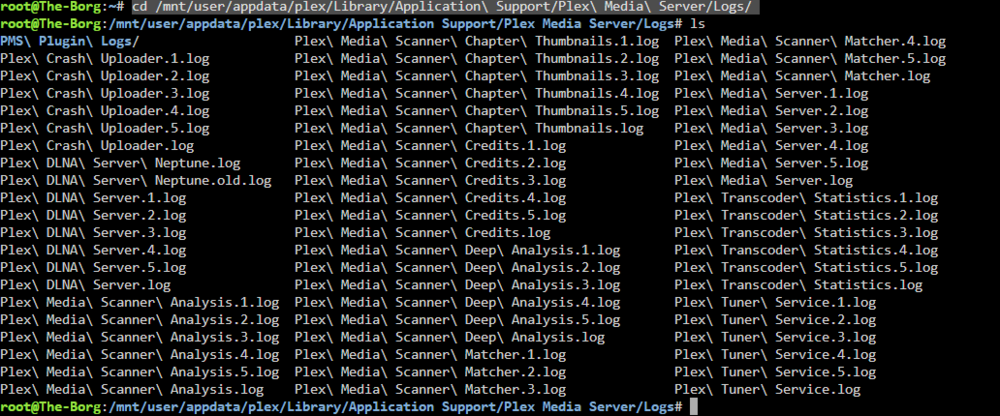
log looks good. is ther a reason your using network mode host? *Not a realy issues as you did hit a plex web UI... as plex requires quite a few ports you should use bridge or custom eth0 set to a lan ip. Plex claim may not be 100% but your in a good state atm. linux server docker logs will not show you plex docker logs. cd /mnt/user/appdata/plex/Library/Application\ Support/Plex\ Media\ Server/Logs/ finaly you need to console into the docker and run the command: ONLY IF YOUR CLAIM DIDN"T WORK> IT APPEARS THT IT DID! curl -X POST "http://localhost:32400/myplex/claim?token=YOUR_CLAIM_TOKEN_HERE" curl -X POST "http://localhost:32400/myplex/claim?token=claim-Sq7ERseyTppMedyCszHN" Shouldn't have to but as a precaustion due to recent plex breach... Per redit: https://www.reddit.com/r/PleX/comments/1nc6ox6/for_those_having_extreme_difficulty_reclaiming/ Will be a bit different. as we will be editing plex config on unraid host web ui but runnign commands in docker console to turn off plex. To manually claim your Plex server, use the following steps: Stop the Plex Media server from running. keep the docker running we have to console into the docker and sopt plex. From the Plex advanced settings, delete the PlexOnlineToken value, and keep the name. cd /mnt/user/appdata/plex/Library/Application\ Support/Plex\ Media\ Server/ Also from the hidden settings, copy the ProcessedMachineIdentifier value as it will be used to generate a claim token. nano Preferences.xml find the options Pelx Onlines adn other near the end of the long line of the file... Open a Web browser and log in with your Plex account. Go to plex.tv and login... After logging in, go to https://www.plex.tv/claim to generate a claim token. Copy this token.(reuse the one you have. or be quick the claim tokens don't last very long and you may need a different claim token... From a terminal window, run the following command:Replace {processed_machine_identifier} with the value from the ProcessedMachineIdentifier setting, and {claim_token} with the claim token from the Web page.curl -X POST -s -H "X-Plex-Client-Identifier: {processed_machine_identifier}" "https://plex.tv/api/claim/exchange?token={claim_token}" At the bottom of the response should be the following values:Each value will need to be copied into the Plex advanced settings with the following key names: username email authentication-token PlexOnlineMail: email PlexOnlineUsername: username PlexOnlineToken: authentication-token AcceptedEULA: 1 PublishServerOnPlexOnlineKey: 1 Restart Plex Media Server docker and you should now have the server claimed to your account... Annoying I know. But I can guarantee a claim this way... as we are esentail builing the plex Preference XML as plex is working but not claimed adn setup didn't start as plex api didn't see a new server claimed...
-
since unraid slack ware in on slackware current https://slackware.halpanet.org/slackdce/packages/15.0/x86_64/multimedia/intel-media-driver/intel-media-driver-21.3.5-x86_64-1_slackdce.txz https://slackware.pkgs.org/current/slackware-x86_64/intel-vaapi-driver-2.4.1-x86_64-3.txz.html it worth a mention.... as a driver plugin may not exist yet as the kerneal doesn't have it yet.
-
AS I don't have the hardware to test and its a long shot... with intel top installed you may need to 3rd party installthe intell driver: cd /boot/extra at boot slackware binary files are installed. system log dmesg to see what became of them Not sure what other libes pacakges may also be needed. https://slackware.pkgs.org/15.0/slackware-x86_64/intel-vaapi-driver-2.4.1-x86_64-3.txz.html https://slackware.pkgs.org/15.0/slackdce-x86_64/intel-media-driver-21.3.5-x86_64-1_slackdce.txz.html The Binary to add to the extra folder on the flash drive. https://slackware.uk/slackware/slackware64-15.0/slackware64/x/intel-vaapi-driver-2.4.1-x86_64-3.txz Warning! SlackDCE is a third-party repository https://slackware.halpanet.org/slackdce/packages/15.0/x86_64/multimedia/intel-media-driver/intel-media-driver-21.3.5-x86_64-1_slackdce.txz
-
I haven't see any updates from shinji257 in quite some time... This forum area is esentail dead. for the unget stuff and shinji257 github request stuff: https://forums.unraid.net/topic/185363-supportrequests-shinji257s-slackwareunraid-package-repository/ https://github.com/shinji257/unraid_pkgs list of applications avilable via unget. (they may be behind... given the slakware version we are at now...) GitHubunraid_pkgs/slackware64-current at main · shinji257/unrai...Contribute to shinji257/unraid_pkgs development by creating an account on GitHub.
-
unget is more for grap this pacakge your clealy missing a lib that you also need to install... This is why I use pkags.org to verify https://slackware.pkgs.org/15.0/slackware-x86_64/powertop-2.13-x86_64-3.txz.html powertop may also be bad on the source github. try adding the slackpack offical binary: https://slackware.uk/slackware/slackware64-15.0/slackware64/ap/powertop-2.13-x86_64-3.txz
-
if possible can we add openconnect for vpn client on unraid host: https://github.com/shinji257/unraid_pkgs/issues/40 https://slackware.pkgs.org/current/slackel-x86_64/openconnect-8.10-x86_64-1dj.txz.html build script: http://www.slackware.com/~alien/slackbuilds/openconnect/build/openconnect.SlackBuild
-
I still think your coaught up on linux bridges Docker’s bridge interface (docker0) is created differently versus Unraid’s system bridges (br0, br1), because they’re managed very differently.. Why Docker uses a 172.x.x.x address and broadcast .255.255 Docker, by default, creates an internal bridge network (docker0) using the subnet 172.17.0.0/16 again this comes from the docker daemon. This comes straight from the Docker daemon’s built-in defaults (unless you override it in /etc/docker/daemon.json) [at least this is where it is in debain... unraids moves this. the nvdia plugin edits the daemon to add the nvdia run time. I don't remember where on unraid the json file is locatd now.. That means: Gateway / bridge IP: 172.17.0.1 Subnet mask: 255.255.0.0 Broadcast: 172.17.255.255 The broadcast is calculated automatically: Network address: 172.17.0.0 Netmask: 255.255.0.0 Broadcast: 172.17.255.255 Docker explicitly sets that because it’s running a userland bridge network using iptables and veth pairs... it needs that broadcast address for container-to-container communication and proper ARP behavior inside the virtual subnet. ok so now lets look at the unraid linux bridge networks. Why Unraid’s bridges show broadcast 0.0.0.0 br0: broadcast 0.0.0.0 br1: broadcast 0.0.0.0 that’s not actually wrong... it’s just how Unraid’s ifconfig reports when the bridge’s member interfaces or the underlying configuration (via ip addr or brctl) doesn’t explicitly define a broadcast value. Most modern Linux networking tools (like iproute2) don’t require or even use the broadcast field for L2-bridged interfaces anymore, because the bridge itself operates at Layer 2 and passes broadcast frames transparently... so its not displaying incorectly.. You can confirm that the kernel actually has a correct broadcast in use by running../ ip addr show br0 inet 192.168.0.4/23 brd 192.168.1.255 scope global br0 If its a display error it jsut showing that its open to all address. That’s the real broadcast, even though ifconfig reports 0.0.0.0. In other words, ifconfig is just misleading — it’s deprecated and doesn’t always display bridge attributes correctly. Now Why Docker’s shows correctly while Unraid’s doesn’t Docker configures its bridge with ip commands when it creates docker0, explicitly including the broadcast: example: ip addr add 172.17.0.1/16 brd 172.17.255.255 dev docker0 Unraid (via brctl and network scripts) instead attaches the host NIC into the bridge and lets the kernel infer broadcast behavior, so it never writes an explicit brd field — hence the 0.0.0.0 you see in the legacy ifconfig output. If you want to see all network details correctly (not the legacy output), use: ip -br addr or ip addr show dev br0 example root@The-Borg:~# ip -br addr lo UNKNOWN 127.0.0.1/8 ::1/128 tunl0@NONE DOWN eth0 UP fe80::1270:fdff:fecd:86e/64 br0 UP 192.168.201.100/24 metric 1 fe80::1270:fdff:fecd:86e/64 docker0 UP 172.17.0.1/16 fe80::42:3bff:fe88:732f/64 shim-br0@br0 UP 192.168.201.101/24 virbr0 DOWN 192.168.122.1/24 vnet0 UNKNOWN fe80::fc54:ff:fe55:3fe4/64 tailscale1 ...Tailscale data... br-1565206c2c60 DOWN 172.18.0.1/16 fe80::42:21ff:fea8:d4b3/64 veth71e0b19@if79 UP fe80::54ff:b2ff:fe1d:b2b/64 root@The-Borg:~# ip addr show dev br0 4: br0: <BROADCAST,MULTICAST,UP,LOWER_UP> mtu 1500 qdisc noqueue state UP group default qlen 1000 link/ether 10:70:fd:cd:08:6e brd ff:ff:ff:ff:ff:ff inet 192.168.201.100/24 metric 1 scope global br0 valid_lft forever preferred_lft forever inet6 fe80::1270:fdff:fecd:86e/64 scope link proto kernel_ll valid_lft forever preferred_lft forever root@The-Borg:~# ip addr show dev docker0 7: docker0: <BROADCAST,MULTICAST,UP,LOWER_UP> mtu 1500 qdisc noqueue state UP group default link/ether 02:42:3b:88:73:2f brd ff:ff:ff:ff:ff:ff inet 172.17.0.1/16 brd 172.17.255.255 scope global docker0 valid_lft forever preferred_lft forever inet6 fe80::42:3bff:fe88:732f/64 scope link proto kernel_ll valid_lft forever preferred_lft forever root@The-Borg:~# ip route default via 192.168.201.1 dev br0 metric 1005 172.17.0.0/16 dev docker0 proto kernel scope link src 172.17.0.1 172.18.0.0/16 dev br-1565206c2c60 proto kernel scope link src 172.18.0.1 linkdown 192.168.122.0/24 dev virbr0 proto kernel scope link src 192.168.122.1 linkdown 192.168.201.0/24 dev shim-br0 proto kernel scope link src 192.168.201.101 192.168.201.0/24 dev br0 proto kernel scope link src 192.168.201.100 metric 1 root@The-Borg:~# That’s the modern way to verify the actual broadcast and subnet values in Linux — and you’ll see that everything is configured correctly under the hood. So to me your mis understand the docker0 network.
-
The symptoms you’re seeing line up with two overlapping issues: a rule/mark collision with Unraid’s “VPN tunneled access for docker” mode, and your WG_VPN chain is additive (it never deletes the old entries), so your later edits don’t show up—and the broad RFC1918 exemption you saw is from the previous run Also: you do have a 51820 rule—your ip rule output shows it at priority 32760: So that part looks right. What to change in Unraid firstIn your WireGuard tunnel, turn OFF “VPN tunneled access for docker.” That mode installs its own fwmark/table 51820 rules (you can see fwmark 0xca6c in your ip rule dump) and will fight our policy routing. We’ll do the container selection ourselves. Make sure the wg interface you’re using (wg1) is up and the peer allows 0.0.0.0/0 (or at least the destinations you expect) in AllowedIPs, with NAT enabled on the peer side if needed. If the peer doesn’t route 0.0.0.0/0, adding a “default dev wg1” in table 51820 won’t actually get you to the Internet. Drop-in script (replace your current one)Use this on array start via the User Scripts plugin. #!/bin/bash set -euo pipefail WG_IF="wg1" WG_TABLE="51820" # Arbitrary mark value (hex + dec) MARK_HEX="0xC8E4" MARK_DEC=$((0xC8E4)) # Container IPs that should egress via WireGuard VPN_SRC_IPS=( 172.18.0.100 172.18.0.101 ) # 1) Make sure replies from policy-routed flows are allowed # (wg-quick usually sets this; do it here to be safe) sysctl -w net.ipv4.conf.all.src_valid_mark=1 >/dev/null # 2) Ensure a default route in our custom table if ! ip -4 route show table "${WG_TABLE}" | grep -qE '^default '; then ip -4 route add default dev "${WG_IF}" table "${WG_TABLE}" || true fi # 3) Install the policy rule for our mark -> table 51820 if ! ip -4 rule show | grep -q "fwmark ${MARK_DEC} lookup ${WG_TABLE}"; then ip -4 rule add fwmark "${MARK_DEC}" lookup "${WG_TABLE}" fi # 4) Create (or flush+rebuild) the WG_VPN chain so edits take effect # We flush to avoid stacking old exemptions/marks forever. if iptables -t mangle -nL WG_VPN >/dev/null 2>&1; then iptables -t mangle -F WG_VPN else iptables -t mangle -N WG_VPN fi # 5) Make sure PREROUTING and OUTPUT jump into WG_VPN once for hook in PREROUTING OUTPUT; do iptables -t mangle -C "${hook}" -j WG_VPN 2>/dev/null || \ iptables -t mangle -A "${hook}" -j WG_VPN done # 6) Exempt LAN/RFC1918/bogon/etc so containers still talk to local Docker/LAN directly # Keep the full RFC1918 ranges; they already include 172.18.0.0/16. for cidr in 10.0.0.0/8 172.16.0.0/12 192.168.0.0/16 100.64.0.0/10 127.0.0.0/8; do iptables -t mangle -A WG_VPN -d "$cidr" -j RETURN done # 7) Mark only the selected container sources for ip in "${VPN_SRC_IPS[@]}"; do iptables -t mangle -A WG_VPN -s "${ip}" -m mark --mark 0x0 -j MARK --set-mark "${MARK_HEX}" done # 8) Never mark traffic coming *from* the WireGuard interface itself iptables -t mangle -A WG_VPN -i "${WG_IF}" -j RETURN # 9) NAT out the WireGuard interface for return path symmetry iptables -t nat -C POSTROUTING -o "${WG_IF}" -j MASQUERADE 2>/dev/null || \ iptables -t nat -A POSTROUTING -o "${WG_IF}" -j MASQUERADE echo "Selective WireGuard policy routing active on ${WG_IF} for: ${VPN_SRC_IPS[*]}" Why these changes fix your issuesUnraid VPN-for-Docker collision: Your ip rule showed an extra rule with fwmark 0xca6c pointing to the same table 51820. That’s Unraid’s Docker-over-WG mode, and it can grab traffic you didn’t intend (and also modifies NAT rules). Turning it off removes that interference so only our 0xC8E4 marks use table 51820. Chain flushing: You changed the exemption list (e.g., to 172.18.*), but your earlier run had already inserted 172.16.0.0/12. Because your script only adds and never deletes, the old broader exemption stuck around. Flushing WG_VPN each run makes the chain reflect your current intent. RFC1918 exemptions: Keep 172.16.0.0/12 (it already includes 172.18.0.0/16). Replacing it with 172.18.0.0/12 is not what you want (and is an invalid supernet for a /12 starting at .18). The broad RFC1918 returns ensure inter-container and LAN access stays local, while only Internet egress is policy-routed. Host losing Internet: With the collision removed and the chain fixed, host-originated traffic (which doesn’t match -s 172.18.0.100/101) won’t be marked, so it will use the main table as usual. The OUTPUT -> WG_VPN jump is safe because we only mark on the -s matches. If you still want to be extra cautious, you can remove the OUTPUT jump entirely and rely solely on PREROUTING (containers hit PREROUTING on ingress to the host’s routing decision anyway). Quick verification steps ip -4 route show table 51820 # should show: default dev wg1 (plus any on-link routes) ip -4 rule # look for: from all fwmark 0xc8e4 lookup 51820 iptables -t mangle -S WG_VPN iptables -t nat -S | grep MASQUERADE ip route get 1.1.1.1 from 172.18.0.100 # Should resolve via wg1 (table 51820) if the peer routes 0.0.0.0/0 If the 4 step shows it would go via wg1 but the container still can’t reach the WAN, double-check the peer’s AllowedIPs/NAT. Many commercial or upstream peers require you to allow 0.0.0.0/0 and/or enable NAT on their side for full Internet egress.


-
this also tells me that we deleted the br0 default ipvlan/macvlan docker network You may need to reboot unraid to have unraid recreate that network again. (as its best to let unraid manage that network. since its custom eth0 this tells me that your network settings have bridge and bonding off.

-
My only sugestins atm would be premake fodlers and set docker safe permissions: The plex appdata config folder mkdir -p /mnt/user/appdata/plex Set docker safe permissions: chmod 777 -R /mnt/user/appdata/plex chmod 777 -R "/mnt/user/TV Shows" chmod 777 -R /mnt/user/Media/Movies chown nobody:users -R /mnt/user/appdata/plex chown nobody:users -R "/mnt/user/TV Shows" chown nobody:users -R /mnt/user/Media/Movies
-
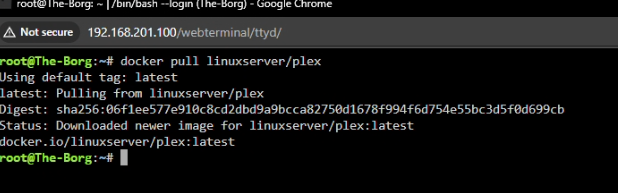
yes looks good so far image pull is clean, we are using root for a side check with permission (unraid dockers run as user root. Dockers may have continer user ID whcih is why we set linux IO plex to use root as root launched... user tempaltes are clear. the extra parm using dns 8.8.8.8 as there have been some issues in the past with fresh plex and claiming this sets a public internet dns for use within the docker. --dns=8.8.8.8 other then taht its double check that your plex.tv plex account has the old plex servers removed.

-
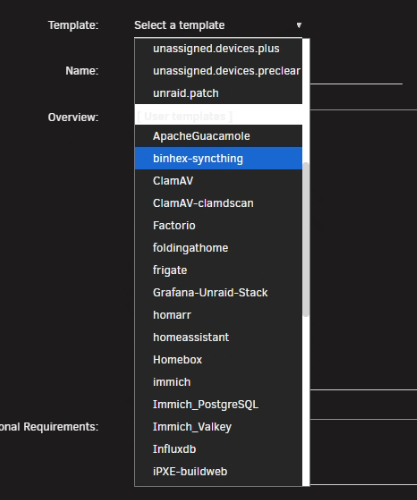
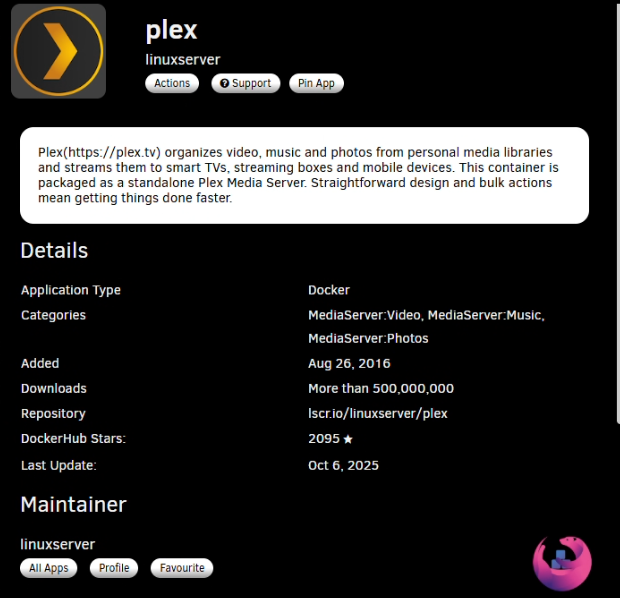
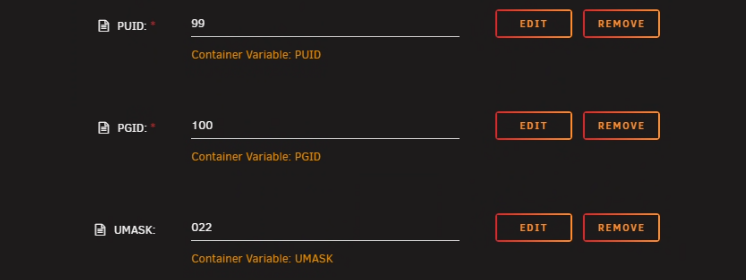
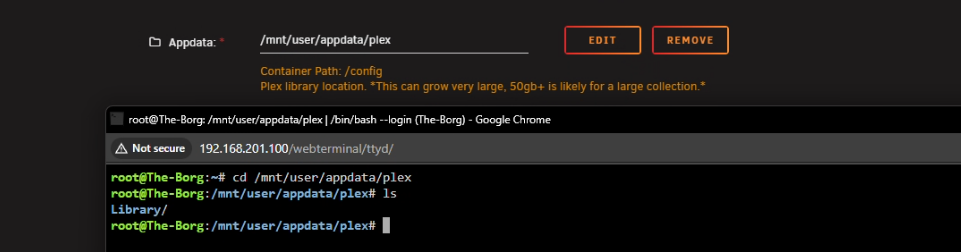
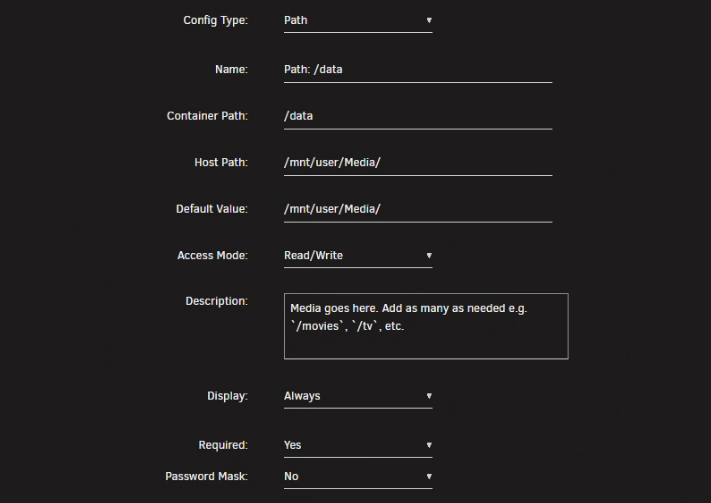
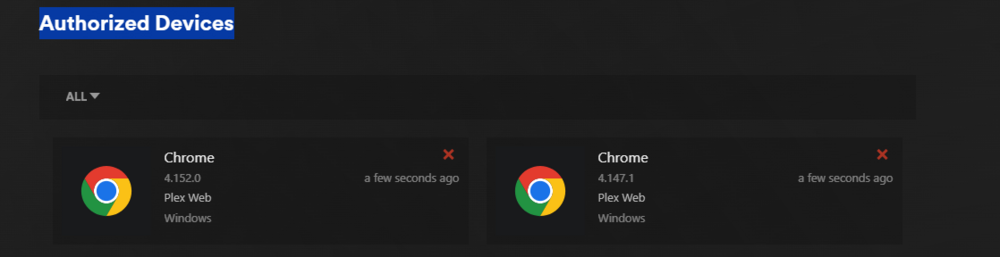
ok with the deletion of the appdata folder. I would start fresh fresh and delte your template and do a docker clean up to remove any bad images. go to add container: select anything tha has plex: and hit the X at the top right to delete the tempalte: then run this script to clean up and doker image https://forums.unraid.net/topic/178033-bmartino1-user-scripts/#findComment-1478647 then lets start fresh so no appdata plex folder. no exisitng plex templates (templates can change...) no pre exsiitng dockers and images... Then we will install advance togle we are going to add and do some things... (Linux Server also gives us the abilty to side load with docker mods to add pacakges to test if issues occur..) double check the repository: while on the tempalte. open a web ui pree pull the docker image. docker pull linuxserver/plex close the termainl... This is to make sure docker adn docker comunication and image pulls are working... and to make the template install form fresh under more setting chnage 99 and 100 to 0 99 -nobody user 100- users group 0- root we want root to access files (this is a side permission fix. you may have bad unraid/docekr folder permissions. docker safe permision tools under settings chmod 777 -R && chown nobody:users -R open web terminal and make sure the paths are empty This way we know before the docker is run that there is a empty path made and used by the unraid tempate and docker for the plex config this is where the plex database and xml configuration will latter exist. add your plex avilable medai... Depending on how you handle you movies/TV shows I have a sinlge folder with TV shows, movies music etc. latter in plex we will add a libray for movies/tv shows music... by going to /data/movies /tv / etc....etc.. start fresh fresh https://plex.tv/claim grab a new claim key You may need to clear old plex servers form plex as well. login to plex.tv go to account settings hit the red x to any and all auth devices to force a resing in and plex adation to your account. example to look for: this way plex api side is not the issues. frinaly in teh extar parm add this line to make sure plex is internet reachable --hostname plex --dns=8.8.8.8 we want a fresh plex image libray created with a fresh plex claim key and libray at a known path I use /data for continer and /mnt/user/media where my p[lex vidoes tvshows sit... then we can look at g card addions one plex is operational. so I would ask you to clear data and confirm with the web termal along the way before apply the plex template.









-
since your reusing docker data it apears that your plex config the xml may need edited to use the new claim key. removing the docker doen't destory the appdata folder that is reused... you need to delete the old plex database the xml config location... due to the recent security breach: https://forums.unraid.net/topic/193388-attention-all-plex-users/#findComment-1579965 you will either need to start fresh or delete the appdata folder out right. gien the eror quote: The log from a brand new container (on a new Docker vDisk, with a new appdata folder) shows the start-script exiting and the claim failing with a 500 error. Here's a key snippet from the latest log... or change the appdata path if you don't want to delete it. as your not starting new/fresh.
-
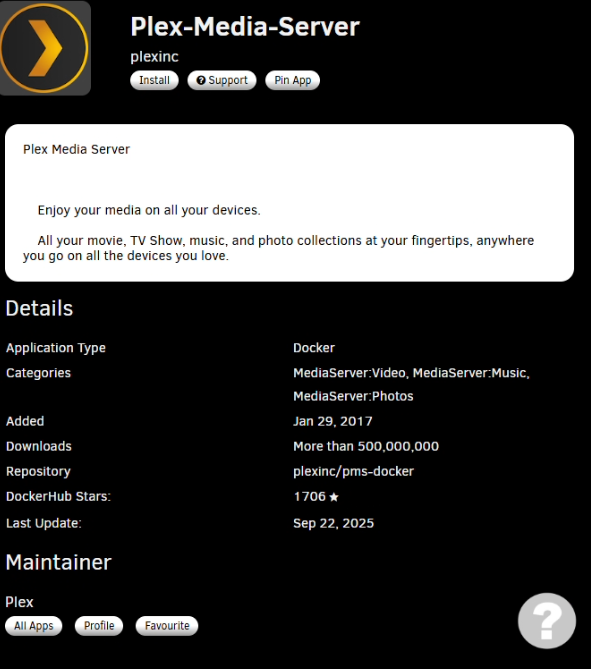
try using plex offical or using plex via linux server. I've personly have had issus with binhex-plexpass and don't like the docker nor its setup... again use plex offical: docker by plex inc that was esetal copied and mainteinted via plex. or use a trusted docker maker and maintainer like linux io linux server: if your starting over... I recommend Linux server as they seem to be faster at security and plex updates...

-
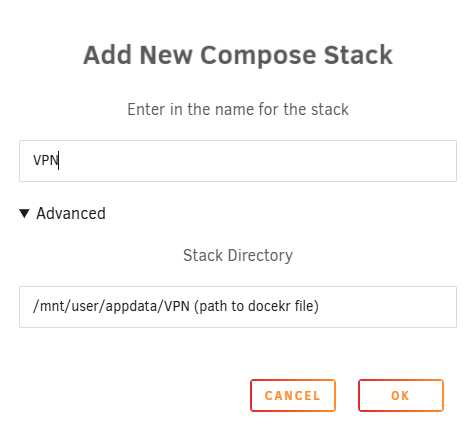
you can do this with policy routing + marks on the Unraid host so only the containers you choose egress over wg0, while they stay on a normal Docker bridge (so they’re still reachable by your other containers). Overview (what we’re doing)Keep containers on a user-defined Docker bridge (not wgX). That preserves service discovery and reachability. Give VPN-bound containers static IPs on that bridge (easy to target with firewall rules). Add policy routing on the host: Mark packets with those source IPs only when they go to the internet (exclude RFC1918 etc). Route marked packets out the WireGuard interface (wg0). Masquerade out wg0 so replies return properly. Do not touch intra-Docker / LAN traffic, so containers still see each other on the bridge. If I understand you correctly. When dealing with vpn docker on unraid Prefer to use docker copoase Docker Compose (example) to go over and reveiw... #version: "3.8" networks: appnet: driver: bridge ipam: config: - subnet: 172.23.0.0/24 gateway: 172.23.0.1 services: qbittorrent: image: lscr.io/linuxserver/qbittorrent:latest container_name: qbittorrent networks: appnet: ipv4_address: 172.23.0.10 # <-- this one will be routed via wg0 ports: - "8080:8080" # example; expose if you actually need host access environment: - PUID=99 - PGID=100 - TZ=America/Chicago restart: unless-stopped prowlarr: image: lscr.io/linuxserver/prowlarr:latest container_name: prowlarr networks: appnet: ipv4_address: 172.23.0.11 # <-- also via wg0 restart: unless-stopped plex: image: lscr.io/linuxserver/plex:latest container_name: plex networks: appnet: {} # dynamic IP (not via wg0) restart: unless-stopped This creates a dedicated user bridge appnet (172.23.0.0/24) and pins a couple of “via-VPN” app IPs so we can match them. All 3 are on the same Docker bridge → they can reach each other by container name/IP. Only the IPs you list (e.g., 172.23.0.10, .11) will be policy-routed out wg0. Double-check your Wiregurad unraid host settings: My understanding is that your using urnaid vpn manger for your wire guard VPN WireGuard & host routing glue A. Make sure WireGuard can NAT outIf you used Unraid’s WG “Remote access to server” or similar, it likely added MASQUERADE already. If not, we’ll add it in our script below. some can be made in the web UI, not a fan of unraids web ui... and hard to share and give examples with our security PHI issues... B. Policy routing script (drop into User Scripts → “At Startup of Array”)This marks packets from the selected container IPs to the WAN (not local ranges) and sends them through table 51820 (our WG table). user script: #!/bin/bash set -e WG_IF="wg0" WG_TABLE="51820" MARK_HEX="0xC8E4" # arbitrary mark value MARK_DEC=$((0xC8E4)) # List the container IPs that must egress via WireGuard VPN_SRC_IPS=( 172.23.0.10 172.23.0.11 ) # --- Set up routing table for WireGuard --- # Add default route via wg0 in our custom table ip -t route show table ${WG_TABLE} | grep -q "default" || ip route add default dev ${WG_IF} table ${WG_TABLE} || true # Add policy rule to use that table for marked packets ip rule show | grep -q "fwmark ${MARK_DEC} lookup ${WG_TABLE}" || ip rule add fwmark ${MARK_DEC} lookup ${WG_TABLE} # --- iptables chains (idempotent) --- iptables -t mangle -C PREROUTING -j WG_VPN 2>/dev/null || iptables -t mangle -N WG_VPN iptables -t mangle -C PREROUTING -j WG_VPN 2>/dev/null || iptables -t mangle -A PREROUTING -j WG_VPN iptables -t mangle -C OUTPUT -j WG_VPN 2>/dev/null || iptables -t mangle -A OUTPUT -j WG_VPN # Exempt local/LAN destinations early (so LAN stays LAN) for cidr in 10.0.0.0/8 172.16.0.0/12 192.168.0.0/16 100.64.0.0/10 127.0.0.0/8; do iptables -t mangle -C WG_VPN -d $cidr -j RETURN 2>/dev/null || iptables -t mangle -A WG_VPN -d $cidr -j RETURN done # Mark traffic from the chosen container IPs for ip in "${VPN_SRC_IPS[@]}"; do iptables -t mangle -C WG_VPN -s ${ip} -m mark --mark 0x0 -j MARK --set-mark ${MARK_HEX} 2>/dev/null \ || iptables -t mangle -A WG_VPN -s ${ip} -m mark --mark 0x0 -j MARK --set-mark ${MARK_HEX} done # NAT/MASQUERADE out the WireGuard interface for internet return path iptables -t nat -C POSTROUTING -o ${WG_IF} -j MASQUERADE 2>/dev/null || iptables -t nat -A POSTROUTING -o ${WG_IF} -j MASQUERADE echo "Selective WireGuard policy routing is active." What this does Creates routing table 51820 with default via wg0. Adds an ip rule to use that table when packets carry our mark. Uses the DOCKER-friendly path (PREROUTING and OUTPUT via a custom WG_VPN chain) to: Immediately return traffic destined to private/LAN ranges (so local stays local). Mark traffic that originates from the listed container IPs. MASQUERADE out wg0 so replies come back properly through the tunnel. How to choose which containers use the VPN Just add their IP to VPN_SRC_IPS in the script and give them that static IP on your Docker bridge in compose. Remove an IP from the list to stop sending it over WG. This scales well: you can target a whole subnet (e.g., -s 172.23.0.0/24) if you create a dedicated “vpn-apps” bridge. I usually keep it to a handful of pinned IPs. Notes & gotchasContainers remain discoverable on the bridge and can talk to other containers exactly as before. Only WAN traffic (non-RFC1918/CGNAT/loopback) from the selected container IPs gets forced over wg0. If a container exposes ports to the host (e.g., -p 8080:8080), that still works — your browser → host → container is LAN and won’t get marked. If your WG config already does NAT or has special firewalling, keep those, but the script’s MASQUERADE is usually necessary. If you run additional WG tunnels, repeat the pattern with a different WG_TABLE/MARK_HEX/interface. Quick test # See rules ip rule ip route show table 51820 iptables -t mangle -S WG_VPN iptables -t nat -S | grep MASQUERADE # Exec into a VPN-bound container and check exit IP: Example docker exec -it qbittorrent bash curl -4 https://ifconfig.io # Should show your WireGuard egress IP you can use docker network inspect <network name> and get the docker IP and sue unraid temple the static asign one...
-
Brandon Martino - Personal SiteGuide-DockerNetworksBrandon Martino - Personal Siteyou will need to implemnt #6 6) --network=container:<name> (share another container’s network) and use a CLI to Connect container to network I would recoemnd using compose where we can define more then 1 network added to a docker.
-
Only think I can really recommend is start any docker you want to keep and run the script here to let docker clean up the images https://forums.unraid.net/topic/178033-bmartino1-user-scripts/#findComment-1478647
-
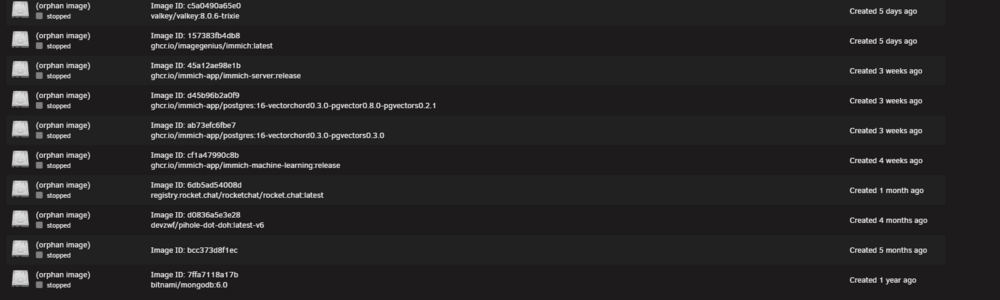
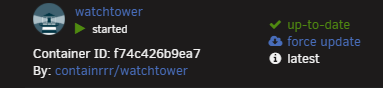
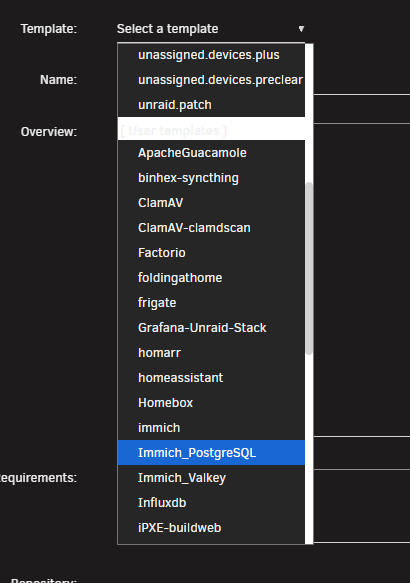
having helped another who had a simalr issues. Error: failed to register layer: rename /var/lib/docker/image/btrfs/layerdb/tmp/write-set-840664239 /var/lib/docker/image/btrfs/layerdb/sha256/e85e2124f93f802837e1ae23fe0eab1238ea3cecbc9e1650d954c5fe335e68a8: file exists most likley dcoker errors and issues with a exisintg image on unraid, however bitnami pulled redis and the image is partail used. per the other person forum my sugestion of deleting the docker and its image worked for them go to advance view: click on the bad image or old non existing images and delte them: then delete the docker and remove it image: make sure the box is checked: as we need unraid to initate a new docker pull for the tempalte. once the old images are gone. and immihc, postgres and redis are gone. reinstall them. as unradi still has the tempate data and your server data is still on disk... click add container: in the drop down list: re select the docker you deleted and apply it to intatea docxker image pull and have the docker back as this is simlar that happened to user: https://forums.unraid.net/topic/193861-need-help-with-immich-error-failed-to-register/#comment-1581359





-
@JorgeB I don't know where but I rember there being a issues with ryzen and C states. can you point me or share here the fourm post about that issue? as this thread and clients may be affected by a known amd bug issues due to cstate. I know of it, I've not experienced it, but the fix was to turn off cstates...
-
do you have a docker web servve like a revers proxy and is that set to host? you may have replaced the unriad web UI ports and prevented urnaid webui form running... per the log it apears that emhttp (unraids web ui server) started then docker started. so if you los web ui, its becuase you have a docker takig the ports or a misconfiguration... looks like /dev/sdd had some issues with files and pathing as well Oct 4 18:59:56 Tower emhttpd: shcmd (98): /etc/rc.d/rc.docker start Oct 4 18:59:56 Tower rc.docker: Starting Docker daemon... Oct 4 18:59:57 Tower sysDrivers: SysDrivers Build Complete Oct 4 19:00:01 Tower kernel: Initializing XFRM netlink socket Oct 4 19:00:02 Tower rc.docker: Docker daemon... Started. Oct 4 19:00:02 Tower rc.docker: Starting network... Oct 4 19:00:03 Tower rc.docker: Processing... br0 Oct 4 19:00:03 Tower rc.docker: created network ipvlan br0 with subnets: 192.168.1.0/24; Oct 4 19:00:03 Tower rc.docker: Network started. Oct 4 19:00:03 Tower rc.docker: Starting containers... Oct 4 19:00:03 Tower update_services: remove queued job 3 Oct 4 19:00:03 Tower update_services: queue new job 4, wait for 10s Oct 4 19:00:03 Tower kernel: mdcmd (36): check correct Oct 4 19:00:03 Tower kernel: md: recovery thread: check P ... Oct 4 19:00:04 Tower rc.docker: glances: started successfully! Oct 4 19:00:04 Tower rc.docker: plex: started successfully! Oct 4 19:00:04 Tower kernel: docker0: port 1(vethbe83fcd) entered blocking state Oct 4 19:00:04 Tower kernel: docker0: port 1(vethbe83fcd) entered disabled state Oct 4 19:00:04 Tower kernel: vethbe83fcd: entered allmulticast mode Oct 4 19:00:04 Tower kernel: vethbe83fcd: entered promiscuous mode Oct 4 19:00:05 Tower kernel: eth0: renamed from veth5580e55 Oct 4 19:00:05 Tower kernel: docker0: port 1(vethbe83fcd) entered blocking state Oct 4 19:00:05 Tower kernel: docker0: port 1(vethbe83fcd) entered forwarding state Oct 4 19:00:05 Tower rc.docker: Containers started. Oct 4 19:00:05 Tower rc.docker: binhex-krusader: started successfully! Oct 4 19:00:05 Tower file.activity: Waiting 10 seconds before starting. Oct 4 19:00:05 Tower kernel: r8169 0000:22:00.0 eth0: Link is Down Oct 4 19:00:05 Tower kernel: br0: port 1(eth0) entered disabled state Oct 4 19:00:06 Tower tips.and.tweaks: Tweaks Applied Oct 4 19:00:06 Tower unassigned.devices: Mounting 'Auto Mount' Remote Shares... Oct 4 19:00:09 Tower kernel: r8169 0000:22:00.0 eth0: Link is Up - 1Gbps/Full - flow control off Oct 4 19:00:09 Tower kernel: br0: port 1(eth0) entered blocking state Oct 4 19:00:09 Tower kernel: br0: port 1(eth0) entered forwarding state Oct 4 19:00:13 Tower reload_services: execute queued job 4 Oct 4 19:00:13 Tower unassigned.devices: Using Gateway '192.168.1.1' for Remote Shares. Oct 4 19:00:13 Tower rc.nfsd: Updating NFS server daemon... Oct 4 19:00:13 Tower rc.nfsd: Restarting NFS server daemon... Oct 4 19:00:13 Tower rc.nfsd: Stopping NFS server daemon... Oct 4 19:00:13 Tower unassigned.devices: Waiting 5 secs before mounting Remote Shares... Oct 4 19:00:13 Tower rpc.mountd[9006]: Caught signal 15, un-registering and exiting. Oct 4 19:00:13 Tower rc.nfsd: /usr/sbin/rpc.nfsd 0 Oct 4 19:00:14 Tower rc.nfsd: /usr/sbin/exportfs -au Oct 4 19:00:14 Tower rc.nfsd: NFS server daemon... Stopped. Oct 4 19:00:15 Tower rc.nfsd: Starting NFS server daemon... Oct 4 19:00:15 Tower rc.nfsd: /usr/sbin/exportfs -r Oct 4 19:00:15 Tower rc.nfsd: /usr/sbin/rpc.nfsd -u -H 192.168.1.9 -H 127.0.0.1 -s 8 Oct 4 19:00:15 Tower file.activity: Starting File Activity Oct 4 19:00:15 Tower file.activity: File Activity inotify starting Oct 4 19:00:16 Tower kernel: NFSD: Using UMH upcall client tracking operations. ### [PREVIOUS LINE REPEATED 1 TIMES] ### Oct 4 19:00:16 Tower kernel: NFSD: starting 90-second grace period (net f0000000) Oct 4 19:00:16 Tower rc.nfsd: /usr/sbin/rpc.mountd Oct 4 19:00:16 Tower rpc.mountd[16874]: Version 2.8.3 starting Oct 4 19:00:16 Tower rc.nfsd: NFS server daemon... Started. Oct 4 19:00:16 Tower rc.nginx: Updating Nginx server daemon... Oct 4 19:00:16 Tower rc.nginx: Reloading Nginx server daemon... Oct 4 19:00:17 Tower rc.nginx: Checking configuration for correct syntax and then trying to open files referenced in configuration... Oct 4 19:00:17 Tower rc.nginx: /usr/sbin/nginx -t -c /etc/nginx/nginx.conf Oct 4 19:00:17 Tower rc.nginx: Reloading Nginx server daemon configuration... Oct 4 19:00:17 Tower nginx: 2025/10/04 19:00:17 [alert] 9293#9293: *285 open socket #31 left in connection 9 Oct 4 19:00:17 Tower nginx: 2025/10/04 19:00:17 [alert] 9293#9293: *266 open socket #22 left in connection 13 Oct 4 19:00:17 Tower nginx: 2025/10/04 19:00:17 [alert] 9293#9293: *268 open socket #26 left in connection 22 Oct 4 19:00:17 Tower nginx: 2025/10/04 19:00:17 [alert] 9293#9293: aborting Oct 4 19:00:19 Tower unassigned.devices: Remote Share '//THETANK/Public' is not set to auto mount. Oct 4 19:00:19 Tower unassigned.devices: Remote Share 'QNAP:/mnt/user/backups' is not set to auto mount. Oct 4 19:00:19 Tower unassigned.devices: Remote Share 'QNAP:/mnt/user/Media' is not set to auto mount. Oct 4 19:00:19 Tower unassigned.devices: Remote Share 'QNAP:/mnt/user/Multimedia' is not set to auto mount. Oct 4 19:00:19 Tower unassigned.devices: Remote Share 'QNAP:/mnt/user/porn' is not set to auto mount. Oct 4 19:00:19 Tower unassigned.devices: Remote Share 'QNAP:/mnt/user/Users' is not set to auto mount. Oct 4 19:15:04 Tower emhttpd: spinning down /dev/sdd Oct 4 19:15:22 Tower root: Fix Common Problems Version 2025.08.07 Oct 4 19:15:22 Tower root: Fix Common Problems: Error: Default docker appdata location is not a cache-only share Oct 4 19:15:23 Tower root: Fix Common Problems: Warning: Plugin file.activity.plg is not up to date Oct 4 19:15:24 Tower root: Fix Common Problems: Warning: Scheduled Parity Checks are not enabled ** Ignored Oct 4 19:15:26 Tower root: Fix Common Problems: Error: Invalid folder disk contained within /mnt Oct 4 19:15:44 Tower emhttpd: read SMART /dev/sdd so emhttp start web port 80 and nginx files https port 443 why it failed I don't know. I can only assume a docker host web server taking port 443
-
step 1 always make a unraid backup file! Main > Flash > backup step 2 disable any and all autostarts. any docker set to auto start, and server set to autostart. new hardware new devcie paths and some configuratrion chagnes may be needed... (especal if changining process aritypes ie amd to intel and vise versa) step 2 bakup things with the appdata backup plugin to keep any dockers and its configurations this way we have a restore point if something fails. step 3 record what disk is at what slot look for disk identifiers such as device seral numbers. step 4 turn off / uninstall any and all drive plugins intel top, nvdia, etc this is due to new kerneal load and you may or may not need the plugin or the plugin drivers can cause other issues. step 5 if vm and you have things bind for passign to a VM. Disalbe and remove all binds! 8as lspci and devcies may not be at the same area/device path on new hardware... this sets it up with exisitn gdata form the other hrad drives while mainting usb data for dockers, samba shares and orgianl array path of disks. sometimes the new config is needed whihc is why you need documentation of waht disk is what int he unrad disk array/pool and to turn off auto staart as new system may not see all disk nor all disk may not be at simlar device paths. ie /dev/sdb and sda are now switched. then going though the log and fising the array maping th ecorect disk where they were, and eanbleing and chaing data paths.
-
as long as all disk and the usb in on the new machine. all data and the array should be there and transferable. you may have some issues with device pathing and docker locatoins. its more geting driver and other plugins fixed for the transfer. I recoeemnd temp disabling any and all vms, any and all dockers and turn autostart of the array off. then add all the nvme disk and the unraid usb into the new machine. launch unraid and get resetup. you should see your disk (pathing may have chnged but as long as you match the corect disk to the corect disk onteh new then start the array all data will be the same and in the same location. then sloly start systems enable vms tunr on vm fixing any issues along the way same with dockers. I've have moved a unraid USB between 5-10 different machihes and was able to migrate cahnge disk and move things with the same unraid system and license. It is possble but there are some pre cautions.






