






bmartino1
Members
-
Joined
-
Last visited
Everything posted by bmartino1
-
correct layer 2 layer 3 with vlan tags. it could be I need time to go though your configurations and check. but atm this look good. The switch is a potental issue. isp > pfsense > switch > unraid pfsesne mutple dhcp servers setup with vlans swithc port form pfsense port igc3 (this tells me the port is intel gigabit port #3...) swithc port will need trunkign and or vlan taged to default valn 1 and other vlans you want unraid eth0 interface to interact with...
-
Thank you, this is at least a start.. we would have to make that xml file and write some code to add this file into the notification. This appears to be the end step script.... so the plugin (the xml file) will need areas to write the initial configuration data and to grab notification events that file... the title, message etc... and the data needed to connect to "join" as the agent... then this script is ran with that data filled in or generated.... Then this script (posted above appears to run) and is run to send the notification filling in the data to the join api system... I'd have to go back and I have recently cleaned up old data... so it may be part of the old .page file in the emhttp example: https://github.com/unraid/webgui/blob/master/emhttp/plugins/dynamix/NotificationAgents.page SO, its hard to say, as I went searching old new etc... even on the unraid flash using grep and can't find any previous history edits of this existing natively. I'm not saying it didn't exist! Clearly something did... I'm just saying that its inital code can no longer be found... so it needs recreated... Docker on CA and plugin on CA required different things in different github setups. and I'm not a fan of unraids emhttp we server and how it does what it does... as posted already as squid gave use a template we could build.... example: https://github.com/Squidly271/Wxwork-sample we will need to esential rebuild this join agent so a plugin thatwould sit in /boot/config/plugins/ where the join.sh and other xml conifg page... so the ca plugin template xml page to install from ca... the setting page xml/http code to add the api key, the xyz data that is sent to this join.sh script and ran... so My 2 blocks currently are: I'm just not sure how nor what the notify system did to grab to then send to the agent to make its message... I'm not going to be able to m,ake a plugin to share once configured.. I'm more then happy to work thoguh iissuesand help script a way around this. as example here: https://forums.unraid.net/topic/194631-plugin-or-script-that-can-function-as-a-docker-watchdog/#findComment-1587981 I'm not sure where nor how to tap unraid notfication to generate the message to the join api... where I could edit the docker name set the words "unifi" on the message to container name var at the top and make notifications. where this agent would somehow intercept and take that message and send it to xyz message over join... So its a bit over my head as I don't know what this agen did nor how to workaround fix. posblie to make a github issues linking this post and asking the unraid dev to look at the old code and see what they can scrape together. "join" is to generic of a word and its hard geting and finding this data... https://github.com/unraid/webgui/issues as i'm not sure how i wouold code the 3rd party plugin to interact and use teh unraid web ui settings.. I left smtp email due to 2fa and app password BS (had google, microsft email smtp for a time...)... I dabbled in agents like slacc, discord messaging and found it easier and better to script and code that into my checks I wanted then trying to mess with unriads notification system... All I can say is this would need recreated and implemented, and I don't have the data, access and ability to do at this time. Everything post so far helps tremendous but this will take time. unraid doesn't really have clear documentation on how to code for its plugins...

-
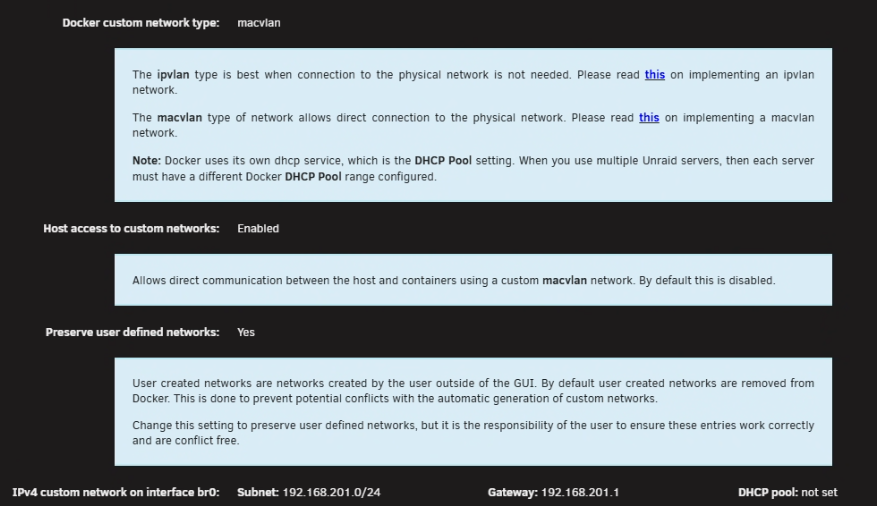
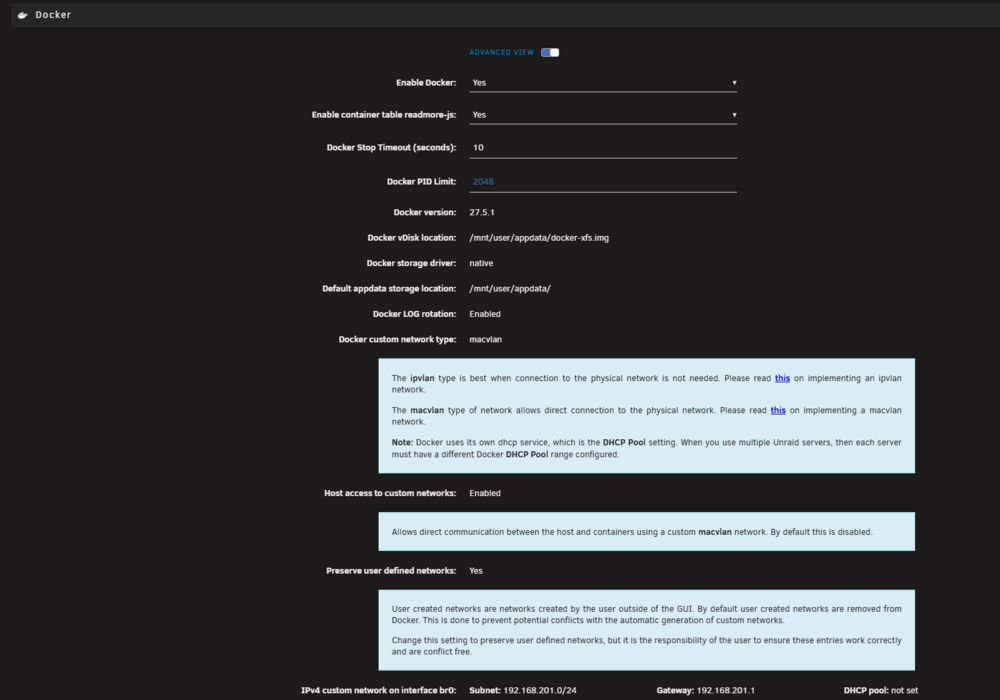
Correct, please set custom to enabled and preserver user defined. Host to enabled will fix some docker isolation issues and on reboot your custom docker network on br0.100 for example would not remain causing other networking issues upon reboot. I want to make sure pfSense is correctly configured for vlans before editing and messing with unraid ... we should be able to run a temp docker, something like docker run -network=eth0.100 bash and consol in and double-check the docker on that vlan ... I'm not set on where what broke where. I do know that there were a mis configuration write with unraid moving form v6 into v7 that messed with docker vlan pool settings. but if your vlan is not correct then edits on unraid won't fix the underline issue. as we all need to make sure pfsense is routeing and able to tag the eth0 interface with multiple vlans... as its possible to have vlan 100 tagged and pluged into unraid and have valn 100 act as the default vlan... so only eth0 is on vlan 100 but doesn't see vlan 100 so packets sent off unraid are bing redirected(pfsense configurations). We want to make sure this isn't a network error first on pfsense. Then to infom unraid that a vlan exist and to tell linux to use eth0.100 we may need to remove the old bad docker data as well. as IDK what your settings curently are... Pleas post a diag! Example, if you turned off bridging br0 doesn't exist and the docker you made for vlan 100 is now eth0.100 not br0.100 so the docker network needs recreated... Not enuoth info to say one way or the other. but often when I jump in and help others on vlan stuff it has always been a network misconfiguration on how they have tagged there vlans in the router...
-
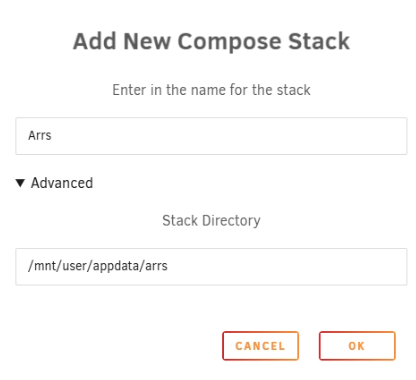
For this stack and more for IF I bring somehting down or need another docker... I wat depend on checks and health cheks... I prefer compose for Arrs setups... ??? did you clear out the old configurations for the *arrs by deleting the appdata configurations? Example for unraid: https://trash-guides.info/ https://trash-guides.info/File-and-Folder-Structure/ https://trash-guides.info/File-and-Folder-Structure/How-to-set-up/Unraid/ example of my *ars folder structure and docker compose on unraid: (what I've done to get it working on unraid in the past) Docker compose plugin... First a bath script to make the necessary folders... Assuming default #!/bin/bash set -Eeuo pipefail # ========================================= # Prepare *arrs folder tree for bind mounts # ========================================= # Edit these to match your system PUID="0" # 99 Unraid 'nobody' user 0 root PGID="0" # 100 Unraid 'users' group 0 root # Root for app configs (per-app subfolders below) APPDATA_ROOT="/mnt/user/appdata/arrs" # Root for data (media + torrents live under here) ARSDATA_ROOT="/mnt/user/arsdata" # Which app config folders to create APP_FOLDERS=(prowlarr sonarr radarr transmission watchtower) # Data subtree (TRaSH layout) DATA_DIRS=( "media" "media/tv" "media/movies" "torrents" "torrents/completed" "torrents/incomplete" "torrents/watch" ) log(){ echo "[$(date +'%F %T')] $*"; } mkown() { local path="$1" mkdir -p -- "$path" chown -R "$PUID:$PGID" "$path" chmod -R 777 "$path" } log "Creating appdata under: $APPDATA_ROOT" for f in "${APP_FOLDERS[@]}"; do mkown "$APPDATA_ROOT/$f" done log "Creating data under: $ARSDATA_ROOT" mkown "$ARSDATA_ROOT" for d in "${DATA_DIRS[@]}"; do mkown "$ARSDATA_ROOT/$d" done log "Summary:" log " PUID: $PUID PGID: $PGID log " APPDATA_ROOT: $APPDATA_ROOT" log " ARSDATA_ROOT: $ARSDATA_ROOT" log "Done." this way /mnt/user/appdata/arrs will be our compose docker and env location for latter!!! then eidt the stack env ENV: TZ=America/Chicago PUID=0 PGID=0 # --- Unraid shares (simple) --- APPDATA_ROOT=/mnt/user/appdata/arrs ARSDATA_ROOT=/mnt/user/arsdata compose file: Compose: #version: "3.9" #unraid compse is v2 adn this version tag is ignored! ################################################################################ # Networks - lets make our own docker bridge (unraid ip:port) to connect to the ars dockers... ################################################################################ networks: arrs: driver: bridge ipam: config: - subnet: 172.45.0.0/24 br0: external: true ################################################################################ # Services ################################################################################ services: # Auto-update the stack (first Sunday each month) watchtower: image: containrrr/watchtower container_name: watchtower network_mode: host environment: - TZ=${TZ} - HOST_CONTAINERNAME=watchtower labels: - net.unraid.docker.managed=composeman - net.unraid.docker.icon=https://containrrr.dev/watchtower/images/logo-450px.png - com.centurylinklabs.watchtower.enable=false volumes: - /var/run/docker.sock:/var/run/docker.sock:rw # First Sunday: 0 0 1-7 * 0 command: --schedule "0 0 1-7 * 0" --cleanup --include-stopped --label-enable restart: unless-stopped ############################################################################## # Indexers / Orchestrators ############################################################################## prowlarr: image: lscr.io/linuxserver/prowlarr:latest container_name: prowlarr labels: - com.centurylinklabs.watchtower.enable=true - folder.view=ARS - net.unraid.docker.managed=composeman - net.unraid.docker.webui=http://[IP]:[PORT:9696]/system/status - net.unraid.docker.icon=https://raw.githubusercontent.com/linuxserver/docker-templates/master/linuxserver.io/img/prowlarr-logo.png environment: - PUID=${PUID} - PGID=${PGID} - TZ=${TZ} volumes: - prowlarr-config:/config - data-root:/data ports: - "9697:9696" networks: arrs: ipv4_address: 172.45.0.3 restart: unless-stopped ############################################################################## # Download Client (Transmission example) use https://www.composerize.com/ for your nbzt docker or run standalon... ############################################################################## transmission: image: lscr.io/linuxserver/transmission:latest container_name: transmission labels: - com.centurylinklabs.watchtower.enable=true - folder.view=ARS - net.unraid.docker.managed=composeman - net.unraid.docker.webui=http://[IP]:[PORT:9091] - net.unraid.docker.icon=https://raw.githubusercontent.com/linuxserver/docker-templates/master/linuxserver.io/img/transmission-logo.png environment: - PUID=${PUID} - PGID=${PGID} - TZ=${TZ} # If you want auth, set these real values or remove entirely: - USER=admin - PASS=password # Optional: direct Transmission to /data/torrents paths per trash guides guide... # - TRANSMISSION_DOWNLOAD_DIR=/data/torrents/completed # - TRANSMISSION_INCOMPLETE_DIR=/data/torrents/incomplete # - TRANSMISSION_WATCH_DIR=/data/torrents/watch volumes: - transmission-config:/config - data-root:/data - downloads:/downloads # points to /data/torrents on the host networks: arrs: ipv4_address: 172.45.0.2 br0: ipv4_address: 192.168.1.254 healthcheck: test: ["CMD-SHELL", "bash -c 'exec 3<>/dev/tcp/127.0.0.1/9091'"] interval: 30s timeout: 5s retries: 10 restart: unless-stopped ############################################################################## # TV / Movies ############################################################################## sonarr: image: lscr.io/linuxserver/sonarr:nightly container_name: sonarr labels: - com.centurylinklabs.watchtower.enable=true - folder.view=ARS - net.unraid.docker.managed=composeman - net.unraid.docker.webui=http://[IP]:[PORT:8989]/system/status - net.unraid.docker.icon=https://raw.githubusercontent.com/linuxserver/docker-templates/master/linuxserver.io/img/sonarr-logo.png environment: - PUID=${PUID} - PGID=${PGID} - TZ=${TZ} volumes: - sonarr-config:/config - data-root:/data ports: - "8989:8989" networks: arrs: ipv4_address: 172.45.0.4 depends_on: prowlarr: condition: service_started transmission: condition: service_healthy restart: unless-stopped radarr: image: lscr.io/linuxserver/radarr:nightly container_name: radarr labels: - com.centurylinklabs.watchtower.enable=true - folder.view=ARS - net.unraid.docker.managed=composeman - net.unraid.docker.webui=http://[IP]:[PORT:7878]/system/status - net.unraid.docker.icon=https://raw.githubusercontent.com/linuxserver/docker-templates/master/linuxserver.io/img/radarr-logo.png environment: - PUID=${PUID} - PGID=${PGID} - TZ=${TZ} volumes: - radarr-config:/config - data-root:/data ports: - "7878:7878" networks: arrs: ipv4_address: 172.45.0.5 depends_on: prowlarr: condition: service_started transmission: condition: service_healthy restart: unless-stopped ################################################################################ # Named volumes → bind mounts set via env file... ################################################################################ volumes: # Per-app configs prowlarr-config: driver: local driver_opts: type: none device: ${APPDATA_ROOT}/prowlarr o: bind sonarr-config: driver: local driver_opts: type: none device: ${APPDATA_ROOT}/sonarr o: bind radarr-config: driver: local driver_opts: type: none device: ${APPDATA_ROOT}/radarr o: bind transmission-config: driver: local driver_opts: type: none device: ${APPDATA_ROOT}/transmission o: bind # Optional spot for watchtower logs/config if you want it watchtower-config: driver: local driver_opts: type: none device: ${APPDATA_ROOT}/watchtower o: bind # Data roots (TRaSH layout) data-root: driver: local driver_opts: type: none device: ${ARSDATA_ROOT} o: bind # Transmission default convenience mount downloads: driver: local driver_opts: type: none device: ${ARSDATA_ROOT}/torrents o: bind But I believe your isseus is with pre-existing data and configuration of the docker that is hard failing not some much inner docker network communication... please review: https://bmartino1.weebly.com/guide-dockernetworks.html https://www.youtube.com/watch?v=3k_MwE0Z3CE


-
Please post a diag file. And bug report... https://forums.unraid.net/bug-reports/stable-releases/ list what plugins you have installed. Per release notes this could be a known issue. https://docs.unraid.net/unraid-os/release-notes/7.2.0/#known-issues linux gui display done't always have non utf-8 character encoding to display correctly...
-
and this tells me your messing with vlans and have hit the docekr netwrok isoaltion issue the vlan needs to have a dhcp server off pfsesne... meaning if I connect to vlan 100 as shown here. I get a dhcp IP form pfsense on that vlan. https://encrypted-vtbn1.gstatic.com/video?q=tbn:ANd9GcRN-XGWaNLzvwS_3harGp8nZhCPfDHmmx3oYCGD5nDNd3PcyHHR server user define network and host access enabled in docker settings. I still recomend using the bridgin for br0 (unraid default configurations) then we need to fix and doulbe check pfsesnt data for vlan and dhcp of a ip on that vlan... then docuble check the vlan on unraid and make a docker network on that vlan then asign that to the docker you wnat onthe vlan and get that mac to asign to pfsense... as given the OG post and data shown it looks like unrad was setup corectly... you will need pre check pfsense configurations for valns and the dhcp server over that vlan connection. Netgate ForumNo DHCP on VLAN interfacesI'm attempting to create a new VLAN configuration on pfSense 2.3.3, and can't get DHCP Server to configure. According to what I've been reading, after confi...

-
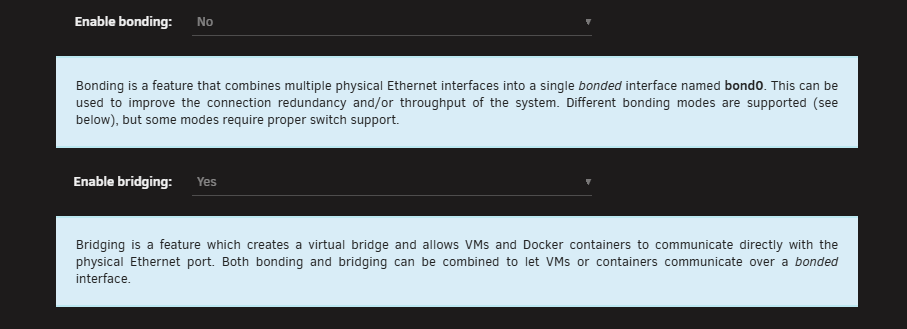
given this data you turned off bridging which is fine/OK. it just means you will use custom eth0 this is your ipvlan/macvlan router lan docker network. so eth0 needs to connect to the pfsense device. unraind docker advance setting to move to macvlan to give dockers there own mac address is how i would direct you to move forward...
-
we used to be able to define a docker run command to set a custom mac address. Docker updates and cahgns now moved this to the dokcer network side so no more define dcoker continer to this premade mac address... macvlan randomly generates this... that said... You can use docker compose and still pre define and set a mac address. example: docker compose to run unboud: networks: br0: external: true # macvlan on your LAN. Must already exist via: # docker network create -d macvlan \ # --subnet=192.168.2.0/24 --gateway=192.168.2.1 \ # -o parent=YOUR_NIC br0 # (replace YOUR_NIC with e.g. eno1, eth0, etc.) #uses unraids custom br0 default docker network services: unbound: image: mvance/unbound:latest # Additional system control if needed... # sysctls: # net.core.rmem_max: "16777216" # Memory budget for Unbound (cap + soft reservation) # mem_limit: 4g mem_reservation: 1g container_name: unbound restart: unless-stopped networks: br0: ipv4_address: 192.168.201.3 mac_address: "##:##:##:##:02:04" #I've written my own unboud and root hits location for this docker ... example only volumes: - /mnt/user/appdata/DNS/unbound/etc/unbound.conf:/opt/unbound/etc/unbound/unbound.conf - /mnt/user/appdata/DNS/unbound/key:/key # NOTE: Unbound is a full resolver and does not *need* upstream DNS here. # Keeping your original list below, but commented for later use if desired. Router Lan IP dns: - 192.168.201.1 labels: net.unraid.docker.icon: "/mnt/user/appdata/DNS/unbound.png" folder.view: "DNS" net.unraid.docker.managed: "composeman" extra_hosts: # Dockers - "unbound:192.168.201.3" healthcheck: test: ["CMD-SHELL", "/opt/unbound/sbin/unbound-host -C /opt/unbound/etc/unbound/unbound.conf -t A example.com >/dev/null 2>&1"] interval: 30s timeout: 5s retries: 5 start_period: 10s as example. AS I'm waiting for the push to convert and move unraid temaptel adn sytems over to Docker compose files... Unraid temapte esentail builds a docer run line that gets excuted to make teh dockers on unraid... we can use: https://www.composerize.com/ to convert them into compose file latter... sharing as proff of concept with docker mac address manipulation...
-
using custom br0 giving the dockers there own lan ip static and opening pfsense and asigning the dockers mac to the ip. https://bmartino1.weebly.com/guide-dockernetworks.html under docker settings you would want to use macvlan to get a mac for each docker in the custom br0 network you can then grab the mac address form the docker via the network inspect command. docker network ls docker network inspect br0 eample my dns unboud docker is given this mac address in unifi I've infomred that this mac is this hostname and ip you then use that data to propgate pfsense and store mac address data... https://www.youtube.com/watch?v=jYZzAsPsyiQ https://docs.netgate.com/pfsense/en/latest/captiveportal/mac-address-control.html

-
for the go file may need to remove files and copy in and set chmod chown comands... simla to how I edit and replaces unraid shost file for other addons docker hostname ip runs adn general network contorls #!/bin/bash sleep 5 rm /etc/hosts cp /boot/config/hosts /etc/hosts chmod 644 /etc/hosts
-
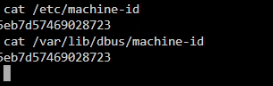
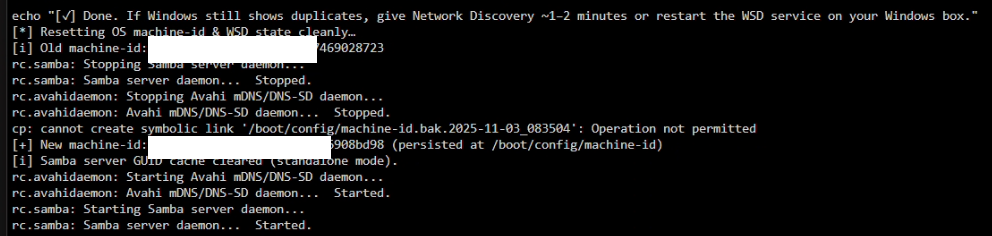
this could asl be issues within the avahi mdns system... heres a script you can try to purge the machine ID form the system... on Unraid (Slackware-based, no systemd), the “machine-id” that a bunch of stuff (dbus, wsdd/wsdd2, sometimes Samba helpers) keys off of can live in /etc/machine-id and/or /var/lib/dbus/machine-id. On Unraid the rootfs is RAM, so you’ll want to regenerate once and persist it on the flash drive, then symlink both locations to that single persistent file. User script plugin: Below is a safe, copy-paste script that: stops Samba/WSD/Avahi if present, backs up any existing IDs, deletes all machine-id copies, creates a fresh ID (persisted at /boot/config/machine-id), symlinks /etc/machine-id and /var/lib/dbus/machine-id to it, clears common wsdd/wsdd2 state files, (optionally) clears Samba’s server GUID cache if you’re not domain-joined, restarts services, shows you the new ID. One-shot fix (run as root in the Unraid console/SSH)#!/bin/bash set -Eeuo pipefail export PATH="/usr/sbin:/usr/bin:/sbin:/bin:/usr/local/sbin:/usr/local/bin" # ===== Settings you can tweak ===== PERSIST_FILE="/boot/config/machine-id" # where the stable ID will live RESET_SAMBA_GUID="auto" # "yes" | "no" | "auto" (auto = only if not domain-joined) # =================================== echo "[*] Resetting OS machine-id & WSD state cleanly…" # Discover current ID (if any) OLD_ID="$( (cat /etc/machine-id 2>/dev/null || cat /var/lib/dbus/machine-id 2>/dev/null || true) \ | head -n1 | tr -d '[:space:]' || true )" [[ -n "${OLD_ID:-}" ]] && echo "[i] Old machine-id: $OLD_ID" || echo "[i] No existing machine-id detected." # Stop network announce bits if present [[ -x /etc/rc.d/rc.samba ]] && /etc/rc.d/rc.samba stop || true pkill -f 'wsdd2' 2>/dev/null || true pkill -f 'wsdd' 2>/dev/null || true [[ -x /etc/rc.d/rc.avahidaemon ]] && /etc/rc.d/rc.avahidaemon stop || true [[ -x /etc/rc.d/rc.avahi-daemon ]] && /etc/rc.d/rc.avahi-daemon stop || true # Backups (to flash so they survive reboot) ts="$(date +%F_%H%M%S)" for f in /etc/machine-id /var/lib/dbus/machine-id; do [[ -s "$f" ]] && cp -a "$f" "/boot/config/$(basename "$f").bak.$ts" || true done # Remove all copies/symlinks of machine-id rm -f /etc/machine-id /var/lib/dbus/machine-id # Create a fresh, persistent ID on the flash and link both locations to it mkdir -p /boot/config dbus-uuidgen > "$PERSIST_FILE" chmod 0644 "$PERSIST_FILE" mkdir -p /var/lib/dbus ln -sf "$PERSIST_FILE" /etc/machine-id ln -sf "$PERSIST_FILE" /var/lib/dbus/machine-id NEW_ID="$(cat "$PERSIST_FILE")" echo "[+] New machine-id: $NEW_ID (persisted at $PERSIST_FILE)" # WSD/WSDD/WSDD2: nuke any saved UUID/state files if the plugin left them around for d in /var/lib/wsdd* /var/run/wsdd* /etc/wsdd* /var/lib/wsdd2* /var/run/wsdd2* /etc/wsdd2*; do [[ -d "$d" ]] || continue find "$d" -maxdepth 1 -type f -regextype posix-extended \ -regex '.*(uuid|state|machine).*' -print -delete || true done # Optionally clear Samba GUID cache (NOT if domain-joined) should_reset_guid="no" if [[ "$RESET_SAMBA_GUID" == "yes" ]]; then should_reset_guid="yes" elif [[ "$RESET_SAMBA_GUID" == "auto" ]]; then if ! net ads status >/dev/null 2>&1 && ! net rpc info >/dev/null 2>&1; then should_reset_guid="yes" fi fi if [[ "$should_reset_guid" == "yes" ]]; then # These files may or may not exist on Unraid; removing them is safe for standalone workgroups. rm -f /var/lib/samba/server_guid.tdb /var/lib/samba/serverid.tdb 2>/dev/null || true echo "[i] Samba server GUID cache cleared (standalone mode)." else echo "[i] Skipped Samba server GUID reset (domain-joined or disabled)." fi # Bring services back [[ -x /etc/rc.d/rc.avahidaemon ]] && /etc/rc.d/rc.avahidaemon start || true [[ -x /etc/rc.d/rc.avahi-daemon ]] && /etc/rc.d/rc.avahi-daemon start || true [[ -x /etc/rc.d/rc.samba ]] && /etc/rc.d/rc.samba start || true # If wsdd/wsdd2 doesn’t auto-spawn via the Unraid plugin, try to launch it (best-effort) command -v wsdd2 >/dev/null 2>&1 && wsdd2 -t >/dev/null 2>&1 || true command -v wsdd >/dev/null 2>&1 && wsdd -t >/dev/null 2>&1 || true echo "[✓] Done. If Windows still shows duplicates, give Network Discovery ~1–2 minutes or restart the WSD service on your Windows box." Make it survive reboots (add to /boot/config/go)Unraid’s OS reloads in RAM, so make sure the same ID is re-applied early on every boot. Append this snippet to the end of /boot/config/go: # ---- persist a stable machine-id across boots ---- if [[ ! -s /boot/config/machine-id ]]; then dbus-uuidgen > /boot/config/machine-id fi ln -sf /boot/config/machine-id /etc/machine-id mkdir -p /var/lib/dbus ln -sf /boot/config/machine-id /var/lib/dbus/machine-id # -------------------------------------------------- (Optional) Hunt down old occurrences of the stale IDIf your /etc/machine-id looked like a “long list” (multiple lines got appended over time), you can purge any places that cached one of those old values: OLD="$(sed -n '1p' /boot/config/machine-id.bak.* 2>/dev/null | tr -d '[:space:]' | head -n1)" [[ -n "$OLD" ]] && grep -R --binary-files=without-match -n "$OLD" \ /etc /var/lib/samba /boot/config /usr/local/emhttp 2>/dev/null | head -n 50 If anything pops up in Samba tdb/registry files and you are not AD-joined, stopping Samba and removing those tdbs (as the script does) is fine—Samba will recreate them. If you want, tell me what you see for: ls -l /etc/machine-id /var/lib/dbus/machine-id pgrep -af 'wsdd|wsdd2' testparm -s | head -n 1 as you may be fighitng internal samba database and netbios settings... I personly don't like nor use WSD. But I'm also capable of runnign my own smb conf... windwos lately has be disgure in the name of security breaking and destroying how widnows uses samba and conects to shares... But a mahince ID for the SID and wsd here makes sence if your only clearing on and noth where it can propagte too... Their may be other locations, but this will atleast clear what I know and regen the machien id on a live booted system....
-
did you manul edit smb? the netbios and machin id can be over wrtten and not used if you replaces samba...
-
Create your bootable media | Unraid DocsUnraid OS is installed on a USB flash drive, which acts as the boot device for your server. You can create this bootable media using our recommended Automated install method with our USB Flash Creator I believe its more to do with the usb and its GUID ... unraid unique GUID is required for licensing... this is alos usb size specfic... Short answer: for Unraid’s flash, GPT vs MBR basically doesn’t matter for UEFI boot. What matters is a FAT32 volume with the standard UEFI fallback path present. Unraid ships Syslinux’s UEFI loader under /EFI on the flash; if that directory is named EFI (not EFI-), your board will UEFI-boot it. That’s why you mostly see “rename EFI- → EFI” and not “convert to GPT.” Boot & startup failures | Unraid DocsWhen your Unraid server fails to start correctly, it can be challenging to identify the cause without a clear understanding of the boot process. Following this guide lets you quickly diagnose and reso Why that works UEFI is defined to look for a default loader on removable media at \EFI\BOOT\BOOTX64.EFI (the “fallback path”), and it can do that regardless of whether the stick is MBR or GPT. Many firmwares will happily UEFI-boot a removable FAT32 device that’s MBR-partitioned. Unraid’s flash creator simply uses one FAT32 partition (traditionally MBR + “active” flag for legacy-compatibility). The “active” flag is ignored by UEFI; the presence of the EFI folder is what flips UEFI on. Secure Boot is mainly the problem Winndwos BS on a key and text chip for licensing... Its not secure and gets int eh way of recvrey... Unraid still doesn’t support Secure Boot. Leave Secure Boot disabled. (Enabling it with “Windows UEFI” keys will block the Syslinux loader. sometimes...) https://uefi.org/specs/UEFI/2.10/03_Boot_Manager.htm ASUS H110-series BIOS knobs (what to set) OS Type: set Other OS (this disables Microsoft Secure Boot enforcement). CSM: If your display initializes fine, you can set Launch CSM = Disabled for “pure UEFI.” If you get a black screen, keep Launch CSM = Enabled but set: Boot Device Control = UEFI and Legacy OPROM, and Boot from Storage Devices = UEFI driver first This lets the firmware use a legacy video Option ROM for display while still booting Unraid in UEFI mode. Boot order: pick the entry that starts with UEFI: for your flash drive. (Unraid UEFI boot only needs the EFI folder present; no extra “make bootable” step.) About the Intel iGPU “blank screen when CSM is off” That’s a firmware/GOP quirk: with CSM off, your board must initialize the iGPU via a UEFI GOP driver; if it doesn’t, you see no pre-OS video. Workarounds that usually fix it: update to the latest BIOS, set Primary Display = CPU Graphics, optionally enable iGPU Multi-Monitor, and try HDMI instead of DP during POST. If it still blanks, just leave CSM enabled with “UEFI driver first” as above; Unraid will still boot in UEFI. Practical checklist for your stick (ASUS H110i + i5-6400): Use the Unraid USB Creator (or your existing stick). Ensure it’s FAT32 and the top-level folder is EFI (not EFI-). In BIOS: Other OS, Secure Boot = Disabled, and either CSM = Disabled or CSM Enabled + Storage “UEFI driver first.” Then boot the UEFI: entry for the flash.
-
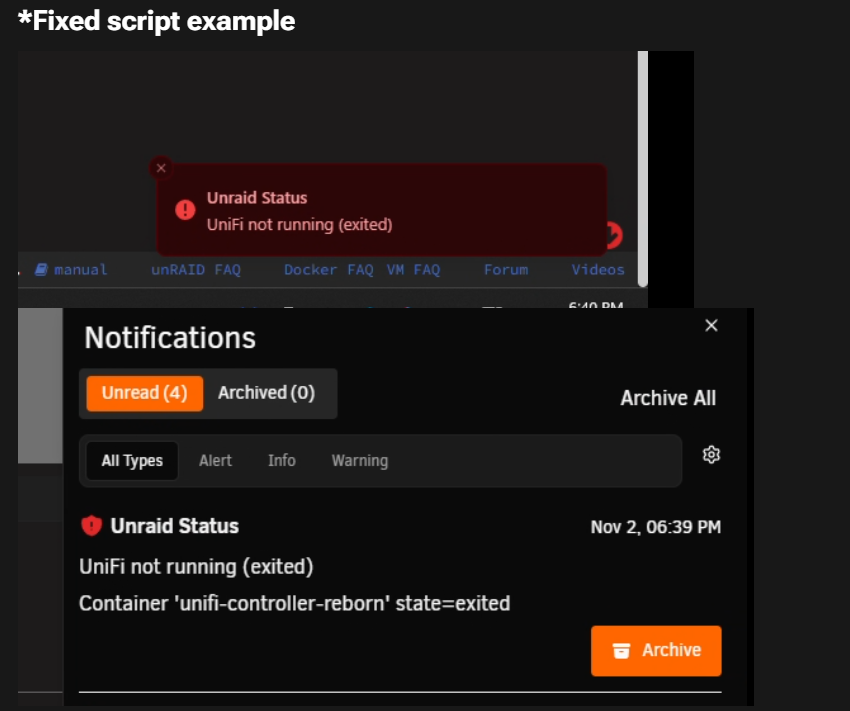
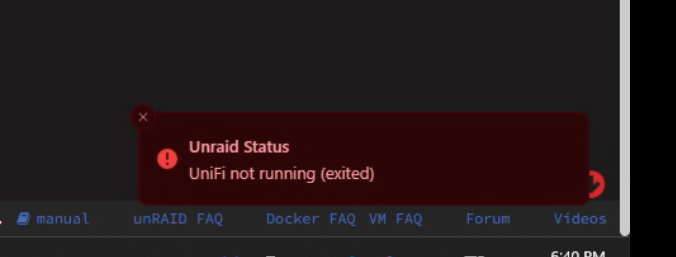
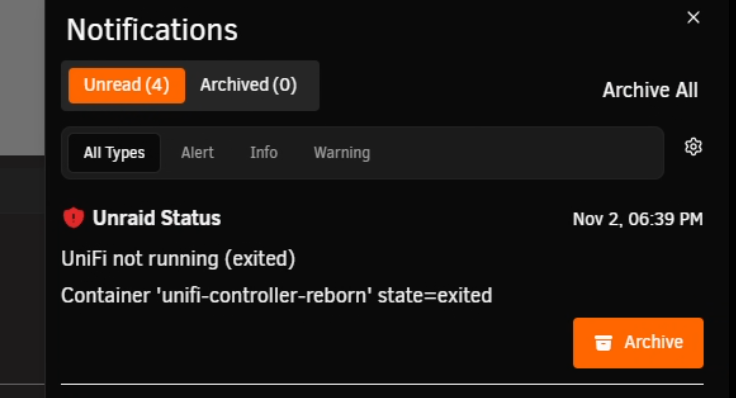
example unraid notfication (if you setup the agents for email, telgram/slac/discord to notfiy you of xyz... et’s keep UniFi’s built-in HEALTHCHECK and add a User Scripts job that watches Docker’s view of the container and fires an Unraid notification only when something changes (down/unhealthy/recovered). No Pi file—just native notify. (all on unraid....) Unraid User Script — unifi-health-notify.shPaste this into Plugins → User Scripts → Add New Script: #!/bin/bash # ##################################### # Name: UniFi Docker notify v2.0 # Description: Unraid notifications for Docker/UniFi status # - Fires an ALERT/WARNING every run while in a bad state # - Sends one NORMAL notice on recovery to healthy # ##################################### set -Eeuo pipefail export PATH="/usr/local/sbin:/usr/local/bin:/usr/sbin:/usr/bin:/sbin:/bin" # ---------- Settings ---------- CONTAINER_NAME="unifi-controller-reborn" # exact name from `docker ps` GRACE_SECONDS=600 # ignore 'starting' for this long after (re)start STATE_FILE="/tmp/unifi-docker-notify.last" # remembers the last state to detect recovery NOTIFY="/usr/local/emhttp/webGui/scripts/notify" # Unraid notifier path # ----------------------------- # race-safe (like your syslog script) if [[ -d "/tmp/${0//\//_}" ]] || ! mkdir "/tmp/${0//\//_}"; then echo "Script is already running!"; exit 1 fi trap 'rmdir "/tmp/${0//\//_}"' EXIT # helpers ts() { date -Iseconds; } now() { date +%s; } notify_alert() { "$NOTIFY" -i "alert" -s "$1" -d "$2"; } # red notify_warning() { "$NOTIFY" -i "warning" -s "$1" -d "$2"; } # yellow notify_normal() { "$NOTIFY" -i "normal" -s "$1" -d "$2"; } # green/white # previous state (for recovery notice only) PREV=""; [[ -f "$STATE_FILE" ]] && PREV="$(cat "$STATE_FILE")" # 0) docker CLI missing if ! command -v docker >/dev/null 2>&1; then notify_alert "Docker CLI missing" "Cannot find 'docker' in PATH at $(ts)." echo "cli_missing" > "$STATE_FILE" exit 0 fi # 1) engine up? if ! docker info >/dev/null 2>&1; then notify_alert "Docker engine is DOWN" "UniFi check skipped at $(ts)." echo "engine_down" > "$STATE_FILE" exit 0 fi # 2) container present? CID="$(docker ps -aqf "name=^${CONTAINER_NAME}$" || true)" if [[ -z "$CID" ]]; then notify_alert "UniFi container NOT FOUND" "Container '${CONTAINER_NAME}' missing at $(ts)." echo "not_found" > "$STATE_FILE" exit 0 fi # 3) status/health/age STATUS="$(docker inspect -f '{{.State.Status}}' "$CONTAINER_NAME" 2>/dev/null || echo unknown)" HEALTH="$(docker inspect -f '{{if .State.Health}}{{.State.Health.Status}}{{else}}none{{end}}' "$CONTAINER_NAME" 2>/dev/null || echo none)" STARTED_AT="$(docker inspect -f '{{.State.StartedAt}}' "$CONTAINER_NAME" 2>/dev/null || echo "")" START_EPOCH="$(date -d "$STARTED_AT" +%s 2>/dev/null || echo 0)" AGE="$(( $(now) - START_EPOCH ))" # best-effort last health output line LAST_OUT="$(docker inspect "$CONTAINER_NAME" 2>/dev/null | awk -F'"' '/"Output":/ {o=$4} END{print o}')" # 4) decide state # good only when running AND healthy (or none=ok for images w/o healthcheck) CUR="" if [[ "$STATUS" != "running" ]]; then CUR="status_${STATUS}" # e.g. status_exited/paused/restarting/created elif [[ "$HEALTH" == "healthy" ]]; then CUR="healthy" elif [[ "$HEALTH" == "starting" ]]; then CUR=$(( AGE < GRACE_SECONDS )) && CUR="starting_grace" || CUR="starting_stuck" elif [[ "$HEALTH" == "unhealthy" ]]; then CUR="unhealthy" else CUR="nohealth_running" fi # 5) notify policy case "$CUR" in healthy) # Only tell us when we *recover* from a bad state if [[ -n "$PREV" && "$PREV" != "healthy" && "$PREV" != "starting_grace" && "$PREV" != "nohealth_running" ]]; then notify_normal "UniFi is HEALTHY" \ "Container: ${CONTAINER_NAME} Status: ${STATUS} Health: ${HEALTH} Uptime: ${AGE}s since ${STARTED_AT}" fi ;; starting_grace) # quiet during warmup (change GRACE_SECONDS if you want alerts here) ;; starting_stuck) notify_warning "UniFi still STARTING" \ "Warmup exceeded ${GRACE_SECONDS}s. Uptime: ${AGE}s Last health output: ${LAST_OUT}" ;; unhealthy) notify_alert "UniFi UNHEALTHY" \ "health=unhealthy Uptime: ${AGE}s Last health output: ${LAST_OUT}" ;; status_*) notify_alert "UniFi not running (${STATUS})" \ "Container '${CONTAINER_NAME}' state=${STATUS} Last health: ${HEALTH} Uptime: ${AGE}s since ${STARTED_AT}" ;; nohealth_running) # This image normally *has* a healthcheck; if not, warn each run notify_warning "UniFi running (no healthcheck)" \ "Container is running but has no Health object. State=${STATUS}" ;; esac # remember last state (for recovery message next run) echo "$CUR" > "$STATE_FILE" exit 0 *Fixed script example Schedule itIn User Scripts, set Schedule → Custom and choose one: every 5 minutes: */5 * * * * every 10 minutes: */10 * * * * every 15 minutes: */15 * * * * every 30 minutes: */30 * * * * (You can also add the script multiple times with different cadences if you like...) then your setting>notfication can alert you... and you can see a history of its health over time in unraid...
-
you can then use unraids sysntofit or built in notfications ssytems... I personly like the pie device this was i tell uptime kuma onteh pie and other things that it cheks are unable to conect or down to notify me.. so witht eh health check added to your extra parm inteh docker... we cna then have unraid user scrpt plugin custom check and cron a file created for the pie to see latter... User Script (copy-paste) In Unraid (Plugins → User Scripts → Add New Script), name it e.g. unifi-health-export.sh, and paste: #!/bin/bash # Unraid User Script: Export UniFi container health to an SMB-visible file # - Preserves the image's built-in HEALTHCHECK (we don't run curl ourselves) # - Writes a single small status file (KV pairs) + an append-only log # - Safe for cron: idempotent, atomic writes set -Eeuo pipefail ### ======== CONFIGURE ME ======== ### CONTAINER_NAME="unifi-controller-reborn" # container name (as shown by docker ps) OUTPUT_DIR="/mnt/user/health/unifi" # SMB-exposed folder (make/share this as needed) STATUS_FILE_NAME="unifi.status" # simple KV file Pi will read LOG_FILE_NAME="unifi_health.log" # append-only log for historical checks # If your SMB share is different, change OUTPUT_DIR accordingly, e.g.: # OUTPUT_DIR="/mnt/user/YourShare/health/unifi" ### ======== /CONFIGURE ME ======== ### STATUS_FILE="${OUTPUT_DIR}/${STATUS_FILE_NAME}" LOG_FILE="${OUTPUT_DIR}/${LOG_FILE_NAME}" mkdir -p "${OUTPUT_DIR}" ts() { date -Iseconds; } # ISO-8601 timestamp # --- Detect Docker engine status early --- if ! docker info >/dev/null 2>&1; then ENGINE_STATE="down" CONTAINER_STATE="unknown" HEALTH_STATE="unknown" OK=0 else ENGINE_STATE="up" # Resolve container id (exact name match) CID="$(docker ps -aqf "name=^${CONTAINER_NAME}$" || true)" if [[ -z "${CID}" ]]; then CONTAINER_STATE="notfound" HEALTH_STATE="none" OK=0 else # Read container state and health (health may be absent) CONTAINER_STATE="$(docker inspect -f '{{.State.Status}}' "${CONTAINER_NAME}" 2>/dev/null || echo unknown)" HEALTH_STATE="$(docker inspect -f '{{if .State.Health}}{{.State.Health.Status}}{{else}}none{{end}}' "${CONTAINER_NAME}" 2>/dev/null || echo none)" # Policy: OK=1 only when container is running AND (health is healthy OR health not defined) if [[ "${CONTAINER_STATE}" == "running" ]] && [[ "${HEALTH_STATE}" == "healthy" || "${HEALTH_STATE}" == "none" ]]; then OK=1 else OK=0 fi fi fi # --- Atomically write the status file (so the Pi never reads a partial write) --- TMP="$(mktemp)" { echo "WHEN=$(ts)" echo "ENGINE=${ENGINE_STATE}" echo "CONTAINER=${CONTAINER_NAME}" echo "STATE=${CONTAINER_STATE}" # running|exited|paused|created|notfound|unknown echo "HEALTH=${HEALTH_STATE}" # healthy|unhealthy|starting|none|unknown echo "OK=${OK}" # 1=good, 0=bad } > "${TMP}" mv -f "${TMP}" "${STATUS_FILE}" # --- Append a one-line log entry (easy to tail on the Pi) --- echo "$(ts) CONTAINER=${CONTAINER_NAME} STATE=${CONTAINER_STATE} HEALTH=${HEALTH_STATE} ENGINE=${ENGINE_STATE} OK=${OK}" >> "${LOG_FILE}" What the Pi reads latter:The status file (e.g., /mnt/user/health/unifi/unifi.status) contains simple key/value lines: WHEN=2025-11-02T18:20:00-06:00 ENGINE=up CONTAINER=unifi-controller-reborn STATE=running HEALTH=healthy OK=1 a scrpt on teh pie conected to a smb share to read the file at example: /mnt/user/health/unifi/unifi.status Your Pi can just parse OK=1 to mean “online & healthy”. Schedule it (cron examples)In the User Scripts UI, set Schedule → Custom and use one of these: Every 5 minutes: */5 * * * * Every 10 minutes: */10 * * * * Every 15 minutes: */15 * * * * Every 30 minutes: */30 * * * * We just read Docker’s view of State.Status and State.Health.Status Again I don't see the need to do a tcp/udp check.
-
on unraid docker ps would show runnign dockers.. root@omv:~# docker ps CONTAINER ID IMAGE COMMAND CREATED STATUS PORTS NAMES f039d932a21b containrrr/watchtower "/watchtower --sched…" 5 weeks ago Up 14 minutes (healthy) watchtower root@omv:~# docker inspect is your friend here... we could make a watch do like automation check file if exist on a smb share for the pie to look and notify. we can have unraid user script plugin run docker ps and grep unifi to see fi its running... and leverage docker based commands... so you see in my docker ps under status I have them reporting healthy. we would have to add additional data to the docker template to write and make a health check example for immich valkey/redis: healthcheck: test: redis-cli ping || exit 1 example code later as i will test... for 11 notes unifi "pete asking" maintained unifi docker container: https://hub.docker.com/r/11notes/unifi https://github.com/11notes/docker-unifi per there docker file as it has a health check! # :: Monitor HEALTHCHECK --interval=5s --timeout=2s CMD curl -kILs --fail https://localhost:8443 as this docker kinda has a health check built in but not one that reports to unraid docker system... This can be added for additional leveraging and checks on unraid docker and use with other systems and scripting like watch dog above. --health-interval=120s --health-timeout=10s --health-retries=2 --health-start-period=600s so now when the docker starts is uses a reported docker health check. root@The-Borg:~# docker ps CONTAINER ID IMAGE COMMAND CREATED STATUS PORTS NAMES 6b7efb2476db 11notes/unifi:8.6.9-unraid "/usr/local/bin/entr…" 19 seconds ago Up 18 seconds (health: starting) 0.0.0.0:1900->1900/udp, :::1900->1900/udp, 0.0.0.0:3478->3478/udp, :::3478->3478/udp, 0.0.0.0:6789->6789/tcp, :::6789->6789/tcp, 0.0.0.0:8080->8080/tcp, :::8080->8080/tcp, 0.0.0.0:8443->8443/tcp, :::8443->8443/tcp, 0.0.0.0:8843->8843/tcp, :::8843->8843/tcp, 0.0.0.0:5514->5514/udp, :::5514->5514/udp, 0.0.0.0:10001->10001/udp, :::10001->10001/udp, 0.0.0.0:8880->8880/tcp, :::8880->8880/tcp unifi-controller-reborn example when it reports unhealth CONTAINER ID IMAGE COMMAND CREATED STATUS PORTS NAMES 25b09e1130ec 11notes/unifi:8.6.9-unraid "/usr/local/bin/entr…" 7 minutes ago Up 7 minutes (unhealthy) 0.0.0.0:1900->1900/udp, :::1900->1900/udp, 0.0.0.0:3478->3478/udp, :::3478->3478/udp, 0.0.0.0:6789->6789/tcp, :::6789->6789/tcp, 0.0.0.0:8080->8080/tcp, :::8080->8080/tcp, 0.0.0.0:8443->8443/tcp, :::8443->8443/tcp, 0.0.0.0:8843->8843/tcp, :::8843->8843/tcp, 0.0.0.0:5514->5514/udp, :::5514->5514/udp, 0.0.0.0:10001->10001/udp, :::10001->10001/udp, 0.0.0.0:8880->8880/tcp, :::8880->8880/tcp unifi-controller-reborn as example... root@The-Borg:~# docker ps CONTAINER ID IMAGE COMMAND CREATED STATUS PORTS NAMES d68859a1c9be 11notes/unifi:8.6.9-unraid "/usr/local/bin/entr…" 40 seconds ago Up 39 seconds (healthy) 0.0.0.0:1900->1900/udp, :::1900->1900/udp, 0.0.0.0:3478->3478/udp, :::3478->3478/udp, 0.0.0.0:6789->6789/tcp, :::6789->6789/tcp, 0.0.0.0:8080->8080/tcp, :::8080->8080/tcp, 0.0.0.0:8443->8443/tcp, :::8443->8443/tcp, 0.0.0.0:8843->8843/tcp, :::8843->8843/tcp, 0.0.0.0:5514->5514/udp, :::5514->5514/udp, 0.0.0.0:10001->10001/udp, :::10001->10001/udp, 0.0.0.0:8880->8880/tcp, :::8880->8880/tcp unifi-controller-reborn then use a docker inspect command to the docker name: docker inspect --format '{{.Config.Healthcheck}}' unifi-controller-reborn # Expect something like: # {[CMD-SHELL curl -kILs --fail https://localhost:8443] 2m0s 10s 10m0s 2} that writes to the smb file... a user script cron every 5,10,15,30 min to check the health status...


-
as I don't know what this agent is doing nor how it interacted with unraid. I'm alos not 100% convinced that this agent existed in v6 (as I don't see it in my older unraid system using a tesla p4 with vgpu...) https://joaoapps.com/join/desktop/ i could see a docker using a vnc web gui running to implement this... https://github.com/joaomgcd/JoinDesktop/releases as a docker image may exist or could be built to restore functionality...
-
Then someone will need to share their old join xml so i can rebuild it... https://docs.unraid.net/unraid-os/release-notes/7.0.0/#notification-agents https://docs.unraid.net/unraid-os/release-notes/6.12.15/#changes-vs-61214 as I can potentially see when and where the agents were reset and brought back to known working defaults. The join agent is 3rd party and with email not setup it apparently borked and broke other agent handling in the unraid web ui. so this join agent will need to become a 3rd paty plugin to restore and fix/rebuild its orginaly functionality... Make a bug report and contact support... Plugins are out of my wheelhouse... that said we can potently pull the OG notification IF it exists via downloading the legacy version and garbing the necessary agent files: https://docs.unraid.net/unraid-os/download_list/ *This would download a empty folder and populate by git clone... so whatever notification you had previously configured may be gone...
-
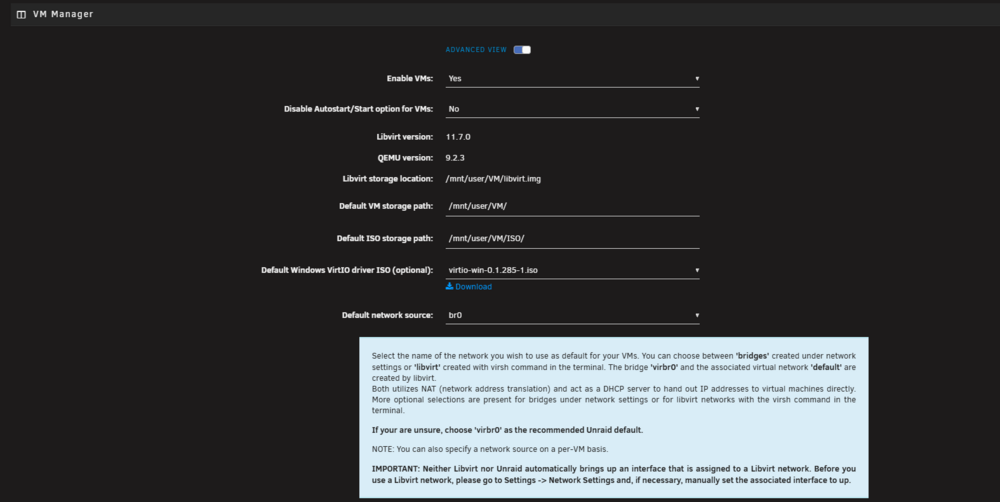
Depends on your network settings and how npn and your local network is configured. I can't say one way of the other as I don't know your network layout. in theory yes. in theory no. some settings need to be changed, fixed and checked. not eouth info to say which way one or the other... as example, my recomend unraid running network settings. especaly when using tailscale or a reversy proxy like npm, cady, trefek.... etc. Is your npm docker using ipvlan or macvlan? what docker network? did you give it a static ip? SO lets see what I run ... example how unriad makes the hyperv network is dictated in the vm settings: this should be br0 so new vms created will get a lan ip... default is vmbr which is a unraid dhcp server that give it internet but not always lan access.... Similar docker network settings can affect traffic. I personally prefer macvlan... this is because I want my dockers to be lan independent and have their own mac and not share a layer3 mac that can cause network routing issues. and general network setup are you using bridge mode? Bonding have multiple network nics? all of this can affect if a docker is able to traverse the network on the unraid host and on the lan via the router.
-
udp requires broadcast and the use of ipvlan/macvlan... uptime kuma is built on node.js... its not common to need a udp check, or a check on the broadcast... https://github.com/louislam/uptime-kuma/issues/9 no udp as there is no need to check udp with node.js... what your describing more is something like portainer and setting up health checks, but portainer has to be running and you have to make the health checks to mark the containers as healthy... there are also a way to start dockers with docker exec... docker start <name of Docker> etc etc... And a FYI, watch dog docker does exist... Docker watchdog: https://github.com/buanet/docker.watchdog (*Similar to running watch tower for docker updates you run watch dog the docker and add -l a label in the dockers your watching... ) -But this needs to run/be running.... But I find uptime kuma quicker and easier to setup then watchdog direct... Similar to running portainer, this would run on top of the unraid docker socket system... if you looking for tcp, udp , and dns for checking there are other nice if up stem checks... not all are free.... like commercial enterprise grade software (Something we use at work) https://www.whatsupgold.com/network-mapping or a separate VM that runs something like netbox or foreman: https://theforeman.org/introduction.html https://netboxlabs.com/ *but this is more documentation not live checks... something could be leveraged and scripted... https://forums.unraid.net/topic/97228-support-linuxserverio-netbox/ *As you would want something with tcp dump and netcast... So Since your scripting, I would build my own script to run... https://www.digitalocean.com/community/tutorials/how-to-use-netcat-to-establish-and-test-tcp-and-udp-connections 3rd party unraid install... /boot/extra to have and write your own user script check... https://slackware.pkgs.org/15.0/slackdce-x86_64/netcat-0.7.1-x86_64-1_slackdce.txz.html Binary Package https://slackware.halpanet.org/slackdce/packages/15.0/x86_64/network/netcat/netcat-0.7.1-x86_64-1_slackdce.txz So, this really Depends on what your wanting it to do and how you want to interact with it.
-
it has to do with docker custom br0 ipvlan/macvlan and docker isolaton. under docker settings if host access to custom networks is disabled unraid will not make a shim bridge to have teh docker on host, bridgemode or inteh custom br0 comunicate with each other. this is due to docker netwrok isolation.
-
in the daig I need to know the syslog, the lsusb and the lspci. Diag is not that big or problematic ther other usefull uraid data in there needed for general I first nee to know if your uising the i2c wire and conecting the rgb to the board or via USB. As that will cahnge and ditcated things. Thank you for the rules file your applying... as I suspected some if not most of theses itesm are failing due to too earlier in boot. the modprobe comand needs ran before theses run to actauil run... (udev loads before the go file...) as stated udev is not the way here for unraid. linux mint adn unraid are 2 seperate sytems with major kerneal and cores system setups. -You don't need the go file(techncialy) but you definetly don't need udev eitehr... IN order to use and run this on unraid you have 3 choices. 1 LXC, 2 Docker, 3 plugin. depending on how you run the OpenRGB software that contorls the hardware and how you pass the i2c hardware into the docker/LXC or what the plugin seees... is the questions. Really needed the diag to confrim what unraid was seeing device wise.. sylog to confirm udev and other loads including what was in the go file / grub comand line... (we can add a syslinux grub comand line to ad the mopropbe before the udev and go file loads per example but that is if udev was truly needed, and its not!) Different prblems require different soultions and work arounds... I have had a simalr AMD board and simalry RGB setup and the soultion came down to a user script at first array start that grabed verfied and used the device in a docker... modprabe in teh go file(i do't like editng the go file) can be same lines in a user script... the docker passing the /dev device for open rgb puts you in a supported linux os like area where teh software can run... so I would need the device ID that is your Corsair Lighting Node and what unraid see to identfy it to further assist. Yo may get faster and better support in teh discord.. https://forums.unraid.net/topic/91935-support-p3r-openrgb-controller/ https://github.com/P3R-CO/openrgb-container so your job atm is mkae sure the modprobe coamdns ran by first array stat and to verify the /dev/i2c exist and is your RGB. then install the openrgb docker and pass the /dev/i2c device with in... Then you can use openrgb to edit and set the rgb... ON linux mint due tot he comunicty custom devcie firm wares and the abilty to run the software direct. Unlike slackware linux and unraid... https://openrgb.org/devices.html That device may not be compatable... Regardless it clear your not following documentations... Again. I need the device your using what cosarid device id, serlnumber what is your contorler. the /dev/i2c that is your device... the unraid diag file... output of lspci, output of lsusb(as some actaul don't use the i2c and its acautly needed to pass the usb into the docker! the syslog to see what happened when and if there are other issues preventing.... Otherwise use teh plugin that ich777 made folwing his documentation! then would then have openrgb run direct on unraid slackware linux... https://github.com/ich777/unraid-openrgb-patch
-
did you follow the github info... are you intel or amd? https://github.com/cajuncoding/OpenRGB-GUI-Unraid?tab=readme-ov-file#-unraid-setup-for-rgb-device-access
-
please give me the rules scirpt your trying to apply. Waht are you tryign to acomplish and what is your end result? https://www.reddit.com/r/unRAID/comments/glry47/rgb_lighting_control_for_unraid_finally/ As stated in taht feature request to have udev rules. and to use them so mkdir /boot/config/udev cd /boot/config/udev touch 99-example.rule as also stated udev folws very certain p[aths and things: https://www.reactivated.net/writing_udev_rules.html And I believe your end result is a user script not a udev. Plesae post a unraid diag file and the custom udev rule your tryign to apply...
-
this also sounds like a cgnat issue.. Meaning you have no public ip... https://www.youtube.com/watch?v=eIpR5ZBCF_g



