






bmartino1
Members
-
Joined
-
Last visited
Everything posted by bmartino1
-
that log end just means dockers were shutting down. this puts veth and other docker created interfaces in a disabled and removed from host state. so to me this looks like part of a host shutdown and the removable of a usb device. Most likely the keyboard at the terminal. Please post a diag and make a bug report...
-
YES! Many!!! Please watch: https://www.youtube.com/watch?v=bKFMS5C4CG0 https://medium.com/@dyavanapellisujal7/docker-macvlan-and-ipvlan-explained-advanced-networking-guide-b3ba20bc22e4 https://forums.unraid.net/topic/132949-macvlan-vs-ipvlan-a-discussion/ unifi and their network traffic doesn't always read the other end of the bridge and its on unraids first array start that unifi over detects 2 macs, the shim bridge and the unraid interface. This is entirely over scan on unifi networking. The big differ is in how networking is routed into the docker container. Macvlan randomly generates a mac address (unless the docker ID is destroyed that random mac stays and is viable via docker inspect commands) Ipvlan reuses the host interface's mac address that means dockers get the same mac as the host. And depending on configurations, Layer2/layer 3 routeing over the host using the same mac address. Originally unraids default shipped with mac vlan and due to changes with how linux networks and how docker made edits and changes to the docker mutated and evolved today... (there was a bug and issues during this which forced the devs to make a report and they fixed most of it and worked around the other...) Macvlan trace bugs(many still on the form...)... and how macvlan isolated from the host... where the move to iproute2 application even changed old linux networking setup due to how layer 2 and layer 3 network traffic was sent... Review https://docs.docker.com/engine/network/ https://docs.docker.com/engine/network/drivers/ipvlan/ https://docs.docker.com/engine/network/drivers/macvlan/ There is still use case scenarios where I would want to use one over the other... Unless you need the additional lan identity such as running pihole, adguards, vpn, etc you would want that additional mac and network isolation... where if using vlans, you would want to use the ipvlan for layer 2 layer 3 routes... https://bmartino1.weebly.com/guide-dockernetworks.html due to ip route and same subnet It is hard to generate a dhcp pool to use both ipvaln and macvlan on the same interface... Due to how unraids generate custom br0 its a pain to configure and make stable upon reboot. teh deletion of a docker network removes the network from the dockers templates and other due to docker network id changes... pros cons... the point... Unifi network scan is overzealous when it detects unraids making the shim bridge on unraid. And depending on how unraid auto starts and spins up dockers on the custom br0 unifi false positive picks up the interface due to how the shim bridge is generated on unraid. as the nature of the shim bridge not using or generating a random mac or unraid not programing in a random mac... the command at boot, network creation duplicates the mac address and dhcp due to ipv4 forwarding sends and gets a dhcp request. unfi detects rouge dhcp server flags this as 2 of the same macs requesting a ip and say no one is a rouge system and trying to hack in... Thus the unfi warning and overzealous hit due to unraid bridge creation. as what happens is eth0 mac gets cloned and makes br0 then br0 mac gets cloned to make shim-br0 unfine doesn't know what unraid did nor see the separation with the interfaces... unifi detects and see 2 of the same mac and logs a error.... Further issues with dockers on ipvlan as they can trigger and do the same... This is why I recommend using macvlan first and ipvaln if you have errors... pfsense and opensense if the settings are high enouth can detect and see this. but I've only encountered this issues and errors on unify due to how they handle clients and record previous client connections... unfi is overzealous in its rouge dhcp scan. unraid doesn't make the shim-bridge interface very well. This is why my user script to flush the shim bridge and static assign a different ip which will make the shim bridge interface generate a random mac... I've seen unifi client spam due to unraid reboots and the use of my workaround script... The workaround is more for the shutup unifi false positive dhcp rouge detection... I've talked to both unraid devs, and unifi on this before in the past...
-
It could be. Usually it's faulty cable and switch disconnect due to packets... Using another device something like wires shark to capture what's happening and when would be needed. Unless you running on some old old hardware or the nic is not 1 gb min for its nice option ROM. While server load and stress could be a cause. It not what seem to be the issue at hand. I would suspect some weird network issues and disconnect first. This is one reason why I prefer to use filezila and sftp to be able to resume pause save and continue transfers.
-
I personaly prefer to use sftp... filezila linux server docker and sftp docker in teh CA....
-
for linux to linux it better to use nfs... or sftp over ssh
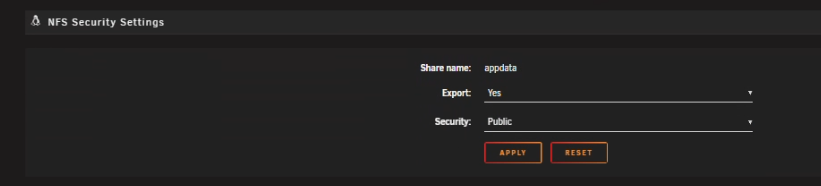
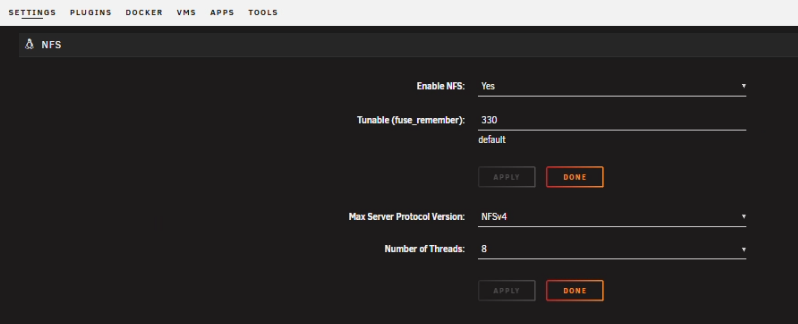
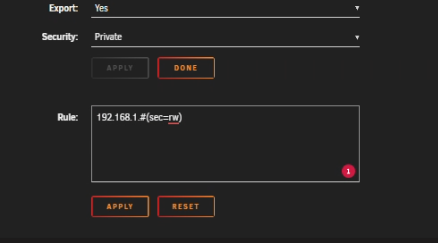
-
unraid has verbose login set fairy high by default at boot. these can be ignored these are known log spam with aspm and known power states especially with passing pcie device into vms, dockers etc... I recommend adding this to your unraid syslinux boot options: pci=noaer pcie_aspm=off example: this doesn't stop the device from reporting or erroring! Just stops the log spamming of it. pci=noaer disables PCIe Advanced Error Reporting, which stops the system from logging corrected errors, and pcie_aspm=off disables PCIe Active State Power Management, which prevents PCIe devices from entering lower power states to reduce power consumption. Both are often used together as a workaround for bugs or unstable systems where PCIe devices report frequent, but benign, errors that can fill up log files. ========================================= pci=noaer What it does: Disables PCIe Advanced Error Reporting (AER), a feature that detects and reports errors on the PCIe bus. Why it's used: It stops the system from logging benign "corrected" errors, which can flood logs and cause performance issues. Side effect: It hides potential errors, so you won't be notified of them in the system logs pcie_aspm=off What it does: Disables PCIe Active State Power Management (ASPM). ASPM is a power-saving feature that puts PCIe links into a lower power state when idle. Why it's used: It can fix issues on systems where ASPM causes instability, device errors, or performance problems. Side effect: It slightly increases power consumption because PCIe links will not be put into low-power states when idle. When to use them These parameters are commonly used together to solve the problem of excessive PCIe error messages in the system logs that don't indicate a serious hardware failure. They are a workaround, so it's best to first check for updated drivers, firmware, or BIOS/UEFI settings before using these options.
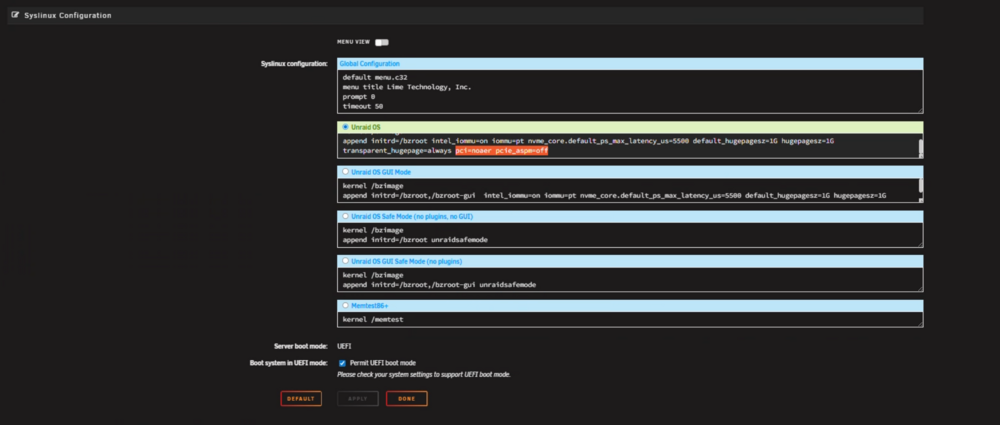
-
please file a bug report. https://forums.unraid.net/bug-reports/stable-releases/
-
its better to use the method of static asigning them in unraid template. ther is technicaly a way to pass the --ip in extra parmaerters and set a ip... but that get complicated and weird if you don't know your networking nor the data your container will see and get... unraids CA tempalte now offers that via optional setting a IP. ths is simlar to force setting the dns ips in a docker continer using the --dns=8.8.8.8 inteh extra par to gurantee that the docker has 8.8.8.8 in the linux resolv.conf dns system.... to be able to resolve internet domains...
-
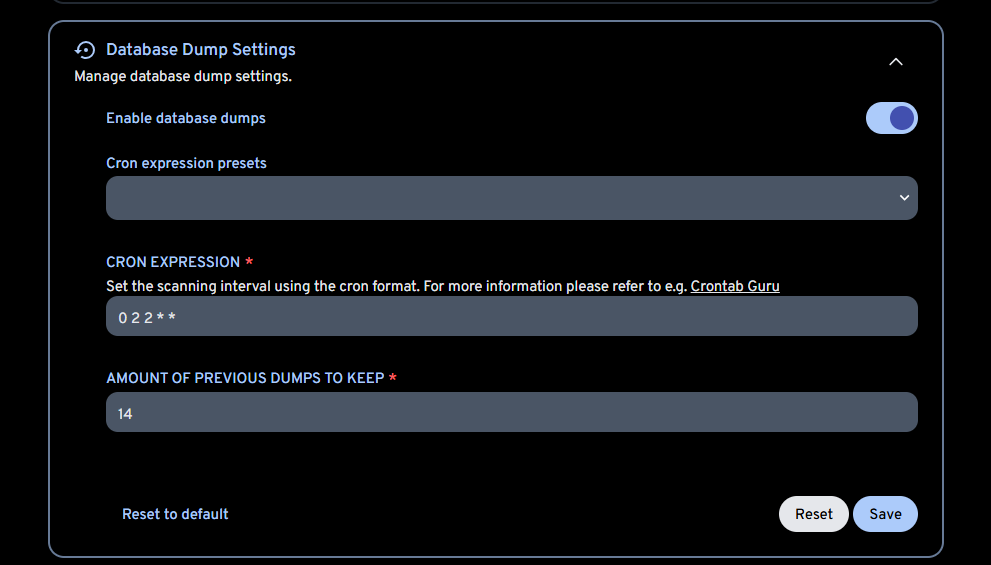
thats a first time error for me. immich auto backups the sql database: Immich server admin settings: so if your getting a error its either not talking to the correct database or differet internal error is happening. That might be a github bug report. see https://github.com/immich-app/immich/issues/14021 So min rant...as this half right: it is Immich looking in the “wrong place”, but not for the data directory. It’s looking in the wrong place for the pg_dumpall binary inside the Immich server container, and that’s what’s blowing up the automatic backup job. What the error actually means Their error: Key points: spawn … ENOENT = the file doesn’t exist in the container where Immich is trying to run it. That path, /usr/lib/postgresql/18/bin/pg_dumpall, is inside the Immich server container, not in the dedicated Postgres container. Immich’s BackupService figures out the Postgres major version and tries to run: /usr/lib/postgresql/<DB_MAJOR>/bin/pg_dumpall This behavior is documented indirectly in various issues where it fails if the matching client binary isn’t present. In the imagegenius baseimage (the one Unraid CA Immich template is built on), they install a specific postgresql-client version (e.g. 16). That creates /usr/lib/postgresql/16/bin/pg_dumpall, but not /usr/lib/postgresql/18/bin/pg_dumpall. That exact mismatch is tracked here for version 14 vs 16, with the same spawn /usr/lib/postgresql/<version>/bin/pg_dumpall ENOENT error. https://github.com/imagegenius/docker-baseimage-immich/issues/11 *I'm stuck on postgress isues... this is a immich server issues and would need a update from immich to use postgress v18... So in your use case: DB container: Postgres 18 (from your Immich_PostgreSQL 18 CA template) – fine. Immich server container: only has pg_dumpall for whatever client Debian ships (likely 16), not 18. Immich sees DB version = 18 → tries /usr/lib/postgresql/18/bin/pg_dumpall → file not found → ENOENT. That has nothing to do with: The Postgres volume mount /var/lib/postgresql vs /var/lib/postgresql/data The PGDATA changes you fixed in the Unraid CA Postgres 18 template Those PGDATA / VOLUME docs you quoted are about where Postgres stores the cluster data, not where the pg_dumpall binary lives. review: https://docs.immich.app/administration/postgres-standalone/ As you are in charge of your own backups. I would dump the old Postgres v16 data build v18 new and restore data. Also, restoring data will change database user access and password to what you had from v16... v16 is not EOL and I don't think image genious has made teh v18 leap yet to iron out the bugs. i would stay on v16. or move to the compose method. https://docs.immich.app/install/unraid https://bmartino1.weebly.com/immich-on-unraid-docker-compose-guide.html
-
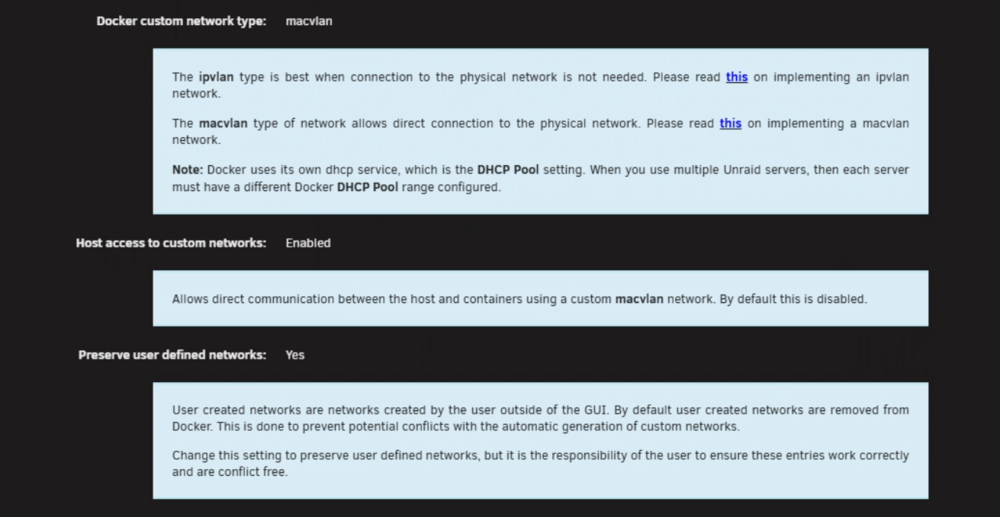
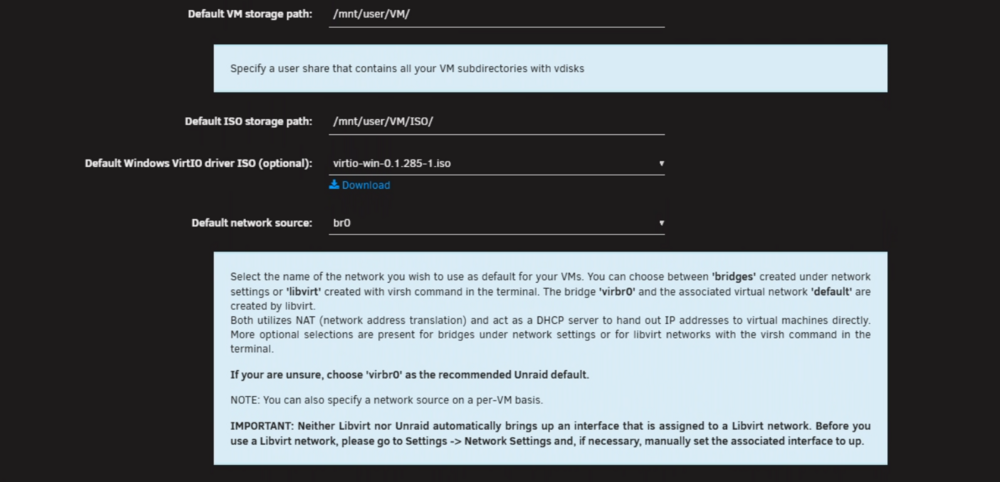
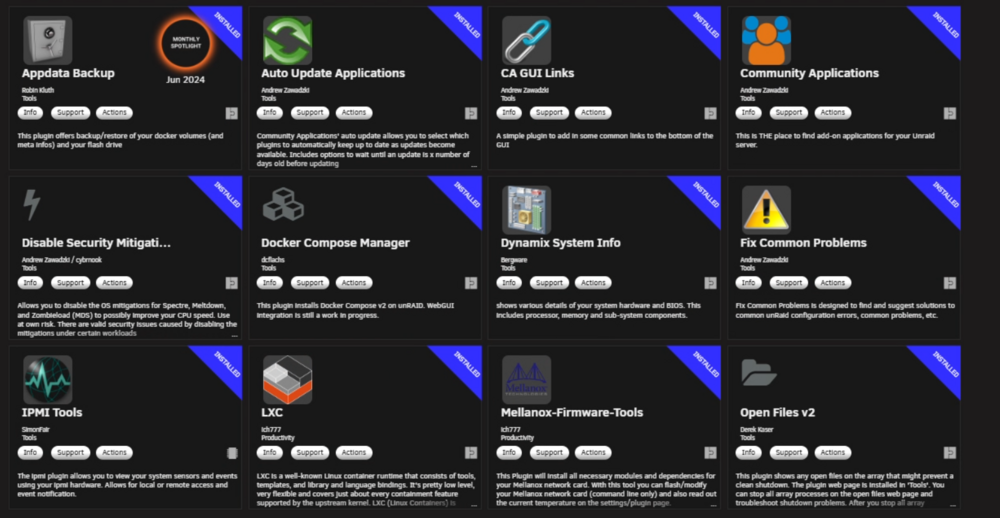
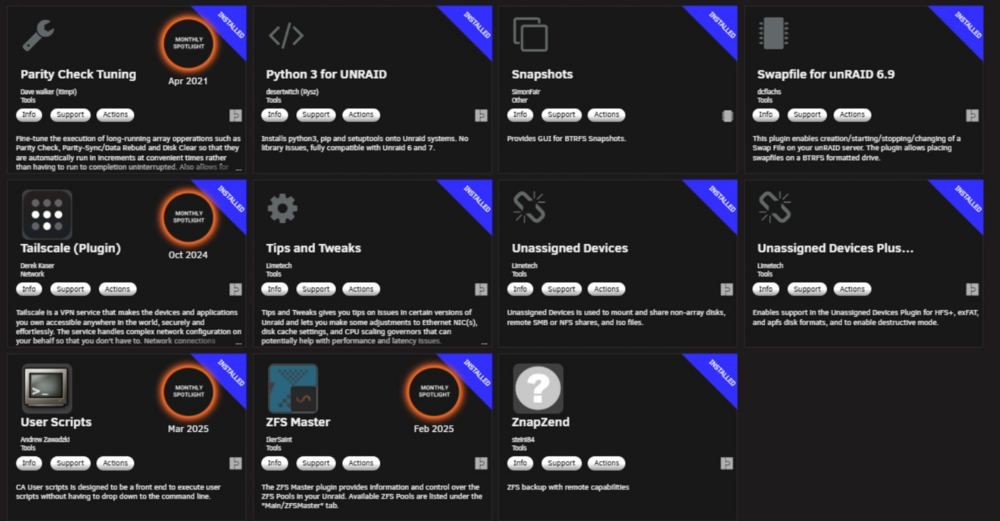
General network settings I recommend: Advance docker settings: *More to do with layer 2/layer 3 issues latter and giving a custom br0 docker lan anatomy with macvlan... Vm settings: *more with new vm creations on defaults paths, settings and how things are generated latter. What vm? any hardware passed? Depending on hardware installed and passing devices into a VM. Then there are a few plugins I recommend be installed on all and any unraid... *Ed, Space invader has quite a few video on this as well... Plugins! Example per CA what I have: Most are optional... the mains are user scripts, unassigned devices, fix common problems appdata backup. tips and tweaks is a nice one as well give you the ability to click in the web ui and get a short description of and documentation on the setting... the blue boxes seen above... Once you have your system ready and your data layout done, share settings and other pre configured then we can look at xml edits and fixes to improve Virtualizing system in unraid. OR vise versa. Virtualizes unraid in proxmox and run your unraid system in a vm. https://forums.unraid.net/topic/179219-guide-proxmox-virtualize-unraid-experimental-with-v7/

-
depends on host machine, mother baord, nubmer of disk, size of disk, type of disk and what you want it to do and how you want to interact with it. I have a amd system (ryzen 5) g processor so it has onboad graphics, a nvdia 20 series card running in Proxmox v9 with VGPU Graphics via polo gpup vgpu guide... with this proxmox VM system I have a HBA lsi card and have 4 disks. 3x 16 TB disk in a zfs raid z1 and a 120 GB wd used as a cache disk for unraid. pool only setup no disk 1 no array. long term data gets stoed on teh 3 disks. shor term data is ran out of the ssd. This gives me proxmox for my VMs, unraid for my dockers and contorl over teh cpu ram and other resouce i can let uraid have. due to kernal 6 chagnes and older nvdia stuff no longer I chagned hat unaid system to a debain omv install... just means if i want a g card in teh vm i have to pcie pass a graphic card simalr to how i pass my hba into unraid curently... so I mean, what your end use case and hardware you have on hand... I went this route to meet my needs and services I was running. the old saying teh I machien that cna do everything... Its not good to have all your things in 1 basket... I try to follow the 321 backup rules as well... 3 location 2 disks 1 offsite to guranteee backup recovery... raid is not a backup its uptime / redundancy... unraid is docker king. I ha yet to find a good suitable replacment... portainer is getting there... icewales casa os has its issues there wokring it out. bit cooin miner docker known umbrel... the curent docker wave atm is mainting and using docker compose. While a plugin exist for v2(out dated) it works well enoth to run copose version... Like I said.. use case... I want to interact with a web UI to contorl theses... all of this can be done via termainl / ssh... I would asume cpu limts and resource issues to cause emhttp (unraid web ui failing)... I would need the xmls vm code to take a look. I don't like unraids defualt vcp[u pinning. I prefer to let the cpu load balancor handle that and set a pre defined abmout... unraid implemnts libvirt qemu hype v and loads vms via xml domain format. https://libvirt.org/formatdomain.html there are some recomend edits, guides and settings setup. but with out knowing what your running it hard to say and recomend...
-
https://hub.docker.com/r/uberchuckie/ollama-intel-gpu Looks promising. My friend just got a arc Intel GPU. I may be able to test on it later...
-
Depends on bios settings and what you UEFI / bios did for last know boot configuration. See the unread docs on boot trouble shooting... Disable secure boot (it's garbage Microsoft and doesn't secure any) it gets in the way of alot of Linux distorts Booting... Double check boot options. It is fine and perfectly capable of un plugging the USB and moving to another port and booting... If any port to double check. Unriad has some know issues when used in USB 3 ports that supply power. It's best to plug and use USB 2.0 ports
-
Enable docker setting host access. Your missing the shm bridge.
-
For icons appearing from the actual templates, there was a known bug issue that had to deal with DNS and unrated ability to connect to the internet. Even with local files or the 127 linking it had to do with a DNS connection and the ability to communicate to a DNS server before it would be able to download and see pictures. Others also seemed to have weird cookie data between an update that also caused. This picture is to disappear and we're able to see them using another browser... These were old bug reports and old communications were similar since you Necro up the thread. I was also informing of the potential issues and fixes due to past form communications on the same issue...
-
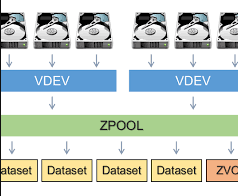
yes due to the nature of hard linking yes I can see that. Due to how the inode can spin and link... Personally, I would have to do some more research As I never thought nor expected hard linking in a disk layout to affect how I would manage storage. I shared some videos with another users on the form going over symlink, soft link and hardlink on linux and unraid implementing with *arrs. as I usually see implementation of the *Ars systems when hard linking is mentioned. Some good videos to re-review in this forum post on hard links. https://forums.unraid.net/topic/194824-question-about-hard-link-behavior-when-using-mntuser-for-media-scraping-nastools-multi-disk-array/ Your implementation makes sense to me now of what I would go one way of the other. Although I wouild suspect, needing the use of terminal CLI to manage that many vdevs in unraid. with my example of tank a row 1 the hardlinks would be in that pool and the data is sent and shared to another pool on the same system so the hard links would still be tankarow1 in that example. While rare for that many disk due to the number of vdevs, if a single vdev pair broke all data would be lost per my understanding of zfs implementation. (while mirrored, and easily recoverable to replace a disk to fix a vdev) a single vdev broken brings down the entiere system... so I'm not saying your implementation is wrong or bad. I'm not sure that what you're wanting out of it, though... Since the vdev is all in one pool. if a vdev fails, the entire pool is down... here some general zfs data info: How multiple vdevs work in a pool Data distribution: Data is striped across the vdevs in the pool, which increases performance compared to a single vdev. Fault tolerance: Each vdev is a self-contained fault domain. If one vdev fails, the entire pool is lost. However, within a multi-vdev pool, a single drive can fail within a vdev (depending on the vdev type) without causing data loss for the pool as a whole. Adding vdevs: You can create a pool from multiple vdevs at once, or add new vdevs to an existing pool to increase capacity. Combining vdev types: It is possible to mix different vdev types in a single pool, such as combining RAID-Z vdevs with mirrored vdevs to get the benefits of each. How it works A pool is a collection of vdevs: A zpool is the top-level storage object and is composed of one or more vdevs. Each vdev is in turn made up of one or more physical devices. Data is distributed across vdevs: Data is spread across the different vdevs, but fault tolerance is maintained within each vdev, not across the pool itself. For example, if you have two mirror vdevs, losing a disk in one vdev will not affect the other vdev. Different vdev types can be combined: You can mix and match different vdev types (e.g., RAIDZ, mirror) in the same pool, but it is generally recommended to have vdevs of the same type and size for performance reasons. Support vdevs can be added: A pool can also include support vdevs like a cache vdev (L2ARC) for speeding up reads or a log vdev (SLOG) for speeding up synchronous writes.
-
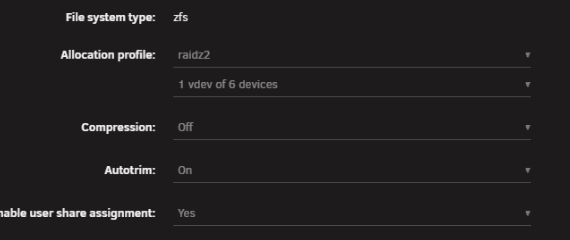
Thats awesome. My friend recently got himself a hand full of old decominisend telecom racks. He has a lot of weird compute all over. I get to test and be his tech support from time to time. :) My only concern is on how your handling mirrored paris? as I would expect mutiple pool groupings not 1 sinlge group of disks. Example: normaly you would do a grouping of disks between pools: Example 1 zfs raidz2 with 6 disks. I can lose 2 disk and still have all my data. This stripes for speed and mirror for backup. I'm also only using 1 vdev. (Separating vdevs would mater in your case across that many disks) so when I saw you hit the slot limit, I was wondering what you were actually doing with 120+ disk in what setup and format. TO me, it sounds like you went zfs mirror only 1 vdev across all 120? When it sounds like your intention is to make multiple disk pool of 2 slots and mirror the 2 pools with each other. (user scripting later between the 2 pools to zfs send miro and maintain data across disk shelfs...) SO I would have been implementing something like disk shelf 1 row 1 disk shelf 1 called tank a and make a pool called tankarow1 to denote where in the rack... this would result with tank a row 1 tank a row 2 etc etc Then the next shelf tank b for next disk shelf etc etc... for help locating them and to have some form of raid parity across a row of disks in the shelfs So you surprised me with going wiht all in one pool group. but with all 120 in a zfs pool per the slot I was curious of what you ended up with?

-
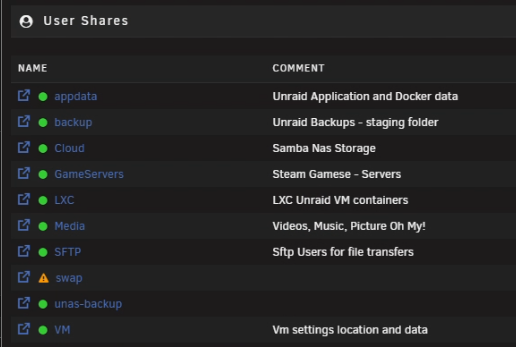
all depends on what you want it to do and how you wnat to interact with it. disk layout is crucail before you start. where you want what saved and how is that saved across disk: unraid does have some pre-made recommended folder structure to follow. (more do to evolution of orginal implementation of code. appdata folder for CA and Docker location for config, settings and data of dockers. system for unriad mutable boot system data disk images for teh docker system and VM hyperv system. domains (as you can see in my picture I went with VM a place where unraid defaults saves Virtual Machines. https://docs.unraid.net/category/manage-storage/ Shares | Unraid DocsA key feature of Unraid is the management of shares. Shares are folders or drives on your Unraid server that can be accessed over a network. You can create as many shares as you want on your Unraid se So no not crazy on starting over. but you want to have a layout before implementation to know where what is and what is happening with your data.
-
make a new usb fresh download form unraid. in the config folder, you will find a ***key file copy that into the new drives config folder. re-license your new usb and boot to a fresh no config version on unraid... https://docs.unraid.net/unraid-os/getting-started/set-up-unraid/create-your-bootable-media/ unraid is kinda enoth to keep version history since the key chagne: https://docs.unraid.net/unraid-os/download_list/ https://docs.unraid.net/unraid-os/system-administration/maintain-and-update/changing-the-flash-device
-
You have piqued my curiosity. What motherboard are you running and how are you connecting all these drives to your motherboard. I understand you have multiple dish shelves per year. Your picture here. And I understand one pcie lane can equal one sata disc. I'm just curious how you're connecting them all. Then I'm curious of how you're handling your ZFS arrayed if you're having them all in one pool. Like what is your vdev setup? Are you running a raid Z5?
-
clear browser data, set unraid dns to 8.8.8.8 and try again.
-
Cli only not by gui. Your the first I hear to have hit the limit.
-
FYI Postgres v18 and up issues. so postgress docker v18 needs different docker varables to run PGDATA Users who wish to opt-in to this change on older releases can do so by setting PGDATA explicitly (--env PGDATA=/var/lib/postgresql/17/docker --volume some-postgres:/var/lib/postgresql). To migrate pre-existing data, adjust the volume's folder structure appropriately first (moving all database files into a PG_MAJOR/docker subdirectory). This (PGDATA) is an environment variable that is not Docker specific. Because the variable is used by the postgres server binary (see the PostgreSQL docs), the entrypoint script takes it into account. https://github.com/immich-app/immich/issues/23663 I have updated the CA for v18 moving forwards to fix issues. and set the app data path back to one so docker tag changes may show a 18 folder or 19 depending on tag...
-
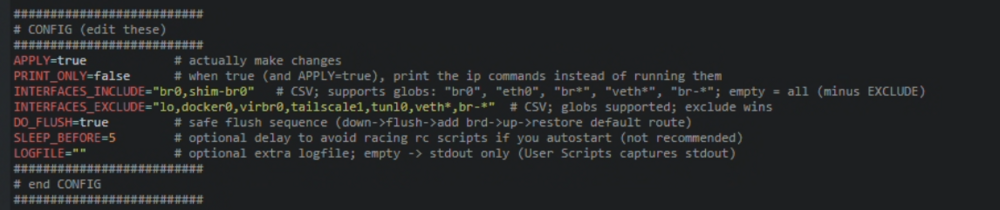
Bring back the broadcast IP fix layer 2/layer 3 dispaly and routing with ifconfig... Work around script fix: #!/bin/bash # show_broadcasts_noninteractive.sh # Non-interactive: compute/set IPv4 broadcast on the PRIMARY (/0..30) addr per iface. # When DO_FLUSH=true: link down -> flush -> add IP+brd -> link up -> restore default route (if it was on this iface). # Wildcard include/exclude supported (br*, veth*, br-*). Pure bash + ip + awk. set -euo pipefail ########################## # CONFIG (edit these) ########################## APPLY=true # actually make changes PRINT_ONLY=false # when true (and APPLY=true), print the ip commands instead of running them INTERFACES_INCLUDE="br0" # CSV; supports globs: "br0", "eth0", "br*", "veth*", "br-*"; empty = all (minus EXCLUDE) INTERFACES_EXCLUDE="lo,docker0,virbr0,tailscale1,tunl0,veth*,br-*" # CSV; globs supported; exclude wins DO_FLUSH=true # safe flush sequence (down->flush->add brd->up->restore default route) SLEEP_BEFORE=0 # optional delay to avoid racing rc scripts if you autostart (not recommended) LOGFILE="" # optional extra logfile; empty -> stdout only (User Scripts captures stdout) ########################## # end CONFIG ########################## _log() { local m="$*" if [[ -n "$LOGFILE" ]]; then printf '%s %s\n' "$(date -Iseconds)" "$m" | tee -a "$LOGFILE" else printf '%s %s\n' "$(date -Iseconds)" "$m" fi } matches_globs_csv() { # $1=name, $2=csv_globs local name="$1" local csv="$2" if [[ -z "$csv" ]]; then return 1 fi local IFS=, local pat read -r -a arr <<< "$csv" for pat in "${arr[@]}"; do pat="${pat#"${pat%%[![:space:]]*}"}" pat="${pat%"${pat##*[![:space:]]}"}" [[ -z "$pat" ]] && continue case "$name" in $pat) return 0 ;; esac done return 1 } should_process_iface() { local ifc="$1" if matches_globs_csv "$ifc" "$INTERFACES_EXCLUDE"; then return 1 fi if [[ -z "$INTERFACES_INCLUDE" ]]; then return 0 fi matches_globs_csv "$ifc" "$INTERFACES_INCLUDE" } ip2int() { local IFS=. local a b c d read -r a b c d <<< "$1" echo $(( (a<<24) | (b<<16) | (c<<8) | d )) } int2ip() { local n=$1 n=$(( n & 0xFFFFFFFF )) printf "%d.%d.%d.%d\n" $(( (n>>24)&255 )) $(( (n>>16)&255 )) $(( (n>>8)&255 )) $(( n&255 )) } cidr_to_mask() { local c=$1 if (( c <= 0 )); then echo 0 return fi if (( c >= 32 )); then echo 4294967295 return fi local top=$(( (1<<c) - 1 )) echo $(( (top << (32-c)) & 0xFFFFFFFF )) } query_kernel_broadcast() { local dst=$1 local out br out=$(ip route get "$dst" 2>&1 || true) br=$(awk '{for(i=1;i<=NF;i++) if($i=="broadcast"){print $(i+1); exit}}' <<< "$out") printf "%s" "$br" } pick_primary_line_for_iface() { # arg1=iface local ifc="$1" # returns one best "ip -4 -o addr show dev IF" line (widest network; skip /31,/32) ip -4 -o addr show dev "$ifc" 2>/dev/null | awk ' { for(i=1;i<=NF;i++) if($i=="inet"){ inet=$(i+1) } if(inet=="") next split(inet,a,"/") ip=a[1]; cidr=a[2]+0 if(cidr>=31) next if(mincidr==0 || cidr<mincidr){ mincidr=cidr; best=$0 } inet="" } END{ if(best!="") print best } ' } # --- main --- if (( SLEEP_BEFORE > 0 )); then _log "Sleeping ${SLEEP_BEFORE}s..." sleep "$SLEEP_BEFORE" fi _log "Start. APPLY=${APPLY} PRINT_ONLY=${PRINT_ONLY} DO_FLUSH=${DO_FLUSH} INCLUDE='${INTERFACES_INCLUDE}' EXCLUDE='${INTERFACES_EXCLUDE}'" # enumerate all ifaces that currently have any IPv4; then filter by include/exclude # (we intentionally avoid associative arrays, and process each iface independently) while IFS= read -r IF; do IF="${IF%:}" should_process_iface "$IF" || continue _log "" _log "Interface: $IF" _log " Pre-state:" ip -4 -o addr show dev "$IF" | sed 's/^/ /' || true # pick primary line PL="$(pick_primary_line_for_iface "$IF" || true)" if [[ -z "$PL" ]]; then _log " No broadcast-capable primary (/0..30); skipping." continue fi inet="$(awk '{for(i=1;i<=NF;i++) if($i=="inet"){print $(i+1); exit}}' <<< "$PL")" rep_brd="$(awk '{for(i=1;i<=NF;i++) if($i=="brd"){print $(i+1); exit}}' <<< "$PL" 2>/dev/null || true)" IP="${inet%%/*}" CIDR="${inet##*/}" # capture default gateway if bound to this iface GW="$(ip route show default 2>/dev/null | awk -v IF="$IF" '$1=="default" && $0 ~ (" dev "IF"($| )"){for(i=1;i<=NF;i++) if($i=="via"){print $(i+1)}}' | head -n1)" if [[ -n "$GW" ]]; then _log " Detected default GW on ${IF}: ${GW}" fi _log " Primary: ${IP}/${CIDR}" if [[ -n "$rep_brd" ]]; then _log " Reported brd: ${rep_brd}" else _log " Reported brd: (none)" fi ip_int="$(ip2int "$IP")" m_int="$(cidr_to_mask "$CIDR")" inv=$(( (~m_int) & 0xFFFFFFFF )) comp_brd="$(int2ip $(( (ip_int & m_int) | inv )))" _log " Computed brd: $comp_brd" kern_brd="$(query_kernel_broadcast "$comp_brd")" if [[ -n "$kern_brd" ]]; then _log " Kernel says brd: $kern_brd" else _log " Kernel brd: (none)" fi CHOSEN="$comp_brd" if [[ -n "$kern_brd" && "$kern_brd" != "0.0.0.0" ]]; then CHOSEN="$kern_brd" elif [[ -n "$rep_brd" && "$rep_brd" != "0.0.0.0" ]]; then CHOSEN="$rep_brd" fi _log " -> Selected broadcast: $CHOSEN" if [[ "$APPLY" != "true" || "$PRINT_ONLY" == "true" ]]; then if [[ "$DO_FLUSH" == "true" ]]; then _log " Would run (in order):" _log " ip link set ${IF} down" _log " ip -4 addr flush dev ${IF}" _log " ip addr add ${IP}/${CIDR} brd ${CHOSEN} dev ${IF}" _log " ip link set ${IF} up" if [[ -n "$GW" ]]; then _log " ip route replace default via ${GW} dev ${IF}" fi else _log " Would run: ip addr replace ${IP}/${CIDR} brd ${CHOSEN} dev ${IF}" fi else if [[ "$DO_FLUSH" == "true" ]]; then _log " Applying (down -> flush -> add IP+brd -> up -> restore default route)..." ip link set "${IF}" down ip -4 addr flush dev "${IF}" ip addr add "${IP}/${CIDR}" brd "${CHOSEN}" dev "${IF}" ip link set "${IF}" up if [[ -n "$GW" ]]; then ip route replace default via "${GW}" dev "${IF}" fi # sanity if ! ip -4 -o addr show dev "$IF" | grep -q "${IP}/${CIDR}"; then _log " ERROR: ${IP}/${CIDR} not present on ${IF} after flush/add." exit 1 fi _log " Applied successfully to ${IF}." else _log " Applying: ip addr replace ${IP}/${CIDR} brd ${CHOSEN} dev ${IF}" ip addr replace "${IP}/${CIDR}" brd "${CHOSEN}" dev "${IF}" _log " Applied successfully to ${IF}." fi fi _log " Post-state:" ip -4 -o addr show dev "$IF" | sed 's/^/ /' || true done < <(ip -4 -o addr show | awk '{print $2}' | sed 's/:$//' | sort -u) _log "" _log "Finished." # NOTE: # - Do NOT autostart this by default. A reboot without this script will restore Unraid's implicit-broadcast state. # - If you choose to autostart anyway, consider SLEEP_BEFORE=5..10 to avoid racing rc.inet* and docker. Last run to implement the fix: LOG per script: Full logs for this script are available at /tmp/user.scripts/tmpScripts/show_broadcasts/log.txt 2025-10-13T17:18:00-05:00 Sleeping 5s... 2025-10-13T17:18:05-05:00 Start. APPLY=true PRINT_ONLY=false DO_FLUSH=true INCLUDE='br0,shim-br0' EXCLUDE='lo,docker0,virbr0,tailscale1,tunl0,veth*,br-*' 2025-10-13T17:18:05-05:00 2025-10-13T17:18:05-05:00 Interface: br0 2025-10-13T17:18:05-05:00 Pre-state: 4: br0 inet 192.168.201.100/24 metric 1 scope global br0\ valid_lft forever preferred_lft forever 2025-10-13T17:18:05-05:00 Detected default GW on br0: 192.168.201.1 2025-10-13T17:18:05-05:00 Primary: 192.168.201.100/24 2025-10-13T17:18:05-05:00 Reported brd: (none) 2025-10-13T17:18:05-05:00 Computed brd: 192.168.201.255 2025-10-13T17:18:05-05:00 Kernel says brd: 192.168.201.255 2025-10-13T17:18:05-05:00 -> Selected broadcast: 192.168.201.255 2025-10-13T17:18:05-05:00 Applying (down -> flush -> add IP+brd -> up -> restore default route)... 2025-10-13T17:18:05-05:00 Applied successfully to br0. 2025-10-13T17:18:05-05:00 Post-state: 4: br0 inet 192.168.201.100/24 brd 192.168.201.255 scope global br0\ valid_lft forever preferred_lft forever 2025-10-13T17:18:05-05:00 2025-10-13T17:18:05-05:00 Interface: shim-br0 2025-10-13T17:18:05-05:00 Pre-state: 9: shim-br0 inet 192.168.201.100/24 scope global shim-br0\ valid_lft forever preferred_lft forever 2025-10-13T17:18:05-05:00 Primary: 192.168.201.100/24 2025-10-13T17:18:05-05:00 Reported brd: (none) 2025-10-13T17:18:05-05:00 Computed brd: 192.168.201.255 2025-10-13T17:18:05-05:00 Kernel says brd: 192.168.201.255 2025-10-13T17:18:05-05:00 -> Selected broadcast: 192.168.201.255 2025-10-13T17:18:05-05:00 Applying (down -> flush -> add IP+brd -> up -> restore default route)... 2025-10-13T17:18:05-05:00 Applied successfully to shim-br0. 2025-10-13T17:18:05-05:00 Post-state: 9: shim-br0 inet 192.168.201.100/24 brd 192.168.201.255 scope global shim-br0\ valid_lft forever preferred_lft forever 2025-10-13T17:18:05-05:00 2025-10-13T17:18:05-05:00 Finished. Script Finished Oct 13, 2025 17:18.05 Full logs for this script are available at /tmp/user.scripts/tmpScripts/show_broadcasts/log.txt
-
unraid emhttp web ui is on the same ports for npm. either change the ports for unraids webui port 80 and 443 or edite the docker bridge ports to docekr nat other ports for npm.. I prefer to use custom br0 and give npm its own statsic IP lan for easier management and no port issues... to start over you may need to delete the npm folder and files in the appdata folder.








