bmartino1
Members
-
Joined
-
Last visited
Everything posted by bmartino1
-
Happedn both in bare metal and VM unraid evnrioments... Verification summary: - Executable files errors: 0 - Directory errors: 0 - Symlink errors: 0 - Configuration errors: 0 - Shutdown configuration errors: 0 - Total errors: 0 All checks passed successfully. Installation verification completed successfully. Installation completed at Thu Dec 18 13:01:17 CST 2025 Cleaning up node_modules archives that don't match current API version: 4.28.2 Current archive to keep: node_modules-for-v4.28.2.tar.xz Cleanup completed. Starting Unraid API service DEBUG: Checking PATH: .:/usr/local/sbin:/usr/sbin:/sbin:/usr/local/bin:/usr/bin:/bin DEBUG: Checking if unraid-api files exist: total 20 drwxr-xr-x 1 root root 100 Dec 16 10:48 . drwxr-xr-x 1 root root 320 Dec 18 13:01 .. drwxr-xr-x 1 root root 740 Dec 16 10:48 assets -rwxr-xr-x 1 root root 1419 Dec 16 10:48 cli.js -rwxr-xr-x 1 root root 15204 Dec 16 10:48 main.js DEBUG: Checking symlink: lrwxrwxrwx 1 root root 25 Dec 18 13:01 /usr/local/bin/unraid-api -> ../unraid-api/dist/cli.js DEBUG: Checking Node.js version: v22.18.0 DEBUG: Checking if cli.js is executable: -rwxr-xr-x 1 root root 1419 Dec 16 10:48 /usr/local/unraid-api/dist/cli.js DEBUG: Attempting to run unraid-api directly: Unraid API v4.28.2+d13a1f61 If no additional messages appear within 30 seconds, it is safe to refresh the page. Added bundled plugin unraid-api-plugin-connect Starting Unraid API service... Starting flash backup service... Starting the Unraid API [PM2][WARN] Applications unraid-api not running, starting... [PM2][WARN] App unraid-api has option 'wait_ready' set, waiting for app to be ready... [PM2] App [unraid-api] launched (1 instances) +--- unraid-api namespace : default version : 4.28.2+d13a1f61 pid : 257520 pm2 id : 0 status : online mode : fork restarted : 0 uptime : 1s memory usage : 209.6mb error log : /var/log/graphql-api.log watching : no PID file : /var/log/.pm2/pids/unraid-api-0.pid
-
when is the connect plugin going to fix the api and graph stuff... Plugin update log Running on supported version 7.2.2 plugin: skipping: unraid_connect_cleanup_for_unsupported_os_versions.sh - Unraid version too high, requires at most version 6.12.0 Backing up original files... Backup complete. Patching header logo if necessary... Current API version on server: 4.28.0 Connect wants to install API version: 4.28.2 Connect has a newer API version - proceeding with upgrade Installing package... Removing old package file: /boot/config/plugins/dynamix.my.servers/dynamix.unraid.net-4.28.0-x86_64-213.txz Stopping Unraid API service before upgrade... Stopping Unraid API service... [PM2] [unraid-api](0) ✓ Cleaning up existing node_modules directory... Removing: /usr/local/unraid-api/node_modules Cleaning up existing unraid-components directory... Clearing contents of: /usr/local/emhttp/plugins/dynamix.my.servers/unraid-components +=============================================================================================================================================+ | Upgrading dynamix.unraid.net-4.28.0-x86_64-213 package using /boot/config/plugins/dynamix.my.servers/dynamix.unraid.net-4.28.2-x86_64-1.txz | +=============================================================================================================================================+ Pre-installing package dynamix.unraid.net-4.28.2-x86_64-1... Removing package: dynamix.unraid.net-4.28.0-x86_64-213-upgraded-2025-12-18,13:01:04 Installing package dynamix.unraid.net-4.28.2-x86_64-1.txz: PACKAGE DESCRIPTION: # dynamix.unraid.net (Unraid API) # # Provides the Unraid API and Connect services for Unraid OS. # This package enables remote management, monitoring, and access # to Unraid servers through the Unraid Connect platform. # # Features include system monitoring, notifications, remote access, # and integration with the Unraid Connect dashboard. # # Homepage: https://unraid.net/ Executing install script for dynamix.unraid.net-4.28.2-x86_64-1.txz. Package dynamix.unraid.net-4.28.2-x86_64-1.txz installed. Package dynamix.unraid.net-4.28.0-x86_64-213 upgraded with new package /boot/config/plugins/dynamix.my.servers/dynamix.unraid.net-4.28.2-x86_64-1.txz. Starting Unraid Connect installation... Setting up Unraid API... Running setup_api.sh Starting API setup script Environment: CONFIG_DIR=/boot/config/plugins/dynamix.my.servers, API_BASE_DIR=/usr/local/unraid-api UNRAID_BINARY_PATH=/usr/local/bin/unraid-api Env file already exists API setup completed at Thu Dec 18 13:01:17 CST 2025 Running post-installation verification... Running verify_install.sh Performing comprehensive installation verification... Checking executable files... ✓ Executable file /usr/local/bin/unraid-api exists and is executable ✓ Executable file /etc/rc.d/rc.unraid-api exists and is executable ✓ Executable file /usr/local/emhttp/plugins/dynamix.my.servers/scripts/gitflash_log exists and is executable Checking directories... ✓ Directory /usr/local/unraid-api exists ✓ Directory /var/log/unraid-api exists ✓ Directory /usr/local/emhttp/plugins/dynamix.my.servers exists ✓ Directory /usr/local/emhttp/plugins/dynamix.unraid.net exists ✓ Directory /etc/rc.d/rc6.d exists ✓ Directory /etc/rc.d/rc0.d exists Checking symlinks... ✓ Symlink /usr/local/bin/unraid-api exists -> ../unraid-api/dist/cli.js ✓ Symlink /usr/local/sbin/unraid-api exists -> ../bin/unraid-api ✓ Symlink /usr/bin/unraid-api exists -> ../local/bin/unraid-api Checking configuration files... ✓ Environment file /boot/config/plugins/dynamix.my.servers/env exists Checking shutdown configuration... Checking for shutdown scripts in rc6.d... ✓ Shutdown script for flash-backup exists and is executable ✓ Shutdown script for unraid-api exists and is executable ✓ rc0.d symlink exists ✓ unraid-api is in PATH ⚠ Installation log file not found Verification summary: - Executable files errors: 0 - Directory errors: 0 - Symlink errors: 0 - Configuration errors: 0 - Shutdown configuration errors: 0 - Total errors: 0 All checks passed successfully. Installation verification completed successfully. Installation completed at Thu Dec 18 13:01:17 CST 2025 Cleaning up node_modules archives that don't match current API version: 4.28.2 Current archive to keep: node_modules-for-v4.28.2.tar.xz Cleanup completed. Starting Unraid API service DEBUG: Checking PATH: .:/usr/local/sbin:/usr/sbin:/sbin:/usr/local/bin:/usr/bin:/bin DEBUG: Checking if unraid-api files exist: total 20 drwxr-xr-x 1 root root 100 Dec 16 10:48 . drwxr-xr-x 1 root root 320 Dec 18 13:01 .. drwxr-xr-x 1 root root 740 Dec 16 10:48 assets -rwxr-xr-x 1 root root 1419 Dec 16 10:48 cli.js -rwxr-xr-x 1 root root 15204 Dec 16 10:48 main.js DEBUG: Checking symlink: lrwxrwxrwx 1 root root 25 Dec 18 13:01 /usr/local/bin/unraid-api -> ../unraid-api/dist/cli.js DEBUG: Checking Node.js version: v22.18.0 DEBUG: Checking if cli.js is executable: -rwxr-xr-x 1 root root 1419 Dec 16 10:48 /usr/local/unraid-api/dist/cli.js DEBUG: Attempting to run unraid-api directly: Unraid API v4.28.2+d13a1f61 If no additional messages appear within 30 seconds, it is safe to refresh the page. Added bundled plugin unraid-api-plugin-connect Starting Unraid API service... Starting flash backup service... Starting the Unraid API [PM2][WARN] Applications unraid-api not running, starting... [PM2][WARN] App unraid-api has option 'wait_ready' set, waiting for app to be ready... [PM2] App [unraid-api] launched (1 instances) +--- unraid-api namespace : default version : 4.28.2+d13a1f61 pid : 257520 pm2 id : 0 status : online mode : fork restarted : 0 uptime : 1s memory usage : 209.6mb error log : /var/log/graphql-api.log watching : no PID file : /var/log/.pm2/pids/unraid-api-0.pid Unraid API service started ✅ Installation is complete, it is safe to close this window plugin: dynamix.unraid.net.plg updated Executing hook script: CA_postHook Clearing Community Applications plugin cache Executing hook script: post_plugin_checks
-
I can make a unraid tempate and add it tothe CA. https://github.com/arianrhodsandlot/retroassembly https://hub.docker.com/r/arianrhodsandlot/retroassembly#quick-start My concern with anything dealing with "retro" / emulation gets gray with how to play content. as it can be a legal issues and not be allowed. but again they have a compose file: Using Docker Compose Make sure you have Docker and Docker Compose installed on your system. Create a docker-compose.yml file: version: '3.8' services: retroassembly: image: arianrhodsandlot/retroassembly container_name: retroassembly ports: [8000:8000] volumes: [/path/to/your/data:/app/data] restart: unless-stopped Replace /path/to/your/data with the actual path where you want to store your game data, ROMs, and save states.
-
https://www.servuo.com/tags/docker/ @LordNightmare and @rcampbell I don't recognize this application, is this a game docker? There site is curewntly undergoing maintenance. But they appear to have semi made dockerfile, which is used to build contianers... There's nothing particularly special about how the Docker container are set up, but I'll include both the Dockerfile and docker-compose.yml file here just in case it would matter fromthe forum: Dockerfile: FROM ubuntu:20.04 RUN apt-get update && apt-get install -y wget && \ wget https://packages.microsoft.com/config/ubuntu/20.04/packages-microsoft-prod.deb -O packages-microsoft-prod.deb && \ dpkg -i packages-microsoft-prod.deb && \ apt-get update && \ apt-get install -y apt-transport-https && \ apt-get install -y dotnet-sdk-5.0 zlib1g-dev mono-complete make RUN mkdir /servuo /game_files WORKDIR /servuo EXPOSE 2593 docker-compose.yml: services: servuo: build: context: . restart: always volumes: - ./servuo:/servuo - ./game_files:/game_files ports: - "2593:2593" command: make volumes: servuo: {} game_files: {}Due to maintenance collected with wayback: https://web.archive.org/web/20231005032300/https://www.servuo.com/threads/stuck-on-login-to-shard-step-servuo-mono-docker-synology-nas.13957/ I would need to know more before I make a github dockerfile and docker pull image for this. as its one thing to create, another thing to support. and it looks like the creators are in the middle of a sdk change and rewrite.
-
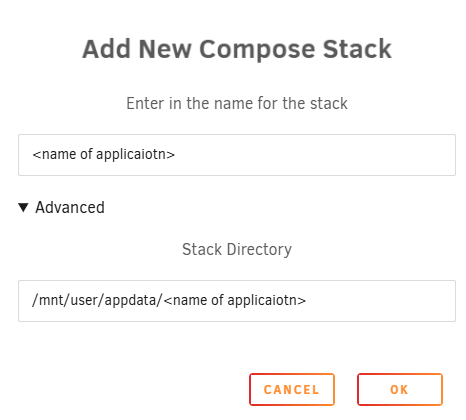
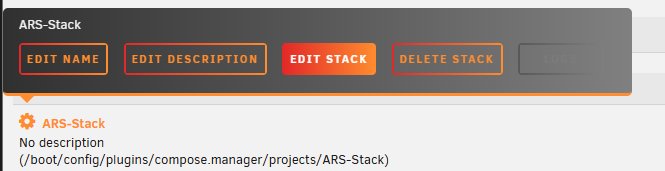
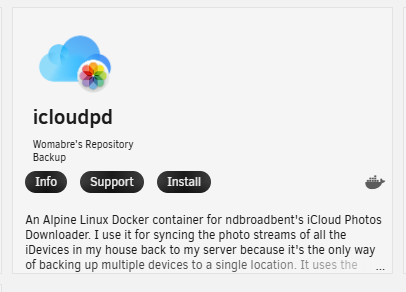
Alot of these have a docker compose file... use compse... example https://github.com/AirswitchAsa/icloudpd-web/blob/main/docker-compose.yml use the compose plugin to add it to unraid... so make path before hand.. mkdir -p /mnt/user/appdata/<name of applicaiotn> *Make sub folders if needed... and add a new stack via the docker web ui... then edit the stack and add the github compose file: almost all doc erks listed here can be done this way... ################################ @Tomahawk51 icloudpd was already added to the unraid ca:

-
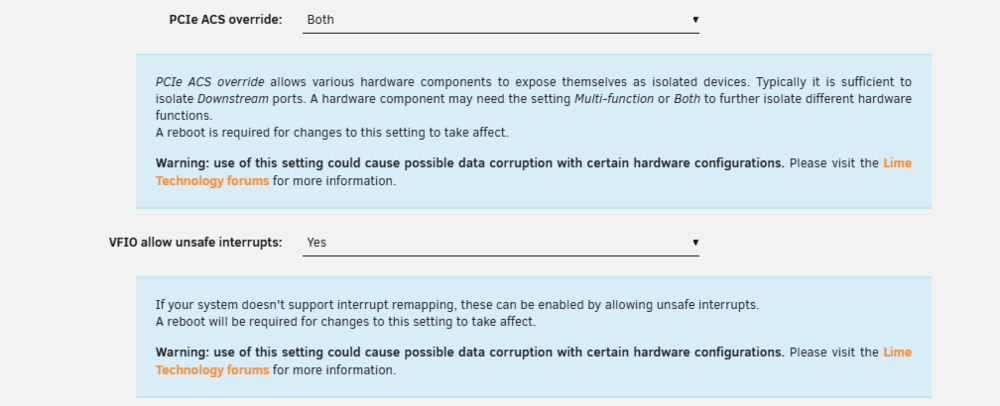
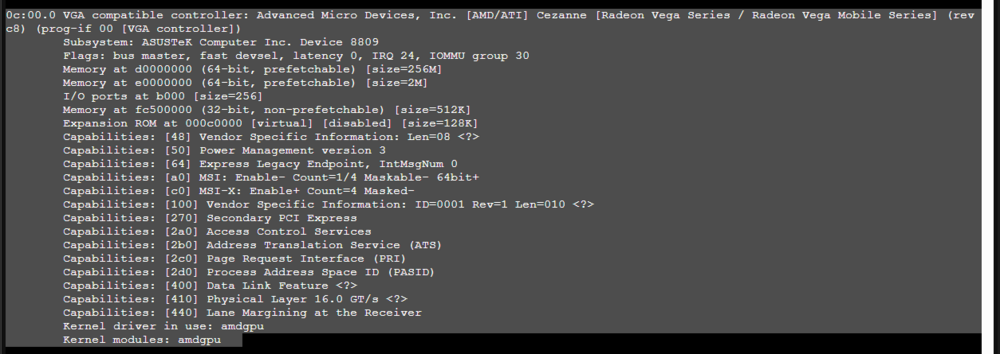
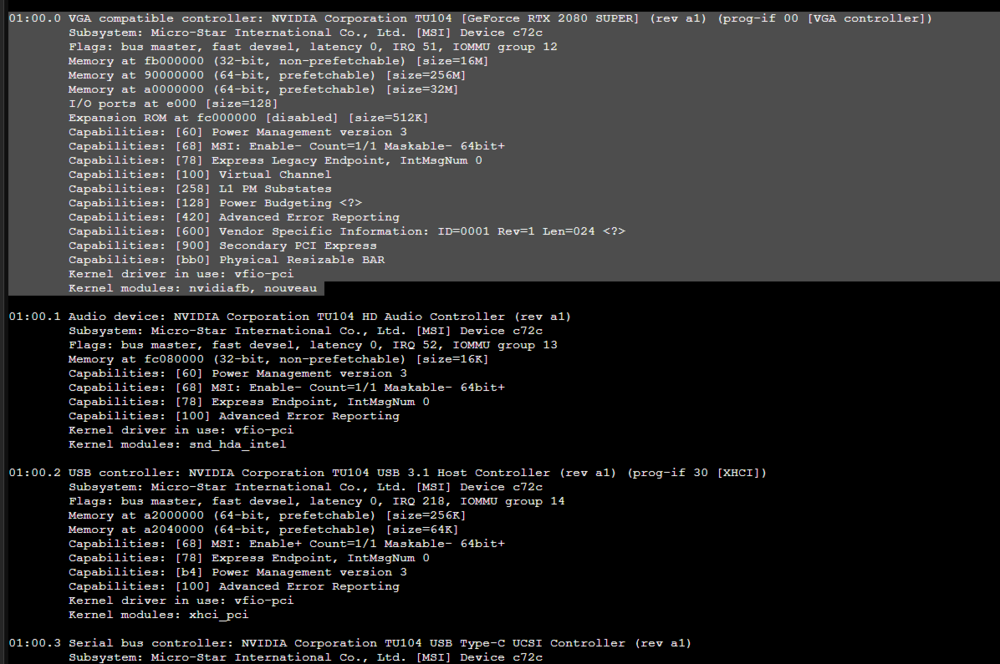
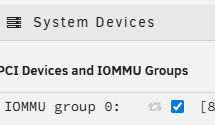
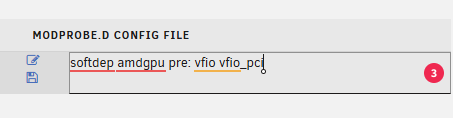
Idealy you want: can be found via the info tab: with adational VM settings: then you want the g card vfio bound IT MUST BE BOUND AND NOT TOUCHED BY THE HOST to be corectly passed into a windwo VM example this card is not bound to vfio (example only) *Not the kerneal driver in use... this needs to be vfio-pci! Example with nvidia... note all parts are vfio-pci (EXAMPLE ONLY!) so make sure your device is selected and vfio bound / stubed then me may want to assit the drive at boot to move into vfio softdep amdgpu pre: vfio vfio_pci in my example for my amd vega Since lspci -v says that my driver in use is amdgpu I would need to softdep a modprobe option to help devices enter vfio-pci. Other known gpu modprobe stuff: # AMD GPU #blacklist amdgpu #blacklist radeon #blacklist rivafb #blacklist rivatv so I would add: save and rebuild modules: then reboot.. THEN AND ONLY THEN ARE WE ready for xml VM code to add the device into a VM See as there are still some gotcha with unraid vms and asigning a pci device to a VM for passthorugh... https://www.youtube.com/watch?v=QlTVANDndpM




-
is this a pcie g card and on what motherbaord? amd/intel? You said AMD 9070XT but I need ot know if its gpu on the CPU or its own pcie card. second do you have proper IOMMU bios settings to pass cards lik this into VM. third is the devce VFIO ZPCI bound? what are your vm settings? windwos 11 is stricter with wdm drivers and you may need a adational qemu device option to pass to assit with gpu passing via softmod amdgpu in a modprobe and making sure the amd g card is reset for a VM as the amd reset bug still afects this model of cpu/gpu...
-
This method is called sidecar and is and can be used in conjunction with other dockers and docker networks... You should run the wg docker in custom br0/eth0/bond0 (depending on your network connections..) https://www.youtube.com/watch?v=bKFMS5C4CG0 Brandon Martino - Personal SiteGuide-DockerNetworksBrandon Martino - Personal Siteonce you get your wiregaurd instance up you would usualy use container network this WireGuard docker name or docker network cli commands to connect things to this docker... also you need to pass cap system to the docker due to the tunnel and access to network tunnels... when messing with mutiple docekr networks on unraid I pref to use compose... as teh unraid docker tempates build a docker run line and some edits, option and data is not there to use the system... so to clerify your docker is missing some key data... this is not a missing kernel module, it’s a Docker capability / device permission failure on Unraid. *That means the container is not allowed to create a network interface. WireGuard inside a container needs three things that Docker does not grant by default: Capability to create network interfaces Capability to configure them Access to /dev/net/tun Without those, wg-quick up wg0 will always fail exactly like this. Potental Fixes: add this line to your extra parm: --cap-add=NET_ADMIN --cap-add=SYS_MODULE --cap-add=NET_RAW --device=/dev/net/tun and use docker network mode host or custom br0... again I prefer compose i would run this... #version: "3.8" services: wireguard: image: ghcr.io/wg-easy/wg-easy:latest container_name: wireguard network_mode: host cap_add: - NET_ADMIN - SYS_MODULE - NET_RAW devices: - /dev/net/tun:/dev/net/tun volumes: - /mnt/user/appdata/wireguard:/etc/wireguard environment: # UI - WG_HOST=your.public.ip.or.dns - PASSWORD=change-me # Optional tuning - WG_PORT=51820 - WG_MTU=1420 - WG_PERSISTENT_KEEPALIVE=25 restart: unless-stopped Why this works (and your error goes away)network_mode: host WireGuard must create a real kernel interface (wg0) Host mode avoids Docker NAT entirely NET_ADMIN Required for ip link add wg0 /dev/net/tun Required for tunnel device NET_RAW Needed for packet handling (especially on Unraid) SYS_MODULE Lets WireGuard load kernel helpers if needed (Unraid already has WG, but this avoids edge cases) mkdir -p /mnt/user/appdata/wireguard *Docker required the folder pre-made... using unrad defaults! This will store: wg0.conf keys peer configs Many ways to accomplish the same thing. as this is why unraid added WireGuard stuff to the host level ...

-
Code propserity... nchan issues https://forums.unraid.net/topic/186600-unraid-crashes-with-stop-running-nchan-processes-webgui-not-reachable/#findComment-1523604 User script plugin at boot: #!/bin/bash # Unraid User Script to modify nginx.conf and restart Nginx # Define file paths NGINX_CONF="/etc/nginx/nginx.conf" BACKUP_CONF="/etc/nginx/nginx.conf.bak" # Backup the existing nginx.conf if [ -f "$NGINX_CONF" ]; then cp "$NGINX_CONF" "$BACKUP_CONF" echo "Backup created at $BACKUP_CONF" else echo "Error: $NGINX_CONF not found! Exiting." exit 1 fi # Add the new configuration settings sed -i '/^http {/a \ nchan_max_reserved_memory 64M;\n nchan_message_timeout 30s;\n nchan_message_buffer_length 100;' "$NGINX_CONF" if [ $? -eq 0 ]; then echo "Nginx configuration updated successfully." else echo "Error: Failed to update Nginx configuration." exit 1 fi # Restart Nginx /etc/rc.d/rc.nginx stop && /etc/rc.d/rc.nginx start if [ $? -eq 0 ]; then echo "Nginx restarted successfully." else echo "Error: Failed to restart Nginx. Check configuration." exit 1 fi exit 0Test and let us know whats up. Not sure whats causing these nginx issues I have not yet seen one in my testing... more due to thing with the unraid connect plugin I'm stating to see nchan and php stuff... but nothing like whats other users have reported... I enabled and did xyz from a known stable and investigated what change where did what... More issues with how unraid emhttp is handling some crashes and extended webview time(left in a open page where things like the dashboard refresh call to many pids to colect data)... -Some VM machien qemu quirks that can be fixed with grub and pre boot enviroments... Most of thees have already been looking into by the devs adn have changed and adapted configs to make a stable system theses fast-cgi / nchan shouldn't be used unless you in a older v6 unriad OS experiencing the issues... "Unraid crashes with "Stop running nchan processes" - WebGUI not reachable"
-
Saving for code prosperity... (why fight the forum trying to search for old code...) Temp relief due to memory leak error... sometimes yes you may want a higher child count... "[WARNING] [pool www] server reached max_children setting (50), consider raising it" at first I thought this to be a nginx / systemctl thing... nope its good old php... and potential issues with fastcgi... IDK what people are doing to hit that and raising the limit is not a fix to the underline issues... Its Temp Relif... Regardless, you will need a user script plugin and a script at first array start to run to make this last between reboots... cat /etc/php-fpm.d/www.conf and look for : pm.max_children = 50 default should have: ; The number of child processes to be created when pm is set to 'static' and the ; maximum number of child processes when pm is set to 'dynamic' or 'ondemand'. ; This value sets the limit on the number of simultaneous requests that will be ; served. Equivalent to the ApacheMaxClients directive with mpm_prefork. ; Equivalent to the PHP_FCGI_CHILDREN environment variable in the original PHP ; CGI. The below defaults are based on a server without much resources. Don't ; forget to tweak pm.* to fit your needs. ; Note: Used when pm is set to 'static', 'dynamic' or 'ondemand' ; Note: This value is mandatory. pm.max_children = 50 so at first array start user script plugin run: #!/bin/bash # Increase PHP-FPM max_children to handle more concurrent UI/API calls # Run "At First Array Start" in User Scripts PHP_FPM_CONF="/etc/php-fpm.d/www.conf" NEW_LIMIT=200 # adjust as needed (default 50) # Verify config exists if [[ -f "$PHP_FPM_CONF" ]]; then echo "Updating pm.max_children in $PHP_FPM_CONF to $NEW_LIMIT..." # Use sed to replace the line if it exists, otherwise append it if grep -q '^pm.max_children' "$PHP_FPM_CONF"; then sed -i "s/^pm.max_children.*/pm.max_children = ${NEW_LIMIT}/" "$PHP_FPM_CONF" else echo "pm.max_children = ${NEW_LIMIT}" >> "$PHP_FPM_CONF" fi # Restart PHP-FPM service safely /etc/rc.d/rc.php-fpm restart echo "PHP-FPM restarted with new limit: $NEW_LIMIT" else echo "ERROR: $PHP_FPM_CONF not found. Unraid may have changed its path." fi This will increase the limit to 200... Common areas to check: appdata backup plugin. - I have seen this run and break with vms that could cause this.... Overload of system with dockers and vms... (look into using the swap plugin and ram disk for docker log plugin!) unraid connect plugin... (api and changes have caused other issues. Zombie process or heavy AI n8n and other task loads python code scripting. Weird nginx nchan and emhttp errors with connecting to unraid via mobile browser / browser left on web ui page... emhttp dashboard left on longer then a day uptimes greater then 1 week... Inconsistency to define to a single cascade issues and is usually in conjunction of multiple things. However, again. this is not a fix!!! You need to figure out the memory leak that hitting the 50...
-
I can neither confirm the time you ran the script nor a issues with your screenshot log... issues again is not the script nor a solution to increase the child max... (this is temp relief anyways...) as you have somthign calling and tyring to call a script... You keep Necroing and going back between mutiple threads... Please keep to one forum post... for continued updates AND FOLLOW THE FORUM RULES!!! MAKE A GENERAL POST AND POST DIAGS! IDK what your runing nor how your running to get in this state... not enouth info to assist either way... you have to find the memory leak... Common areas in testing. appdata backup plugin. overloaded system to many dockers vm running at once. Python and python code. and the unraid connect plugin... Please post diag... ?When the last time you reboted teh server? What is it doing to end up in this state...? Setup a system log server...
-
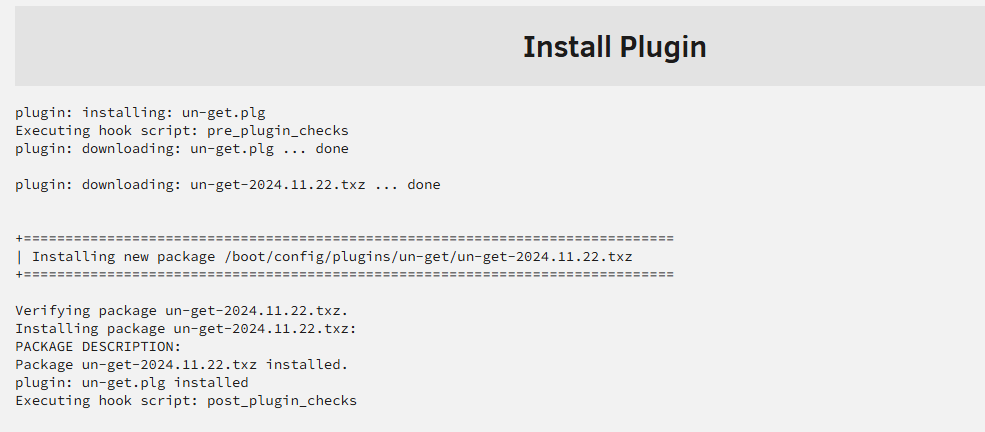
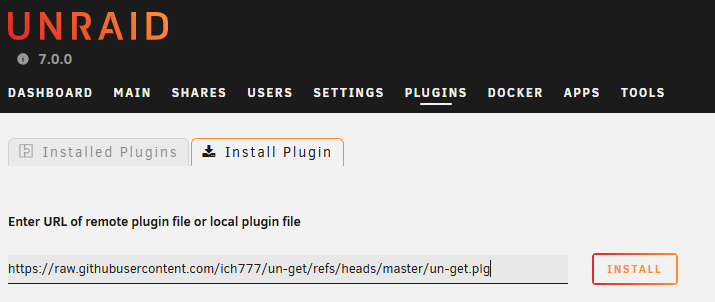
code prosperity... Nerd tools / extra options. Thanks to ich777. allows for 3rd party Slack pack app isntalls. step 1: install unget: https://raw.githubusercontent.com/ich777/un-get/refs/heads/master/un-get.plg Step 2: add source list to new repo: The add repo line to /boot/config/plugins/un-get/sources.list : https://raw.githubusercontent.com/shinji257/unraid_pkgs/main/slackware64-current/ shinji257as ich777 had one at one time: https://github.com/ich777/slackware Step 3 install packages per github: https://github.com/shinji257/unraid_pkgs example I want 7zip: un-get install 7zip Make a user script or add to go file to install applications... This is my understanding of it atm... User script: *At first boot of array #!/bin/bash # Define path and line to add SOURCE_LINE="https://raw.githubusercontent.com/shinji257/unraid_pkgs/main/slackware64-current/ shinji257" SOURCE_DIR="/boot/config/plugins/un-get" SOURCE_FILE="$SOURCE_DIR/sources.list" # Ensure the directory exists if [ ! -d "$SOURCE_DIR" ]; then echo "[+] Creating un-get config directory: $SOURCE_DIR" mkdir -p "$SOURCE_DIR" fi # Ensure the file exists if [ ! -f "$SOURCE_FILE" ]; then echo "[+] Creating sources.list: $SOURCE_FILE" touch "$SOURCE_FILE" fi # Add source line if not already present if ! grep -Fxq "$SOURCE_LINE" "$SOURCE_FILE"; then echo "[+] Adding shinji257 repo to sources.list" echo "$SOURCE_LINE" >> "$SOURCE_FILE" else echo "[✓] shinji257 repo already present" fi #Verify sources echo "[✓] verify repo already present" cat $SOURCE_FILE # Update un-get sources echo "[*] Updating un-get sources..." un-get update Optional add install at bottom to keep apps uptodate... un-get install screen
-
I'm still investigating what may be causing this and at best I'm getting some weird stuff with those that use the unraid connect and it's due to how the API is being redeveloped and changed, but the API shouldn't be causing these errors to this degree. I'm not sold that. It's the unraid connect plug-in if you use that but wanted to throw that out there as a potential problem area
-
Ssh config tool plugin created ssh users that could at one time... Terminal useradd And group usermod -aG grouname username And am passed -a username for samba... The reason why they made you use the web UI is because the operating system existed RAM and the files created this way for the etc Shadow file which contains the user accounts and passwords is erased on a reboot. There are work arounds...
-
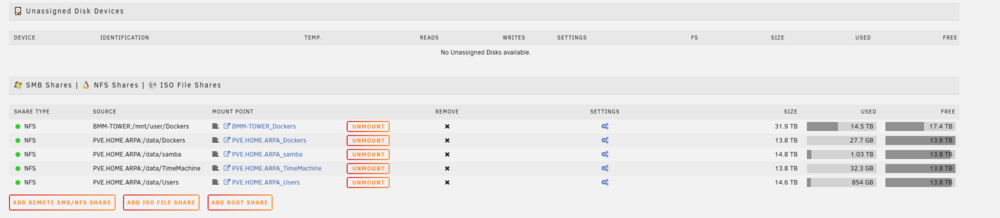
or updates to the unasinged disk plugin with nfs conceted or smb conted remote shares. example If I nfs cont to my other unraid sytem.. and if I would want to share I would want to share this via this unraid system via smb. (1 samba to rule them all) I wuold want and/or need to set per share options... This is curtenlty done with teh extra parm option and using /wrting my own share. So i can see having a include on teh flash drive to set adational samba per share options... things like samba per share options... acl map full control = yes acl allow execute always = yes map archive = yes map system = yes map hidden = yes create mask = 0775 force create mode = 0777 directory mask = 0777 force directory mode = 0777 force user = root force group = root

-
I do not. I kinda abanded the project due to issues with MongoDB and an ability to share good working version to use docker... how to get it up and working reliably... has been a challenge... its has and will always be a issue with commands to mongdb to get it working... My CA unraid templates have not been maintained nor checked on this in a while (so i'm not sure if what is posted will work...) and was more to bring the dockers back into unraid for template editing to futz with for other users that build and use this on unraid... For me to go back and redo this... I would essential have to make and monitor my on mongodb database9Which i nether have the time nor the ability to allocate to this) with custom scritps to fix, montitor and do zxy... where it was neither worth my timer pressuring nor fighting to get it working... IDK also, what changed and stopped following rocket chat due to there new subscription requirements and there other weird requirements to set one up. The best I can do is direct you to earlier in the forum with my mong db commands to fix the mongdb... The templats and OG post when I tried to resurrect this application on how to setup and run mongdb are needed from the earlier in post. I can get it working for myself... (As I know some of the inner working due to rocket chat and having access to other support channels and data from mongodb and rocket chat themselves... But that doesn't mean its stable running like this on unriad.. nor should be ran the way due to last communications form rocket chat devs... its is. Last Comunciations with rocket chat, they didn't want this to be contanierzed and in a docker env. They rather you install it mongo and others in a liunx env. so vm/lxc... ATM, My focus atm is more on immich and not this project. Sorry I can't help. to use there supported via github docekr version (teh rocket chat app it self...) https://github.com/RocketChat/rocketchat-compose/blob/main/compose.yml I would move the project into compose and not unraid CA docker splitting due to needing and setingup mongo and a gurantee if passed with theses setting and data it will work reliably.. Please review rocket chats documentation... again The CA dockers in my repo was only to help bring them into Unraid and not a stable working model due to mongodb configurations... at this time.... https://www.rocket.chat/install https://docs.rocket.chat/docs/additional-deployment-methods more on mongo as I understand it the rocketchat docker in in debain as such following the vm/lxc for mongodb setup... https://docs.rocket.chat/v1/docs/deploy-on-debian#set-up-mongodb as I'm still waitng on mongdb to get back to me on a good way to deply and set these via docker run (which is how unraids CA template generates the dockers in unraid... CA temaptles construct the docker run line and execute them.... your issues appears to be stemming from a missing option data or mongodb configuration. IDK mongodb enough to assist further. and would point you towards dev recommendation of a VM / ICH777 debain LXC.
-
Bumping this ... As an example, adding extra options at the bottom to support or remove things such as using Windows attributes Setting up valid users that I don't have to go through another tab for the users to access, read, write shares for the samba systems for these folders. Setting Pacific forced user read. Write to these folders. Setting creative masks Force create masks The goal is to give advanced users the ability to add something to the share. Where it wouldn't be hard to add something to the SMB share to include and advance share name created in the samba folder based on the web UI options...
-
it was for that reason that I made the new CA immich dockers to help easy the transtion. ANd web to a Webstie for guide due to issues with Unraid forum and suport pages... review: https://medium.com/@damngoodtech/how-to-easily-restore-a-postgresql-database-in-a-docker-container-23ccfaa3d60b https://davejansen.com/how-to-dump-and-restore-a-postgresql-database-from-a-docker-container/ https://docs.immich.app/administration/backup-and-restore/ and if running unrad CA method you are running in a postgress standalone: https://docs.immich.app/administration/postgres-standalone/ new install guid for CA: https://bmartino1.weebly.com/immich-on-unraid-ca-docker.html Only thing that changes is whe you launch postgress you run the postgress resotr comands... New install copose: https://bmartino1.weebly.com/immich-on-unraid-docker-compose-guide.html THe mainteriners recomend method...(more due to univeral; across any and all linux distors...) Ther are many way to interace with your postgress dsatabase to backup, dump rstore... simlarly the immich defualt folder layout or storage tempalte and volume mapoing. Yes you can maintin your old data and transtion to the curent working known stable models... BUT YOU ARE ULTIMATE INCHAGE OF YOUR DATA!
-
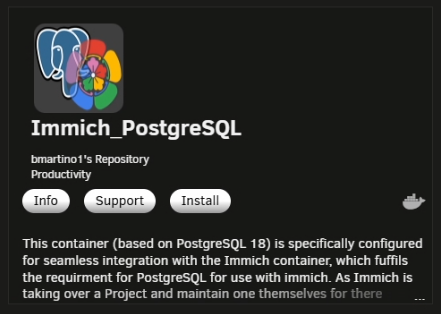
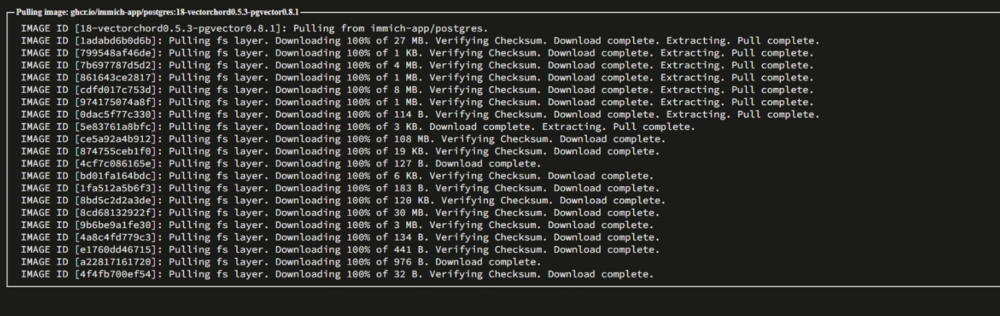
imimch it slef droped support for pg xxx plugin and imich decided to maintin ther own postgress docker image using the new supported plugin vectorchord. this was during postgressv14 being the norm. v16 being the go to staple and v18 being the bleeding edge. Image genious(the mainteiner of teh docker image for the unraid CA) after working with them pushed to update and migration that now requires vetochord over the pg plugin. Immich mainting ther own docker image gave usrs the abilty to move and update by usin ghte tag with both pg and vetochord... YOU HAVE ALWAYS BEEN IN CHARGE OF YOUR OWN DATA AND BACKUP! Immich them selves want you to use the docker compose method. Space invader atempted to help as trtying to have novice and others use edit and have compse on uraid was still a beta things and not easily expalined nor gone over... He partnered with image genios who shipes a docker image that runs both the imich server and imch remote learning in 1 docker. So the question has and will always be. Do IO run CA and folow image genious update stack, github and notes. Or Do i follow the immich stack mainter github update and notes. Thsi caused alot of issues and drops form the platform as they worked themselves out... Meanidn that a UpDate path REQUIRES a good working postgres tag and the backup and restore (migrations) of the postgress version. Image genoius recomedns runnign postgress v16 imache compose recomend runing v18 folwoing EOL and realse cyclesw postgress v16 is not EOL untill 2028 https://www.postgresql.org/support/versioning/ so there is no direct answer to "CORRECT" update path...
-
or raid mirro it across another disk for redundacy...
-
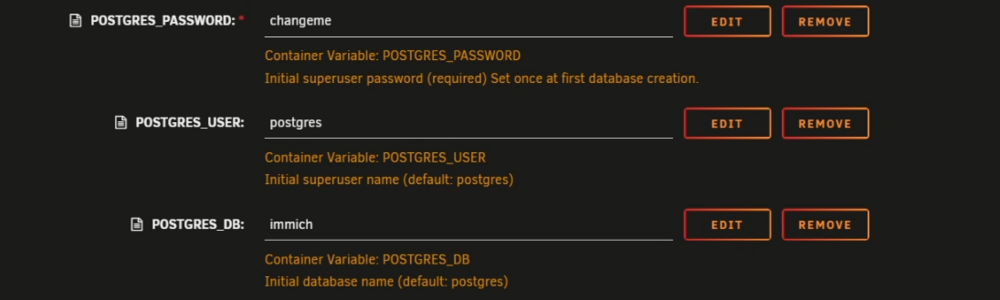
the db name was always customizable. No idea what the default was when I made the updated Postgres CA templates It was a near exact duplicate of space invaders so what ever he had as defaults was the shipped name. Usually Postgres defaults with Postgres as a db name. Most use the application there using as some multi task 1 database with mutiple database systems. so 1 Postgres image for immich and on this Postgres instance they will have another database called net probe for the netprobe stack and xyz for that stack... while others will run mutule of the same with only 1 database... in your case, its whatever the sql file has. And what the original docker at creation made. you can edit the sql file in notepad and see the commnads and look for the database name. to get teh database name... IT more important at a resotre to infomr imich to conect ot the corect databse after the restore...
-
CA updated new template should be avilable 12/4/2025
-
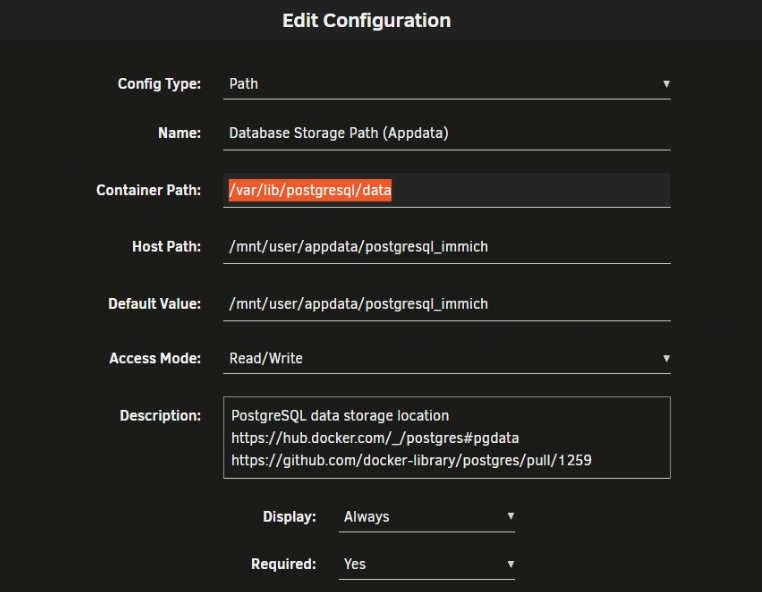
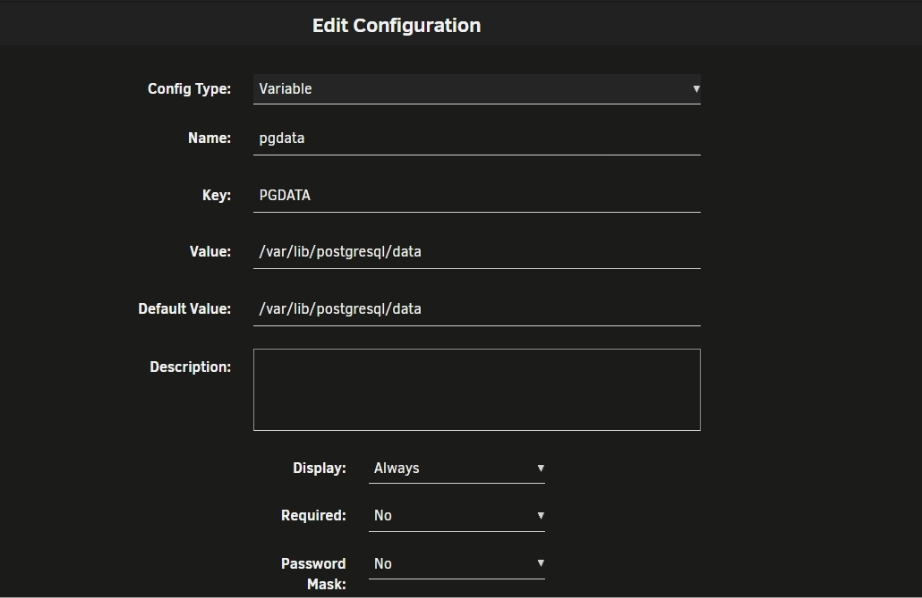
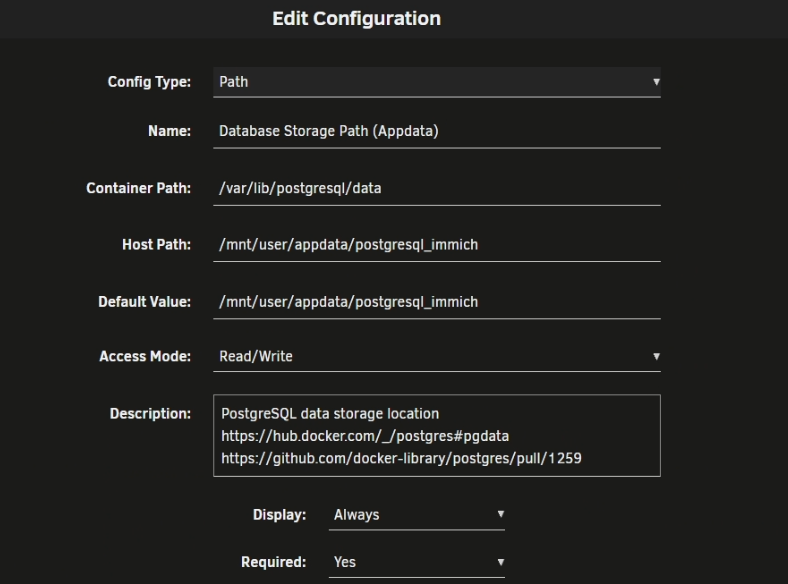
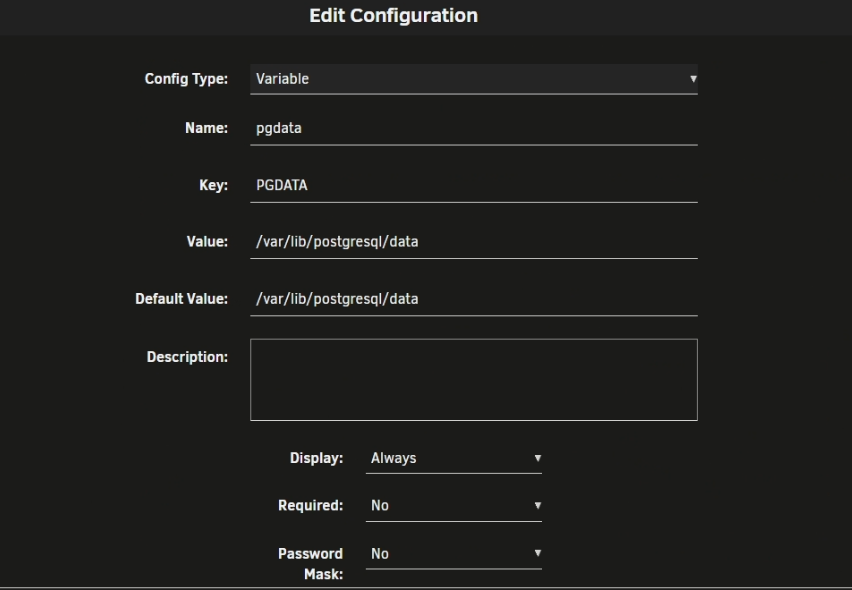
appologies I thought I made the template edit to fix this i see i copied the worng one to my github repo the CA will be updated later the correct temapte is in that fixes and sets the /data folder for all Postgres moving off tag 16 to higher tags due to changes in Postgres. you will still need to add a folder location to access the backup dump of your v16 you may need to delete the appdat folder for a fresh download of the template. Thank you for bringing this to my attention.
-
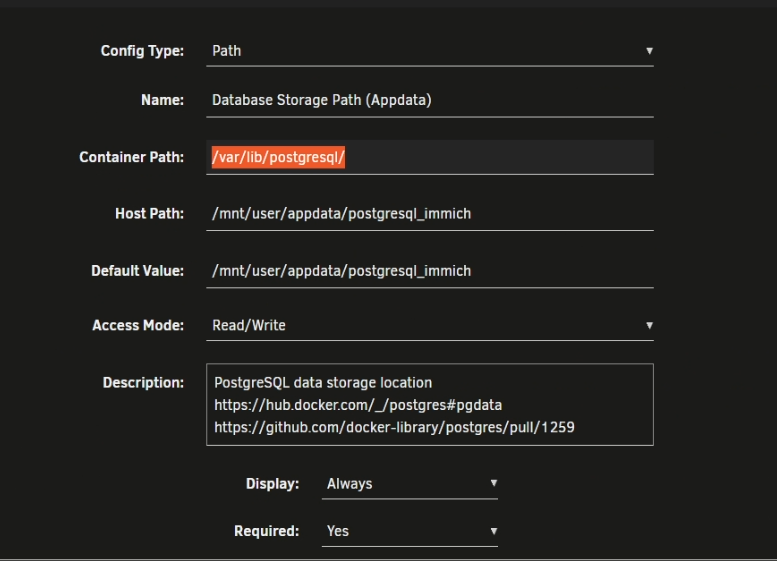
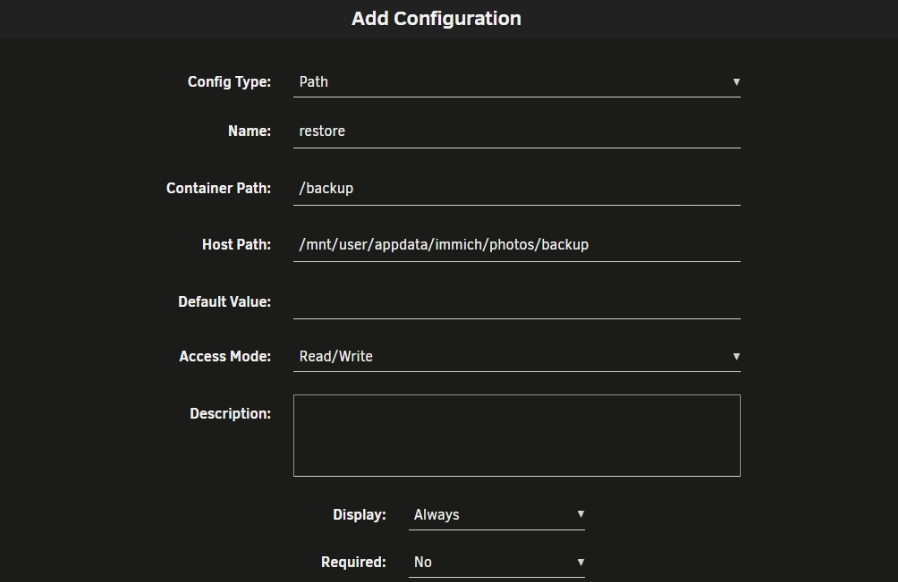
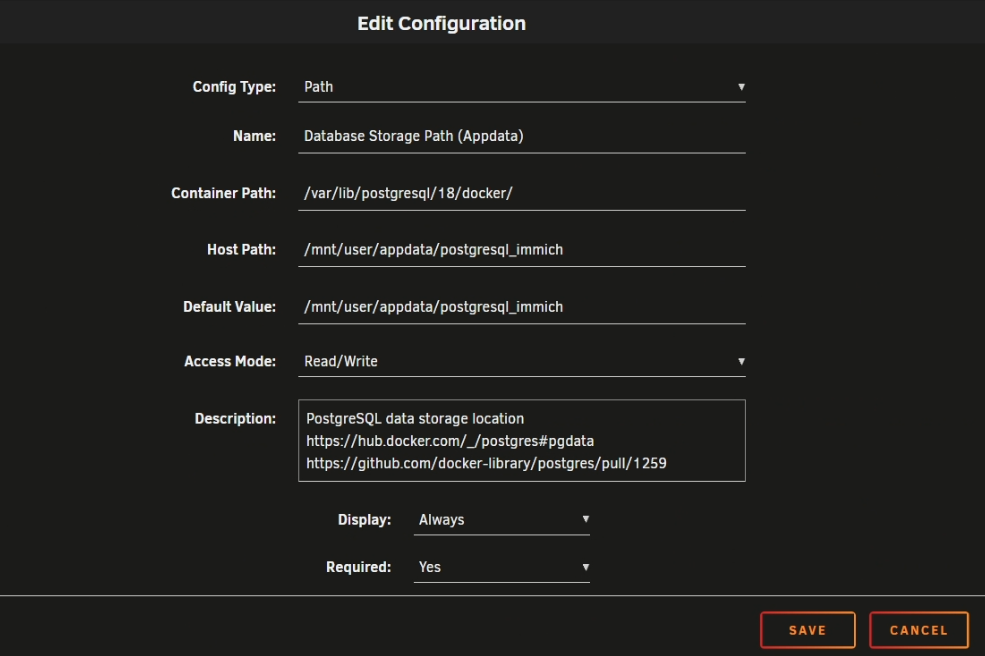
now i'm setup with a blank postgress ready to restore my sql file... the v18 tag require the continer var to be /var/lib/postgresql/18/docker/ Per the log error: since this is v18 i need to add 18/docker AS I don't have a good way to share the CA template due to the postgress change of a default pgdata location... once postgress is up we can console into it and run the pg restore command... my sql file is now in /backup pwer my earlier add container I see that my temaplte on the CA failed I will be updateing it shortly to fix this by forcing v18 and v19 newer tags to use pgdata to odler /var/postgres /data folder

-
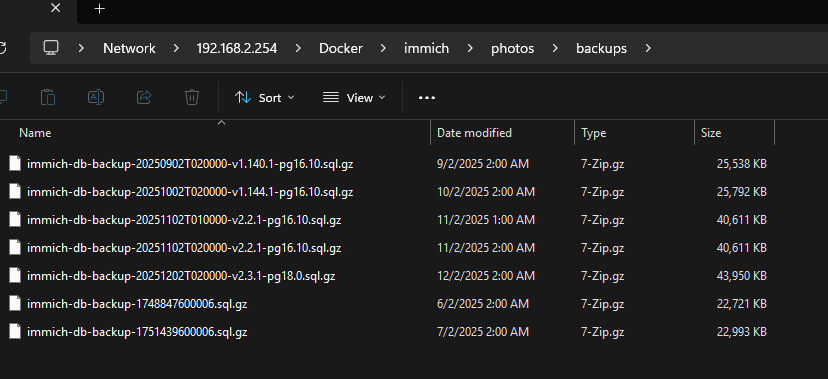
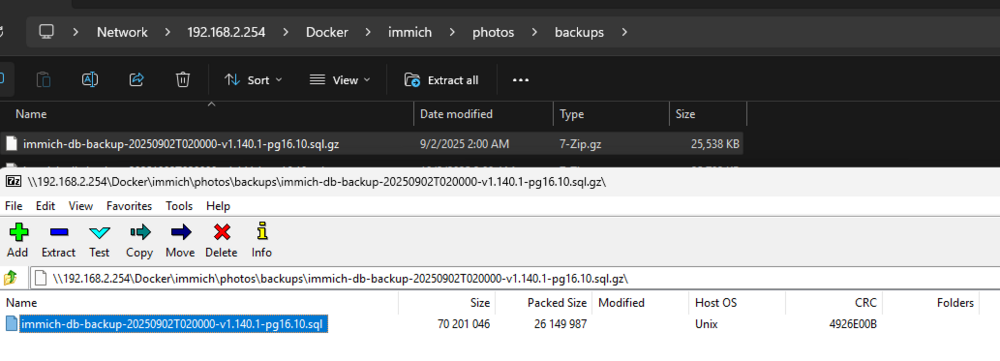
so I would 7zip extract my lattest backup so I have a file I would then clear and resetup a new postgress databse double check the docker tag and contner due to pgdata changees with postgress v18 and add the docker pat varble to add my folder for immich... this way when I console in the docker I see imchi backup form the postgress continer I would leave this default as this is my login credentals for the restore command. once postgress v16 sql is restored the password and user will revert to my v16 data. IT IS BEST TO KEEP AND MAINTIN THE SAME DB NAME/ USER / PASSOWoED!!!! I then apply the v18 immich_postgress form the CA --which is setup for v18 atm. then wait until postgress makes its database...