






bmartino1
Members
-
Joined
-
Last visited
Everything posted by bmartino1
-
it has to do with unraid networking and how they are setting up and interrupting ipv6. you esential made a ipv6 ad hock on the urnaid interface when you staticaly assinged the ipv6 address... where unraid now atampts to make a dhcp ipv6 slack ra call and it gets nothing in resopnose over the ipv6 interface. thus it clsoes ipv6 for further networking dhcp and vlan stuff later per the rc inet script.... see feature request: https://forums.unraid.net/topic/194716-make-multiple-addresses-for-ipv6-possible/#comment-1587770 with out a lot of workarounds and scripting to flush interfaces and staticaly asiging ipv6 address to multiple vlan networks based on the data presented... as you needs ipv6 dhcp mode in slacc and use ra. Unriad script for their inet and network setup are not seeing nor communicating to make the ipv6 connections. unriad prefers ipv4 due to a networking stabilty bug...
-
Currently unraid uses Slacc for ipv6 networks this is why even when statically set your unraid doesn't see the ipv6 in the vlan/docker settings. Unraid is not seeing the ipv6 dhcp server.
-
for the ars stack, I prefer to use the docker compose method... as you will need to setup the VPN network and data to use the PIA vpn in conjunction with the docker network to maintain communication... Review rule of thumb for docker networks https://bmartino1.weebly.com/guide-dockernetworks.html General Guide... Create your new Unraid folder layout to match for composeRun once on Unraid (terminal): mkdir -p \ /mnt/user/appdata/{pia,prowlarr,sonarr,radarr,sabnzbd,transmission} \ /mnt/user/ARS/media/{tv,movies} \ /mnt/user/ARS/torrents/{incomplete,completed,watch} I have to assume a default pathing to adjust mounts accordingly... New docker-compose.yml for example setupNotes: VPN container is named pia. SAB + Transmission share the VPN network namespace, so they’re reached at pia’s IP (either 172.45.0.10 on the docker bridge, or 192.168.1.42 on LAN via br0). By setting up a docker bridge for isolation for arrs network and br0 external LAN network. (I recommend using macvlan...) this helps multi network setups where things that acquire content use the VPN IP. I recommend compose to help fix unraid network docker weirdness to communicate with vpn and multiple docker network stacks. networks: arrs: driver: bridge ipam: config: - subnet: 172.45.0.0/24 br0: external: true services: ########################################################################### # PIA WireGuard Gateway (the “VPN container”) # SABnzbd and Transmission live inside THIS network namespace ########################################################################### pia: image: thrnz/docker-wireguard-pia:latest container_name: pia cap_add: - NET_ADMIN - SYS_MODULE sysctls: - net.ipv4.conf.all.src_valid_mark=1 # env_file: # - /mnt/user/appdata/.env environment: - PIA_USER=${PIA_USER} - PIA_PASS=${PIA_PASS} - PIA_REGION=${PIA_REGION} - LOCAL_NETWORK=172.45.0.0/24,192.168.1.0/24 - VPN_DNS=1.1.1.1,9.9.9.9 - PORT_FORWARDING=1 - RECONNECT=1 - ACTIVE_HEALTHCHECKS=1 volumes: - /mnt/user/appdata/pia:/config - /lib/modules:/lib/modules:ro networks: arrs: ipv4_address: 172.45.0.10 aliases: # These names are what Radarr/Sonarr should use as download clients - sabnzbd - transmission br0: # Change me – LAN IP used to access SAB + Transmission WebUIs also update lables for webUI... ipv4_address: 192.168.1.42 healthcheck: test: ["CMD-SHELL", "ip link show wg0 >/dev/null 2>&1"] interval: 10s timeout: 3s retries: 30 restart: unless-stopped labels: folder.view: "ars" net.unraid.docker.managed: "composeman" net.unraid.docker.webui: "https://10.0.0.1" # PIA control page (non-critical) net.unraid.docker.icon: "https://raw.githubusercontent.com/thrnz/docker-wireguard-pia/master/assets/pia.png" com.centurylinklabs.watchtower.enable: "true" ########################################################################### # SABnzbd (forced through VPN) # IMPORTANT: WebUI is accessed via the PIA container IP ########################################################################### sabnzbd: image: lscr.io/linuxserver/sabnzbd:latest container_name: sabnzbd # env_file: # - /mnt/user/appdata/.env environment: - PUID=${PUID} - PGID=${PGID} - TZ=${TZ} volumes: - /mnt/user/appdata/sabnzbd:/config - /mnt/user/ARS/torrents/incomplete:/incomplete-downloads - /mnt/user/ARS/torrents/completed:/downloads - /mnt/user/ARS:/data network_mode: "service:pia" depends_on: pia: condition: service_healthy restart: unless-stopped labels: folder.view: "ars" net.unraid.docker.managed: "composeman" # WebUI runs on PIA IP :8080 net.unraid.docker.webui: "http://192.168.1.42:8080" net.unraid.docker.icon: "https://raw.githubusercontent.com/linuxserver/docker-templates/master/linuxserver.io/img/sabnzbd-logo.png" com.centurylinklabs.watchtower.enable: "true" ########################################################################### # Transmission (forced through VPN) # IMPORTANT: WebUI is accessed via the PIA container IP ########################################################################### transmission: image: lscr.io/linuxserver/transmission:latest container_name: transmission # env_file: # - /mnt/user/appdata/.env environment: - PUID=${PUID} - PGID=${PGID} - TZ=${TZ} volumes: - /mnt/user/appdata/transmission:/config - /mnt/user/ARS/torrents:/downloads - /mnt/user/ARS/torrents:/data/torrents - /mnt/user/ARS/torrents/watch:/watch network_mode: "service:pia" depends_on: pia: condition: service_healthy healthcheck: test: ["CMD-SHELL", "exec 3<>/dev/tcp/127.0.0.1/9091"] interval: 30s timeout: 5s retries: 10 restart: unless-stopped labels: folder.view: "ars" net.unraid.docker.managed: "composeman" # WebUI runs on PIA IP :9091 net.unraid.docker.webui: "http://192.168.1.42:9091" net.unraid.docker.icon: "https://raw.githubusercontent.com/linuxserver/docker-templates/master/linuxserver.io/img/transmission-logo.png" com.centurylinklabs.watchtower.enable: "true" ########################################################################### # Indexers / Orchestrators (NOT through VPN) ########################################################################### prowlarr: image: lscr.io/linuxserver/prowlarr:latest container_name: prowlarr # env_file: # - /mnt/user/appdata/.env environment: - PUID=${PUID} - PGID=${PGID} - TZ=${TZ} volumes: - /mnt/user/appdata/prowlarr:/config - /mnt/user/ARS:/data - /mnt/user/ARS/torrents/completed:/downloads ports: - "9697:9696" networks: arrs: ipv4_address: 172.45.0.3 restart: unless-stopped labels: folder.view: "ars" net.unraid.docker.managed: "composeman" net.unraid.docker.webui: "http://[IP]:9696/system/status" net.unraid.docker.icon: "https://raw.githubusercontent.com/linuxserver/docker-templates/master/linuxserver.io/img/prowlarr-logo.png" com.centurylinklabs.watchtower.enable: "true" sonarr: image: lscr.io/linuxserver/sonarr:latest container_name: sonarr # env_file: # - /mnt/user/appdata/.env environment: - PUID=${PUID} - PGID=${PGID} - TZ=${TZ} volumes: - /mnt/user/appdata/sonarr:/config - /mnt/user/ARS/torrents/completed:/downloads - /mnt/user/ARS/media/tv:/tv - /mnt/user/ARS:/data ports: - "8989:8989" networks: arrs: ipv4_address: 172.45.0.4 depends_on: - prowlarr - pia restart: unless-stopped labels: folder.view: "ars" net.unraid.docker.managed: "composeman" net.unraid.docker.webui: "http://[IP]:8989/system/status" net.unraid.docker.icon: "https://raw.githubusercontent.com/linuxserver/docker-templates/master/linuxserver.io/img/sonarr-logo.png" com.centurylinklabs.watchtower.enable: "true" radarr: image: lscr.io/linuxserver/radarr:latest container_name: radarr # env_file: # - /mnt/user/appdata/.env environment: - PUID=${PUID} - PGID=${PGID} - TZ=${TZ} volumes: - /mnt/user/appdata/radarr:/config - /mnt/user/ARS/torrents/completed:/downloads - /mnt/user/ARS/media/movies:/movies - /mnt/user/ARS:/data ports: - "7878:7878" networks: arrs: ipv4_address: 172.45.0.5 depends_on: - prowlarr - pia restart: unless-stopped labels: folder.view: "ars" net.unraid.docker.managed: "composeman" net.unraid.docker.webui: "http://[IP]:7878/system/status" net.unraid.docker.icon: "https://raw.githubusercontent.com/linuxserver/docker-templates/master/linuxserver.io/img/radarr-logo.png" com.centurylinklabs.watchtower.enable: "true" Your .env file (example with compose above)Usually generated in a folder specified at creation....: example /mnt/user/appdata/.env PUID=99 PGID=100 TZ=America/Chicago # PIA (required) PIA_USER=your_pia_username PIA_PASS=your_pia_password PIA_REGION=us_chicago (Region strings depend on the image/version; the thrnz container docs are the authority. GitHub) The actual fix: how Radarr/Sonarr talk to SAB/TransmissionBecause SAB and Transmission are inside the pia network namespace, you must point Radarr/Sonarr to the pia container: Use one of these (pick ONE style)A) Docker-bridge addressing (recommended for stability): SAB host: 172.45.0.10 port 8080 Transmission host: 172.45.0.10 port 9091 B) LAN addressing (if you prefer): SAB host: 192.168.1.42 port 8080 Transmission host: 192.168.1.42 port 9091 C) Alias style (works because we added aliases on pia): SAB host: sabnzbd port 8080 Transmission host: transmission port 9091 SABnzbd “Host whitelist” gotchaIf SAB refuses connections even though the port is reachable, add allowed hostnames/IPs in: SABnzbd → Config → Special → host_whitelist (or equivalent in your version). Example entries: sonarr,radarr,prowlarr,pia,sabnzbd,172.45.0.0/24,192.168.1.0/24 This specific “SAB whitelist blocks the *arrs” failure mode is common. example found: https://forum.yams.media/viewtopic.php?t=187
-
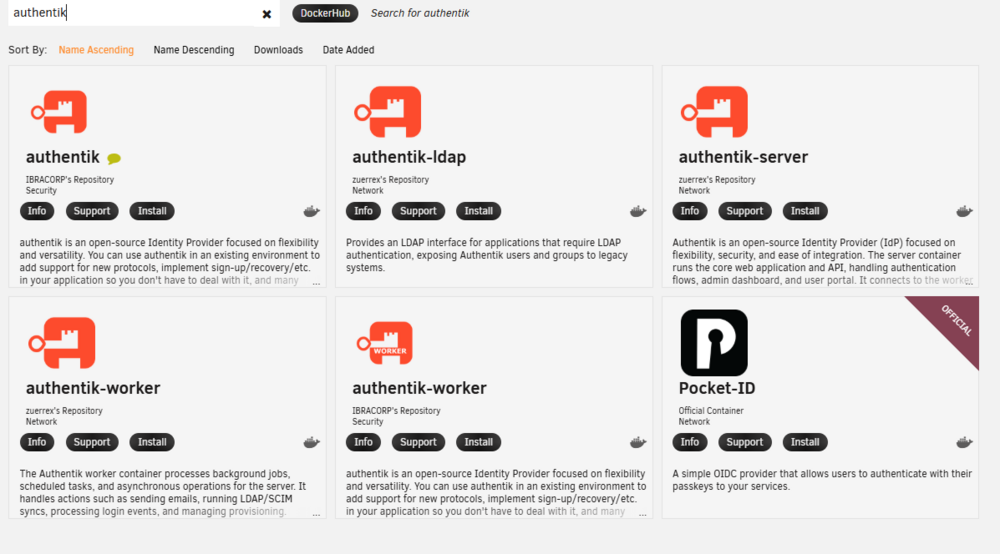
web UI updates are for docker tages repos only. if the xml is removed from the CA it was removed for a reason. Thus maintain the tempalte/docker is now on you. I would recommend reusing the temple and change the docker tag to a trusted version or use the new/current model for authentik. (no reason to remove if the docker is still working and getting docker tag updates) looks like zuerrex is mainting them now for unraid. This means you would need to use there docker tempatle and tag to get better support on the forum... xml is never updated you must delete it and redownlad form the CA. as explained above... example of XML I maintain for the CA https://github.com/bmartino1/unraid-docker-templates it can take 2-4 hours after I edit a template before the CA is updated to use one of my xml templates. I personaly have become more partial to using docker compose. unraid plugin to use compose on unraid...
-
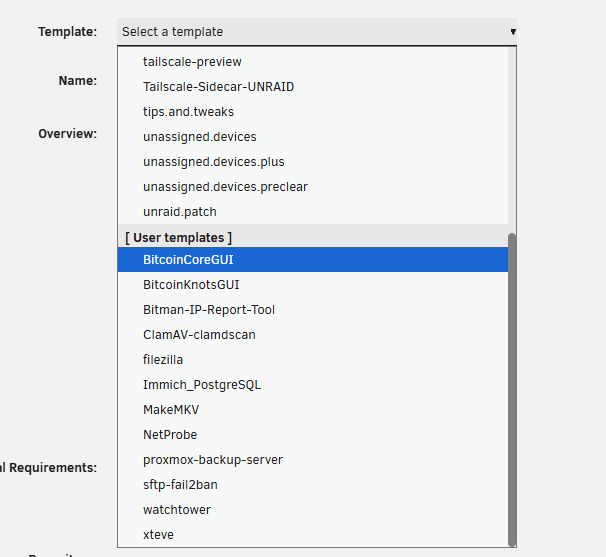
no, kinda... so a docker update depends on the docker tag. Most are shipped with latest so when a update is available and if unraid is told to do so it will update. Things that age and change over time due to updates like the recent immich Postgres v18 tag is changing variables. It is recommended to delete the template and redownload form the CA. Select your template: hit the x to delete. then go to the CA and redownload and install... this will re populate the new template with updated xml. or edit your exisitng docker. and add the missing data, paths and new needed stuff. usualy found on the support pages..



-
that said unraid has started to improve and integrate with native zfs. via openzfs https://www.youtube.com/watch?v=UR5RCItyCsw
-
yes, no, maybe so. It all comes down to what you want it to do and how you want to interact with it. I highly discourage the use of nextcloud... what does nextcloud do that you can do better with a different set of dockers... Short answer: For 4×18 TB HDD + 2 TB SSD, Docker-heavy workloads (Immich, Nextcloud), and a beginner who still wants real data safety, unRAID is a very strong fit — as long as you understand what it does and does not do. If you want maximum data integrity guarantees (ZFS everywhere) and are comfortable with higher complexity, TrueNAS SCALE or Proxmox + ZFS can be better. If you want flexibility, disk independence, easy Docker, and sane recovery options, unRAID shines. Bitrot protection & ransomware reality (important nuance)BitrotunRAID is not ZFS. That means: ❌ No native block-level checksumming like ZFS ❌ No automatic silent corruption self-healing But this does not mean your data is unprotected. What unRAID does well: Parity protects against disk failure Filesystems like XFS (default) are extremely stable Scrubs + checksums can be layered Backups are first-class citizens, not an afterthought Practical unRAID approach (recommended): Store app data on cache (SSD) Nightly backups to array using: rsync + checksums or tools like CA Backup / Appdata Backup Optional: store critical data twice (array + external backup) This is operationally safer than ZFS alone, because: RansomwareNo NAS OS “prevents” ransomware. What matters: Offline or immutable backups Snapshot separation Least-privilege containers unRAID excels here because: Docker containers don’t get raw disk access Appdata is centralized Backups are simple and visible Disk longevity: spin-down vs 24/7This is one of unRAID’s strongest points. Facts:Startup stress is real Constant heat also kills drives Enterprise drives are designed for 24/7 Consumer drives benefit from reduced duty cycles unRAID advantage:Per-disk independence Only the disk holding the file spins up Media reads ≠ spin up entire array For a home server with 18 TB drives, this is ideal: Lower heat Lower power draw Less wear overall Contrast: ZFS → all disks active RAIDZ → no spin-down granularity Docker & service deployment (this is where unRAID wins)You’re running: Immich Nextcloud Other Docker services unRAID’s Docker ecosystem is beginner-friendly but not limiting. Option A: GUI templates (easy)Community Apps Pre-built templates Automatic updates Volume paths visible Option B: Docker Compose (power user, still clean)unRAID supports Docker Compose via plugins. This works natively on unRAID with: predictable paths no VM overhead simple backups User Scripts plugin (this is huge and often overlooked)The User Scripts plugin lets you hook into system events. Examples that matter for this user: Nightly checksum + backuprsync -av --checksum /mnt/user/photos/ /mnt/user/backups/photos/ Pre-shutdown Docker backupdocker stop immich nextcloud tar -czf /mnt/user/backups/appdata_$(date +%F).tar.gz /mnt/user/appdata docker start immich nextcloud SMART monitoring / alertssmartctl -a /dev/sdX >> /mnt/user/logs/smart.log This is far easier than cron + systemd + permissions in most Linux NAS distros. Performance: what actually is limited?Yes — unRAID uses independent disks + parity. What this means:❌ No striped read/write performance ❌ Large sequential writes are slower than RAIDZ What it does not affect:Docker performance SSD cache performance Media serving Databases on cache App responsiveness Reality for this build: Immich DB → SSD (fast) Thumbnails → SSD (fast) Media → HDD (fine) Nextcloud → SSD + HDD (fine) If you were doing: High-IOPS VMs Heavy databases on spinning disks Then yes — ZFS would win. ___________________________________________________________ unRAID vs alternatives (my honest comparison) unRAID (recommended here)✔ Disk independence ✔ Spin-down ✔ Simple Docker ✔ Easy recovery ✔ Beginner friendly ✖ No native ZFS bitrot protection(zfs snapshot scripts exsit to provide this...) Proxmox (PVE) + unRAID (best hybrid)✔ Use unRAID for storage ✔ Use PVE for VMs/lxc helper scripts: https://community-scripts.github.io/ProxmoxVE/scripts ✔ Keep Docker simple ✖ Slightly more complexity TrueNAS SCALE✔ ZFS integrity ✔ Kubernetes ✖ Steep learning curve ✖ Less flexible disk expansion OpenMediaVault✔ Debian-based ✔ Flexible ✖ More manual work ✖ Weaker Docker UX So I would highly recommend ZFS and unriad for your use case...
-
does you dchp server for ipv6 ... using slacc and RA?
-
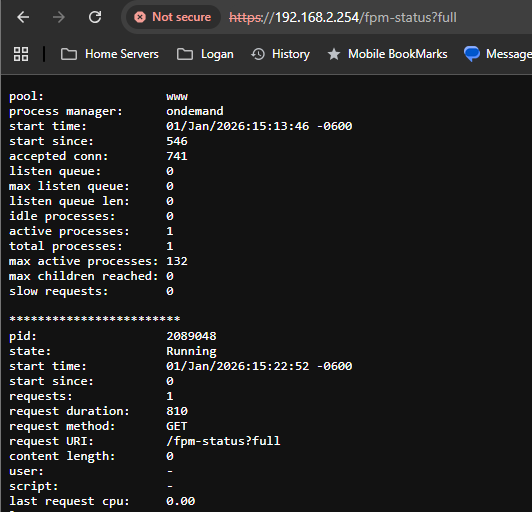
some more code prosperity.. https://forums.unraid.net/topic/194245-pool-www-server-reached-max_children-setting-50-consider-raising-it/#findComment-1598907 Script to finetune unraids fastcgi.. and add teh fastcgi status page to track the childs what pid how long etc... a #!/bin/bash # Unraid PHP-FPM hardening + diagnostics # Run: At First Array Start PHP_FPM_CONF="/etc/php-fpm.d/www.conf" set_value() { local key="$1" local value="$2" if grep -qE "^[;[:space:]]*${key}[[:space:]]*=" "$PHP_FPM_CONF"; then sed -i -E "s|^[;[:space:]]*${key}[[:space:]]*=.*|${key} = ${value}|" "$PHP_FPM_CONF" else echo "${key} = ${value}" >> "$PHP_FPM_CONF" fi } if [[ -f "$PHP_FPM_CONF" ]]; then echo "Configuring PHP-FPM limits and status endpoint in $PHP_FPM_CONF" # Process model set_value "pm" "ondemand" set_value "pm.max_children" "50" set_value "pm.process_idle_timeout" "10s" set_value "pm.max_requests" "200" # Hung / zombie worker kill switches set_value "request_terminate_timeout" "120s" set_value "request_terminate_timeout_track_finished" "yes" # FPM status endpoint (read-only diagnostics) set_value "pm.status_path" "/fpm-status" # Restart PHP-FPM echo "Restarting PHP-FPM..." /etc/rc.d/rc.php-fpm restart echo "PHP-FPM configuration enforced successfully." else echo "ERROR: $PHP_FPM_CONF not found. PHP-FPM may not be installed or path changed." fi adds and sets: so lets makse some safe tuning: pm = ondemand pm.max_children = 50 pm.process_idle_timeout = 10s pm.max_requests = 200 request_terminate_timeout = 120s request_terminate_timeout_track_finished = yes pm.status_path = /fpm-status simnalr another base script needs ran to allow niginx / the web server to use the status page.. #!/bin/bash # Unraid nginx FastCGI injection for PHP-FPM status # Ensures correct /fpm-status location exists and is clean # Run: At First Array Start NGINX_LOCATIONS="/etc/nginx/conf.d/locations.conf" read -r -d '' STATUS_BLOCK <<'EOF' location = /fpm-status { include fastcgi_params; fastcgi_param SCRIPT_NAME /fpm-status; fastcgi_param SCRIPT_FILENAME /fpm-status; allow 192.168.0.0/16; deny all; } EOF if [[ ! -f "$NGINX_LOCATIONS" ]]; then echo "ERROR: $NGINX_LOCATIONS not found." exit 1 fi echo "Ensuring /fpm-status nginx location is correct..." # Remove any existing /fpm-status block (clean slate) sed -i '/location = \/fpm-status {/,/}/d' "$NGINX_LOCATIONS" # Append the correct block echo "$STATUS_BLOCK" >> "$NGINX_LOCATIONS" # Test and reload nginx if nginx -t; then nginx -s reload echo "nginx reloaded successfully with /fpm-status enabled." else echo "ERROR: nginx config test failed. Status block not applied." exit 1 fi
-
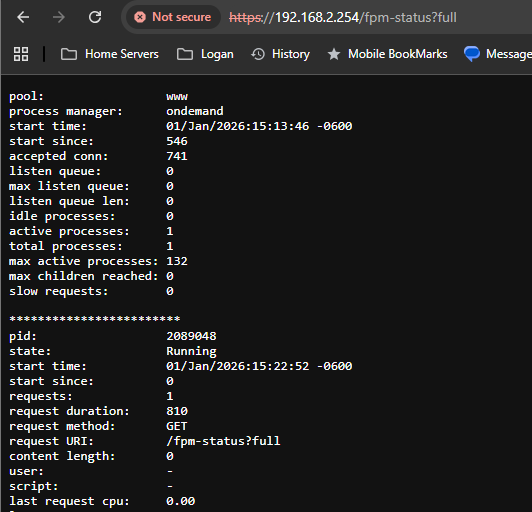
I'm not seeing this nor see how you get into these arears... ... fine lets edit fast-cgi... theres some htings to note as unraids emhttp server and its interaction with orginal nginx for https / fastcgi/php... root@OMV:~# cat /etc/php-fpm.d/www.conf ; Start a new pool named 'www'. ; the variable $pool can be used in any directive and will be replaced by the ; pool name ('www' here) [www] ; Per pool prefix ; It only applies on the following directives: ; - 'access.log' ; - 'slowlog' ; - 'listen' (unixsocket) ; - 'chroot' ; - 'chdir' ; - 'php_values' ; - 'php_admin_values' ; When not set, the global prefix (or /usr) applies instead. ; Note: This directive can also be relative to the global prefix. ; Default Value: none ;prefix = /path/to/pools/$pool ; Unix user/group of the child processes. This can be used only if the master ; process running user is root. It is set after the child process is created. ; The user and group can be specified either by their name or by their numeric ; IDs. ; Note: If the user is root, the executable needs to be started with ; --allow-to-run-as-root option to work. ; Default Values: The user is set to master process running user by default. ; If the group is not set, the user's group is used. ; limetech - user/group is root ;user = nobody ;group = nobody user = root group = root ; The address on which to accept FastCGI requests. ; Valid syntaxes are: ; 'ip.add.re.ss:port' - to listen on a TCP socket to a specific IPv4 address on ; a specific port; ; '[ip:6:addr:ess]:port' - to listen on a TCP socket to a specific IPv6 address on ; a specific port; ; 'port' - to listen on a TCP socket to all addresses ; (IPv6 and IPv4-mapped) on a specific port; ; '/path/to/unix/socket' - to listen on a unix socket. ; Note: This value is mandatory. ;limetech - listen at socket ;listen = 127.0.0.1:9000 listen = /var/run/php-fpm.sock ; Set listen(2) backlog. ; Default Value: 511 (-1 on Linux, FreeBSD and OpenBSD) ;listen.backlog = 511 ; Set permissions for unix socket, if one is used. In Linux, read/write ; permissions must be set in order to allow connections from a web server. Many ; BSD-derived systems allow connections regardless of permissions. The owner ; and group can be specified either by name or by their numeric IDs. ; Default Values: Owner is set to the master process running user. If the group ; is not set, the owner's group is used. Mode is set to 0660. ;listen.owner = nobody ;listen.group = nobody ;listen.mode = 0660 ; When POSIX Access Control Lists are supported you can set them using ; these options, value is a comma separated list of user/group names. ; When set, listen.owner and listen.group are ignored ;listen.acl_users = ;listen.acl_groups = ; List of addresses (IPv4/IPv6) of FastCGI clients which are allowed to connect. ; Equivalent to the FCGI_WEB_SERVER_ADDRS environment variable in the original ; PHP FCGI (5.2.2+). Makes sense only with a tcp listening socket. Each address ; must be separated by a comma. If this value is left blank, connections will be ; accepted from any ip address. ; Default Value: any ;listen.allowed_clients = 127.0.0.1 ; Set the associated the route table (FIB). FreeBSD only ; Default Value: -1 ;listen.setfib = 1 ; Specify the nice(2) priority to apply to the pool processes (only if set) ; The value can vary from -19 (highest priority) to 20 (lower priority) ; Note: - It will only work if the FPM master process is launched as root ; - The pool processes will inherit the master process priority ; unless it specified otherwise ; Default Value: no set ; process.priority = -19 ; Set the process dumpable flag (PR_SET_DUMPABLE prctl for Linux or ; PROC_TRACE_CTL procctl for FreeBSD) even if the process user ; or group is different than the master process user. It allows to create process ; core dump and ptrace the process for the pool user. ; Default Value: no ; process.dumpable = yes ; Choose how the process manager will control the number of child processes. ; Possible Values: ; static - a fixed number (pm.max_children) of child processes; ; dynamic - the number of child processes are set dynamically based on the ; following directives. With this process management, there will be ; always at least 1 children. ; pm.max_children - the maximum number of children that can ; be alive at the same time. ; pm.start_servers - the number of children created on startup. ; pm.min_spare_servers - the minimum number of children in 'idle' ; state (waiting to process). If the number ; of 'idle' processes is less than this ; number then some children will be created. ; pm.max_spare_servers - the maximum number of children in 'idle' ; state (waiting to process). If the number ; of 'idle' processes is greater than this ; number then some children will be killed. ; pm.max_spawn_rate - the maximum number of rate to spawn child ; processes at once. ; ondemand - no children are created at startup. Children will be forked when ; new requests will connect. The following parameter are used: ; pm.max_children - the maximum number of children that ; can be alive at the same time. ; pm.process_idle_timeout - The number of seconds after which ; an idle process will be killed. ; Note: This value is mandatory. ; limetech - let's use ondemand ;pm = dynamic pm = ondemand ; The number of child processes to be created when pm is set to 'static' and the ; maximum number of child processes when pm is set to 'dynamic' or 'ondemand'. ; This value sets the limit on the number of simultaneous requests that will be ; served. Equivalent to the ApacheMaxClients directive with mpm_prefork. ; Equivalent to the PHP_FCGI_CHILDREN environment variable in the original PHP ; CGI. The below defaults are based on a server without much resources. Don't ; forget to tweak pm.* to fit your needs. ; Note: Used when pm is set to 'static', 'dynamic' or 'ondemand' ; Note: This value is mandatory. pm.max_children = 50 ; The number of child processes created on startup. ; Note: Used only when pm is set to 'dynamic' ; Default Value: (min_spare_servers + max_spare_servers) / 2 pm.start_servers = 2 ; The desired minimum number of idle server processes. ; Note: Used only when pm is set to 'dynamic' ; Note: Mandatory when pm is set to 'dynamic' pm.min_spare_servers = 1 ; The desired maximum number of idle server processes. ; Note: Used only when pm is set to 'dynamic' ; Note: Mandatory when pm is set to 'dynamic' pm.max_spare_servers = 3 ; The number of rate to spawn child processes at once. ; Note: Used only when pm is set to 'dynamic' ; Note: Mandatory when pm is set to 'dynamic' ; Default Value: 32 ;pm.max_spawn_rate = 32 ; The number of seconds after which an idle process will be killed. ; Note: Used only when pm is set to 'ondemand' ; Default Value: 10s ;pm.process_idle_timeout = 10s; ; The number of requests each child process should execute before respawning. ; This can be useful to work around memory leaks in 3rd party libraries. For ; endless request processing specify '0'. Equivalent to PHP_FCGI_MAX_REQUESTS. ; Default Value: 0 pm.max_requests = 500 ; The URI to view the FPM status page. If this value is not set, no URI will be ; recognized as a status page. It shows the following information: ; pool - the name of the pool; ; process manager - static, dynamic or ondemand; ; start time - the date and time FPM has started; ; start since - number of seconds since FPM has started; ; accepted conn - the number of request accepted by the pool; ; listen queue - the number of request in the queue of pending ; connections (see backlog in listen(2)); ; max listen queue - the maximum number of requests in the queue ; of pending connections since FPM has started; ; listen queue len - the size of the socket queue of pending connections; ; idle processes - the number of idle processes; ; active processes - the number of active processes; ; total processes - the number of idle + active processes; ; max active processes - the maximum number of active processes since FPM ; has started; ; max children reached - number of times, the process limit has been reached, ; when pm tries to start more children (works only for ; pm 'dynamic' and 'ondemand'); ; Value are updated in real time. ; Example output: ; pool: www ; process manager: static ; start time: 01/Jul/2011:17:53:49 +0200 ; start since: 62636 ; accepted conn: 190460 ; listen queue: 0 ; max listen queue: 1 ; listen queue len: 42 ; idle processes: 4 ; active processes: 11 ; total processes: 15 ; max active processes: 12 ; max children reached: 0 ; ; By default the status page output is formatted as text/plain. Passing either ; 'html', 'xml' or 'json' in the query string will return the corresponding ; output syntax. Example: ; http://www.foo.bar/status ; http://www.foo.bar/status?json ; http://www.foo.bar/status?html ; http://www.foo.bar/status?xml ; ; By default the status page only outputs short status. Passing 'full' in the ; query string will also return status for each pool process. ; Example: ; http://www.foo.bar/status?full ; http://www.foo.bar/status?json&full ; http://www.foo.bar/status?html&full ; http://www.foo.bar/status?xml&full ; The Full status returns for each process: ; pid - the PID of the process; ; state - the state of the process (Idle, Running, ...); ; start time - the date and time the process has started; ; start since - the number of seconds since the process has started; ; requests - the number of requests the process has served; ; request duration - the duration in µs of the requests; ; request method - the request method (GET, POST, ...); ; request URI - the request URI with the query string; ; content length - the content length of the request (only with POST); ; user - the user (PHP_AUTH_USER) (or '-' if not set); ; script - the main script called (or '-' if not set); ; last request cpu - the %cpu the last request consumed ; it's always 0 if the process is not in Idle state ; because CPU calculation is done when the request ; processing has terminated; ; last request memory - the max amount of memory the last request consumed ; it's always 0 if the process is not in Idle state ; because memory calculation is done when the request ; processing has terminated; ; If the process is in Idle state, then informations are related to the ; last request the process has served. Otherwise informations are related to ; the current request being served. ; Example output: ; ************************ ; pid: 31330 ; state: Running ; start time: 01/Jul/2011:17:53:49 +0200 ; start since: 63087 ; requests: 12808 ; request duration: 1250261 ; request method: GET ; request URI: /test_mem.php?N=10000 ; content length: 0 ; user: - ; script: /home/fat/web/docs/php/test_mem.php ; last request cpu: 0.00 ; last request memory: 0 ; ; Note: There is a real-time FPM status monitoring sample web page available ; It's available in: /usr/share/fpm/status.html ; ; Note: The value must start with a leading slash (/). The value can be ; anything, but it may not be a good idea to use the .php extension or it ; may conflict with a real PHP file. ; Default Value: not set ;pm.status_path = /status ; The address on which to accept FastCGI status request. This creates a new ; invisible pool that can handle requests independently. This is useful ; if the main pool is busy with long running requests because it is still possible ; to get the status before finishing the long running requests. ; ; Valid syntaxes are: ; 'ip.add.re.ss:port' - to listen on a TCP socket to a specific IPv4 address on ; a specific port; ; '[ip:6:addr:ess]:port' - to listen on a TCP socket to a specific IPv6 address on ; a specific port; ; 'port' - to listen on a TCP socket to all addresses ; (IPv6 and IPv4-mapped) on a specific port; ; '/path/to/unix/socket' - to listen on a unix socket. ; Default Value: value of the listen option ;pm.status_listen = 127.0.0.1:9001 ; The ping URI to call the monitoring page of FPM. If this value is not set, no ; URI will be recognized as a ping page. This could be used to test from outside ; that FPM is alive and responding, or to ; - create a graph of FPM availability (rrd or such); ; - remove a server from a group if it is not responding (load balancing); ; - trigger alerts for the operating team (24/7). ; Note: The value must start with a leading slash (/). The value can be ; anything, but it may not be a good idea to use the .php extension or it ; may conflict with a real PHP file. ; Default Value: not set ;ping.path = /ping ; This directive may be used to customize the response of a ping request. The ; response is formatted as text/plain with a 200 response code. ; Default Value: pong ;ping.response = pong ; The access log file ; Default: not set ;access.log = log/$pool.access.log ; The access log format. ; The following syntax is allowed ; %%: the '%' character ; %C: %CPU used by the request ; it can accept the following format: ; - %{user}C for user CPU only ; - %{system}C for system CPU only ; - %{total}C for user + system CPU (default) ; %d: time taken to serve the request ; it can accept the following format: ; - %{seconds}d (default) ; - %{milliseconds}d ; - %{milli}d ; - %{microseconds}d ; - %{micro}d ; %e: an environment variable (same as $_ENV or $_SERVER) ; it must be associated with embraces to specify the name of the env ; variable. Some examples: ; - server specifics like: %{REQUEST_METHOD}e or %{SERVER_PROTOCOL}e ; - HTTP headers like: %{HTTP_HOST}e or %{HTTP_USER_AGENT}e ; %f: script filename ; %l: content-length of the request (for POST request only) ; %m: request method ; %M: peak of memory allocated by PHP ; it can accept the following format: ; - %{bytes}M (default) ; - %{kilobytes}M ; - %{kilo}M ; - %{megabytes}M ; - %{mega}M ; %n: pool name ; %o: output header ; it must be associated with embraces to specify the name of the header: ; - %{Content-Type}o ; - %{X-Powered-By}o ; - %{Transfert-Encoding}o ; - .... ; %p: PID of the child that serviced the request ; %P: PID of the parent of the child that serviced the request ; %q: the query string ; %Q: the '?' character if query string exists ; %r: the request URI (without the query string, see %q and %Q) ; %R: remote IP address ; %s: status (response code) ; %t: server time the request was received ; it can accept a strftime(3) format: ; %d/%b/%Y:%H:%M:%S %z (default) ; The strftime(3) format must be encapsulated in a %{<strftime_format>}t tag ; e.g. for a ISO8601 formatted timestring, use: %{%Y-%m-%dT%H:%M:%S%z}t ; %T: time the log has been written (the request has finished) ; it can accept a strftime(3) format: ; %d/%b/%Y:%H:%M:%S %z (default) ; The strftime(3) format must be encapsulated in a %{<strftime_format>}t tag ; e.g. for a ISO8601 formatted timestring, use: %{%Y-%m-%dT%H:%M:%S%z}t ; %u: remote user ; ; Default: "%R - %u %t \"%m %r\" %s" ;access.format = "%R - %u %t \"%m %r%Q%q\" %s %f %{milli}d %{kilo}M %C%%" ; A list of request_uri values which should be filtered from the access log. ; ; As a security precuation, this setting will be ignored if: ; - the request method is not GET or HEAD; or ; - there is a request body; or ; - there are query parameters; or ; - the response code is outwith the successful range of 200 to 299 ; ; Note: The paths are matched against the output of the access.format tag "%r". ; On common configurations, this may look more like SCRIPT_NAME than the ; expected pre-rewrite URI. ; ; Default Value: not set ;access.suppress_path[] = /ping ;access.suppress_path[] = /health_check.php ; The log file for slow requests ; Default Value: not set ; Note: slowlog is mandatory if request_slowlog_timeout is set ;slowlog = log/$pool.log.slow ; The timeout for serving a single request after which a PHP backtrace will be ; dumped to the 'slowlog' file. A value of '0s' means 'off'. ; Available units: s(econds)(default), m(inutes), h(ours), or d(ays) ; Default Value: 0 ;request_slowlog_timeout = 0 ; Depth of slow log stack trace. ; Default Value: 20 ;request_slowlog_trace_depth = 20 ; The timeout for serving a single request after which the worker process will ; be killed. This option should be used when the 'max_execution_time' ini option ; does not stop script execution for some reason. A value of '0' means 'off'. ; Available units: s(econds)(default), m(inutes), h(ours), or d(ays) ; Default Value: 0 ;request_terminate_timeout = 0 ; The timeout set by 'request_terminate_timeout' ini option is not engaged after ; application calls 'fastcgi_finish_request' or when application has finished and ; shutdown functions are being called (registered via register_shutdown_function). ; This option will enable timeout limit to be applied unconditionally ; even in such cases. ; Default Value: no ;request_terminate_timeout_track_finished = no ; Set open file descriptor rlimit. ; Default Value: system defined value ;rlimit_files = 1024 ; Set max core size rlimit. ; Possible Values: 'unlimited' or an integer greater or equal to 0 ; Default Value: system defined value ;rlimit_core = 0 ; Chroot to this directory at the start. This value must be defined as an ; absolute path. When this value is not set, chroot is not used. ; Note: you can prefix with '$prefix' to chroot to the pool prefix or one ; of its subdirectories. If the pool prefix is not set, the global prefix ; will be used instead. ; Note: chrooting is a great security feature and should be used whenever ; possible. However, all PHP paths will be relative to the chroot ; (error_log, sessions.save_path, ...). ; Default Value: not set ;chroot = ; Chdir to this directory at the start. ; Note: relative path can be used. ; Default Value: current directory or / when chroot ;chdir = /var/www ; Redirect worker stdout and stderr into main error log. If not set, stdout and ; stderr will be redirected to /dev/null according to FastCGI specs. ; Note: on highloaded environment, this can cause some delay in the page ; process time (several ms). ; Default Value: no ;catch_workers_output = yes ; Decorate worker output with prefix and suffix containing information about ; the child that writes to the log and if stdout or stderr is used as well as ; log level and time. This options is used only if catch_workers_output is yes. ; Settings to "no" will output data as written to the stdout or stderr. ; Default value: yes ;decorate_workers_output = no ; Clear environment in FPM workers ; Prevents arbitrary environment variables from reaching FPM worker processes ; by clearing the environment in workers before env vars specified in this ; pool configuration are added. ; Setting to "no" will make all environment variables available to PHP code ; via getenv(), $_ENV and $_SERVER. ; Default Value: yes ;clear_env = no ; Limits the extensions of the main script FPM will allow to parse. This can ; prevent configuration mistakes on the web server side. You should only limit ; FPM to .php extensions to prevent malicious users to use other extensions to ; execute php code. ; Note: set an empty value to allow all extensions. ; Default Value: .php ;security.limit_extensions = .php .php3 .php4 .php5 .php7 ; Pass environment variables like LD_LIBRARY_PATH. All $VARIABLEs are taken from ; the current environment. ; Default Value: clean env ;env[HOSTNAME] = $HOSTNAME ;env[PATH] = /usr/local/bin:/usr/bin:/bin ;env[TMP] = /tmp ;env[TMPDIR] = /tmp ;env[TEMP] = /tmp ; Additional php.ini defines, specific to this pool of workers. These settings ; overwrite the values previously defined in the php.ini. The directives are the ; same as the PHP SAPI: ; php_value/php_flag - you can set classic ini defines which can ; be overwritten from PHP call 'ini_set'. ; php_admin_value/php_admin_flag - these directives won't be overwritten by ; PHP call 'ini_set' ; For php_*flag, valid values are on, off, 1, 0, true, false, yes or no. ; Defining 'extension' will load the corresponding shared extension from ; extension_dir. Defining 'disable_functions' or 'disable_classes' will not ; overwrite previously defined php.ini values, but will append the new value ; instead. ; Note: path INI options can be relative and will be expanded with the prefix ; (pool, global or /usr) ; Default Value: nothing is defined by default except the values in php.ini and ; specified at startup with the -d argument ;php_admin_value[sendmail_path] = /usr/sbin/sendmail -t -i -f [email protected] ;php_flag[display_errors] = off ;php_admin_value[error_log] = /var/log/fpm-php.www.log ;php_admin_flag[log_errors] = on ;php_admin_value[memory_limit] = 32M ; limetech - set our include path php_value[include_path] = ".:/usr/local/emhttp" root@OMV:~# Following the default config they ship some notes and caveats... Your real problem: ondemand + no hard kill = saturation default ships with: pm = ondemand pm.max_children = 50 With no request kill timeout enabled. That means: A worker accepts a request If that request never returns, the worker never dies Enough of those → you hit 50 → everything stalls This is classic Unraid / emhttp behavior when a PHP call touches: /mnt/user during disk spin-up a stalled Docker socket a dead plugin endpoint slow USB / FUSE filesystem blocking shell_exec() The missing kill switch (this is what you want) You must enable a hard timeout: request_terminate_timeout = 120s Optionally track finished requests too (important for emhttp): request_terminate_timeout_track_finished = yes Why this mattersEven if PHP ignores max_execution_time Even if fastcgi_finish_request() was called Even if shutdown handlers hang FPM will SIGTERM the worker anyway This is the actual zombie killer. making the child pids... How to prove what’s leaking or stuck (no guessing) Watch live FPM state: pm.status_path = /fpm-status then go to http://unraid ip/fpm-status?full Look for: Workers stuck in Running state for long durations Same script path repeated High request duration, low request count Regardless theres a memomory leak some where ... so lets makse some safe tuning: pm = ondemand pm.max_children = 50 pm.process_idle_timeout = 10s pm.max_requests = 200 request_terminate_timeout = 120s request_terminate_timeout_track_finished = yes so heres another user script to help idetfy and kils some zombie childs... DO SO AT YOUR OWN RISK!!! #!/bin/bash # Unraid PHP-FPM hardening + diagnostics # Run: At First Array Start PHP_FPM_CONF="/etc/php-fpm.d/www.conf" set_value() { local key="$1" local value="$2" if grep -qE "^[;[:space:]]*${key}[[:space:]]*=" "$PHP_FPM_CONF"; then sed -i -E "s|^[;[:space:]]*${key}[[:space:]]*=.*|${key} = ${value}|" "$PHP_FPM_CONF" else echo "${key} = ${value}" >> "$PHP_FPM_CONF" fi } if [[ -f "$PHP_FPM_CONF" ]]; then echo "Configuring PHP-FPM limits and status endpoint in $PHP_FPM_CONF" # Process model set_value "pm" "ondemand" set_value "pm.max_children" "50" set_value "pm.process_idle_timeout" "10s" set_value "pm.max_requests" "200" # Hung / zombie worker kill switches set_value "request_terminate_timeout" "120s" set_value "request_terminate_timeout_track_finished" "yes" # FPM status endpoint (read-only diagnostics) set_value "pm.status_path" "/fpm-status" # Restart PHP-FPM echo "Restarting PHP-FPM..." /etc/rc.d/rc.php-fpm restart echo "PHP-FPM configuration enforced successfully." else echo "ERROR: $PHP_FPM_CONF not found. PHP-FPM may not be installed or path changed." fi and to add the fastcgi staus page as a link... #!/bin/bash # Unraid nginx FastCGI injection for PHP-FPM status # Ensures correct /fpm-status location exists and is clean # Run: At First Array Start NGINX_LOCATIONS="/etc/nginx/conf.d/locations.conf" read -r -d '' STATUS_BLOCK <<'EOF' location = /fpm-status { include fastcgi_params; fastcgi_param SCRIPT_NAME /fpm-status; fastcgi_param SCRIPT_FILENAME /fpm-status; allow 192.168.0.0/16; deny all; } EOF if [[ ! -f "$NGINX_LOCATIONS" ]]; then echo "ERROR: $NGINX_LOCATIONS not found." exit 1 fi echo "Ensuring /fpm-status nginx location is correct..." # Remove any existing /fpm-status block (clean slate) sed -i '/location = \/fpm-status {/,/}/d' "$NGINX_LOCATIONS" # Append the correct block echo "$STATUS_BLOCK" >> "$NGINX_LOCATIONS" # Test and reload nginx if nginx -t; then nginx -s reload echo "nginx reloaded successfully with /fpm-status enabled." else echo "ERROR: nginx config test failed. Status block not applied." exit 1 fi
-
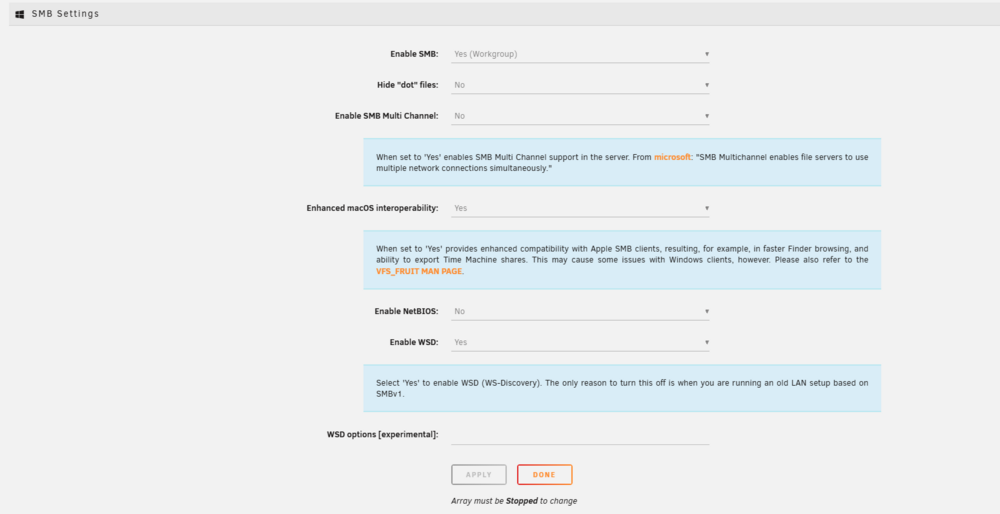
edit the samba setting to match theses settings:
-
otherwise, you will need to complete delete the appdata folder and start over and reimport / set up your media library once more...
-
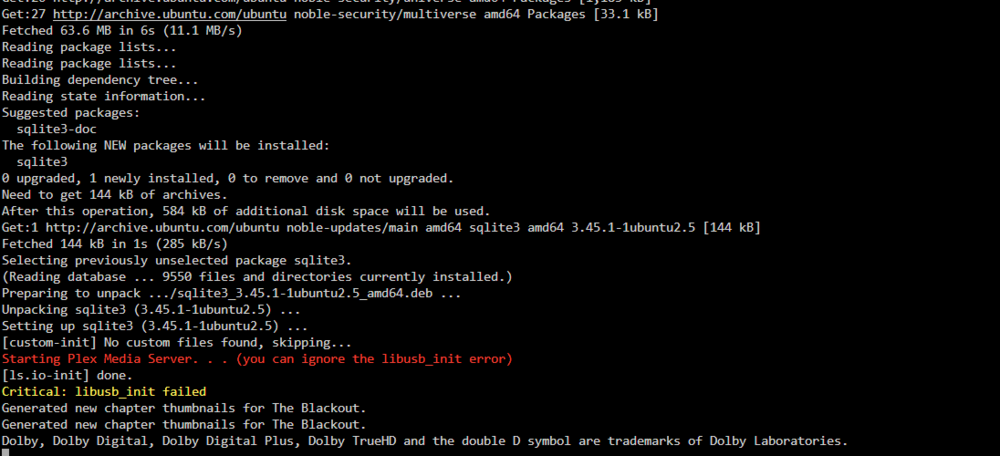
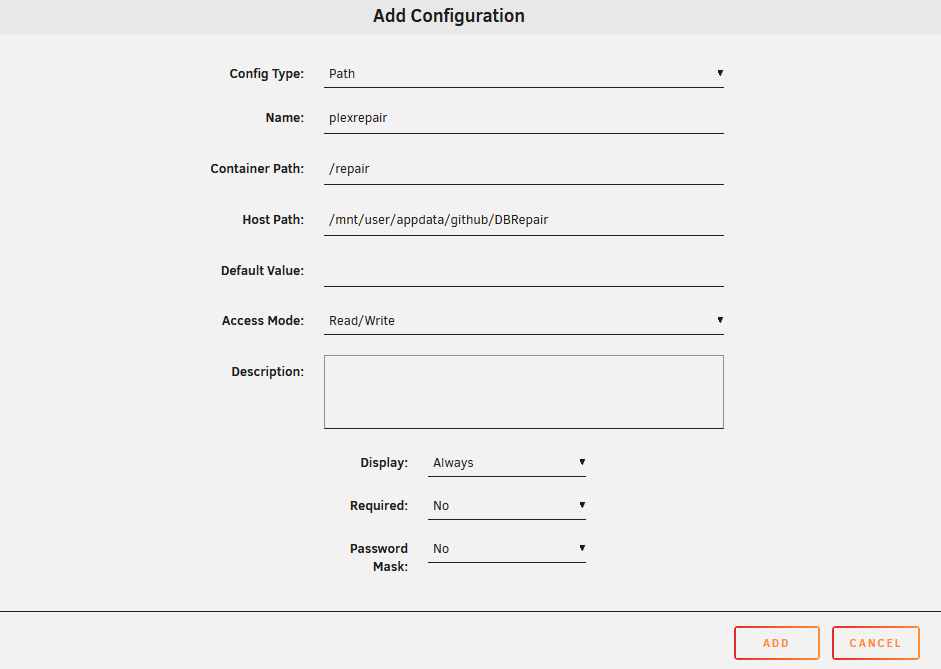
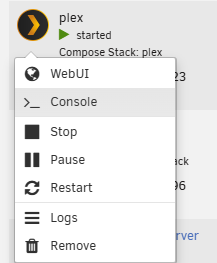
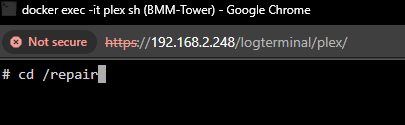
... you need to add/used the docker mod install/add the sqlite3 application... see: https://github.com/linuxserver/docker-plex/issues/425 *then use the database repair script by adding the github file to your Plex folder and console into the docker and go to the folder and launch the Plex repair script... Review github: https://github.com/ChuckPa/DBRepair *this is the plex repair system script... so make a folder location... mkdir /mnt/user/appdata/github git clone https://github.com/ChuckPa/DBRepair.git cd DBRepair chmod +x DBRepair.sh we will then pass this folder info plex at a location... next we need to edit the docker. and add your folder with the needed script: you will need to add this line to your plex extra parameters: -e DOCKER_MODS=linuxserver/mods:universal-package-install -e INSTALL_PACKAGES=sqlite3 This will install the needed sqlite package to edit and use the plex documentation and script to fix load and mess with the plex database. this will install the 3rd party application inside the docker see docker logs: with the extra parm and the above script... apply and start the docker. next console into plex: Move into the container folder per my picture I used /repair. and run the db repair script. cd /repair ./DBRepair.sh And follow the prompts, this will keep the docker running but kill the plex application and run the necessary sqlite database commands to run clean and fix the plex database.


-
Mainly you just need your config folder copied this is everything from your docker setting and template to key and drive storage....
-
My only two cents to throw my hand into some of this.... Look into system Linux grub commands that turn off and affect ASPM. Things like: nvidia.NVreg_ResmanDebugLevel=255 modprobe.blacklist=nouveau pci=noaer pcie_aspm=off As usual find it to be ASPM power related due to sleep states... More from eol device, new Linux kernel hardening and v550 Nvidia LTS 16 set reaching EOL.... So I'm not sure 10000 series cards will be available past kernel 6.14 with EOL or v500 coming up... https://www.google.com/url?sa=t&source=web&rct=j&opi=89978449&url=https://www.nvidia.com/en-us/networking/products/lts-releases/&ved=2ahUKEwi-jbGdheORAxXK1fACHSWHPdcQFnoECBgQAQ&usg=AOvVaw2CEpbS-yawfaoAt8LsFcB6 The NVIDIA GTX 16-series GPUs have been completely discontinued from production as of early 2024, and remaining market inventory is being exhausted. However, official driver support is ongoing. Driver and Software End of Life (EOL) GeForce GTX 16-series (Consumer GPUs): These cards are still receiving regular Game Ready driver updates. NVIDIA has shifted its focus to the RTX brand, but the 16-series (Turing architecture without RT/Tensor cores) is not yet in a legacy support phase like the older GTX 10-series. NVIDIA vGPU Software 16 Releases (Enterprise Software): The specific vGPU Software 16 Long-Term Support (LTS) branch is supported until July 2026. Key Dates for Related Products Product/Software Branch Status/Action End of Life (EOL) Date GTX 16-series GPUs Production discontinued Early 2024 vGPU Software 16 LTS Branch Supported branch July 2026 GTX 10-series (Pascal), 900-series (Maxwell) GPUs Transitioning to legacy/quarterly security updates Regular driver support ends October 2025 NVIDIA Data Center GPU Drivers 550 family EOL reached June 2025 For the latest official information on specific software lifecycles, you can refer to the NVIDIA Long-Term Support Releases page or the NVIDIA Driver End of Life tracker. NVIDIA Virtual GPU (vGPU) Software Aug 4, 2025 — NVIDIA vGPU Software 16 Releases. Branch status: Long-Term Support Branch supported until July 2026. Sources in NVIDIA Docs... NVIDIA to End GeForce Regular Driver Support for Maxwell, Volta, and Pascal ... Jul 30, 2025 — NVIDIA is planning to retire regular driver updates for its older, pre-RTX GPU generations after October 2025, the company announced. These include ... Sources in TechPowerUp Per following Nvidia I would expect 10 series and 20 series to end drivers support in future kernel past 6.14 come July 2026 with v16 LTS leaving the Nvidia Enterprise space... (Similar thing happens wo the gyx 780 series. Nothing wrong with hardware software to new and doesn't complie and latest kerenl
-
You would need to run a docker /web server application to use web base download and uploading... In CA look for rejeto hfs. A docker I made that adds web site file access that jdownload can use against... Unraid ships with samba and nfs for accessing network shares you would normally use cifa/nfs to connect to unraid. You may need to install samba / cifa common first... https://docs.fedoraproject.org/en-US/quick-docs/samba/ To connect to a Samba share on Fedora, you can use the command smbclient followed by the share path and your username, like this: smbclient //server/share -U username. You may need to install Samba client utilities first with sudo dnf install samba-client.
-
Really wished libvirt would add search and better info... Review docs: https://libvirt.org/formatdomain.html#id25 hyperv Enable various features improving behavior of guests running Microsoft Windows. Since 11.3.0 some of these flags are also available for Xen domains running Microsoft Windows.
-
I believe you are refering to <cpu mode='host-passthrough' check='none' migratable='on'> <topology sockets='1' dies='1' clusters='1' cores='6' threads='2'/> <cache mode='passthrough'/> <!-- Explicit feature policy (non-conflicting, defensive) --> <feature policy='disable' name='hypervisor'/> <feature policy='require' name='pcid'/> <feature policy='require' name='pdpe1gb'/> <feature policy='require' name='aes'/> <feature policy='require' name='topoext'/> </cpu> https://www.reddit.com/r/VFIO/comments/cpf96e/feature_policydisable_namehypervisor_greatly/ It is used to asist in telling windows and games that the system in not running in a VM. again you would have to read and find the info in the docs: https://libvirt.org/formatdomaincaps.html
-
So you just trying to increase the text size of the terminal interface in the web TTY line... As it looks like you're already scaled with control Plus already. As it seems more like a scaling issue and a website zoom issue... Ctrl+0
-
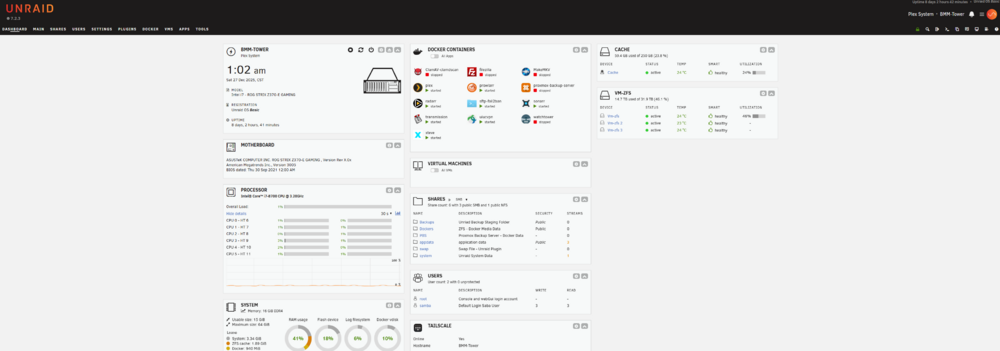
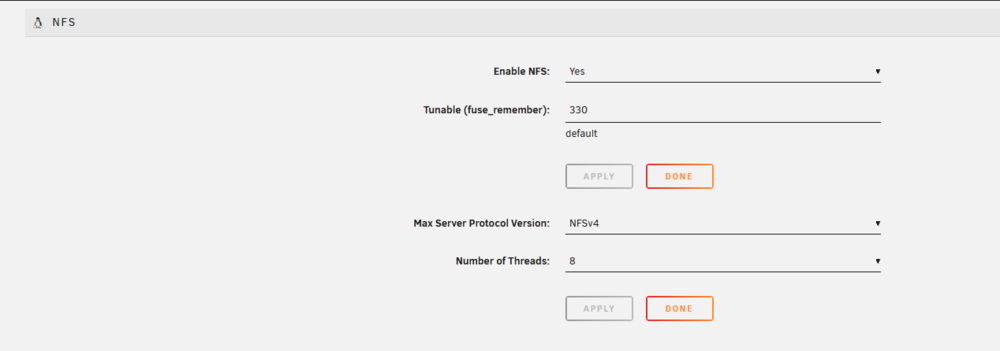
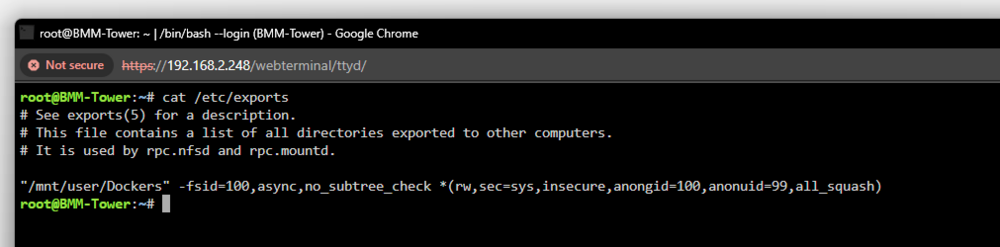
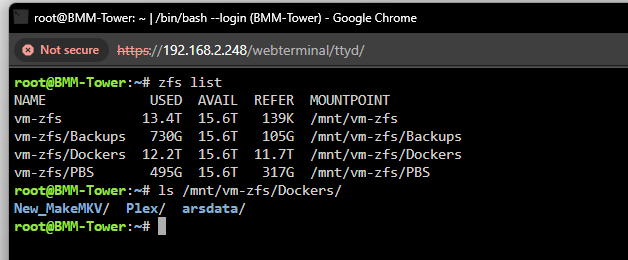
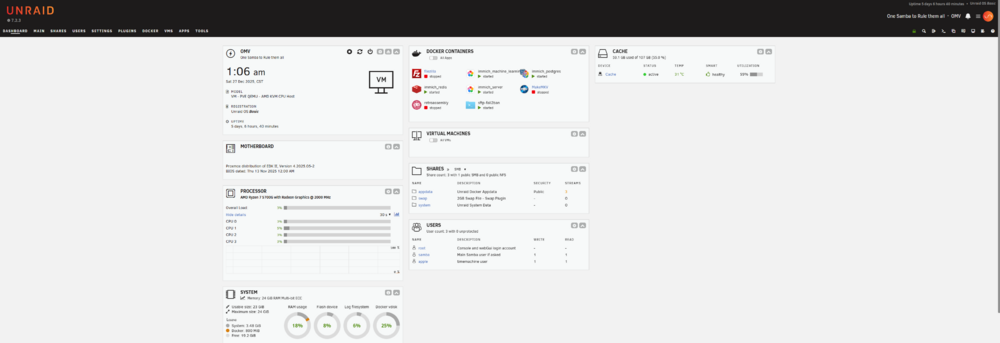
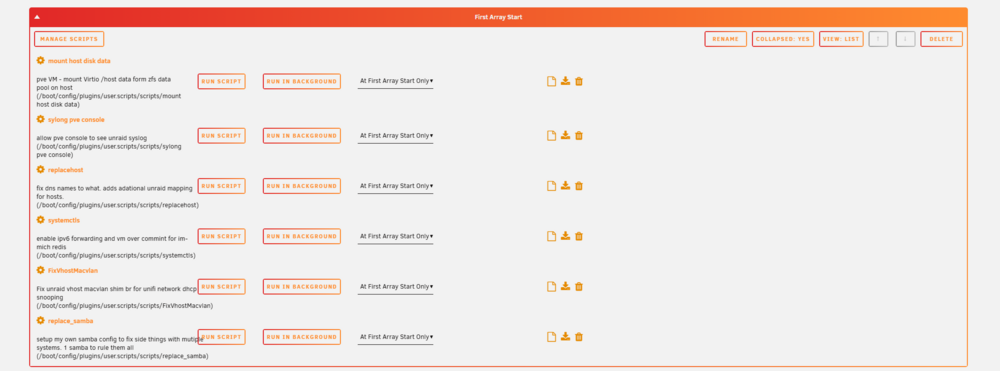
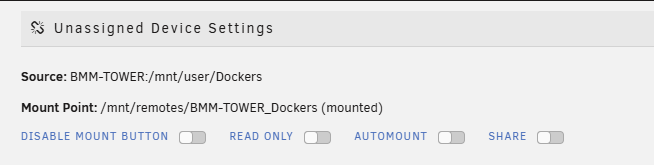
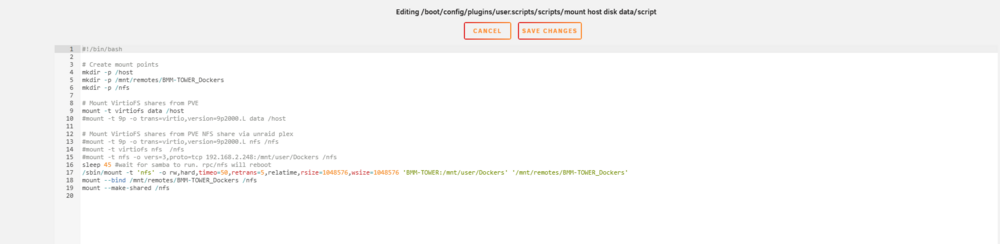
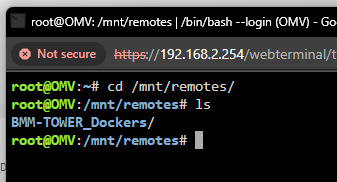
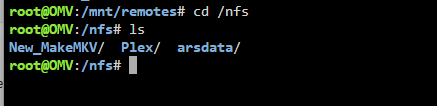
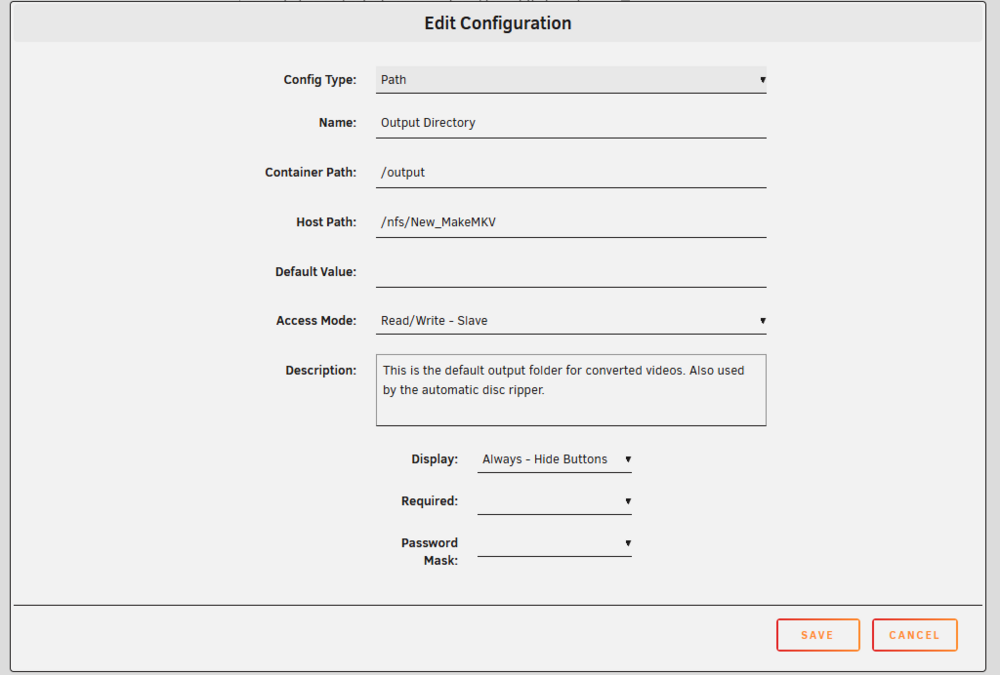
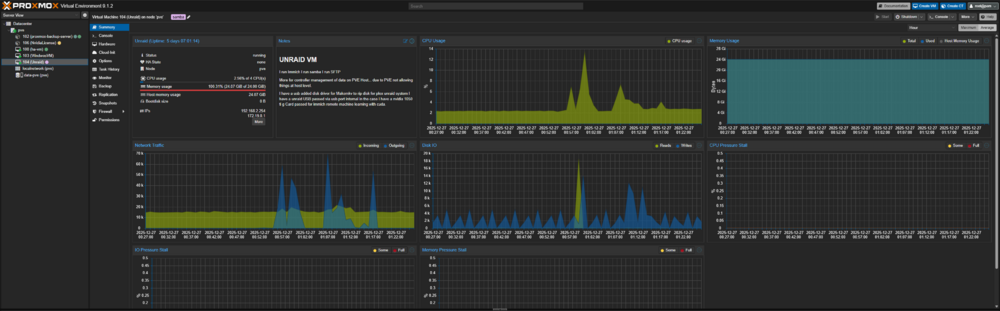
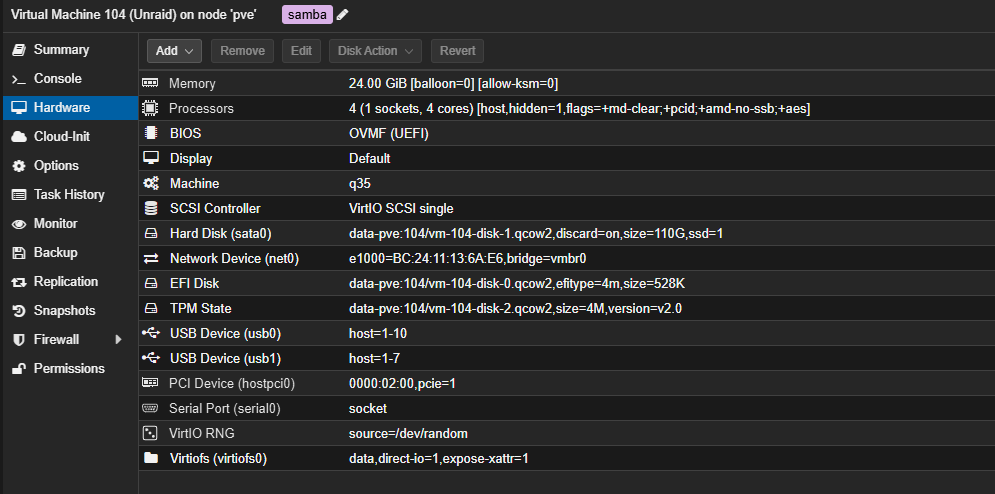
nfs for liunx only smb for apple / windows. I run NFS for UNRIAD to UNRaid only. SMB is for any other client that connects to my system. Apologies if that is not clear. let me try to re-explain my setup... if only to clear confusion and go over my refactor a bit... as I'm testing some things what if and i can therefore i will, but doesn't mean its stable nor one should copy what I'm doing... I was trying to inform and give you the correct method for unriad to unriad. In truth you can use webdav, sftp, smb(samba) nfs any network system via network to share connected between 2 systems. unraid ships with nfs and samba. and for linux to liunx communication, its best to use nfs. This is due to rules and being able to share the folder to a select ip or ip range and be secure while maintaining file integrity, permission and other options... So I have Remote system: Main job, Plex. I have dockers I want accessible. I can go to 192.168.x.x and see my system NFS is being wonky (as I have done similar test with v7 beat and RC candidates..) aside, so I recent changed it back to public:*the share would be secure/private and a nfs exports rule would be set.... *as you can see the plex unraid is using this folder share via nfs in public mode... unraid setting requires nfs enabled for both the server and the UD system to connect... you can edit the default unraid appdata settings. as mentiond before to share your docker data. If you stay with unraid defaults. in my case this is ZFS. i have a dataset called Dockers My goal: I want to still rip disk remotely and have them plex accessible. or be local when on site and still be able to rip disks on unraid plex... so I nfs share this folder for my main samba system my master browser. so i only have to go to 1 ip address for all my necessary data My home machine in a VM: Thus my home unraid instance... I use unassigned disk and mount my nfs share to be able to talk see and write files * I actual use a user scirpt. As I was testing nfs, 9p9mode and virtfs with vms... Decided after i got it working to why have another point of failure if proxmox connects first then passes so I moved the nfs connection into my main OMV unraid instance. I run quite a bit of custom workaround code... (one thing leads to another. but I know my way around the system...) Normally one would set up and use UD with automount.. *in my case this borked some things and I wanted teh mount else where... --Again recently finshed testing to do nfs edtis and check pve vm stuff with unraid... so Instead In my smb edits.... for my one host all systems connection. (as i have data on pve, I have doat on pelve unraid... and I have data on OMV... I want 1 sytem to go to for samba and the doata there within... so in my netowrk a system would go though Client > OMV > NFS > plex folder Client > OMV > Samba> PVE ZFS folder I run the mount command that UD does and rebind it to /nfs ... as I orginal mounted nfs via pve and into the VM by another virtfs.... so my previous data fo mount points for PVE OMV... as Unriad is only geting a qemu Vdisk for dat... PVE is my zfs data pool and control system. But all my data from ZFS is on my PVE instance so SMB mount and others... *Original was going to use remotes, but nfs pve to unraid and didn't like what the UD makes as it generates treible name paths... UD mounts these at "/mnt/remotes" and that is not easy to type and use when in testing... so for quick writes as I have issues with keybaords and buttons :/ to help with quick writes where I can now use "/nfs" when refering to my plex stuff on another system... so I took control and ran a workaround to make it do What I want it to do and How I want to interact with it... so now I can interact with /nfs as if I was on the Plex OMV server, but I'm on my OMV instance using NFS. POSIX, permission and other tom fooly aside. this is the known and correct way for linux to handle and use file sharing between other linux ssytems. so what about the docker! so now my docker needs sahred mount spaces OMV: I can mount map and set this to use the nfs share path /nfs. FCP checks and fixes these things (atleast warns that hey you should do this because this...) as I'm using a remote folder for a docker and due to unraid "Fuse" for making and mount things at /mnt/user ... I need to set a "slave" read/write in the docker settings in the event of network failure nd the nfs connection is down where OMV can't talk to my plex unraid instance... And this is why I said what I said and why i'm doing what i'm doing in this current refactor. this allows me to use the same docker at home or remote to interact with 2 separate systems. Bare-metal and VM betwwen 2 unraid instances and dockers.





-
Usually hard drives are first to go, depending on thermals a cpu, ram and graphics card would be next. Hard drive have a known MTS (Mean time to failure) which averaged 3-5 years. Some processors (if they were nott hurt in production or had poor microcode over the years (both amd and intel have had some faults) theses usually outlive the machine. Motherboards depending on production and Thermals last generation and chipsets of current needed hardware vs current gen markets which usaly last 3-5 years on average... but the motherbaord can essay out live 30 years. (I still have comdor and win 95 systems that still boot to this day...) so an average current gen system should last 10 or more years Deeping on expected workload(a mining sytem due to thermasl may hurt hardware and not last as longs per exampe), thermals and hardware specs mater here. Enterprise hard drive have higher mean time. and cheaper hard drives if not using or pushing for full performance can often outlast and live longer then the estimated MTF. Voyager 2 is a good example. I usually look at the super computers and clusters of systems that cycle though server systems over time.... Alot of systems that can't really be bought down and are specked for redundancy / uptime like government systems and healthcare systems. https://www.reddit.com/r/sysadmin/comments/oihh22/what_is_the_oldest_production_server_that_youve/ I still have a few Intel 5th gen systems that run unraid and do fairly well. (15 year old systems) that still work great today with VMS, plex, dockers etc... https://en.wikipedia.org/wiki/Intel_5_Series that said its all about what the processor can handle now in terms of chipssets and microcode instructions... like windows 11 realy wants the "popcnt" instruction chipset capable processors... new ai sytems with TPU/NPU built into the CPU... which may make older tech obsolet due to software restraints. Looking at nvidai with deviecs hit EOL. Looking at the nvidia gtx 780 v400 seres drivers. This will not run in todays kernels... event eh linux open source won't touch or load them... Nothing worng with this great xp era G card. But it will no run unraid, transcode or other use case with unraid withough goin into a older OS... the 780 still works but the software is newer then the hardware. thus its time to upgrade into curent / next gen of Graphic cards. Hardware when taken care of can last Many years.
-
@grtgbln thoughts
-
@JorgeB @Squid any way we can get this implemented?
-
... Gave to some data already to assist nvdia and GPU pass. Add this to the end of the xml to stop the pci USB ejection of pcie devices passed. Fix windows kvm to hiden but on. Sets and fixed the Nvidia code 43 <qemu:commandline> <qemu:arg value='-cpu'/> <qemu:arg value='host,hidden=1,+pcid,+pdpe1gb,+aes,+kvm_pv_unhalt,+kvm_pv_eoi,hv_vendor_id=NV43FIX,kvm=off'/> <qemu:arg value='-device'/> <qemu:arg value='amd-iommu'/> <qemu:arg value='-global'/> <qemu:arg value='pcie-root-port.hotplug=off'/> </qemu:commandline>Qemu extra is needed before you install windows...
-
Essentially I'm running two of the same docker. And I lm using 1 unraid to run samba shares to be able to go to 1 up to access the content. 1 unraid (non samba) is running, ars stack, Plex, PBS back a ZFS raid z1 of media content. The only share is my "appdarafolder" a Docker folder that contains data for a docker makemkv. As this system is a bit remote. (Tail scale access) And the docker folder for make MKV so I can rip my own media local at home or in that machine when on site... This way if I'm home and have a disk make MKV can still throw my media to the correct system (via nfs) on my samba unRAID system... Usually when you want 2 unRAID systems to talk with each other you use NFS.






