






bmartino1
Members
-
Joined
-
Last visited
Everything posted by bmartino1
-
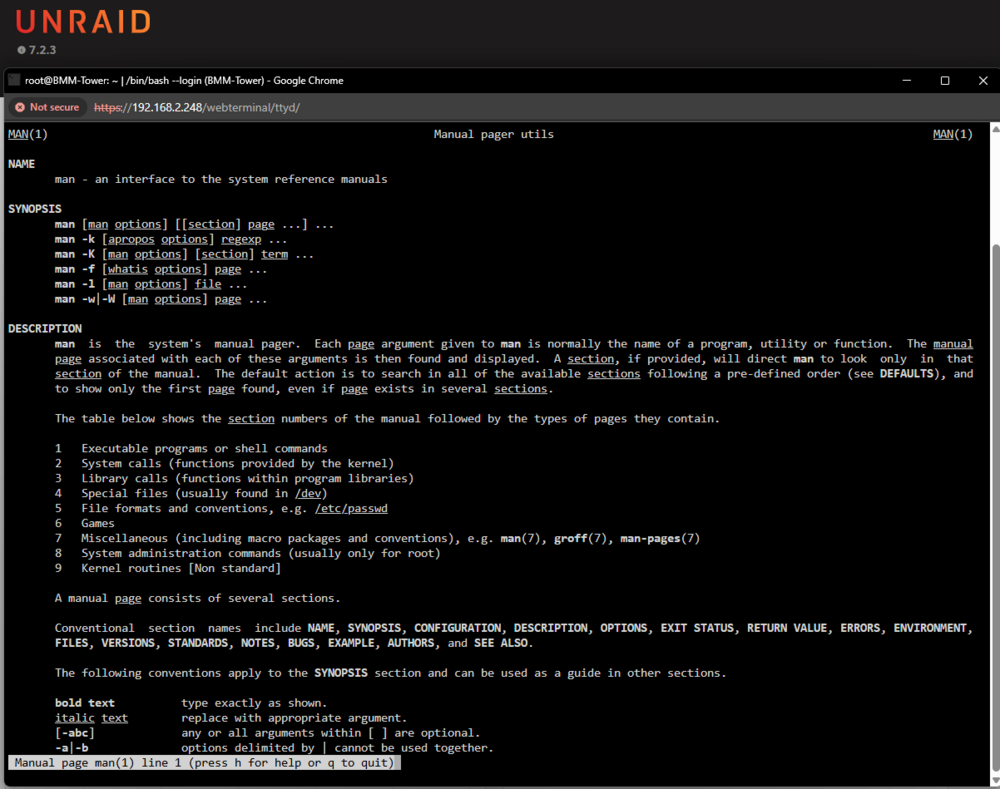
yes the Linux command for manpages and manual and man pages for what is included for slack ware linux requires 3rd party applications. unget is this app and done. not this app and its dependency.... welcome to dependency hell... but man and manpages has and will always be a 3rd party extra install... I usually check and use pkgs.org to check the binary and its potential dependency... so, your looking for the slack version of manpages application called man-page: https://slackware.pkgs.org/15.0/slackware-x86_64/man-pages-5.13-noarch-1.txz.html and then the db / collection of mapages for a language pack. so my question is do you need / want the man db... as for slack linux that is unget install man-db: https://slackware.pkgs.org/15.0/slackware-x86_64/man-db-2.9.4-x86_64-3.txz.html as man is the default system reader and not the content of the commands on the system... for the slackware db or man-page-languepack is the content... the mandb for slackware: Homepage: http://www.nongnu.org/man-db/ then there is groff https://slackware.pkgs.org/15.0/slackware-x86_64/groff-1.22.4-x86_64-4.txz.html So Example: un-get install man-db man-pages groff The following package(s) will be installed: man-db man-pages Are you sure? [y/N] y 0K ........ . 100% 9.37M=0.06s 0K ........ ........ ........ ........ ........ ........ 98% 12.4M 0s 3072K 100% 18.0M=0.2s +===============================================================+ | Installing new package /boot/extra/man-db-2.13.1-x86_64-2.txz | +===============================================================+ Verifying package man-db-2.13.1-x86_64-2.txz. Installing package man-db-2.13.1-x86_64-2.txz: PACKAGE DESCRIPTION: # man-db (database-driven manual pager suite) # # This package provides the man command and related utilities # for examining on-line help files (manual pages). It has several # enhancements over man, including an indexed database for searches # with -k or apropos, the ability to easily view man pages in a browser, # better i18n support, and a much more efficient implementation of the # -K (full text search) option. # # Homepage: http://www.nongnu.org/man-db/ # Executing install script for man-db-2.13.1-x86_64-2.txz. Package man-db-2.13.1-x86_64-2.txz installed. +================================================================+ | Installing new package /boot/extra/man-pages-6.16-noarch-1.txz | +================================================================+ Verifying package man-pages-6.16-noarch-1.txz. Installing package man-pages-6.16-noarch-1.txz: PACKAGE DESCRIPTION: # man-pages (system documentation) # # Man pages are online documentation for Linux. This package includes # many section 1, 2, 3, 4, 5, 7, and 8 man pages for Linux. # # The man-pages distribution is maintained by Michael Kerrisk with # the help of more writers, editors, and other contributors than we # can name here. # # For more information, see http://www.kernel.org/doc/man-pages/ # Executing install script for man-pages-6.16-noarch-1.txz. Package man-pages-6.16-noarch-1.txz installed. # +==============================================================+ | Installing new package /boot/extra/groff-1.23.0-x86_64-2.txz | +==============================================================+ Verifying package groff-1.23.0-x86_64-2.txz. Installing package groff-1.23.0-x86_64-2.txz: PACKAGE DESCRIPTION: # groff (document formatting system) # # The GNU groff package provides versions of troff, nroff, eqn, tbl, and # other Unix text-formatting utilities. Groff is used to 'compile' man # pages stored in groff/nroff format into a form which can be printed or # displayed on the screen. These man pages are stored in compressed # form in the /usr/man/man? directories. # Executing install script for groff-1.23.0-x86_64-2.txz. Package groff-1.23.0-x86_64-2.txz installed. then run the groff command to populate. and this restores man man so at first arry start I would need to screen and run groff as the man pages don't surive a reboot.
-
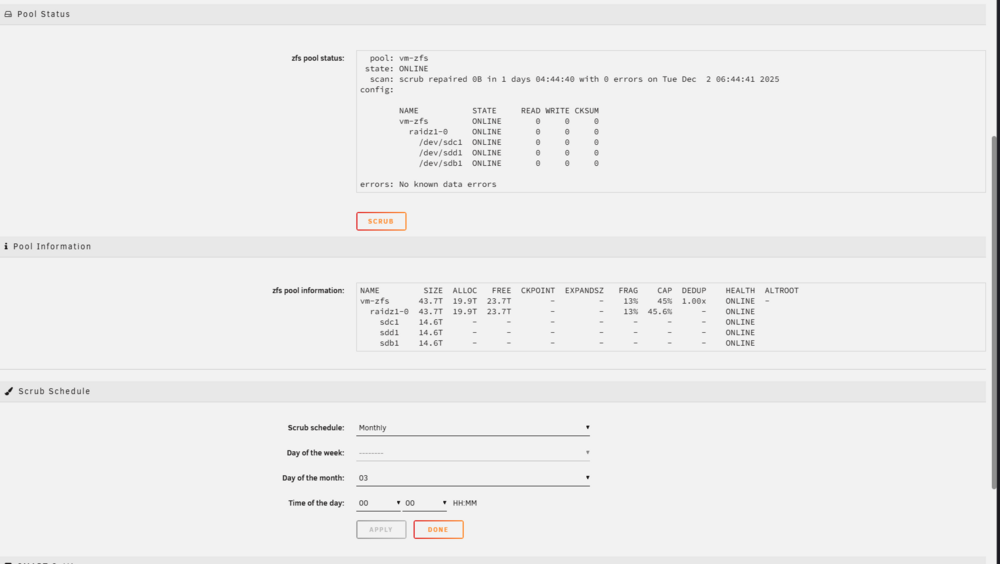
snapshots is the only things that not in teh unraid platform At this point, native ZFS integration is becoming essential. Specifically, Unraid needs to provide: Built-in ZFS pool health monitoring - Been tthere day one beforfe the need of the zfs plugin... Automatic user notifications for errors, degradation, or resilver events - semi check (fcp plugin and other zfs realted syslog error will occur, jsut not notifed...) Native snapshot creation, scheduling, pruning, and restoration - Smei Check has alwys been a user script and mutiple varients on teh forum... A basic GUI for pool and dataset visibility - Check main page just not clear in documentations... most of these are burried in teh main tab and have been for quite some time... I click on vm-zfs: So I could see a script default send simlar to under scrup where a recursive snapshot is made on a schedule. udpates to the native open zfs support to include notify prompts and updates onteh pool when scrub started, when reslive made, when xyz is degraded via zpool stats %pool name% But alot has and has alwys been implemented...

-
rclone plugin does this.
-
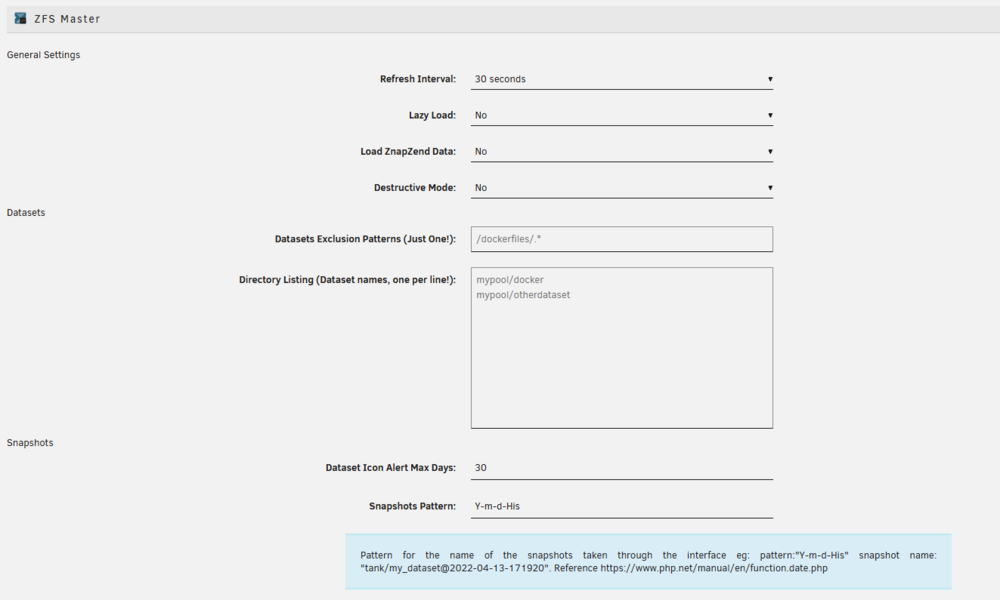
I was able to get this working but only with using my own smb config. More code reused from Level 1 forums... https://forum.level1techs.com/t/zfs-on-unraid-lets-do-it-bonus-shadowcopy-setup-guide-project/148764 I posted on the forum about it a long while back... I required the zfs master plugin to guarantee snapshots shadow format.. and I needed at least 2 snapshot premade WITH CHANGES! https://forums.unraid.net/topic/178033-bmartino1-user-scripts/#findComment-1478664 but yes I have and still have this working with zfs and unraid samba... view old data on forum: https://forums.unraid.net/topic/165604-how-do-you-structure-your-shares/#findComment-1419875
-
terminal htop plugin open files
-
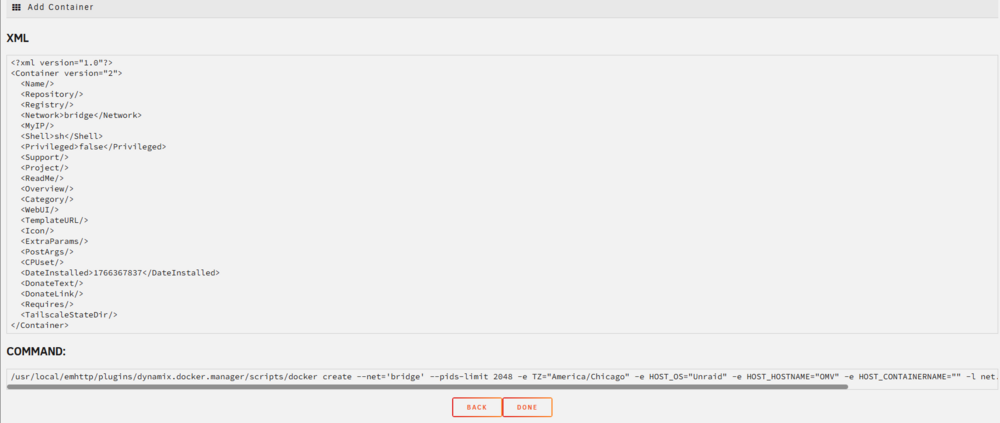
docker authing give one the ability to save and edit the xml. Its is ill advise to make edits to a already running docker do to how emhttp and temples are used. even with template authoring, I have lost a template doing this doe to names. What this does is add the save option this generates the docker run line for inspection and the pre made xml ready to ship to a github repo to share on the CA and even then its is kind already possible... as you can edit a running docker already... but if you save while making edits the docker is not automatically updated to the new settings... (apply does that) https://github.com/bmartino1/unraid-docker-templates theres a form to fill out with a github repo for squid to add to the scan of the CA to add custom xml files to the unraid CA. https://docs.unraid.net/unraid-os/using-unraid-to/run-docker-containers/community-applications/#contributing-your-own-applications Authoring mode helps devs in final Q/A to add items to the CA

-
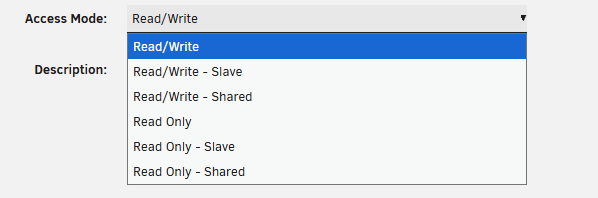
my understanding is yes as the template just builds a docker run line. and anything that can be setup in a docker run line and be placed there. This includes and is not limited to other advance docker option that affect making a ram disk and zdisk for dockers applications. I've done similar with pbs and plex for transcode using extra par lines making ram disk of variant sizes. and temp fs to be deleted upon reboot. Included attempts to get unifi protect running under a docker using these mount and temp option in extra parameters. some of my template even ship with some extra options so yes To my understanding as I have not gotten a no or a change, yes this lines up with expected expatiation and use case in templates and how unraid intended to run... more info in the docker docs: https://docs.docker.com/engine/storage/tmpfs/ there also the make the tempfs in the extra parm and path mount it in the unraid template where you can specify readonly... including using bind mounts...
-
thers a few scripts still floating around... https://forums.unraid.net/topic/178033-bmartino1-user-scripts/#findComment-1478662 mainly looking for keyword in the syslog and making a unraid notification. og script https://forums.unraid.net/topic/121039-syslog-notify-create-notifications-if-specific-words-occur-in-the-logs/ shouldn't be too hard to adapt / rescode and script.
-
... https://lwn.net/Articles/871866/
-
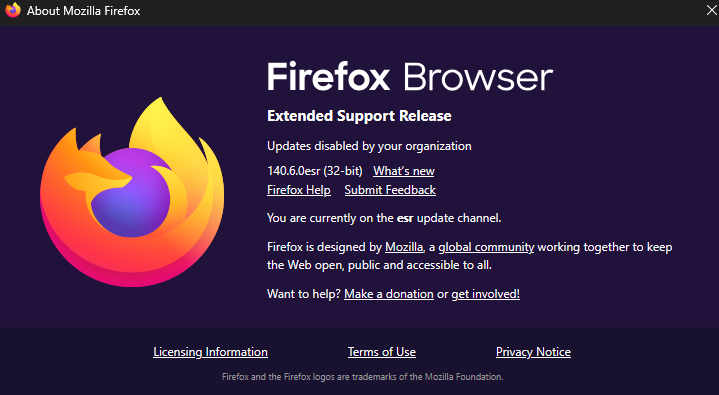
Just tested in firefox. no issues. But I'm using esr version
-
lattest update seems to have fixed most if not all of my errors 2025.12.19.2020 up-to-date While not all error are fixed, progress is being made where connect is usable once more.
-
lattest update seems to have fixed most if not all of my errors 2025.12.19.2020 up-to-date
-
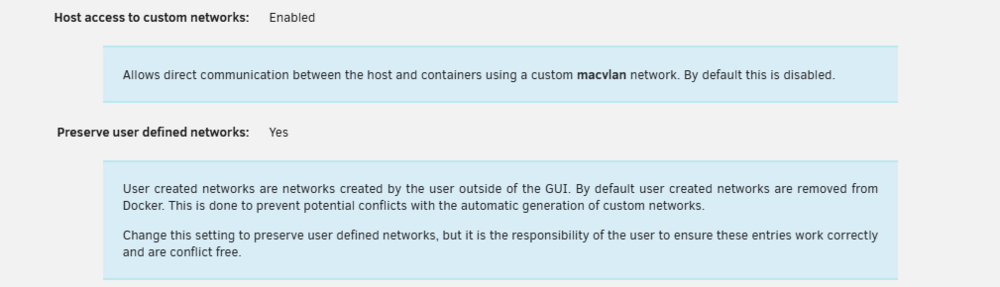
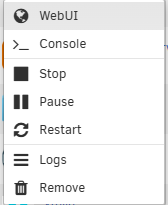
what si the dockers network. what are your docker settings? as 192.168.0.17:8080 works... is 192.168.0.17 your unraid ip? I assume bridge mode. Diag don't show dockers configurations... more info on docker networks: https://bmartino1.weebly.com/guide-dockernetworks.html first fix and update the web UI Option: fill this with the 192.168.0.17:8080 which will add the docker web ui option to open the immich web ui... Double-check your docker advance settings.. Make sure host access is enabled



-
GitHubGitHub - Free-TV/IPTV: M3U Playlist for free TV channelsM3U Playlist for free TV channels. Contribute to Free-TV/IPTV development by creating an account on GitHub.
-
lattest 4 imac... mid 2025... No issues with time machine... Its best to use smb extra parm and make your own time machine backup using the smb extra options... Have and make a samba user in unriad web ui... and let apple dictate the quota !!! as explained here: my recommendation instead of redoing the whole smb conf... (tested working)... Steps manually create and control you own samba share... First go to users: make a dedicated user that will connect to your time machine share. This will be the apple connected user... next pick a location where you want the share saved... in my case that path is /mnt/user/TimeMachine so we set and fix permission first... cd /mnt/user/ chmod 777 -R TimeMachine chown nobody:users -R TimeMachine *This to make sure that unraid has correct permissions... -For extra hardening you can set the user to the smb user you just made... then stop the array... (as it the only way to apply and set stuff in smb extra...) Setting > smb extras and paste in the time machine share... DO NOT REUSE A SHARE NAME IF IN THE SAHRES TAB!!!! example time machine smb share for extra this will make a samba share called TimeMachine [TimeMachine] path = /mnt/user/TimeMachine browseable = yes read only = no guest ok = no writeable = yes acl map full control = yes acl allow execute always = yes map archive = yes map system = yes map hidden = yes vfs objects = catia fruit streams_xattr fruit:encoding = native fruit:metadata = stream fruit:resource = stream fruit:locking = none ea support = yes store dos attributes = yes #Edit and set yourself! # If you want Unraid to advertise this as a Time Machine target: fruit:time machine = yes ; fruit:time machine max size = 0 # Restrict access to specific users the user you made in the web ui! REQUIRED BY TIME MACHINE! valid users = apple samba #as files are written to unraid share this forces the chmod of files on the share... 777 / 655 security to who can see read write... create mask = 0660 force create mode = 0660 directory mask = 0770 force directory mode = 0770 #this force what every user that conected to be this user/group so all time machene files are writeen as unraid root... for extra hardning set to the chown user/groups... force user = root force group = root start the array... in termianl run testparm: *I'm testing virtio / wemu 9pm moses in aunraid VM passing virtio to a folder in unraid... this is why my path says /host... One could also do a fuse folder bind mount and move time machien to another folder... example as I have another unraid baremetal elsewhere... and have a share set for just my main vm unraid... so nfs a folder.. /sbin/mount -t 'nfs' -o rw,hard,timeo=50,retrans=5,relatime,rsize=1048576,wsize=1048576 'BMM-TOWER:/mnt/user/Dockers' '/mnt/remotes/BMM-TOWER_Dockers' mount --bind /mnt/remotes/BMM-TOWER_Dockers /nfs mount --make-shared /nfs*This will make the folders at one location another... (original was going to keep things nice by adding to the /mnt/folder but FCP complains to much...) ... then resetup your time machine and when asked if reusing existing files/folder to yes reuse them! time machine and samba is not "broke" just needs other samba stuff... Be sure to save your unraid user in teh key chain and MAKE SURE YOUR SAMBA IS CONECTED AS THE UNRAID USER FOR APPLE TIMEMACHINE!!!
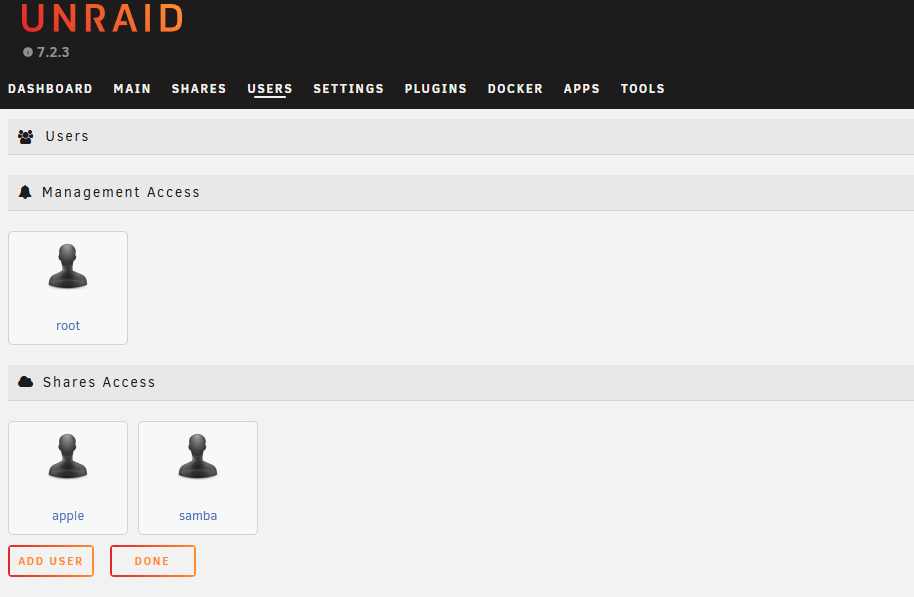

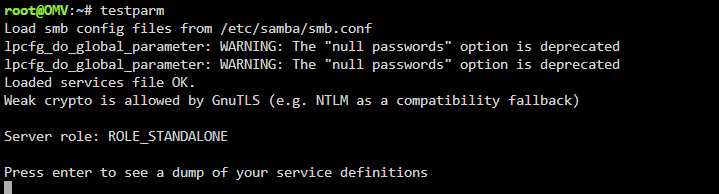
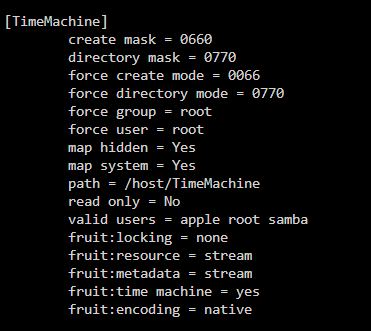
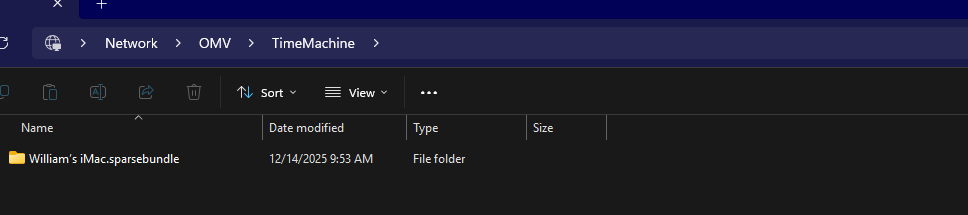
-
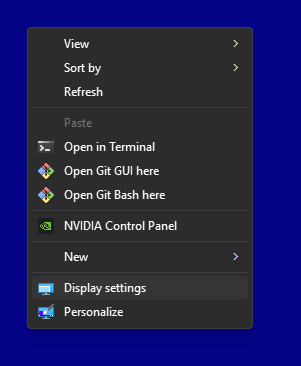
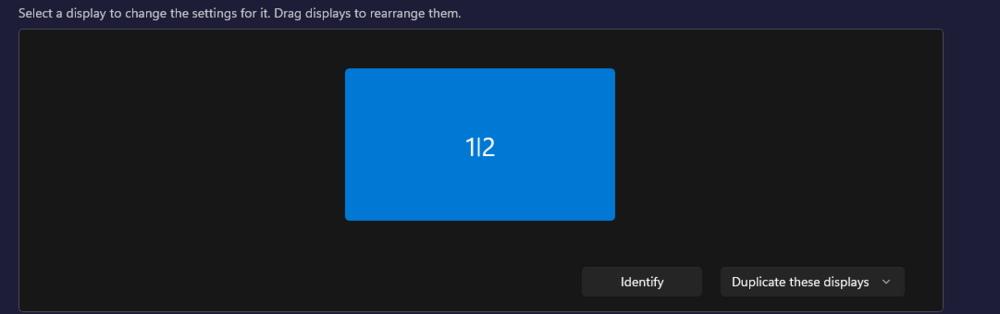
if you open windows display setting does it see another display? if yes then this is unraid spice/default vnc dispaly issues and teh amd gpu need to be marked the primary gpu... I'm usig prox vm example and use parsec to rdp adn instaleld a virtual display so I would see 2 and duplaict to assit rdp conection back to my passthrough device:
-
Nope... Still the same. If you see XYZ on ls /dev /dev/accel/ to see a npu you... You pass that device into a docker/VM to use the npu... Neither Intell nor AMD have upstream drivers in the kernel yet...
-
So what's the error exactly. As I have no issues on my end but ami also know the inner working or vfio/unraid and proxmox to get VM/qemu working.... Is it displayed out scratchy? You clearly have some RDP that made a vdisply on card.... What does device manger say? Is there a hard code? Or yellow !. What error?
-
If it's a issue of the web ui link that can be edited in the docker settings... https://forums.unraid.net/topic/193997-guide-immich-docker-setup-unraid-ca/
-
... https://forums.unraid.net/topic/178033-bmartino1-user-scripts/#findComment-1478661 smb extra... make your own time machine share... #example Apple Time Machine (let apple define quota not unraid...) [TimeMachine] path = /mnt/user/TimeMachine browseable = yes read only = no guest ok = no # time machien requires a samba user connected! valid users = samba_user root writeable = yes acl map full control = yes acl allow execute always = yes map archive = yes map system = yes map hidden = yes create mask = 0660 force create mode = 0669 directory mask = 0770 force directory mode = 0770 force user = root force group = root vfs objects = catia fruit streams_xattr fruit:encoding = native # If you want Unraid to advertise this as a Time Machine target: fruit:time machine = yes # If you want unraid asigned size quota ; fruit:time machine max size = 0 fruit:metadata = stream fruit:resource = stream fruit:locking = none # ACL + extended attributes ea support = yes store dos attributes = yes you must have a smaba user made inthe urnaid web ui and set valid users... then connect to TimeMachine as that users.. then one can use apple time machine on apple sied to set quota and connction via settings...
-
Thank you for post a diag I was able to confim that vfio adn device binding is correct upstream thert are a few small edits I can recomend to the xml code. 1 we can remove cputune and let unraid load balcne use 6 cores 2 threads. using cpu host mode. 2. we need to test without the g-card bios rom (while recomend I have never needed one ) while usefull, it hurts testing to windows. 3. lets use a lower version of q35 lets use 7.2 not lattest v9 Here is a xml file for you to test. as unraid is using libvirt via domain xml: https://libvirt.org/formatdomain.html we want to add some qemu options: <qemu:commandline> <qemu:arg value='-cpu'/> <qemu:arg value='host,+kvm_pv_unhalt,+kvm_pv_eoi,hv_vendor_id=NV43FIX,kvm=off'/> <qemu:arg value='-device'/> <qemu:arg value='amd-iommu'/> <qemu:arg value='-global'/> <qemu:arg value='pcie-root-port.hotplug=off'/> </qemu:commandline> <?xml version='1.0' encoding='UTF-8'?> <domain type='kvm' id='2' xmlns:qemu='http://libvirt.org/schemas/domain/qemu/1.0'> <name>LMB-PC01</name> <uuid>8c8d2cf8-a2c1-8615-cfb2-a48a2c7dae6b</uuid> <metadata> <vmtemplate xmlns="http://unraid" name="Windows 11" iconold="windows11.png" icon="windows11.png" os="windowstpm" webui="" storage="default"/> </metadata> <memory unit='KiB'>33554432</memory> <currentMemory unit='KiB'>33554432</currentMemory> <memoryBacking> <nosharepages/> </memoryBacking> <vcpu placement='static'>12</vcpu> <resource> <partition>/machine</partition> </resource> <os> <type arch='x86_64' machine='pc-q35-7.2'>hvm</type> <loader readonly='yes' type='pflash' format='raw'> /usr/share/qemu/ovmf-x64/OVMF_CODE-pure-efi-tpm.fd </loader> <nvram format='raw'> /etc/libvirt/qemu/nvram/8c8d2cf8-a2c1-8615-cfb2-a48a2c7dae6b_VARS-pure-efi-tpm.fd </nvram> </os> <features> <acpi/> <apic/> <kvm> <hidden state='on'/> </kvm> </features> <cpu mode='host-passthrough' check='none' migratable='on'> <topology sockets='1' dies='1' clusters='1' cores='6' threads='2'/> <cache mode='passthrough'/> <!-- Explicit feature policy (non-conflicting, defensive) --> <feature policy='disable' name='hypervisor'/> <feature policy='require' name='pcid'/> <feature policy='require' name='pdpe1gb'/> <feature policy='require' name='aes'/> <feature policy='require' name='topoext'/> </cpu> <clock offset='localtime'> <timer name='hpet' present='no'/> <timer name='hypervclock' present='yes'/> </clock> <on_poweroff>destroy</on_poweroff> <on_reboot>restart</on_reboot> <on_crash>restart</on_crash> <devices> <emulator>/usr/local/sbin/qemu</emulator> <controller type='pci' index='0' model='pcie-root'> <alias name='pcie.0'/> </controller> <controller type='pci' index='1' model='pcie-root-port'> <model name='pcie-root-port'/> <target chassis='1' port='0x8'/> <alias name='pci.1'/> <address type='pci' domain='0x0000' bus='0x00' slot='0x01' function='0x0' multifunction='on'/> </controller> <controller type='pci' index='2' model='pcie-to-pci-bridge'> <model name='pcie-pci-bridge'/> <alias name='pci.2'/> <address type='pci' domain='0x0000' bus='0x01' slot='0x00' function='0x0'/> </controller> <controller type='pci' index='3' model='pcie-root-port'> <model name='pcie-root-port'/> <target chassis='3' port='0x9'/> <alias name='pci.3'/> <address type='pci' domain='0x0000' bus='0x00' slot='0x01' function='0x1'/> </controller> <controller type='pci' index='4' model='pcie-root-port'> <model name='pcie-root-port'/> <target chassis='4' port='0xa'/> <alias name='pci.4'/> <address type='pci' domain='0x0000' bus='0x00' slot='0x01' function='0x2'/> </controller> <controller type='pci' index='5' model='pcie-root-port'> <model name='pcie-root-port'/> <target chassis='5' port='0xb'/> <alias name='pci.5'/> <address type='pci' domain='0x0000' bus='0x00' slot='0x01' function='0x3'/> </controller> <controller type='pci' index='6' model='pcie-root-port'> <model name='pcie-root-port'/> <target chassis='6' port='0xc'/> <alias name='pci.6'/> <address type='pci' domain='0x0000' bus='0x00' slot='0x01' function='0x4'/> </controller> <controller type='pci' index='7' model='pcie-root-port'> <model name='pcie-root-port'/> <target chassis='7' port='0xd'/> <alias name='pci.7'/> <address type='pci' domain='0x0000' bus='0x00' slot='0x01' function='0x5'/> </controller> <controller type='virtio-serial' index='0'> <alias name='virtio-serial0'/> <address type='pci' domain='0x0000' bus='0x03' slot='0x00' function='0x0'/> </controller> <controller type='sata' index='0'> <alias name='ide'/> <address type='pci' domain='0x0000' bus='0x00' slot='0x1f' function='0x2'/> </controller> <controller type='usb' index='0' model='qemu-xhci' ports='15'> <alias name='usb'/> <address type='pci' domain='0x0000' bus='0x00' slot='0x07' function='0x0'/> </controller> <interface type='bridge'> <mac address='52:54:00:5a:26:15'/> <source bridge='br0'/> <target dev='vnet1'/> <model type='e1000'/> <alias name='net0'/> <address type='pci' domain='0x0000' bus='0x02' slot='0x01' function='0x0'/> </interface> <serial type='pty'> <source path='/dev/pts/1'/> <target type='isa-serial' port='0'> <model name='isa-serial'/> </target> <alias name='serial0'/> </serial> <console type='pty' tty='/dev/pts/1'> <source path='/dev/pts/1'/> <target type='serial' port='0'/> <alias name='serial0'/> </console> <channel type='unix'> <source mode='bind' path='/run/libvirt/qemu/channel/2-LMB-PC01/org.qemu.guest_agent.0'/> <target type='virtio' name='org.qemu.guest_agent.0' state='connected'/> <alias name='channel0'/> <address type='virtio-serial' controller='0' bus='0' port='1'/> </channel> <input type='mouse' bus='ps2'> <alias name='input0'/> </input> <input type='keyboard' bus='ps2'> <alias name='input1'/> </input> <tpm model='tpm-tis'> <backend type='emulator' version='2.0' persistent_state='yes'/> <alias name='tpm0'/> </tpm> <audio id='1' type='none'/> <!-- AMD GPU (reset-stable layout, no ROM) --> <hostdev mode='subsystem' type='pci' managed='yes'> <driver name='vfio'/> <source> <address domain='0x0000' bus='0x0b' slot='0x00' function='0x0'/> </source> <address type='pci' domain='0x0000' bus='0x07' slot='0x00' function='0x0' multifunction='on'/> </hostdev> <hostdev mode='subsystem' type='pci' managed='yes'> <driver name='vfio'/> <source> <address domain='0x0000' bus='0x0b' slot='0x00' function='0x1'/> </source> <address type='pci' domain='0x0000' bus='0x07' slot='0x00' function='0x1'/> </hostdev> <hostdev mode='subsystem' type='pci' managed='yes'> <driver name='vfio'/> <source> <address domain='0x0000' bus='0x03' slot='0x00' function='0x0'/> </source> <boot order='1'/> <alias name='hostdev2'/> <address type='pci' domain='0x0000' bus='0x04' slot='0x00' function='0x0'/> </hostdev> <hostdev mode='subsystem' type='usb' managed='no'> <source> <vendor id='0x046d'/> <product id='0x0ac4'/> <address bus='5' device='2'/> </source> <alias name='hostdev3'/> <address type='usb' bus='0' port='1'/> </hostdev> <hostdev mode='subsystem' type='usb' managed='no'> <source> <vendor id='0x2357'/> <product id='0x0604'/> <address bus='5' device='3'/> </source> <alias name='hostdev4'/> <address type='usb' bus='0' port='2'/> </hostdev> <watchdog model='itco' action='reset'> <alias name='watchdog0'/> </watchdog> <memballoon model='none'/> </devices> <!-- ============================= --> <!-- QEMU CUSTOM COMMAND-LINE ARGS --> <!-- ============================= --> <qemu:commandline> <qemu:arg value='-cpu'/> <qemu:arg value='host,hidden=1,+pcid,+pdpe1gb,+aes,+kvm_pv_unhalt,+kvm_pv_eoi,hv_vendor_id=NV43FIX,kvm=off'/> <qemu:arg value='-device'/> <qemu:arg value='amd-iommu'/> <qemu:arg value='-global'/> <qemu:arg value='pcie-root-port.hotplug=off'/> </qemu:commandline> </domain> Please test with above xml for your VM
-
thank you review now. 0b:00.0 VGA compatible controller: Advanced Micro Devices, Inc. [AMD/ATI] Navi 48 [RX 9070/9070 XT] (rev c0) (prog-if 00 [VGA controller]) Subsystem: ASUSTeK Computer Inc. Device 061a Flags: bus master, fast devsel, latency 0, IRQ 163, IOMMU group 25 Memory at d0000000 (64-bit, prefetchable) [size=256M] Memory at e0000000 (64-bit, prefetchable) [size=2M] I/O ports at e000 [size=256] Memory at fce00000 (32-bit, non-prefetchable) [size=512K] Expansion ROM at 000c0000 [disabled] [size=128K] Capabilities: [48] Vendor Specific Information: Len=08 <?> Capabilities: [50] Power Management version 3 Capabilities: [64] Express Legacy Endpoint, IntMsgNum 0 Capabilities: [a0] MSI: Enable+ Count=1/1 Maskable- 64bit+ Capabilities: [100] Vendor Specific Information: ID=0001 Rev=1 Len=010 <?> Capabilities: [150] Advanced Error Reporting Capabilities: [200] Physical Resizable BAR Capabilities: [240] Power Budgeting <?> Capabilities: [270] Secondary PCI Express Capabilities: [2a0] Access Control Services Capabilities: [2d0] Process Address Space ID (PASID) Capabilities: [320] Latency Tolerance Reporting Capabilities: [410] Physical Layer 16.0 GT/s <?> Capabilities: [450] Lane Margining at the Receiver Capabilities: [500] Physical Layer 32.0 GT/s <?> Kernel driver in use: vfio-pci Kernel modules: amdgpu 0b:00.1 Audio device: Advanced Micro Devices, Inc. [AMD/ATI] Navi 48 HDMI/DP Audio Controller Subsystem: Advanced Micro Devices, Inc. [AMD/ATI] Navi 48 HDMI/DP Audio Controller Flags: bus master, fast devsel, latency 0, IRQ 97, IOMMU group 26 Memory at fcea0000 (32-bit, non-prefetchable) [size=16K] Capabilities: [48] Vendor Specific Information: Len=08 <?> Capabilities: [50] Power Management version 3 Capabilities: [64] Express Legacy Endpoint, IntMsgNum 0 Capabilities: [a0] MSI: Enable- Count=1/1 Maskable- 64bit+ Capabilities: [100] Vendor Specific Information: ID=0001 Rev=1 Len=010 <?> Capabilities: [150] Advanced Error Reporting Capabilities: [2a0] Access Control Services Kernel driver in use: vfio-pci This is good as this tells me the device is correctly setup for VM passthorugh. I will need the VMs XML file as well to see where things may be going wrong.
-
you have not configrmed tnor shared any data to reflect or go of of... Please post a diag file... whats the output of lspci -v for the amd card and its other comnents (hdmi audio) whatst the status of bound. then we can look at vm xml code then the widnwos enviroment as upstream is not correct I cna't help anything downstream. jsut becasue linux pop dets and use and see the gpu doen't mean its working. 2d vs 3d aceleration...
-
root@BMM-Tower:~# cat /var/log/graphql-api.log [19:12:52 INFO app]: ENV {"API_VERSION":"4.28.2+d13a1f61","BYPASS_CORS_CHECKS":false,"BYPASS_PERMISSION_CHECKS":false,"CHOKIDAR_USEPOLLING":false,"DEBUG":false,"ECOSYSTEM_PATH":"/usr/local/unraid-api/ecosystem.config.json","ENABLE_NEXT_DOCKER_RELEASE":false,"ENVIRONMENT":"production","GRAPHQL_INTROSPECTION":false,"INTROSPECTION":false,"IS_DOCKER":false,"LOG_CORS":false,"LOG_LEVEL":"INFO","LOG_TYPE":"pretty","MOTHERSHIP_GRAPHQL_LINK":"https://mothership.unraid.net/ws","NODE_ENV":"production","PATHS_CONFIG_MODULES":"/boot/config/plugins/dynamix.my.servers/configs","PATHS_LOCAL_SESSION_FILE":"/var/run/unraid-api/local-session","PATHS_LOGS_DIR":"/var/log/unraid-api","PATHS_LOGS_FILE":"/var/log/graphql-api.log","PM2_HOME":"/var/log/.pm2","PM2_PATH":"/usr/local/unraid-api/node_modules/pm2/bin/pm2","PORT":"/var/run/unraid-api.sock","SUPPRESS_LOGS":false,"environment":{"IS_MAIN_PROCESS":true}} {"apiVersion":"4.28.2+d13a1f61"} [19:12:52 INFO app]: PATHS {"core":"/usr/local/unraid-api/dist/assets","unraid-api-base":"/usr/local/unraid-api/","unraid-data":"/boot/config/plugins/dynamix.my.servers/data","docker-autostart":"/var/lib/docker/unraid-autostart","docker-socket":"/var/run/docker.sock","rclone-socket":"/var/run/rclone.socket","parity-checks":"/boot/config/parity-checks.log","htpasswd":"/etc/nginx/htpasswd","emhttpd-socket":"/var/run/emhttpd.socket","states":"/usr/local/emhttp/state","dynamix-base":"/boot/config/plugins/dynamix","dynamix-config":["/usr/local/emhttp/plugins/dynamix/default.cfg","/boot/config/plugins/dynamix/dynamix.cfg"],"myservers-base":"/boot/config/plugins/dynamix.my.servers/","myservers-config":"/boot/config/plugins/dynamix.my.servers/myservers.cfg","myservers-config-states":"/usr/local/emhttp/state/myservers.cfg","myservers-keepalive":"/boot/config/plugins/dynamix.my.servers/fb_keepalive","keyfile-base":"/boot/config","machine-id":"/var/lib/dbus/machine-id","log-base":"/var/log/unraid-api","unraid-log-base":"/var/log","var-run":"/var/run","auth-sessions":"/var/lib/php","auth-keys":"/boot/config/plugins/dynamix.my.servers/keys","passwd":"/boot/config/passwd","libvirt-pid":"/var/run/libvirt/libvirtd.pid","activationBase":"/boot/config/activation","webGuiBase":"/usr/local/emhttp/webGui","identConfig":"/boot/config/ident.cfg","activation":{"assets":"/boot/config/activation/assets","logo":"/boot/config/activation/assets/logo.svg","caseModel":"/boot/config/activation/assets/case-model.png","banner":"/boot/config/activation/assets/banner.png"},"boot":{"caseModel":"/boot/config/plugins/dynamix/case-model.png","caseModelConfig":"/boot/config/plugins/dynamix/case-model.cfg"},"webgui":{"imagesBase":"/usr/local/emhttp/webGui/images","logo":{"fullPath":"/usr/local/emhttp/webGui/images/UN-logotype-gradient.svg","assetPath":"/webGui/images/UN-logotype-gradient.svg"},"caseModel":{"fullPath":"/usr/local/emhttp/webGui/images/case-model.png","assetPath":"/webGui/images/case-model.png"},"banner":{"fullPath":"/usr/local/emhttp/webGui/images/banner.png","assetPath":"/webGui/images/banner.png"}}} {"apiVersion":"4.28.2+d13a1f61"} [19:12:52 INFO app]: Config directory ready {"apiVersion":"4.28.2+d13a1f61"} [19:12:52 ERROR emhttp]: Failed loading state file from "/usr/local/emhttp/state/var.ini" with "Invalid File Path: /usr/local/emhttp/state/var.ini, or Extension: ini" {"apiVersion":"4.28.2+d13a1f61","logger":"emhttp"} [19:12:52 ERROR emhttp]: Failed loading state file from "/usr/local/emhttp/state/devs.ini" with "Invalid File Path: /usr/local/emhttp/state/devs.ini, or Extension: ini" {"apiVersion":"4.28.2+d13a1f61","logger":"emhttp"} [19:12:52 ERROR emhttp]: Failed loading state file from "/usr/local/emhttp/state/nginx.ini" with "Invalid File Path: /usr/local/emhttp/state/nginx.ini, or Extension: ini" {"apiVersion":"4.28.2+d13a1f61","logger":"emhttp"} [19:12:52 ERROR emhttp]: Failed loading state file from "/usr/local/emhttp/state/shares.ini" with "Invalid File Path: /usr/local/emhttp/state/shares.ini, or Extension: ini" {"apiVersion":"4.28.2+d13a1f61","logger":"emhttp"} [19:12:52 ERROR emhttp]: Failed loading state file from "/usr/local/emhttp/state/disks.ini" with "Invalid File Path: /usr/local/emhttp/state/disks.ini, or Extension: ini" {"apiVersion":"4.28.2+d13a1f61","logger":"emhttp"} [19:12:52 ERROR emhttp]: Failed loading state file from "/usr/local/emhttp/state/users.ini" with "Invalid File Path: /usr/local/emhttp/state/users.ini, or Extension: ini" {"apiVersion":"4.28.2+d13a1f61","logger":"emhttp"} [19:12:52 ERROR emhttp]: Failed loading state file from "/usr/local/emhttp/state/sec.ini" with "Invalid File Path: /usr/local/emhttp/state/sec.ini, or Extension: ini" {"apiVersion":"4.28.2+d13a1f61","logger":"emhttp"} [19:12:52 ERROR emhttp]: Failed loading state file from "/usr/local/emhttp/state/sec_nfs.ini" with "Invalid File Path: /usr/local/emhttp/state/sec_nfs.ini, or Extension: ini" {"apiVersion":"4.28.2+d13a1f61","logger":"emhttp"} [19:12:52 INFO app]: Emhttp state loaded {"apiVersion":"4.28.2+d13a1f61"} [19:12:52 INFO app]: Registration key loaded {"apiVersion":"4.28.2+d13a1f61"} [19:12:52 INFO app]: Dynamix config loaded {"apiVersion":"4.28.2+d13a1f61"} [19:12:52 INFO app]: State manager initialized {"apiVersion":"4.28.2+d13a1f61"} [19:12:52 INFO app]: Registration key watch active {"apiVersion":"4.28.2+d13a1f61"} [19:12:52 INFO app]: Bootstrapping NestJS server (budget: 29977ms)... {"apiVersion":"4.28.2+d13a1f61"} [19:12:53 INFO api]: Starting Nest Server on Port / Path: /var/run/unraid-api.sock {"apiVersion":"4.28.2+d13a1f61","logger":"api"} [19:12:53 INFO RoutesResolver]: RestController {/}: {"apiVersion":"4.28.2+d13a1f61","logger":"api","context":"RoutesResolver"} [19:12:53 INFO RouterExplorer]: Mapped {/, GET} route {"apiVersion":"4.28.2+d13a1f61","logger":"api","context":"RouterExplorer"} [19:12:53 INFO RouterExplorer]: Mapped {/graphql/api/customizations/:type, GET} route {"apiVersion":"4.28.2+d13a1f61","logger":"api","context":"RouterExplorer"} [19:12:53 INFO RouterExplorer]: Mapped {/graphql/api/auth/oidc/authorize/:providerId, GET} route {"apiVersion":"4.28.2+d13a1f61","logger":"api","context":"RouterExplorer"} [19:12:53 INFO RouterExplorer]: Mapped {/graphql/api/auth/oidc/callback, GET} route {"apiVersion":"4.28.2+d13a1f61","logger":"api","context":"RouterExplorer"} [19:12:53 WARN RCloneService]: RClone API service is not initialized, skipping provider info loading {"apiVersion":"4.28.2+d13a1f61","logger":"api","context":"RCloneService"} [19:12:53 INFO UnraidFileModificationService]: Loading file modifications... {"apiVersion":"4.28.2+d13a1f61","logger":"api","context":"UnraidFileModificationService"} [19:12:53 ERROR UnraidFileModificationService]: Failed to apply modification: auth-request: {} {"apiVersion":"4.28.2+d13a1f61","logger":"api","context":"UnraidFileModificationService"} [19:12:53 ERROR UnraidFileModificationService]: Failed to check if file /usr/local/emhttp/plugins/dynamix/include/DefaultPageLayout.php should be applied: Error: Failed to compare Unraid version - missing unraid version {"apiVersion":"4.28.2+d13a1f61","logger":"api","context":"UnraidFileModificationService"} [19:12:53 ERROR UnraidFileModificationService]: Failed to check if file /usr/local/emhttp/plugins/dynamix/DisplaySettings.page should be applied: Error: Failed to compare Unraid version - missing unraid version {"apiVersion":"4.28.2+d13a1f61","logger":"api","context":"UnraidFileModificationService"} [19:12:53 ERROR UnraidFileModificationService]: Failed to check if file /etc/hosts should be applied: Error: Failed to compare Unraid version - missing unraid version {"apiVersion":"4.28.2+d13a1f61","logger":"api","context":"UnraidFileModificationService"} [19:12:53 ERROR UnraidFileModificationService]: Failed to check if file /etc/nginx/nginx.conf should be applied: Error: Failed to compare Unraid version - missing unraid version {"apiVersion":"4.28.2+d13a1f61","logger":"api","context":"UnraidFileModificationService"} [19:12:53 ERROR UnraidFileModificationService]: Failed to check if file /usr/local/emhttp/plugins/dynamix/Notifications.page should be applied: Error: Failed to compare Unraid version - missing unraid version {"apiVersion":"4.28.2+d13a1f61","logger":"api","context":"UnraidFileModificationService"} [19:12:53 ERROR UnraidFileModificationService]: Failed to check if file /etc/rc.d/rc.nginx should be applied: Error: Failed to compare Unraid version - missing unraid version {"apiVersion":"4.28.2+d13a1f61","logger":"api","context":"UnraidFileModificationService"} [19:12:53 ERROR UnraidFileModificationService]: Failed to check if file /usr/local/emhttp/plugins/dynamix/include/.set-password.php should be applied: Error: Failed to compare Unraid version - missing unraid version {"apiVersion":"4.28.2+d13a1f61","logger":"api","context":"UnraidFileModificationService"} [19:12:53 ERROR UnraidFileModificationService]: Failed to check if file /usr/local/emhttp/plugins/dynamix/include/.login.php should be applied: Error: Failed to compare Unraid version - missing unraid version {"apiVersion":"4.28.2+d13a1f61","logger":"api","context":"UnraidFileModificationService"} [19:12:53 INFO CustomizationService]: CustomizationService initialized with paths from store. {"apiVersion":"4.28.2+d13a1f61","logger":"api","context":"CustomizationService"} [19:12:53 INFO CustomizationService]: Activation directory /boot/config/activation not found. Skipping activation setup. {"apiVersion":"4.28.2+d13a1f61","logger":"api","context":"CustomizationService"} [19:12:53 WARN MothershipConnectionService]: Missing config values: store.emhttp.var.version is not set, store.emhttp.var.flashGuid is not set {"apiVersion":"4.28.2+d13a1f61","logger":"api","context":"MothershipConnectionService"} [19:12:53 INFO ConnectPluginModule]: Connect plugin initialized with {"mothership":{"status":"PRE_INIT"},"dynamicRemoteAccess":{"runningType":"DISABLED","error":null,"lastPing":null,"allowedUrl":null},"config":{"wanaccess":false,"wanport":0,"upnpEnabled":true,"apikey":"***REDACTED***","localApiKey":"***REDACTED***","email":"REDACTED!!!!"avatar":"","regWizTime":"","dynamicRemoteAccessType":"UPNP"}} {"apiVersion":"4.28.2+d13a1f61","logger":"api","context":"ConnectPluginModule"} [19:12:53 INFO GraphQLModule]: Mapped {/graphql, POST} route {"apiVersion":"4.28.2+d13a1f61","logger":"api","context":"GraphQLModule"} [19:12:53 ERROR MothershipSubscriptionHandler]: Mothership client unavailable. State might not be loaded. {"apiVersion":"4.28.2+d13a1f61","logger":"api","context":"MothershipSubscriptionHandler"} [19:12:53 WARN VmsService]: Initial hypervisor connection failed: Libvirt is not running. Setting up watcher. {"apiVersion":"4.28.2+d13a1f61","logger":"api","context":"VmsService"} [19:12:53 INFO NestApplication]: Nest application successfully started {"apiVersion":"4.28.2+d13a1f61","logger":"api","context":"NestApplication"} [19:12:53 INFO api]: Server listening on /var/run/unraid-api.sock {"apiVersion":"4.28.2+d13a1f61","logger":"api"} [19:12:53 INFO api]: Nest Server is now listening {"apiVersion":"4.28.2+d13a1f61","logger":"api"} [19:12:53 INFO app]: Startup complete in 894ms {"apiVersion":"4.28.2+d13a1f61"} [19:12:03 INFO VmsService]: Attempting to initialize VMs service...attempt 1/12 {"apiVersion":"4.28.2+d13a1f61","logger":"api","context":"VmsService"} [19:12:03 WARN VmsService]: Initial hypervisor connection failed: Libvirt is not running. Setting up watcher. {"apiVersion":"4.28.2+d13a1f61","logger":"api","context":"VmsService"} [19:12:13 INFO VmsService]: Attempting to initialize VMs service...attempt 2/12 {"apiVersion":"4.28.2+d13a1f61","logger":"api","context":"VmsService"} [19:12:13 WARN VmsService]: Initial hypervisor connection failed: Libvirt is not running. Setting up watcher. {"apiVersion":"4.28.2+d13a1f61","logger":"api","context":"VmsService"} [19:12:23 INFO VmsService]: Attempting to initialize VMs service...attempt 3/12 {"apiVersion":"4.28.2+d13a1f61","logger":"api","context":"VmsService"} [19:12:23 WARN VmsService]: Initial hypervisor connection failed: Libvirt is not running. Setting up watcher. {"apiVersion":"4.28.2+d13a1f61","logger":"api","context":"VmsService"} [19:12:30 INFO app]: Exiting with signal 130 {"apiVersion":"4.28.2+d13a1f61"} [19:12:30 INFO UnraidFileModificationService]: Rolling back all modifications... {"apiVersion":"4.28.2+d13a1f61","logger":"api","context":"UnraidFileModificationService"} [19:12:30 INFO RCloneApiService]: RClone process not running or already stopped. {"apiVersion":"4.28.2+d13a1f61","logger":"api","context":"RCloneApiService"} [19:12:30 INFO RCloneApiService]: RCloneApiService module destroyed {"apiVersion":"4.28.2+d13a1f61","logger":"api","context":"RCloneApiService"} [19:12:30 WARN UpnpService]: UPNP Mapping removal failed. Missing ports: {} {"apiVersion":"4.28.2+d13a1f61","logger":"api","context":"UpnpService"} [19:12:32 INFO app]: ENV {"API_VERSION":"4.28.2+d13a1f61","BYPASS_CORS_CHECKS":false,"BYPASS_PERMISSION_CHECKS":false,"CHOKIDAR_USEPOLLING":false,"DEBUG":false,"ECOSYSTEM_PATH":"/usr/local/unraid-api/ecosystem.config.json","ENABLE_NEXT_DOCKER_RELEASE":false,"ENVIRONMENT":"production","GRAPHQL_INTROSPECTION":false,"INTROSPECTION":false,"IS_DOCKER":false,"LOG_CORS":false,"LOG_LEVEL":"INFO","LOG_TYPE":"pretty","MOTHERSHIP_GRAPHQL_LINK":"https://mothership.unraid.net/ws","NODE_ENV":"production","PATHS_CONFIG_MODULES":"/boot/config/plugins/dynamix.my.servers/configs","PATHS_LOCAL_SESSION_FILE":"/var/run/unraid-api/local-session","PATHS_LOGS_DIR":"/var/log/unraid-api","PATHS_LOGS_FILE":"/var/log/graphql-api.log","PM2_HOME":"/var/log/.pm2","PM2_PATH":"/usr/local/unraid-api/node_modules/pm2/bin/pm2","PORT":"/var/run/unraid-api.sock","SUPPRESS_LOGS":false,"environment":{"IS_MAIN_PROCESS":true}} {"apiVersion":"4.28.2+d13a1f61"} [19:12:32 INFO app]: PATHS {"core":"/usr/local/unraid-api/dist/assets","unraid-api-base":"/usr/local/unraid-api/","unraid-data":"/boot/config/plugins/dynamix.my.servers/data","docker-autostart":"/var/lib/docker/unraid-autostart","docker-socket":"/var/run/docker.sock","rclone-socket":"/var/run/rclone.socket","parity-checks":"/boot/config/parity-checks.log","htpasswd":"/etc/nginx/htpasswd","emhttpd-socket":"/var/run/emhttpd.socket","states":"/usr/local/emhttp/state","dynamix-base":"/boot/config/plugins/dynamix","dynamix-config":["/usr/local/emhttp/plugins/dynamix/default.cfg","/boot/config/plugins/dynamix/dynamix.cfg"],"myservers-base":"/boot/config/plugins/dynamix.my.servers/","myservers-config":"/boot/config/plugins/dynamix.my.servers/myservers.cfg","myservers-config-states":"/usr/local/emhttp/state/myservers.cfg","myservers-keepalive":"/boot/config/plugins/dynamix.my.servers/fb_keepalive","keyfile-base":"/boot/config","machine-id":"/var/lib/dbus/machine-id","log-base":"/var/log/unraid-api","unraid-log-base":"/var/log","var-run":"/var/run","auth-sessions":"/var/lib/php","auth-keys":"/boot/config/plugins/dynamix.my.servers/keys","passwd":"/boot/config/passwd","libvirt-pid":"/var/run/libvirt/libvirtd.pid","activationBase":"/boot/config/activation","webGuiBase":"/usr/local/emhttp/webGui","identConfig":"/boot/config/ident.cfg","activation":{"assets":"/boot/config/activation/assets","logo":"/boot/config/activation/assets/logo.svg","caseModel":"/boot/config/activation/assets/case-model.png","banner":"/boot/config/activation/assets/banner.png"},"boot":{"caseModel":"/boot/config/plugins/dynamix/case-model.png","caseModelConfig":"/boot/config/plugins/dynamix/case-model.cfg"},"webgui":{"imagesBase":"/usr/local/emhttp/webGui/images","logo":{"fullPath":"/usr/local/emhttp/webGui/images/UN-logotype-gradient.svg","assetPath":"/webGui/images/UN-logotype-gradient.svg"},"caseModel":{"fullPath":"/usr/local/emhttp/webGui/images/case-model.png","assetPath":"/webGui/images/case-model.png"},"banner":{"fullPath":"/usr/local/emhttp/webGui/images/banner.png","assetPath":"/webGui/images/banner.png"}}} {"apiVersion":"4.28.2+d13a1f61"} [19:12:32 INFO app]: Config directory ready {"apiVersion":"4.28.2+d13a1f61"} [19:12:32 INFO app]: Emhttp state loaded {"apiVersion":"4.28.2+d13a1f61"} [19:12:32 INFO app]: Registration key loaded {"apiVersion":"4.28.2+d13a1f61"} [19:12:32 INFO app]: Dynamix config loaded {"apiVersion":"4.28.2+d13a1f61"} [19:12:32 INFO app]: State manager initialized {"apiVersion":"4.28.2+d13a1f61"} [19:12:32 INFO app]: Registration key watch active {"apiVersion":"4.28.2+d13a1f61"} [19:12:32 INFO app]: Bootstrapping NestJS server (budget: 29798ms)... {"apiVersion":"4.28.2+d13a1f61"} [19:12:32 INFO api]: Starting Nest Server on Port / Path: /var/run/unraid-api.sock {"apiVersion":"4.28.2+d13a1f61","logger":"api"} [19:12:32 INFO RoutesResolver]: RestController {/}: {"apiVersion":"4.28.2+d13a1f61","logger":"api","context":"RoutesResolver"} [19:12:32 INFO RouterExplorer]: Mapped {/, GET} route {"apiVersion":"4.28.2+d13a1f61","logger":"api","context":"RouterExplorer"} [19:12:32 INFO RouterExplorer]: Mapped {/graphql/api/customizations/:type, GET} route {"apiVersion":"4.28.2+d13a1f61","logger":"api","context":"RouterExplorer"} [19:12:32 INFO RouterExplorer]: Mapped {/graphql/api/auth/oidc/authorize/:providerId, GET} route {"apiVersion":"4.28.2+d13a1f61","logger":"api","context":"RouterExplorer"} [19:12:32 INFO RouterExplorer]: Mapped {/graphql/api/auth/oidc/callback, GET} route {"apiVersion":"4.28.2+d13a1f61","logger":"api","context":"RouterExplorer"} [19:12:32 WARN RCloneService]: RClone API service is not initialized, skipping provider info loading {"apiVersion":"4.28.2+d13a1f61","logger":"api","context":"RCloneService"} [19:12:32 INFO UnraidFileModificationService]: Loading file modifications... {"apiVersion":"4.28.2+d13a1f61","logger":"api","context":"UnraidFileModificationService"} [19:12:32 INFO CustomizationService]: CustomizationService initialized with paths from store. {"apiVersion":"4.28.2+d13a1f61","logger":"api","context":"CustomizationService"} [19:12:32 INFO CustomizationService]: Activation directory /boot/config/activation not found. Skipping activation setup. {"apiVersion":"4.28.2+d13a1f61","logger":"api","context":"CustomizationService"} [19:12:32 INFO ConnectPluginModule]: Connect plugin initialized with {"mothership":{"status":"PRE_INIT"},"dynamicRemoteAccess":{"runningType":"DISABLED","error":null,"lastPing":null,"allowedUrl":null},"config":{"wanaccess":false,"wanport":0,"upnpEnabled":true,"apikey":"***REDACTED***","localApiKey":"***REDACTED***","email":REDACTD!~","avatar":"","regWizTime":"","dynamicRemoteAccessType":"UPNP"}} {"apiVersion":"4.28.2+d13a1f61","logger":"api","context":"ConnectPluginModule"} [19:12:32 INFO GraphQLModule]: Mapped {/graphql, POST} route {"apiVersion":"4.28.2+d13a1f61","logger":"api","context":"GraphQLModule"} [19:12:32 INFO MothershipGraphqlClientService]: Connecting to wss://mothership.unraid.net/ws {"apiVersion":"4.28.2+d13a1f61","logger":"api","context":"MothershipGraphqlClientService"} [19:12:32 WARN VmsService]: Initial hypervisor connection failed: Libvirt is not running. Setting up watcher. {"apiVersion":"4.28.2+d13a1f61","logger":"api","context":"VmsService"} [19:12:32 INFO NestApplication]: Nest application successfully started {"apiVersion":"4.28.2+d13a1f61","logger":"api","context":"NestApplication"} [19:12:32 INFO api]: Server listening on /var/run/unraid-api.sock {"apiVersion":"4.28.2+d13a1f61","logger":"api"} [19:12:32 INFO api]: Nest Server is now listening {"apiVersion":"4.28.2+d13a1f61","logger":"api"} [19:12:32 INFO app]: Startup complete in 911ms {"apiVersion":"4.28.2+d13a1f61"} [19:12:33 INFO MothershipGraphqlClientService]: Connected to wss://mothership.unraid.net/ws {"apiVersion":"4.28.2+d13a1f61","logger":"api","context":"MothershipGraphqlClientService"} [19:12:42 INFO VmsService]: Attempting to initialize VMs service...attempt 1/12 {"apiVersion":"4.28.2+d13a1f61","logger":"api","context":"VmsService"} [19:12:42 WARN VmsService]: Initial hypervisor connection failed: Libvirt is not running. Setting up watcher. {"apiVersion":"4.28.2+d13a1f61","logger":"api","context":"VmsService"} [19:12:52 INFO VmsService]: Attempting to initialize VMs service...attempt 2/12 {"apiVersion":"4.28.2+d13a1f61","logger":"api","context":"VmsService"} [19:12:52 WARN VmsService]: Initial hypervisor connection failed: Libvirt is not running. Setting up watcher. {"apiVersion":"4.28.2+d13a1f61","logger":"api","context":"VmsService"} [19:12:02 INFO VmsService]: Attempting to initialize VMs service...attempt 3/12 {"apiVersion":"4.28.2+d13a1f61","logger":"api","context":"VmsService"} [19:12:02 WARN VmsService]: Initial hypervisor connection failed: Libvirt is not running. Setting up watcher. {"apiVersion":"4.28.2+d13a1f61","logger":"api","context":"VmsService"} [19:12:12 INFO VmsService]: Attempting to initialize VMs service...attempt 4/12 {"apiVersion":"4.28.2+d13a1f61","logger":"api","context":"VmsService"} [19:12:12 WARN VmsService]: Initial hypervisor connection failed: Libvirt is not running. Setting up watcher. {"apiVersion":"4.28.2+d13a1f61","logger":"api","context":"VmsService"} [19:12:22 INFO VmsService]: Attempting to initialize VMs service...attempt 5/12 {"apiVersion":"4.28.2+d13a1f61","logger":"api","context":"VmsService"} [19:12:22 WARN VmsService]: Initial hypervisor connection failed: Libvirt is not running. Setting up watcher. {"apiVersion":"4.28.2+d13a1f61","logger":"api","context":"VmsService"} [19:12:32 INFO VmsService]: Attempting to initialize VMs service...attempt 6/12 {"apiVersion":"4.28.2+d13a1f61","logger":"api","context":"VmsService"} [19:12:32 WARN VmsService]: Initial hypervisor connection failed: Libvirt is not running. Setting up watcher. {"apiVersion":"4.28.2+d13a1f61","logger":"api","context":"VmsService"} [19:12:42 INFO VmsService]: Attempting to initialize VMs service...attempt 7/12 {"apiVersion":"4.28.2+d13a1f61","logger":"api","context":"VmsService"} [19:12:42 WARN VmsService]: Initial hypervisor connection failed: Libvirt is not running. Setting up watcher. {"apiVersion":"4.28.2+d13a1f61","logger":"api","context":"VmsService"} [19:12:52 INFO VmsService]: Attempting to initialize VMs service...attempt 8/12 {"apiVersion":"4.28.2+d13a1f61","logger":"api","context":"VmsService"} [19:12:52 WARN VmsService]: Initial hypervisor connection failed: Libvirt is not running. Setting up watcher. {"apiVersion":"4.28.2+d13a1f61","logger":"api","context":"VmsService"} [19:12:02 INFO VmsService]: Attempting to initialize VMs service...attempt 9/12 {"apiVersion":"4.28.2+d13a1f61","logger":"api","context":"VmsService"} [19:12:02 WARN VmsService]: Initial hypervisor connection failed: Libvirt is not running. Setting up watcher. {"apiVersion":"4.28.2+d13a1f61","logger":"api","context":"VmsService"} [19:12:12 INFO VmsService]: Attempting to initialize VMs service...attempt 10/12 {"apiVersion":"4.28.2+d13a1f61","logger":"api","context":"VmsService"} [19:12:12 WARN VmsService]: Initial hypervisor connection failed: Libvirt is not running. Setting up watcher. {"apiVersion":"4.28.2+d13a1f61","logger":"api","context":"VmsService"} [19:12:22 INFO VmsService]: Attempting to initialize VMs service...attempt 11/12 {"apiVersion":"4.28.2+d13a1f61","logger":"api","context":"VmsService"} [19:12:22 WARN VmsService]: Initial hypervisor connection failed: Libvirt is not running. Setting up watcher. {"apiVersion":"4.28.2+d13a1f61","logger":"api","context":"VmsService"} [19:12:32 INFO VmsService]: Attempting to initialize VMs service...attempt 12/12 {"apiVersion":"4.28.2+d13a1f61","logger":"api","context":"VmsService"} [19:12:32 WARN VmsService]: Initial hypervisor connection failed: Libvirt is not running. Setting up watcher. {"apiVersion":"4.28.2+d13a1f61","logger":"api","context":"VmsService"} root@BMM-Tower:~#









