






bmartino1
Members
-
Joined
-
Last visited
Everything posted by bmartino1
-
Is it possible to upgrade a dump made by postgres 16 to version 18? yes I have done this recenlty my self to trest teh image genis unraid CA form postgress v16 to v18. When you restore form a backup your porvious immich postgress v16 data sucah as user name and passowrd are over writeen so you will need to maintin v16 credentals if you restore. https://medium.com/@damngoodtech/how-to-easily-restore-a-postgresql-database-in-a-docker-container-23ccfaa3d60b I would use a immich last backup sql file made. or use pgadmin a third party docker to connect ot hte database and dump its contents. the goal is to unziip/extract the files inteh zip/tar etc to get to you sql file One can then follow guide: https://davejansen.com/how-to-dump-and-restore-a-postgresql-database-from-a-docker-container/ I then to use a docker varable and samba to use 7zip to extract the archived backup to get my sql file then add a tempatle edit and docker varbale to pass the file into the continer... then i would use unriad docker webui to console conect to get a termainl windows of the docker container and run the comands pointing at the file I passwed in the folder... There is no one size fits all and many way to acomplish this. as the goal is to excute the sql file in the postgress database tag version you want.
-
a database restore from old to new will restore old user and passowrd to connect to postgress.
-
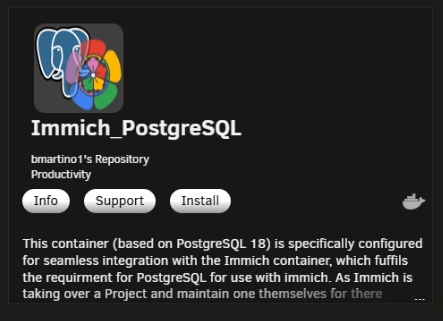
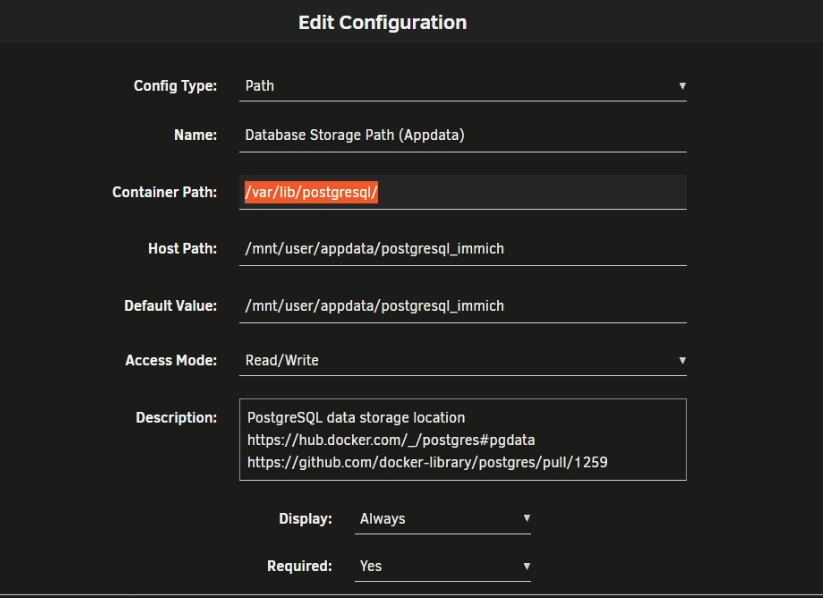
v18 tag cahgned docekr varables. you will need to edit the docker appdata container location for tag version 18 /var/lib/postgresql/18/docker https://forums.unraid.net/topic/146106-immich-docker-self-hosted-google-photos-setup/page/8/#findComment-1557544


-
per sytem log your experiencing ntp time server error adn soemthing comand wise stoped teh nginx server adn caused a reboot loop... Dec 2 18:08:51 BlockBuster2 rc.nginx: Stopping Nginx server daemon gracefully... Dec 2 18:09:40 BlockBuster2 sshd-session[34507]: Connection from 192.168.1.226 port 53807 on 192.168.1.69 port 22 rdomain "" Dec 2 18:09:41 BlockBuster2 sshd-session[34507]: Postponed keyboard-interactive for root from 192.168.1.226 port 53807 ssh2 [preauth] Dec 2 18:09:48 BlockBuster2 sshd-session[34507]: Postponed keyboard-interactive/pam for root from 192.168.1.226 port 53807 ssh2 [preauth] Dec 2 18:09:48 BlockBuster2 sshd-session[34507]: Accepted keyboard-interactive/pam for root from 192.168.1.226 port 53807 ssh2 Dec 2 18:09:48 BlockBuster2 sshd-session[34507]: pam_unix(sshd:session): session opened for user root(uid=0) by (uid=0) Dec 2 18:09:48 BlockBuster2 sshd-session[34507]: User child is on pid 34600 Dec 2 18:09:48 BlockBuster2 sshd-session[34600]: Starting session: shell on pts/0 for root from 192.168.1.226 port 53807 id 0 Dec 2 18:10:04 BlockBuster2 rc.nginx: Stopping Nginx server daemon gracefully... Dec 2 18:10:04 BlockBuster2 rc.nginx: Nginx server daemon... Already stopped. Dec 2 18:10:04 BlockBuster2 rc.nginx: Starting Nginx server daemon... Dec 2 18:10:08 BlockBuster2 rc.nginx: Nginx server daemon... Started. Dec 2 18:10:33 BlockBuster2 ntpd[2339]: kernel reports TIME_ERROR: 0x41: Clock Unsynchronized Dec 2 18:10:44 BlockBuster2 rc.nginx: Stopping Nginx server daemon gracefully... Dec 2 18:10:45 BlockBuster2 nginx: 2025/12/02 18:10:45 [alert] 34899#34899: *309 open socket #20 left in connection 258 Dec 2 18:10:45 BlockBuster2 nginx: 2025/12/02 18:10:45 [alert] 34899#34899: *317 open socket #29 left in connection 268 Dec 2 18:10:45 BlockBuster2 nginx: 2025/12/02 18:10:45 [alert] 34899#34899: *336 open socket #38 left in connection 269 Dec 2 18:10:45 BlockBuster2 nginx: 2025/12/02 18:10:45 [alert] 34899#34899: *361 open socket #34 left in connection 271 Dec 2 18:10:45 BlockBuster2 nginx: 2025/12/02 18:10:45 [alert] 34899#34899: *321 open socket #30 left in connection 272 Dec 2 18:10:45 BlockBuster2 nginx: 2025/12/02 18:10:45 [alert] 34899#34899: aborting Dec 2 18:10:46 BlockBuster2 rc.nginx: Nginx server daemon... Stopped. Dec 2 18:10:46 BlockBuster2 rc.nginx: Starting Nginx server daemon... Dec 2 18:10:50 BlockBuster2 webgui: curl error: Failed to connect to localhost port 80 after 0 ms: Could not connect to server endpoint: notify Dec 2 18:10:50 BlockBuster2 publish: curl to notify failed Dec 2 18:10:50 BlockBuster2 webgui: curl error: Failed to connect to localhost port 80 after 0 ms: Could not connect to server endpoint: session Dec 2 18:10:50 BlockBuster2 publish: curl to session failed Dec 2 18:10:50 BlockBuster2 webgui: curl error: Failed to connect to localhost port 80 after 0 ms: Could not connect to server endpoint: temperature Dec 2 18:10:50 BlockBuster2 publish: curl to temperature failed Dec 2 18:10:50 BlockBuster2 webgui: curl error: Failed to connect to localhost port 80 after 0 ms: Could not connect to server endpoint: devices Dec 2 18:10:50 BlockBuster2 publish: curl to devices failed Dec 2 18:10:50 BlockBuster2 webgui: curl error: Failed to connect to localhost port 80 after 0 ms: Could not connect to server endpoint: arraymonitor Dec 2 18:10:50 BlockBuster2 publish: curl to arraymonitor failed Dec 2 18:10:50 BlockBuster2 webgui: curl error: Failed to connect to localhost port 80 after 0 ms: Could not connect to server endpoint: mainPingListener Dec 2 18:10:50 BlockBuster2 publish: curl to mainPingListener failed Dec 2 18:10:50 BlockBuster2 webgui: curl error: Failed to connect to localhost port 80 after 0 ms: Could not connect to server endpoint: parity Dec 2 18:10:50 BlockBuster2 publish: curl to parity failed Dec 2 18:10:50 BlockBuster2 webgui: curl error: Failed to connect to localhost port 80 after 0 ms: Could not connect to server endpoint: paritymonitor Dec 2 18:10:50 BlockBuster2 publish: curl to paritymonitor failed Dec 2 18:10:50 BlockBuster2 webgui: curl error: Failed to connect to localhost port 80 after 0 ms: Could not connect to server endpoint: fsState Dec 2 18:10:50 BlockBuster2 publish: curl to fsState failed Dec 2 18:10:50 BlockBuster2 webgui: curl error: Failed to connect to localhost port 80 after 0 ms: Could not connect to server endpoint: mymonitor Dec 2 18:10:50 BlockBuster2 publish: curl to mymonitor failed Dec 2 18:10:50 BlockBuster2 webgui: curl error: Failed to connect to localhost port 80 after 0 ms: Could not connect to server endpoint: mainPingListener Dec 2 18:10:50 BlockBuster2 publish: curl to mainPingListener failed Dec 2 18:10:50 BlockBuster2 rc.nginx: Nginx server daemon... Failed. Dec 2 18:10:51 BlockBuster2 webgui: curl error: Failed to connect to localhost port 80 after 0 ms: Could not connect to server endpoint: devices Dec 2 18:10:51 BlockBuster2 publish: curl to devices failed Dec 2 18:10:51 BlockBuster2 webgui: curl error: Failed to connect to localhost port 80 after 0 ms: Could not connect to server endpoint: arraymonitor Dec 2 18:10:51 BlockBuster2 publish: curl to arraymonitor failed Dec 2 18:10:51 BlockBuster2 webgui: curl error: Failed to connect to localhost port 80 after 0 ms: Could not connect to server endpoint: mainPingListener Dec 2 18:10:51 BlockBuster2 publish: curl to mainPingListener failed Dec 2 18:10:52 BlockBuster2 webgui: curl error: Failed to connect to localhost port 80 after 0 ms: Could not connect to server endpoint: devices Dec 2 18:10:52 BlockBuster2 publish: curl to devices failed Dec 2 18:10:52 BlockBuster2 webgui: curl error: Failed to connect to localhost port 80 after 0 ms: Could not connect to server endpoint: arraymonitor Dec 2 18:10:52 BlockBuster2 publish: curl to arraymonitor failed Dec 2 18:10:52 BlockBuster2 webgui: curl error: Failed to connect to localhost port 80 after 0 ms: Could not connect to server endpoint: mainPingListener Dec 2 18:10:52 BlockBuster2 publish: curl to mainPingListener failed Dec 2 18:10:53 BlockBuster2 webgui: curl error: Failed to connect to localhost port 80 after 0 ms: Could not connect to server endpoint: devices Dec 2 18:10:53 BlockBuster2 publish: curl to devices failed Dec 2 18:10:53 BlockBuster2 webgui: curl error: Failed to connect to localhost port 80 after 0 ms: Could not connect to server endpoint: arraymonitor Dec 2 18:10:53 BlockBuster2 publish: curl to arraymonitor failed Dec 2 18:10:53 BlockBuster2 webgui: curl error: Failed to connect to localhost port 80 after 0 ms: Could not connect to server endpoint: mainPingListener Dec 2 18:10:53 BlockBuster2 publish: curl to mainPingListener failed Dec 2 18:10:53 BlockBuster2 webgui: curl error: Failed to connect to localhost port 80 after 0 ms: Could not connect to server endpoint: parity Dec 2 18:10:53 BlockBuster2 publish: curl to parity failed Dec 2 18:10:53 BlockBuster2 webgui: curl error: Failed to connect to localhost port 80 after 0 ms: Could not connect to server endpoint: paritymonitor Dec 2 18:10:53 BlockBuster2 publish: curl to paritymonitor failed Dec 2 18:10:53 BlockBuster2 webgui: curl error: Failed to connect to localhost port 80 after 0 ms: Could not connect to server endpoint: fsState Dec 2 18:10:53 BlockBuster2 publish: curl to fsState failed Dec 2 18:10:53 BlockBuster2 webgui: curl error: Failed to connect to localhost port 80 after 0 ms: Could not connect to server endpoint: mymonitor Dec 2 18:10:53 BlockBuster2 publish: curl to mymonitor failed Dec 2 18:10:53 BlockBuster2 webgui: curl error: Failed to connect to localhost port 80 after 0 ms: Could not connect to server endpoint: mainPingListener Dec 2 18:10:53 BlockBuster2 publish: curl to mainPingListener failed Dec 2 18:10:54 BlockBuster2 webgui: curl error: Failed to connect to localhost port 80 after 0 ms: Could not connect to server endpoint: devices Dec 2 18:10:54 BlockBuster2 publish: curl to devices failed Dec 2 18:10:54 BlockBuster2 webgui: curl error: Failed to connect to localhost port 80 after 0 ms: Could not connect to server endpoint: arraymonitor Dec 2 18:10:54 BlockBuster2 publish: curl to arraymonitor failed Dec 2 18:10:54 BlockBuster2 webgui: curl error: Failed to connect to localhost port 80 after 0 ms: Could not connect to server endpoint: mainPingListener Dec 2 18:10:54 BlockBuster2 publish: curl to mainPingListener failed Dec 2 18:10:55 BlockBuster2 webgui: curl error: Failed to connect to localhost port 80 after 0 ms: Could not connect to server endpoint: temperature Dec 2 18:10:55 BlockBuster2 publish: curl to temperature failed Dec 2 18:10:55 BlockBuster2 webgui: curl error: Failed to connect to localhost port 80 after 0 ms: Could not connect to server endpoint: devices Dec 2 18:10:55 BlockBuster2 publish: curl to devices failed Dec 2 18:10:55 BlockBuster2 webgui: curl error: Failed to connect to localhost port 80 after 0 ms: Could not connect to server endpoint: arraymonitor Dec 2 18:10:55 BlockBuster2 publish: curl to arraymonitor failed Dec 2 18:10:55 BlockBuster2 webgui: curl error: Failed to connect to localhost port 80 after 0 ms: Could not connect to server endpoint: mainPingListener Dec 2 18:10:55 BlockBuster2 publish: curl to mainPingListener failed Dec 2 18:11:13 BlockBuster2 rc.nginx: Stopping Nginx server daemon gracefully... Dec 2 18:11:13 BlockBuster2 rc.nginx: Nginx server daemon... Already stopped. Dec 2 18:11:13 BlockBuster2 rc.nginx: Starting Nginx server daemon... Dec 2 18:11:17 BlockBuster2 rc.nginx: Nginx server daemon... Started. Dec 2 18:13:43 BlockBuster2 webgui: Successful login user root from 192.168.1.226 Dec 2 18:14:20 BlockBuster2 webgui: CaddyV2: Could not download icon https://d1q6f0aelx0por.cloudfront.net/product-logos/library-caddy-logo.png IO would suspect a issue inteh bond and potenal need to install teh net driver plugin for realek devices. NTP failed earlier int he boot before your first web ui and ssh login to the system. The sytem is not mainting a stable netowrk conection per the log and evental fails.
-
thank you for a diaga. not seeing much. looks like there some issues going on with unriad hype v system... graphql-api.txt gettign constant failure with libvirt... which is a little weird... [02:12:04 INFO api]: Server listening on /var/run/unraid-api.sock {"apiVersion":"4.27.2+375dcd05","logger":"api"} [02:12:04 INFO api]: Nest Server is now listening {"apiVersion":"4.27.2+375dcd05","logger":"api"} [02:12:14 INFO VmsService]: Attempting to initialize VMs service...attempt 1/12 {"apiVersion":"4.27.2+375dcd05","logger":"api","context":"VmsService"} [02:12:14 WARN VmsService]: Initial hypervisor connection failed: Libvirt is not running. Setting up watcher. {"apiVersion":"4.27.2+375dcd05","logger":"api","context":"VmsService"} [02:12:24 INFO VmsService]: Attempting to initialize VMs service...attempt 2/12 {"apiVersion":"4.27.2+375dcd05","logger":"api","context":"VmsService"} [02:12:24 WARN VmsService]: Initial hypervisor connection failed: Libvirt is not running. Setting up watcher. {"apiVersion":"4.27.2+375dcd05","logger":"api","context":"VmsService"} [02:12:34 INFO VmsService]: Attempting to initialize VMs service...attempt 3/12 {"apiVersion":"4.27.2+375dcd05","logger":"api","context":"VmsService"} [02:12:34 WARN VmsService]: Initial hypervisor connection failed: Libvirt is not running. Setting up watcher. {"apiVersion":"4.27.2+375dcd05","logger":"api","context":"VmsService"} [02:12:44 INFO VmsService]: Attempting to initialize VMs service...attempt 4/12 {"apiVersion":"4.27.2+375dcd05","logger":"api","context":"VmsService"} [02:12:44 WARN VmsService]: Initial hypervisor connection failed: Libvirt is not running. Setting up watcher. {"apiVersion":"4.27.2+375dcd05","logger":"api","context":"VmsService"} [02:12:54 INFO VmsService]: Attempting to initialize VMs service...attempt 5/12 {"apiVersion":"4.27.2+375dcd05","logger":"api","context":"VmsService"} [02:12:54 WARN VmsService]: Initial hypervisor connection failed: Libvirt is not running. Setting up watcher. {"apiVersion":"4.27.2+375dcd05","logger":"api","context":"VmsService"} [02:12:04 INFO VmsService]: Attempting to initialize VMs service...attempt 6/12 {"apiVersion":"4.27.2+375dcd05","logger":"api","context":"VmsService"} [02:12:04 WARN VmsService]: Initial hypervisor connection failed: Libvirt is not running. Setting up watcher. {"apiVersion":"4.27.2+375dcd05","logger":"api","context":"VmsService"} [02:12:14 INFO VmsService]: Attempting to initialize VMs service...attempt 7/12 {"apiVersion":"4.27.2+375dcd05","logger":"api","context":"VmsService"} [02:12:14 WARN VmsService]: Initial hypervisor connection failed: Libvirt is not running. Setting up watcher. {"apiVersion":"4.27.2+375dcd05","logger":"api","context":"VmsService"} [02:12:24 INFO VmsService]: Attempting to initialize VMs service...attempt 8/12 {"apiVersion":"4.27.2+375dcd05","logger":"api","context":"VmsService"} [02:12:24 WARN VmsService]: Initial hypervisor connection failed: Libvirt is not running. Setting up watcher. {"apiVersion":"4.27.2+375dcd05","logger":"api","context":"VmsService"} [02:12:34 INFO VmsService]: Attempting to initialize VMs service...attempt 9/12 {"apiVersion":"4.27.2+375dcd05","logger":"api","context":"VmsService"} [02:12:34 WARN VmsService]: Initial hypervisor connection failed: Libvirt is not running. Setting up watcher. {"apiVersion":"4.27.2+375dcd05","logger":"api","context":"VmsService"} [02:12:44 INFO VmsService]: Attempting to initialize VMs service...attempt 10/12 {"apiVersion":"4.27.2+375dcd05","logger":"api","context":"VmsService"} [02:12:44 WARN VmsService]: Initial hypervisor connection failed: Libvirt is not running. Setting up watcher. {"apiVersion":"4.27.2+375dcd05","logger":"api","context":"VmsService"} [02:12:54 INFO VmsService]: Attempting to initialize VMs service...attempt 11/12 {"apiVersion":"4.27.2+375dcd05","logger":"api","context":"VmsService"} [02:12:54 WARN VmsService]: Initial hypervisor connection failed: Libvirt is not running. Setting up watcher. {"apiVersion":"4.27.2+375dcd05","logger":"api","context":"VmsService"} [02:12:04 INFO VmsService]: Attempting to initialize VMs service...attempt 12/12 {"apiVersion":"4.27.2+375dcd05","logger":"api","context":"VmsService"} [02:12:04 WARN VmsService]: Initial hypervisor connection failed: Libvirt is not running. Setting up watcher. {"apiVersion":"4.27.2+375dcd05","logger":"api","context":"VmsService"} [02:12:02 INFO app]: Exiting with signal 130 {"apiVersion":"4.27.2+375dcd05"} [02:12:02 INFO UnraidFileModificationService]: Rolling back all modifications... {"apiVersion":"4.27.2+375dcd05","logger":"api","context":"UnraidFileModificationService"} [02:12:02 INFO RCloneApiService]: RClone process not running or already stopped. {"apiVersion":"4.27.2+375dcd05","logger":"api","context":"RCloneApiService"} [02:12:02 INFO RCloneApiService]: RCloneApiService module destroyed {"apiVersion":"4.27.2+375dcd05","logger":"api","context":"RCloneApiService"} [02:12:05 INFO app]: ENV {"API_VERSION":"4.27.2+375dcd05","BYPASS_CORS_CHECKS":false,"BYPASS_PERMISSION_CHECKS":false,"CHOKIDAR_USEPOLLING":false,"DEBUG":false,"ECOSYSTEM_PATH":"/usr/local/unraid- I'm not seing any vms or the VM sytem enabled... I do see yor using ?bond? on a realtek driver for your eht0 nic... standar plugin no cmd, or 3rd party appl;icaiton... singale cache disk pool per diag... still combing thoguh the logs and diag... but not seeing anything abnoraml atm. ?Is this Unriad instace on baremetal aor virtualized?
-
its is best to make your own general post... posting diag and other... IDK what you guys are doing to get the monitor script to go off the walls like this...
-
The single command /usr/bin/php -q /usr/local/emhttp/plugins/dynamix.docker.manager/scripts/update_container "$CONTAINER_NAME" "$CONTAINER_NAME" being the docker continer name via docker ps
-
yes... qute a few docker and urnaid comands... https://forums.unraid.net/topic/178033-bmartino1-user-scripts/#findComment-1593272
-
you will need to edit the docker appdata container location for tag version 18 /var/lib/postgresql/18/docker unraiod also don'et support nor have gunzip installed its a 3rd party application that can be retrived via un-get in nerdtools... https://docs.immich.app/administration/backup-and-restore/ unget plugin for slack 3rd party packages... https://forums.unraid.net/topic/129200-plug-in-nerdtools/page/25/#findComment-1513524 un-get install gzip https://slackware.pkgs.org/15.0/slackware-patches-x86_64/gzip-1.12-x86_64-1_slack15.0.txz.html Binary for extra folder https://slackware.uk/slackware/slackware64-15.0/patches/packages/gzip-1.12-x86_64-1_slack15.0.txz
-
Due to postgress and immich coniter to sett eh postgress tag version. you must specfi the coret docker major location. FYI Postgres v18 and up issues. so postgress docker v18 needs different docker varables to run PGDATA Users who wish to opt-in to this change on older releases can do so by setting PGDATA explicitly (--env PGDATA=/var/lib/postgresql/17/docker --volume some-postgres:/var/lib/postgresql). To migrate pre-existing data, adjust the volume's folder structure appropriately first (moving all database files into a PG_MAJOR/docker subdirectory). This (PGDATA) is an environment variable that is not Docker specific. Because the variable is used by the postgres server binary (see the PostgreSQL docs), the entrypoint script takes it into account. https://github.com/immich-app/immich/issues/23663 I have updated the CA for v18 moving forwards to fix issues. and set the app data path back to one so docker tag changes may show a 18 folder or 19 depending on tag...
-
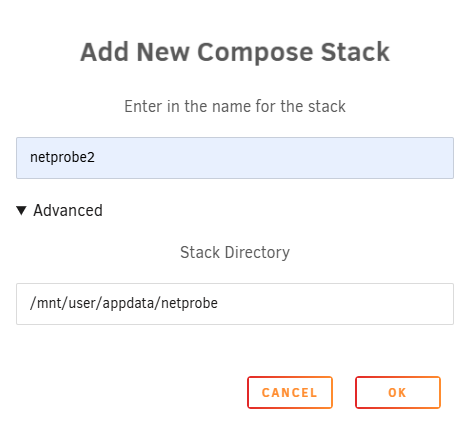
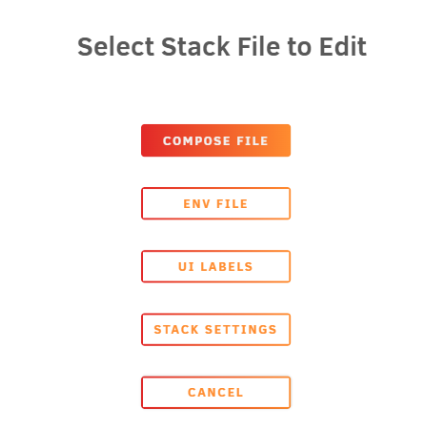
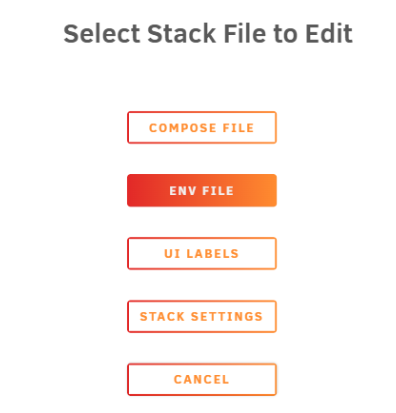
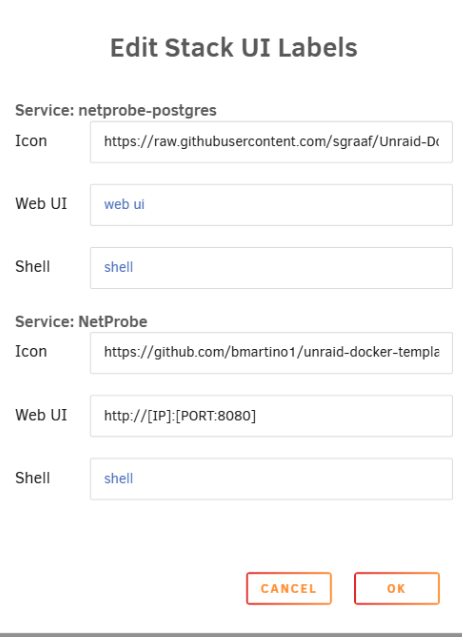
the run drive detects is abort of nvdia driver insall. as nvdia vgpu requires the nvdia drive to run and at run time it will black list the nouveau driver. Nvidia done't really no what breaks where or atleast hasn't been upfront about it.Please post a diag file and/or a picture of the main page of the cache disk the webui ha icons and other to confirm if it was encrypted. ? are you running a user script at boot to provide the key file?If you don't want to use a single sql file for the database, I have just finished edits to use either SQLite or Postgres, adding additional docker variables to a new docker tag. bmmbmm01/netprobe:postgres16 *This image can be used with the Unriad CA by changing the repo setting and still use sqlite! This would require a standalone Postgres database running. for ease of deployment to use the docker compose with Postgres built in... I would recommend cloning the github and using the docker compose file and data there... cd /mnt/user/appdata/ git clone https://github.com/bmartino1/NetProbe_Python.git netprobe mkdir -p /mnt/user/appdata/netprobe/{postgres,sqlite} cd /mnt/user/appdata/netprobe ls rm docker-compose.yml ls The above command will premade the necessary volume mounts within the cloned project page... to make the needed folders for the host volume database... /mnt/user/appdata/netprobe/postgres /mnt/user/appdata/netprobe/sqlite this will also pre setup for the file below... github docker compose file is a general all around OS version... and more the one here is more for the auto env ui stack labels and settings: Now onto Unraid Setup: Then with the docker compose plugin installed, we link the folder /mnt/user/appdata/netprobe Then edit the stack. It should autoload the github version... this version will build the docker for you to run so if you want to make html js or even python changes to the probe.. Be my guest... Here is a compose file for Postgres all in one: #version: "3.8" services: postgres: image: postgres:16-alpine container_name: netprobe-postgres restart: unless-stopped # If you want to keep config in a file: use .env via compose plugin... #env_file: # - ./probe/config.env environment: POSTGRES_DB: ${POSTGRES_DB:-netprobe} POSTGRES_USER: ${POSTGRES_USER:-netprobe} POSTGRES_PASSWORD: ${POSTGRES_PASSWORD:-netprobe} volumes: - netprobe_pgdata:/var/lib/postgresql/data healthcheck: test: ["CMD-SHELL", "pg_isready -U ${POSTGRES_USER:-netprobe} -d ${POSTGRES_DB:-netprobe}"] interval: 10s timeout: 5s retries: 5 labels: - "net.unraid.docker.icon=https://raw.githubusercontent.com/sgraaf/Unraid-Docker-Templates/main/postgresql16/icon.png" - "folder.view=netprobe" - "net.unraid.docker.managed=composeman" netprobe: #build: ./probe # Image exists... if you edit the gitclone of the project use build over image instead: image: bmmbmm01/netprobe: latest container_name: NetProbe restart: unless-stopped depends_on: postgres: condition: service_healthy # If you want to keep config in a file: # env_file: # - ./probe/config.env environment: WEB_PORT: ${WEB_PORT:-8080} #Use Postgres docker variables... USE_POSTGRES: ${USE_POSTGRES:-true} DB_ENGINE: ${DB_ENGINE:-postgres} # Postgres connection details (match the postgres service above via env file...) POSTGRES_HOST: ${POSTGRES_HOST:-postgres} POSTGRES_PORT: ${POSTGRES_PORT:-5432} POSTGRES_DB: ${POSTGRES_DB:-netprobe} POSTGRES_USER: ${POSTGRES_USER:-netprobe} POSTGRES_PASSWORD: ${POSTGRES_PASSWORD:-netprobe} #Probe Data. Most are default unless specified... PROBE_INTERVAL: ${PROBE_INTERVAL:-30} PING_COUNT: ${PING_COUNT:-4} APP_TIMEZONE: ${APP_TIMEZONE:-UTC} # Ping targets SITES: ${SITES:-fast.com,google.com,youtube.com} ROUTER_IP: ${ROUTER_IP:-} # DNS config DNS_TEST_SITE: ${DNS_TEST_SITE:-google.com} DNS_NAMESERVER_4: ${DNS_NAMESERVER_4:-My_DNS_Server} DNS_NAMESERVER_4_IP: ${DNS_NAMESERVER_4_IP:-192.168.1.1} # Speedtest configuration SPEEDTEST_ENABLED: ${SPEEDTEST_ENABLED:-True} SPEEDTEST_INTERVAL: ${SPEEDTEST_INTERVAL:-14400} ports: - "${WEB_PORT:-8080}:8080" # Volume only really used if you ever switch to sqlite, but safe to keep.. volumes: - netprobe_data:/data labels: - "folder.view=netprobe" - "net.unraid.docker.managed=composeman" - "net.unraid.docker.webui=http://[IP]:[PORT:8080]" - "net.unraid.docker.icon=https://github.com/bmartino1/unraid-docker-templates/blob/main/images/netprobe.png?raw=true" # Optional: if ping needs extra caps in your environment #cap_add: # - NET_RAW # - NET_ADMIN # - SYS_ADMIN # Optional: use an existing host network on Unraid (e.g. br0) Best in bridgemode.. #networks: # default: # external: true # name: br0 volumes: netprobe_data: driver: local driver_opts: type: none device: /mnt/user/appdata/netprobe/sqlite o: bind netprobe_pgdata: driver: local driver_opts: type: none device: /mnt/user/appdata/netprobe/postgres o: bind and a example env file: # --------------------------------------- # NetProbe + Postgres (.env for Unraid) # This file is read automatically by the # Docker Compose (compose.manager) plugin # --------------------------------------- # ------------------------------- # Core Netprobe settings # ------------------------------- WEB_PORT=8080 APP_TIMEZONE=UTC # Probe timing (you can leave defaults if you want) PROBE_INTERVAL=30 PING_COUNT=4 # ------------------------------- # Database backend (Postgres) # ------------------------------- # Use Postgres docker variables... USE_POSTGRES=true DB_ENGINE=postgres # Postgres connection details (must match postgres service) POSTGRES_HOST=postgres POSTGRES_PORT=5432 POSTGRES_DB=netprobe POSTGRES_USER=netprobe POSTGRES_PASSWORD=netprobe # ------------------------------- # Ping targets # ------------------------------- # Comma-separated list of external sites to ping SITES=fast.com,google.com,youtube.com # Router IP on your LAN ROUTER_IP=192.168.1.1 # ------------------------------- # DNS config # ------------------------------- DNS_TEST_SITE=google.com # Only overriding DNS #4 to be your LAN DNS; # DNS 1–3 will fall back to built-in defaults. DNS_NAMESERVER_4=My_DNS_Server DNS_NAMESERVER_4_IP=192.168.1.1 # ------------------------------- # Speedtest configuration # ------------------------------- SPEEDTEST_ENABLED=True # 4 hours in seconds SPEEDTEST_INTERVAL=14400 If Building, I recoined using the update stack button ... then you can load the web page...

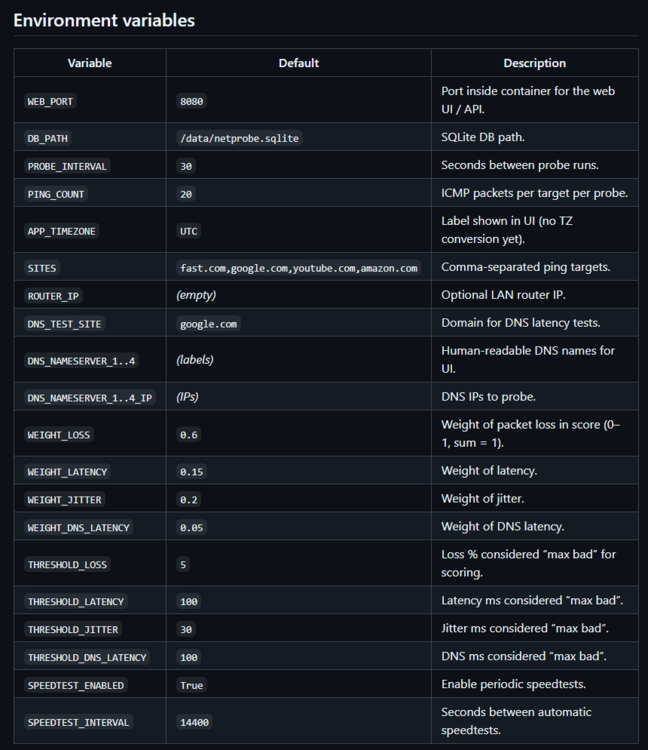
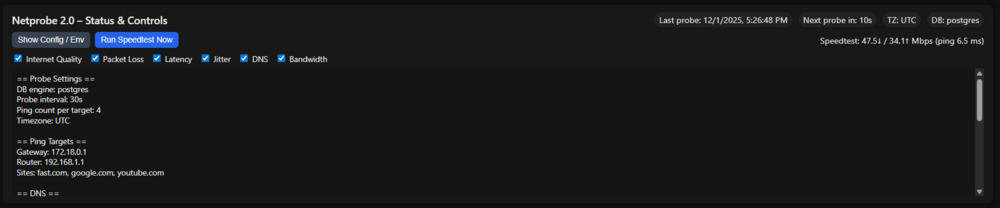 Github: https://github.com/bmartino1/NetProbe_Python Docker Hub: https://hub.docker.com/r/bmmbmm01/netprobe Netprobe 2.0 – Internet Quality Dashboard Netprobe 2.0 is a lightweight, container-friendly network probe and web UI for home / lab internet monitoring. It periodically: Pings your gateway, router and a list of “anchor” sites. Measures packet loss, latency and jitter. Measures DNS lookup latency per DNS server. Runs scheduled and manual Speedtest.net tests. Stores everything in SQLite and renders a dark-mode dashboard with Chart.js. The goal is a simple “drop in and forget it” quality monitor that you can run on Unraid, Proxmox, Docker, etc. Python gunicorn / flask app for a web server Python code to get and test networks...
 docker image now exist as a all in one systems... Python build web server to probe... why run grafana, prmethus, redis... when we can have 1 docker do this??? https://hub.docker.com/r/bmmbmm01/netprobe @Abracadadra sorry this was on the back burner for a while as a friend of mine needed it. with bitnami redis edits and ohter going on I decided to refactor there project and repurpse it all under 1 python based docker... unraid CA tempalte latter. I have testd this iwht docker copose on unrad and it works well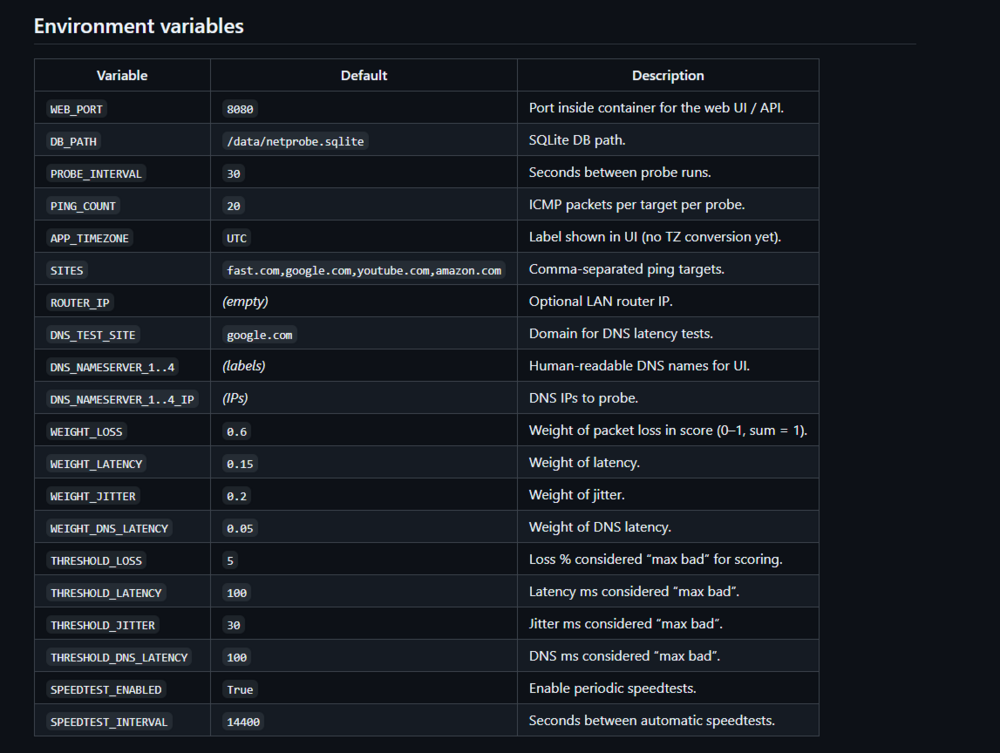
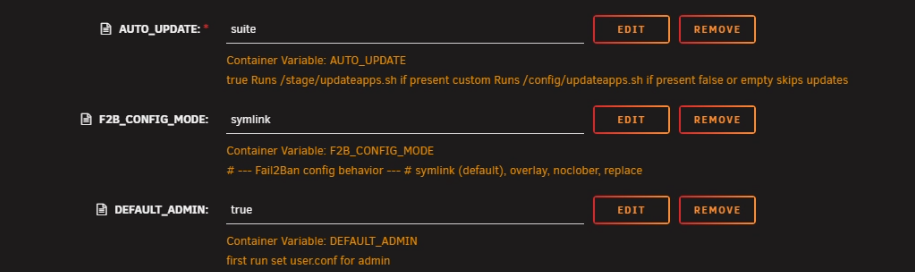
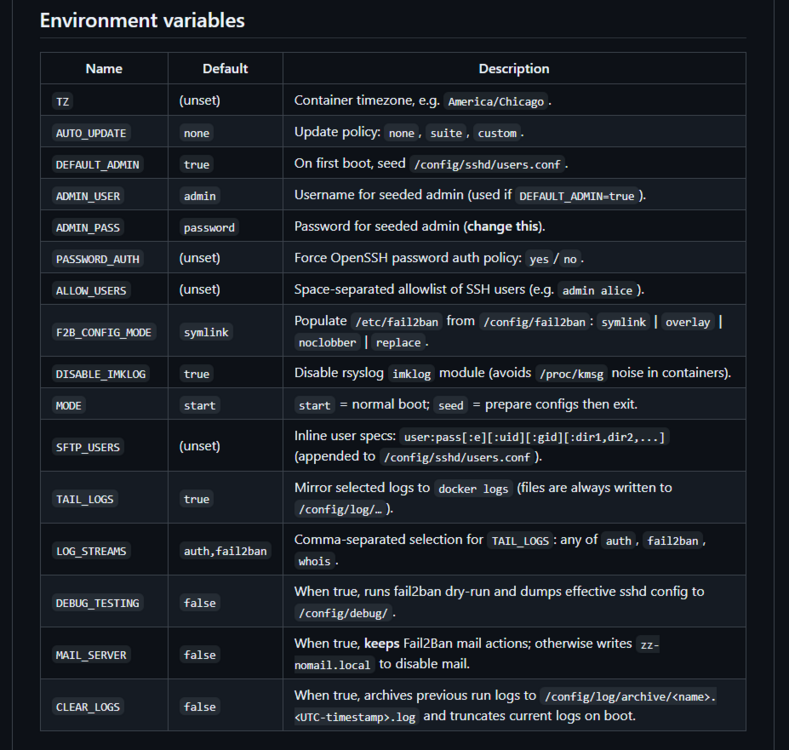
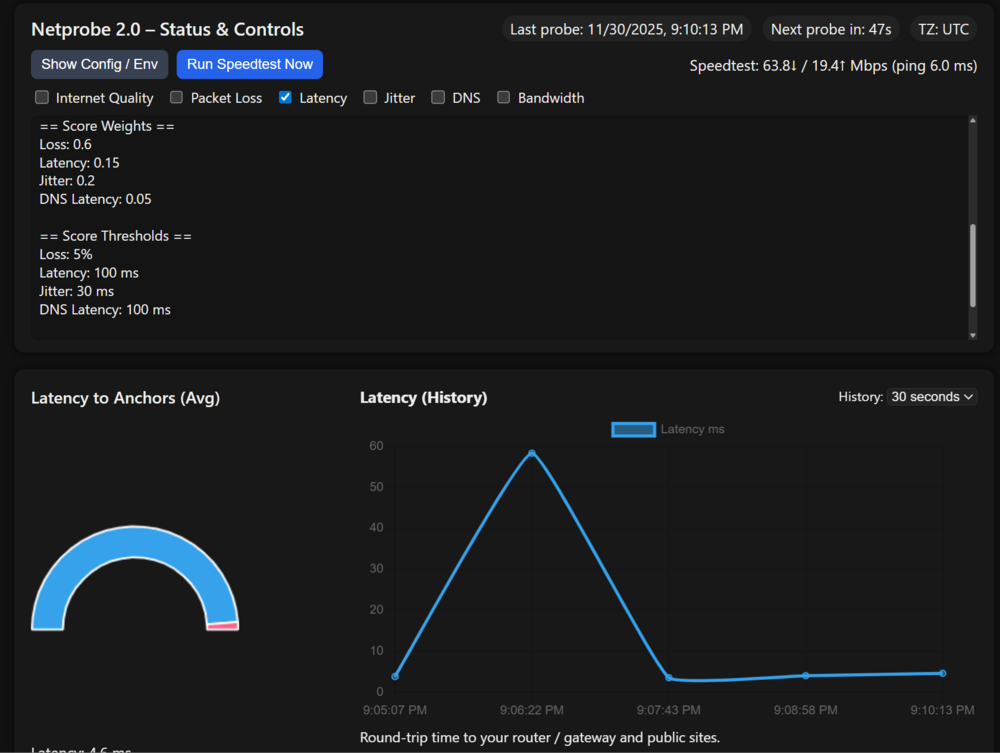 Correct. not all cards support sriov nor have xhic / echi capabilities...https://qemu-project.gitlab.io/qemu/system/devices/usb.html any success with baremetal unraid and passing things like usb HD like the wd passport? I usualy end up in some weird area where i can't format use or eid the usb drive due to how unraid host read and interpts the usb data at the host level before the VM guest does things to it... ?has unraid improved usb mass storage device additions? as I remember having to use a plugin in v6 to even attempt to pass the entire USB port...that plugin is not in v7... My goal is to rebuild my HD recover Lazars system. so I would have unraid host launch a VM adding the usb device to recover data from vm of windows to linux and a Variety of other systems... Last attempts at this were met with issues on how unraids qemu virtualized system works... a good examples is a generic usb card reader and a micro/sd card. I often encounter host guest VM issues when using sd cards on unrad in the VM environment...i've had no issues using expansion slots to boot unriad. its netiher good nor bad. its hardware specfic... and software specific... *There used to be a plugin to pass individual usb ports and plugged in devices... if the usb is in the pcie card being passed to the VM then that is a bad IDEA! as unraid mounts the flash drive at /boot and removing the flash drive kills and errors the OS as unraid sits in ram... Unlike proxmox with other qemu edits to passing individual usb ports. unraid is more IOMMU specific and wold require either the flash drive plugged into a mother boards port that can't be passed to the VM as the host needs forever access to it... look into the usb vm manger plugin.Debian wants 1000:1000 for the line. But I want the user group marked there that why 100 This is only at new user creation per the user.conf file. Deletion of console command to usermod -aG %username% %group name% are needed to change user groups after creation.... https://linux.die.net/man/8/usermodI have not found a good way to fix that in the docker. It is a known error that can be ignored. This is essentially saying that Debian at user creation has made a uid# and guid# and to make the group ID that the ID exist... So it complains about the user group add portion... That number that gets passed by the user config string that makes the user. And the number needs to be higher than 1000 for the start of new user and group creations.... The reason that number exists is more for permission of a puid and guid of the docker for reading and writing paths on the unraid host.... Template ships with uid 0 and guid 0 root for escalated permissions. Essentially the admin user 1000 with group "users" 100 is what's the container passes permission wise to the unraid host to the folder mounted at container /home/admin/sftp and is what is passed to unraid for permission... Which is why we want 1000:100 for the user conf for userid and group id in the string... I tried to find a fix for this while use the code to help transition users from sftp and the older "MarkusMcNugen/docker-sftp" image.... to reuse this in Debian and config another system controls to fix that. It has more to do with the fact that we're using the number 100 which is a default group and because of the nature of the add command we're using the existing guid. I stayed Debian as that is what I know and Ubuntu is built off of it so it wasn't too hard to revamp code to get a working image and once I understood all faucets of the old code new code and existing code I was able to add my own variables and what I wanted from the docker... The only reason I didn't go alpine was issues with the WHOIS binary... as alot of the openssh CVE are in the structure of the SSHD config. As I use the fail2ban docker log folder and who is log to hardware firewall ban. And have an allowlist area for fail2ban from known location / friend's house. I use this docker in a rsync with zfs send for a ring network... At this Time I have no plans to edit fix code and updat the image as things are working on my end with the data as it should. Please let me know of any issues and I will give you a workaround and or update the unraid template / github code...due to sftp2 rework and how to handle custom edits and other edits for fail2ban I would recommend staring over by deleting the appdata config. Specifically the fail2ban folder... (your keys, user.conf and others are fine and should be used in the transition) debug is more for the move between sftp and sftp2. I kept sftp1 but won't update it due to phusion and the nature of openssh CVE that requires the latest glibs to be secure. Thus the move to sftp2. Which is working. ??? so is their a issue your having?
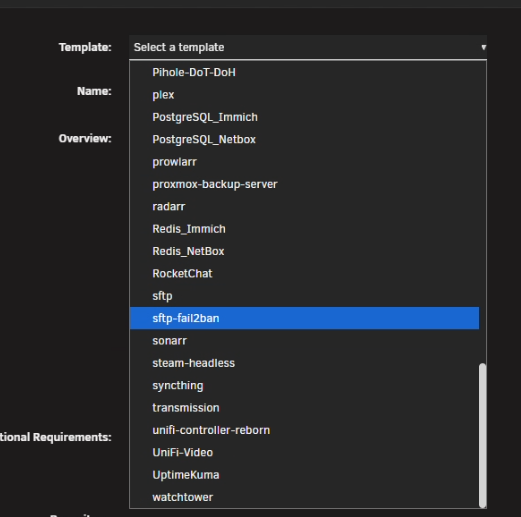
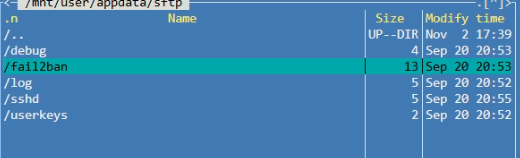 it already has but I don't have good documentation to move into it... this shoudl be in teh tempalte you may need to delte the old tempalte if you previously installed the intial tranfer update. sftp2 shoudl be on debain slim now where I'm not bound by the phusion ubuntu maintainers... sftp2 came about do to isseus with cusom or auto update openssh upon docker restart when the opensshteam added a openssh pacakges for next gen OS due to edits to underline libs thus broke sftp... so I would recomend: (As I tried to make this as compabitle as posbble for transtiong users... you can edit the repository and use: the CA temaplte has been updated already. so you may need to remove the old one on unraid (which will clear settings...) on doker webui tab add continer. selct the sftp docker template and hit the x at the top to remove... as the updated CA tempatle has some new options but teh enty script is writen to use defaults if not supplied... as I've added new and more dokver varables to easily deply this. adatioanl docker varables as I shiped a working default for transtioning users: per my gihub: https://github.com/bmartino1/sftp2 so yes this is and has been updated already.

 May be time to make a new post delete this or move to the proxmox forum as its more on how to edit and install proxmox then virtualize unraid on proxmox...





