






bmartino1
Members
-
Joined
-
Last visited
Everything posted by bmartino1
-
usualy you can edit the dhcp address of your new router to use 192.168.1.x this sounds like a belkin router. what new router did you purchase and I will try to find the manual / documetntion to set your dhcp range to 192.168.1.x
-
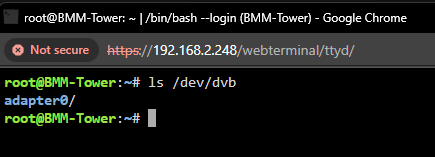
again to be clear you need to follow the instruction found here for plex: https://forums.unraid.net/topic/98978-plugin-nvidia-driver/#findComment-913251 as it appears, you may not be passing the nvidia card correctly and is needed... https://support.plex.tv/articles/225877427-supported-dvr-tuners-and-antennas/ --device=/dev/dvb/ is technical all you need. make sure the dvb tuner is seen ls /dev/dvb

-
I recommend using the linux server or plex official docker and not other 3rd parties. you are trying to pass a tuner for plex antenna / homerun/iptv add-on. the nvidia gpu need to be host accessble witht eh driver plugin installed. then you need to follow the first post page to pass the nvidia gpu into plex https://forums.unraid.net/topic/98978-plugin-nvidia-driver/ I prefer docker compose when using iptv... I prefer linux server (as plex used linux server docker file to use and make dockers versions...) example: #version: "3.8" services: plex: image: lscr.io/linuxserver/plex:latest pull_policy: always container_name: plex hostname: plex labels: folder.view: "plex" net.unraid.docker.managed: "composeman" net.unraid.docker.webui: "http://[IP]:[PORT:32400]/web/index.html" net.unraid.docker.icon: "https://raw.githubusercontent.com/linuxserver/docker-templates/master/linuxserver.io/img/plex-logo.png" com.centurylinklabs.watchtower.enable: "true" #Tailscale # tsdproxy.enable: "true" # tsdproxy.name: "plex" # tsdproxy.funnel: "true" # tsdproxy.container_port: "32400" # tsdproxy.tsnet_verbose: "true" runtime: nvidia environment: - DOCKER_MODS=linuxserver/mods:universal-package-install - INSTALL_PACKAGES=sqlite3 - TZ=America/Chicago - HOST_OS=Unraid - HOST_HOSTNAME=Docker - HOST_CONTAINERNAME=plex - PLEX_CLAIM=claim-yourkeyhere - NVIDIA_DRIVER_CAPABILITIES=all - VERSION=docker - PUID=0 - PGID=0 # - UMASK=022 # Persistent data stays on disk volumes: - /mnt/user/Dockers/Plex/:/data #Plex Media Library # - /mnt/user/Dockers/arsdata/media:/arsdata - /mnt/user/Dockers/Plex/database:/config # In-RAM filesystems for tmp + transcode # This is the compose equivalent of: # --mount type=tmpfs,destination=/tmp # --mount type=tmpfs,destination=/transcode tmpfs: - /tmp - /transcode devices: - /dev/dvb/ #passes tunner - /dev/dri:/dev/dri #helps pass nvidia ports: - "32400:32400" - "32443:32443" - "1900:1900/udp" - "5353:5353/udp" - "8324:8324" - "32410:32410/udp" - "32412:32412/udp" - "32413:32413/udp" - "32414:32414/udp" - "32469:32469" dns: - 192.168.1.1 - 8.8.8.8 - 100.100.100.100 restart: unless-stopped networks: br0: ipv4_address: 192.168.1.254 mac_address: "26:a4:59:5c:cc:3b" depends_on: - xteve #Optional IPTV via hd tuner #https://github.com/Free-TV/IPTV xteve: image: alturismo/xteve container_name: xteve network_mode: host pids_limit: 2048 environment: TZ: America/Chicago HOST_CONTAINERNAME: xteve volumes: - /mnt/user/appdata/xteve/xteve:/root/.xteve - /mnt/user/appdata/xteve/config:/config - /mnt/user/appdata/xteve/tmp:/tmp/xteve - /mnt/user/appdata/xteve/TVH:/TVH labels: folder.view: "plex" net.unraid.docker.managed: "composeman" net.unraid.docker.webui: "http://[IP]:[PORT:34400]/web/" net.unraid.docker.icon: "https://avatars0.githubusercontent.com/u/53275662?s=460&v=4" com.centurylinklabs.watchtower.enable: "true" restart: unless-stopped networks: br0: external: true Your missing the docker run options for runtime and capabilities at ta min...
-
Rejeto is a web with user file share access example ... SInce your want to sync files between mutiple devices.. I would recommend syncthing. or a sftp rsync. https://syncthing.net/ https://docs.linuxserver.io/images/docker-syncthing/ as this would give you muti device file syncs across and file access.
-
the problem is the resync back up and the data regenerated trying to resotre or mess form a working state wil cause problems even with some advnce things to atempt to recover not a gurantee nor a sucess but to recretae with teh same database... (as long as the media data didn't chang paths, all data would survie... it not worth trying to restore form a restored point.
-
your atleast in a semi stable instance. because you have done a restore already you are now in that state. watch history is not saved taht far back and the sync feature is more for the server to send to plex not vise versa. That data is gone due otthe restroe. we could have atempted recovery by reinstalling plex by keeping the orginal database which would require a new claim key but no different settings move file path and other.(as i ahve done for migrating between sytems with not wantign to mess with database naming and fixes over the years. diag don't give th full story. since you were already able to run the repair tool any/everything that can be done remotely has been done you now in a staqble usable state and will have to take the data loss.
-
If you start the flex Docker does it still continue running even though it crashes in the server? If it doesn't continue to stay running then the whole docker is fubar and you've lost all your database information. It must restart... Not enough info to assist to regulate other things where I'll gladly tell you some other secrets or side stop but again no communication good luck
-
Well I take it that you're not using the information I've already talked about here. So the only other thing I can recommend is attempt to reclaim the server by editing parts of the Plex XML file. But since you're not communicating with what you tested, what you haven't tested, not posting diagnostics or other stuff. No info and not communicating. I can't assist you. We're not mind readers. There's no data here that we can go off of that. You haven't already tried and I needed to verify that you've actually ran the script properly to stop your Plex system to attempt a database repair
-
When you use next cloud, what is it that you need the system to do that nextcloud is doing for you and then I can give you a recommendation of other dockers that can do that job in a similar or better way
-
The only reason I don't recommend the next cloud application suit is because they're not secure by default. Docker updates break things constantly and it's a pain to fix and manually have to edit configs all over the place. So you really have to know the nginx config system. So what it does and it sells that is. It creates a web-based user experience that's similar to Google drive. Depending on plugins and other systems, you can achieve that through other means. I have a good example if you're just looking for a web-based user controller for file access for your systems between who can log in and use whatever share folder. Rejeto HFS... If you're looking for just file sharing between other systems across other systems, I recommend SFTP and actually use the file protocol. We take that if you need web dab there's other doctors that set up webdev if you need a website to access files, there's other website Files. The point being is what nuxcloud does is great. Assuming you're okay with being on that version and may or may not being able to update out when there's a Docker tag update or other vulnerability that you have to monitor and watch. Too many people I've seen even here that use the all-in-one Docker system. Keep getting into the caveats where they have to edit the config manually and then the docker tag updates and now the docker edit is no longer working or something else breaks along the lines where it's just not a seamless integration and easy to explain and or get started situation. Where you can use multiple other dockers that are simpler, secure by default and maintain that same functionality. So my question is the alternative would be what is it that you needed to do and how do you want to interact with it. Are you just needing a place where you can access to upload things like a Dropbox situation and use things known as webdav?
-
bitrot is a concern but due to new hardware and systems its been mitigated, not removed! Again. I HAVE lost files due to it on unriad... this is why i'm pro ZFS snapshot. Shouldn't be a issue even without ecc ram. bios and hard drives have things on chips to help this. Mitigated doesn't mean it doesn't exist nor happen... This is why its important to backup and follow a 321 rule on important files. 3 disks 2 location with ideal 1 being offsite... (a backup is only good if it can be restored)... Using disk file systems for correct loads. Linux, windows apple all have different file systems. XFS, btrfs, ext, zfs, hfs, applefs, ntfs, fat32.... all have pro cons use case and is what your hard drive will use to store data.... https://docs.unraid.net/category/manage-storage/ Example such as large reads and writes on a database, i wouldn't normally not store this on a zfs without a special vdisk metadata drive to handle the high read/writes. *but again that gets into complex systems... default unraid array disk and parity use xfs where cache and pool disk default to btrfs It comes down to what you want it to do and how you want to interact with it. I like to tinker. and do things because i can. that doesn't mean its stable nor you should try. Unraid in and of itself would be a perfect fit and using youtube video form space invader to learn along the way. https://www.youtube.com/c/SpaceinvaderOne
-
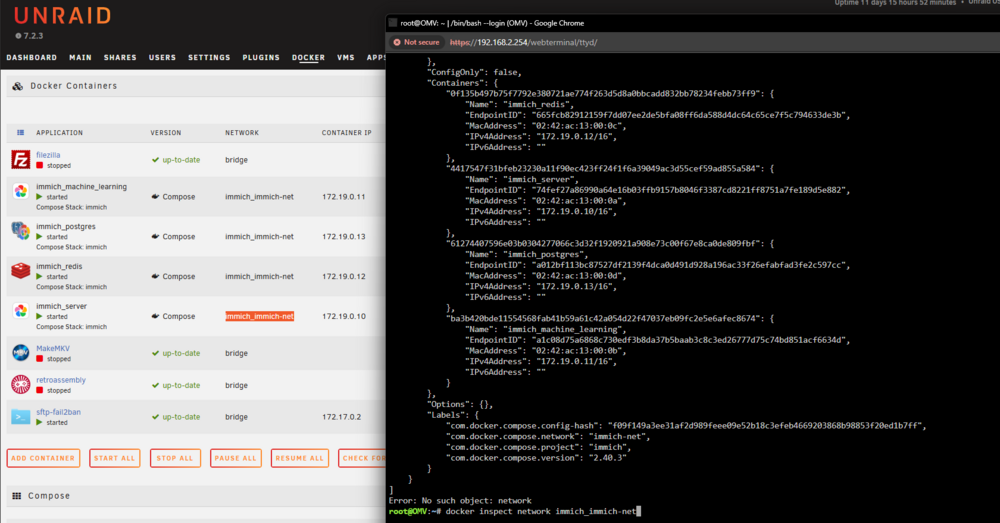
docker inspect command... docker inspect network br0.101 look for the container name and the ipv4 / ipv6 address
-
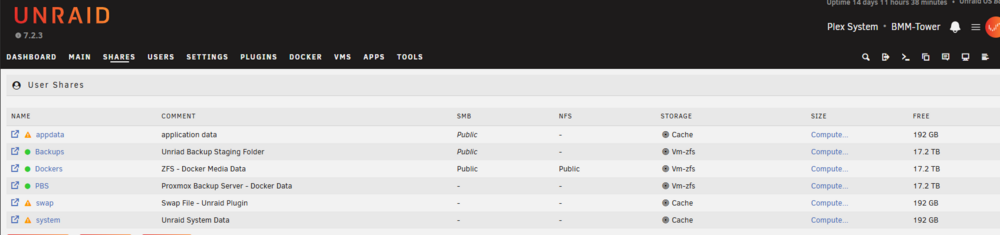
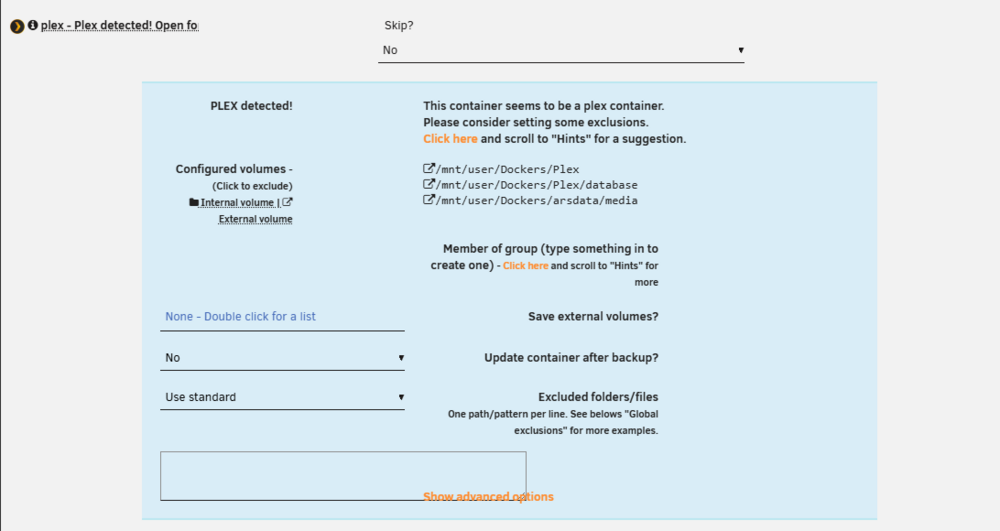
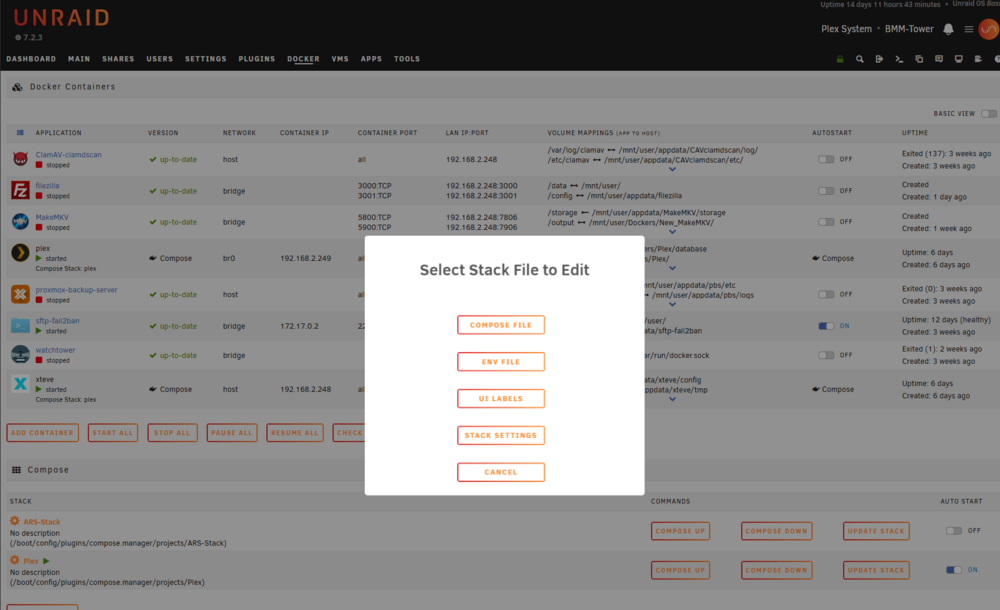
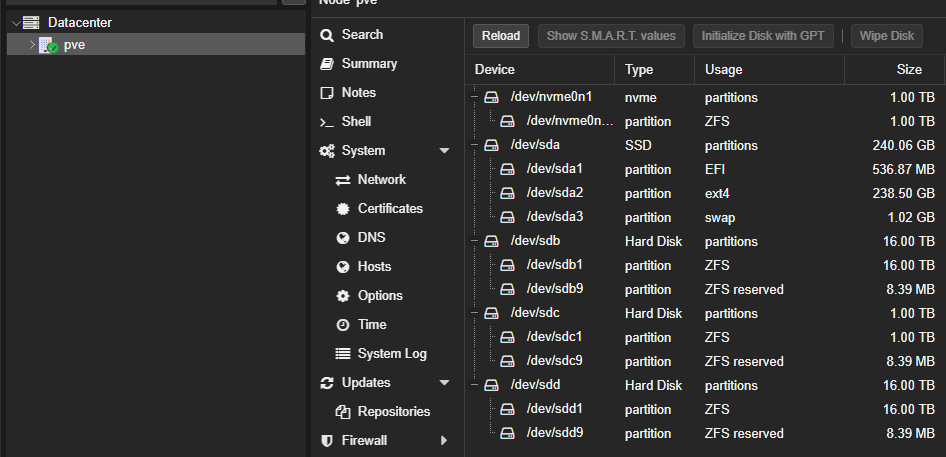
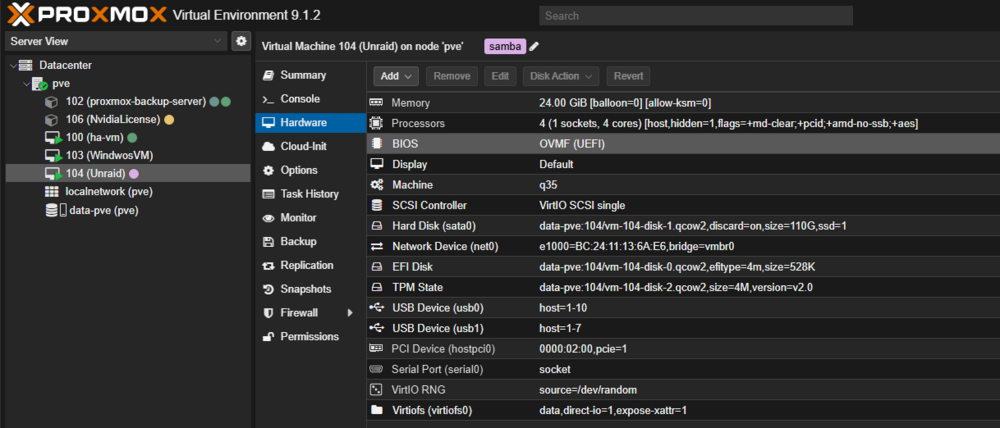
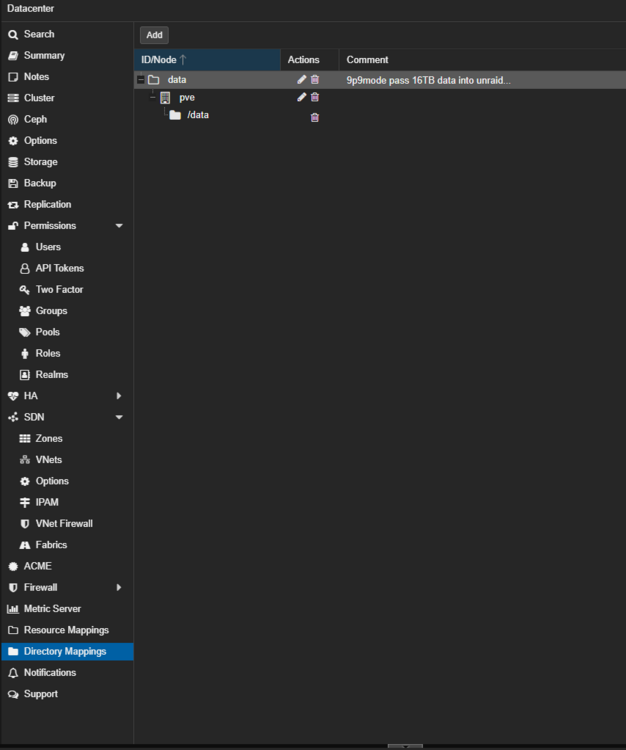
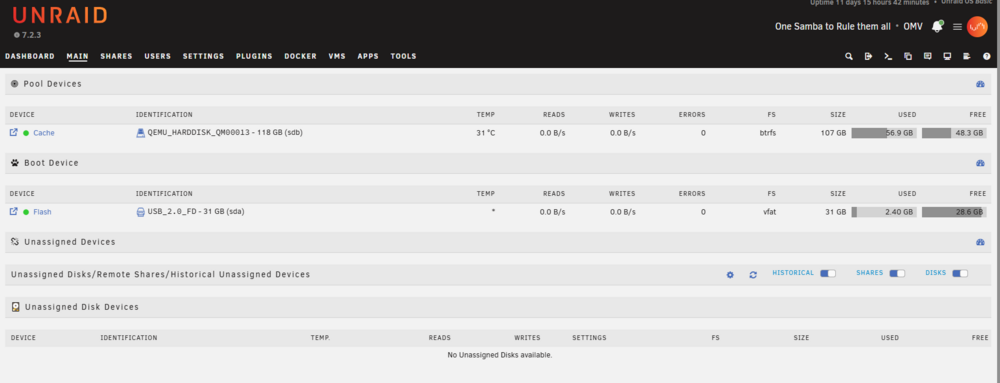
I have lost files due to bit rot on unraid it's why I mention. And only if you're using btrfs or zfs that can restore a snapshot to fix the file or grouping of files. ... With my unraid setup, I usually make a share called backup and use that as a station area. Lately the app data backup plugin has been breaking and not been easily set up make Docker backups and also skip certain folders. A good example is Plex. Well, the app data backup plugin will now detect that there is a Plex install. Setting up to exclude certain folders depending on how you use ZFS You can be a pain to ignore the media folder and also not backup... the Plex database is what you want. *excludes overwrite areas in same paths for backup So I actually use a user script that does what the backup script was going to do but only targets the files, folders, and other systems that I want to Target. #!/bin/bash # Unraid Docker + Appdata backup script # Stops running containers, tars appdata/configs, then restarts containers. set -euo pipefail ######################################## # CONFIGURATION # ######################################## # Where to store backups (handles spaces fine as long as it's quoted) BACKUP_ROOT="/mnt/vm-zfs/Backups/unraid docker data" # Base name for the backup file (it will get a timestamp appended) BACKUP_PREFIX="unraid-docker-backup" # Core Unraid appdata APPDATA_DIR="/mnt/user/appdata" # Unraid Docker XML templates DOCKER_XML_DIR="/boot/config/plugins/dockerMan/templates-user" # Arrs stack appdata + docker-compose ARRS_APPDATA_DIR="/mnt/user/Dockers/arsdata/appdata" ARRS_COMPOSE_FILE="${ARRS_APPDATA_DIR}/docker-compose.yml" # Plex database + docker-compose PLEX_DB_DIR="/mnt/user/Dockers/Plex/database" PLEX_COMPOSE_FILE="/mnt/user/Dockers/Plex/docker-compose.yml" ######################################## # DO NOT EDIT BELOW HERE # ######################################## TIMESTAMP="$(date +%Y%m%d-%H%M%S)" BACKUP_FILE="${BACKUP_ROOT}/${BACKUP_PREFIX}-${TIMESTAMP}.tar.gz" CONTAINERS_FILE="/tmp/unraid-docker-running-containers-${TIMESTAMP}.txt" echo "=== Unraid Docker Backup ===" echo "Timestamp : ${TIMESTAMP}" echo "Backup target : ${BACKUP_FILE}" echo # Ensure backup directory exists echo "[1/5] Creating backup directory if needed..." mkdir -p "${BACKUP_ROOT}" ######################################## # Capture and stop running containers ######################################## echo "[2/5] Capturing list of running containers..." # List names of running containers (one per line) docker ps --format '{{.Names}}' > "${CONTAINERS_FILE}" || true if [[ -s "${CONTAINERS_FILE}" ]]; then echo "Found running containers:" cat "${CONTAINERS_FILE}" echo echo "[3/5] Stopping running containers..." # docker stop accepts a list of names/IDs as separate args docker stop $(cat "${CONTAINERS_FILE}") || true else echo "No running containers found." fi ######################################## # Build list of paths to backup ######################################## echo echo "[4/5] Building backup path list..." paths=() if [[ -d "${APPDATA_DIR}" ]]; then echo " + Including: ${APPDATA_DIR}" paths+=("${APPDATA_DIR}") else echo " - Skipping (not found): ${APPDATA_DIR}" fi if [[ -d "${DOCKER_XML_DIR}" ]]; then echo " + Including: ${DOCKER_XML_DIR}" paths+=("${DOCKER_XML_DIR}") else echo " - Skipping (not found): ${DOCKER_XML_DIR}" fi if [[ -d "${ARRS_APPDATA_DIR}" ]]; then echo " + Including: ${ARRS_APPDATA_DIR}" paths+=("${ARRS_APPDATA_DIR}") fi if [[ -f "${ARRS_COMPOSE_FILE}" ]]; then echo " + Including: ${ARRS_COMPOSE_FILE}" paths+=("${ARRS_COMPOSE_FILE}") fi if [[ -d "${PLEX_DB_DIR}" ]]; then echo " + Including: ${PLEX_DB_DIR}" paths+=("${PLEX_DB_DIR}") fi if [[ -f "${PLEX_COMPOSE_FILE}" ]]; then echo " + Including: ${PLEX_COMPOSE_FILE}" paths+=("${PLEX_COMPOSE_FILE}") fi # Safety check: make sure we have something to back up if [[ ${#paths[@]} -eq 0 ]]; then echo "ERROR: No valid paths found to back up. Aborting." # Try to restart containers before exiting if [[ -s "${CONTAINERS_FILE}" ]]; then echo "Attempting to restart previously running containers..." xargs -r docker start < "${CONTAINERS_FILE}" || true fi exit 1 fi ######################################## # Create the tar.gz archive ######################################## echo echo "[5/5] Creating backup archive..." echo "Running: tar -cvpzf \"${BACKUP_FILE}\" [paths...]" tar -cvpzf "${BACKUP_FILE}" "${paths[@]}" echo echo "Backup complete: ${BACKUP_FILE}" # Flush to disk sync ######################################## # Restart previously running containers ######################################## if [[ -s "${CONTAINERS_FILE}" ]]; then echo echo "Restarting previously running containers..." xargs -r docker start < "${CONTAINERS_FILE}" || true echo "Container restart commands issued." else echo echo "No containers were running before backup; none to restart." fi # Cleanup temp file rm -f "${CONTAINERS_FILE}" echo echo "=== Unraid Docker Backup finished successfully ===" exit 0 There are many user scripts including a post with all my user scripts for code prosperity and a bunch of others on the form. Space invader YouTube videos and mutg have active forms that go over this as well. There's even an rsync backup post that can go over and assist you with setting up backups. https://forums.unraid.net/topic/97958-rsync-incremental-backup/ Other programs exist as well including plugins and applications and Dockers that can do the same like lucky backup and rclone plugin... Based on the disk that you've reported here in the Western digital Enterprise drives, this would be fine in a ZFS array and can be ran 24/7. Unraid does not ship a snapshot script which is also used to help fight it brought and some forms of redundancy backup. Snapshots are not a backup in and of themselves. But snapshots can be used to restore a file on x date when changes have been made. This is the bit route protection. And backup config restore. But this would Mark your 18 TB for raid Z1 and ZFS and be used as a tank or deep storage. (I would assume) Large files such as pictures and media files would be here and anything else that requires space would be entered into these disks as they would run 24/7. And we would build a system that would run 24/7. Using ZFS consumes more RAM and unraid is a ram hungry system to begin with as the whole OS is mutable and Boots into the ram of the computer. If you're comfortable with portainer, you can also run portainer on top of unraid's Docker system and use docker containers. If you do so, use one not both to control dockers. Unraid has a nice Docker web UI. Even with compose and the compose plug-in systems, it's fairly straightforward. To add a composed file. Make your edits. Add an EnV file. Make your edits... For me as I'm still testing some things with virtualized unraid. Proxmox allows me the ability to back up a virtual disks and the disk systems themselves. And because unraid now has moved the ability where I no longer need the ZFS array. I can let Proxmox control my ZFS discs. Pass a ZFS data set from my ZFS discs on proxmox into the VM as a virtiofs. #!/bin/bash # Create mount points mkdir -p /host # Mount VirtioFS shares from PVE mount -t virtiofs data /host #old qemu 9p mode #mount -t 9p -o trans=virtio,version=9p2000.L data /host Pass a temporary Vdesk for cached disk for btrfs for pool system. And then I'm entirely in vm land where I can now use VM backups and PBS to backup entire systems at those states. For me it's easier backups and the ability to use ZFS send to receive to a remote system to store my snapshots and data. Not a priority can be a bit complex but gives me a little bit more freedom and control over virtual space. this give me a "best of both worlds" kind of setup pve for all my VM needs. Unraid for all my docker needs.

-
defaults are fine, but we may need to add a ip route for the ipv6 subnets. this can be done via the gui double check that the vlans have routs to br0 and or to the subnets for traffic. good luck. maybe another mod will be here to assit further.


-
IDK not enough to go off of. to clarify, are you using the same ip range for both br0.101 and br0.112 ? or are they different. as unraid doesn't handle ip routes when the same ip is used on multiple interfaces. @JorgeB thoughts? Apologies. its late for me. I'm off to bed.
-
Apologies its ip route this can also be seen in the gui. via the routing table: *more somethign to doble check. ??? did the docker still start with ipv6 i wonder... docker ps. or the ip address is in uses else where. and docker inspect the network will show the ip in use tied to a docker. Id reboot unraid to double-check and make sure alots changed and it can be hard to pinpoint sometimes..

-
the error say it all. this tells me the br0.101 doesn't have a ip route and may not have a ipv4 address added to it to communicate to the 10.x address you have. IDK why that is. if you run ip a does teh br0.101 have a ipv4 address as well? if you run iproute do you see a route for that subnet 10.x network for br0.101 ? that would be the networking gotcha at this point.

-
un checking hte box and saving then rechecing the box enbled it with slaccc and the interface having a ipv6 that checkbox esetal runs this script to make teh defautl dcoker netwrok br0.101 docker network create \ -d ipvlan \ --subnet=192.168.1.0/24 \ --gateway=192.168.1.1 \ --ipv6 \ --subnet=2001:db8:101:100::/64 \ --gateway=2001:db8:101:100::1 \ -o parent=br0.101 \ br0.101-ipv6 to much back and forth the forum can't keep up and I don't know what your referencing. seeing @ mame here wanting to jump in?
-
Correct so now in the fixed ip in the docker temple you can comma separate it but add a static ipv6 address here for that docker to be statically assigned to. as you have user define enabled the docker ipv 6 should be saved across reboots. You apear to be golden and setup corectly now. UNriad and vlans can be problematic. it usualy statis withteh ipv6 dhcp server and slacc based on the default shiped inet script.
-
correct as now when docker starts unraid will make the network based on setting defiened in the config. as such with user defined. we can now run terminal comand such as: docker network create \ -d ipvlan \ --subnet=192.168.1.0/24 \ --gateway=192.168.1.1 \ --ipv6 \ --subnet=2001:db8:101:100::/64 \ --gateway=2001:db8:101:100::1 \ -o parent=br0.101 \ br0.101-ipv6To make the docker network with the ipv6 data. Note the parent interface this needs a ipv6 address. you must fill in the ipv data here for the network. then your dockers in the template can use ipv6

-
the inet script by unriad din't detect ipv6 comunication and thus ran teh compabilty bug patch to force ipv4 for docekr networks. you have to not let unriad define this and manualy run commands to set the interface ip and make the docker network. again unraid docekr setting didn't see ipv6 use docker network inspect it will say ipv6 disabled ... this is what your fighitng...
-
you would see the ipv6 subnet there as well, this just set the --ip=#### line in the extra parm. while in theory you could set a ipv6 address there it would be using ipv6 to ipv4 tap to tunnel over ip4 in that state based on the picture. since you have preserver user defined on. I would remove docker setting checmark for br.101 and create my own docker network to have ipv6 enabled. docker network create \ -d ipvlan \ --subnet=192.168.1.0/24 \ --gateway=192.168.1.1 \ --ipv6 \ --subnet=2001:db8:101:100::/64 \ --gateway=2001:db8:101:100::1 \ -o parent=br0.101 \ br0.101-ipv6 *without knowing the ipv6 delegation and data I used a semi default from my own... as essentially the docker network done't have ipv6 enabled. Check with docker inspect commands docker network inspect br0.101
-
example script: #!/bin/bash # Configure br0.101 with IPv4 + IPv6 # Run: At First Array Start (Docker must be stopped/starting) sleep 20 IFACE="br0.101" # Bring interface down ip link set "$IFACE" down || true # Flush existing addresses ip addr flush dev "$IFACE" # ---- IPv4 (static) --------------------------------------------------------- ip addr add 192.168.1.25/24 dev "$IFACE" # ---- IPv6 (static) --------------------------------------------------------- ip -6 addr add 2001:db8:101::25/64 dev "$IFACE" # Enable IPv6 on interface explicitly sysctl -w net.ipv6.conf."$IFACE".disable_ipv6=0 # Bring interface up ip link set "$IFACE" up and docker network create \ -d ipvlan \ --subnet=192.168.1.0/24 \ --gateway=192.168.1.1 \ --ipv6 \ --subnet=2001:db8:101:100::/64 \ --gateway=2001:db8:101:100::1 \ -o parent=br0.101 \ br0.101-ipv6
-
no, that just power users commands. as a workaround. Example: https://forums.unraid.net/topic/178033-bmartino1-user-scripts/#findComment-1492333 we can run similar to bring down a interface and let dhcp reactive it or set an ip on the interface. we would work around this by manually setting the ip to the vlan interface in unraid similar with how I fix the unifi dhcp snooping issues with 2 sides of the same bridge with 2 different macs getting the same ip address.
-
that is my understading of it when testing with unfi network settings and ipv6 for unraid.



