






bmartino1
Members
-
Joined
-
Last visited
Everything posted by bmartino1
-
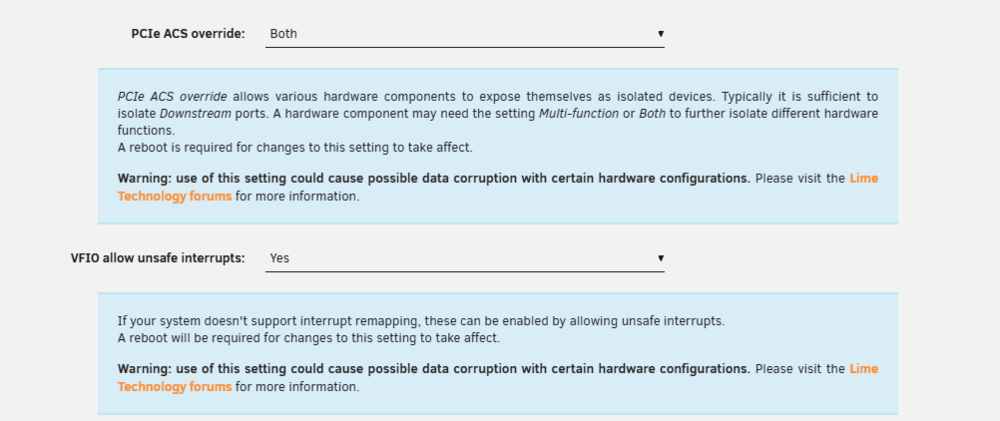
so yes there is adational bios otions that need enabled and set your syslog is showing Jan 7 13:02:29 Tower kernel: iommu: Default domain type: Passthrough and sone't have any thing with DMAR nor remaping which is required for iommu support at the linmux qemu software layer and vfio for sriov devices. Verifying IOMMU parameters Verify IOMMU is enabledReboot, then run: dmesg | grep -e DMAR -e IOMMU There should be a line that looks like "DMAR: IOMMU enabled". If there is no output, something is wrong. Verify IOMMU interrupt remapping is enabledIt is not possible to use PCI passthrough without interrupt remapping. Device assignment will fail with 'Failed to assign device "[device name]": Operation not permitted' or 'Interrupt Remapping hardware not found, passing devices to unprivileged domains is insecure.'. All systems using an Intel processor and chipset that have support for Intel Virtualization Technology for Directed I/O (VT-d), but do not have support for interrupt remapping will see such an error. Interrupt remapping support is provided in newer processors and chipsets (both AMD and Intel). To identify if your system has support for interrupt remapping: dmesg | grep 'remapping' If you see one of the following lines: AMD-Vi: Interrupt remapping enabled DMAR-IR: Enabled IRQ remapping in x2apic mode ('x2apic' can be different on old CPUs, but should still work) then remapping is supported. If your system doesn't support interrupt remapping, you can allow unsafe interrupts with: but atm this looks to be bios level settings...
-
I otherwise highly recommend running and using the docker compose method... rocket.chat is still updating documentation due to recent changes in code and project. alot has changed... https://github.com/RocketChat/Rocket.Chat as seen here: https://raw.githubusercontent.com/RocketChat/Docker.Official.Image/refs/heads/main/compose.yml and due to changes from dev of rocket.chat: https://github.com/RocketChat/rocketchat-compose which requires the database compose and standard compose to run (the inspiration behind the AIO image...) https://docs.rocket.chat/docs/deploy-with-ubuntu and the v7.12 docker file per the repo pull That said rocket.chat is still transition and fixing things so i highly recommend the compose option... But the stack as a whole is lot and quite a bit that has my concers for udpates form npm, to node to javascritp 3 to rocket.chat needing to revamp for new codes... so here is a all in one unraid ready comopse file pulling rocket.chats copsoe files. Directory Layout (Recommended) rocketchat-unraid/ ├── compose.yml └── .envUnraid Compose Manager works best when everything is flat. docker-compose.yml (Unraid-ready)version: "3.8" services:# =====================================================# NATS# =====================================================nats: image: docker.io/nats:${NATS_VERSION:-2.11-alpine} container_name: rocketchat-nats restart: unless-stopped command: --http_port 8222 ports: - "${NATS_BIND_IP:-127.0.0.1}:${NATS_PORT_NUMBER:-4222}:4222" labels: folder.view: "rocketchat" net.unraid.docker.managed: "composeman" net.unraid.docker.webui: "" net.unraid.docker.icon: "${UNRAID_ICON}" # =====================================================# MongoDB (Replica Set – auto-initialized)# =====================================================mongodb: image: docker.io/bitnamilegacy/mongodb:${MONGODB_VERSION:-6.0} container_name: rocketchat-mongodb restart: unless-stopped volumes: - /mnt/user/appdata/rocketchat/mongodb:/bitnami/mongodb environment: MONGODB_REPLICA_SET_MODE: primary MONGODB_REPLICA_SET_NAME: rs0 MONGODB_PORT_NUMBER: 27017 MONGODB_INITIAL_PRIMARY_HOST: mongodb MONGODB_INITIAL_PRIMARY_PORT_NUMBER: 27017 MONGODB_ADVERTISED_HOSTNAME: mongodb MONGODB_ENABLE_JOURNAL: "true" ALLOW_EMPTY_PASSWORD: "yes" ports: - "${MONGODB_BIND_IP:-127.0.0.1}:27017:27017" labels: folder.view: "rocketchat" net.unraid.docker.managed: "composeman" net.unraid.docker.webui: "" net.unraid.docker.icon: "${UNRAID_ICON}" # =====================================================# Rocket.Chat# =====================================================rocketchat: image: ${IMAGE:-registry.rocket.chat/rocketchat/rocket.chat}:${RELEASE:-latest} container_name: rocketchat restart: unless-stopped depends_on: - mongodb - nats environment: ROOT_URL: ${ROOT_URL:-http://192.168.2.42:3000} PORT: ${PORT:-3000} DEPLOY_METHOD: docker DEPLOY_PLATFORM: compose REG_TOKEN: ${REG_TOKEN:-} # Mongo MONGO_URL: mongodb://mongodb:27017/rocketchat?replicaSet=rs0 MONGO_OPLOG_URL: mongodb://mongodb:27017/local?replicaSet=rs0 # NATS TRANSPORTER: "nats://nats:4222" # Metrics (optional, harmless if unused) LICENSE_DEBUG: "true" OVERWRITE_SETTING_Prometheus_Enabled: "true" OVERWRITE_SETTING_Prometheus_Port: "${METRICS_PORT:-9458}" ports: - "${BIND_IP:-0.0.0.0}:${HOST_PORT:-3000}:3000" - "${BIND_IP:-0.0.0.0}:${METRICS_PORT:-9458}:${METRICS_PORT:-9458}" volumes: - /mnt/user/appdata/rocketchat/uploads:/app/uploads labels: folder.view: "rocketchat" net.unraid.docker.managed: "composeman" net.unraid.docker.webui: "http://192.168.2.42:${HOST_PORT:-3000}" net.unraid.docker.icon: "${UNRAID_ICON}"Minimal .env (Recommended)# ===================================================== # Rocket.Chat # ===================================================== IMAGE=registry.rocket.chat/rocketchat/rocket.chat RELEASE=latest ROOT_URL=http://192.168.2.42:3000 HOST_PORT=3000 PORT=3000 BIND_IP=0.0.0.0 REG_TOKEN= # ===================================================== # MongoDB # ===================================================== MONGODB_VERSION=6.0 MONGODB_BIND_IP=127.0.0.1 # ===================================================== # NATS # ===================================================== NATS_VERSION=2.11-alpine NATS_PORT_NUMBER=4222 NATS_BIND_IP=127.0.0.1 # ===================================================== # Metrics (optional) # ===================================================== METRICS_PORT=9458 # ===================================================== # Unraid # ===================================================== UNRAID_ICON=https://raw.githubusercontent.com/RocketChat/Rocket.Chat.Artwork/master/Logos/icon.svg
-
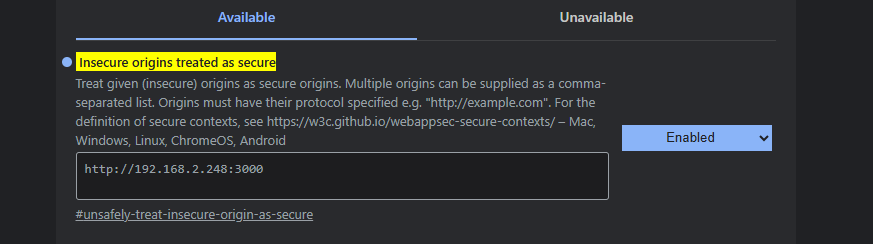
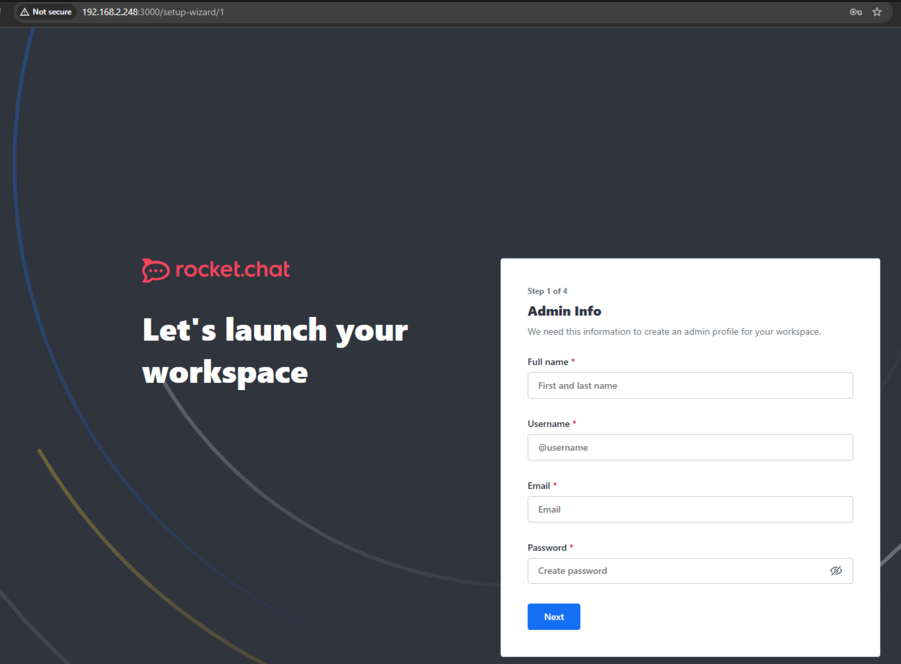
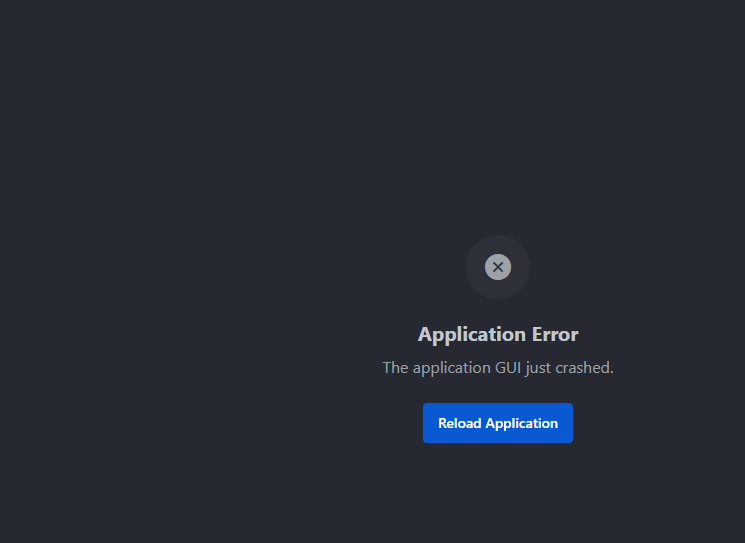
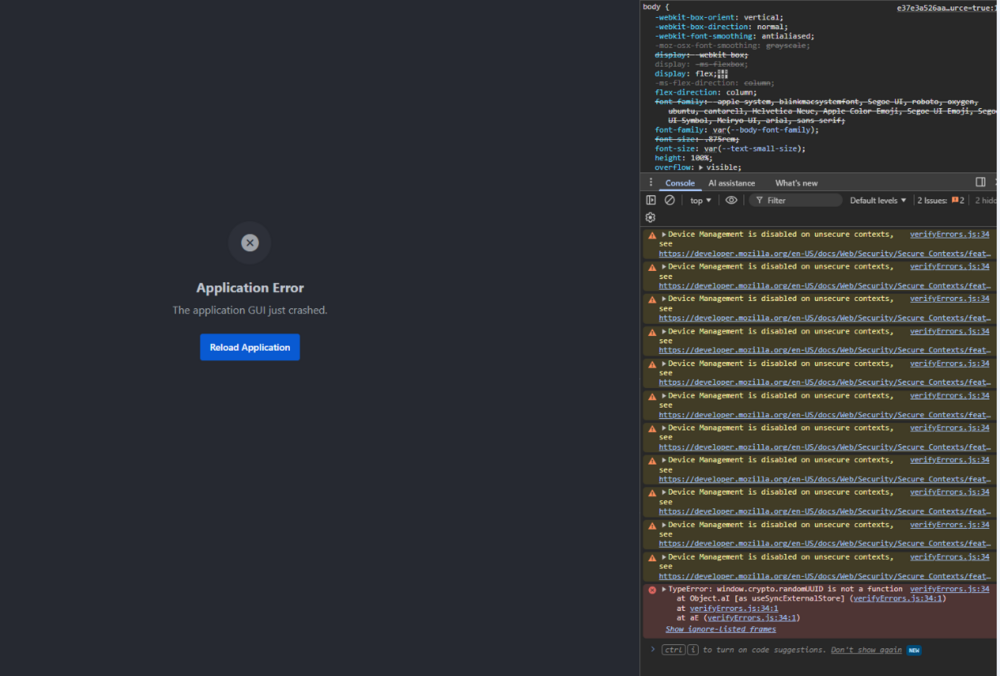
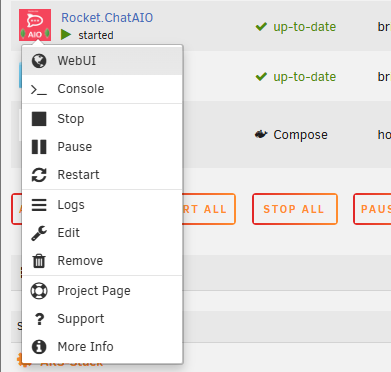
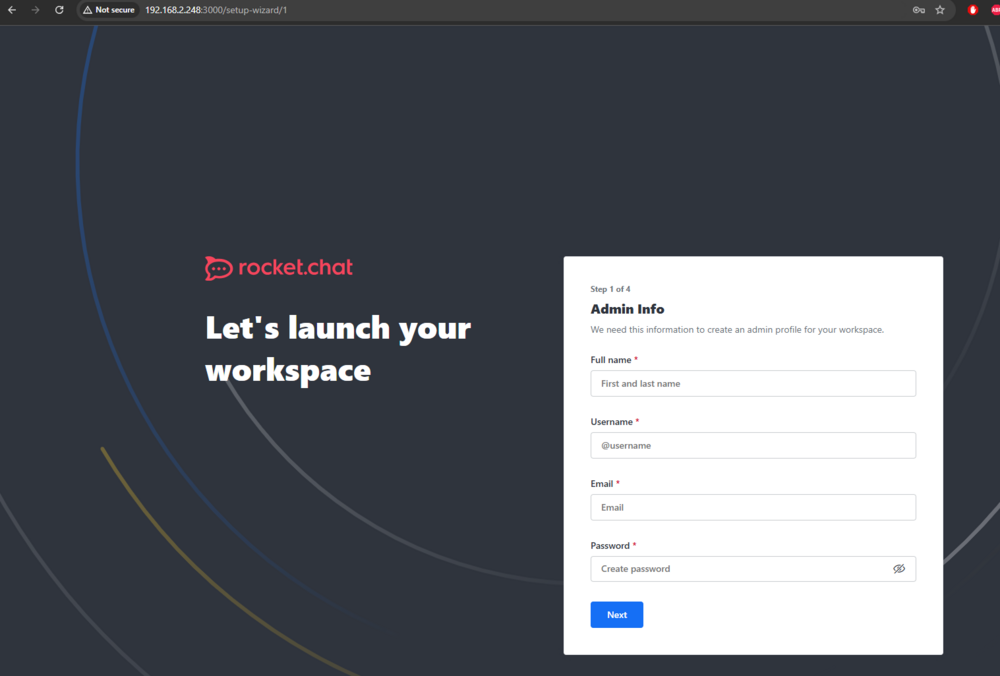
tests where with google chrome the setup wizard and registration worked flawlessly... once you use the docker webui option and sucesfuly register your workspace then get when going to the home location this is a https crypto issue due to changes in the rocket.chat code. chrome://flags/#unsafely-treat-insecure-origin-as-secure otherwise use in conjunction with a reverse proxy and update your Root_URL!

-
whats does info say: please post a diagnostic file... intel or amd? some amd requrie going deper into bios to enable iommu not set to auto and enable memory remaping. may require a mother board bios firmware update as well...


-
pleas post a diagnostic you may need a reltek plugin install. or user scirpt to update teh ethtool for 2.5 connecitons as noted here: https://forums.unraid.net/topic/141349-plugin-realtek-r8125-r8126-r8168-and-r815267-drivers/#findComment-1279775
-
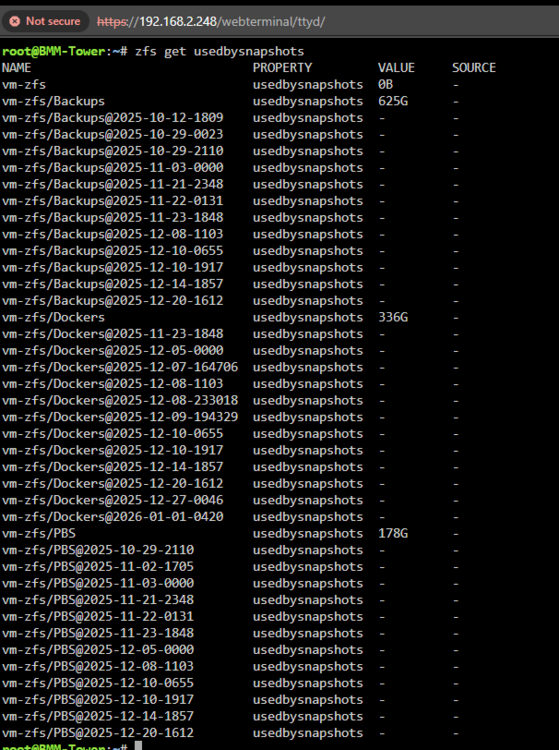
exampls updated script with size storage space restrictions. #!/usr/bin/env bash set -euo pipefail ######################## simple-snapshot-zfs ####################### ###################### User Defined Options ####################### DATASETS=("vm-zfs/Backups") SNAPSHOT_QTY=5 MAX_SNAPSHOT_SPACE="500G" # HARD LIMIT PER DATASET ################################################################## timestamp=$(date "+%Y-%m-%d-%H:%M") echo "Starting Snapshot ${timestamp}" echo "_____________________________________________________________" create_snapshot_if_changed() { local DATASET="$1" local WRITTEN WRITTEN=$(zfs get -H -o value written "${DATASET}") if [[ "${WRITTEN}" != "0" ]]; then local TS TS="$(date '+%Y-%m-%d-%H%M')" zfs snapshot -r "${DATASET}@${TS}" echo "Recursive snapshot created: ${DATASET}@${TS}" else echo "No changes detected in ${DATASET}. No snapshot created." fi } prune_by_count() { local DATASET="$1" local KEEP="${SNAPSHOT_QTY}" mapfile -t SNAPSHOTS < <( zfs list -t snapshot -o name -s creation -r "${DATASET}" | grep "^${DATASET}@" ) local COUNT=${#SNAPSHOTS[@]} echo "Snapshot count for ${DATASET}: ${COUNT}" if (( COUNT > KEEP )); then local TO_DELETE=$((COUNT - KEEP)) for snap in "${SNAPSHOTS[@]:0:${TO_DELETE}}"; do zfs destroy "${snap}" echo "Deleted snapshot (count limit): ${snap}" done fi } prune_by_space() { local DATASET="$1" while true; do local USED USED=$(zfs get -H -o value usedbysnapshots "${DATASET}") echo "Snapshot space used by ${DATASET}: ${USED}" if ! zfs get -H -o value usedbysnapshots "${DATASET}" \ | awk -v max="${MAX_SNAPSHOT_SPACE}" ' BEGIN { exit (system("numfmt --from=iec " $0) > system("numfmt --from=iec " max)) }' then break fi local OLDEST OLDEST=$(zfs list -t snapshot -o name -s creation -r "${DATASET}" | grep "^${DATASET}@" | head -n 1) [[ -z "${OLDEST}" ]] && break zfs destroy "${OLDEST}" echo "Deleted snapshot (space limit): ${OLDEST}" done } for dataset in "${DATASETS[@]}"; do create_snapshot_if_changed "${dataset}" prune_by_count "${dataset}" prune_by_space "${dataset}" echo "_____________________________________________________________" done echo "----------------------------Done!----------------------------" What This Script Now Guarantees✔ Snapshots only created if data changed ✔ Snapshot count limit enforced ✔ Snapshot space limit enforced ✔ Oldest snapshots removed first ✔ Fully recursive-safe ✔ Uses correct ZFS accounting (usedbysnapshots) Per-snapshot USED is not additive → don’t sum it. The only authoritative metric is: zfs get usedbysnapshots DATASET
-
user script plugin cron monthly: https://forums.unraid.net/topic/178033-bmartino1-user-scripts/#findComment-1478664 we can even edit it based on sanpshot size...
-
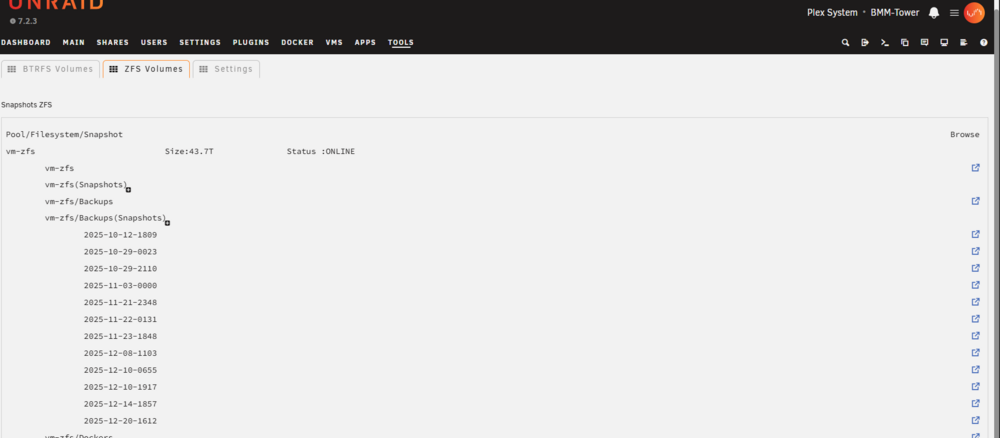
snapshot plugin and zfs master plugin
-
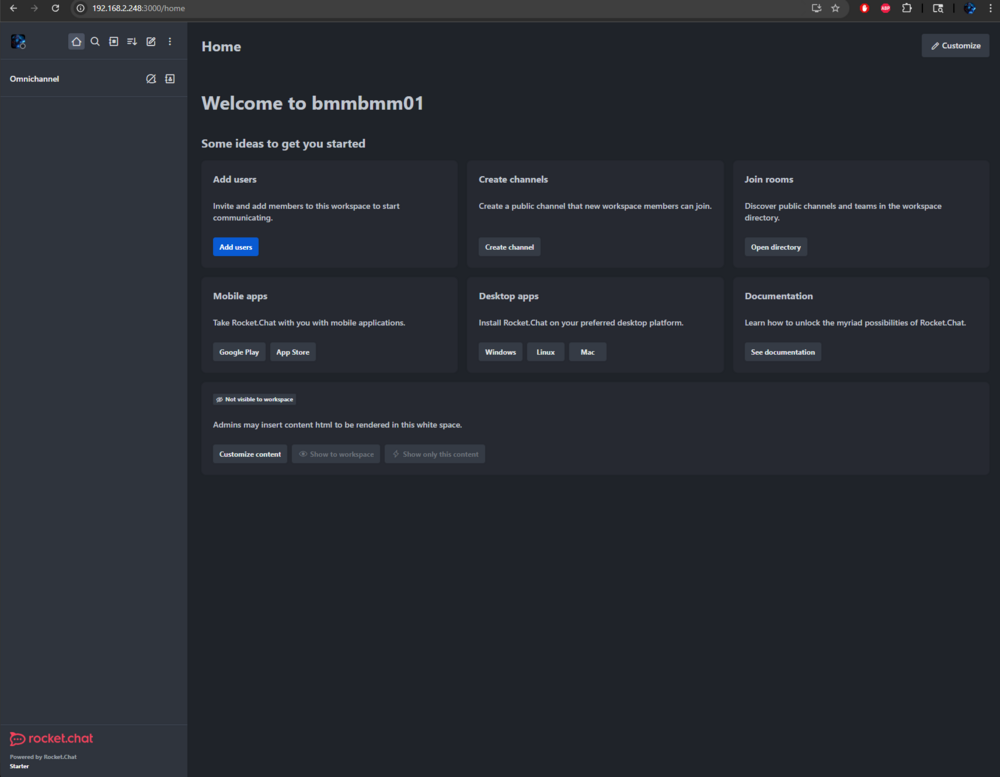
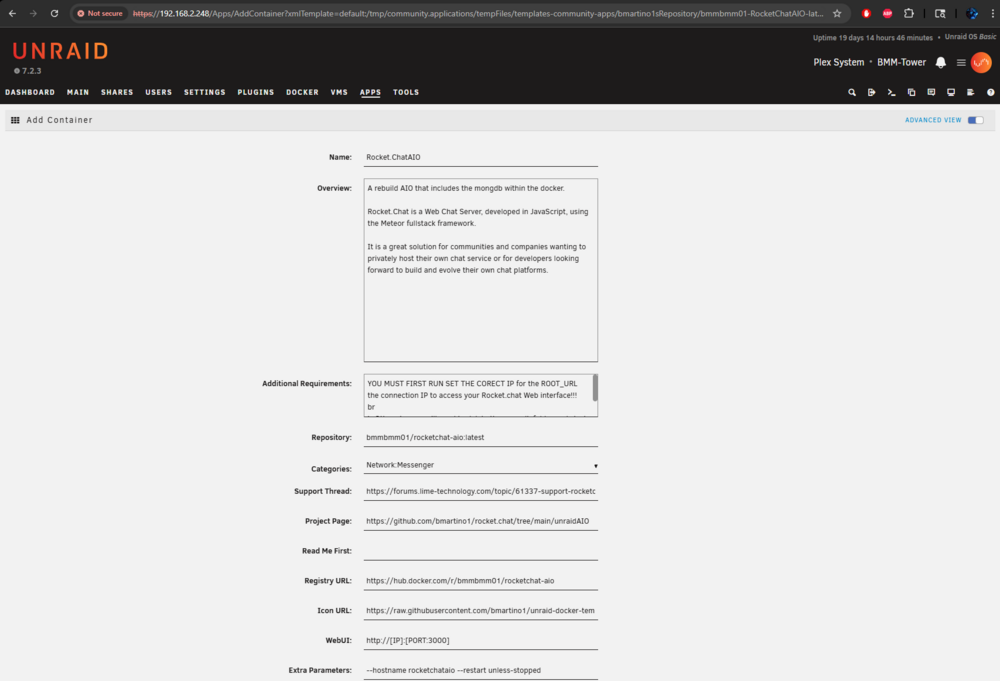
AIO has been heavily changed and updated due to recent issues and chagnes to rocket.chat lattest image.... There is a new CA updated new template options... Again the seen before forks issues is a docker carsh restart loading somnthign before rocket.chat... That I can manual triger but don't experience.... any atempts to use the image today have been heavily redone... mutiple times thorugh out the day tags, images and other have beendone so earlier testing is not applicable... the AIO will install smtp(postfix), mongdb v8, the lastest version of rocket.chat form there github... dependacy per npm javascript node22 deno and metora the backbone framework to run the bare min to get up and working. testing have shown no issues even with a docker restart crash... Example of a working AIO instance after final testing and data pushed: Docker log example: [AIO] Starting Postfix... ...done. [AIO] Sending local SMTP test email... [AIO] Starting NATS... [AIO] Starting MongoDB... [AIO] Waiting for MongoDB socket... [AIO] Replica set already initialized. [AIO] Starting Rocket.Chat on 0.0.0.0:3000 ... LocalStore: store created at LocalStore: store created at LocalStore: store created at {"level":40,"time":"2026-01-08T00:32:31.079Z","pid":7,"hostname":"rocketchataio","name":"VoIPAsteriskService","msg":"Voip is not enabled. Cant start the service"} {"level":51,"time":"2026-01-08T00:32:31.130Z","pid":7,"hostname":"rocketchataio","name":"Migrations","msg":"Not migrating, already at version 318"} NetworkBroker started successfully. {"level":51,"time":"2026-01-08T00:32:33.760Z","pid":7,"hostname":"rocketchataio","name":"License","msg":"License installed","version":"3.0","hash":"VrKgWnx0"} {"level":30,"time":"2026-01-08T00:32:33.778Z","pid":7,"hostname":"rocketchataio","name":"homeserver","name":"DatabaseConnectionService","msg":"Connected to MongoDB database: rocketchat"} {"level":30,"time":"2026-01-08T00:32:33.778Z","pid":7,"hostname":"rocketchataio","name":"homeserver","msg":"EventEmitterService: External emitter injected"} +--------------------------------------------------------------+ | SERVER RUNNING | +--------------------------------------------------------------+ | | | Rocket.Chat Version: 7.13.2 | | NodeJS Version: 22.21.0 - x64 | | MongoDB Version: 8.0.17 | | MongoDB Engine: wiredTiger | | Platform: linux | | Process Port: 3000 | | Site URL: http://192.168.2.248:3000 | | ReplicaSet OpLog: Not required (running micro services) | | Commit Hash: 72fe118ea7 | | Commit Branch: HEAD | | | +--------------------------------------------------------------+ Proof of concept: THE AIO IS FOR FRESH INSTALLS ONLY! *Warning no proxy / https is in the image! this is due to other proxy integrations for use on unraid... tests where with browser Google Chrome where the setup wizard and registration worked flawlessly... However, new developments to rocket.chat may requires http / proxy setups to use now... I can still use the applicaiotn as seen above with http and by using an expermiental chrome flag by editing and adding to chrome flag. chrome://flags/#unsafely-treat-insecure-origin-as-secure I highly recommend deleting the mongdb folder and try again with the latest pushed docker tag image. Future updates / Release should not require the mongdb to be deleted.
-
so i can only asume you have fubared your database: so you must deelte this folder and start again... I can manually reproduced due to contains restart and how mongdb loads slower then rocket.chat I am implementing a fix to the docker image atm.

-
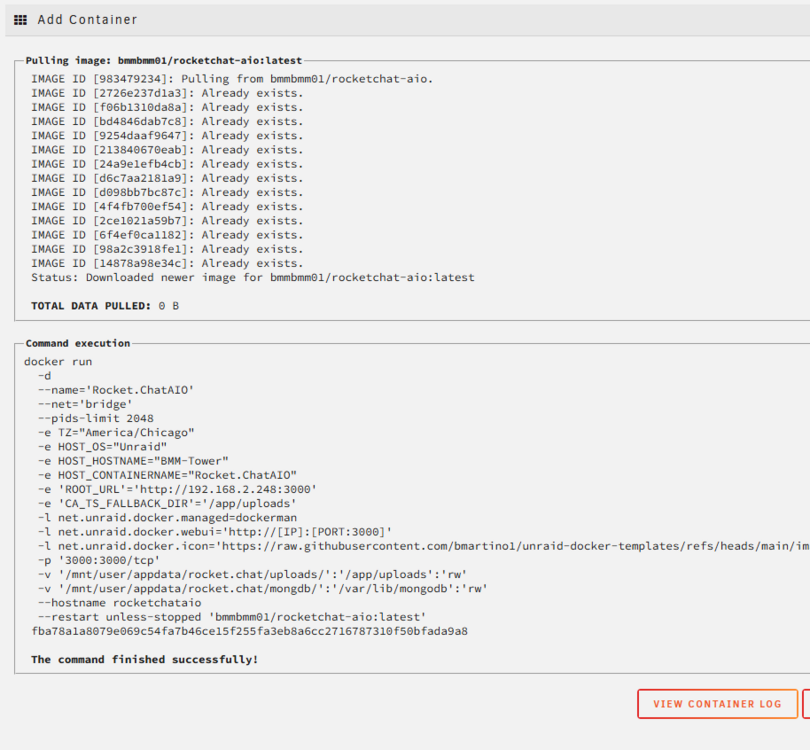
using bridge: i use my unraid ip: ... so you messede up as it writes the root url for guarantee connections... I prefer to manualy make my directory before hand know where the data is stored... root@BMM-Tower:/mnt/user/appdata# mkdir -p /mnt/user/appdata/rocket.chat/mongdb/ root@BMM-Tower:/mnt/user/appdata# ls /mnt/user/appdata/rocket.chat/mongdb/ root@BMM-Tower:/mnt/user/appdata# expected docker log: ############################################ strict mode: use allowUnionTypes to allow union type keyword at "#/properties/count" (strictTypes) strict mode: use allowUnionTypes to allow union type keyword at "#/properties/offset" (strictTypes) strict mode: missing type "object" for keyword "additionalProperties" at "#" (strictTypes) strict mode: missing type "object" for keyword "properties" at "#" (strictTypes) strict mode: missing type "object" for keyword "required" at "#/oneOf/0" (strictTypes) strict mode: missing type "object" for keyword "required" at "#/oneOf/1" (strictTypes) Wed, 07 Jan 2026 19:03:42 GMT body-parser deprecated undefined extended: provide extended option at app/app.js:135830:64 Wed, 07 Jan 2026 19:03:42 GMT body-parser deprecated undefined extended: provide extended option at app/app.js:135831:57 (node:1) NOTE: The AWS SDK for JavaScript (v2) is in maintenance mode. SDK releases are limited to address critical bug fixes and security issues only. Please migrate your code to use AWS SDK for JavaScript (v3). For more information, check the blog post at https://a.co/cUPnyil (Use `node --trace-warnings ...` to show where the warning was created) strict mode: missing type "object" for keyword "additionalProperties" at "#" (strictTypes) [AIO] Starting MongoDB... about to fork child process, waiting until server is ready for connections. forked process: 14 child process started successfully, parent exiting [AIO] Waiting for MongoDB... [AIO] Initializing replica set... test> ... ... ... { ok: 1 } test> [AIO] Starting Rocket.Chat on 0.0.0.0:3000 ... LocalStore: store created at LocalStore: store created at LocalStore: store created at {"level":40,"time":"2026-01-07T19:03:48.942Z","pid":1,"hostname":"rocketchataio","name":"VoIPAsteriskService","msg":"Voip is not enabled. Cant start the service"} [2026-01-07T19:03:57.344Z] INFO a86c9afd-d561-42ab-a494-c656fcfa91d9/BROKER: Moleculer v0.14.35 is starting... [2026-01-07T19:03:57.345Z] INFO a86c9afd-d561-42ab-a494-c656fcfa91d9/BROKER: Namespace: <not defined> [2026-01-07T19:03:57.345Z] INFO a86c9afd-d561-42ab-a494-c656fcfa91d9/BROKER: Node ID: a86c9afd-d561-42ab-a494-c656fcfa91d9 [2026-01-07T19:03:57.345Z] INFO a86c9afd-d561-42ab-a494-c656fcfa91d9/REGISTRY: Strategy: RoundRobinStrategy [2026-01-07T19:03:57.346Z] INFO a86c9afd-d561-42ab-a494-c656fcfa91d9/REGISTRY: Discoverer: LocalDiscoverer [2026-01-07T19:03:57.347Z] INFO a86c9afd-d561-42ab-a494-c656fcfa91d9/BROKER: Serializer: EJSONSerializer [2026-01-07T19:03:57.350Z] INFO a86c9afd-d561-42ab-a494-c656fcfa91d9/BROKER: Validator: FastestValidator [2026-01-07T19:03:57.352Z] INFO a86c9afd-d561-42ab-a494-c656fcfa91d9/BROKER: Registered 13 middleware(s). [2026-01-07T19:03:57.352Z] INFO a86c9afd-d561-42ab-a494-c656fcfa91d9/BROKER: Transporter: TcpTransporter {"level":51,"time":"2026-01-07T19:03:57.364Z","pid":1,"hostname":"rocketchataio","name":"DatabaseWatcher","msg":"Using change streams"} {"level":30,"time":"2026-01-07T19:03:57.381Z","pid":1,"hostname":"rocketchataio","name":"homeserver","name":"DatabaseConnectionService","msg":"Connected to MongoDB database: rocketchat"} {"level":30,"time":"2026-01-07T19:03:57.381Z","pid":1,"hostname":"rocketchataio","name":"homeserver","msg":"EventEmitterService: External emitter injected"} ufs: temp directory created at "/tmp/ufs" +--------------------------------------------------+ | SERVER RUNNING | +--------------------------------------------------+ | | | Rocket.Chat Version: 7.13.2 | | NodeJS Version: 22.21.0 - x64 | | MongoDB Version: 7.0.28 | | MongoDB Engine: wiredTiger | | Platform: linux | | Process Port: 3000 | | Site URL: http://192.168.2.248:3000 | | ReplicaSet OpLog: Enabled | | Commit Hash: 72fe118ea7 | | Commit Branch: HEAD | | | +--------------------------------------------------+ [2026-01-07T19:03:58.363Z] INFO a86c9afd-d561-42ab-a494-c656fcfa91d9/TRANSIT: Connecting to the transporter... [2026-01-07T19:03:58.364Z] INFO a86c9afd-d561-42ab-a494-c656fcfa91d9/TRANSPORTER: TCP server is listening on port 45477 [2026-01-07T19:03:58.364Z] INFO a86c9afd-d561-42ab-a494-c656fcfa91d9/TRANSPORTER: UDP Discovery is disabled. [2026-01-07T19:03:58.364Z] INFO a86c9afd-d561-42ab-a494-c656fcfa91d9/TRANSPORTER: TCP Transporter started. [2026-01-07T19:03:58.869Z] INFO a86c9afd-d561-42ab-a494-c656fcfa91d9/REGISTRY: '$node' service is registered. [2026-01-07T19:03:58.870Z] INFO a86c9afd-d561-42ab-a494-c656fcfa91d9/REGISTRY: 'matrix' service is registered. [2026-01-07T19:03:58.870Z] INFO a86c9afd-d561-42ab-a494-c656fcfa91d9/$NODE: Service '$node' started. [2026-01-07T19:03:58.870Z] INFO a86c9afd-d561-42ab-a494-c656fcfa91d9/MATRIX: Service 'matrix' started. [2026-01-07T19:03:58.870Z] INFO a86c9afd-d561-42ab-a494-c656fcfa91d9/BROKER: ✔ ServiceBroker with 2 service(s) started successfully in 507ms. ################### thats it finish the wizard and setup for rocket chat... I can't make it any easier... Iv'be seen no other mongdb issues and a problem after wizzard setup to use the platform... full features require paid support form rocket.chat...




-
you can clone the system disk and attach the disk to the same system but bios and which disk is primary becomes the question yes.
-
read the adational notes. you ran somting inteh continer. this works out of the box... you dind't set teh corect chat url at first run anda fo bared the mongo db you MUST DELTE THE FOLDER and let the AIO mange Mongdb...
-
ok not enough data to assist either way... vm xml, vm vdisk, vm os loaders. Hardware passed? Theses can cause issues... VM vdisks snapshots, qdisk vs raw vs etc... backup will not target passed devices.. per example... if snapshots you need to grab additional libvirt data... essential the database history to restore the vdisk... more info on that on the forum in other posts.... (its honestly best to not touch snapshots AT ALL if using the backup systems... or to make it 1 vdisk file again) theres caveats and gotchas to that... also explain on the forum... DID you do your research as you not asking questions... Unraid doesn't support "health checks" for VM that i'm aware of... health checks in what way? that the vm started again? that a qm start error code and vise versa... as this seems like somehtign that can be easily scripted... unrids vms systems use limvirt qemu systems in xml domain format. https://libvirt.org/formatdomain.html you want a backup script for pre or post that fine... but again to what targeting what for what where... not enough data to assist either way... did you read any of the support forum pages or docs? https://forums.unraid.net/topic/86303-vm-backup-plugin/ https://www.reddit.com/r/unRAID/comments/18xo4kf/vm_backup_best_practices/ https://forums.unraid.net/topic/51703-vm-faq/#comment-523800 https://www.reddit.com/r/unRAID/comments/57j8f6/video_guide_backing_up_and_restoring_vms_in/ https://docs.unraid.net/unraid-os/using-unraid-to/create-virtual-machines/vm-setup/
-
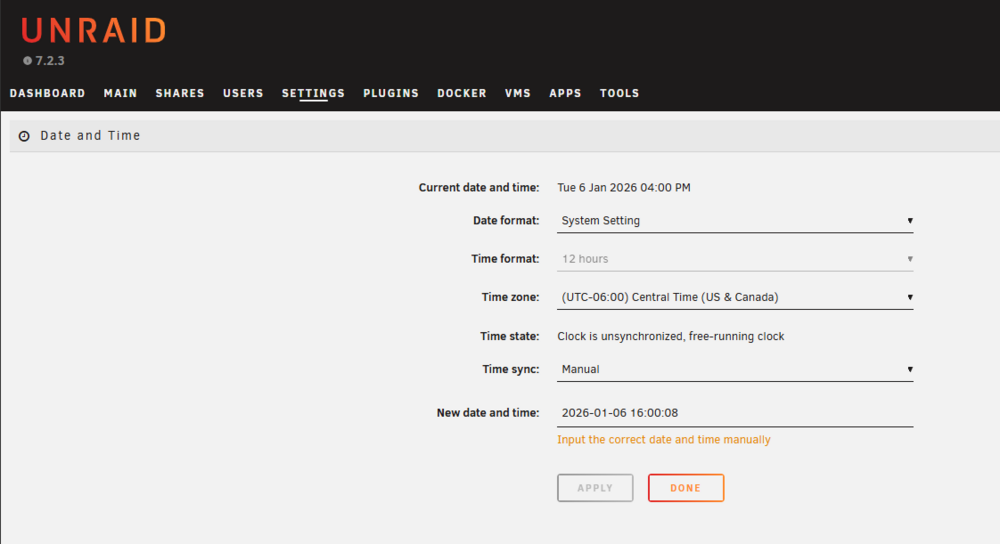
still reviewing the diag... Jan 6 16:51:56 Stockton rc.ntpd: Starting NTP server daemon... Jan 6 16:51:56 Stockton ntpd[2264]: ntpd [email protected] Fri Jul 4 19:14:57 UTC 2025 (1): Starting Jan 6 16:51:56 Stockton ntpd[2264]: Command line: /usr/sbin/ntpd -g -u ntp:ntp Jan 6 16:51:56 Stockton ntpd[2264]: ---------------------------------------------------- Jan 6 16:51:56 Stockton ntpd[2264]: ntp-4 is maintained by Network Time Foundation, Jan 6 16:51:56 Stockton ntpd[2264]: Inc. (NTF), a non-profit 501(c)(3) public-benefit Jan 6 16:51:56 Stockton ntpd[2264]: corporation. Support and training for ntp-4 are Jan 6 16:51:56 Stockton ntpd[2264]: available at https://www.nwtime.org/support Jan 6 16:51:56 Stockton ntpd[2264]: ---------------------------------------------------- Jan 6 16:51:56 Stockton ntpd[2264]: DEBUG behavior is enabled - a violation of any diagnostic assertion will cause ntpd to abort Jan 6 16:51:56 Stockton ntpd[2266]: proto: precision = 0.040 usec (-24) Jan 6 16:51:56 Stockton ntpd[2266]: basedate set to 2025-06-22 Jan 6 16:51:56 Stockton ntpd[2266]: gps base set to 2025-06-22 (week 2372) Jan 6 16:51:56 Stockton ntpd[2266]: Listen normally on 0 lo 127.0.0.1:123 Jan 6 16:51:56 Stockton ntpd[2266]: Listen normally on 1 eth0 10.0.10.87:123 Jan 6 16:51:56 Stockton ntpd[2266]: Listening on routing socket on fd #18 for interface updates Jan 6 16:51:56 Stockton ntpd[2266]: kernel reports TIME_ERROR: 0x41: Clock Unsynchronized ### [PREVIOUS LINE REPEATED 1 TIMES] ### Jan 6 16:51:56 Stockton rc.ntpd: NTP server daemon... Started. yor apear to have a time issues and some github secure comunication don't work without a snyunced clock.. Please go to settings dat and time and manualy set the clock to the corect dat and time. as this could be a time desync vs dns issues
-
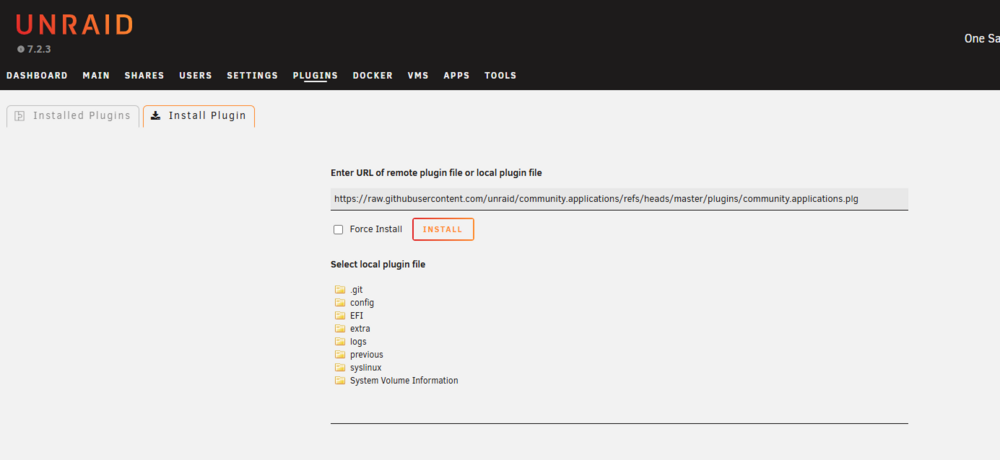
please post diagnostic. you may need adational driver plugins for netowrk nic. see forum support page as well. https://forums.unraid.net/topic/38582-plug-in-community-applications/ INSTALLATION To Install CA, just go to the already existing Apps Tab in the Unraid UI and you'll be prompted to automatically install it. After installation, going to the Apps tab will bring up Community Applications. All button actions etc should (hopefully) be self explanatory. Note All screenshots in this post are subject to change as Community Applications continues to evolve *If running adblockers or dns blocking make sure github is unblocked. theres the manual plugin way as well. https://github.com/unraid/community.applications/tree/master/plugins https://raw.githubusercontent.com/unraid/community.applications/refs/heads/master/plugins/community.applications.plg but this shoudl be working nativley by clciking the apps and clicking the install button. please double check your internet connection as this is almost always dns issues and try with googles 8.8.8.8
-
now that sometime has passed thought i'd share the docker update command to add the label. But didn't say anything until now due to issues it would have caused. as THIS IS NOT A FIX!!! docker ps to get the docker name for the next command... docker update -l net.unraid.docker.managed=dockerman <my-container> @primeval_god this is the docker update command, as you were not aware per post... But is not the underlying issue... This can and will break other parts of emhttp due to a missing template file and done't restore functionality... this will give the docker that needed label without redownloading or initiating a docker pull. Then a refresh of the docker web ui would show it... BUT! I can't stress enough to RECREATE THE DOCKER via UNRAID! or run the Script noted earlier in the forum: https://forums.unraid.net/topic/178736-docker-container-now-shows-3rd-party/page/2/#findComment-1514066 UNLESS YOU USED DOCKER CLI to connect unraid dockerman dockers via docker cli for networks... like a VPN... in which case your using UNRID docker temptles and docker networks ALL WRONG! using docker cli to add multiple networks due to missed commands and docker network communications has also been known to flag them out as unraids dockerman is no longer maintaining the docker... *this is the only instance where updating the label May fix it... as its cosmetic not file corruption and files not in correct areas... But thats a issues if docker networks, and linux alias for docker names the container template applies this lable by default and it can be seen with docker template authoring. re applying the label may not fix the 3rd party state if this is network container related due to users using CLI things to other docker network and not making a proper internal docker network to bridge them with user defined networks... This is where i would recommend using compose plugin and use a compose file to properly setup unraid docker and there networks for cross talk especial with VPNs... https://docs.docker.com/reference/compose-file/networks/ (Why docker cli pull a docker into 3rd party even though a label exist is due to how emhttp is no longer maintaining its network THIS IS NOT A BUG!) its a template limitation of Docker run and how docker run connects to docker networks... and is proff of docker network misuse... read the docker networking docks and setup a "INTERNAL docker network with docker alais... things that can be added to the unraid template extra parameters! or in a compose file... https://docs.docker.com/engine/network/
-
the easiest solution if you are just looking to disk clone the system disk of the studio pc to a unraid share... I would have you look into clonezilla this would boot on the Other system but conect and save its disk cone on a unraid share... https://clonezilla.org/ Example of on screen ono the stuid sytem to clone: https://clonezilla.org/show-live-doc-content.php?topic=clonezilla-live/doc/01_Save_disk_image on the studio mahcine once a month after seting up clone zilla to automate, connect to a unarid samba share and make a disk clone. using unriad as a nas. I would then cloe the studio pc to a unraid disk image... Or you could run a clone zilla docker. https://hub.docker.com/r/theniwo/clonezilla then installing soemthign like https://www.bacula.org/ on the studio pc and have it clone / backup files to a unraid share. many ways to accomplish this. just would require some scripting it comes down to how you want to interact iwth it and what you wnat it to do, but this is totally achievable. Usually this is called a ingesting system. when a disk gets conected and is auto clones, copied. Symantec Nortan ghost is a good one. as there are many software varients of this. but if you want free you need to script it your self.
-
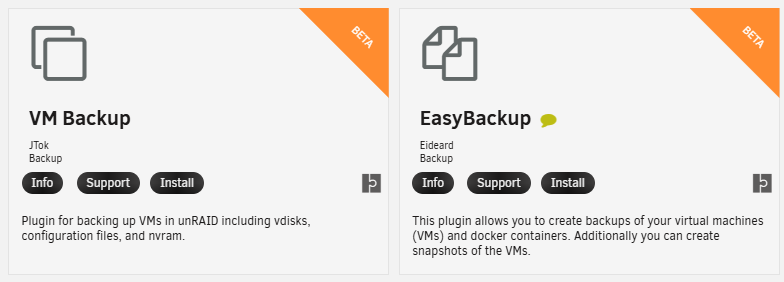
have you looked into easy backup a well? as both are beta plugins.
-
I've just updated the templates and some work to make a rocket.chat and mongdb AIO all in one tempate for unraid for easy 1 click run and install this is due to issues with setting up the mongdb database that is needed for rocket.chat. I would still recoend running your own mongdb and the rocket.chat docker. https://github.com/bmartino1/rocket.chat/tree/main/unraidAIO
-
what exactly are you wanting done with what where. vms and libvirt (especal with snapshots) and not easy to make full backups.
-
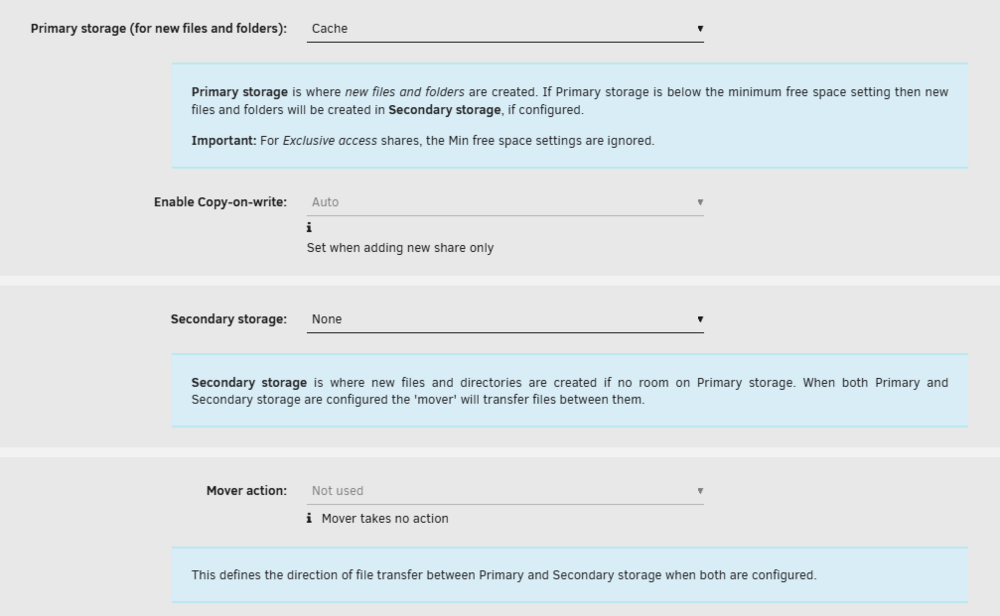
i bleieve that is what the original setup was with disk 1 disk party and pool disk cache. Were the cache pool was the temp fast data to then dump to the disk 1 array. re review the docs for a simlar setup: https://docs.unraid.net/unraid-os/using-unraid-to/manage-storage/array/overview/ Cache pools | Unraid DocsIn Unraid, a %%cache pool|cache-pool%% is a collection of one or more drives, typically SSDs or high-speed HDDs. These drives temporarily store data before it's moved to your main %%array|array%%. Usi as some have used zdisk, some have used ram disk for temp storage. This is a hard concept to explain and go over. But limitation of disk would get in the way and on power outage becomes the problem of data corruption. what disk has what data where... to me it sounds like you want a true temp cache disk for all read and writes of data on unraid before it moves data for the primary stroage in the array... this is kinda curently done with the share settings: If i'm understanding the feature request. so in the purposed setup / feature you want a disk to act as a mirror to also be one with primary storage and mover sends to the array? as this could be done with some software raid and overhead...

-
if the unraid flash drive lost the template for the docker then this makes sense. https://forums.unraid.net/topic/178033-bmartino1-user-scripts/#findComment-1593272 Please run the above script to fix / check. if the template is still there the webui needs to run the docker update script to resync. if using docker compose for the dockers then yes its 3rd party theres abactinal lableing to set it to compose... if it stays 3rd party afterwards the template is gone missing or broken and you will need to reinstall the docker. as seen here: https://forums.unraid.net/topic/178736-docker-container-now-shows-3rd-party/?do=findComment&comment=1510652
-
usb connected disk in unraid need to be conected via the Unasinged disk plugin. if you added them to unraid webui via array/pool that is not suppoorted nor a good working capability... this is due to the usb conection seral conection time outs and drops. thers very litte we can do to. I know of a few usb quirks that cna be set and done. but to fix the “superspeed USB restarted HDCI” error is not somthing we can overcome due to the usb conection to the disks.
-
what i do is make a share / staging folder for backups. then with other plugins / scripts such as appdata backup plugin. appdata backup will make a tar backup of the docker systems and vms xml and if you chose so, makes a unraid flash drive backup... So I mount a usb make edits if needed and hit run script manual (it can be scheduled...) this is something fairly easy to setup for weekly backup. even remote connection to other systems no usb / disk pluged in. still requires mounting the remote systems or connecting in some way... I'm a fan of sftp via openssh server and have a updated docker to run and share unraid over sftp and usign rsync to the sftp of the unraid sytem on the remote system to copy data...









