






bmartino1
Members
-
Joined
-
Last visited
Everything posted by bmartino1
-
you must use ip a and get the interface name and replace with what your unraid sees as its shim bridge in v6 i saw vhost. in v7 its shim-br0 etc etc... #!/bin/bash # Reset and configure vhost0 interface sleep 80 ip link set shim-br0 down # Bring vhost0 down ip addr flush dev shim-br0 # Remove any existing IPs #use static IP?: ip addr add 192.168.201.101/24 dev shim-br0 # Assign the desired IP #use dhcp?: #ifconfig vhost0 0.0.0.0 #dhcpcd vhost0 ip link set shim-br0 up # Bring vhost0 up

-
this is a known issue with how unraid maks a shim bridge and what unifi detects. I treat teh shim brdige like a servce that needs its own static ip. I made a user script to solve this issues as it unfi network spefic detecting unraids shim bridge to conect teh macvlan docker networsk on the hst and on the lan it self... see script: https://forums.unraid.net/topic/178033-bmartino1-user-scripts/#findComment-1492333
-
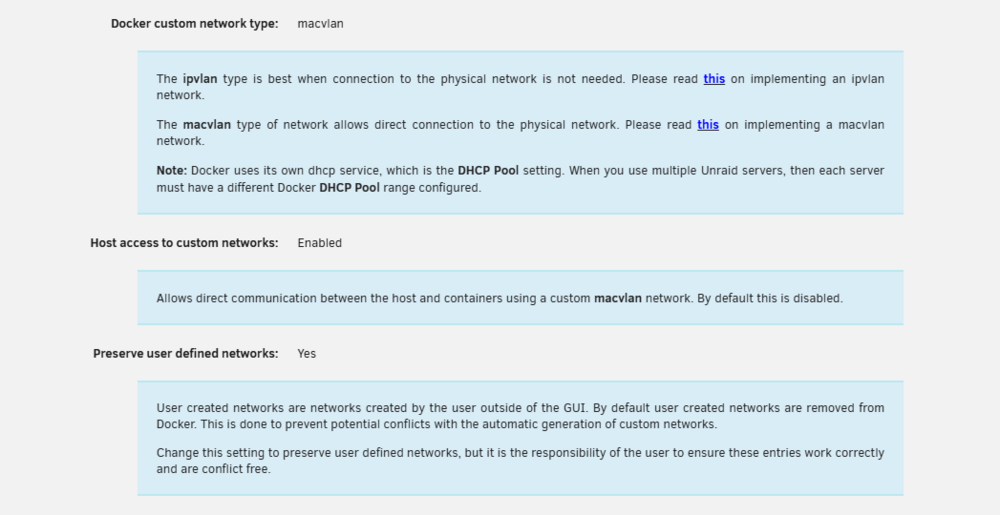
docker ps docker inspect diag done't realy show doker stuff it helps but doen't give use the full poicture... 2025-11-11 15:40:23 0 [ERROR] Can't start server : Bind on unix socket: Permission denied 2025-11-11 15:40:23 0 [ERROR] Do you already have another server running on socket: /run/mariadb/mariadb.sock ? this tells me that teh port is in use on the sytem already so docker network issues and how they are comunicating with each other... First ensure your docker advance settings: https://www.youtube.com/watch?v=bKFMS5C4CG0 https://bmartino1.weebly.com/guide-dockernetworks.html
-
I usualy only hear about the hard links sym lilnk stuff when people try and setup the Arrs system.. example ars compose setup... https://forums.unraid.net/topic/194760-dockers-fail-to-communicate-on-unraid-72/#findComment-1588190 Short answer up front: Yes—if you create a hard-link via /mnt/user, Unraid’s FUSE layer (shfs) will only succeed when the source and destination resolve to the same underlying disk. If the paths would land on different disks, the hard-link syscall fails with a “cross-device link” error (EXDEV) and most apps fall back to copying. It won’t silently hard-link across disks. see https://forums.unraid.net/topic/51381-hard-links-on-user-shares/ Moving data between disks breaks the hard-link relationship (because a single inode can’t span filesystems). You’ll either end up with two independent files (double space) or need a tool that recreates hard-links after the move (e.g., rsync -H). https://docs.unraid.net/unraid-os/using-unraid-to/manage-storage/shares/ Shares realy should be primary only... 1) Mapping /mnt/user in Docker and hard-linksMapping just /mnt/user → /NAS is fine. When your scraper asks for a hard-link: If /NAS/影视/... and /NAS/Media/... both point to folders that Unraid has placed on disk2, shfs makes the hard-link on disk2. If allocator rules would put the destination on another disk, the call fails with EXDEV (“Invalid cross-device link”). Apps that support “hard-link or copy” will then copy. Make sure Global Share Settings → “Enable hard links” is Yes (sometimes shown as “Tunable (support Hard Links)” in guides). Without it, many link operations will be blocked or slow. How to maximize “same-disk” probability Keep “download” and “library” in the same user share (e.g., a single Media share with downloads/ and library/ subfolders) and use Split level rules that keep each movie/show folder together. That nudges Unraid to place both the original and the link target on the same disk. (Hard-links require same disk regardless of using /mnt/user.) Avoid Most-free allocation for link-heavy workflows; it’s the most likely to scatter files across disks. Prefer High-water or Fill-up. There are active reports of mover/allocator interactions selecting different disks and thereby breaking link expectations. 2) Moving folders that contain originals + hard-linksWithin the same disk: a “move” is just a rename; hard-links remain intact and space is still counted once. (You can do this safely with Dynamix File Manager if you’re sure the path stays on the same /mnt/diskX.) Across disks (user shares or Unbalance default move): a move becomes copy+delete; there is no way to carry the single inode across filesystems, so hard-linked files become independent copies and space usage increases. Many users discover “moved 2.2 TB but space only dropped 1.5 TB” because hard-linked siblings remain on the old disk. How to preserve hard-links when you must rebalance Use rsync with -aH to re-create hard-links at the destination. Unbalance lets you add custom rsync flags; users report success adding -XH (xattrs + hard-links) in Unbalance settings. Note: -H forces rsync to scan the entire transfer set to detect link groups; expect more RAM/CPU. Be cautious with the Mover. There are ongoing reports (7.0/7.1 era) where mover operations can break hard-links when the allocator chooses different disks for link siblings. Until that’s fully resolved, the safest approach is to write directly to the final disk for link-heavy shares or keep them cache-only and avoid mover for those paths. 3) Practical recipe for your Nastools layoutIn Settings → Global Share Settings: enable Hard links. Use one share (e.g., Media) with subfolders 影视/电影/ and Library/Movie/. Set Split level so each movie folder stays on one disk (e.g., “automatically split only top 2 levels” fits your tree). This keeps the original and library path likely co-located. Prefer High-water (or Fill-up) over Most-free. If you must rebalance or evacuate a disk, use Unbalance with rsync flags -aH (and -X if you care about xattrs) to preserve link groups. Answers to your Q/A bulletsWill a hard-link via /mnt/user always land on the same disk as the source? Yes, or it fails. Hard-links never “hop” to a different disk. If the destination resolves to another disk, the call returns EXDEV; tools may then copy instead of link. If I move a folder with originals + hard-links between disks, will Unraid keep the relationship and single space usage? Not by default. Cross-disk moves break the shared inode. Use rsync -H (e.g., via Unbalance custom flags) to rebuild the hard-links on the destination. Otherwise you’ll consume space twice. Please review: https://forums.unraid.net/topic/51381-hard-links-on-user-shares/ and https://www.reddit.com/r/unRAID/comments/1kpxzpa/unbalance_and_preserve_hard_links/
-
Review: https://trash-guides.info/File-and-Folder-Structure/How-to-set-up/Unraid/
-
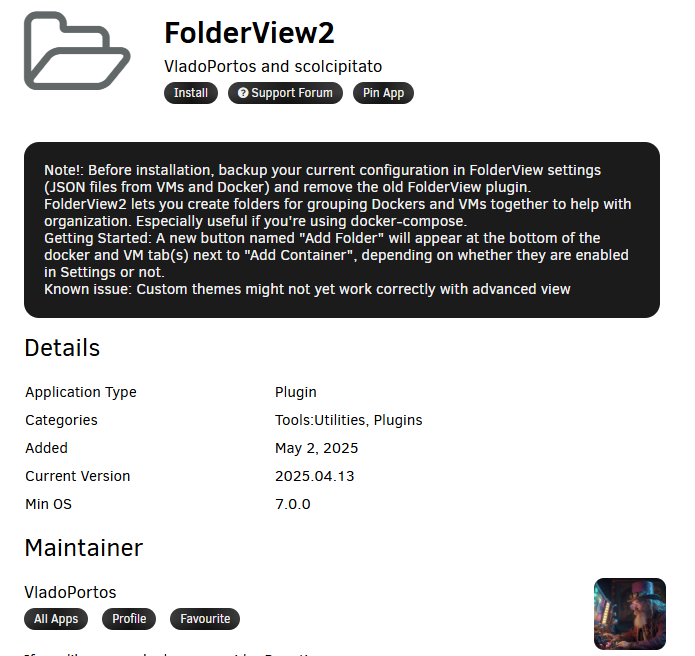
only with a side them edit and making a mess of the web ui. a plugin can be installed to edit the dashbaord . Where we leverage the theme engine to edit eh web page and display. You can make a grouping of the one you want to hide and move it to the bottom... as we are waiting on some updates and fixes.. https://docs.unraid.net/unraid-os/release-notes/7.2.0/#plugins per release notes the theme engine with soem plugins might glitch so use at your own risk. Possible yes, not easily done.
-
well, lots going on here. First FYI SMB on unraids doesn't have nor natively support Active Directory. I would highly recommend going ZFS: Since using zfs please review: https://forums.unraid.net/topic/177887-os-70beta4-best-practice-storagediskcache-configuration/#findComment-1478045 Short answer: your plan is solid, but you can make it safer, faster, and simpler by (a) using a small ZFS or btrfs mirrored pool for your important data (docs/photos), (b) keeping Frigate on its own device, and (c) being picky about rsync flags and share settings. Below is a tight review plus a ZFS-based variant you asked for. As I Understand it: Quick review of your current plan No parity for the media: totally fine for “easy-to-replace” Plex content. Consider at least good backups for irreplaceables. 512 GB SSD cache: great for Docker/appdata and SABNZBD extraction. Make sure appdata, domains, and system shares are set to Primary storage: Cache (or a pool) and Mover: Prefer/Only so they don’t spray onto array disks. WD Purple for Frigate: ok for 24×7 sequential writes. I’d still keep Frigate’s DB/thumbs on SSD for responsiveness; keep the recordings on the Purple. 2×8 TB Reds “duplicated”: Unraid array itself does not do duplication like DrivePool. Use a pool (btrfs RAID1 or ZFS mirror) for this. That way duplication is automatic and bullet-proof. SMR drives in the array: fine for large sequential media. Don’t use them for metadata-heavy workloads. Some of my Notes / Revisions: Migration flow tweaks (keeps your rolling-consolidation idea) Prep in Windows (DrivePool) Your “empty 4–5 drives, fill others” approach is good. Optional but recommended: run chkdsk /f on each NTFS volume before shutdown. Build first Unraid boot with empty drives Assign the 3–4 empty disks, format XFS (or make pools—see ZFS section below). the layout you chose will matter latter I recommend pool devices only no d1 unraid array... Install: Community Apps → Unassigned Devices; from "unget/NerdTools" 3rd party install: screen https://slackware.pkgs.org/15.0/slackware-x86_64/screen-4.9.0-x86_64-1.txz.html. --Helpfull later and a nice side scripting tool... https://forums.unraid.net/topic/129200-plug-in-nerdtools/page/25/#comment-1513524 Copy from NTFS (Unassigned Devices) → Unraid Mount NTFS read-only in Unassigned Devices Plugin. Copy with rsync: # example: NTFS drive mounted at /mnt/disks/WD10 # copy into a user share named "media" rsync -aHAXv --info=progress2 --preallocate --numeric-ids \ --inplace \ /mnt/disks/WD10/PoolPart.*/ /mnt/user/media/ Notes: -aHAX preserves hardlinks, ACLs, xattrs (keep what’s there). --preallocate reduces fragmentation; --inplace avoids temp space spikes. For very slow SMR, add --no-compress. Do not mix /mnt/diskX and /mnt/user on the same copy command (classic “user share copy bug” rule). Your source is /mnt/disks so you’re safe. Verify, then add the emptied drive to the array/pool After each copy: # quick verification pass (no rewrites) rsync -aHAXvn --delete /mnt/disks/WD10/PoolPart.*/ /mnt/user/media/ If the dry-run shows nothing to copy/delete, you’re good. Now stop array → assign the just-emptied disk → format → continue. Permissions sweep once at the end Use Tools → Docker Safe New Perms (from Fix Common Problems) on your media/document shares to normalize to nobody:users. chmod 777 -R * && chown nobody:users -R * Share layout (Unraid array + pools)frigate (recordings): point to the Purple disk (or a “purple” pool/dataset). Include disks: only the Purple (or set Primary storage: the Purple pool). Keep frigate’s DB on the SSD cache/pool (e.g., appdata/frigate). documents (mirrored): place this on a mirror pool (ZFS or btrfs RAID1) made from the 2×8 TB Reds. media (unprotected): send to the XFS array disks (all except Purple and the mirrored Reds). Review the Docs: Manage storage | Unraid DocsShares | Unraid DocsA key feature of Unraid is the management of shares. Shares are folders or drives on your Unraid server that can be accessed over a network. You can create as many shares as you want on your Unraid se My ZFS setup Recommendation (min on Unraid 6.12+)Unraid now supports named pools. You can create a ZFS pool in the GUI (recommended) or CLI. Here’s the practical layout: Pools and datasetsPool safe (ZFS mirror) for documents/photos Devices: the two 8 TB Reds. Pool properties (GUI → set per dataset after creation): compression=lz4 xattr=sa atime=off recordsize=128K (good default for mixed small/medium files) Datasets: safe/documents (Primary storage for your “documents” share) Optional: safe/photos if you want a separate share Snapshots: enable regular snapshots (e.g., daily, keep 30). You can script with User Scripts: zfs snapshot -r safe@daily-$(date +%F) # prune: zfs list -t snap; zfs destroy safe@daily-YYYY-MM-DD Off-box backups: later you can zfs send | zfs receive to another ZFS machine/NAS or to a USB backup drive with ZFS. Pool purple (single-disk ZFS or XFS) for Frigate recordings Device: 4 TB WD Purple. If ZFS: recordsize=1M (video) compression=lz4 xattr=sa, atime=off Keep sync=standard (don’t disable sync unless you fully accept data-loss risk on power loss). Put Frigate clips/recordings at purple/frigate-recordings. Point the Frigate share to this dataset. Pool cache (SSD, single-device) Device: 512 GB NVMe/SATA SSD. ZFS or btrfs are both fine here. If ZFS: compression=lz4, xattr=sa, atime=off, recordsize=16K–64K are fine for DBs. Datasets: cache/appdata, cache/system, cache/domains Set the Appdata/Systems/Domains shares: Primary storage: cache; Mover: Prefer/Only. Array (unprotected XFS disks) for Plex media All remaining HDDs (including SMR) as individual XFS disks, no parity. Share media → Primary storage: Array; Allocation Most-free; Split level automatic. Exclude the Purple and the 2×8 TB Reds from media if you want a hard separation. Wiring shares to pools (Storage settings in each share)documents → Primary storage: safe (ZFS mirror). Mover: Only/Prefer safe. photos (if separate) → Primary storage: safe. frigate: appdata/frigate → cache frigate/recordings → purple In Frigate’s config, point clips/recordings to /mnt/purple/frigate-recordings (or to the share that maps there). media → Primary storage: Array. Optional CLI creation (if you prefer) # Mirror pool (two 8TB Reds) zpool create -f -o ashift=12 safe mirror /dev/disk/by-id/RED_8TB_A /dev/disk/by-id/RED_8TB_B zfs set compression=lz4 safe zfs set xattr=sa safe zfs set atime=off safe zfs create safe/documents zfs set recordsize=128K safe/documents # Purple pool for Frigate zpool create -f -o ashift=12 purple /dev/disk/by-id/PURPLE_4TB zfs set compression=lz4 purple zfs set xattr=sa purple zfs set atime=off purple zfs create purple/frigate-recordings zfs set recordsize=1M purple/frigate-recordings # Cache pool (single SSD) zpool create -f -o ashift=12 cache /dev/disk/by-id/SSD_512G zfs set compression=lz4 cache zfs set xattr=sa cache zfs set atime=off cache zfs create cache/appdata zfs create cache/system zfs create cache/domains Other Docker/ Frigate placement tipsDB (SQLite) and thumbnails on SSD (/mnt/cache/appdata/frigate). (asuming one primary location for storage! per unraid shares doc...) Recordings on Purple (/mnt/purple/frigate-recordings), recordsize=1M. If you ever see dropped frames or slow clips, confirm the recordings path isn’t accidentally on the array. ?trying to setup PLex and *Arrs stack... I recommend using docker compose: example ars compose setup... https://forums.unraid.net/topic/194760-dockers-fail-to-communicate-on-unraid-72/#findComment-1588190 Preclear & healthBefore adding any drive to array/pools: run Preclear Disks (plugin) or at least a long SMART test. You’ll catch early failures. Backups & “what ifs”Documents/Photos: ZFS mirror + snapshots + periodic send/receive to an external ZFS disk is the best “DrivePool duplication” analogue—and more robust. Media: you’ve accepted risk; if you later change your mind, you can add one parity and keep the rest unprotected, or move media into a ZFS pool with RAIDZ.
-
thers a known issues with unraid and cstates. I don't know where teh link to the FAQ on this is ... bios disalbe c states. @JorgeB
-
becasue your in a genral support post and not a bug report nor comunicated to teh Devs the issue at hand... ... does no one read teh license agrements, post heders or anouncments?!!! go make a dam bug report: https://forums.unraid.net/bug-reports/stable-releases/
-
I would love if you could still test this. That's fine if you moved on. I need to make a few edits. Another. I forgot to even test a reboot and I'll need to change file location stuff. As the best I can do is begin it to install and show what it should do but actually tested to make sure it makes its edits and response to the joint agents. Something out of scoop for me cuz I can't seem to figure out that website to create a account to get a joint API and test.
-
Witch docker images? I asked cuz if you're using bitnami those images are no longer in in the hub and the unraid upgrade can sometimes cause a repo or change in the docker volumes. Due to how the unreaid driver can be touched and upgraded. But it shouldn't stop existing images or data within the docker volume from running. Can you do a docker pole of your current MySQL and postgres image?
-
I want the user script plugin log to apply and log shoe me the results had to do with logging and time stamp if issues latter with testing
-
uer script plugin at frist arry boot sysctl -w fs.inotify.max_user_instances=1024 What I Run: #!/bin/bash # Delay before starting sleep 10 # Apply sysctl settings apply_sysctl_settings() { echo "Applying sysctl settings..." sysctl -w net.ipv6.conf.all.forwarding=1 sysctl -w net.ipv6.conf.br0.accept_ra=2 #sysctl -w net.ipv6.conf.br0.accept_ra_rt_info_max_plen=64 echo "Verifying sysctl settings..." sysctl net.ipv6.conf.all.forwarding sysctl net.ipv6.conf.br0.accept_ra #sysctl net.ipv6.conf.br0.accept_ra_rt_info_max_plen } #run loop apply_sysctl_settings for ipv6 forwarding to ha docker..

-
Unriad CA https://forums.unraid.net/topic/193997-guide-immich-docker-setup-unraid-ca/#comment-1588470
-
https://forums.unraid.net/topic/193998-guide-immich-docker-setup-docker-compose/#comment-1582200
-
Please post an unray diagnostic file... Would you make any reach and changes to your network such as docker Network a reboot if not reserved docker networks... Cuz that will grab the IP that the doctor sees. So what do you see if you console into the Docker... Not enough info to assist
-
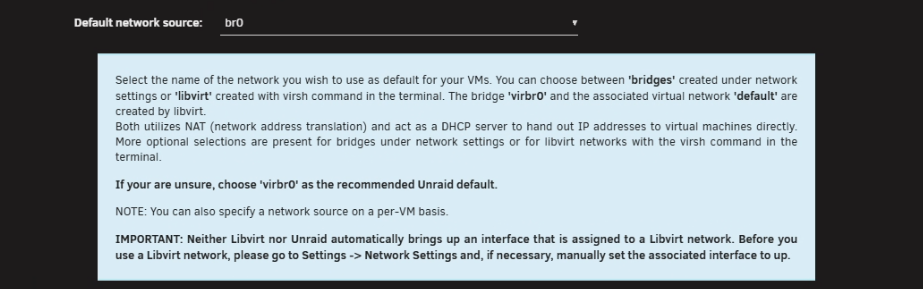
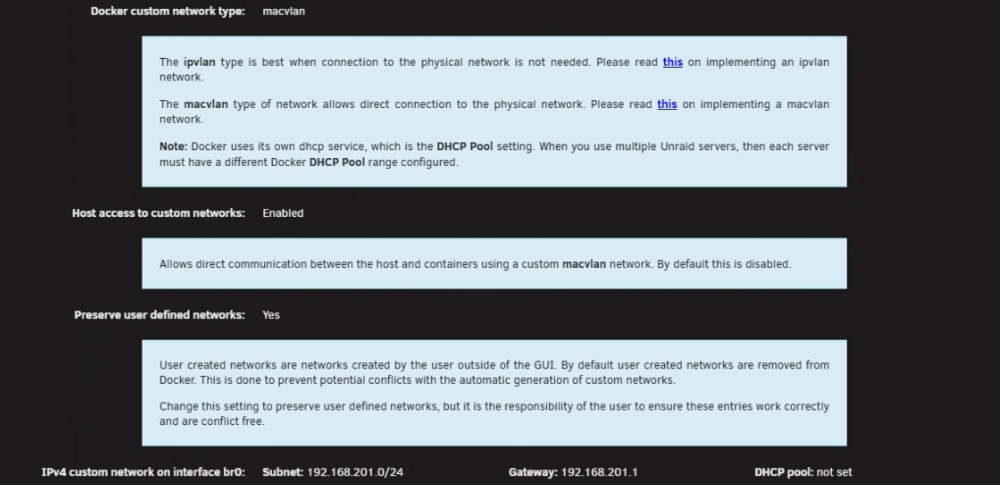
I find it easier to use docker compose and using the tunnel all traffic at the unraid host level to move endpoints. Usually its the downloading parts... Transmission, qbit etc you want different endpoints on example ars compose setup... https://forums.unraid.net/topic/194760-dockers-fail-to-communicate-on-unraid-72/#findComment-1588190 I highly recommended reviewing: https://bmartino1.weebly.com/guide-dockernetworks.html as you will need to use the network container or docker cli to connect the gluten vpn docker to the others... other recommended docker /vm/ unraid networking options... vm settings: docker settings: other internal docker network creating with wiregurad sidecar: https://forums.unraid.net/topic/194113-wireguard-on-a-container-but-with-local-docker-network-access/#findComment-1585198
-
I personally am a fan of foscom ip cameras and unifi protect cameras... (this is what I played around with in a cooperate and company settings before uhd, 1080 P and 4 K...) unifi g4 bullets can be used in unifi video docker and setups still... A lot of the free stuff was scooped up. and of them all the unfi eco systems is one of the better non subscription based setups. frigate and ha automation such as face detection and when movement detected ha lights on etc etc... so for cameras I definitely recommend using unfi: https://ui.com/physical-security/bullet *Does need a unifi protect system to first setup even standalone in the app then enable rtsp feeds and the cameras can be used with other nvr systems like Shinobi, frigate etc.. So, You’re on exactly the right track: pick wired PoE, ONVIF/RTSP-capable cameras, run an open NVR in Docker on Unraid, and integrate events into Home Assistant. But best is a matter of personal opinions, price points your willing to pay and what you want it to do and how you want to interact with it... Given yoru data in OP -- Cameras: Reolink PoE domes/bullets (good price/perf; ONVIF + RTSP) → great with Frigate/HA. Avoid most battery Eufy cams for 24/7 RTSP; some plug-in/wired Eufy models do RTSP but support is spotty model-by-model. UniFi cams are excellent if you’re already in Protect; you can also expose RTSP out for 3rd-party NVRs https://www.home-assistant.io/integrations/reolink/ NVR on Unraid: Frigate (Docker) + MQTT + Home Assistant. Optional Coral/Hailo or GPU decode for performance. If you want a more classic timeline NVR, Shinobi runs well in Docker; Blue Iris is Windows-only (run in a Windows VM if you must). https://docs.frigate.video/frigate/installation/ Cameras & compatibility (what “just works”)Reolink PoE (e.g., 5–8 MP RLC-series): RTSP + ONVIF supported; integrates directly with HA via the official Reolink integration, and feeds Frigate easily. Use sub-stream for detection, main stream for recording. Eufy: Many battery models don’t offer reliable RTSP (a.k.a. “NAS”) or disable it during idle; several wired/plug-in SKUs and newer S-series/HomeBase combos do offer RTSP/NAS, but validate your exact model before buying. Community reports note instability/timeouts on some models. Bottom line: workable, but more finicky than Reolink. UniFi cameras: Fantastic image/low-latency in UniFi Protect. If you want to keep everything on Unraid, you can still enable RTSP per camera in Protect and ingest into Frigate/Shinobi/HA. (Protect itself doesn’t run in Docker.) NVR choices (and where they shine)Frigate (Docker on Unraid) — my top rec for your goals Designed for object detection (people, vehicles, pets) with MQTT-native Home Assistant integration. Hardware accel: GPU decode (VAAPI/NVDEC/QSV) for streams + optional Coral TPU or Hailo-8 for detection at very low CPU. Clean mobile/desktop UI; clips/snapshots to your Unraid shares. Shinobi (Docker) Traditional NVR with a flexible timeline and alerting; pairs well if you want a “classic DVR” feel without much AI. Blue Iris (Windows-only) Feature-rich, legendary tuning, tons of plugins (e.g., Blue Onyx AI). But it requires Windows—so on Unraid you’d run a Windows VM with a passthrough iGPU/GPU and dedicated storage. If you prefer pure Unraid Docker, stick with Frigate/Shinobi. Scrypted (bonus) A plugin hub that can restream/transcode (e.g., WebRTC) and present cameras to HA/Apple Home; can sit in front of Frigate or alongside it. Runs as Docker or HA add-on. Home Assistant integrations (so the automations flow)Frigate ⇄ HA: Install MQTT (e.g., Mosquitto) → Frigate publishes events (person/vehicle) → HA automations fire (lights, TTS, notifications with snapshots). Reolink ⇄ HA: First-party integration now; local control even if you block internet. UniFi Protect ⇄ HA: Official integration exposes thumbnails, event clips, and live streams for dashboards and automations. Eufy ⇄ HA: Use the community Eufy Security HACS integration; expect more tinkering vs Reolink/UniFi. Best-practice build on Unraid (wired, private, reliable)Network: Use PoE cams on a VLAN or isolated subnet; give Unraid a NIC on that network (or a second Docker network) so Frigate pulls RTSP directly. Streams: Configure each cam with H.264, CBR, and GOP/I-frame = FPS (e.g., 15 fps & keyframe 15). In Frigate, set sub-stream (low-res) for detection and main stream (hi-res) for recordings. (This is the standard Frigate pattern.) Acceleration: Enable Intel QSV / VAAPI / NVDEC in Frigate for video decode. Add Google Coral (Edge TPU) or Hailo-8/L for detection if you have many cameras. Storage: Map Frigate’s /media to an Unraid share on a fast disk/pool; set retention (e.g., 7–30 days). HA glue: Install MQTT + Frigate integration, build automations (doorbell → announce + snapshot; person detected → turn on floods, etc.). Optional restream: If Reolink streams wobble, add go2rtc (bundled in Frigate) to proxy and stabilize feeds for HA dashboards. Answers to your specific Qs“Can I install Reolink’s own NVR software in Docker on Unraid?” Reolink’s client apps aren’t offered as Linux server NVRs. The usual pattern is: use their RTSP/ONVIF with Frigate/Shinobi/Blue Iris—or use a Reolink hardware NVR. For HA, the official Reolink integration is the cleanest path. -- https://support.reolink.com/hc/en-us/articles/900000617826-Which-Reolink-Products-Support-CGI-RTSP-ONVIF/ “Same for Eufy?” Eufy doesn’t ship a Linux NVR for Docker. A subset of models exposes RTSP/NAS; others don’t (or are unreliable). If you’re 24/7 recording to Unraid, prefer wired/plug-in Eufy SKUs that explicitly list RTSP/NAS (or stick to Reolink/UniFi). --https://service.eufy.com/article-description/S330-S300-eufyCam-eufyCam-3-3C-FAQ-Before-You-Buy?ref=Home_Page Blue Iris vs Frigate vs neither? For an all-Unraid, Docker, local-first stack tightly integrated with HA, Frigate wins. Choose Blue Iris only if you want its GUI/tooling and you’re fine running a Windows VM (or a separate Windows box). Shinobi is a nice middle ground if you want a classic NVR without AI... --https://docs.frigate.video/frigate/installation/ A couple up-to-date guides/docs you’ll actually useFrigate install + config docs (Docker is the recommended method; includes go2rtc & hardware accel guidance). https://docs.frigate.video/frigate/installation/ Frigate -- Home Assistant (MQTT required). https://github.com/blakeblackshear/frigate/discussions/7792 Reolink RTSP/ONVIF support list (confirm model before buying). https://support.reolink.com/hc/en-us/articles/900000617826-Which-Reolink-Products-Support-CGI-RTSP-ONVIF/ UniFi Protect: enable RTSP per camera (to feed Frigate/HA). https://community.ui.com/questions/Access-UniFi-Protect-camera-RTSP-stream/b1ba4c62-0764-4223-80d0-650768b0f87f Shinobi Docker instructions (if you want a traditional NVR). https://docs.shinobi.video/installation/docker Blue Iris official site + requirements (Windows-only; VM option). https://blueirissoftware.com/ Scrypted -- Home Assistant (handy restream/cards). https://docs.scrypted.app/home-assistant.html Firgate jsut a paing to config write for the cameras... but once you get the config.yml in its done and fun... so, My recommended shopping/build list for you 8 MP Reolink PoE cams (RLC-8xx series) for outdoor; plug-in Eufy only where you really want it and it’s confirmed RTSP. PoE switch on a camera VLAN. Frigate (Docker on Unraid) + Mosquitto + HA integration. Edge TPU (Coral USB) or Hailo-8 if >4–6 cameras with detection. Optional: Scrypted for silky WebRTC dashboards and rebroadcasts; or Shinobi if you want that DVR-style timeline.
-
tailsscale support area: https://forums.unraid.net/forum/111-tailscale/ see examples and fun: https://forums.unraid.net/topic/184659-some-fun-with-tailscale-examples/ another forum post: https://forums.unraid.net/topic/194487-can-somone-explain-tailscale-to-me-ive-watched-the-videos-of-space-invader-but-they-are-not-really-helping/#findComment-1586167
-
did the same web ui button work in desktop browser mode??? As this option is a docker template advacne edit that you can change options and break the button... what docker app? what ports or application is it suposed to open? example plex:

-
using AI atempts to recreate files... let’s bring the old Join notification agent back into Unraid’s Notifications UI. Below are three drop-in artifacts: a proper Agent XML (Join.xml) so it shows up under Settings → Notifications → Agents, a minimal plugin installer (join-agent.plg) that persists the XML on the flash drive and copies it into RAM on boot, an optional standalone shell (/boot/config/plugins/dynamix/notifications/agents/Join.sh) you can keep using for quick tests or fallbacks. I matched the style of Dynamix’ built-in agents (e.g., Discord) and Squid’s sample agent. The XML uses the {0} injection point so values you set in the UI land at the top of the script automatically. https://github.com/unraid/webgui/blob/master/emhttp/plugins/dynamix/agents/Discord.xml GitHubGitHub - Squidly271/Wxwork-sampleContribute to Squidly271/Wxwork-sample development by creating an account on GitHub. 1) Join.xml (agent definition) Save this as: /boot/config/plugins/dynamix/agents/Join.xml (persistent) The plugin below will copy it to RAM at: /usr/local/emhttp/plugins/dynamix/agents/Join.xml <?xml version="1.0" encoding="utf-8"?> <Agent> <Name>Join</Name> <Variables> <Variable Help="Your Join API Key from https://joaoapps.com/join/" Desc="API Key" Default="">API_KEY</Variable> <Variable Help="Device or group target. Use 'group.all' to broadcast to all your Join devices, or a specific deviceId." Desc="Device Id" Default="group.all">DEVICE_ID</Variable> <Variable Help="Fields included in the notification title. Defaults to the Unraid SUBJECT." Desc="Notification Title" Default="$SUBJECT">TITLE</Variable> <Variable Help="Fields included in the message body. Defaults to Unraid DESCRIPTION + CONTENT + LINK when present." Desc="Notification Message" Default="$DESCRIPTION\n\n$CONTENT\n$LINK">MESSAGE</Variable> </Variables> <Script> <![CDATA[ #!/bin/bash ############ {0} ############ # Join Notification Agent for Unraid # Based on the Dynamix agent format (see Discord.xml). # # Files & logs: # Script path (RAM): /boot/config/plugins/dynamix/notifications/agents/Join.sh # Log file: /var/log/notify_Join # # Quick tests: # 1) Dry run with env vars (bypasses notify): # EVENT="My Event" SUBJECT="My Subject" DESCRIPTION="My Description" CONTENT="Body text" IMPORTANCE="alert" LINK="/Dashboard" bash /boot/config/plugins/dynamix/notifications/agents/Join.sh # # 2) Full Unraid notify path: # /usr/local/emhttp/webGui/scripts/notify -e "My Event" -s "My Subject" -d "My Description" -m "My Message" -i "alert" -l "/Dashboard" # # If a notification doesn't go through, check /var/log/notify_Join SCRIPTNAME=$(basename "$0") LOG="/var/log/notify_${SCRIPTNAME%.*}" # ---- Pull fields the same way as other agents (Discord) ---- EVENT="${EVENT:-Unraid Status}" SUBJECT="${SUBJECT:-Notification}" DESCRIPTION="${DESCRIPTION:-No description}" IMPORTANCE="${IMPORTANCE:-normal}" CONTENT="${CONTENT:-}" LINK="${LINK:-}" HOSTNAME="${HOSTNAME:-$(hostname)}" TIMESTAMP="${TIMESTAMP:-$(date +%s)}" # If LINK is a relative path, expand to GUI base URL if [[ -n "${LINK}" ]] && [[ ${LINK} != http* ]]; then if [[ -r /usr/local/emhttp/state/nginx.ini ]]; then # shellcheck disable=SC1090 source <(grep "NGINX_DEFAULTURL" /usr/local/emhttp/state/nginx.ini || true) LINK="${NGINX_DEFAULTURL}${LINK}" fi fi # Discord has a bare-hostname guard; Join doesn't care, but we'll keep LINK only if it looks usable. if [[ -n "${LINK}" ]]; then HOST="$(echo "${LINK}" | cut -d'/' -f3)" [[ -z "${HOST}" ]] && LINK="" fi # ---- Build final TITLE / MESSAGE respecting agent-level overrides ---- # The UI Variables come in as literals that may include $SUBJECT, $DESCRIPTION, etc. # Evaluate them after we’ve populated the notify variables so the defaults expand. _expander() { # Expand \n, etc, then allow variable expansion (SUBJECT, DESCRIPTION, CONTENT, LINK...) # shellcheck disable=SC2016 local raw="$1" # First interpret escapes local with_escapes; with_escapes="$(echo -e "$raw")" # Then expand env vars safely eval "echo \"$with_escapes\"" } FINAL_TITLE="$(_expander "${TITLE:-$SUBJECT}")" # Default MESSAGE concatenates description/content/link but strips the "No description" placeholder. [[ "${DESCRIPTION}" == "No description" ]] && DESCRIPTION="" DEFAULT_BODY="$(printf "%s\n\n%s\n%s" "$DESCRIPTION" "$CONTENT" "$LINK")" FINAL_MESSAGE="$(_expander "${MESSAGE:-$DEFAULT_BODY}")" # ---- Add a small importance prefix (emoji text). You can tweak this mapping. ---- case "${IMPORTANCE}" in alert) IMP_PREFIX="(ALERT) ";; warning) IMP_PREFIX="(WARN) ";; *) IMP_PREFIX="";; esac FINAL_TITLE="${IMP_PREFIX}${FINAL_TITLE}" # ---- Validate required settings ---- if [[ -z "${API_KEY}" ]]; then echo "Missing Join API key; set it in Settings → Notifications → Agents → Join." >>"$LOG" logger -t "$SCRIPTNAME" -- "Join: Missing API key" exit 1 fi DEVICE="${DEVICE_ID:-group.all}" # ---- Call Join REST API ---- # Docs: https://joaoapps.com/join/api/ # Endpoint (classic): https://joinjoaomgcd.appspot.com/_ah/api/messaging/v1/sendPush # We use GET with urlencoding for title/text/deviceId/apikey, as in prior working scripts. JOIN_URL="https://joinjoaomgcd.appspot.com/_ah/api/messaging/v1/sendPush" # Convert newlines to \n for transport while keeping them readable on device # Join will happily accept real newlines as well, but urlencode handles them either way. TITLE_ENC=$(echo -ne "$FINAL_TITLE") BODY_ENC=$(echo -ne "$FINAL_MESSAGE") # Try a couple times in case of transient issues MAX=3 for ((i=1; i<=MAX; i++)); do ret=$(curl -s -k -G \ --data-urlencode "title=${TITLE_ENC}" \ --data-urlencode "text=${BODY_ENC}" \ -d "deviceId=${DEVICE}" \ -d "apikey=${API_KEY}" \ "${JOIN_URL}" 2>&1) # Join returns JSON; success contains "success": true if echo "$ret" | grep -q '"success": *true'; then exit 0 fi { date echo "attempt $i of $MAX failed" echo "$ret" } >>"$LOG" (( i < MAX )) && sleep 1 done logger -t "$SCRIPTNAME" -- "Join: Failed sending notification" exit 1 ]]> </Script> </Agent> 2) join-agent.plg (tiny plugin to persist the agent)Save this as: /boot/config/plugins/join-agent.plg and install via Plugins → Install Plugin → ‘Install from disk’ (or installplg /boot/config/plugins/join-agent.plg from SSH). This keeps a copy of the agent on your flash and copies it to RAM on boot—same pattern as Squid’s sample. <?xml version="1.0"?> <PLUGIN name="join-agent" author="you" version="2025.11.04" pluginURL="" supportURL="https://forums.unraid.net/" min="6.10.0"> <CHANGES> 2025.11.04 - Initial release: Join notification agent for Unraid. </CHANGES> <!-- Persist the agent XML on the flash (source of truth) --> <FILE Name="/boot/config/plugins/dynamix/agents/Join.xml"> <![CDATA[ <?xml version="1.0" encoding="utf-8"?> <Agent> <Name>Join</Name> <Variables> <Variable Help="Your Join API Key from https://joaoapps.com/join/" Desc="API Key" Default="">API_KEY</Variable> <Variable Help="Device or group target. Use 'group.all' to broadcast to all your Join devices, or a specific deviceId." Desc="Device Id" Default="group.all">DEVICE_ID</Variable> <Variable Help="Fields included in the notification title. Defaults to the Unraid SUBJECT." Desc="Notification Title" Default="$SUBJECT">TITLE</Variable> <Variable Help="Fields included in the message body. Defaults to Unraid DESCRIPTION + CONTENT + LINK when present." Desc="Notification Message" Default="$DESCRIPTION\n\n$CONTENT\n$LINK">MESSAGE</Variable> </Variables> <Script> <![CDATA[ #!/bin/bash ############ {0} ############ SCRIPTNAME=$(basename "$0") LOG="/var/log/notify_${SCRIPTNAME%.*}" EVENT="${EVENT:-Unraid Status}" SUBJECT="${SUBJECT:-Notification}" DESCRIPTION="${DESCRIPTION:-No description}" IMPORTANCE="${IMPORTANCE:-normal}" CONTENT="${CONTENT:-}" LINK="${LINK:-}" HOSTNAME="${HOSTNAME:-$(hostname)}" TIMESTAMP="${TIMESTAMP:-$(date +%s)}" if [[ -n "${LINK}" ]] && [[ ${LINK} != http* ]]; then if [[ -r /usr/local/emhttp/state/nginx.ini ]]; then source <(grep "NGINX_DEFAULTURL" /usr/local/emhttp/state/nginx.ini || true) LINK="${NGINX_DEFAULTURL}${LINK}" fi fi _expander(){ local raw="$1"; local with_escapes; with_escapes="$(echo -e "$raw")"; eval "echo \"$with_escapes\""; } [[ "${DESCRIPTION}" == "No description" ]] && DESCRIPTION="" DEFAULT_BODY="$(printf "%s\n\n%s\n%s" "$DESCRIPTION" "$CONTENT" "$LINK")" FINAL_TITLE="$(_expander "${TITLE:-$SUBJECT}")" FINAL_MESSAGE="$(_expander "${MESSAGE:-$DEFAULT_BODY}")" case "${IMPORTANCE}" in alert) IMP_PREFIX="(ALERT) ";; warning) IMP_PREFIX="(WARN) ";; *) IMP_PREFIX="";; esac FINAL_TITLE="${IMP_PREFIX}${FINAL_TITLE}" if [[ -z "${API_KEY}" ]]; then echo "Missing Join API key; set it in Settings → Notifications → Agents → Join." >>"$LOG" logger -t "$SCRIPTNAME" -- "Join: Missing API key"; exit 1; fi DEVICE="${DEVICE_ID:-group.all}" JOIN_URL="https://joinjoaomgcd.appspot.com/_ah/api/messaging/v1/sendPush" TITLE_ENC=$(echo -ne "$FINAL_TITLE"); BODY_ENC=$(echo -ne "$FINAL_MESSAGE") MAX=3 for ((i=1;i<=MAX;i++)); do ret=$(curl -s -k -G --data-urlencode "title=${TITLE_ENC}" --data-urlencode "text=${BODY_ENC}" -d "deviceId=${DEVICE}" -d "apikey=${API_KEY}" "${JOIN_URL}" 2>&1) if echo "$ret" | grep -q '"success": *true'; then exit 0; fi { date; echo "attempt $i of $MAX failed"; echo "$ret"; } >>"$LOG" (( i < MAX )) && sleep 1 done logger -t "$SCRIPTNAME" -- "Join: Failed sending notification"; exit 1 ]]> </Script> </Agent> ]]> </FILE> <!-- On install/upgrade, copy into RAM location Dynamix reads --> <FILE Run="/bin/bash"> <![CDATA[ mkdir -p /usr/local/emhttp/plugins/dynamix/agents cp -f /boot/config/plugins/dynamix/agents/Join.xml /usr/local/emhttp/plugins/dynamix/agents/Join.xml # ensure notifications/agents dir exists (script gets materialized here by Dynamix) mkdir -p /boot/config/plugins/dynamix/notifications/agents echo "Join agent installed." ]]> </FILE> <!-- On remove, clean up RAM copy but leave flash copy unless forced --> <FILE Run="/bin/bash" Method="remove"> <![CDATA[ rm -f /usr/local/emhttp/plugins/dynamix/agents/Join.xml echo "Join agent removed (flash copy preserved at /boot/config/plugins/dynamix/agents/Join.xml)." ]]> </FILE> </PLUGIN> 3) (Optional) Join.sh standaloneThis mirrors your existing working file (kept for completeness). If you didn’t already have it, drop it at: /boot/config/plugins/dynamix/notifications/agents/Join.sh #!/bin/bash ########## API_KEY="xxxxxxxxxxxxxxxxxxxxxxxxxxxxxxxxxxx" TITLE="${SUBJECT:-$TITLE}" MESSAGE="${DESCRIPTION:-$MESSAGE}" ########## TITLE=$(echo -e "$TITLE") MESSAGE=$(echo -e "$MESSAGE") curl -s -k -G \ -d "apikey=$API_KEY" \ --data-urlencode "title=$TITLE" \ --data-urlencode "text=$MESSAGE" \ -d "deviceId=group.all" \ https://joinjoaomgcd.appspot.com/_ah/api/messaging/v1/sendPush 2>&1 Install & test... Install the plugin Copy join-agent.plg to /boot/config/plugins/join-agent.plg. From Unraid: Plugins → Install Plugin → Install from disk, select the file; or SSH: installplg /boot/config/plugins/join-agent.plg Configure Go to Settings → Notifications → Agents → Join. Paste your API Key. Leave Device Id as group.all or set a specific deviceId. (Optional) Tweak Title/Message fields—defaults already expand $SUBJECT, $DESCRIPTION, $CONTENT, $LINK. Send a test Click Notifications → Test (or): /usr/local/emhttp/webGui/scripts/notify \ -e "Join Test" -s "Unraid → Join ✅ " \ -d "This is a test notification from $(hostname)." \ -m "Body via CONTENT" -i "warning" -l "/Dashboard" If anything fails, check: /var/log/notify_Join Please test...
-
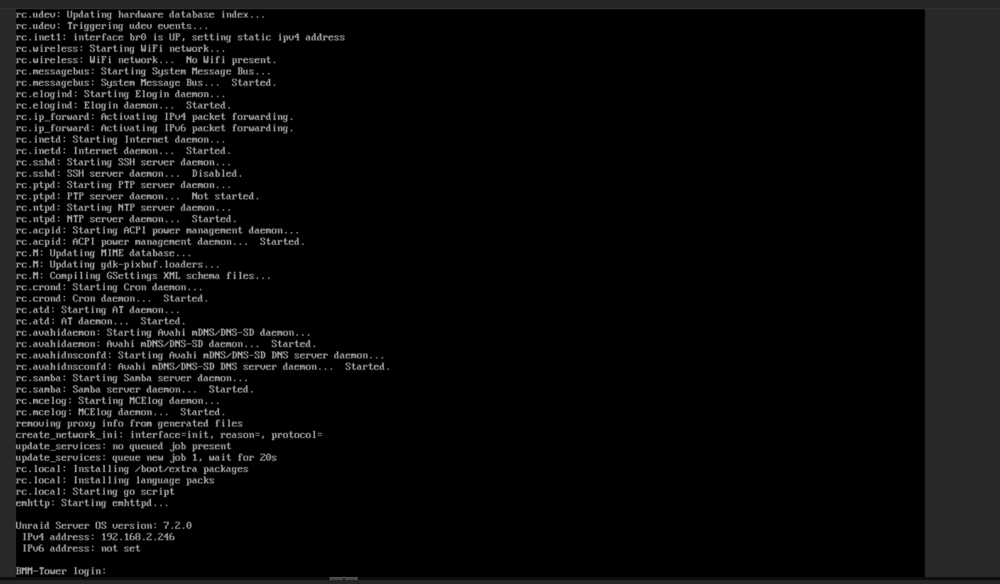
root@The-Borg:~# ls -ail /usr/local/emhttp/plugins/dynamix/scripts total 176 118 drwxr-xr-x 1 root root 80 Oct 29 18:48 ./ 117 drwxr-xr-x 1 root root 140 Oct 29 18:48 ../ 6940 -rwxr-xr-x 1 root root 434 Nov 15 2023 agent* 6941 -rwxr-xr-x 1 root root 229 Nov 15 2023 bootmode* 6942 -rwxr-xr-x 1 root root 420 Nov 15 2023 btrfs_balance* 6943 -rwxr-xr-x 1 root root 330 Aug 15 14:24 btrfs_check* 6944 -rwxr-xr-x 1 root root 819 Nov 15 2023 btrfs_scrub* 6945 -rw-r--r-- 1 root root 1739 Aug 18 13:23 check.source 6946 -rwxr-xr-x 1 root root 775 Nov 15 2023 console* 6947 -rwxr-xr-x 1 root root 39251 Oct 14 23:42 diagnostics* 6948 -rwxr-xr-x 1 root root 774 Nov 15 2023 disk_size* 6949 -rwxr-xr-x 1 root root 489 Nov 15 2023 emcmd* 6950 -rwxr-xr-x 1 root root 728 Feb 16 2025 error_interfaces* 6951 -rwxr-xr-x 1 root root 236 Aug 15 14:24 exfat_check* 6952 -rwxr-xr-x 1 root root 226 Aug 15 14:24 ext_check* 6953 -rwxr-xr-x 1 root root 13602 Apr 4 2025 feedback* 6954 -rwxr-xr-x 1 root root 1693 Nov 15 2023 flash_backup* 6955 -rwxr-xr-x 1 root root 577 Nov 15 2023 ftpusers* 6956 -rwxr-xr-x 1 root root 2114 Aug 14 00:44 install_key* 6957 -rwxr-xr-x 1 root root 15620 Jun 28 2024 monitor* 6958 -rwxr-xr-x 1 root root 6538 Feb 25 2025 netconfig* 6959 -rwxr-xr-x 1 root root 2514 Aug 14 00:44 newperms* 6960 -rwxr-xr-x 1 root root 849 Jan 8 2025 nfsSettings* 6961 -rwxr-xr-x 1 root root 9915 Feb 16 2025 notify* 6962 -rwxr-xr-x 1 root root 229 Aug 15 14:24 ntfs_check* 6963 -rwxr-xr-x 1 root root 1282 Apr 21 2025 open_ssl* 6964 -rwxr-xr-x 1 root root 3390 Dec 16 2024 outgoingproxy* 6965 -rwxr-xr-x 1 root root 1154 Nov 15 2023 parity_control* 17077 -rwxr-xr-x 1 root root 8099 Oct 29 18:48 parity_history* 6966 -rwxr-xr-x 1 root root 3150 Feb 5 2024 parity_history.orig* 6967 -rwxr-xr-x 1 root root 141 Dec 29 2023 powermode* 6968 -rwxr-xr-x 1 root root 255 Aug 15 14:24 reiserfs_check* 6969 -rwxr-xr-x 1 root root 336 May 10 03:32 reload_services* 6970 -rwxr-xr-x 1 root root 649 Feb 5 2024 replace_key_job* 6971 -rwxr-xr-x 1 root root 677 Mar 26 2025 restore_favorites* 6972 -rwxr-xr-x 1 root root 3583 Feb 16 2024 rsyslog_config* 6973 -rwxr-xr-x 1 root root 1437 Nov 15 2023 run_cmd* 6974 -rwxr-xr-x 1 root root 4582 Jun 23 12:24 select_case* 6975 -rwxr-xr-x 1 root root 4182 Jul 16 2024 set_proxy* 6976 -rwxr-xr-x 1 root root 826 Nov 15 2023 share_size* 6977 -rwxr-xr-x 1 root root 269 Jul 27 2024 show_interfaces* 6978 -rwxr-xr-x 1 root root 4035 Aug 14 00:44 ssd_trim* 6979 -rwxr-xr-x 1 root root 8080 Mar 22 2024 statuscheck* 6980 -rwxr-xr-x 1 root root 9897 Oct 14 23:42 system_information* 6981 -rwxr-xr-x 1 root root 1771 Apr 21 2025 update_access* 6982 -rwxr-xr-x 1 root root 541 May 30 13:22 update_services* 6983 -rwxr-xr-x 1 root root 1602 Nov 15 2023 upnp_poller* 6984 -rwxr-xr-x 1 root root 104 Nov 15 2023 upnp_poller_start* 6985 -rwxr-xr-x 1 root root 1350 May 31 10:54 upnp_port* 6986 -rwxr-xr-x 1 root root 2304 Feb 5 2024 wg_config* 6987 -rwxr-xr-x 1 root root 1649 Mar 31 2025 wireless* 6988 -rwxr-xr-x 1 root root 252 Aug 15 14:24 xfs_check* 6989 -rwxr-xr-x 1 root root 518 Jul 30 12:52 zfs_scrub* root@The-Borg:~# real hardware non affected system... VM hardware no afected system.. root@BMM-Tower:~# ls -ail /usr/local/emhttp/plugins/dynamix/scripts total 167 118 drwxr-xr-x 2 root root 967 Oct 14 23:42 ./ 117 drwxr-xr-x 1 root root 160 Nov 4 11:01 ../ 6940 -rwxr-xr-x 1 root root 434 Nov 15 2023 agent* 6941 -rwxr-xr-x 1 root root 229 Nov 15 2023 bootmode* 6942 -rwxr-xr-x 1 root root 420 Nov 15 2023 btrfs_balance* 6943 -rwxr-xr-x 1 root root 330 Aug 15 14:24 btrfs_check* 6944 -rwxr-xr-x 1 root root 819 Nov 15 2023 btrfs_scrub* 6945 -rw-r--r-- 1 root root 1739 Aug 18 13:23 check.source 6946 -rwxr-xr-x 1 root root 775 Nov 15 2023 console* 6947 -rwxr-xr-x 1 root root 39251 Oct 14 23:42 diagnostics* 6948 -rwxr-xr-x 1 root root 774 Nov 15 2023 disk_size* 6949 -rwxr-xr-x 1 root root 489 Nov 15 2023 emcmd* 6950 -rwxr-xr-x 1 root root 728 Feb 16 2025 error_interfaces* 6951 -rwxr-xr-x 1 root root 236 Aug 15 14:24 exfat_check* 6952 -rwxr-xr-x 1 root root 226 Aug 15 14:24 ext_check* 6953 -rwxr-xr-x 1 root root 13602 Apr 4 2025 feedback* 6954 -rwxr-xr-x 1 root root 1693 Nov 15 2023 flash_backup* 6955 -rwxr-xr-x 1 root root 577 Nov 15 2023 ftpusers* 6956 -rwxr-xr-x 1 root root 2114 Aug 14 00:44 install_key* 6957 -rwxr-xr-x 1 root root 15620 Jun 28 2024 monitor* 6958 -rwxr-xr-x 1 root root 6538 Feb 25 2025 netconfig* 6959 -rwxr-xr-x 1 root root 2514 Aug 14 00:44 newperms* 6960 -rwxr-xr-x 1 root root 849 Jan 8 2025 nfsSettings* 6961 -rwxr-xr-x 1 root root 9915 Feb 16 2025 notify* 6962 -rwxr-xr-x 1 root root 229 Aug 15 14:24 ntfs_check* 6963 -rwxr-xr-x 1 root root 1282 Apr 21 2025 open_ssl* 6964 -rwxr-xr-x 1 root root 3390 Dec 16 2024 outgoingproxy* 6965 -rwxr-xr-x 1 root root 1154 Nov 15 2023 parity_control* 6966 -rwxr-xr-x 1 root root 3150 Feb 5 2024 parity_history* 6967 -rwxr-xr-x 1 root root 141 Dec 29 2023 powermode* 6968 -rwxr-xr-x 1 root root 255 Aug 15 14:24 reiserfs_check* 6969 -rwxr-xr-x 1 root root 336 May 10 03:32 reload_services* 6970 -rwxr-xr-x 1 root root 649 Feb 5 2024 replace_key_job* 6971 -rwxr-xr-x 1 root root 677 Mar 26 2025 restore_favorites* 6972 -rwxr-xr-x 1 root root 3583 Feb 16 2024 rsyslog_config* 6973 -rwxr-xr-x 1 root root 1437 Nov 15 2023 run_cmd* 6974 -rwxr-xr-x 1 root root 4582 Jun 23 12:24 select_case* 6975 -rwxr-xr-x 1 root root 4182 Jul 16 2024 set_proxy* 6976 -rwxr-xr-x 1 root root 826 Nov 15 2023 share_size* 6977 -rwxr-xr-x 1 root root 269 Jul 27 2024 show_interfaces* 6978 -rwxr-xr-x 1 root root 4035 Aug 14 00:44 ssd_trim* 6979 -rwxr-xr-x 1 root root 8080 Mar 22 2024 statuscheck* 6980 -rwxr-xr-x 1 root root 9897 Oct 14 23:42 system_information* 6981 -rwxr-xr-x 1 root root 1771 Apr 21 2025 update_access* 6982 -rwxr-xr-x 1 root root 541 May 30 13:22 update_services* 6983 -rwxr-xr-x 1 root root 1602 Nov 15 2023 upnp_poller* 6984 -rwxr-xr-x 1 root root 104 Nov 15 2023 upnp_poller_start* 6985 -rwxr-xr-x 1 root root 1350 May 31 10:54 upnp_port* 6986 -rwxr-xr-x 1 root root 2304 Feb 5 2024 wg_config* 6987 -rwxr-xr-x 1 root root 1649 Mar 31 2025 wireless* 6988 -rwxr-xr-x 1 root root 252 Aug 15 14:24 xfs_check* 6989 -rwxr-xr-x 1 root root 518 Jul 30 12:52 zfs_scrub* root@BMM-Tower:~# Its more to verify that its not a plugin causing this... FYI monitor is the script that is prepackaged with emhttp and is what auto reloads the stats on the dashboard... The question is what ran or didn't run correctly to cause it to break exit code 1 and fail... Please post a diag and make a bug report.
-
@Squid to hit this a runaway script may be running. we are trying to track the scirpt to kill the process and patch so it done't happen again. not sure if its a 3rd party plugin or other unatentd bug or interaction. I personaly haven't hit this error and can't reproduce it. Otehrs claim it leaving it on the dashbaord on a browser over night that fills up and const refresh the script. that comand as you see list the scripts active and curenlty running for squid and other devs to take a look and inspect. I'm seeing alot of WG, Reversproxy and other runing whcih coould cause the connections over them to hist the memory cap and connt load of the emhttp page... I'm not saying its the vpn... but @UnraidTobias yor line shows. 6986 -rwxr-xr-x 1 root root 2304 Feb 5 2024 wg_config* 6964 -rwxr-xr-x 1 root root 3390 Dec 17 2024 outgoingproxy* is showing mutiple vpn scripts running... where @Joloxx9 your lines don't... and we can compare on a healthy sytem what scirpt doen't belong and whats still running that might cause this error...
-
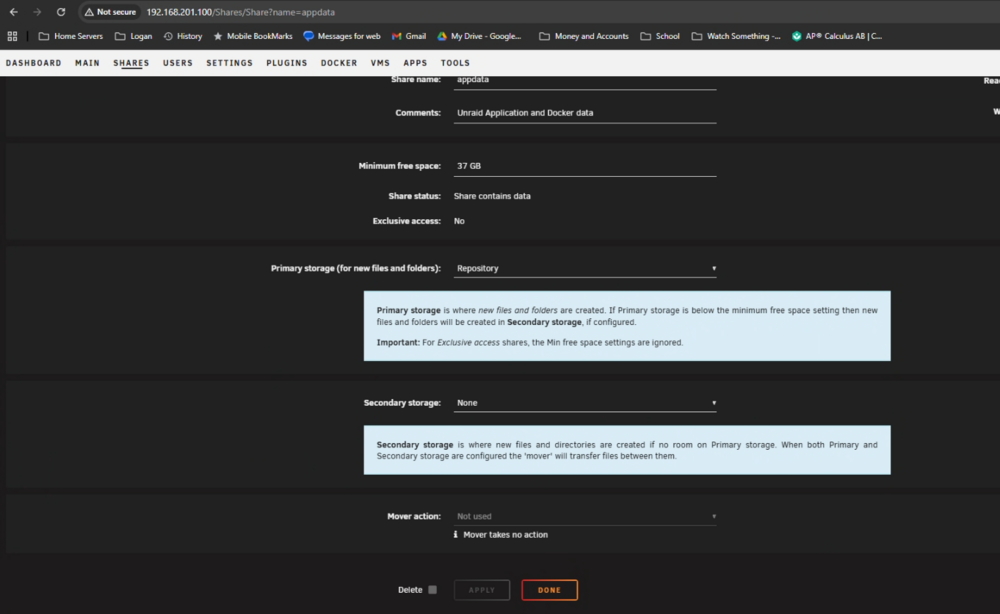
whats the share setting and data at? When using cache it shas to be mover moving the files... ? set it to your cache disk and set primary only for your cache setup... Otherwise check out and use a compose file... https://forums.unraid.net/topic/194760-dockers-fail-to-communicate-on-unraid-72/#findComment-1588190

-
If you guys see this again, can you post the output of ls -ail /usr/local/emhttp/plugins/dynamix/scripts






