bmartino1
Members
-
Joined
-
Last visited
Everything posted by bmartino1
-
not possible... I have an encrypted disk and an unencrypted disk in my array. I want the unencrypted disk (or user shares on it) to be available to access in windows (mounted).... as windows doesn't understand the Linux file systems. And if software raid was used, all disk would need to be present. You wouldn't be using windows to access a encrypted unraid array of disk. Why you can’t mount / unlock Unraid encrypted disks directly from WindowsUnraid’s encryption is handled at the Linux kernel level (LUKS/dm-crypt). This means: The encryption key management, passphrase entry, and disk unlocking all happen inside the Unraid OS. Once unlocked, Unraid mounts the disk using a Linux filesystem (typically XFS or BTRFS) and presents the data to clients (Windows, macOS, etc.) via network protocols like SMB or NFS. Windows cannot directly read or interact with these disks because: Filesystem mismatch – Windows does not understand XFS or BTRFS. Even if the disk were unencrypted, Windows can’t mount it natively. Encryption layer – Windows has no built-in support for LUKS. You would need third-party Linux tools (not available in standard Windows) to even attempt a mount, and that still wouldn’t integrate with Unraid’s array. Array management – Unraid isn’t like plugging in an external USB drive. It manages parity and array assignments internally. If you bypass that, you risk corrupting the array. Why Unraid isn’t asking for a passphraseBy default, Unraid can be configured to automatically load the encryption key from a keyfile stored on the flash boot device. That’s why when you start the array, your encrypted disk is unlocked silently without prompting. If you want to always enter a passphrase manually, you need to remove the keyfile and force Unraid to prompt you when the array starts. Theres a forum that goes over this even with a secure key file to unencrypted at boot... https://weirdion.medium.com/automating-unraid-array-decryption-12a9de3f4ad7 Encrypting your data | Unraid DocsEncrypting your drives in Unraid adds a strong layer of protection for sensitive data, helping to prevent unauthorized access if a drive is lost or stolen. Encryption is available for the %%array|arra Why you can’t “leave it locked but mapped in Windows”What you’re describing—seeing a share in Windows Explorer, clicking on it, and then getting prompted for a passphrase—just isn’t possible with Unraid’s current architecture. Windows never talks to the raw encrypted disk; it only talks to the SMB share exported by Unraid. If the disk is locked, that share simply doesn’t exist until you unlock it through the Unraid webGUI (or CLI if you script it). There’s no mechanism for Windows to pass a LUKS passphrase to Unraid. That step has to be done server-side. What is possibleHave your unencrypted disks auto-mount at array start and expose those shares to Windows. Keep your encrypted disks locked at array start (remove the keyfile). When you want access, log into the Unraid webGUI, enter the passphrase, and then the shares on that encrypted disk will appear to Windows like normal network folders. If you want a smoother workflow, you could script the unlock process on the server side, but it will still require a passphrase entry in Unraid, not Windows. review: https://forums.unraid.net/topic/162128-how-can-one-securely-autostart-an-encrypted-unraid-array/ https://forums.unraid.net/topic/137748-best-way-to-encrypt-exist-disks/
-
Q/AQ: Why doesn’t the base Unraid include Realtek drivers by default, meaning why do we need a plugin? Unraid is built on a Slackware-based Linux kernel that Limetech compiles with a focus on stability. Only drivers that are considered stable, open-source, and well-maintained upstream get included directly in the kernel builds. Realtek network adapters are notorious for having multiple revisions with slightly different chipsets, and the official drivers are often out-of-tree (not merged into the Linux kernel). Some of their code is proprietary, or at least not maintained in the mainline kernel. As a result, Linux will include a “basic” in-kernel driver for Realtek NICs, but it may not fully support every revision (like the RTL8125/RTL8125B). That’s why community or 3rd-party plugins exist: they package Realtek’s newer driver and make it work with Unraid’s kernel. Q: In the past, some NICs had lots of issues with Unraid. Is this still true? Yes, Realtek NICs have historically been more problematic on Linux than Intel NICs. Issues include link drops, poor throughput, and stability problems. Many of these problems stem from Realtek’s lag in upstream driver support. Intel NICs generally “just work” because their drivers are upstream, well-maintained, and included in the kernel. For Realtek 2.5GbE (RTL8125/8125B), the situation has improved a lot. With the proper plugin/driver, they are usually stable. But, compared to Intel or Broadcom NICs, there’s still a higher risk that a future kernel upgrade could break support until the plugin catches up. Q: Has anyone used the TrendNet TEG-25GECTX in Unraid successfully? The TrendNet card is just a board partner’s implementation of the Realtek RTL8125B controller... similar to how different vendors make GeForce graphics cards using the same NVIDIA GPU. Functionally, it’s a Realtek 8125B NIC. Users on the Unraid forums have reported success with 8125/8125B controllers once the Realtek plugin is installed. The main caution is that stability depends on the Realtek driver plugin being maintained in sync with Unraid kernel releases. The latest release of the Linux 6.12 kernel is 6.12.48, which was released on September 19, 2025, and is supported as a Long Term Support (LTS) kernel until at least December 2026... https://en.wikipedia.org/wiki/Linux_kernel_version_history The TEG-25GECTX uses the Realtek RTL8125B chipset Q: Anyone use this nic in their unraid server with success? Any driver issues that I need to be aware of? I personally haven't used that vendor in a while and don't have this hardware. I'm not aware of any gotchas except some users have reported getting realtek higher than 1GB nic and only seeing 1 GB speed. This has been answered int eh forum as its a eth tool issue with the nic no having the 2.5 or height advertising speeds. Explained here https://forums.unraid.net/topic/141349-plugin-realtek-r8125-r8126-r8168-and-r815267-drivers/#findComment-1279775 Due to these issues, i've stayed away from both intel and realtek. it's more of what is the current kernel doing and what's available and been added. then what has unraid/limetek done to keep with the current kernel. Usually these driver issues are fixed in the next kernel. However unraid has been following openzfs for kerneal support and major kerneal changes and updates are slowed due to waiting on openzfs to support the next kernel upgrade. https://github.com/openzfs/zfs/releases (This is an example of why debain stayed on 6.1 LTS kernel... 6.12 kernel are in active development and we are the testers...) Unraid is also not a major corporation and is limited by hardware and access to test everything. there are also unsupported 3rd party built kernel but that very advance Linux and bzroot manipulation that I wouldn't recommend. So if you use this hardware and a driver plugin Its recommend to stay on the current SATBLE LTS version. AS I've seen users with beta test version. If Limetech bumps the kernel and the plugin isn’t updated immediately, you could lose network access until the plugin catches up. Which has been a problem for a few but not most end users that run the realtek hardware. Release notes also go over some help full information as well https://docs.unraid.net/unraid-os/release-notes/7.1.4/ such as what kernel they are running Linux kernelversion 6.12.24-Unraid (no change) Unriad is built on Slackware linux which done't see much support then other mainstream distro like arch or Debian or RFLE...
-
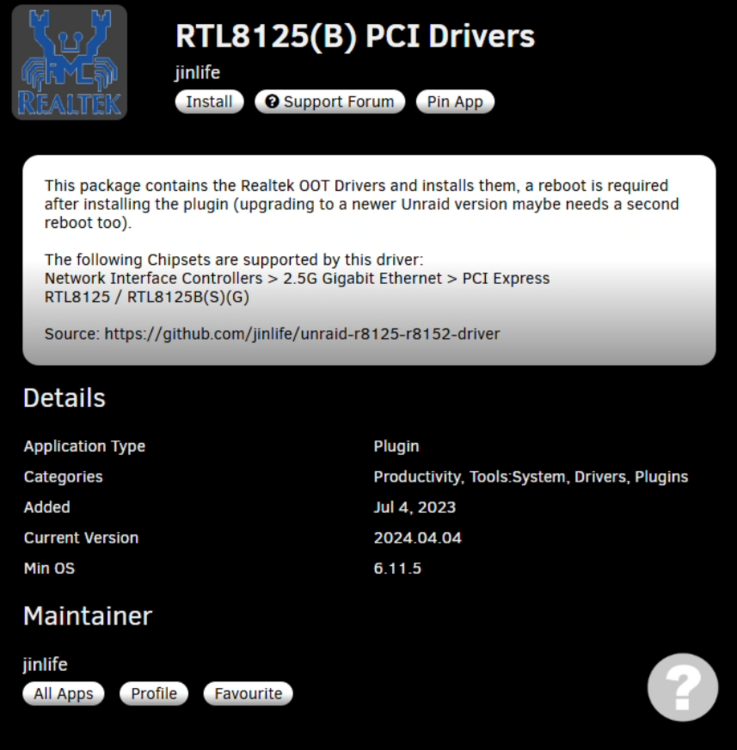
there are drive plugins for the relatek. its more a issues with realtek and intel changes for new hardware in the linux kernel. I'm not aware of any isseus with the Realtek RTL8125B in the lattest 7.1.4 with the driver plugin. just be sure to install the driver plugin:
-
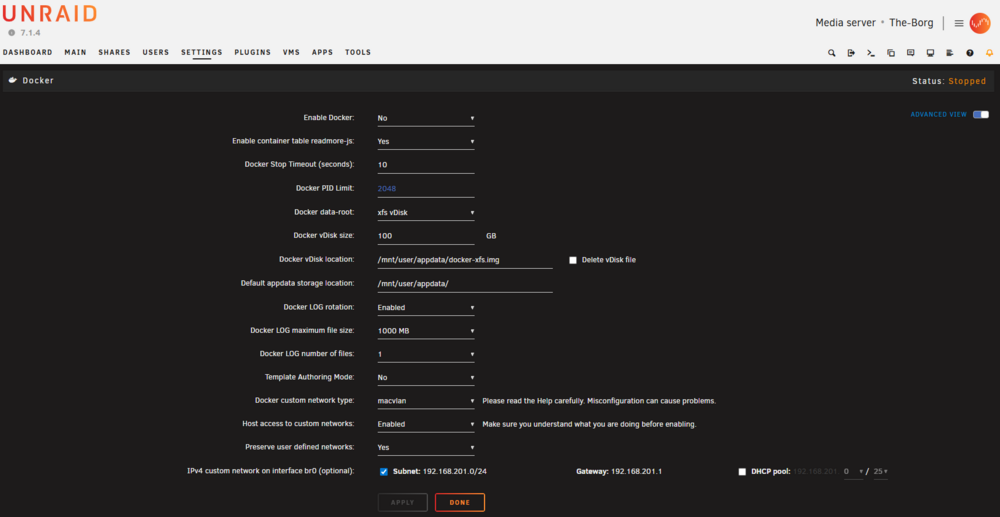
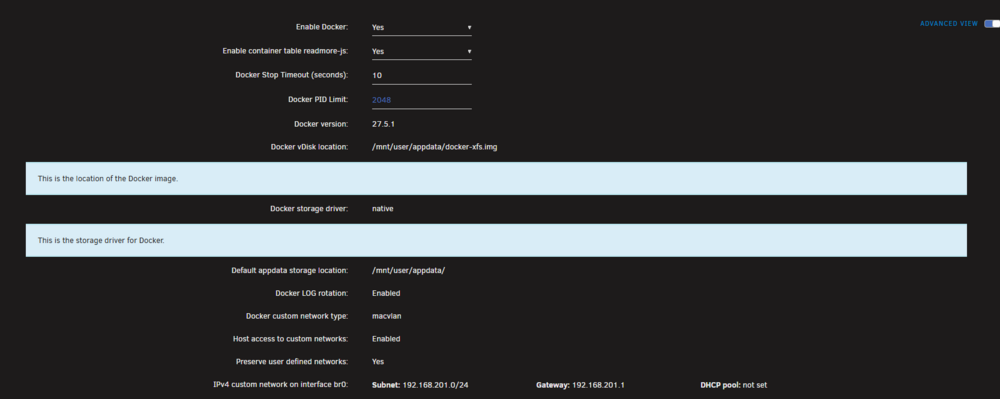
So, regarding the performance questions... Docker Data-Root: Directory vs Image FileImage file (docker.img / vdisk) Pros: One big file is simple for mover/backups. Less metadata overhead when copying/moving. Cons: Fixed size → if it fills up, you must expand manually. Adds an extra filesystem layer (Unraid mounts a loop device on top of your cache FS). That indirection can add slight overhead in metadata operations, especially on BTRFS. (I recomend 100 GB docker size for docker logs, docker image and adation data taht builds and gorws inside of containers.) Performance impact: On SSD/NVMe cache the penalty is small, but still an extra layer of abstraction. Directory (folder mode on BTRFS cache) Pros: Direct I/O to the underlying FS, no need for resizing, fewer layers. On fast BTRFS SSDs this is often faster for high-IOPS workloads (lots of small files). Cons: If mover ever has to relocate appdata, it must copy many small files (slower maintenance). Backups/restores less convenient than one file. Watch share setting... appdata should be a single primary location! Performance impact: Generally equal or better than an image file if you’re already on a dedicated SSD/NVMe cache. Conclusion: For performance, directory mode is typically the better choice on a BTRFS cache. The only downside is convenience (harder to move/backup vs one vdisk). Docker Storage Driver: Native vs Overlay2overlay2 The Linux kernel’s optimized union filesystem. Handles image layering efficiently. Generally best performance for container start/stop, builds, and layer management. Lower copy-up overhead, faster metadata handling in most modern kernels. Recommended by Docker upstream as the default driver for almost all distros. native (btrfs driver) Stores container layers as BTRFS subvolumes (which is why you see btrfs/subvolumes). Gives you CoW and snapshot features at the filesystem level. Can become slower under heavy workloads with lots of layers or many small file changes (metadata overhead in BTRFS). More complex fragmentation behavior, sometimes needs balance/defrag maintenance. Conclusion: overlay2 on top of BTRFS cache → usually better raw performance and less maintenance hassle. native (btrfs driver) → offers advanced snapshooting features but can be slower and heavier in metadata overhead. Recommendation for your setup (BTRFS cache, SSD/NVMe):Data-root as a directory → to avoid vdisk overhead and resizing. overlay2 as the storage driver → for faster, leaner container operations. *Giving the performance over unraids default configuration and ease of backup.


-
Unraid's Docker storage system utilizes a virtual disk image file named docker.img to store container data and programs. This file, by default, resides in the system user share, often leveraging the cache pool for enhanced performance. The docker.img file employs the BTRFS file system and is mounted internally by Unraid. (due to USB mutable ram OS, think of the docker img of a VMs hard drive that we run on the host) Key aspects of Unraid's Docker storage system: docker.img: This central file contains all the data and programs for each Docker container running on Unraid, excluding application data (appdata) and other items explicitly mapped to the main array. Cache Pool Integration: Storing docker.img on the cache pool, typically composed of SSDs, is recommended for optimal performance due to faster read/write speeds. Appdata Management: Application-specific data, such as settings and libraries, is typically stored outside the container, often in a dedicated appdata user share. This approach ensures data persistence across container updates or reinstalls. a default path for unraid templates containt dockers configuration data. Volume Mappings: When configuring Docker containers, volumes are mapped from within the container to specific shares on the Unraid server. This allows containers to access data stored on the main array or cache pool, while perceiving it as local to the container. other paths you want a docker to be able to read and inteact onthe unraid host. Configuration Storage: Unraid saves Docker container configurations as VM XML templates on the flash drive, facilitating easy reinstallation or restoration of containers with preferred settings. most of theses questions on this can be found in the docs and release notes: https://docs.unraid.net/unraid-os/using-unraid-to/run-docker-containers/overview/ https://docs.unraid.net/unraid-os/using-unraid-to/run-docker-containers/managing-and-customizing-containers/ Regardein the root file locaiton. Here is some old data regarding the docker .img file type to use for FS data https://forums.unraid.net/topic/126557-6103-docker-data-root-options/ Please also Review: https://www.reddit.com/r/unRAID/comments/t2ll3w/dockers_folder_or_image/ So.... Docker “Image File” vs Docker “Directory” for Data-Root (vDisk vs folder)What they are:Image File (vdisk / docker.img / vDisk): Docker data + appdata are stored inside a large file, formatted with a filesystem inside (e.g. BTRFS or XFS), that acts like a block device. That file is mounted and Docker uses it as its data-root (where containers, images, volumes metadata live). Directory / “folder” mode: Docker data-root is a folder on a normal filesystem (e.g. your cache drive or share). Containers and images live as files/subfolders rather than inside a block image. Docker Storage Driver: “Native” vs “Overlay2”This one is a little more subtle. Unraid in some contexts uses a “native” storage driver. That generally means using the backend’s filesystem’s driver / default behavior. Depending on what the underlying FS is (BTRFS, ZFS, XFS, etc.), “native” can map to different things. OverlayFS / overlay2 is a union filesystem technique that Docker uses commonly on Linux: image layers + container layers get stacked, with upper/lower/merged dirs. It has been the recommended storage driver for many Linux distributions. The storage driver docker docs data info: https://docs.docker.com/engine/storage/drivers/select-storage-driver/ Recommend setup use case Form personal experience with unraids docker systems... I recommend using the vdisk xfs docker img file and native storage driver for dockers on unriad. This has been my default configurations following the docker release and unraid OS updates over the years. To use appdata on xfs/btrfs/zfs in the array and/or a cache pools of disk... As some of these settings are needed and dictated more from the hardware your running, the storage options you have and what files system format you are using and wanting to interact with.
-
please post a diag... as example for 2.5 gb there is an additional things you need to do and run to make sure your getting and using the full link speed: example: https://forums.unraid.net/topic/141349-plugin-realtek-r8125-r8126-r8168-and-r815267-drivers/#findComment-1279775 there are some known issues and some advance configuration you may need to do https://www.youtube.com/watch?v=ZMMopEiwiEo https://www.youtube.com/watch?v=25umVbN__6M the diag would have helpd and been quicker... so your on you own after this line of testing.... 1st check your ip route to make sure your standard 1 GB eth nic and your 10GB connection is set to use teh 10 GB link as this is a common gothca run ip route and look at your subnet lan to the dev interface adn MAKE SURE IT IS TEH INTERFACE THAT IS 10 GB link... ok I have to asume eth0 sine no diag, no hardware. coper?sfp?sfp+ etc... so you will need to fix the comands and interfaces... A. ) Check Link Status & Speed # Show all interfaces and their link speeds ethtool eth0 # If multiple NICs exist, adjust eth0 → eth1/eth2 Look for: Speed: 10000Mb/s Duplex: Full Link detected: yes If it shows 1000Mb/s, you’re capped at 1 GbE somewhere (driver, switch port, SFP, or cable). B. ) Verify IP and Interface ip addr show eth0 ip -s link show eth0 This confirms the IP assignment, MTU, and packet errors/drops. Optional but I'd set it.... as your mtu may still be 1500 for 1GB C.) Test Jumbo Frames (optional if your network supports >1500 MTU) # Check current MTU ip link show eth0 # Temporarily set to 9000 (for test) ip link set eth0 mtu 9000 # Ping with large packets ping -M do -s 8972 <gateway_or_other_host> D.) Check Driver & Module ethtool -i eth0 lspci -nnk | grep -A3 -i eth This tells you which driver is in use. Some 10 GbE NICs (Mellanox, Intel X550, Broadcom) need firmware or tuning. (Dirver plugin for melnox exist as a plugin for example you may need adatioanl drivers/modprobe as teh unraid kerneal may not have a driver for your hardware...) E.) Monitor Traffic or somethign that can I'm used to deb and having deb coanads or something I can use to monitor... iftop -i eth0 nload eth0 unraid cand do this with adatial 3rd party slack pack install.. look into: (to install: slackpkg install iftop or via NerdTools plugin in Unraid). F.) Systemctl / Service Checks Unraid doesn’t use NetworkManager by default but you can still check lets review some still worth a mention... unraid usrs systemvar and scripts located elswhere... # See if networking service is running systemctl status networking # Restart interface ifdown eth0 && ifup eth0 Since iperf3 works well inside LAN, try: # Run a multithreaded speedtest (CLI) speedtest --servers speedtest --threads=8 --progress=no If you don’t have Ookla CLI curl -s https://install.speedtest.net/app/cli/install.rpm.sh | bash and lastly if you've wathed the youtbe and still need to use tcp staks and settings.. TCP Stack & Offload Settings # Check NIC offloading ethtool -k eth0 # Disable problematic offloads (test only) ethtool -K eth0 tso off gso off gro off Sometimes GRO/TSO offload issues cause capped speed in virtualized or container workloads. so again please post a diag so we can get a better picture of what hardware and linux sytem data.. Recap: Run ethtool eth0 and confirm the link speed. Run ethtool -k eth0 to see offload features. Try a multithreaded Ookla test (--threads=8).
-
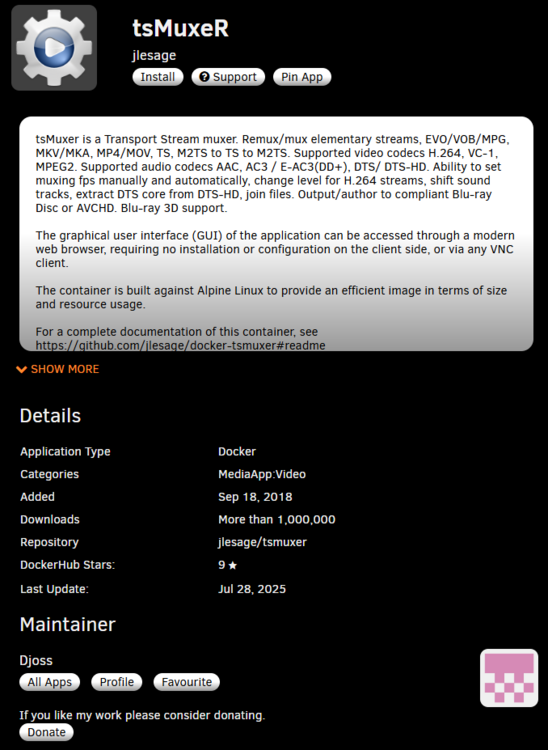
I'm not familiar with that as a docker... You may get better support here: ML: https://forums.unraid.net/forum/77-general/ or here: German: https://forums.unraid.net/forum/76-deutsch/ From what I can find, its is possible but complicated and not a simple run and done. as that project is not docker nor Linux based. Rekordbox is not officially supported to run directly within a Docker container. Pioneer DJ, the developer of Rekordbox, designs the software to be installed and run directly on a host operating system like Windows or macOS. *Your better off using a windows VM and a network share on unraid. While it is not officially supported, some users explore workarounds and indirect methods involving Docker for specific aspects related to Rekordbox: Prolink-go in Docker: One example is running prolink-go, a third-party tool for Pioneer Pro DJ Link, in a Docker container to allow it to coexist with Rekordbox on the same machine. This does not involve running Rekordbox itself in Docker, but rather a supporting application. Shared Library Management with Dockerized Services: Users might leverage Docker for services that interact with Rekordbox's library, such as running a Nextcloud instance in a Docker container on a NAS and then pointing Rekordbox's settings to synchronize with the Nextcloud shared folder. This allows for centralized library management, but again, Rekordbox itself is not within the container. which is where I would send you, but i'm not a fan of Nextcloud. this would require you to still run rekordbox elsewhere... Key Considerations: Performance and Stability: Running complex applications like Rekordbox, especially those with real-time audio processing and hardware interaction, within a virtualized environment like Docker can introduce performance overhead and potential stability issues. Official Support: Any issues encountered when attempting to run Rekordbox in an unsupported configuration like Docker would not be covered by Pioneer DJ's official support. Alternatives: For managing and syncing Rekordbox libraries, official features like Rekordbox Cloud Library Sync (using services like Dropbox or Google Drive) or network shared folders are available and generally recommended for their stability and support. https://rekordbox.com/en/support/information/ for this project if you want that software application you may be forced to use there cloud https://rekordbox.com/en/feature/cloud/ however, other music dockers exist. whats your end goal? what are you trying to do and how do you want to interact with it? Example: https://github.com/9001/copyparty Docker README: https://github.com/9001/copyparty/blob/hovudstraum/scripts/docker/README.md docker image: https://hub.docker.com/r/copyparty/dj OR are you just trying to have a web path or nas path to your music? example of something in the Unraid CA: as you're better off having a window's / apple's samba share on unraid and connecting to your Rekordbox via the share.
-
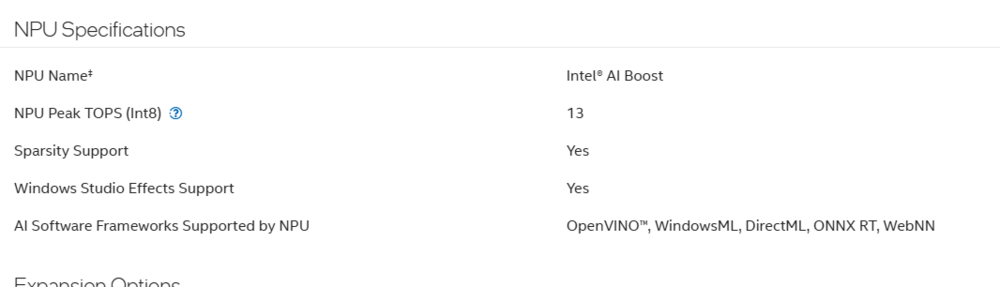
cool that seems like the intel vpu drive is not working, not sure if here is a good place to discuss that simon. Short answer: you want the Intel NPU / iVPU kernel driver, whose Linux module is named intel_vpu (it shows up in logs as iVPU / VPU). If that module isn’t built into your Unraid kernel, it won’t load—and you’ll just see the raw PCI device (8086:7f2f) like you do now. so we can see if the kernel module exist and load. it See if the module exists & load it script: # is the driver present? modinfo intel_vpu 2>/dev/null || echo "intel_vpu.ko not found" # try to load it sudo modprobe intel_vpu # check kernel config to see if it was compiled zcat /proc/config.gz | grep -E 'DRM_ACCEL_IVPU|IVPU|INTEL_VPU' # look for device node and dmesg ls -l /dev/accel /dev/accel/accel0 dmesg | grep -i -E 'ivpu|intel_vpu|vpu' If it loads, you should get a /dev/accel/accel0 device (that’s the modern accel framework path). Set access for your user/container as needed: # example permissions (adjust to your setup) chgrp render /dev/accel/accel0 && chmod g+rw /dev/accel/accel0 per github: https://github.com/intel/linux-npu-driver/releases So, If modprobe intel_vpu fails with “module not found” That means your Unraid kernel was built without DRM_ACCEL_IVPU (the iVPU option). In that case you have three paths: Wait for an Unraid build with iVPU enabled (simplest). Custom kernel for Unraid that enables DRM_ACCEL_IVPU=m and includes the firmware blobs (advanced). PCI passthrough to a Linux VM (Ubuntu 22.04/24.04) and install Intel’s user-space NPU driver in the guest. Users have reported success seeing /dev/accel/accel0 once passed through. (this is where I think ICH777 and a driver plugin would be needed for npu devices. or someone more skiled with plugins.) Firmware & user-space Even with the kernel module present, you also need the firmware and user-space stacks: Firmware: recent linux-firmware packages include iVPU blobs; if they’re missing you’ll see ivpu_fw_request(): Failed to request firmware in dmesg. KNown bugs with debian- https://bugs.launchpad.net/ubuntu/+source/linux-firmware/+bug/2071771 User-space: Intel provides the Linux NPU driver packages (Level Zero + compiler/runtime) for Ubuntu; these are installed via .deb (APT) or the GitHub release tarballs. On Unraid you wouldn’t install them system-wide, but you can use them inside a VM or a container based on Ubuntu. per the github link... Project page (explains that Linux uses the older “VPU” name): per OP github link: https://github.com/intel/linux-npu-driver since you atleast see the lspci device: 80:14.5 Non-VGA unclassified device: Intel Corporation Device 7f2f (rev 10) that tells me that this may require the adatial software and modprobe data for the npu-driver That 8086:7f2f ID is an Arrow Lake NPU function that often shows up exactly like this until the iVPU driver binds. Multiple reports list the same 7f2f ID prior to driver attach. BUT, the module you want to test and try to load it is... module you want is intel_vpu (iVPU). Try modprobe intel_vpu If the module isn’t found, your Unraid kernel wasn’t built with DRM_ACCEL_IVPU—you’ll need an Unraid build that enables it, a custom kernel, or pass the device through to an Ubuntu VM and use Intel’s NPU driver there... since on the betat may need a beta post: https://docs.unraid.net/unraid-os/release-notes/7.2.0/ but i'm curious what the out put of is... uname -r modinfo intel_vpu zcat /proc/config.gz | grep DRM_ACCEL_IVPU dmesg | grep -i ivpu as I'm not using the beta and not sure if the dev will add addational driver support to the linux kernel Linux kernelversion 6.12.42-Unraid built-in: CONFIG_EFIVAR_FS: EFI Variable filesystem CONFIG_INTEL_RAPL: Intel RAPL support via MSR interface
-
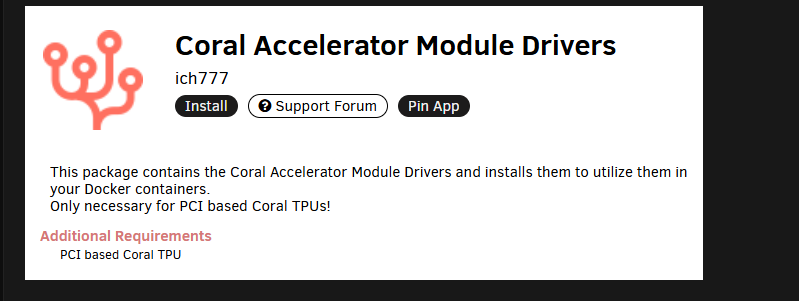
you can pass it into a vm and use a vm on a differnt OS. I'm not sure of all the drivers and support for theses devices. That's more ICH777 area and his driver plugins that use and support this for use in things like frigate docker and Home assistant. as an example... As unrad runs on x86_64 with slack ware linus. if i'm understanding you have https://www.intel.com/content/www/us/en/products/sku/241060/intel-core-ultra-9-processor-285k-36m-cache-up-to-5-70-ghz/specifications.html if the chip supports x86_64 instructions, then it will work in unraid/linux... in order to use these additional chipset and instruction, the kernel needs to load them... (they may not be loaded by default...) at this Time, I'm not 100% sure if unraid supports them or not... As this is a IT software and hardware specific issue and your results will vary.... However, Ive used and seen some npu with dockers on unraid...) the intel plugin and docker that support and use openVINO will use and benefit for having a NPU... in general this post was referring to the Coral applications and existences of npu drivers that already exist at the kernel level. it more of what dockers have support and can use and benefit from the npu. and someone wanting to load additional npu to the host which is not possible outside of a drive plugin. (that may or not be needed) or script loading additional software.... as this is more cpu instruction sets and the processor support npu.... its not realy a question of does unraid use and can use it but whats your intent and how are you running xyz that may or may not use the npu... these npu are additional addons that can help with AI and other task that use the added processor instruction set... some npu are built into the cpu.... the host unraid problem still lies in the need for a modprobe to utilize the npu on the host... https://www.reddit.com/r/linux/comments/1dkqwf6/is_there_any_use_for_a_npu_module_on_linux/ which is why I informed of the plugin drivers: An example of a Linux compatible NPU is Google Coral https://coral.ai/products/accelerator/ which others on the forum have used and have used with unraid on the forum with face identification in frigate. with out knwoning more on the NPU I can't say one way or the other... so the question is more what npu hardware are you running and does unraid slackware liunx have a kernal level modprobe driver for that hardware... otherwise a driver may be needed depending on how you use and will use the npu...
-
Without more info of your tdarr settings, or client tv paly data and how your access the content... Essential tdarr is your dlna sever and you need a tdarr client to connect to it to use it... which the TV doesn't use... direct play is still failing as it can't connect nor understands the file type of encoding to play the file.
-
if you want direct play you need to convert the original file media to the tv codec and capabilities. or use something like tdar to do transcode and make a similar playable file. Usually transcode and decode in this sense will not function the way you think or want as it's just moving the processing power need to play but there still buffer and network latency Issus. This is why jellyfin will work with its own play app as its trans codes to what the play need to play. Not enough info... what tdarr settings are you running? as you are running jellyfin which does the transcoding and remux to the players file type. Otherwise, you now have to find the Sony's playable file type. and its codecs for sound audio etc... I have done similar dlna with PlayStation servers and ps3 and other TV networks.... But From the OG post and info so far. And my understanding of tdarr. I don't think tdarr is what your looking for. as direct play is limited by the chip and the capabilities of the TV itself, its the client player... Thus something like any video convertor or handbreak (unraid docker exisits...)to convert the media to the tvs playable file container format is what's need to include the older tech to use the video format... https://www.sony.com/electronics/support/articles/S1F0798 So my question is what's the Original source content and its file format, and what files don't play on the older sony tv? as you will need to fix the files to be in the correct codec and file format for direct play. so what is tdarr: Tdarr is a free, open-source application for automating the transcoding and management of large media libraries by processing files based on predefined rules. It utilizes FFmpeg or HandBrake for transcoding, can use either a CPU or a GPU for processing, and supports a distributed architecture with multiple "Tdarr Nodes" to scale its processing power. Users can configure Tdarr through plugins to automatically convert videos to more efficient codecs like H.265, which frees up disk space, and can also perform health checks on files for corruption Examples... A common use for Tdarr is to simply convert video files from h264 to h265 (hevc), saving 40%-50% in size. The application is in the form of a click-to-run web-app, comprised of the following 2 components: Tdarr_Server - Central process which all Nodes connect with... SO! per the support articulate it appears that your older TV doesn't support h.264 or h.265 and thus needs to be converted to a file type that the codec playing on the TV understands. SO your fighting dlna and the TVs limitations of its own codec player. As I've done similar work with content and The TVs should use similar ps3 technology and while this doesn't exist on linux/unraid that I know of... atm I would recommend you file format correct the source content for the TVs limitations. or use a dlna server that will transcode for you as that not what tdar does nor fix in your use case... https://www.ps3mediaserver.org/
-
Review: Some Best Practices for a ZFS only Setup: View ZFS Forum Info ZFS Unraid Docs Docker Guides: Immich Docker-compose Setup Immich Unraid-Template in the CA
-
ok what do you want it to do and how do you want to interact with it? If i'm reading your post coretly... Your Current Layout2× NVMe → Main Cache Pool (System / Appdata) Good choice: NVMe is fast, perfect for Docker/VM/appdata workloads. ⚠️ Consider mirroring them (RAID1) if you want protection. Appdata can be backed up, but losing it is painful. 1× 2TB SSD → Cache Pool (no protection) for Media (with Mover to Array) Reasonable if you’re only using this as a write cache for large media downloads. ⚠️ Risk: no redundancy, if the SSD dies mid-transfer before mover runs, you lose files. 2× 2TB SSD → RAID1 Cache Pool (Databases + Immich) Excellent use. These workloads are I/O heavy and benefit from protection. Some limitation to review: Use Cases & ConsiderationsMedia (TV, Movies, etc.) Long-term storage belongs on the array (your 5×15TB HDDs). Cache for downloads is fine, just know unprotected SSD cache has risk. Suggestion: you could combine all 3 SSDs into one BTRFS pool and assign share rules per use-case. That way you’re not slicing up your SSDs too much. Nextcloud / Alternatives Nextcloud is powerful but heavy and finicky (lots of PHP, DB overhead, maintenance, and problems with updates). Alternatives: Immich (already planning): stellar for photos. Seafile: lightweight document sync/collaboration, much faster than Nextcloud. Syncthing: if you only need file sync, no groupware. If you don’t need calendars/email: skip Nextcloud. sftp for file webdav access or even rejetto hfs... What is nextcloud going to provide that is better or easeir done with something else? since your using immich there is nexcloud with memories pluin as example.... Databases / Password App / Paperless / Dev Work Absolutely best to keep on SSD (mirrored). If you later expand, consider moving them to NVMe for even more speed. Light Game Server SSD/NVMe is perfect for game servers. Your asking alot out of the hardware. immich and a game server can be quite resource intensive... GIvein the info: Share Layout (Media / Photos / Apps)You asked whether to merge or split shares: Option 1 (Keep Separate): Media share on HDD array (with SSD write cache). Photos share on RAID1 SSD pool for Immich. Cleaner isolation, but more pools = more complexity. Option 2 (Merge SSDs into one big protected pool): One larger SSD RAID1 pool (~2TB usable). Appdata, Photos, Databases all live there. Simpler, but less flexibility. I’d recommend Option 2 for simplicity, unless you specifically want to dedicate an SSD to staging downloads. or look into zfs and other disk options... Recommendations:Mirror NVMe pool (RAID1) → safer for appdata, VMs, configs. Combine 3× SSDs into 1 RAID1 pool (BTRFS/ZFS mirror) and then split workloads by share. I recomend a raidz1 to get the mirro and strip protection from zfs file format... Use “Prefer Cache” for databases, photos, appdata. Use “Yes → Mover” for downloads/media staging. Keep HDD array (5×15TB) as bulk storage → parity protection for media library. Skip Nextcloud unless you need groupware → try Seafile (lightweight) or just Immich + Syncthing.
-
?why not run something like jellyfin or plex and play it in a single app? dlna?
-
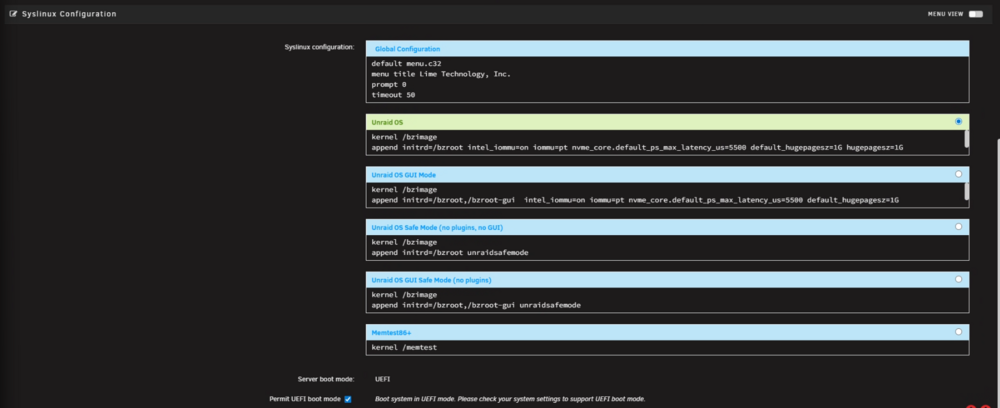
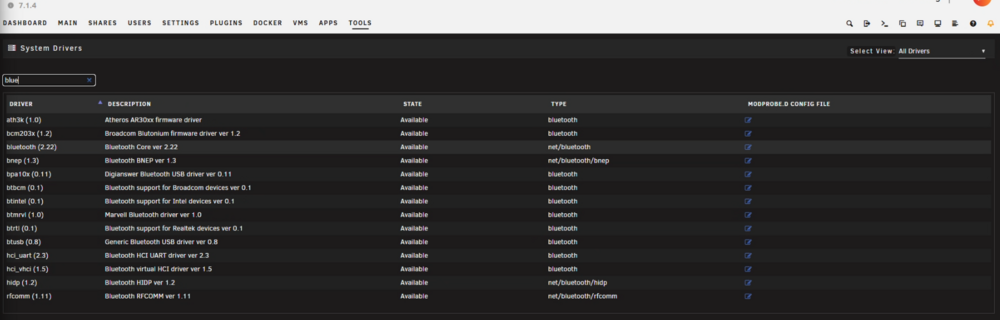
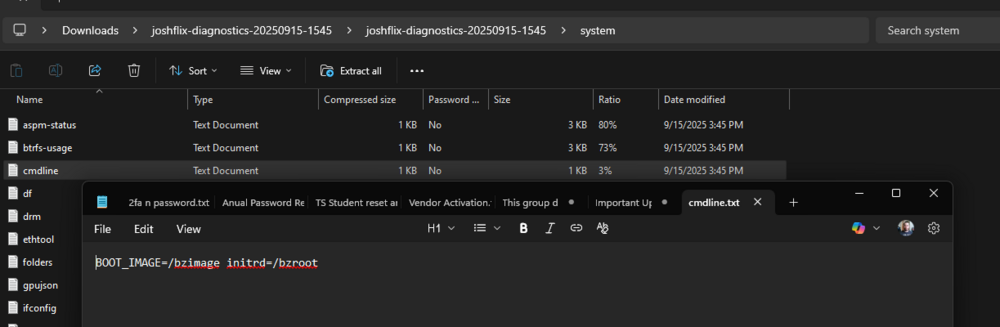
ok so let me clarify it then. Thank you for asking as I don't alwys go into great depth as it can be alot.... as this is advanced linux stuff... The goal atm is to tell the host unraid kernel not to load the Bluetooth drivers. Since this is kinda a mutable os. (run in ram and things are loaded off the usb... we have to run scripts or edit things at boot to apply some settings to stay at a reboot or apply to the system. Unraid loads and exists in ram... if you don't want to edit grub as explained before above. We can try the modprobe file action. As there are many ways to accomplish the same things... you can make a file at /boot/config/modprobe.d/blacklist-bt.conf # Keep host from binding the onboard BT so we can pass it to a VM blacklist btusb blacklist btintel blacklist btrtl blacklist btbcm after making the file you will need to reboot to apply it. This can also be seen in the GUI via tool > system drivers I find it easier to tell grub this additional boot option then trying to mess with unraids modprobe configurations and adding stuff to the flash drive to edit the linux default drivers.... So, as I prefer the syslinux route and add options to grub at the boot screen, in Main → Flash → Syslinux add to the append line: if you go to main flash and scroll to the bottom, you will see the system Linux grub area. <unraid IP>/Main/Flash?name=flash and scroll to the very bottom: I would leave the top syslinux configuration alone. we only care about the green box. this is are default boot options for unraid and also where one can enable or disable UEFI boot via the unraid gui. as noted in my system's setup I have additional grub options I run and configurations for each machine I run linux on depending on needed use case and to set specific options... the bear min here in the boxes to boot unraid is kernel /bzimage append initrd=/bzroot note the gui option below has adationail line for intrid to load the gui stuff... note my picture above and how I have additional data after the initrd.... Some web ui settings like the VM settings add grub options here so at boot here is where one can leverage linux to turn on or off features. here, we can leverage at boot configurations for modprobe to turn on or off device drivers If you have something in the green box as I default to default boot (with uefi). Some use gui mode... we want to add to the append line in that box.... so here i want you to add the modprobe gurb option that will blacklist (disable) the devices that use thoese drivers. if you run in terminal lspci -a you will see at the bottom of your device a driver in use. We are essential telling unraid to never use or load that driver. Since this is a usb Bluetooth I believe the command is lsusb -a where you can see the Bluetooth device. Ideally we want the device to use vfio-pci for pce devices for VM only use... but since this is USB and not PCI we have to go a different route. so at this grub area option I want you to replace the UNRAID OS green box contents with this: kernel /bzimage append initrd=/bzroot modprobe.blacklist=btusb,btintel,btrtl,btbcm *If you have soemthing int he box already let me know as this may chage what need to be in this box!!! then click apply at the end. you can see my grub boot line as example: kernel /bzimage append initrd=/bzroot intel_iommu=on iommu=pt nvme_core.default_ps_max_latency_us=5500 default_hugepagesz=1G hugepagesz=1G transparent_hugepage=always pci=noaer pcie_aspm=off all of the theses options affect my running hardware and are used to fin tune some options for the host for my use case. Some are forced to default on by unraid. Other help Virtualization and side bugs. Other turn off things that I don't want on to begin with. In your case, I just want the host to not use the Bluetooth modprobe. There is technical a terminal command but i rather this be default off off. And not deal with any lingering issues after a reboot. This is one to target Bluetooth as we belvie that its the bluetooth device giving you the spam in the logs... (I want a rebooted machine with theses options and diag...) then post a updated diag file. As the cmdline will tel me if you ran it or not and potential give me the other necessary data to double-check that we got the device example infor for your lsusb as this is your bluetooth device... Bus 001 Device 007: ID 8087:0aaa Intel Corp. Bluetooth 9460/9560 Jefferson Peak (JfP) as we want to target this device for vm use... Then using a hook script that I shared above with the data given we can tell the host to find your usb via its vendor data and attach it to the VM in question. As normaly I deal with the pcie devices and that level... but the same concepts and principles apply here. we also have other options as well... since the spam of the log let bring down the device... Bring the controller down (if it exists) and unbind the USB interfaces try to run command hciconfig hci0 down 2>/dev/null || true *At least this is what would work in debain. unraid runs on slackware. Since i don't have access to the affect machine nor the hardware, I can only go over things I would do to get to the bottom of xyz... lspci -nn | grep -i usb # example: 00:14.0 USB controller: Intel Corporation ... [8086:a2af] (which i have that need to clarify the device...) and lsusb as shown per your diag.... I would potential add adational grub options like usbcore.autosuspend=-1 to stop usb power management and usb sleep states. and things like vfio-pci.ids=8086:a2af intel_iommu=on iommu=pt but this would require unraid vm setting for ACLS that would add something like pcie_acs_override=downstream,multifunction to the green box... but this in theory would only remote the port to port pass the device to the VM and is a bit convoluted. which is why I'm trying to start small and get you to point a test check and then to point b. With the devices black listed, we could then use CA plugins for USB devices to auto connect to a VM when running instead of the script. but that was after confirm that the hw error is indeed bluetooth... as the goal is to st make sure the host doesn't touch use nor interact with the bluetooth device. then in the VM / vm config and settings attach the device to the VM so only the vm can manage and use the device. I rather a reboot and this in grub at a higher level to affect the kernel and host operations due to the mutable OS where I can't always edit a config file, and it remains in use and effect at a reboot. to test as there is techily a mod probe to remove the current installed Bluetooth devices in use. (Not disable!) sudo modprobe -r btusb btintel btrtl btbcm 2>/dev/null || true but things were touched and the spam in the syslog make it near imposable for me to assist with other checks and problems... removing doesn't undo the problem at hand... thus part of the answer and a script to try. as I don't know you skill level and I rather you ask question and get answer then randomly take the word of a person on a public forum.


-
you will need to add this to the main grub boot launch modprobe.blacklist=btusb,btintel,btrtl,btbcm and run my script posted above yes. this is because unraids kerneal is trying to touch and load apart of the bluetooth device even though you are planning to pass it to a VM. this is to stop the host unraid form touching the devices meant for other arears.
-
good as the diag don't tell the full story and what was givein was limited. ok we can confirm this is a VM devcie pass isue and we are refering to HA as the VM not a docker... the spam in the log is most likely when the vm was turned off and the devce didn't power cycle or take the mvoing form the host tot eh vm corectly. have you alread restarted the host unraid? yo may need to run adational gube modprb comnds and have a user script to reset the bluetotth devcie whent eh vm turns of or when its in use with the vm as the host dind't pass it corectly to the VM. What are your VM Settings? the dig ddin't show a good lspci you should rely bind the bluetooth devie out. main > flash> to edit unriad host grub boot options... example: so what i recomend for adational grub boot loading to fix this and restart unraid is: modprobe.blacklist=btusb,btintel,btrtl,btbcm to stop the host form loading bluetooth out right at bootand pasing the device id per your picture toteh xml code to passs the device for use int eh vm only <hostdev mode='subsystem' type='usb' managed='yes'> <source> <vendor id='0x8087'/> <product id='0x0aaa'/> </source> </hostdev> if you have the user script plugin tool this script might work taht wil acomplish this... #!/bin/bash # Detach Intel BT (8087:0aaa) from any host driver and hot-attach to a VM if running. VENDOR="8087" PRODUCT="0aaa" VM_NAME="Windows 11" # <-- set your VM name exactly # 1) Try to unbind interfaces of the matching USB device from any driver (e.g. btusb) for dev in /sys/bus/usb/devices/*; do [[ -f "$dev/idVendor" && -f "$dev/idProduct" ]] || continue if [[ "$(cat "$dev/idVendor")" "$VENDOR" && "$(cat "$dev/idProduct")" "$PRODUCT" ]]; then for ifpath in "$dev":*; do [[ -e "$ifpath/driver/unbind" ]] || continue intf="$(basename "$ifpath")" echo "$intf" > "$ifpath/driver/unbind" 2>/dev/null done # prevent auto-rescan/rebind on host [[ -w "$dev/authorized" ]] && echo 0 > "$dev/authorized" fi done # 2) If the VM is already up, hot-plug the USB device into it cat >/tmp/usb-bt.xml <<EOF <hostdev mode='subsystem' type='usb' managed='yes'> <source> <vendor id='0x${VENDOR}'/> <product id='0x${PRODUCT}'/> </source> </hostdev> EOF if command -v virsh >/dev/null 2>&1; then if virsh domstate "$VM_NAME" 2>/dev/null | grep -qi running; then virsh attach-device "$VM_NAME" /tmp/usb-bt.xml --live fi fi echo "Bluetooth ${VENDOR}:${PRODUCT} detached from host and attached to ${VM_NAME} (if running)." Some FAQs / gotchas Why not vfio-pci? Intel Bluetooth shows up as a USB device (8087:0aaa), so vfio-pci doesn’t apply. vfio-pci is for PCIe devices (USB controllers can be PCIe, but this BT module itself is USB). Do I need ACS override / unsafe interrupts? No. Those are for PCIe passthrough. Not needed for a raw USB device. Still seeing logs? Make sure btusb is blacklisted (either via the file or append) and rebooted. You can verify with: lsmod | grep bt need more info to asist otherwise...


-
this is often called a forbiden router. https://www.youtube.com/watch?v=r9fWuT5Io5Q https://www.reddit.com/r/unRAID/comments/6wnkow/video_guide_how_to_setup_a_virtual_vpn_router_on/ i've gon over the linux comads. Your better off passing a pcie nic device to gurantee seperation. Unraid is not networking equipment you will experience layer 2 layer 3 isseues... i've gone over the thoeries the comands and pratcal use case of making bride interfaces and connection. the end iseus is that unraid done't have a good wat to mutip ip orute when a interface shares the same subnet. so exampel eth1 and eth2 and pluged into the same router dhcp server. unriad will deafutl trafic over eth1 even thouigh ewth2 is conected. even in bondin and dfault configs eth1 is prefed... however you can make a passed physicl nic and make a br42 interface and coenct that to your router VM and use br42 with a docker netwrok also explained on the forum before... I don't recomend trying this on unriad. HWile posble it server no good use case even with atempts at firewall and contorls. physical hardware and softwre constratins to teh cost of hardware and need for a specfic use case.
-
q/a Mirror vs. Backup-to-ArrayZFS mirror (two NVMe drives): This is the cleanest, most robust setup. Your Docker/VM/scratch workloads will benefit from the performance of NVMe, and you’ll get redundancy at the filesystem level. If one NVMe dies, the other continues without downtime. Also, ZFS scrubs will ensure silent corruption doesn’t creep in. → This is the option I’d recommend if you care about uptime and performance. One NVMe + backup to array (ZFS disk in array): This adds complexity. You’d be mirroring your cache drive into a much slower spinning disk in the array. That disk would also be tied to parity writes if it’s in the array, which hurts performance. In practice, you’d never want your “live” Docker/VM workloads touching that slower disk. As a backup target it could work, but then you’d still want a snapshot/replication job, not a ZFS mirror. → Feels like extra moving parts for less benefit unless you really want a cold backup living on spinning rust. Which Disk to Use if You Went That RouteIf you did use an array disk as a backup target: It doesn’t really matter whether it’s a “movie,” “tv,” or “music” disk — ZFS datasets won’t care about file type. What matters is I/O pattern overlap. If you back up to a disk that’s otherwise idle (say, a movie disk), you won’t introduce contention during reads/writes from other services. But if you have the option, a dedicated disk outside the parity array (just as a ZFS pool member) would be better. That way you don’t drag down parity performance and can snapshot/replicate at full speed. Splitting Dockers / VM / Scratch WorkloadsAll-in-one NVMe (current setup): Totally fine for most home labs. ZFS datasets let you isolate and tune things (compression, recordsize, quotas) per dataset, so you can already optimize per workload without separate physical devices. Two or three NVMe drives: You might see marginal gains if you had extremely heavy simultaneous VM I/O and large Docker scratch downloads — but unless you’re hammering the drives constantly (e.g., Plex + multiple VMs + *arr unpacking at once), it’s overkill. Best compromise: Use one mirrored pair of NVMe drives as your ZFS pool. Inside it, create datasets for: appdata / docker VMs scratch/downloads This way you can tune each dataset (e.g., disable compression on scratch, set larger recordsize for VM images, smaller for databases), but still keep redundancy and NVMe-level performance. Some Practical AdviceMirror the NVMe drives with ZFS. That’s the no-regret move. Skip backing up to an array disk for redundancy. If you want backups, use ZFS replication (zfs send | zfs recv) on a schedule, but target something not latency-sensitive. Keep workloads together on the NVMe mirror and separate them into ZFS datasets. That gives you flexibility without juggling hardware.
-
Some Best Practices for a ZFS only Setup: View ZFS Forum Info ZFS Unraid Docs
-
contact support they can assit wil aquireing new lciense for purcahsed products.
-
Sep 15 04:40:13 JOSHFLIX kernel: Bluetooth: hci0: Exception info Sep 15 04:40:13 JOSHFLIX kernel: Bluetooth: hci0: Hardware error 0x0a this looks like a improper vm pass and usb power stae error using usb bluetooth with a vm/docker. please review: https://www.youtube.com/watch?v=ZXvcdI3mQuA https://www.youtube.com/watch?v=UilWLtMYd-U https://www.reddit.com/r/unRAID/comments/1fsgvlt/video_guide_install_home_assistant_vm_on_unraid/ https://www.reddit.com/r/unRAID/comments/lw8f0l/how_to_set_up_home_assistant_on_unraid/ if using Home assistnat while there are CA dockers you realy should use teh HA VM. https://community.home-assistant.io/t/ha-os-on-unraid/59959 https://community.home-assistant.io/t/install-home-assistant-as-a-vm-on-unraid/270195 https://youtu.be/-EAbiMkrcFE?si=sXLpEbvQmg8V-HKc https://github.com/home-assistant/operating-system/releases where its easeer to gui select your bluethooth device for the VM only.
-
ignore it or pass the Bluetooth into a vm/docker that can use it like home assistant that will always stay running... Its mostlikely a modprbe or usb reset error due to unraid linux slack kernal and the missing host unraid packages are not installed. To use and see bluetooth, that why you see errors. I bleve the 3rd party packages whcih requires gui boot mode is called blueman to utilize and use bluetooth on unraid host. Given the post... you could have a usb bind or other isseus with passing your device given the info presented...
-
MTF and general material access for USB disk manufactures.... Yes we have smaller san flash, but he SOC and chips burn through their eprom lines. Similar to the OG lightbulbs laster years to new current gen may last a month. Its also depends on the constant read and writes. I've gone through a good 10 drive between 3 license and only 1 system that has been on a single drive per my info and memory. limetech back ends should see the license chages... Theres a PSA that goes over this a bit. I haven't had issues with Unraid USB on BestBuy PNY drives. I tend to get a 5 pack of 8GB or 16 GB. The last good usb I had that I use with Unraid is the sandisk Cruzer series, but hteres a PSA here due to some manfacutres and clones where unraid requires a disk ID for the license key that I don't recomend san disk. see the PSA:
-
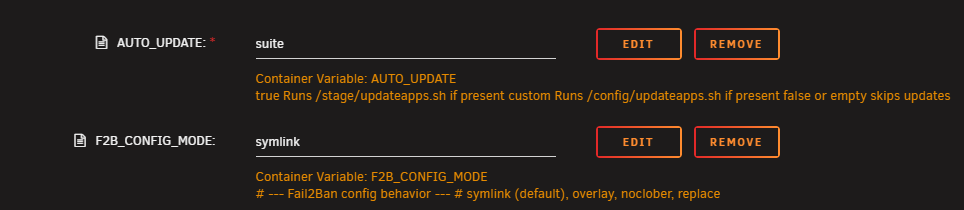
Introducing Project SFTP2 well looks like its time for a bit of a rebuild as OpenSSH move to version 10... The update script scraped the pool and pulled OpenSSH 10.0p1, which requires glibc (libc6) ≥ 2.42 I may also look ad adding the whois login and application to a new Debian slim. As I don't like having to wait on another developer for their base image to update and incoperate cores system packages... so currently the docker sftp-fail2ban sill work and works well if you don't use the update script or a custom as mentioned earlier for added features that will auto update the openssh and fail2ban... So I decided to look at other options as rebuild a debain-slim version that does the same... Will be looking to leave the phusion docker image that was used to make this forked from MarkusMcNugen/docker-sftp due to waiting on the base docker to update the glibs... so reusing this forum space for both sftp-fail2ban and sftp2(once it hits the CA) as at this point I'm just using the forum as a wall for notes and head banging as I learn how to develope a docker from another project. Now with the experience and data I have I will rebuild in a different aspect in mind. https://github.com/bmartino1/sftp2 on could use the sftp-fail2ban and just add the #2 to the image. This would require a minor change as some overhaul was done to how I implement and use jails and fail2ban. The old stuff works, but its recommended to start over to guarantee config and settings... I may make a update to the entry point script per my notes in the github. Once the phusion base image has a ubuntu base image for ubunut 20 lts with the updated glibs a update may be made to maintain the sftp-fail2ban docker. https://github.com/phusion/baseimage-docker but would warn that work and fixes will be made more in the sftp2 image. This is why I added the custom option and other for end users to begin with...