






bmartino1
Members
-
Joined
-
Last visited
Everything posted by bmartino1
-
Then its a kernel issue... some other users have been reporting similar... without a DIAG FILE I can't see what your running or double check... They all reverted back to 7.1.3 and the issue gone away. From my testing when theses occur, its always a aspm thing with how they handle power states... the kerneal could be flagin it. the linux driver code could be flaggin it... Regardless, something is telling it to go to a sleep state otherwise its physical hardware failure. the Physical traces coming undone prooble due to heat on the board. (I've seen werider...) I have yet to experience this even with testing mutifactets of hardware with a variety of systems. Please post a diag file... I would even 3rd party boot a live distro / ssd install debain and see if its happening. IF you think its unraid causing it...
-
there was a known issue with how v6 wrote bad configs. even vlans with improper subnets broke. That forum that went over that is lost ont he4 forum. I would recomend starting the newto over witht eh net unraid v7 web UI.
-
this honestly sounds more like a dns issue and a resolv.conf issue. are you using tailscale?
-
In Unraiid for pool I would use btrfs. for array xfs for pools with 3 disks of the same size zfs Really depends on what your plan is in the short term and long term for there use and data accessed on it as a daily driver. given the context: One for cache & VMs One for Plex cache & downloads, torrents etc btrfs is fine for both nvme...
-
are you running any docker compose or CA pluging doing a backup and update? is watch tower docker running? As you clearly have something calling and running that finished or errored in 15 min. of the suposed offline unresponsivness
-
should be it own general support thread while simlar not the same. your are refering to the script screen and TTYl unraid limt resource. the same can be seen when applying a docker temapte and opeing a new tab and trying to connect to unraid and do another task. Unraid is not a muti user target nor task driven system. the applying of the tempatel, dolowading of thte docekr adn other are all apart onf 1 big script taht will and must take some things offline to reestablish them otherwise while it will be onteh system it will not be nt eh web server emhttp that unraid is running. you can open a web ttyl and docker pull mutiple in mutiple web ttyl and not get the same discoenct or unresobive ness. this is becae only docker adn pull was called and not the other in teh intended operation of unraid. the OP issue here is a different netowrk issues that is partly due to docker and the br1 setup, along with misconfiguration of the sleep plugin / autotweak plugin with power causng a disconect on the device entering a sleep state. @gguglielmi Your issue is not the same.
-
Jul 15 14:59:47 raider autotweak: Failed to set ASPM policy ... Jul 15 14:59:47 raider autotweak: Set r8125 ASPM to disable Jul 15 14:59:47 raider autotweak: Set r8168 ASPM to disableOK, this may be a docker realted issue as well. time will tell on that though... what is the output of lspci -v what is the drive in use for the onboard nic? r8125 or r8168 or both 2 realtek nics onboard?AS This may be caused by autotweak plugin... as if it not able to write its config correctly. but this is expected if your using the grub option I mentioned. as We set it earlier at boot and now its in the kernel.Please post a diag file if it happens again.we can add a sysnotif user script thatt needs manual run to look for exact working in the syslog and sine it happens constantly around 5 AM ish we can also have it look at that as well something I ediet for my needs to help scan and look for key words in the logs... adapted from another script on the forum... #!/bin/bash # ##################################### # Name: Syslog notify v1.4 (custom) # Description: Creates Unraid notification on errors and writes eth1 drop log context to /tmp/notify.txt # Author: Based on Marc Gutt + Custom check of eth1 drop # ##################################### # Settings syslog_file=$(ls -t /var/log/syslog{.[0-9],} 2>/dev/null | head -n 1) log_file="/tmp/syslog-notify-last-error-line-number.log" notify_context="/tmp/notify.txt" words="corrupt|error|fail|tainted" ignore_lines=( 'kernel: CIFS: VFS: \\*\* error -9 on ioctl to get interface list' 'sshd[*]: Read error from remote host port : Connection reset by peer' 'sshd[*]: Read error from remote host port : Connection timed out' ) # Make script race-safe if [[ -d "/tmp/${0//\//_}" ]] || ! mkdir "/tmp/${0//\//_}"; then echo "Script is already running!" && exit 1; fi; trap 'rmdir "/tmp/${0//\//_}"' EXIT; # Get starting line if [[ -f "$log_file" ]]; then line_number_start=$(cat "$log_file") [[ $line_number_start -gt $(grep -c ^ "$syslog_file") ]] && line_number_start=0 else line_number_start=$(grep -c ^ "$syslog_file") line_number_start=$((line_number_start-100)) echo "$line_number_start" > "$log_file" fi # --------------------------- # Section 1: eth1 Drop Scanner # --------------------------- context_lines=3 eth1_matches=$(tail -n +"$((line_number_start+1))" "$syslog_file" | grep -ni "r816[89].*eth1: Link is Down") if [[ -n "$eth1_matches" ]]; then while read -r match; do line_num=$(echo "$match" | cut -d: -f1) matched_line=$(echo "$match" | cut -d: -f2-) absolute_line=$((line_num + line_number_start)) { echo "=== eth1 DOWN Detected @ $(date) ===" sed -n "$((absolute_line - context_lines)),$((absolute_line + context_lines))p" "$syslog_file" echo "" } >> "$notify_context" # Update marker echo "$absolute_line" > "$log_file" done <<< "$eth1_matches" fi # --------------------------- # Section 2: Generic Error Notifier # --------------------------- EOL=$'\n' errors="" while read -r line; do for ignore_line in "${ignore_lines[@]}"; do IFS=\* read -r one two three four <<< "$ignore_line" if [[ $line == "$one""$two"*"$three"*"$four" ]]; then continue 2 fi done last_line="$line" errors="$errors$EOL$line" done < <(tail -n +"$((line_number_start+1))" "$syslog_file" | grep -iP "($words)") if [[ $errors ]]; then line_number_start=$(grep -nFx "$last_line" "$syslog_file" | cut -f 1 -d ":") echo "$line_number_start" > "$log_file" /usr/local/emhttp/webGui/scripts/notify -i "alert" -s "syslog $(echo "$errors" | grep -ioP "($words)" | tr '[:upper:]' '[:lower:]' | sort -u | xargs)" -d "${errors:1}" else line_number_start=$(grep -c ^ "$syslog_file") echo "$line_number_start" > "$log_file" fi # --------------------------- # Section 3: Log Size Check # --------------------------- log_size=$(df | grep -oP "[0-9]+(?=% /var/log)") if [[ ! -f /tmp/syslog-notify.size ]] && [[ $log_size -gt 90 ]]; then touch /tmp/syslog-notify.size /usr/local/emhttp/webGui/scripts/notify -i "alert" -s "log utilizes more than 90%!" -d "$(du -h /var/log/* | sort -h | tail)" elif [[ -f /tmp/syslog-notify.size ]]; then rm /tmp/syslog-notify.size fi this script when manual run will: Script is self-contained and preserves original functionality. No unnecessary notifications, just logs to /tmp/notify.txt when eth1/br1 flaps. Easily view the log: cat /tmp/notify.txt or tail it live: tail -f /tmp/notify.txt a tmp file will be written into ram and gone at reboot... a file writes a log to: /tmp/notify.txt to help diag events when it happens again... mut g sysnotif script of error.txt
-
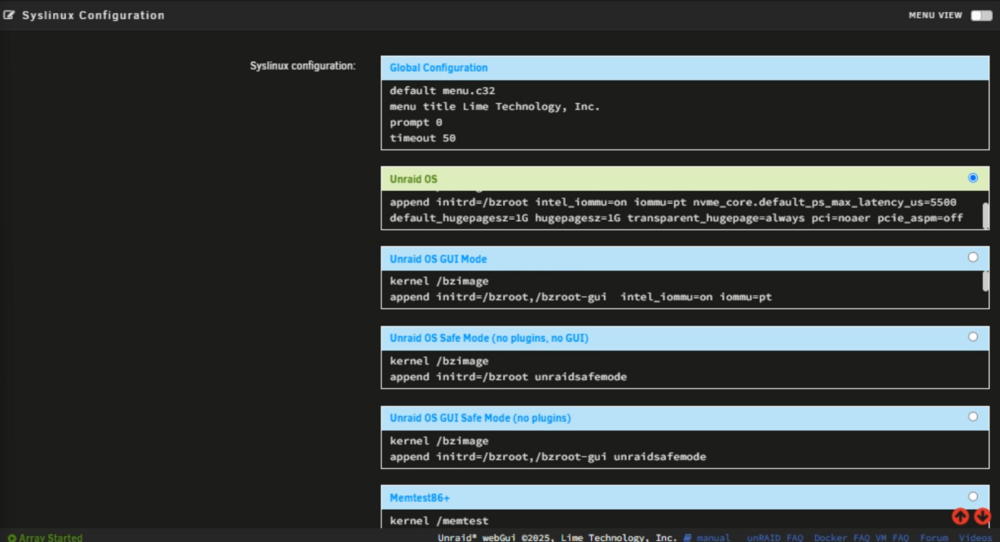
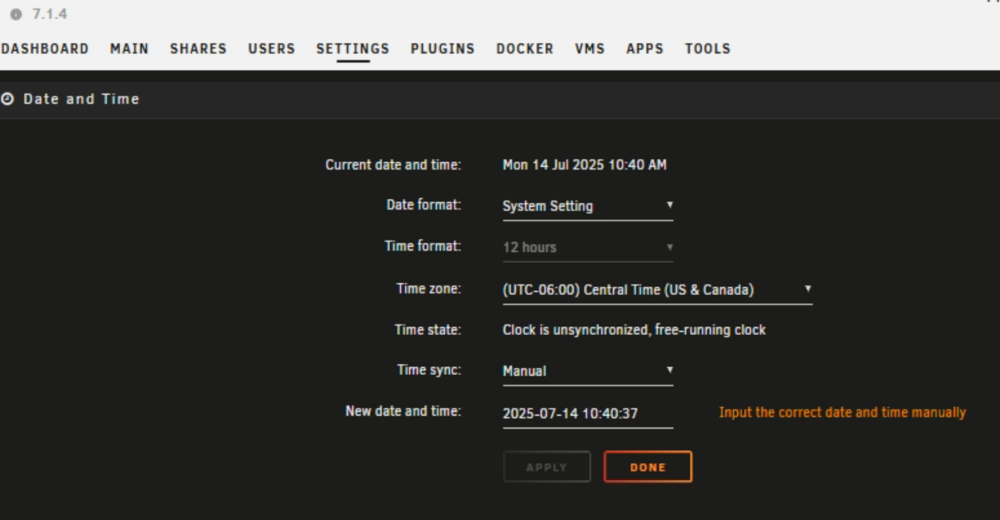
clearly as this is a bug... either caused by malfunctioning hardware or dfault software configurations... I still think this is power aspm related with werid power states... the best way I can describe what the log is reporting here is: ...???... Something in the Linux kernel, be it a chip, the motherboard and its bios, is acting like a usb connection and is flagging the pci/onboard device as becoming disconnected then reconnected. thus, the kernel/software reads that the physical device was removed from the system. Then somehow the device becomes reattached. NTP needs a clock count and set when devices happen as logging and to set a counter... I can only assume a faulty pcie/irq connection... Acting like I plugged a usb drive in, then immediately unpluged the device and plugged it back in. Its the only thing I can assume from other testing that would cause this log message: Jul 14 05:02:11 raider ntpd[2116]: new interface(s) found: waking up resolverSO I would have to recommend checking another few arras and potential suggest a grub / kernel edit at this point. as this could also be caused via cmos and system clock. or a not fully seated pci addon card. even a Acpi bug(windows secure boot BS and bios bugs for motherboards for windows only...) SO my next checks would be double-check the physical hardware... Open the case and make sure the devices are fully seated, even unplugging and putting it back in the pciie slot... Confirm all cables are fully connected... ?is the cmos battery diead/dieing on your motherboard? power off the machine nad unplug the power supply. wait 5 min plugin the power back in and enter bios ?did bios factory reset remvoing bios changes? Then replace cmos battery on Mother board... otherwise I would recomend some syslinux / unraid gruub boot edits... I would recomend runnign with theses grub boot options.. Click Main Tab > click on Flash > Scroll down to Syslinux Configuration Lets add these options... acpi=force acpi_osi=Linux usbcore.autosuspend=-1 pci=noaer pcie_aspm=off r8168.aspm=0 Kernel /bzimage append initrd=/bzroot acpi=force acpi_osi=Linux usbcore.autosuspend=-1 pci=noaer pcie_aspm=off r8168.aspm=0*You must reboot to apply the grub settings... https://www.gnu.org/software/grub/manual/grub/grub.html#Environment Parameter Main Purpose Typical Use in Unraid Setup acpi=force Force ACPI, fix BIOS quirks Power states, PCI detection issues acpi_osi=Linux BIOS compatibility Ensures BIOS exposes correct features to Linux usbcore.autosuspend=-1 Stable USB behavior Prevents USB sleep/Power states... Stops USB powered dropouts, also useful in VM passthrough setups pci=noaer Silence harmless PCIe error spam Cleaner logs, less overhead pcie_aspm=off Force full PCIe performance Kernel level set aspm off instead of autotweak.... (autotweak will ahve a better time assiging power states based on settings...)also Helps avoid GPU/NVMe/USB controller passthrough instability This will disable PCIe Active State Power Management, both for PCIe and the Realtek driver. Fixing Many NIC flapping issues are power-management related... then there's making a modprobe.conf using unraid system drivers... echo "options r8168 aspm=0" >> /etc/modprobe.d/r8168.conf as we will need to make a file ont eh usb drive or use the web ui to make a modprobe for r8168 Review/change BIOS settings if onboard...Check for: "Global C-State Control" → set to Disabled (To test) PCIe ASPM → Disabled Onboard LAN Power Saving → Disabled Due to bugs with ntpd and time I would recommend using only 1 ntp server if auto or turning that to manual.... settings > Date and time then you could add an adational grub option to fix the device time and clock... trace_clock=local By default, the Linux kernel uses a global time source (like TSC, HPET, or ktime) for tracing events (e.g., with ftrace or perf). trace_clock=local switches that behavior: It makes the ftrace and other trace events use the local CPU’s clock instead of a synchronized global clock. This helps avoid issues on multi-CPU/core systems where the clock sources aren’t perfectly synchronized. But this isn't irq, clock level issues as its ntpd forcing a time sync and set at new or reconnect of hardware... without a full syslog to check other areas thats harder to pin down.
-
the most likely culprit is the cable. But here are my finsings formt he syslog diag: Based on a detailed scan of your syslog.txt and diagnostics, here are notable findings and recommendations beyond the eth1 dropouts: At 05:01:18, eth1 (r8169 0000:02:00.0) drops its link: eth1: Link is Down br1: port 1(eth1) entered disabled state It tries to come back up at 09:31:41, but fails multiple times eth1: Link is Up - 1Gbps/Full - flow control off br1: port 1(eth1) entered blocking state br1: port 1(eth1) entered forwarding state then drops again: eth1: Link is Down br1: port 1(eth1) entered disabled state Analysis: This shows recurring driver instability or hardware negotiation failure. The Realtek r8169 driver is notoriously unreliable for 24/7 server workloads. PCIe Power Management + Wake/Sleep Risk (autotweak + s3.sleep)autotweak sets PCIe power management to auto for eth1: autotweak: PCIe PM control set to 'auto' for device 0000:02:00.0 dynamix.s3.sleep plugin is also installed and enabled: (I have had isseus wiht this one and don't recomend the use of the plugin!) *Risk: If WOL or PCIe ASPM policies are toggling eth1 into a power-saving state at 5 AM, it could cause the NIC to lose link. In Autotweak, change PCIe PM for eth1 to performance or off. In S3 Sleep, disable or carefully configure wake/sleep schedules. Test- fully disable WOL for eth1 ethtool -s eth1 wol d issues noted at boot: nvalid EEPROM Warning (eth0 Realtek) r8169 0000:01:00.0: invalid VPD tag 0x00 (size 0); assume missing optional EEPROM (Unraid driver plugin should fix this...) no other known issues that I can tell via the log / diag
-
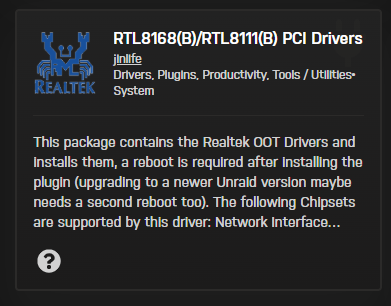
Some plugins to double-check double-check the autotweak plugin settings and dynamix.s3.sleep plugin sllep setting. As sleep may be trying to engage based on a default and misconfigured setting. as autotweak may be editing wol or other power states and is eth1 gets a werid magic pacet and unriad / soemthign told it to go to sleep this would explain the disconects.... Exampe wiht diag file as ethtool for eth1 support WOL but shoing some issues maintating adn secureing a connection... Settings for eth1: Supported ports: [ TP MII ] Supported link modes: 10baseT/Half 10baseT/Full 100baseT/Half 100baseT/Full 1000baseT/Full Supported pause frame use: Symmetric Receive-only Supports auto-negotiation: Yes Supported FEC modes: Not reported Advertised link modes: 10baseT/Half 10baseT/Full 100baseT/Half 100baseT/Full 1000baseT/Full Advertised pause frame use: Symmetric Receive-only Advertised auto-negotiation: Yes Advertised FEC modes: Not reported Speed: Unknown! Duplex: Unknown! (255) Auto-negotiation: on master-slave cfg: preferred slave master-slave status: unknown Port: Twisted Pair PHYAD: 0 Transceiver: external MDI-X: Unknown Supports Wake-on: pumbg Wake-on: d Link detected: no driver: r8169 version: 6.12.24-Unraid firmware-version: rtl8168h-2_0.0.2 02/26/15 ######################################## *(This could also be plugin realtek modprobe / driver related...) I would have you also replace the cable from eth1 to the network as eth1 is not getting a full mdix packet that auto sets its speed / duplex curently it was reading as it is unknown... Also Please install the reltek driver for unraid: Be aware of Realtek r8169 driver quirks Unraid’s Realtek r8169 driver is notorious for instability, especially under load or with certain chipsets. Users have seen frequent "Link is down" messages in syslog. A longstanding community suggestion is to replace it with the vendor-provided r8168 driver, which many find more reliable... Steps: Install the Realtek driver plugin for Unraid (search CA for "Realtek"). also try to run ifconfig eth1 down ifconfig eth1 up to fully bring the interface down then up... Summary and suggested next steps:Step Category Action 1 Physical Replace cable, check switch port 2 Software Install Realtek plugin (r8168 driver) 3 Settings Disable power-saving in autotweak/s3 plugins 4 Configuration Reassign NIC roles via Network Rules (You could chose eth1 and eth0 and revers to test...) 5 Hardware Test with Intel-based NIC 6 Quick fix Use CLI to reenable link without reboot otherwise you may be forced to crown run the command via user script to sent teh eth ip link up commnad every hour... https://crontab.guru/#0_4-8_*_*_* “At minute 0 past every hour from 4 through 8.” at 2025-07-14 04:00:00 0 4-8 * * *
-
this tells me there is somethings network misconfigured and running that is bring the link down. as this is correct if ip a / ifconf shows the link to be down and its indeed has a connection.. Reveing diag file. sorry lifes been a bit busy and in and out of the forum latley... Glad this is working for you as it would be linux temrinal comands to bring down/up maybe even flush... A command that brings the interface back up ip link set eth1 up Given that the network layout 192.168 --- Router --- 10.x --- Router ----- WAN .....LAN | ........ | DMZ Internet .........| ........ | ....eth0 +--Unraid--+ eth1 ............Server This could also be casued by a ip route / ip chagne / subnet changed with the unraid device getting a different IP when on the DMZ... reviewing diag and will report back with findings if any.
-
this tells me that your sytem ran out of resources, unraid web ui atempted to do something while under heavy load and ran out of memory. nchan is a comon one I have found with leaving a unraid dashbaord open for too long or doing thing when the mermoy of the host is maxed. (do you have swap/swap plugin). swap should have helped prevent or be used when this happens to recover.? what verion of unrad are you on. Lattest stable 7.1.4 has patched and fixed nginx nchan memory errors... https://forums.unraid.net/topic/178541-server-unresponsive-nchan-error-message/ I wrote a script and helpd someone having nchan errors in the past... Haveing a hard time finding that forum post and code to try. I recall some mods helping others with simalr issues with a unresponsive unriad host. soemthings happens while underload where there a memory leak that casues this... @Squid you wanted someone to test something if this came up again? If you guys see this again, can you post the output of ls -ail /usr/local/emhttp/plugins/dynamix/scripts So, My first recommendation is make sure you on the latest Stable unraid version. https://docs.unraid.net/unraid-os/download_list/ the error more shows the exhibition of errors with unraid emhttp and https nginx web server... this may be casued by a underlaods sytem busy when trying to do somethign int he web ui and unraid becoems unresponve as its already doing a task...
-
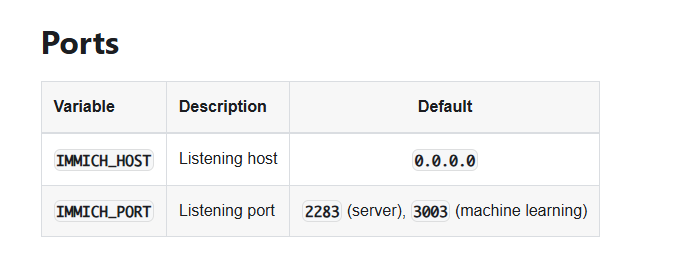
??? ... You should be deleting temaptel variables... Please review Some Docker networking Info when to use what docker network As the ports are ignored if using br0 and setting the interface ports to different ports is only usable and available for docker nat to change ports. You have to change the even for immich in side the docker container (My understating is that is not possible with image genious docker image. a env / premade server config is made for us. Immage genious server config / env set immich web UI to port 8080 If you use a docker network that is not docker bridge the unraid teampte of docker port map and nat contorel are ignored and not used. Note that these are the ENV docker varables that composes could use to change and edit poprts... While untested. In theory once could try passing immich ENV https://immich.app/docs/install/environment-variables/ Unraid CA immage genious users default port 8080 I will not test this(PAssing compose docker env) and can only recommend you look more into docker networks. IMMICH_PORT Listening port 2283 (server), 3003 (machine learning)
-
npm stands for nginx proxy manger. nginx is just teh web serever front end. when I say npm I'm not meaing the npm nging seperate instance. hemidal from my findings is using a baked in nginx npm instance. which is the problem.
-
thanks this helps a little bit... No, Tailscale Funnel does not open all ports. It allows you to expose specific local ports to the internet over HTTPS, but it restricts the allowed ports to 443, 8443, and 10000. Funnel only works over TLS-encrypted connections and has bandwidth limitations. this is why i went funnel and tsdprxy with a sidcar method... sorry I'm not goign to be much help hear. to many pooints of failules and unkonws... I need to look into hemdal and see what npm and it is realy doing to further assist. as usualy npm is its own seperate docker instance when used this way... As always review the DOCs! https://tailscale.com/kb/1464/funnel-vs-sharing https://docs.unraid.net/unraid-os/release-notes/7.0.0/#tailscale-integration https://docs.unraid.net/unraid-os/manual/security/tailscale/ TailScale Serve option the Docker gui options in unraid template set this... So, what does tailsacle serve do... DOCs: https://tailscale.com/kb/1312/serve you can setup a portfoward without a Public IP port forwarding and without the vpn client to connect (this is a Tailscale Beta feature! atm...) https://tailscale.com/kb/1223/funnel a explained in OG post see Review: https://forums.unraid.net/topic/184659-some-fun-with-tailscale-examples/ I'm Not saying to use funnel What I'm saying is I'm missing somethign to explain and futher assist in this manner. I think the issue lies within npm and how it is handling hemdial...
-
cache is a general pc term meanind to put temperaly before saving... There are quite a few "cache" things. there memory cach, there disk cache, there IO Cache the Virtual Cache... would need more context then just the word cache... Unraid docs would help here: Storage Management | Unraid DocsStorage Management | Unraid DocsTo assign devices toShare settings as well... https://docs.unraid.net/unraid-os/manual/shares/ https://docs.unraid.net/unraid-os/manual/shares/user-shares/ https://docs.unraid.net/unraid-os/manual/shares/disk-shares/ How to explain.... Imagine your Unraid server is a house. The Array is your big, slow filing cabinet—great for long-term storage, but it takes a while to open drawers. The Cache is your kitchen counter—fast and easy to reach. You drop things there first before later moving them to the filing cabinet (the Array). Unraid does this automatically using the mover. A Pool is like an extra room in your house. It's not the kitchen counter (cache), and it's not the filing cabinet (array). It's just another space, and you decide what it's used for. So, what's the difference between a Cache and a Pool? Technically, they're both BTRFS/ZFS disk groups—what Unraid now calls pools. The only real difference is whether you assign a pool to act as a cache for the Array (via share settings like "Use cache: Yes/Only/Prefer"). ... So, when is a pool not a cache? When you're using it for: Appdata (for Docker/VMs) that should never move to the array Downloads (Deluge/qBittorrent/SABnzbd etc.) that benefit from SSD speed Media (e.g. 4K videos for Plex) that you don't want slowed down by the Array Backups, scratch disks, or ISO libraries that don't need parity But what about parity for pools?Pools don’t have Unraid-style single parity. But BTRFS pools can be mirrored (RAID1), striped (RAID0), or more (RAID5/6 with caution). Want redundancy? Use RAID1 or RAID10 for your pool. Want performance? Use RAID0 (no redundancy). Summary... Cache = fast temporary space for the array. Pool = fast permanent space you can use however you want. Both are “pools,” just used differently. Cache is a role, not a thing.
-
kinda. I don't know the hemidal Docker personally. My further confusing is that this looks like funnel not server given you went to name .yourtailscale. net so unless unraid is called hemidal the server shoudl have been machinename. tailscale network nam. net / docker name given to server since the docker has both hemdal the server and and npm this may require a separate npm instance.

-
Alot of web server dockers require additional and special headers... https://www.pomerium.com/blog/heimdall-reverse-proxy https://www.reddit.com/r/selfhosted/comments/rw14ax/setting_up_heimdall_behind_an_nginx_reverse_proxy/ The issue I have with tailscale and the "serve" feature is its a pain to properly configure and its a 1 docker 1 serve options... so the solution to use a npm reverse proxy was each docker that had a web UI I wanted behind a Reverse proxy need its own npm docker.. so I'm running 5 web server that would require 1 npm each for 1 tail scale serve feature... first you need to make sure you are telling npm to properly hit Heimdal and are letting nginx fix and pass the header nginx hemidal per redt... location / { proxy_set_header Host $host; proxy_set_header X-Forwarded-Scheme $scheme; proxy_set_header X-Forwarded-Proto $scheme; proxy_set_header X-Forwarded-For $remote_addr; proxy_set_header X-Real-IP $remote_addr; proxy_pass $forward_scheme://$server:$port$request_uri; } once Heimdal is working though NPM then we can look at unraid settings to setup tailscale... Review: https://forums.unraid.net/topic/184659-some-fun-with-tailscale-examples/ is npm a docker compose or unraid CA docker template?
-
yes you can copy the config folder of the previous unraid flash drive. some caveots is that the disk setup onthe olde system is set int eh config. (so go to disk settings and turn off auto start array) as a new config will need to be run... Since teh key file was copied to a new system. be sure to NOT DELTE A key if you made a working unraid usb already. and to remove teh *.key files form the folder copy form the old unraid to the new unraid.. when unraid is booted the flash drive is at /boot ther are alos plugins such as unraid replication Which I wold recomend you use and look into. including the appdata backup plugin to make a backup adn restore / copy to your new disk setup.
-
I could see making a new path in the template point it to the NVME thus the docker using that path is now on this drive... I don't like dual docker pathing like this since /photo would be set to xyz by default path tot eh array and you symlinking essential the /photo/thumbs to the nvme... .... Was doing some research when I came across this as the issue I have is Compose vs CA. In compose its define a EnV value and point it to the new path (AS seen in the github link above.) https://immich.app/docs/install/environment-variables/ as the Unriad CA is using imagegenious monalithic docker in the template... I don't know if a Immich Variable will pass through the docker and into immich if defined in the template... Also Since Immich was and is looking to phase out redis. Looks like imagegenius is looking to move to valkey... GitHubGitHub - imagegenius/docker-immich: Monolithic (Single) D...Monolithic (Single) Docker Container for Immich. Contribute to imagegenius/docker-immich development by creating an account on GitHub. My solution would be to transition to the docker compose to still use immich docs and data to define a Docker ENV value for the placement of files and docker volumes... Immich Via Compose ################################################################################### # Upload File Location # # This is the location where uploaded files are stored. ################################################################################### LIBRARY_LOCATION=/mnt/user/Immich/ THUMBS_LOCATION=/mnt/apps/Immich-Cache/thumbs/ UPLOAD_LOCATION=/mnt/apps/Immich-Cache/upload/ PROFILE_LOCATION=/mnt/apps/Immich-Cache/profile/ VIDEO_LOCATION=/mnt/apps/Immich-Cache/encoded-video/ And then i added this volumes to the following dockers in docker-compose: immich-machine-learning immich-microservices immich-server volumes: - ${LIBRARY_LOCATION}:/usr/src/app/upload/library - ${UPLOAD_LOCATION}:/usr/src/app/upload/upload - ${THUMBS_LOCATION}:/usr/src/app/upload/thumbs - ${PROFILE_LOCATION}:/usr/src/app/upload/profile - ${VIDEO_LOCATION}:/usr/src/app/upload/encoded-video https://forums.unraid.net/topic/190532-guide-immich-docker-setup-docker-compose/#findComment-1556636 Thanks MowMdown as I was not finding a easier / good solution for this.
-
ok so you may need a nic plugin driver... Not sure how your getting into a state where the eth0 / br0 are up but your docker interfaces are down: br-2437bb60b432: <NO-CARRIER,BROADCAST,MULTICAST,UP> mtu 1500 qdisc noqueue state DOWN mode DEFAULT group default link/ether 02:42:b4:41:d3:5e brd ff:ff:ff:ff:ff:ff 10: docker0: <NO-CARRIER,BROADCAST,MULTICAST,UP> mtu 1500 qdisc noqueue state DOWN mode DEFAULT group default link/ether 02:42:75:55:bd:2f brd ff:ff:ff:ff:ff:ff 11: br-8f4313a3e239: <NO-CARRIER,BROADCAST,MULTICAST,UP> mtu 1500 qdisc noqueue state DOWN mode DEFAULT group default link/ether 02:42:6d:a3:fa:6a brd ff:ff:ff:ff:ff:ff 12: br-ae25bf0cd9b4: <NO-CARRIER,BROADCAST,MULTICAST,UP> mtu 1500 qdisc noqueue state DOWN mode DEFAULT group default .,.. this tells me you hvae a broken docker network setup... Please post a diagnostic file. not enouth info to assist.
-
Don't know what you mean... Sounds like your wanting to ask something but don't know how to clearly articulate it... https://forums.unraid.net/topic/191366-whats-your-backup-strategy/#findComment-1562715
-
GitHubSetting path for generated content/originals in new insta...Hello, I see that in version 1.52, there is now the ability to separate the library from the cached content: "Users can now store thumbnails and encoded videos at a different location," but I am un...https://forums.unraid.net/topic/160883-how-to-put-immich-on-nvme-and-thumbnails/ It is my understadning that this is done via 2 locations. 1 Postgress handles and holds theis data and 2 some picture data that exisit on disk. If postgress is on the nvme this should be fine in an of itself using the default storage tempatle that immich ships with... To start in this porject you have to edit teh immich storage temapte on how and where fiels are stored.. The immich app unraid template doen't support this out of the box yo need to add a new path and tell the immich server int eh configs to edit where the thumbnail data is stored... view the doc on chaing the settings: https://immich.app/docs/administration/system-settings/#image-settings-thumbnails-and-previews
-
as plex is making it and starting up... this tells me you have other network isseus preventing communication... I would need to know the docker's info... what port, docker network is plex using? Docker network inspect please post a picture of your docker tab that views plex when running... Diag will not give me the data need to assist here... diag shows you have a bridge network with 3 interface... ?vlans? need to now the network layout... Modem > Router > ??? > Unraid ??? eth0 > ??? eth1 > ??? eth2 > etc not enother info to assist.
-
...





