






bmartino1
Members
-
Joined
-
Last visited
Everything posted by bmartino1
-
... you didn't setup the docker nat for immich correctly you can't change containt port off of 8080 the conatin is still using port 8080 you told unraid to use host port 8082 and changed the port for immich to alod use port 8082... https://forums.unraid.net/topic/191526-image-genius-immich-docker-container-running-but-can-not-connect-happens-with-most-docker-containers-debug-howto/#findComment-1564290 stop immihc edit the web ui port and set that back to 8080...
-
Enable insecure guest logons in...Enable insecure guest logons in SMB2 and SMB3 for Windows...This article describes how to enable guest logons policy in SMB2 and SMB3 for Windows client and Windows Server devices using Group Policy and PowerShell.
-
when you say explorer do yo mean windows file explorer? "Modify files in unRaid from Explorer" Unraid has a users tab you may need to make a user there and assign a passowrd and when windows ask for credentials use that account. You may also need to set file and user permission of files on unraid... Fix file permission cd /mnt/users/Path to the share... chmod 777 -R * chown nobody:users -R *
-
CA Plugins Backups using removable disks Unassigned disk plugin... Each disk destination identifiable by the backup software (like barcode in tapes) Disk Location Plugin Two copies per job, different disks. User script Plugin - Cron Schedule A pool of 10 disks, software asking for "mount now disk #7" without me caring about the rotation. Pools are hardcoded into the array i recomend ZFS... otherwise your all in unassigend for indvidual disk apartus... Backups of app data appdata backup plugin Backups is selectable folders look into the rsync and other user scripts for file backup... ZFS for the integrity & compression features ZFS Master Plugin. Termainl Commands to already made items... Use plugin under main tab to set compression... Install and use unraid plugins to acomplish your needs.. any things specfic your looking for... not sure what you really mean with "A pool of 10 disks, software asking for "mount now disk #7" without me caring about the rotation."
-
the question is (IF the 4 ports are all onthe same card) how are you passing the interfaces... To correctly pass a pcie device, you must VFIO bind the entire PCIE Card. So the only other solution is to have Bridge interfaces interact ont he host and pass over into the VM. (Which has its own security concerns...) Otherwsie you have to heavaily edit the VMs XML to target and use that interfaces (Not easily done...) My solution was lost on the forum (As I've done simlar inthe past and m,ovded on as I hit slackware unraid network limitations. Unraid is not networking equipment adn you will hit layer 2 /layer 3 isseus tryng to run a "Forbiden router" in Unriad. The guidance I have is to get a seperate pcie device and VFIO Bind that interface ot the VM. (this is the correct secure and safest way to do this properly.. The improper way is to mkae our own br interfaces assigning the interface adn then editng the xml to target our made br interfaces... That data is lost onthe forum and I'm not going to go over thatt again as i htis caveots, gotchas and other isseus... Mostly in how unraid and systemctl handle ipv4 and ipv6 forwarding... So my guidance is get another nic for the VM only and pas the entire nic into the VM.
-
dont' worry about it.. I'm refering to the modprobe edit. You added data to vmd.conf for modprobe the edits are for vfio.conf per your modprobe vmd.conf holds the extra modprobe data for the amdgpu to help transion it to vfio-pci.... its fine... perfect the gcard is passed corectly: 03:00.0 VGA compatible controller [0300]: Advanced Micro Devices, Inc. [AMD/ATI] Navi 22 [Radeon RX 6700/6700 XT/6750 XT / 6800M/6850M XT] [1002:73df] (rev c0) Subsystem: XFX Limited Device [1eae:6710] Kernel driver in use: vfio-pci Kernel modules: amdgpu 03:00.1 Audio device [0403]: Advanced Micro Devices, Inc. [AMD/ATI] Navi 21/23 HDMI/DP Audio Controller [1002:ab28] Subsystem: Advanced Micro Devices, Inc. [AMD/ATI] Navi 21/23 HDMI/DP Audio Controller [1002:ab28] Kernel driver in use: vfio-pci note the driver in use... *Only the vm can see and use the gcard now. go file and grub boot look ok... and teh bind look good: BIND=0000:03:00.0|1002:73df 0000:03:00.1|1002:ab28 0000:04:00.0|144d:a80a 0000:06:00.0|1912:0014 syslog shows good Iommu... Now we need to test / rebuild the windows xml if needed. double check your vfio devices are added to the VM G card data should still be: <!-- GPU passthrough (function 0: GPU) --> <hostdev mode='subsystem' type='pci' managed='yes'> <driver name='vfio'/> <source> <address domain='0x0000' bus='0x03' slot='0x00' function='0x0'/> </source> <rom file='/mnt/user/isos/vbios/amdrx6750xt.rom'/> <address type='pci' domain='0x0000' bus='0x07' slot='0x00' function='0x0'/> </hostdev> <!-- GPU HDMI Audio (function 1) --> <hostdev mode='subsystem' type='pci' managed='yes'> <driver name='vfio'/> <source> <address domain='0x0000' bus='0x03' slot='0x00' function='0x1'/> </source> <address type='pci' domain='0x0000' bus='0x07' slot='0x01' function='0x0'/> </hostdev> your ready to try the windows VM once more

-
@JorgeB Thoughts
-
Bar 4g and up support should be enabled. looks like your gcard his iommu memory cap Jul 1 23:45:25 Tower kernel: pci 0000:00:02.0: BAR 4 [io 0x6000-0x603f] Jul 1 23:45:25 Tower kernel: pci 0000:00:02.0: DMAR: Skip IOMMU disabling for graphics Jul 1 23:45:25 Tower kernel: pci 0000:00:02.0: Video device with shadowed ROM at [mem 0x000c0000-0x000dffff] Jul 1 23:45:25 Tower kernel: pci 0000:00:02.0: VF BAR 0 [mem 0x00000000-0x00ffffff 64bit] Jul 1 23:45:25 Tower kernel: pci 0000:00:02.0: VF BAR 0 [mem 0x00000000-0x06ffffff 64bit]: contains BAR 0 for 7 VFs Jul 1 23:45:25 Tower kernel: pci 0000:00:02.0: VF BAR 2 [mem 0x00000000-0x1fffffff 64bit pref] Jul 1 23:45:25 Tower kernel: pci 0000:00:02.0: VF BAR 2 [mem 0x00000000-0xdfffffff 64bit pref]: contains BAR 2 for looks like sriov and iommu is enabled corectly so we can now begin with the next stepson the xml Jul 1 23:45:25 Tower kernel: DMAR: Intel(R) Virtualization Technology for Directed I/O looks lke the amd gpu is in pceirq slot 04 per the vfio bind: BIND=0000:04:00.0|144d:a80a 0000:06:00.0|1912:0014 you may need to edit the xml to make sure the pcie device are correct. <!-- GPU passthrough (function 0: GPU) --> <hostdev mode='subsystem' type='pci' managed='yes'> <driver name='vfio'/> <source> <address domain='0x0000' bus='0x03' slot='0x00' function='0x0'/> </source> <rom file='/mnt/user/isos/vbios/amdrx6750xt.rom'/> <address type='pci' domain='0x0000' bus='0x07' slot='0x00' function='0x0'/> </hostdev> <!-- GPU HDMI Audio (function 1) --> <hostdev mode='subsystem' type='pci' managed='yes'> <driver name='vfio'/> <source> <address domain='0x0000' bus='0x03' slot='0x00' function='0x1'/> </source> <address type='pci' domain='0x0000' bus='0x07' slot='0x01' function='0x0'/> </hostdev> as the bus 0x03 will need to stay 03.... but gpu needs vfio bound... <!-- GPU passthrough (function 0: GPU) --> <hostdev mode='subsystem' type='pci' managed='yes'> <driver name='vfio'/> <source> <address domain='0x0000' bus='0x03' slot='0x00' function='0x0'/> </source> <rom file='/mnt/user/isos/vbios/amdrx6750xt.rom'/> <address type='pci' domain='0x0000' bus='0x07' slot='0x00' function='0x0'/> </hostdev> <!-- GPU HDMI Audio (function 1) --> <hostdev mode='subsystem' type='pci' managed='yes'> <driver name='vfio'/> <source> <address domain='0x0000' bus='0x03' slot='0x00' function='0x1'/> </source> <address type='pci' domain='0x0000' bus='0x07' slot='0x01' function='0x0'/> </hostdev>*no edits are needed mis read the bind in the diag file... also it looks like your grub line is not in its not set, it 100% helps but not needed though.. diag shows: BOOT_IMAGE=/bzimage initrd=/bzroot per syslog of what currently running... group 19 apears to be your amd gpu: /sys/kernel/iommu_groups/19/devices/0000:04:00.0 but it appears you vfio bound your nvme???... ok what did you bind... 04:00.0 Non-Volatile memory controller [0108]: Samsung Electronics Co Ltd NVMe SSD Controller PM9A1/PM9A3/980PRO [144d:a80a] Subsystem: Samsung Electronics Co Ltd SSD 980 PRO [144d:a801] Kernel driver in use: vfio-pci Kernel modules: nvme 06:00.0 USB controller [0c03]: Renesas Electronics Corp. uPD720201 USB 3.0 Host Controller [1912:0014] (rev 03) Kernel driver in use: vfio-pci to use the amd gpu n a VM via pasthoguh the amd GPU need to be bound. it appears your amd GPU is not vfio bound... 03:00.0 VGA compatible controller [0300]: Advanced Micro Devices, Inc. [AMD/ATI] Navi 22 [Radeon RX 6700/6700 XT/6750 XT / 6800M/6850M XT] [1002:73df] (rev c0) Subsystem: XFX Limited Device [1eae:6710] Kernel driver in use: amdgpu Kernel modules: amdgpu 03:00.1 Audio device [0403]: Advanced Micro Devices, Inc. [AMD/ATI] Navi 21/23 HDMI/DP Audio Controller [1002:ab28] Subsystem: Advanced Micro Devices, Inc. [AMD/ATI] Navi 21/23 HDMI/DP Audio Controller [1002:ab28] also you used vmd for modprobe not vfio...
-
correct, not that i'm aware of anyways.
-
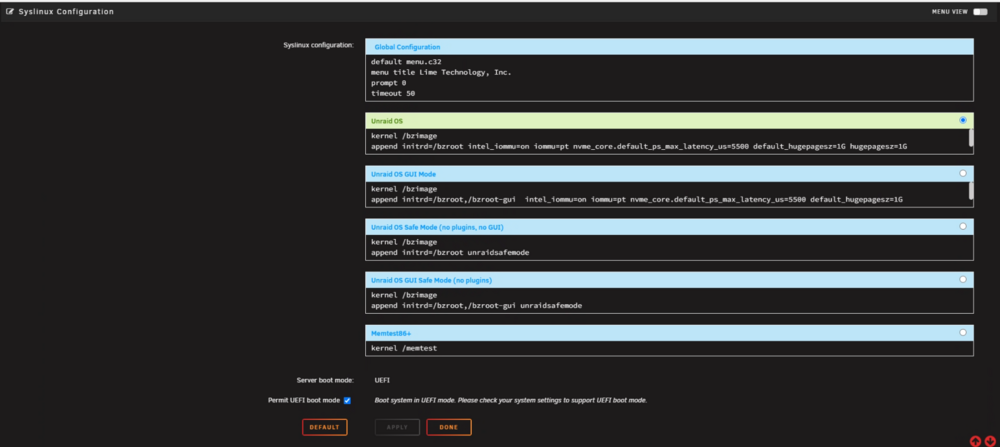
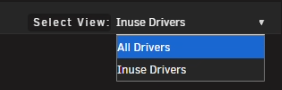
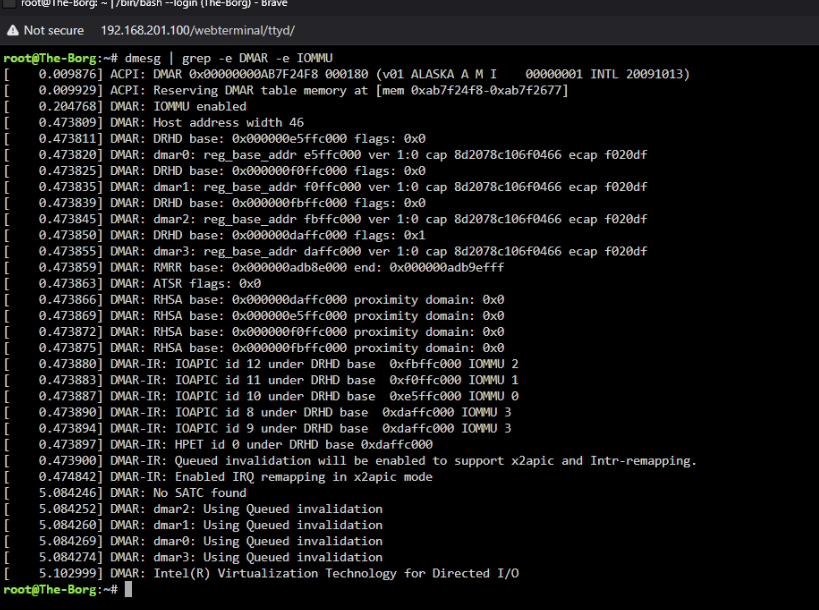
I see your using some grub edits BOOT_IMAGE=/bzimage video=efifb:off,vesafb:off pcie_acs_override=multifunction vfio_iommu_type1.allow_unsafe_interrupts=1 initrd=/bzroot this is close... you also have a werid go file modprobe i915 chmod -R 777 n/dev/dri callig and manipulating g-cards... yet your modprobe is blacklisting the blacklist i915 go file is not a place for the modprobe go file is too ealry inteh boot porcess... lspic -v and make sure the gcard say vfio-pci drvier in use... vfio looks good otherwise.. success... Device 1912:0014 at 0000:06:00.0 bound to vfio-pci --- Devices listed in /sys/bus/pci/drivers/vfio-pci: lrwxrwxrwx 1 root root 0 Jul 1 19:03 0000:03:00.0 -> ../../../../devices/pci0000:00/0000:00:01.0/0000:01:00.0/0000:02:00.0/0000:03:00.0 lrwxrwxrwx 1 root root 0 Jul 1 19:03 0000:03:00.1 -> ../../../../devices/pci0000:00/0000:00:01.0/0000:01:00.0/0000:02:00.0/0000:03:00.1 lrwxrwxrwx 1 root root 0 Jul 1 19:03 0000:04:00.0 -> ../../../../devices/pci0000:00/0000:00:06.0/0000:04:00.0 lrwxrwxrwx 1 root root 0 Jul 1 19:03 0000:06:00.0 -> ../../../../devices/pci0000:00/0000:00:1c.0/0000:06:00.0 vfio-pci binding complete having a hard time narrowing down if this is on a intel or AMD motehrboard... I asume Intel given some other things... libvirt log is showing some tiant and problems... 2025-07-01 19:53:05.730+0000: 20146: warning : qemuDomainObjTaintMsg:5481 : Domain id=4 name='Windows 11' uuid=4c428f86-dc51-5435-fafd-aa3a4e1581e0 is tainted: high-privileges 2025-07-01 20:19:25.196+0000: 20141: error : virNetSocketReadWire:1782 : End of file while reading data: Input/output error Quite a bit we need to check go over and fix... ############################################## IT IS KEY TO REBOOT AT THE STEPS!!! AS OPTIONS CHANGE AFTER EACH REBOOT AND SETTINGS!!! First reveiw: https://forums.unraid.net/topic/160112-gpu-passthrough-in-ubuntu-desktop-2204-vm-not-recognized/ -WHile this is for nvidia simalr for AMD... we need to fix your intell igpu and other settings... remove the go file and restore it back to spec: root@The-Borg:~# cd /boot/config root@The-Borg:/boot/config# ls Plus.key domain.cfg go iscsi/ parity-checks.log pools/ shares/ ssl/ default/ drift go~ machine-id passwd random-seed smb-extra.conf super.dat disk.cfg editor.cfg history/ modprobe.d/ plugins/ secrets.tdb smb-override.conf super.old disk.old flash.cfg hosts network-extra.cfg plugins-error/ shadow smbpasswd vsftpd.user_list docker.cfg forcesync ident.cfg network.cfg plugins-removed/ share.cfg ssh/ wireguard/ root@The-Borg:/boot/config# cat go #!/bin/bash # Start the Management Utility /usr/local/sbin/emhttp root@The-Borg:/boot/config# ... remove the modprobe that is blacklisting the intel IGPU: root@The-Borg:/boot/config# cd modprobe.d/ root@The-Borg:/boot/config/modprobe.d# ls root@The-Borg:/boot/config/modprobe.d# rm i915.conf make a user screipt at first array start to run the modprobe call for i915 Next go to main and restore your default boot. we need to edit vm setting before applying our grub lines... Make sure Unraid OS is your default boot... we will not be using GUI mode as we will latter run comadns to wipe teh Frame buffer that has been known to cause issues in the past... kernel /bzimage append initrd=/bzroot REBOOT UNRAID!!! Next lets make some Unraid VM settings... before the array starts (as you may need to fix other i915 modprobe settings... as we will be rebooting again... I recommend editing VM settings to set pcie acs override to both and VFIO allow unsafe intrupts... uncheck all devices under tools > System devices I want a clean setup as this may move some IOMMU groups and devices we are passing... there should be nothign bound at this point! REBOOT UNRAID!!! Now lets add the grub boot line. kernel /bzimage append initrd=/bzroot video=vesafb:off,efifb:off,simplefb:off,astdrmfb initcall_blacklist=sysfb_init pci=noaer pcie_aspm=off pcie_acs_override=multifunction vfio_iommu_type1.allow_unsafe_interrupts=1 next go to tools > System Devices and check the devices taht you are removing fomr the unraid host to pass into a VM all parts of the AMD GPU... then we will go to tools >system drivers int eh top right go to selet view all: search for VFIO here I want you to edit vfio and add option hit the pencil to edit a box to the right... softdep amdgpu pre: vfio-pci click save modprobe the small save icon(flopy disk and rebuild modules. reboot and run these 3 lines as then we are ready to pass a gpu / pcie device into a VM aas the host unraids wil not be touching nor affecting the VM or hardware anymore... As we need to make sure you Bios is setup corectly and Iommu is enabled: dmesg | grep -e DMAR -e IOMMU dmesg | grep 'remapping' under system info: syslog and diag will be needed after all of these chagnes to verify and confirm.. you should see simlar: please post a new diag file. as you may need to redo the xml for the windwos VM as pcie device and IRQ address may have changed...






-
If the VM boots and your in windos. verify device manger... i would suspect the rom file: <rom file='/mnt/user/isos/vbios/amdrx6750xt.rom'/> at this point. When doing GPU passthorugh I never specfied a rom file and had plenty of windwos VM and games runnign. so remove the rom file line... we also need to make sure the GPU is corectly setup for VFIO PCIE Passthorugh meaning taht the unraid host is not touching or using the G-card and only the VM wil use the G-card. Please.... reviewing diag file to confirm correct vfio settings. Otherwise, its a issues of the host not letting go of the graphics card. amd reset bug.
-
thank you apologies I misread a pfsenase as proxmox. a bit harder to do in unraid unless your ok with passing the nic card and all ports into the PFsense VM. I attempted to go over similar setups in the past by making bridge interfaces to be used as a wan / lan and setting up a lan interface from a contoured VM as a docker network to go through the VM router. Can't seem to find my old unraid resources... https://www.youtube.com/watch?v=lvH93ovezT8 https://www.reddit.com/r/unRAID/comments/re5r1k/pfsense_on_unraid/ https://forums.unraid.net/topic/115277-how-to-setup-pfsense-vmware-on-unraid-os-with-2-nic-ports/
-
a picture of you main tab will help here.
-
based on your layout Unraid array: D1: - xfs parity to disk 1: - xfs Pool Devices: ?cache:- 2 ZFS Mirror "I have 4 16TB drives in my unraid server, 3 data, and 1 parity. 2 zfs, 1 xfs, 1 parity." so in theory the parity drive can rebuild disk 1 It is for the unrad array parity crazyness I elected to go ZFS only as its easeier to manupilate and do things with zfs... although to move form a zfs mirror to a raidz1 a complete reformat needs to happen... SO i would advise you to revert the setup. asuming your zfs is not the disk that lost data. and only d1 and parity were changed.
-
is the host proxmox or unriad? If proxmox: Virtualizing Unraid View Proxmox VM Unraid Guide: as if its proxmox the pfsense VM would most likely have 2 interface setup as vrbr0 and vrbr1 both 2 separate interfaces and pfsense setup to use vbr1 as lan where vbr0 is the wan and gets a IP from proxmox... Look into forbidden router setups... https://forum.level1techs.com/t/psa-forbidden-router-make-two/190597
-
Some services range to $$$ thousands of dollars... most don't recvoer al the data. adn its take forever when placed in the low level to access data form disks... Theres a few youtube video over it . esentail you want a $$$ thosudand dollar piece of equipment that can do disk foresics.... Regarding teh recaculate pariity... good question IDK. Its hard to explain and go over recovery opyion when this occurs. again its better to think taht the drive is dead and with it all the data on it. This is why its important to have backups. In thory your better off turning off the machine and pulling the HDD in question with another machine. If you have parity and d1 setup correctly you can recover d1 depending on how your array is setup. review docs https://docs.unraid.net/legacy/FAQ/Parity/ https://www.youtube.com/watch?v=1orfWpekkqw&pp=0gcJCfwAo7VqN5tD
-
sorry, your SOL once formatted unless using very expensive tools and software. (the cost is not worth it) the data is gone after a format. Since this is disk not ssd / nvme cell the data technically still exists on disk in a low level area and technically data can be recovered but not easily and not free... You are better off taking the loss of data in this situation. What happens when you format? Formatting a disk essentially resets the file system, which is like a table of contents for the disk, making the data inaccessible through normal means. kinda... (imagine that there is a small ssd chip on the HDD disk controler telling the PC how and where to go to find this data... this chip gets erased when you format...) However, the data itself is usually not immediately erased and remains on the disk until new data overwrites it. A quick format only erases the file system, while a full format may overwrite the data with zeros, making recovery more difficult.
-
Just to be clear, you solved this issue: "EDIT: Solved installing Nvidia Driver Plugin." as you have a NVIDIA device and needed the drivers installed for the nvidia card to work.
-
Unraid uses libvirt XML Domain Configs to make and use QEMU/KVM VMs... https://libvirt.org/formatdomain.html Additionaly My personal Prefference is to remove vcpu and VM cpu pinning.... <vcpu placement='static'>8</vcpu> <cpu mode='host-passthrough' check='none'> <topology sockets='1' cores='4' threads='2'/> <cache mode='passthrough'/> </cpu> I would delete Vcpu out right and set topolgy to match your CPU to allow the threads to the VM and let unraid loadbalcner handle CPU load for the VM... delete: <vcpu placement='static'>8</vcpu> <cpu mode='host-passthrough' check='none'> <topology sockets='1' cores='4' threads='2'/> <cache mode='passthrough'/> </cpu>and use: <cpu mode='host-passthrough' check='none'> <topology sockets='1' cores='1' threads='8'/> <cache mode='passthrough'/> </cpu>
-
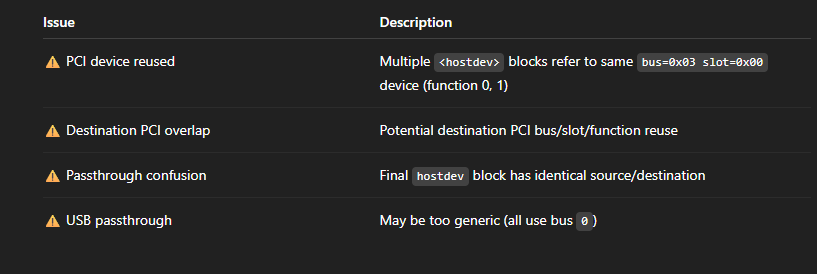
quite a bit is wrong in the XML. And I would advise you use host mode not vcpu select.. This will require editing the VMs xml... as you have Duplicate PCI Device Address Conflict You have the following block: <hostdev mode='subsystem' type='pci' managed='yes'> <driver name='vfio'/> <source> <address domain='0x0000' bus='0x03' slot='0x00' function='0x0'/> </source> <rom file='/mnt/user/isos/vbios/amdrx6750xt.rom'/> <address type='pci' domain='0x0000' bus='0x03' slot='0x00' function='0x0'/> </hostdev> This same GPU is also listed in a second device: <hostdev mode='subsystem' type='pci' managed='yes'> <driver name='vfio'/> <source> <address domain='0x0000' bus='0x03' slot='0x00' function='0x1'/> </source> <address type='pci' domain='0x0000' bus='0x04' slot='0x00' function='0x0'/> </hostdev> And again: <hostdev mode='subsystem' type='pci' managed='yes'> <driver name='vfio'/> <source> <address domain='0x0000' bus='0x04' slot='0x00' function='0x0'/> </source> <address type='pci' domain='0x0000' bus='0x05' slot='0x00' function='0x0'/> </hostdev> And again: <hostdev mode='subsystem' type='pci' managed='yes'> <driver name='vfio'/> <source> <address domain='0x0000' bus='0x06' slot='0x00' function='0x0'/> </source> <address type='pci' domain='0x0000' bus='0x06' slot='0x00' function='0x0'/> </hostdev> this is causing conflts with device passthorugh... These raise the following red flags: You're assigning a device (or its function) from bus 0x03 slot 0x00 more than once (function 0x0 and 0x1). While it is technically valid to passthrough both a GPU and its HDMI audio device (function 0 and 1), you must be cautious that: You don’t reassign the same physical PCI device's function to multiple virtual PCI slots unless it's intentional. The final hostdev block for bus 0x06 slot 0x00 function 0x0 uses a PCI address that is both source and destination — this may cause conflicts or fail to start the VM. so here is a cleaned up vm xml... <domain type='kvm' xmlns:qemu='http://libvirt.org/schemas/domain/qemu/1.0'> <name>Windows 11</name> <uuid>4c428f86-dc51-5435-fafd-aa3a4e1581e0</uuid> <memory unit='KiB'>17301504</memory> <currentMemory unit='KiB'>17301504</currentMemory> <vcpu placement='static'>8</vcpu> <cpu mode='host-passthrough' check='none'> <topology sockets='1' cores='4' threads='2'/> <cache mode='passthrough'/> </cpu> <memoryBacking> <nosharepages/> </memoryBacking> <os> <type arch='x86_64' machine='pc-q35-9.2'>hvm</type> <loader readonly='yes' type='pflash' format='raw'>/usr/share/qemu/ovmf-x64/OVMF_CODE-pure-efi-tpm.fd</loader> <nvram>/etc/libvirt/qemu/nvram/4c428f86-dc51-5435-fafd-aa3a4e1581e0_VARS-pure-efi-tpm.fd</nvram> </os> <features> <acpi/> <apic/> <hyperv> <relaxed state='on'/> <vapic state='on'/> <spinlocks state='on' retries='8191'/> <vendor_id state='on' value='none'/> </hyperv> </features> <clock offset='localtime'/> <on_poweroff>destroy</on_poweroff> <on_reboot>restart</on_reboot> <on_crash>restart</on_crash> <devices> <emulator>/usr/local/sbin/qemu</emulator> <disk type='file' device='cdrom'> <driver name='qemu' type='raw'/> <source file='/mnt/user/ISOs/Win11_24H2_English_x64.iso'/> <target dev='hda' bus='sata'/> <readonly/> <boot order='1'/> </disk> <disk type='file' device='cdrom'> <driver name='qemu' type='raw'/> <source file='/mnt/user/ISOs/virtio-win-0.1.266-1.iso'/> <target dev='hdb' bus='sata'/> <readonly/> </disk> <!-- Controllers --> <controller type='pci' index='0' model='pcie-root'/> <controller type='pci' index='1' model='pcie-root-port'/> <controller type='pci' index='2' model='pcie-root-port'/> <controller type='pci' index='3' model='pcie-root-port'/> <controller type='pci' index='4' model='pcie-root-port'/> <controller type='pci' index='5' model='pcie-root-port'/> <controller type='pci' index='6' model='pcie-root-port'/> <controller type='sata' index='0'/> <controller type='virtio-serial' index='0'/> <controller type='usb' index='0' model='ich9-ehci1'/> <controller type='usb' index='0' model='ich9-uhci1'/> <controller type='usb' index='0' model='ich9-uhci2'/> <controller type='usb' index='0' model='ich9-uhci3'/> <!-- Network --> <interface type='bridge'> <mac address='52:54:00:c4:d9:aa'/> <source bridge='br0'/> <model type='virtio-net'/> </interface> <!-- GPU passthrough (function 0: GPU) --> <hostdev mode='subsystem' type='pci' managed='yes'> <driver name='vfio'/> <source> <address domain='0x0000' bus='0x03' slot='0x00' function='0x0'/> </source> <rom file='/mnt/user/isos/vbios/amdrx6750xt.rom'/> <address type='pci' domain='0x0000' bus='0x07' slot='0x00' function='0x0'/> </hostdev> <!-- GPU HDMI Audio (function 1) --> <hostdev mode='subsystem' type='pci' managed='yes'> <driver name='vfio'/> <source> <address domain='0x0000' bus='0x03' slot='0x00' function='0x1'/> </source> <address type='pci' domain='0x0000' bus='0x07' slot='0x01' function='0x0'/> </hostdev> <!-- USB passthrough devices --> <hostdev mode='subsystem' type='usb' managed='no'> <source> <vendor id='0x046d'/> <product id='0xc08b'/> </source> <address type='usb' bus='0' port='1'/> </hostdev> <hostdev mode='subsystem' type='usb' managed='no'> <source> <vendor id='0x1c4f'/> <product id='0x0002'/> </source> <address type='usb' bus='0' port='2'/> </hostdev> <!-- Input and other devices --> <input type='mouse' bus='ps2'/> <input type='keyboard' bus='ps2'/> <serial type='pty'> <target type='isa-serial' port='0'/> </serial> <console type='pty'> <target type='serial' port='0'/> </console> <channel type='unix'> <target type='virtio' name='org.qemu.guest_agent.0'/> </channel> <tpm model='tpm-tis'> <backend type='emulator' version='2.0' persistent_state='yes'/> </tpm> <audio id='1' type='none'/> <watchdog model='itco' action='reset'/> <memballoon model='virtio'/> </devices> </domain> Review: https://www.youtube.com/watch?v=QlTVANDndpM
-
??? are you using a usb ethernet device? Jul 2 05:01:58 raider kernel: br1: port 1(eth1) entered disabled state Jul 2 05:02:01 raider ntpd[1875]: Deleting 3 br1, [10.1.2.1]:123, stats: received=0, sent=0, dropped=0, active_time=10 secs I Don't understand how you have a pulg in play added Nic and then have a line to remove the bridge. Unless you are plugin in or removing a netowrk... there are some commands yes I can only asume theses are captures of a docker compose or other docker setup. as Jul 2 05:01:48 raider kernel: br1: port 1(eth1) entered blocking state Jul 2 05:01:48 raider kernel: br1: port 1(eth1) entered forwarding state Tells me that a docker atempted to make a bride adn use br1 interface... ip link ifconfig up ifconfig down ip a many linux netowrk comands exist. but I woudl need a diag file. what your running and how you get into this state and what your overall goal is... Also how many nics and your network setup and layout. ? modem > router > ?unraid? unriad what eth interface and connection settings. as your doing something that introduces a new interface to the sytem and removing th interface casuing this... terminal acces may be required depending on how your network is setup...
-
Ok, I have to know now... lolz. Was this inspired by linus tech tips and the LTT Screwdriver :) https://forum.level1techs.com/t/proxmox-vs-unraid-for-2-gamers-1-cpu-setup/163937 https://forums.unraid.net/topic/99735-i-want-to-do-a-2-gamers-1-pc-build/ https://www.reddit.com/r/unRAID/comments/14jgkk7/2_gamers_1_pc/
-
while labeld 6.9 it meant for any unraid version 6.9 and up. its min os is 6.9 confusing I know... But is swap doesn't touch it during the werid times then its a docker/server resource task with a potential leak. in whcih case vnstat loks to be the culprit as it ran out of cache a place to write. Swap should assit and fix that.
-
this looks like the cache of the disk drives is filling up. I would recommend you run the unraid swap plugin. this requires a disk formatted as btrfs
-
in plex extra parameters... -e DOCKER_MODS=linuxserver/mods:universal-package-install -e INSTALL_PACKAGES=sqlite3




