






bmartino1
Members
-
Joined
-
Last visited
Everything posted by bmartino1
-
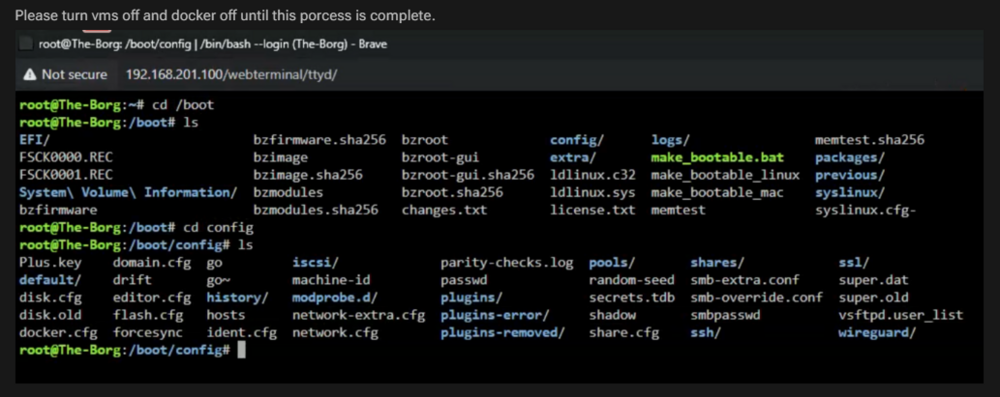
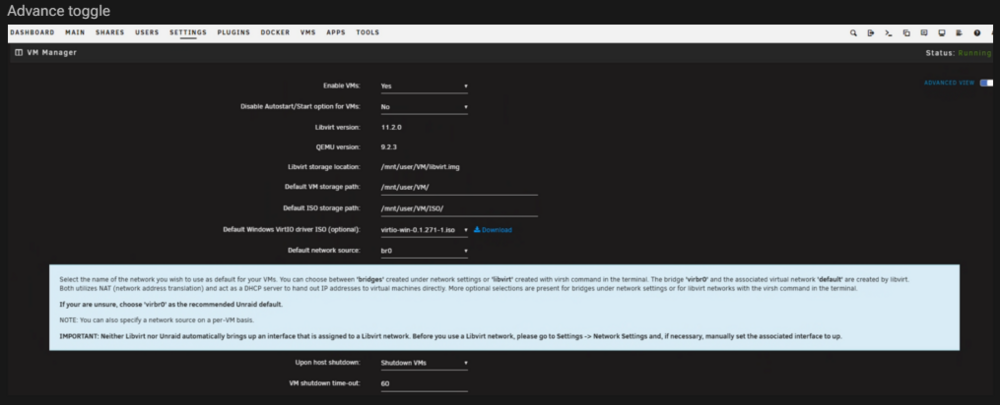
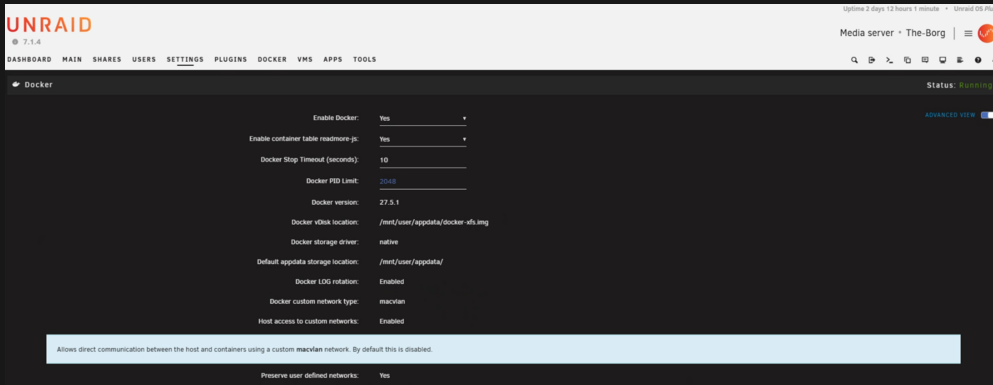
My Honest advice and step by step would be to clear the unraid networking config reboot and start fresh with Unraids default networking. Before Beginning make sure you have a flash backup. Main > Flash > Flash backup. This can be used to restore... Before following these steps be sure to write down any static IPs and have the user script plugin installed as there bay be some scripts used there latter... Following these steps will completely restart the unraid networking and bring it back to DHCP at first configurations. Delete the docker network database of docker network configurations. (Also found in the docker disk image.) rm /var/lib/docker/network/files/local-kv.db--If docker is off / disabled it may still exisit do this be for diableing docker... Since we are messing with internal networks. Turn off. LXC/Docker/VMS Settings Docker Enabled no, VM Manger enabled No.... etc With the sytem prepred we are ready to proceed with the steps. Step one is tell the USB to recreate Unraids Default Network. simalr to first inintal configuration. Reset unraid docker network to guarantee default configurations. cd /boot/config rm network* reboot this reset unraids to factory default network configurations. Reboot server! After a reboot, go to Settings → Network Settings in the Unraid web UI and resetup your static ip if at all... This Way I can guarantee that 0 previous configuration is to blame... Now with a the unraid defaults you should have bonding off bridging on and eth0 connected to your lan subnet *At this time DO NOT DO ANY OTHER CONFIGURATION OUTSIDE OF STATIC IP ASSIGNMENT TO ETH0! We first need to get the networking stuff set and squared away and working. Then you can futz with vlan and other interfaces settings... Next lets go to the VM Settings. Make sure the Default Network Source is NOT VMBIR! it should be set to br0. This affect how the shim bridge is made and some internal cross talk for VMs. *While Rare, this has also broken docker communications. Next to Docker settings. (I would honestly recommened deleting the vdisk file. And starting fresh! -This will clear out the previous Docker Tab all Docker template settings are still on the Flash Drive and Mapped Data is Saved to the Disks I recommend creating a XFS Docker Vdisk Image. Depends on How You handle your storage and where the system vdisk image is located at. More info in the Release notes... *This has also rarely caused docker issues.(While Your Diag and other docker issues don't necessarily point to its a recommend change for the future.) Here we want to make sure that you are enabling Host access to custom networks. and Preserver user defined (Host access networks is what's making the shim-bridge and ip duplication, which may be problematic and the next step to check and change) -We want this enabled for lan access to the docker networks... Next we need to add and run a few user scripts 1. will set the shim bridge to another static ip on the sub lan through eth0 2 will set and make sure unraids system ctl forwarding is enabled and working. Both scripts will need to run at first array start. as after setting these setting We will reboot once more. (Especially after a deleting of the docker vdisk file.) Which is required to move forward and make sure all of your networking is default! Script 1: https://forums.unraid.net/topic/178033-bmartino1-user-scripts/#findComment-1492333 as macvlan and enable host may cause a duplate IP preventing traffic... to fix we treat the interface like a service taht needs its own static IP check first with ip a #!/bin/bash # Reset and configure vhost0 was in v6 v7 may still see vhost but new config its called shim-br interface ip link set shim-br0 down # Bring vhost0 down ip addr flush dev shim-br0 # Remove any existing IPs #use static IP?: ip addr add 192.168.x.x/24 dev shim-br0 # Assign the desired IP ip link set shim-br0 up # Bring vhost0 upat Use Static IP be sure to set an avilable ip address ... -This will move the other side of the shim bridge to a static IP. By default it will attempt to bridge against br0 with the static IP set to eth0. UNraid esentail takes the eth0 and forms the br0 interface then docker tries to do the same with resutles with 2 interfaces with teh same IP. (This can cause netowrking equipment to fail as it done't know how to talk or cros into unraid.) More noticable on Unifi Equipment. as seen in teh forum post... Script 2: By default Unriad dsibalbe some form of ip forwarding that can prevent docker services and cross talk #!/bin/bash # Delay before starting sleep 10 # Apply sysctl settings apply_sysctl_settings() { echo "Applying sysctl settings..." sysctl -w net.ipv6.conf.all.forwarding=1 sysctl -w net.ipv6.conf.br0.accept_ra=2 sysctl -w net.ipv6.conf.br0.accept_ra_rt_info_max_plen=64 sysctl -w vm.overcommit_memory=1 echo "Verifying sysctl settings..." sysctl net.ipv6.conf.all.forwarding sysctl net.ipv6.conf.br0.accept_ra sysctl net.ipv6.conf.br0.accept_ra_rt_info_max_plen sysctl vm.overcommit_memory } apply_sysctl_settingsThis script will apply ipv6 forwarding that is disabled by default. Unraid requires a SLAC with RA enabled to properly handle and see ipv6 witch can also case some internal comunciation issues. ipv4 is already enabled by default. note the br0 acept ra make sure your vlan is added latter... system control -p sysctl -p to see all of unraid system control settings... Reboot the system make sure teh docker vidsk is xfs and created and running, make sure the script have ran... then lets make a immich docker that hsa postgress that we can follow for testing. somethign I know that has postgress and will function as I'm not sure what your doing that breakign things to this level... https://forums.unraid.net/topic/190532-guide-immich-docker-setup-docker-compose chose your pathing I will set a defulat for immich: I Have to Assume Unraid Default Pathing for the Guide: mkdir -p /mnt/user/appdata/immich/{config,database/postgres,database/redis,libaries,photos} /mnt/user/appdata/immich/config/ /mnt/user/appdata/immich/database/postgres/ /mnt/user/appdata/immich/database/redis/ /mnt/user/appdata/immich/libaries/ /mnt/user/appdata/immich/photos/ immich docker compose: https://forums.unraid.net/applications/core/interface/file/attachment.php?id=356591&key=7415fa48ec42d836a47bd783ac65eae8 immich env file: https://forums.unraid.net/applications/core/interface/file/attachment.php?id=356590&key=91c510657d4217e22bb37c785f724dec compose up and run immich and wait 1 hour or so and check docker logs. AS THIS SHOULD BE YOUR ONLY DOCKERS RUNNING AT THIS TIME! If it stays up Great restor your Other dockers coreting any issue along the way... This si the only way I can gurantee that 1 its not unraid, and 2 its non of the uraid gatcha on how your tying to run something...
-
Hell it could even be tail scale.. Regardless, you have a service that's not properly mapped. If you're claimant, these are unraid files. Did you do something to the boot drive? Regardless, you need to stop whatever service is doing it and fix its file pathing Your diag file error and is no good please post a diag file
-
My probe needs to wait until something else load which wont within to go file. (Too early in boot process) You're better off using a user script plug-in and running the script at first to array start.
-
you most liekly have a docker making files and folder maybe nginx with a data path set to /mnt/user/ it self and not to a folder within /mnt/user/<appname> I would recommend you stop all dockers and edit each one double checking path and locations.
-
Gave generic response I give to almost all mcelog post and questions. Without the diag file or other info to go off of limited data gets limited reply. Its not quite Copy/paste from FCP... More depends on if your runnign intel / amd as both have different things to do to check and go about. But since you have so many back to back this is almost definetly ram failure in some way. Good luck
-
Thank you For posting the Diag File... It appears that the vlan and macvlan is breaking your shim-bridge to connect to the network for other dockers... yeah. macvlan and vlan related docker networking troubles... You're likely experiencing PostgreSQL disconnects due to macvlan-related instability in Docker on Unraid, especially when using multiple macvlan bridge networks (br0, br0.50, etc.). Here's what the logs are showing... Docker Containers Flapping / Disconnecting: -Multiple containers on macvlan and bridge networks enter disabled states rapidly: syslog / syslog-previous per diag.. Example: port 2(vethXXXX) entered disabled state vethXXXX (unregistering): left promiscuous mode ... entered disabled state *These are classic signs of network interface issues—veth pairs flapping on bridge networks... as they are starting and stoping and other netowrking misconfigurations... Custom Docker Compose Networks: Many containers have "additional networks" restored (e.g., custom-bridge, br0.50, immich_default, etc.) indicating multiple overlay/bridge networks managed by Docker Compose, likely creating network contention or namespace confusion Macvlan Shim Interfaces You're using shim-br0 and shim-br0.50 via macvlan mode bridge, which is notoriously unstable when the host also talks to containers on the same subnet (common Unraid issue) it should be shaing and using 1 shim brdige not both. Since your using Vlans, THis is a unraid netwroking misconfioguration and not one easliy diagnsted adn fixed... Theoyr / Root Cause Hypothesis Macvlan conflict or bridging instability is causing PostgreSQL containers to intermittently lose connectivity, especially when: Unraid's host (e.g., 192.168.1.5) tries to communicate with macvlan containers on the same subnet. Docker Compose creates overlapping or conflicting bridges. Docker's default isolation and veth pairs hit race conditions when rapidly restarting containers. Unless you absoulte need macvlan (As I prefer to use macvlan myself)... Some Fix Recomendations... Fix Recommendations: Avoid Host-Container Same Subnet Macvlan Use ipvlan mode instead of macvlan if staying that route... -Or use a separate subnet for container networks (e.g., 192.168.100.x) to isolate traffic. so vlan 50 is subnet traffic of 50.x .... Use Docker Bridge for Internal Services If your PostgreSQL is only used by other containers, prefer bridge or custom-bridge networks. Avoid putting DB containers on br0. Add Static Delay to DB StartupAdd depends_on + restart_policy in docker-compose.yml: depends_on: - postgres restart: always Reduce Simultaneous Network Restoration When containers come up at once, many veth changes occur. Try starting essential services first (like DB), then use docker-compose up for the rest. Debug Further with Logs Look for PostgreSQL container logs (docker logs) for connection reset, timeout, or terminated messages to align with syslog entries. A tracking comand to see the postgress disconect when flaged... watch -n 1 "brctl show; docker network inspect <postgres-network>" or pull form syslog: tail -f /var/log/syslog | grep veth When symptoms occur... But every sign is point to mis linux network configuration and how you have br0.55 createde and working making breaks wiht the underline shim docker birdge on how unriad functions... The Web UI only affects br0 / eth0 based on unraid documentation... https://www.youtube.com/watch?v=0xk7LsWwp2I https://www.youtube.com/watch?v=9Ta9e09KyYw Your docker networks needs fixing...
-
again I would need the output of the docker inspect, ls and daig file... can't asist with out data...
-
I would need a diag file form unraid to further assist. This sounds like unraid docker misconfigurations. Potential docer network and port addigment issues. "Any help with this? The odd part is, if I re-install MySQL / MariaDB, it always works once. But after that, the connection refuses, which feels like the ports are fighting each other, which shouldn't be possible when using a custom network? EDIT: The plot thickens. If I restart Adminer with a different IP, it'll connect to the MariaDB database just fine. Once. After that, it'll get locked out with "Connection refused"" Even if a service is running a port lets say 3000 as its common. and I have 2 dockers that use port 3000 both are in a 2 separate bridge networks. That is still port conflict. even more when 3000 is a range of ports for one service but a static web port for another docker. as docker, network nat puts both services at unarid IP:3000 I would need the output of docker network ls and the docker network inspect example of the defaults docker network inspect br0 docker network inspect bridge docker network inspect <custum name of made docker...> with out this its hard to confirm and direct. also review post:
-
cool. I don't remember the linux command to check. But I do know some 10 GB nics don't advertise they are 10 GB connections. Example with some realtek as seen here: https://forums.unraid.net/topic/141349-plugin-realtek-r8125-r8126-r8168-and-r815267-drivers/#findComment-1279775
-
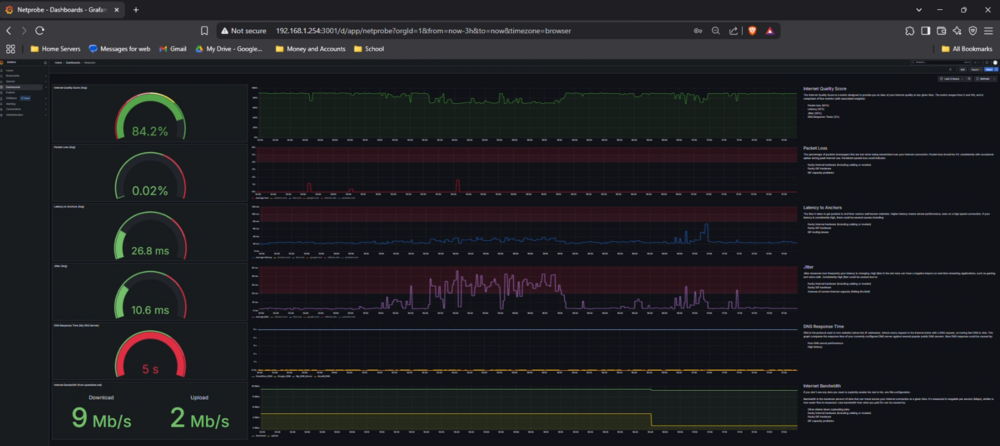
as it looks like your trying to capture data for speediest. Might I recommend a done compose that doesn't use Postgres. https://forums.unraid.net/topic/163308-docker-netprobe https://github.com/bmartino1/netprobe_lite
-
then let the docker compose make the docker bridge and test and try it. Docker Compose Yaml File Syntax #version: "3.9" services: speedtest-tracker: image: lscr.io/linuxserver/speedtest-tracker:latest restart: unless-stopped ports: - 31166:80 environment: - PUID=99 - PGID=100 - APP_KEY=base64:somekey - APP_URL=https://speedtest.example.com - DB_CONNECTION=pgsql - DB_HOST=speedtest-tracker-db-1 - DB_PORT=5432 - DB_DATABASE=speedtest_tracker - DB_USERNAME=speedtest_tracker - DB_PASSWORD=redacted - SPEEDTEST_SCHEDULE=0 6 1 * * - SPEEDTEST_SERVERS=48375,13345,62875,63281,16089 - DISPLAY_TIMEZONE=America/Chicago - PRUNE_RESULTS_OLDER_THAN=0 volumes: - /mnt/user/appdata/speedtest-tracker:/config depends_on: db: condition: service_healthy networks: custom-bridge: ipv4_address: 172.25.0.10 aliases: - speedtest-tracker dns: - 8.8.8.8 db: image: postgres:17 restart: always environment: - POSTGRES_DB=speedtest_tracker - POSTGRES_USER=speedtest_tracker - POSTGRES_PASSWORD=redacted volumes: - /mnt/user/appdata/postgres-speedtest-tracker:/var/lib/postgresql/data healthcheck: test: ["CMD-SHELL", "pg_isready -U speedtest_tracker -d speedtest_tracker"] interval: 5s retries: 5 timeout: 5s networks: custom-bridge: ipv4_address: 172.25.0.11 aliases: - speedtest-tracker-db-1 dns: - 8.8.8.8 networks: custom-bridge: driver: bridge ipam: config: - subnet: 172.25.0.0/24 name: compose-custom-bridge Uses a custom bridge network named compose-custom-bridge. Assigns static IPs within the 172.25.x.x subnet. Sets Google's 8.8.8.8 as the DNS server. Be sure to Fix any indentation and YAML structure issues. This way the docker compose makes the docker bridge network and removes it when docker compose down is done... You may also benfit form lables for unraid icons and other side data. docker-compose.yaml
-
the forum doesn't lie sir.. Edited 20 hours ago by wblondel add CRS305 configuration I dont' know where else to help you nor what was added where.. only that info has changed... it would have been better as a second post...
-
since your editing past post I'm not going to keep going back and forth with you.. having to reread new data taht want ther the first time I parsed it. the reason for the hyper v switch is due to networking issues that can occur and look like they are occuring... with the unraid home assistant VM and that the HA is running on Unraid. -Futher prvoing my point. THe issues may be on and at the HA VM... whcih means the Unraid Host... THis si a public Forum.. specfic to Unraid. I went thorgh all the networking gothcha that I have seen and assited others With HA on theis forum. My goal ATM is to make sure Unriad is not the problem. but with reedits and reverting that makes this difcult... Then go ask AI... I'm trying to be as detailed and forth with regardign setting why how I came to that concluion and other... When I presented with xyz when you clear need somethign else... ATM there are to many points of failure and I can't assit in this way. So I'm steping back and letting you know that some one else can try and assit you here...
-
Upgraded the test system, qemu VM. Borg and others with out issues.
-
yes. but the issues lies in linux networking with ip routes. the vlan needs to be on a separate subnet ip a ip route The unraid web UI will only affect br0 / eth0 based on unraid settings. Docker settings require host access enabled and preserve user defined... more info here: as this is a common question/issue on the forum
-
otherwise make a docker network... I can't guarantee ip routes to not use the eth0 10 GB interface over the eth1 1 GB interface if on the same subnet... not enouth info to further assist... You can absolutely dedicate eth1 to a single container without disrupting unRAID’s core network. The best approach: create a macvlan or ipvlan Docker network on eth1, then attach only that container to it. Here’s how Create a macvlan network on eth1 docker network create -d macvlan \ --subnet=192.168.1.0/24 \ --gateway=192.168.1.1 \ -o parent=eth1 \ steamnet I Prefer macvlan... heres ipvlan docker network create -d ipvlan \ --subnet=192.168.1.0/24 \ --gateway=192.168.1.1 \ -o parent=eth1 \ steamnet-ipv This isolates traffic: containers in steamnet send and receive only via eth1 see: https://forums.docker.com/t/using-a-second-nic-exclusively-for-docker-services/127180 Launch the Steam container on that network docker run -d \ --name steamos \ --network steamnet \ --ip 192.168.1.80 \ linuxserver/steamos *You would edit the docker tempate and selct steamnet in the netowrk dropdown... -This gives the container a dedicated IP on your main subnet, shared with unRAID's interface on eth0, but routed separately thanks to macvlan isolation. Why this worksDocker creates a virtual NIC tied to eth1 inside the container. The container’s network is entirely isolated from br0/eth0 paths . Other containers and unRAID services stay unaffected. Note: Don’t use --network host!Host mode exposes all host interfaces to the container (including eth0), which you experienced breaks core services
-
Review: ??? host give all interfaces that unriad has to the docker... You would need to vfio and pass this to the docker via devices. use a bridge or vlan to separate and use traffic. the linux server docker should be ran in a docker bridge mode... https://hub.docker.com/r/linuxserver/steamos
-
mce event are 90% ram. reboot unraid at the grub boot menu select memtest. as this is a sign of hardware failure. Unriad the Host OS it self sits in ram. On intel you can run mcelog if no output it was ecce ram memory correction if output then thats the issues. Its best when you hit a MCE to reboot unraid and at the grub boot menu run the memtest application to rule out faulty hardware. If AMD mcelog application doesn't work for you, your better off installing the CA Plugin live memory test and also to reboot unraid and at the grub boot menu run the memtest application to rule out faulty hardware. this looks like ram failure and hardware needs to be replaced.
-
ok, Is something not working in that configuration? https://www.youtube.com/watch?v=0xk7LsWwp2I https://www.youtube.com/watch?v=9Ta9e09KyYw You may need to go to listening interfaces to edit what br0 is connected too... the unraid webui affects eth0 / br0 depending on other settings. thus the use of terminal and other command line commands to make another bridge interface for eth1 and tagged vlan. an example is making a linux bridge our seves... no web UI as the Web UI is limited to what its interacting. This requires Decker setting preserver user defined enabled. Then I can only suggest running: #!/bin/bash set -e VLAN=666 BR=br1 IF=eth1 SUBIF=${IF}.${VLAN} BR_SUB=${BR}.${VLAN} DOCKER_NET=my_br1_vlan60 echo "=== CLEANUP any existing VLAN/interface/bridge ===" ip link delete ${BR_SUB} 2>/dev/null || true ip link delete ${SUBIF} 2>/dev/null || true ip link delete ${BR} 2>/dev/null || true echo "=== CREATE BRIDGE and attach ${IF} ===" ip link add name ${BR} type bridge ip link set dev ${BR} up ip link set dev ${IF} up ip link set dev ${IF} master ${BR} echo "-- ${IF} added to ${BR}" echo "=== CREATE VLAN sub-interfaces VLAN ${VLAN} ===" ip link add link ${IF} name ${SUBIF} type vlan id ${VLAN} ip link set dev ${SUBIF} up ip link add link ${BR} name ${BR_SUB} type vlan id ${VLAN} ip link set dev ${BR_SUB} up echo "-- VLAN sub-interfaces ${SUBIF} and ${BR_SUB} up" echo "=== SET IP on ${BR_SUB} (optional) ===" # Uncomment and edit as needed # ip addr add 10.10.60.11/26 dev ${BR_SUB} echo "=== CREATE Docker bridge network on ${BR} ===" docker network inspect ${DOCKER_NET} >/dev/null 2>&1 || \ docker network create \ -d bridge \ --opt "com.docker.network.bridge.name=${BR}" \ ${DOCKER_NET} echo "✅ Setup complete. Docker network: ${DOCKER_NET} attached to bridge ${BR}." echo "You can launch containers using: docker run --network ${DOCKER_NET} …" What this script does: Bridge setup: Creates br1 and enslaves eth1 VLAN tagging: eth1.60: handles VLAN 60 traffic br1.60: the bridge’s VLAN interface Docker network: Uses Docker’s --opt com.docker.network.bridge.name=br1 to bind the new br1 bridge into Docker Adjust VLAN=60 to your desired VLAN ID. Assign IP to br1.60 if this host needs IP reachability on that VLAN. Remove optional IPv4 block if you’d prefer DHCP. Ensure your physical switch port is set to trunk VLAN 60 (or untagged per your info) then you can target a macvlan/ipvlan for static ip for docker with the above mentioned docker network create command.

-
TNAS uses the EXT 4 or Btrfs file system, please check the official specification on there website... I have messed with theses before in the past... The unraid unassigend disk plugin will work to connect and see the data on disk. Any linux distro will be able to mount and few. If they were raided and using LMV it may be a bit harder outside of the Tnas OS... as such all data on the device from the previous is most likely in a mdadm linux software raid setup... TerraMaster's TOS 6 also features TRAID, which is a dynamic RAID technology. TRAID allows for flexible expansion of storage space by adding or replacing hard drives of different capacities. When creating a TRAID array, the file system (ext4 or Btrfs) is used to manage the storage. (Similar to how unraid handles the standarad array of disks.) TRAID: A TerraMaster-specific RAID technology that leverages either ext4 or Btrfs for data storage and provides flexibility in disk management. As they hit new config and other, I believe this was formatted original as unraid as they are using AI. regardless, data needs to come off some disk and be reformatted to work with another OS.
-
ok this seems feasible. Your correct. Apologies if that came off cross. Its something I have to keep reminding myself and inform other. Not mush changes with LACP and I have found that even with bonding it will defer to etho0 until eth0 is not available. more info on unriad setup with LACP: https://forums.unraid.net/topic/124311-counfiguring-8023ad-lacp/ most use unifi: https://gist.github.com/sems/f3b2f10ea0fb30d6f6fade841a12dfae your experience with LACP is common. On Unraid, the benefits are often minimal unless you’re aggregating traffic across multiple clients or running iSCSI/NFS at scale. Also, Docker and LACP often conflict, with Docker preferring a single NIC (usually eth0), making bonding a bit moot in this context. Since we are now separating 2 eth interfaces with Vlans. We will need to make sure the output on unraid interfaces show eth0.1021 and eth1.666 with the array off under settings > Network settings. There is a add vlan option. Since both are mainly dockers based. You would need to make 2 docker networks to the tagged vlan interfaces to cross talk. Unraid docker run doen't allow for more then 1 docker connected at a time. so full separation and isolation may not be 100% fesible. Networking on Unraid can be confusing. once you get unraid to see the 2 interfaces "eth0.1021 and eth1.666" and have the docker setting to preserve user defined networks, you can create 2 docker networks. and inform the dockers on unraid to be on this net or that net, but not both at the same time. (atleast not easily... there a side unraid command to attach networks to running dockers..) * docker network connect media_net my_container You're absolutely right to separate traffic this way: using eth0 for media (on VLAN 1021) and eth1 for Docker downloads (on VLAN 666) makes a lot of sense and gives you clear monitoring and path separation. Once you’ve configured Unraid to show: eth0.1021 → for media-serving containers eth1.666 → for download-heavy containers # For media servers on eth0.1021 docker network create -d macvlan \ --subnet=172.16.17.0/24 \ --gateway=172.16.17.1 \ -o parent=eth0.1021 \ media_net # For downloaders on eth1.666 docker network create -d macvlan \ --subnet=10.67.2.0/27 \ --gateway=10.67.2.1 \ -o parent=eth1.666 \ download_net -Adjust the subnet/gateway to match your real network layout, of course. Make sure Settings > Docker has “Preserve user-defined networks” set to Yes before starting the Docker service. Each container can only be on one custom network at creation in the Unraid UI. If you need multiple networks, you can: Or use docker-compose via compose.manager plugin...
-
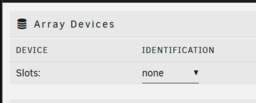
right now your under the new config sytem setup if you want the unraid traditional array Disk 1, Parity, disk 2 etc you need to set the Array Slots # from none to something else This may require formatting the disk and use xfs file system. otherwise you need to hit add pool call it something like cache and also set the slots # of disks... this by default will format them as btrfs. if you want zfs it must be a pool device only you click the name and select the file system typ to zfs depending on the slot number and select zfs raidz1 1 vdev standard array tutorial https://youtu.be/Y2VkyZiPaM8?si=n0go_SEURnaXZpzR (About 14 min in) or zfs setup https://youtu.be/UR5RCItyCsw?si=0WOQldgOwMGnDQAI If this was a previous unriad with data on disk you may need to set the slot placing the correct disk where it was before and setting the File system to auto to detect the previous data on disk.
-
given that you have 8 nvme I would recommend a zfs pool https://forums.unraid.net/topic/177887-os-70beta4-best-practice-storagediskcache-configuration/ BUT if they have data on them, you want saved, we need to move data off the drives first. And configure a grouping of disks as your 8x 4TB disks can easily become 4x 4TB mirror pools having 4 4tb volumes to work with or 2x 4TB raidz2 (10 ish TB where you can lose 2 nvme and still have all data) or any other combination that will suit your needs for setup... What are you planing to do with unraid on this device? VMs, Dockers? General NAS duties? Review: https://docs.unraid.net/unraid-os/manual/shares/user-shares/#default-shares As disk setup here can impact latter. Are you looking to expand storage? This may affect how you want to set up the disks Then you need to come up with a folder hierarchy system. xyz folder exist where and what is written to it. How do you want to interact with it, and what do you want it to do?
-
With BIOS changes, it is recommended to have secure boot off. But as it appears, your in the unraid interface. I say you're doing well. Is this the first time booting into unraid? As unraid doesn't auto add devices to the array / pool for configuration. You build that: https://docs.unraid.net/unraid-os/manual/storage-management/ Is there data on the nvme SSD that you're trying to save? As You appear to be at the first step of disk creation. You may need to make a new pool of devices and set up a grouping of disk to use them on unraid... Example a grouping of 3 setup as zfs raidz1 for xyz application. You will need to decided if all disk need formatted (Loos data on them) and be made into a unraid box. Then decide on what file system you want and how you want to handle the disk.
-
Thank you for posting a Diag file. 90% of the time this is ECCE Ram Memory correction. If it is the cehck event was a warrnign that ram was corrected. Unriad the Host OS it self sits in ram. On intel you can run mcelog if no output it was ecce ram memory correction if output then thats the issues. Its best when you hit a MCE to reboot unraid and at the grub boot menu run the memtest applciation to rule out faulty hardware. If AMD mcelog applciaiton doesn't work for you, your better off installing the CA Plugin live memory test and also to reboot unraid and at the grub boot menu run the memtest application to rule out faulty hardware.




