






bmartino1
Members
-
Joined
-
Last visited
Everything posted by bmartino1
-
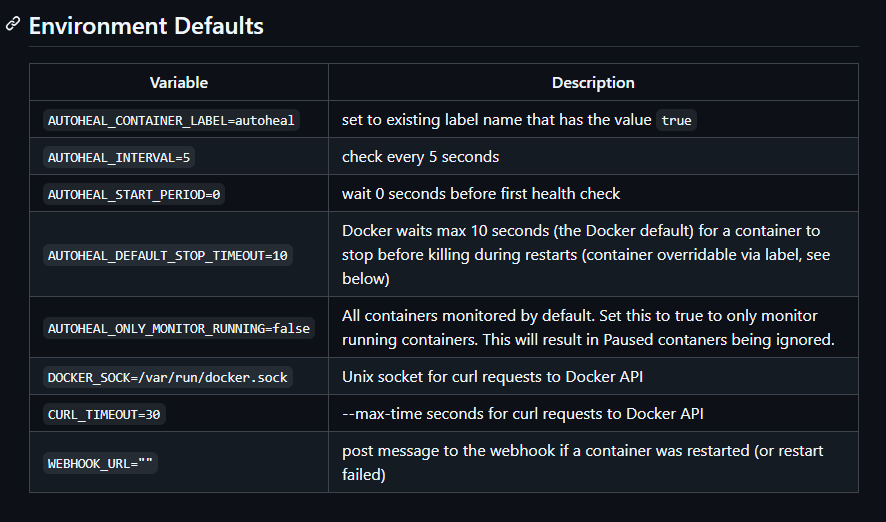
you either need to run the docker run from and hav the "autoheal docker running" per the github page or you need to add additional labels simalr to the watch tower docker(autoupdate) to the dockers you want it to work on and affect... Docker AutohealMonitor and restart unhealthy docker containers. This functionality was proposed to be included with the addition of HEALTHCHECK, however didn't make the cut. This container is a stand-in till there is native support for --exit-on-unhealthy moby/moby#22719. 2. Use in your container imageChoose one of the three alternatives: a) Apply the label autoheal=true to your container to have it watched; b) Set ENV AUTOHEAL_CONTAINER_LABEL=all to watch all running containers; c) Set ENV AUTOHEAL_CONTAINER_LABEL to existing container label that has the value true; Docker Compose (example)services: app: extends: file: ${PWD}/services.yml service: app labels: autoheal-app: true autoheal: deploy: replicas: 1 environment: AUTOHEAL_CONTAINER_LABEL: autoheal-app image: willfarrell/autoheal:latest network_mode: none restart: always volumes: - /etc/localtime:/etc/localtime:ro - /var/run/docker.sock:/var/run/docker.sock so again what is it that your trying to do? ... whats the isseus. what are you tryign to do ... liek add autohela to a template docker??? You may need to go into advance view... and add somethign here: or by adding somehtign to the template... again per the github: cuz at best this just runs ontop of the docker /var runtime socket adding a healthcheck like process to dockers taht may or may not have a health check to stop unhealty dockers... Makes more sense to run this with compose... Regardless you ned 1 master Docker running - can be ran directly form the github and let it do its thing or add adational lables and option to the other dockers. review: Watch tower https://www.youtube.com/watch?v=mSSlrRgSAP4 More about health Cheks and docker: https://www.youtube.com/watch?v=yBJ2baG-ULY and implemeting health check to a docker: https://www.youtube.com/watch?v=_CVewEfVQAo Unraid is not helm, kubernetes or docker in a docker swam... its barley podman depending on interactions. and you get more out of health checks and this auto heal if you run portainer ontop of unraid to view the health and other image of a docker. I see no value or usecase with this auto heal docker on unraid.



-
cool then the stun issue you were having is a internal docker cross talk issues between other host networks. Thanks for sharing and giving a solution. with the release of Unifi OS. I'm not sure what the next evolutions will be like yet.
-
compose or env? for what dockers?
-
please delete the bad data in the /mnt/user/appdata path or where ever you told the template and path to exist... then follow the guide to setup and install immich on unraid: Docker Guides: Immich Docker-compose Setup Immich Unraid-Template in the CA Please post questions and isseus here...
-
you need to delete the app data path as well. the docker creates a folder and files that persist on disk even if you remove or uninstall the docker.
-
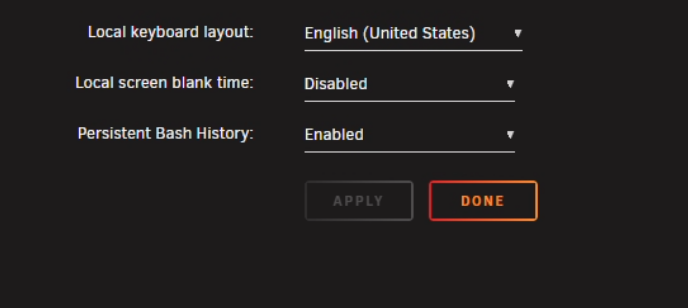
Interesting bug then. My understanding is that this is happening when the monitor is off. in which i can only asume it has to do with console blank ... Settings > Console settings. as this has turned off hte screen but is requesing a diaplay but not getting it... its werid that it when your in the dashbaord. I would asume a plugin or other nginx isseus with ho the dispaly dashbaord is being requested. simalr to the nchan memory errors. again would need a diag file to look deeper into what may be happening. as thiws may be a triger form the impelmentaiton of the screen time out state and trying to use the monitor.
-
@ich777 thoughts
-
Please post a unraid Diag file as I would liek to check some things form the libvirt log, the vm a config and other areas of the machines system login to better assist in a solution. if the goal is to pass this monitor and use the "igpu" in the VM Then I see n reason why the host shouldn't have this bound and accessible to the vm only no host access or control...
-
Thank you for the clarity and information, this helps me better understand the issues at hand and whats going on. So, This tells me that the thunderbolt device in the off stat is being registered as a device requesting power and a edid display data and unraid full logging is capturing the power state of what it reads and sends to the kernel as it is inaccessible. The HID value changed and its not accepting inputs. pcieport 0000:1b:00.0: Unable to change power state from D3cold to D0, device inaccessible when on it responds and tells Linux that xyz /dev/ path is accepting xyz and transporting a EDID for display when it's off the HID didn't change but the ability for it to accept and send and receive the otherwise functional packets has stopped. This is partly due to how KVMs work and what the kernel see what is being read can be read... (Similar to i plug a usb in and immediately unplug and plug it back in and unplug) Here more information on that: Thunderbolt docks/KVMs often cut power when the monitor is off → the PCIe root/downstream port (e.g. 0000:1b:00.0) runtime-suspends to D3cold power state... As this is a harmless but is a constant log spam due to Power and pcie ASMP and reports via AES you can ignore it by adding pci=noaer to the grub kernel params (disables PCIe AER messages) and that will suppress this harmless message. I personaly prefer to disable these poser states... due to VM and other hardware issues... and usb power state quirks... especialy when using them for a VM... To Prevent D3cold (preferred)" Disable PCIe port power management so the port never drops to D3 in the Main > Flash > grub edit you should run pcie_port_pm=off pcie_aspm=off pcie_port_pm=off disables runtime PM(Power management) on PCIe ports (stops D3cold). pcie_aspm=off turns off link-level ASPM, further reducing power-down chances. * (Let the device handle it and not use software to report or control it...) OR Otherwise you would need to test it via terminal Per-device (no reboot, test first) - # See current state cat /sys/bus/pci/devices/0000:1b:00.0/power/control # Force always-on echo on > /sys/bus/pci/devices/0000:1b:00.0/power/control As that is essential what this udev rule does.... you could add another udev rule affecting the port itself too... # /boot/config/udev/rules.d/90-pcie-port-always-on.rules ACTION=="add", SUBSYSTEM=="pci", KERNEL=="0000:1b:00.0", ATTR{power/control}="on" and let unraid control its dscold state (which may send a signal and turn on the monitor....) if you don't want to turn off aer or the power managment to the ports you can try tweaking the hotplug as its is a time syn issues of the kvm/screen being off and being reported as xyz device but unable to recvive and send as it is off. and need to be in that kind of state for when power returns to connect and be used... so a grub edit of: pciehp.pciehp_poll_mode=1 *This disables PCI hotplug polling and can fix boot errors or hardware detection issues related to the PCI host bridge, like the "Notification initialization failed" or "Cannot get irq -1" errors. otherwise, you can disable ASPM in Bios or setup power controls with a user script at boot. Or a trigger to run when it detects the device is off in that state and runs something like: echo on > /sys/bus/pci/devices/0000:1b:00.0/power/control to grant Linux the power control it needs/request when it goes into that power state. but essential what happened is the device is off and unraid was still sending something to it until the device didn't stop the tranmission(common KVM issue) and was forced into the power state of avbaible but not listening. then linux is reading it as (Similar to i plug a usb in and immediately unplug and plug it back in and unplug...)
-
may be a continuation to post: https://forums.unraid.net/topic/193037-unraid-gui-keeps-spaming-the-following-kernel-errors-pcieport-unable-to-change-power-state-from-d3cold-to-d0-device-inaccessible/?&do=getLastComment
-
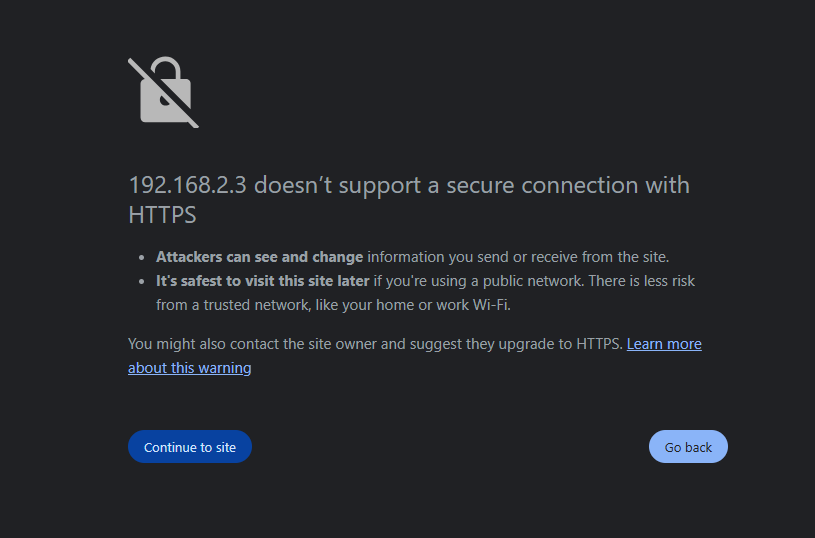
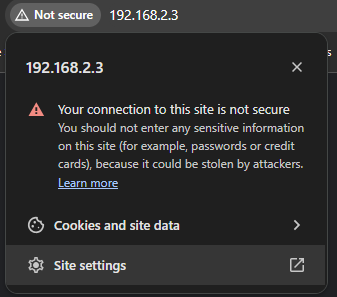
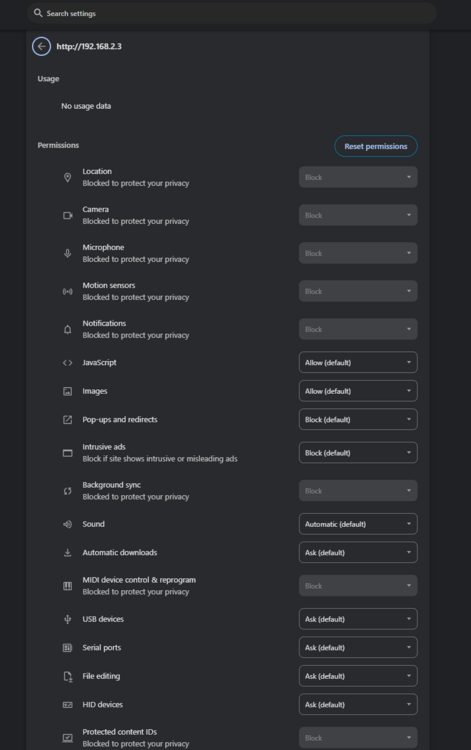
this sounds like a browser ssl connection to a web page and a saved setting to the site permission of a web page. Clearing the data form the web browser should clear the option. Honestly I'm not 100% sure what you mean by the "external link warning dialogue" do you mean a chrome ssl error potential risk? like this ssl warning: in chrome on the web page i can click on the key or not secure and a popup will appear when I can delete the site settings... Clicking site setting takes me to the chrome setting page for that specific website where i can delete and reset the page. by clicking reset permission This is the only thing I can think of when you mean "external link warning dialogue" and is all in browser cookies and web site data. This is also browser specific. what web browser?

-
double check and try a different network cable. a break in the line or a kink can cause drop outs.
-
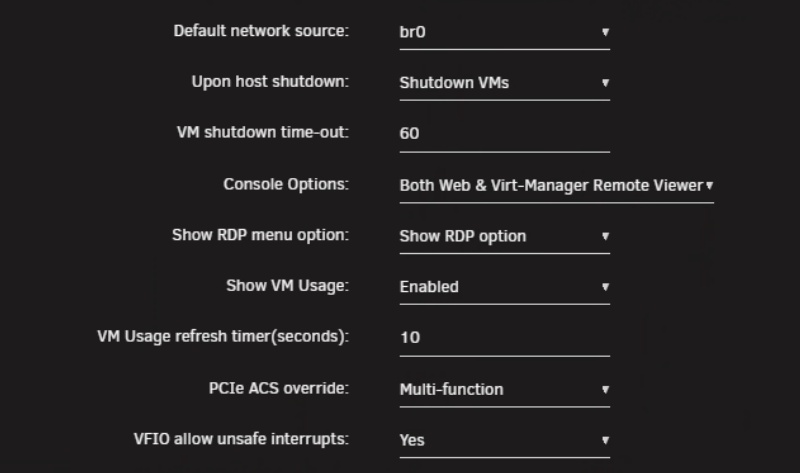
I would recommend binding and passing the IOMMU group that has the bolt port. as the kvm monitor device you have has connection and data states when off and when on. I would recommend editing the VM webui advance settings for IOMMU This should add data to teh Main > Flash > syslinux grub. And I reccomend adding and running the grub options from the previous post. Didn't see you made another with similar issues.
-
did you edit unraid grub syslinux and reboot and checked again per post:
-
??? ... SPace invader has quite a bit of video on youtube and other... https://www.youtube.com/@SpaceinvaderOne looks like you browsed though the docs atleast :) - https://docs.unraid.net/unraid-os/manual/additional-settings/#network-settings Not aware of a guide per se. plenty of youtube videos and stuff on the forum... networking on slackware/unriad can get complicated. are you trying something with vlans? *Unraid is not netwroking equipment! ... General tips and tricks: https://www.youtube.com/watch?v=PtDU6kfiaI0 Vlans: https://www.youtube.com/watch?v=9Ta9e09KyYw passing nic into a VM: https://www.youtube.com/watch?v=n2OPfALLqRA unriad docker network creation: https://www.youtube.com/watch?v=7fzBDCI8O2w Some Docker networking Info when to use what docker network Is there something specific your trying to do or want info on how one does it? as depending on the complexity and end goal it may not exist natively inteh web UI and may require advanced linux termanl commands and knowledge to crate a workaround. Are you using VMs? are you using Dockers? are you using Vlans? netowrking at layer 3 or Layer 2... ? :/ Forbidden router?...
-
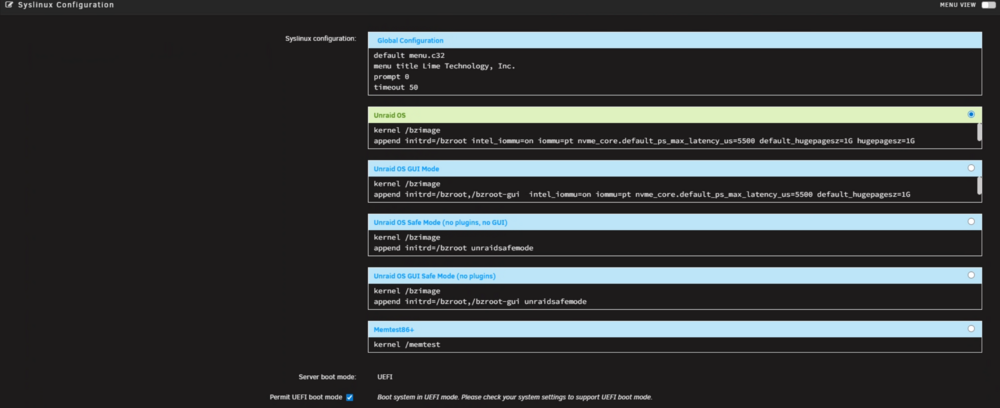
What exatly is the issue? On unriad your just trying to pass the usb thunderbolt into a VM? what do you mean by: POWER-OFF my Thunderbolt monitor Unraid Did you turn off the screen? hitting the power button on the thunderbolt dock? a Dell wd19s is what I have to test and have tested before. that power button on the dock is a signal term switch that tells the device to power off. as a screen/monitor it self has a state when its on adn a state when its off. and when off it may read as a hid device with no input until the KVM is acvite for the reconnection. a rescan may be need to move from powerr off to on if already connected. ? https://www.dell.com/en-us/shop/dell-ultrasharp-27-thunderbolt-hub-monitor-u2724de/apd/210-bksj/monitors-monitor-accessories Just Need a bit more clarity of what device what button and what your trying to achieve. Regardless, your did something that turns off something and unraid errors... It also looks like you have some solution or something else solved. if its working for you now I wouldn't worry about it. My Question is, So, Why do you need the udev rule to begin with? With that in mind and out of the way, Regarding info form this post as I don't mind helping to write a Udev rule. Rescan is not always necessary this depends on what need to be reset to b e re trigered to respond and act accordingly. As it looks like your getting a power state issue now. this can be edited both in the VM and on the host. pcieport 0000:1b:00.0: Unable to change power state from D3hot to D0, device inaccessible^- are usualy a pcie aspm misconfiguration with Passthorugh where its was told by the system to be in this state when the host is now saying it needs to be in this state. We can use udev to target the dock via vendor / pcie device ID. [1496624.280732] thunderbolt 0-1: new device found, vendor=0xd4 device=0xc045 [1496624.280739] thunderbolt 0-1: DELL U2724DE [1496625.575269] thunderbolt 0-1: device disconnected [1496629.083819] thunderbolt 0-1: new device found, vendor=0xd4 device=0xc045 With display monitors and other its more on getting the fame buffer to reset to resend the edid communication to the monitor. This also looks like your using a type of octo link(using thunderbolt for pcie). And outside of touching the udev rule. I would recommend editing the unraid grub boot options. Main > Flash > syslinux configuration add more Grub options to the green section adational lines of: kernel /bzimage append initrd=/bzroot acpi=force acpi_osi=Linux usbcore.autosuspend=-1 pci=noaer pcie_aspm=off To outrule a acpi sigterm and bios issues lets tell the linux system at boot to force acpi and force load a linux acpi to fix some thunder bolt and unraid usb3 and above lets disable the autosuspend of the usb ports. (using -1 will disable the option to let usb 12 volts turn off power and enter some power states. *This is what I think your hitting now with your udev and dock issues... then lets fix and turn of pcie aspm power management and suppress pcie power issues in the logs to force a always on connection. and potential the thunderbolt.host_reset=0 option per the other post. this way we remove points of failure and issues with IOMMU and VM passthorugh. As it looks like you have something marked as solved. Unknown if you found a workaround or a fix. But AI like chat gpt can help you rewrite or fix a udev rule. Otherwise i'd point you to some documentation on udev for thunderbolt: https://www.kernel.org/doc/html/v5.0/admin-guide/thunderbolt.html as it looks like you have something that is targeting the monitor only and if not the monitor you can target the pcie vendor device id for the udev rule.
-
I would reboot to update, I don't remember the triger reload command for slackware linux.
-
you may have to many IP suing the same mac address use macvlan: Some Docker networking Info when to use what docker network
-
Limitation of available speed and resources at the internal network layer. form unirad / device own hardware adn nic opt rom space your sppeds are most likely droping to the internal lan speds of your network as it has to traver that to get to the internet at large to use the domain thus your RP is your slowest connection and point where it would drop to 100/200 as thats your ISP limit for your modem side.Calling rsync form apple or rsync form unraid terminal? I assume a smb connection on the Apple device. as it’s not really a Unraid/XFS bug, it’s mostly about how macOS implements SMB + rsync Here’s what’s going on:On macOS, rsync doesn’t talk to the filesystem directly when you’re writing to a remote SMB share — it’s writing through Apple’s SMB client. Apple’s SMB client is very aggressive with write caching and metadata updates. By default, when rsync finishes copying a file, the mtime (modification time) isn’t guaranteed to be flushed down to disk correctly. That’s why you see it reset to “now” on the Unraid side instead of being preserved. When you add --fsync, rsync tells the OS to explicitly flush each file’s data and metadata to disk before moving on. That forces macOS to commit the proper mtime, so you see the expected behavior in Unraid. Why this is Apple-specificOn Linux rsync over SMB/NFS/SSH, you generally don’t need --fsync. On macOS, Apple’s SMB stack often ignores utimes()/futimens() metadata updates until the file is fully closed and flushed. Without fsync, the SMB server (Unraid in this case) just gets “best-effort” timestamps. That’s why it doesn’t matter whether you use rsync 2.6.9 or 3.4.1 — the problem is lower in the stack (SMB + APFS caching behavior). some potential workarounds... If you want stable results without always remembering --fsync: rsync -a --fsync source/ /Volumes/UnraidShare/dest/ Force rsync to go over SSH instead of SMB Mount your Unraid share via SSH (or just run rsync directly over ssh://). That way rsync is talking directly to Unraid’s filesystem, bypassing Apple’s SMB client. rsync -a -e ssh source/ user@unraid:/mnt/user/share/ Use --inplace in some workflows (can help with timestamp consistency if files are being updated instead of replaced). Check your Unraid SMB settings Sometimes forcing fruit:metadata=netatalk or disabling AAPL extensions in smb-extra.conf changes how timestamps are handled. But for your case, it seems squarely an rsync + macOS SMB caching thing. Rewrite unraids SMB: https://forums.unraid.net/topic/178033-bmartino1-user-scripts/#findComment-1478661it looks like the system ran out of memory to store sleep data. unriad Full OS exist in ram. sleep also needs quite a bit of ram resource to put the machine in a sleep state. you hit OOM: Aug 20 10:49:23 Vault kernel: OOM killer enabled. if you have a btrfs partition, I recmoned installing the swap plugin to help deter and potential fix this by making a swap partition.are you using tail scall and set dns = true? this breaks unraids dns... as you told Tailscle to overwrite the host DNS system. Please post a diag fileyou forcefully set immich verion in docker to a direct version to go after. ghcr.io/imagegenius/immich:1:132.3 any docker updte will fetch and go after 1 immich:1:132.3 are you CA or Compose? see guide posts for immich: Docker Guides: Immich Docker-compose Setup Immich Unraid-Template in the CA Please ask questions Here!you will most likley need to make a udev rule. Unraid has prebuilt USB rules. and thunderport falls under that for the inital /boot mopunt and load into ram for the OS. Unraid also doen't support thuderbolt disk in teh array/pool as a usb discnet and power states break casing other errors for operation. ... those syslog errors are basically telling you that the udevd process is trying to write to attributes that don’t exist or aren’t writable under the Thunderbolt sysfs tree with unraid config folder one can make a udev folder and add rules.... ( I Assuem you did.... ) Anything in /boot/config/udev/*.rules is applied early, but Thunderbolt is hot-plug and sometimes the device path won’t match what you’ve hard-coded. When the device disappears (disconnect, sleep, link flap), the kernel removes those attributes, so subsequent udev events fail with No such file or directory. Also your udev rule is too aggressive... ATTR{authorized}=="0", ATTR{authorized}="1", RUN+="/bin/sh -c 'echo 1 > …'" That’s trying to set authorized in multiple different attribute sub-dirs (nvm_active1, nvm_non_active1, wakeup*, etc.) where it doesn’t even make sense. That’s why you get “Permission denied” and “No such file or directory”. The only safe/writable one is typically /sys/bus/thunderbolt/devices/.../authorized. make a safer udev rule: # /boot/config/udev/50_enable_thunderbolt.rules # # Auto-authorize Thunderbolt devices safely # # Notes: # - Only acts when a new Thunderbolt device is added # - Writes to the device's own "authorized" attribute # - Avoids touching unrelated nvm/wakeup attributes # - No PCI rescan unless you know you need it (uncomment last line if required) ACTION=="add", SUBSYSTEM=="thunderbolt", \ ATTR{authorized}=="0", \ RUN+="/bin/sh -c 'echo 1 > /sys$devpath/authorized'" # If a PCI rescan is necessary for certain docks/GPUs, uncomment: # ACTION=="add", SUBSYSTEM=="thunderbolt", \ # ATTR{authorized}=="0", \ # RUN+="/bin/sh -c 'echo 1 > /sys/bus/pci/rescan'" Why this is safer:No hardcoded sysfs path → works regardless of which Thunderbolt port (0-1, 0-3, etc.) you use. Only sets authorized=1 on the actual device path → avoids spamming syslog with Permission denied. PCI rescan optional → only needed if the downstream device (like a GPU/dock PCIe bridge) doesn’t show up automatically



