bmartino1
Members
-
Joined
-
Last visited
Everything posted by bmartino1
-
https://support.plex.tv/articles/repair-a-corrupted-database/ Depends on the plex docker you are running linux server docker image, then yes. Plex offical, no, any other that is not based on and off linux server no.... This is due to the docker not having the sqlite packages installed to run the sql commands to login into the db file and repair the docker... as you will need to console into the docker run sql comands to connect to the plex db file and run sql comands to repair / fix the corruption... see github issue: https://github.com/linuxserver/docker-plex/issues/425#event-17945050644 Ther I was presented with a docker mod option to install sqlite3 GitHubGitHub - linuxserver/docker-mods at universal-package-ins...Documentation and Examples of base container modifications - GitHub - linuxserver/docker-mods at universal-package-install then you can repair the plex database with this github project: https://github.com/ChuckPa/DBRepair my placing the extracted tar realse file in the /config folder... with sqlite3 installed you can then run thorugh a nice script that will to it for you... This will repair plex... the script will shutdwon plex form within the docker, open the db file and run the plex needed sql comands to fix the coruption...
-
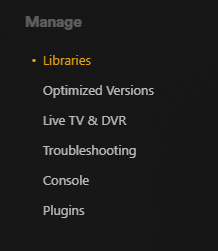
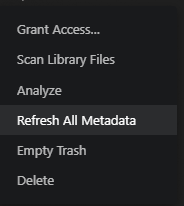
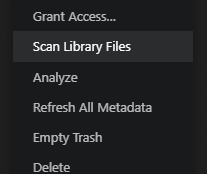
file permission issues maybee... plase run these commands with plex off to amke sure the medai folder for TV Movies are correct. stop all docker go to toolx> docker safe permission set unraid docker permissions... cd /path to plex media/ chown nobody:users -R * chmod 777 -R * then in plex make sure you run thorugh the basics for library scanning.. go to and make sure you empty the trash to each of your libraries Scan Library files and Refresh all metadata... you can scan all your libraires for new content otherwsie you need to make sure the plex docker can read teh new tv / movie file path from within the container... console into plex cd to your path and look around... Otherwises your experiences database coruption issues... where its easeier to start plex over then it is to correct large libraries and have plex rescan folder to re import movies and tv.


-
depends on how its setup but yes this uses the md driver for software raid with mdadm
-
I'm in the USA Central Time. (Illinois area) Central Time is five hours behind Universal Coordinated Time (abbreviated as UTC-5) during Daylight Saving Time and six hours behind Universal Coordinated Time (UTC-6) The first post inteh compose guide goes over generic linux install https://forums.unraid.net/topic/190532-guide-immich-docker-setup-docker-compose Unraid compose setup has a few tweaks to make it run nicer on unraid... on other linux distros due to docker implementation its easier to run docker compose. I run OMV a debin linux and immich runs fin in docker compose. Immich doesn't realy have a direct linux install option per their docs. (it what they do to install it in docker... https://immich.app/docs/install/requirements/ https://immich.app/docs/developer/setup/ the immich project page can be found here: https://github.com/immich-app/immich In theory if on wanted a direct linux install you could pull stuff from the docker file https://github.com/imagegenius/docker-immich/blob/main/Dockerfile install redis, install Postgres and run the necessary packages to clone and download the immich server stack... "I have also been thinking of another scenario, but I do not know if that is possible: I have an external virtual linux machine hosted, it might be a possibility to set up Immich on that one (not unraid, but linux) and maybe there's ways to sync two Immich instances?" While possible to run docker in the virtual linux machine. As run another docker form of immich. I'm not aware of a sync or cross to share data between 2 different servers. however, it is possible to sync between 2 different machines. It is more a issues of file access and Postgres database data... this is a very advance setup... While Immich doesn't have a built-in feature for syncing between two Immich servers, you can achieve this using external tools and a shared infrastructure. The primary method involves using tools like rclone or Syncthing to synchronize the library folders between servers, ensuring they have access to the same database and file storage. Here's a breakdown of the process: 1. Shared Infrastructure: Database: . Both Immich servers should ideally connect to the same PostgreSQL database and Redis instance. File Storage: . They should also access the same file storage, either through a shared network drive (like NFS or SMB) or by mounting the same volumes into their respective containers, according to Immich documentation. 2. Synchronization Tools: rclone: . A command-line program for managing files on cloud storage, which can also be used to synchronize files between local storage and cloud storage, or between different local storage locations, according to Reddit users. Syncthing: . A continuous file synchronization program that allows you to synchronize files between multiple devices, according to Reddit users. 3. Synchronization Steps: 1. Initial Sync: Use rclone or Syncthing to copy all the files from the source Immich server's library folder to the destination server's library folder. 2. Subsequent Syncs: After the initial sync, use the chosen tool to synchronize changes (new files, modified files, or deleted files) between the two servers. 3. One-Way vs. Two-Way Sync: You can choose to synchronize in one direction (e.g., from server A to server B) or implement a two-way sync where changes on either server are reflected on the other. 4. Database Replication: For more advanced setups, you might consider replicating the database using PostgreSQL replication, which can provide high availability and fault tolerance. 4. Considerations: Network Configuration: . Ensure proper network connectivity between the servers, possibly using a direct cable or a switch. Security: . Consider encrypting the communication between the servers, especially if they are not on the same local network. Scalability: . For more complex setups involving multiple servers, you might need to consider load balancing and other advanced configurations. In essence, by sharing the database and file storage and using synchronization tools like rclone or Syncthing, you can effectively sync data between two Immich servers. However, I would not advise someone to do this. Many point of failure and easy to corrupt immich and the database. Both systems would need the same database password due to database backups and restores. thus some security concerns. If the gaol is to maintain uptime. or the Goal to maintain / have a working backup there are easier and better ways to manage and do this.
-
Good question. I left Unraid VM for this issue and went to proxmox and proxmox backup server. @SimonF thoughts? vm backup solutions for Unraid. There are ways I'm not familiar with them any more.
-
you really should not run the docker mod redis it has been known to cause problems with docker updates and break immich... did you read the forum guide? https://forums.unraid.net/topic/190531-guide-immich-docker-setup-unraid-ca/ follow it read all the posts!
-
I don't realy know how to use pgadmin. I know that it a good alternative to having users run termianl commands. I had issues with working immich postgress and getting pgadmin to connect and make a backup.. sorry I can't help wiht pg admin. The bes I can do is sent you to youtube and other guides... https://www.youtube.com/watch?v=21J06XEbLD4 -This is because I can console into the database docker and run sql commands. Regarding the another question running in my head yes yo can remove old docker networkings you created. docker network ls docker netwrok rm <dockername> see docker docs: https://docs.docker.com/reference/cli/docker/network/rm/ it will only cause issues if it is in use with another docker.
-
in theory yes, but not in the unraid setup for its array / pool setup You would need to use the unasiged disk to mount the old array and reformat the disk for use on unraid. TOS tnas is property file system that uses linux files systems. any linux distro would be able to boot to are least mount the disk for data recovery.... However, Since this is a raid of disk all disk would need to be connected and called to be mounted. to maintain the software were to access the data on the disks. While possible its not a gurantee. this is due to how TOS seutps the disks and raid array... (Very advance mount and other comands may bee needed in other distro (including unraid) to access the data on the disk... Review: https://forum.terra-master.com/en/viewtopic.php?t=3191&start=50 your better off seting up unraid with other disk first and coping the data off a TOS recover media in another system this is due to how they use and setup software raid they coined as TRAID General Docs on it and google: To recover data from a TerraMaster TRAID configuration, you'll need to remove the drives from the NAS, connect them to a computer, and use data recovery software like ReclaiMe File Recovery Software. TRAID, or TerraMaster RAID, is a flexible disk array management system that allows for online migration, capacity expansion, and redundancy policies. Here's a more detailed breakdown: Remove Drives: Carefully remove the hard drives from your TerraMaster NAS. Connect to Computer: Connect the drives to your computer, either directly to the motherboard or via USB-to-SATA adapters. Use Recovery Software: Download, install, and run data recovery software, such as ReclaiMe. Select TRAID Volume: In the software, locate and select the TRAID volume from the list of devices. Start Scanning: Initiate the scanning process to analyze the data on the drives. Preview and Purchase: Once the initial scan is complete, preview the recovered data. If the data looks good, you'll need to purchase a license for the software to copy the data. Copy Recovered Data: Finally, copy the recovered data to a safe storage location, such as an external drive or another NAS. Important Considerations: Backups are crucial: . Always back up your data regularly to prevent data loss from hardware failures or other issues. TOS 5 and Btrfs: . TerraMaster's TOS 5 operating system utilizes Btrfs file systems, which support Snapshot and TFSS (TerraMaster File System Snapshot) protection, offering a way to protect and recover data in case of errors or damage
-
I would highly recommend reading this post I wrote going over docker networks... https://forums.unraid.net/topic/188695-docker-network-issue/#findComment-1541042 and reviewing the docker docs and unraid docs. https://docs.docker.com/engine/network/ Docker Management | Unraid DocsDocker Management | Unraid DocsDocker is a technology that allows users to provide each application
-
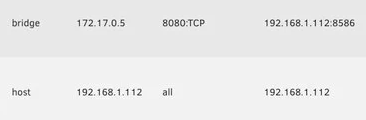
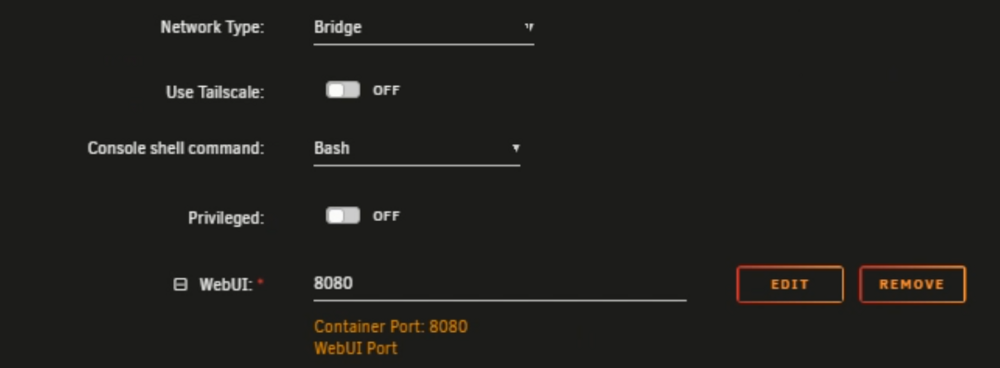
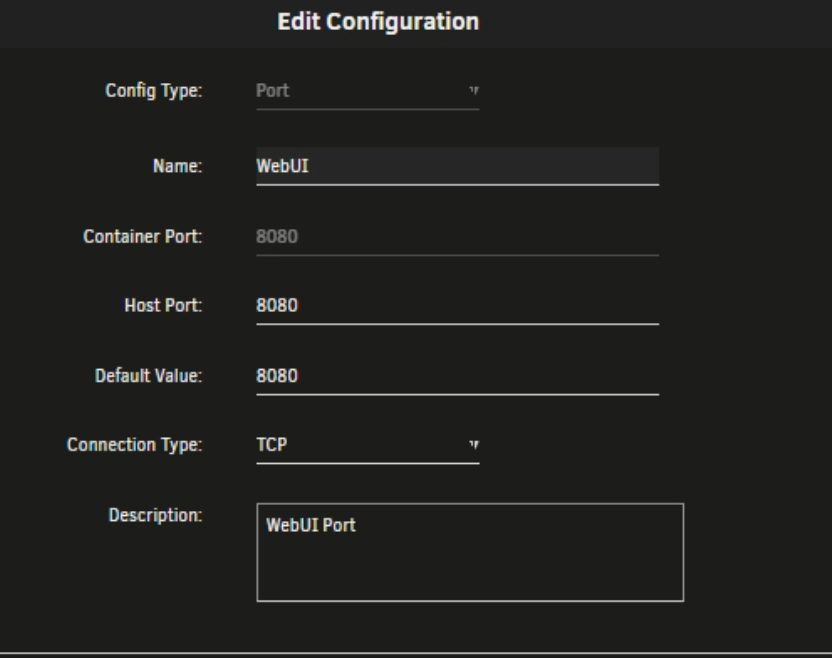
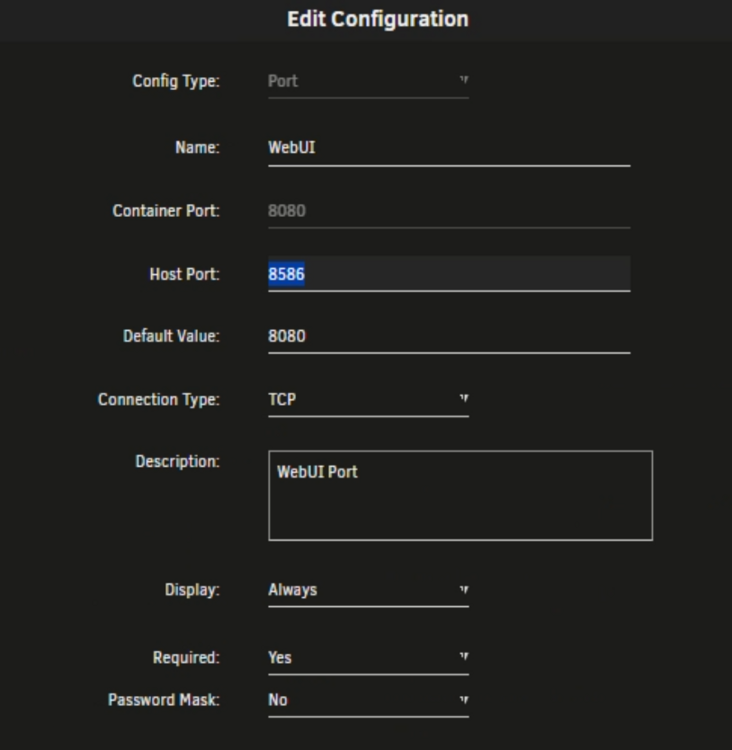
Few things and apologies, I will remember to use a "CA(Community apps)" moving forward so context stays for new users. 1 would need a log from immich if its not error that correct. there appears to be some weird port forwaring issue you are experiencing... Per your picture: as the left looks correct... shows that immich is in docker bridge mode and only port 8080 is being doicker bridge NAT passed and port is open.... but unriad also shows port 8586??? SO, if you go to your unraid IP 192.168.1.112:8080 do you hit immich? otherwise make sure your webui port settings are correct and the advance togle webui ip:port to access immich is correct... Double check immich settings: I don't know where you got port 8586 and if you want to use port 8586 the docker port in network bridge needs to be:


-
by default unraid runs a nginx for emhttp for nginx use and ssl and https access to teh web managemnt... unraid also has a nginx proxy manger in tools section.
-
Due to a serious data wiping bug I would advise you upgrade off v7.0.1 and into the lattest 7.0,4 are you runnign a reverse proxy? Here's what stands out in the final portion of the syslog-previous before the system lockup: rc.nginx restarting every 2 minutes: Jun 28 01:08:39 Tower rc.nginx: Nginx server daemon... Started. Jun 28 01:10:39 Tower rc.nginx: Stopping Nginx server daemon forcibly... ... (this repeats every 2 minutes, consistently) The nginx server is being forcibly stopped and restarted every ~2 minutes. This is abnormal and strongly suggests a script, container, or failing health check causing repeated restarts. emhttpd: error: publish, 177: Connection reset by peer (104) Jun 28 01:19:32 Tower emhttpd: error: publish, 177: Connection reset by peer (104): read ??? Is the unraid connect plugin installed? there have been some known issues with it and casuing this kind of behavior... This means Unraid’s web UI (emhttpd) lost connection to its internal publishing mechanism — very likely due to the constant nginx restarts, or underlying network/socket issues. No crash trace or kernel panic shown: The log does not include a panic, OOM kill, or kernel error, which suggests the system froze in a hard state — possibly hardware or kernel deadlock rather than a soft failure. but acts as the emhttp / https nginx system is breaking and thus the managment web interface is dead... youve reported that even at terminal it apears frozen and unable to take terminal caomdns. The beginning of the new syslog shows a normal Unraid boot sequence: Microcode and kernel version: Jun 28 18:48:21 Tower kernel: microcode: updated early: 0xf6 -> 0xfc Jun 28 18:48:21 Tower kernel: Linux version 6.6.78-Unraid Normal RAM map and hardware detection: BIOS-e820: ... usable/reserved memory regions ... NX (Execute Disable) protection: active Nothing unusual or faulty in the physical RAM mapping. No hardware or CPU flags are failing at boot. That I can see / find... ########### Some Potential Root Causes Misconfigured reverse proxy: You mentioned Nginx Proxy Manager was disabled, but nginx is still running and forcibly restarted — you may still have services trying to talk through a broken proxy config. System resource exhaustion (socket/table limits, file descriptors, memory): If nginx or emhttpd are repeatedly crashing, it may indicate descriptor/resource limits being hit. Docker container script or cron task restarting nginx blindly on a loop. Hardware instability after extended uptime (45+ days): Could be overheating, memory corruption, or board-level instability (e.g. RAM or USB controller glitches). If reverse proxy ... check for nginx or docker loop: Look at /etc/cron.*, /boot/config/go, and any custom docker-compose or plugin that might auto-restart nginx. Disable nginx and nginx-proxy-manager fully: docker ps -a docker stop <nginx container> docker rm <nginx container> Inspect logs further up (before the nginx loop): I can do that next if you'd like. System health: Run a memtest overnight from Unraid’s boot menu. Review BIOS settings (disable secure boot, set USB boot priority, enable legacy mode). Review cooling/temps (sensors, IPMI if available).
-
if running zfs and a misspelling of the share you may need to delete the dataset of that misspelled name. Otherwise you have a scirpt, docker or service that sees the misspelled folder and need to edit the script to use a different path.
-
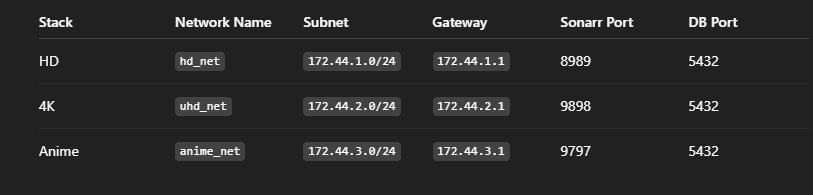
docker-compose.hd.yml version: "3.8" networks: hd_net: driver: bridge ipam: config: - subnet: 172.44.1.0/24 gateway: 172.44.1.1 services: hd-sonarr: image: lscr.io/linuxserver/sonarr container_name: hd-sonarr restart: unless-stopped ports: - 8989:8989 environment: - PUID=99 - PGID=100 - UMASK=022 volumes: - /mnt/user/data/:/data - /mnt/user/appdata/sonarr-hd:/config depends_on: - hd-db networks: hd_net: ipv4_address: 172.44.1.10 hd-db: image: postgres:14 container_name: hd-postgresql restart: unless-stopped environment: - POSTGRES_DB=sonarr - POSTGRES_USER=postgres - POSTGRES_PASSWORD=redacted volumes: - /mnt/cache/appdata/sonarr-hd-db:/var/lib/postgresql/data healthcheck: test: ["CMD-SHELL", "pg_isready -U postgres"] interval: 10s retries: 10 networks: hd_net: ipv4_address: 172.44.1.11 docker-compose.4k.yml version: "3.8" networks: uhd_net: driver: bridge ipam: config: - subnet: 172.44.2.0/24 gateway: 172.44.2.1 services: uhd-sonarr: image: lscr.io/linuxserver/sonarr container_name: uhd-sonarr restart: unless-stopped ports: - 9898:8989 environment: - PUID=99 - PGID=100 - UMASK=022 volumes: - /mnt/user/data/:/data - /mnt/user/appdata/sonarr-4k:/config depends_on: - uhd-db networks: uhd_net: ipv4_address: 172.44.2.10 uhd-db: image: postgres:16 container_name: uhd-postgresql restart: unless-stopped environment: - POSTGRES_DB=sonarr - POSTGRES_USER=postgres - POSTGRES_PASSWORD=redacted volumes: - /mnt/cache/appdata/sonarr-4k-db:/var/lib/postgresql/data command: > postgres -c checkpoint_timeout=30min -c max_wal_size=2GB -c min_wal_size=500MB -c checkpoint_completion_target=0.9 -c wal_level=replica healthcheck: test: ["CMD-SHELL", "pg_isready -U postgres"] interval: 10s retries: 10 networks: uhd_net: ipv4_address: 172.44.2.11 docker-compose.anime.yml version: "3.8" networks: anime_net: driver: bridge ipam: config: - subnet: 172.44.3.0/24 gateway: 172.44.3.1 services: anime-sonarr: image: lscr.io/linuxserver/sonarr container_name: anime-sonarr restart: unless-stopped ports: - 9797:8989 environment: - PUID=99 - PGID=100 - UMASK=022 volumes: - /mnt/user/data/:/data - /mnt/user/appdata/sonarr-anime:/config depends_on: - anime-db networks: anime_net: ipv4_address: 172.44.3.10 anime-db: image: postgres:14 container_name: anime-postgresql restart: unless-stopped environment: - POSTGRES_DB=sonarr - POSTGRES_USER=postgres - POSTGRES_PASSWORD=redacted volumes: - /mnt/cache/appdata/sonarr-anime-db:/var/lib/postgresql/data healthcheck: test: ["CMD-SHELL", "pg_isready -U postgres"] interval: 10s retries: 10 networks: anime_net: ipv4_address: 172.44.3.11
-
looking at it more it apears you have 3 ... not 2 and i'm not going to do teh work to make 3 composes with the data at hand.. you know the gist. All I can say is simplfiy it down make 1 first and run and add with exiting true to have them all in the same docker net and stay interconnected... sonar and its postgress in HD, anime, 4k etc.... trying to do tomuch with the same dokcer in teh same network... ports in use and I don't have a good soultion without hevily editing compose and usign custum br0 and assigning lan ips to the dockers...
-
So this is the idea to make sure its not networking based. we will let compose make and use the bridge... Goal: Two separate Compose files: docker-compose.hd.yml (HD Sonarr only) docker-compose.4k.yml (4K Sonarr + PostgreSQL containers) The network should be created by Compose if not present. Explicit static IPs for each container (to match your working setup). PostgreSQL containers with robust healthcheck. Direct /mnt/cache/... usage for PostgreSQL data to avoid fuse issues. No name collisions between containers (e.g. hd-web, 4k-web, anime, remux). docker-compose.hd.yml version: "3.8" networks: arr_bridge: driver: bridge ipam: config: - subnet: 172.42.0.0/16 gateway: 172.42.0.1 services: hd-web: image: lscr.io/linuxserver/sonarr container_name: hd-web restart: unless-stopped ports: - 8989:8989 environment: - PUID=99 - PGID=100 - UMASK=022 volumes: - /mnt/user/data/:/data - /mnt/user/appdata/sonarr:/config networks: arr_bridge: ipv4_address: 172.42.0.10 docker-compose.4k.yml version: "3.8" networks: arr_bridge: external: true services: 4k-web: image: lscr.io/linuxserver/sonarr container_name: 4k-web restart: unless-stopped ports: - 9898:8989 environment: - PUID=99 - PGID=100 - UMASK=022 volumes: - /mnt/user/data/:/data - /mnt/user/appdata/sonarr-4k:/config depends_on: - 4k-web-postgresql networks: arr_bridge: ipv4_address: 172.42.0.11 4k-web-postgresql: image: postgres:14 container_name: 4k-web-postgresql restart: unless-stopped environment: - POSTGRES_DB=postgres - POSTGRES_USER=postgres - POSTGRES_PASSWORD=redacted volumes: - /mnt/cache/appdata/postgres-sonarr-4k-web-db:/var/lib/postgresql/data - ./init-databases.sql:/docker-entrypoint-initdb.d/init-databases.sql healthcheck: test: ["CMD-SHELL", "pg_isready -U postgres"] interval: 10s retries: 10 networks: arr_bridge: ipv4_address: 172.42.0.21 anime: image: lscr.io/linuxserver/sonarr container_name: sonarr-anime restart: unless-stopped ports: - 9899:8989 environment: - PUID=99 - PGID=100 - UMASK=022 volumes: - /mnt/user/data/:/data - /mnt/user/appdata/sonarr-anime:/config depends_on: - anime-postgresql networks: arr_bridge: ipv4_address: 172.42.0.12 anime-postgresql: image: postgres:14 container_name: anime-postgresql restart: unless-stopped environment: - POSTGRES_DB=postgres - POSTGRES_USER=postgres - POSTGRES_PASSWORD=redacted volumes: - /mnt/cache/appdata/postgres-sonarr-anime-db:/var/lib/postgresql/data - ./init-databases.sql:/docker-entrypoint-initdb.d/init-databases.sql healthcheck: test: ["CMD-SHELL", "pg_isready -U postgres"] interval: 10s retries: 10 ports: - 5434:5432 networks: arr_bridge: ipv4_address: 172.42.0.22 4k-remux: image: lscr.io/linuxserver/sonarr container_name: sonarr-4k-remux restart: unless-stopped ports: - 8979:8989 environment: - PUID=99 - PGID=100 - UMASK=022 volumes: - /mnt/user/data/:/data - /mnt/user/appdata/sonarr-4k-remux:/config depends_on: - 4k-remux-postgresql networks: arr_bridge: ipv4_address: 172.42.0.13 4k-remux-postgresql: image: postgres:16 container_name: 4k-remux-postgresql restart: unless-stopped environment: - POSTGRES_DB=postgres - POSTGRES_USER=postgres - POSTGRES_PASSWORD=redacted volumes: - /mnt/cache/appdata/postgres-sonarr-4k-remux-db:/var/lib/postgresql/data - ./init-databases.sql:/docker-entrypoint-initdb.d/init-databases.sql command: > postgres -c checkpoint_timeout=30min -c max_wal_size=2GB -c min_wal_size=500MB -c checkpoint_completion_target=0.9 -c wal_level=replica healthcheck: test: ["CMD-SHELL", "pg_isready -U postgres"] interval: 10s retries: 10 networks: arr_bridge: ipv4_address: 172.42.0.23 This should fix the issues your are having. You may need to delete any exisint names of docker bridges that exisit int eh IP subnet thesse compose are using... or change names and subnets in teh compose files...
-
OK, I'm going to Use AI to help reconstruct/rebuild the Compose just a FYI. to make sure pathing, configurations and other are correct... Just to be clear: You're seeing: Broken pipe / client disconnect errors in Compose-deployed containers using PostgreSQL No such issues when launching the same containers with the Unraid Docker UI Your manual bridge arr_bridge works reliably when created via CLI Problems mostly appear when Compose tries to recreate networks and containers Why this may be happening: Docker Compose recreating or conflicting with existing networks: Compose tries to manage the network lifecycle unless marked external: true This can cause unintended container restarts or disconnections on network changes Volume inconsistencies between /mnt/vm-zfs/ and /mnt/user/ /mnt/user/ uses FUSE (via Unraid's user-share system), which is notoriously flaky with databases (like PostgreSQL or SQLite) under heavy I/O Preferred for PostgreSQL: Use /mnt/cache/ or /mnt/diskX/ paths directly if possible Network stack bugs in Unraid or Docker engine on Unraid Some reports show Docker Compose + Unraid + custom bridge networks behave inconsistently over time (possibly due to iptables/dnsmasq interactions) Database readiness race conditions: Even with depends_on and healthcheck, PostgreSQL may not be 100% ready for transactional connections Here’s a cleaned-up, Unraid-optimized version of your Compose: I assume your using my docker network from earlier... we will use the Use external: true and pre-create the network docker network create \ --driver=bridge \ --subnet=172.42.0.0/16 \ --gateway=172.42.0.1 \ arr_bridge Compose Fixes Additional Recommendations Use /mnt/cache/... instead of /mnt/user/ for database containers to reduce FUSE latency and corruption risks Use healthcheck + wait-for-it or dockerize for better DB readiness handling inside Sonarr Monitor Unraid’s Docker engine logs: tail -f /var/log/docker.log for errors when the disconnects happen The Turth is I don't know why you are runign 2 of the same docker 1 for HD and 1 for 4K that a bit weried and may alos intrdocue post conflgits as they are in the same bdige and bth are the same docker usingthe same ports... Your better off seperateing the 4k and the HD if doin that in there 2 seperage docker networks and docker compses... this is due to the fact that both docers are still using the same ports while you can change the host to conect into that docker brdge these dockers are fighting each other to who is asigned the port they are both using... --This is why your expering network issues... version: "3.8" services: hd-web: image: lscr.io/linuxserver/sonarr container_name: hd-web restart: unless-stopped ports: - 8989:8989 environment: - PUID=99 - PGID=100 - UMASK=022 volumes: - /mnt/user/data/:/data - /mnt/user/appdata/sonarr:/config networks: - arr_bridge 4k-web: image: lscr.io/linuxserver/sonarr container_name: 4k-web restart: unless-stopped ports: - 9898:8989 environment: - PUID=99 - PGID=100 - UMASK=022 volumes: - /mnt/user/data/:/data - /mnt/user/appdata/sonarr-4k:/config depends_on: - 4k-web-postgresql networks: - arr_bridge 4k-web-postgresql: image: postgres:14 container_name: 4k-web-postgresql restart: unless-stopped environment: - POSTGRES_DB=postgres - POSTGRES_USER=postgres - POSTGRES_PASSWORD=redacted volumes: - /mnt/cache/appdata/postgres-sonarr-4k-web-db:/var/lib/postgresql/data - ./init-databases.sql:/docker-entrypoint-initdb.d/init-databases.sql healthcheck: test: ["CMD-SHELL", "pg_isready -U postgres"] interval: 10s retries: 10 networks: - arr_bridge anime: image: lscr.io/linuxserver/sonarr container_name: sonarr-anime restart: unless-stopped ports: - 9899:8989 environment: - PUID=99 - PGID=100 - UMASK=022 volumes: - /mnt/user/data/:/data - /mnt/user/appdata/sonarr-anime:/config depends_on: - anime-postgresql networks: - arr_bridge anime-postgresql: image: postgres:14 container_name: anime-postgresql restart: unless-stopped environment: - POSTGRES_DB=postgres - POSTGRES_USER=postgres - POSTGRES_PASSWORD=redacted volumes: - /mnt/cache/appdata/postgres-sonarr-anime-db:/var/lib/postgresql/data - ./init-databases.sql:/docker-entrypoint-initdb.d/init-databases.sql healthcheck: test: ["CMD-SHELL", "pg_isready -U postgres"] interval: 10s retries: 10 ports: - 5434:5432 networks: - arr_bridge 4k-remux: image: lscr.io/linuxserver/sonarr container_name: sonarr-4k-remux restart: unless-stopped ports: - 8979:8989 environment: - PUID=99 - PGID=100 - UMASK=022 volumes: - /mnt/user/data/:/data - /mnt/user/appdata/sonarr-4k-remux:/config depends_on: - 4k-remux-postgresql networks: - arr_bridge 4k-remux-postgresql: image: postgres:16 container_name: 4k-remux-postgresql restart: unless-stopped environment: - POSTGRES_DB=postgres - POSTGRES_USER=postgres - POSTGRES_PASSWORD=redacted volumes: - /mnt/cache/appdata/postgres-sonarr-4k-remux-db:/var/lib/postgresql/data - ./init-databases.sql:/docker-entrypoint-initdb.d/init-databases.sql command: > postgres -c checkpoint_timeout=30min -c max_wal_size=2GB -c min_wal_size=500MB -c checkpoint_completion_target=0.9 -c wal_level=replica healthcheck: test: ["CMD-SHELL", "pg_isready -U postgres"] interval: 10s retries: 10 networks: - arr_bridge networks: arr_bridge: external: true Where My Ars stack runs... and compose is as such... Following the Trash Guides for the ars stack: https://trash-guides.info/File-and-Folder-Structure/How-to-set-up/Unraid/ -I have my compose build its own docker network and it uses 172.45 -I use transmision as I know the software and have other eidts to help with fiding content. #version: "3.8" networks: arrs: driver: bridge ipam: config: - subnet: 172.45.0.0/24 services: transmission: image: lscr.io/linuxserver/transmission container_name: transmission pull_policy: always labels: - "com.centurylinklabs.watchtower.enable=true" environment: - PUID=0 - PGID=0 - TZ=America/Chicago volumes: - /mnt/vm-zfs/Dockers/arsdata/transmission/config:/config - /mnt/vm-zfs/Dockers/arsdata/torrents:/downloads - /mnt/vm-zfs/Dockers/arsdata/torrents:/data/torrents ports: - "9091:9091" #TCP and UDP for a secure port networks: arrs: ipv4_address: 172.45.0.2 restart: unless-stopped prowlarr: image: lscr.io/linuxserver/prowlarr:nightly container_name: prowlarr pull_policy: always labels: - "com.centurylinklabs.watchtower.enable=true" environment: - PUID=0 - PGID=0 - TZ=America/Chicago volumes: - /mnt/vm-zfs/Dockers/arsdata/prowlarr/config:/config - /mnt/vm-zfs/Dockers/arsdata:/data ports: - 9697:9696 networks: arrs: ipv4_address: 172.45.0.3 restart: unless-stopped #TV-Shows sonarr: image: lscr.io/linuxserver/sonarr:develop container_name: sonarr pull_policy: always labels: - "com.centurylinklabs.watchtower.enable=true" environment: - PUID=0 - PGID=0 - TZ=America/Chicago volumes: - /mnt/vm-zfs/Dockers/arsdata/sonarr/config:/config - /mnt/vm-zfs/Dockers/arsdata:/data ports: - 8989:8989 networks: arrs: ipv4_address: 172.45.0.4 restart: unless-stopped #Movies radarr: image: lscr.io/linuxserver/radarr container_name: radarr pull_policy: always labels: - "com.centurylinklabs.watchtower.enable=true" environment: - PUID=0 - PGID=0 - TZ=America/Chicago volumes: - /mnt/vm-zfs/Dockers/arsdata/radarr/config:/config - /mnt/vm-zfs/Dockers/arsdata:/data ports: - 7878:7878 networks: arrs: ipv4_address: 172.45.0.5 restart: unless-stopped #Music - Requires a private conenction # lidarr: # image: lscr.io/linuxserver/lidarr # container_name: lidarr # pull_policy: always # labels: # - "com.centurylinklabs.watchtower.enable=true" # environment: # - PUID=0 # - PGID=0 # - TZ=America/Chicago # volumes: # - /mnt/vm-zfs/Dockers/arsdata/lidarr/config:/config # - /mnt/vm-zfs/Dockers/arsdata:/data # ports: # - 8686:8686 # networks: # arrs: # ipv4_address: 172.45.0.6 # restart: unless-stopped readarr: image: lscr.io/linuxserver/readarr:develop container_name: readarr pull_policy: always labels: - "com.centurylinklabs.watchtower.enable=true" environment: - PUID=0 - PGID=0 - TZ=America/Chicago volumes: - /mnt/vm-zfs/Dockers/arsdata/readarr/config:/config - /mnt/vm-zfs/Dockers/arsdata:/data ports: - 8787:8787 networks: arrs: ipv4_address: 172.45.0.7 restart: unless-stopped bazarr: image: lscr.io/linuxserver/bazarr container_name: bazarr pull_policy: always labels: - "com.centurylinklabs.watchtower.enable=true" environment: - PUID=0 - PGID=0 - TZ=America/Chicago volumes: - /mnt/vm-zfs/Dockers/arsdata/bazarr/config:/config - /mnt/vm-zfs/Dockers/arsdata:/data ports: - 6767:6767 networks: arrs: ipv4_address: 172.45.0.8 restart: unless-stopped #CloudFlareCaptch - Dead # flaresolverr: # image: ghcr.io/flaresolverr/flaresolverr:latest # pull_policy: always # labels: # - "com.centurylinklabs.watchtower.enable=true" # container_name: flaresolverr # environment: # - LOG_LEVEL=info # ports: # - "8191:8191" # networks: # arrs: # ipv4_address: 172.45.0.9 # restart: unless-stopped^ - just as refference... as the Ars setup needs a specfic file structure On the host (unRAID) you will need to add /mnt/user before it. So /mnt/user/data data ├── torrents │ ├── books │ ├── movies │ ├── music │ └── tv ├── usenet │ ├── incomplete │ └── complete │ ├── books │ ├── movies │ ├── music │ └── tv └── media ├── books ├── movies ├── music └── tv as I have this auto with My Plex... so you need to make another docker network and separate the same dockers as 2 separate docker instance....
-
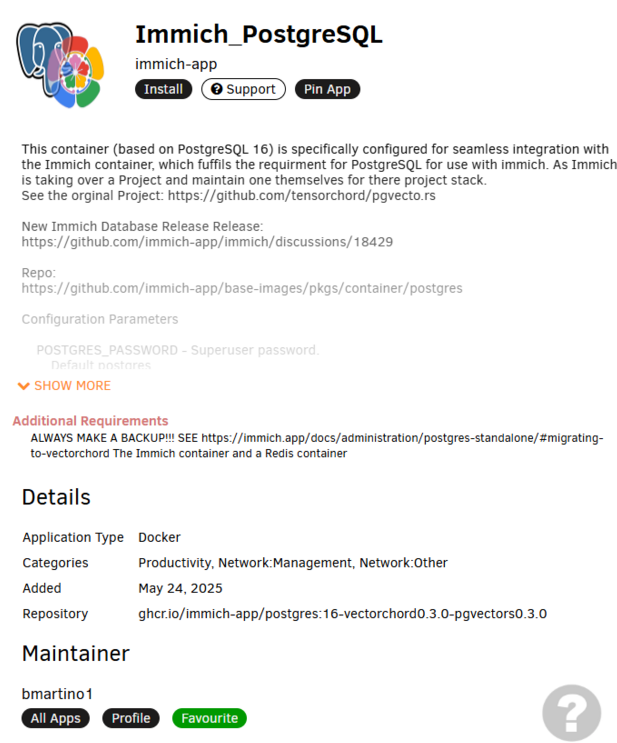
also you should switch the image to use my postgress immch docker that uses the vecrot chord. Image genious has moved off the pgvetochord Postgres plugin. be sure to use the same password from both and set the same appdta path for your postgress. Immch gave use a docker that will run the pgvetor database comands to fix teh tables that may also be prevenint the lattest imich CA docker form connectiong to postgres. I'd prefer you get pgadmin working and make a backup first.. otherwise if you have the data to reuploaded I would recommend starting Postgres over with this Postgres docker. (This would require deleting the appdata folder.)
-
what docker netowrk do you have for ars and what is the docker networkg for the postgress docker? psotgress should be at its own custom IP, based on what your telling me.
-
this soulds like cross talk between 2 different docker netowrks. so unless the postgress database is in teh same docker bridege or set to its own lan IP with custom ip it won't be able to talk to somethign else int eh docker bridge. teh docker brdige uses router esk NAT and docker sget a 172.x.x.x address and are acessble via NAT rules form there docker brdge via the host. theus a docker like posgeree in unrads default bridge or host will not be able to cros the netowrk without forming some ip route and inter network cros talk...
-
the ars network really should be in its own docker bridge. docker network create \ --driver=bridge \ --subnet=172.42.0.0/16 \ --gateway=172.42.0.1 \ ars_stack Breakdown:--driver=bridge: This specifies the type of network. The default type is bridge, which allows containers to communicate with each other and the host system. --subnet=172.42.0.0/16: This defines the range of IP addresses in the subnet. The /16 gives you a large range (172.42.0.1 to 172.42.255.254). --gateway=172.42.0.1: This sets the gateway for the network, which is typically the first IP in the subnet. ars_stack: This is the name you're giving to the network. Place all the *ars dockers in this bridge so they can talk to each other...
-
its a potential. I would recommend stopping all dockers. Going to tool > docker safe permission. And run that with all dockers stopped this will sett docker safe permission across the appdata folder... cd /mnt/users/appdata chmod 777 -R * chown nobody:users -R *
-
regardless the immich log is says that its credentials/ hotname, and its abilty to talk to Postgres is the issues. You need to fix the Postgres docker and update immich to connect... If you restored a Postgres backup and changed password(not use the password from the restore), the restore reverted the password to what it was when it was int eh backup.... You need to verify that you are able to connect to Postgres from another system / other software... PGadmin can be used her to assit with that. to make sure you are able to connect to Postgres. Postgress template docker option don't update or change the password. the temple set it once at creation... you have a communication issues between immich and postgress you need to fix it.. Revew the guide to make a guaranteed communication... you may need to delete the postgress appdata and start over...
-
MCE events are 90% ram. anytime theses happen one should reboot unraid, and at the grub boot menu select memtest. as this can be a early sign of hardware failure.... The Unriad Host OS itself sits in ram. FCP and next steps depend on chipset... On intel, you can run in terminal mcelog if no output it was ecce ram memory correction(whcih is noramly and it correct itself.. if theres an output form the command from mcelog then thats the issues.... Its best when you hit a MCE to reboot unraid to reset and reload unraid into ram.. and at the grub boot menu run the memtest application to rule out faulty hardware. If your running AMD mcelog application doesn't work for you, your better off installing the CA Plugin live memory test and also to reboot unraid and at the grub boot menu run the memtest application to rule out faulty hardware.... Reviewing diag file. thank you.
-
nexcloud / calibra most likely culprits... bloat can happen in 3 areas... 1. Docker log spam error constantly hitting a log... 2. improper volume mounts to place data in a image volume to a disk (Data written inside the image and grows) 3 Build / docker image cache... not enough info to assist. please post a diag file: Looks like you tried, but the forum didn't get it. Outside of checking the logs of the dockers and running other docker commands for cleanup. there is not much that can be done. You are running a lot of dockers. Adding up the space hits you within that data Mount. This doesn't include space not seen that exist... I can only recommend cleaning your docker data. https://forums.unraid.net/topic/178033-bmartino1-user-scripts/#findComment-1478647 ^Script found here -Warning this will remove any and all non-running dockers and its docker data! (Not any volume path mounts or unraid templates...)