





Wolbaz
Members
-
Joined
-
Last visited
Everything posted by Wolbaz
-
Eh I ran a reboot and now everything is back up per normal. Should I be looking at replacing my usb drive?
-
Meant to add that this is IOMMU Group 14:

-
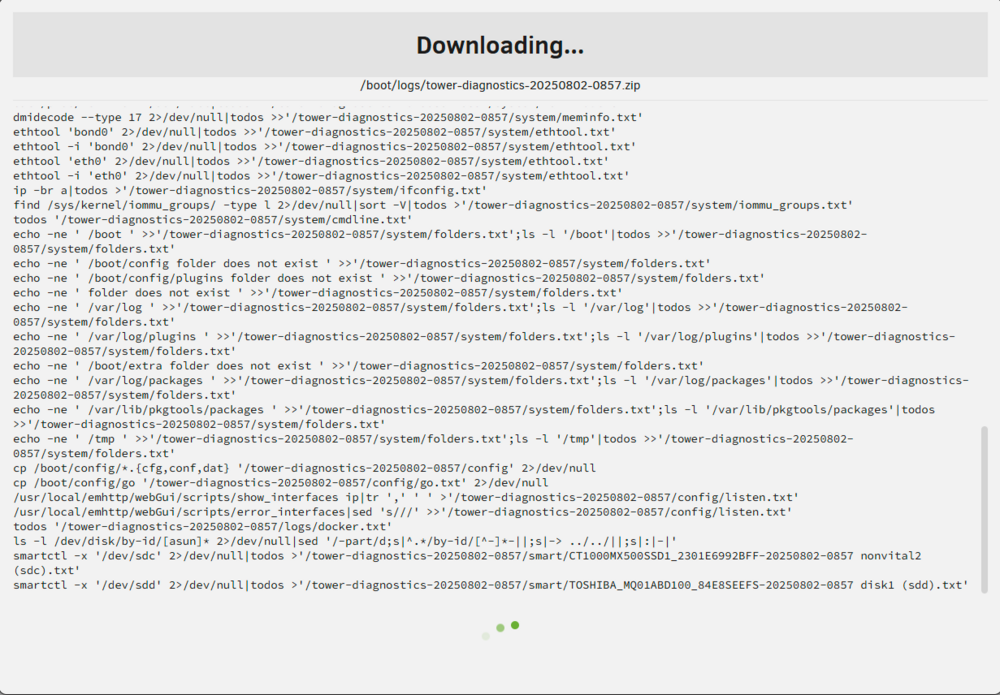
Unraid 7.0.0 FS: vfat Executing file system check/sbin/fsck.vfat -n '/dev/sde1' 2>&1 fsck.fat 4.2 (2021-01-31) There are differences between boot sector and its backup. This is mostly harmless. Differences: (offset:original/backup) 65:01/00 Not automatically fixing this. Dirty bit is set. Fs was not properly unmounted and some data may be corrupt. Automatically removing dirty bit. Leaving filesystem unchanged. /dev/sde1: 1674 files, 363764/765952 clusters File system corruption detected! Recent change was binding IOMMU group 14 to VFIO so I could get MB Audio passthrough to my VM. My USB stick is plugged in to the internal port, could that have caused this? I'm not going to try changing anything until I hear back. I tried to download diagnostics and got the following : Before the download starts it switches to this page:



-
Got it to work after following this, except one thing I didn't realize at first is you also need to check the SPI controller under other PCI devices in order for the analog audio ports to show up. Works perfectly on my Aorus Pro AX Z490.
-
Okay I wasn't sure if I should remove the flag without asking about the messages here first.
-
I don't monitor my system very often so I'm not sure how long it's been like this, but I happened to login the other day and found disk 1 unmountable. Phase 1 - find and verify superblock... Phase 2 - using internal log - zero log... ALERT: The filesystem has valuable metadata changes in a log which is being ignored because the -n option was used. Expect spurious inconsistencies which may be resolved by first mounting the filesystem to replay the log. - scan filesystem freespace and inode maps... - found root inode chunk Phase 3 - for each AG... - scan (but don't clear) agi unlinked lists... - process known inodes and perform inode discovery... - agno = 0 - agno = 1 - agno = 2 - agno = 3 - agno = 4 - agno = 5 - agno = 6 - agno = 7 - process newly discovered inodes... Phase 4 - check for duplicate blocks... - setting up duplicate extent list... - check for inodes claiming duplicate blocks... - agno = 0 - agno = 2 - agno = 4 - agno = 7 - agno = 3 - agno = 6 - agno = 1 - agno = 5 No modify flag set, skipping phase 5 Phase 6 - check inode connectivity... - traversing filesystem ... - traversal finished ... - moving disconnected inodes to lost+found ... Phase 7 - verify link counts... Maximum metadata LSN (3:83707) is ahead of log (3:80876). Would format log to cycle 6. No modify flag set, skipping filesystem flush and exiting. wolbaznas-diagnostics-20241219-1947.zip
-
I think this has done the trick, I'll report back if I run into any more issues, thanks!
-
No dice on that, I did update the bios and unraid to 6.12.4 as well with no luck.
-
Setup is an unraid server with 3 vms (one homeassistant 2 windows), two gpu's, one 4 controller usb card with controllers passed through to each VM. In the past I've been able to use my capture card, audio interface, and webcam to stream to twitch using OBS Studio with no issues. Now it seems randomly I get full system crashes when OBS is open and I have the peripherals active. Sometimes it happens quickly and sometimes it takes hours. I finally got a remote syslog setup and it gave me the following at the time of the crash: Oct 15 09:45:37 Tower kernel: pcieport 0000:00:1b.4: AER: Multiple Corrected error received: 0000:00:1b.4 Oct 15 09:45:38 Tower kernel: sched: RT throttling activated I've considered updating bios, but I was concerned because one of the releases says it will disable downgrading due to vulnerabilities concerns, and I don't see anything in the notes about error corrections. tower-diagnostics-20231015-1004.zip
-
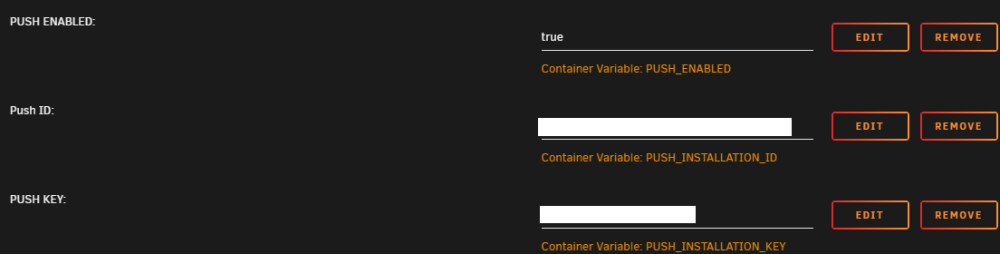
FYI as of the latest version of this you can enable mobile client push notifications (basically live sync to your phone) https://github.com/dani-garcia/vaultwarden/wiki/Enabling-Mobile-Client-push-notification. Add the variables to the docker template mentioned above, and restart the container. After that, re-install your phone app. Kind of a pain but well worth it to not have to sync manually any more.
-
I tried to install NerdPack for mcelog, but I couldn't find it on community applications. The server is new to me - but an old one I got on FB marketplace. When I first had it running I swapped out the fans for noctua so I could hear myself think, but the fans kept shutting themselves off after a few days causing a plethora of overheating issues, so I wouldn't be surprised if I cooked something. I think I've resolved the fans shutting off, but now this just popped up and parity check started itself at the same time. wolbaznas-diagnostics-20230511-1809anon.zip
-
This fixed it for me, thank you!
-
After update today: Something really wrong went on during dismiss_plugin_warning Post the ENTIRE contents of this message in the Community Applications Support Thread OS: 6.11.5 Browser: Mozilla/5.0 (Windows NT 10.0; Win64; x64) AppleWebKit/537.36 (KHTML, like Gecko) Chrome/112.0.0.0 Safari/537.36 Language: <br /> <b>Warning</b>: parse_ini_file(/boot/config/plugins/dynamix/dynamix.cfg): failed to open stream: No such file or directory in <b>/usr/local/emhttp/plugins/community.applications/include/paths.php</b> on line <b>92</b><br /> {"status":"disclaimed"} I tried to reinstall CA, no luck, I don't think its a browser issue, since I'm running a separate install of 6.11.4 and it's working fine.
-
As I understand it a reboot will temporarily fix this, but I'd like to sort out the actual cause first. tower-diagnostics-20221106-0947.zip Edit: The cause was narrowed down to the IBRACORP's repository pterodactyl-daemon container. Not sure why, but I've removed it since I wasn't really using it anyway.
-
I found that I have issue with trying to put just '9' in the version number. Doing so gives me the following: today at 9:07:44 AMEntrypoint | 2022-03-19 09:07:44 | [debug] Timezone set to: GMT-4 today at 9:07:44 AMEntrypoint | 2022-03-19 09:07:44 | [info] Starting felddy/foundryvtt container v9.255.0 today at 9:07:44 AMEntrypoint | 2022-03-19 09:07:44 | [debug] CONTAINER_VERBOSE set. Debug logging enabled. today at 9:07:44 AMEntrypoint | 2022-03-19 09:07:44 | [warn] FOUNDRY_VERSION has been manually set and does not match the container's version. today at 9:07:44 AMEntrypoint | 2022-03-19 09:07:44 | [warn] Expected 9.255 but found 9 today at 9:07:44 AMEntrypoint | 2022-03-19 09:07:44 | [warn] The container may not function properly with this version mismatch. today at 9:07:44 AMEntrypoint | 2022-03-19 09:07:44 | [info] No Foundry Virtual Tabletop installation detected. today at 9:07:44 AMEntrypoint | 2022-03-19 09:07:44 | [info] Using FOUNDRY_USERNAME and FOUNDRY_PASSWORD to authenticate. today at 9:07:45 AMAuthenticate | 2022-03-19 09:07:45 | [debug] Saving cookies to: cookiejar.json today at 9:07:45 AMAuthenticate | 2022-03-19 09:07:45 | [info] Requesting CSRF tokens from https://foundryvtt.com today at 9:07:45 AMAuthenticate | 2022-03-19 09:07:45 | [debug] Fetching: https://foundryvtt.com today at 9:07:45 AMAuthenticate | 2022-03-19 09:07:45 | [info] Logging in as: wolbaz today at 9:07:45 AMAuthenticate | 2022-03-19 09:07:45 | [debug] Fetching: https://foundryvtt.com/auth/login/ today at 9:07:46 AMAuthenticate | 2022-03-19 09:07:46 | [debug] Community URL: /community/wolbaz today at 9:07:46 AMAuthenticate | 2022-03-19 09:07:46 | [info] Successfully logged in as: wolbaz today at 9:07:46 AMEntrypoint | 2022-03-19 09:07:46 | [info] Using authenticated credentials to download release. today at 9:07:46 AMReleaseURL | 2022-03-19 09:07:46 | [debug] Loading cookies from: cookiejar.json today at 9:07:46 AMReleaseURL | 2022-03-19 09:07:46 | [info] Fetching S3 pre-signed release URL for build 9... today at 9:07:46 AMReleaseURL | 2022-03-19 09:07:46 | [debug] Fetching: https://foundryvtt.com/releases/download?build=9&platform=linux today at 9:07:47 AMfile:///home/foundry/get_release_url.js:50 today at 9:07:47 AM throw new Error(`Unexpected response ${response.statusText}`); today at 9:07:47 AM ^ today at 9:07:47 AM today at 9:07:47 AMError: Unexpected response Not Found today at 9:07:47 AM at fetchReleaseURL (file:///home/foundry/get_release_url.js:50:15) today at 9:07:47 AM at processTicksAndRejections (node:internal/process/task_queues:96:5) today at 9:07:47 AM at async main (file:///home/foundry/get_release_url.js:70:24) today at 9:07:47 AM at async file:///home/foundry/get_release_url.js:81:24 today at 9:07:50 AMContainer stopped Restarting with 9.255 works, however, so I'll just do that. Leaving version number blank also gives an issue: today at 9:10:05 AMEntrypoint | 2022-03-19 09:10:05 | [debug] Timezone set to: GMT-4 today at 9:10:05 AMEntrypoint | 2022-03-19 09:10:05 | [info] Starting felddy/foundryvtt container v9.255.0 today at 9:10:05 AMEntrypoint | 2022-03-19 09:10:05 | [debug] CONTAINER_VERBOSE set. Debug logging enabled. today at 9:10:05 AMEntrypoint | 2022-03-19 09:10:05 | [warn] FOUNDRY_VERSION has been manually set and does not match the container's version. today at 9:10:05 AMEntrypoint | 2022-03-19 09:10:05 | [warn] Expected 9.255 but found today at 9:10:05 AMEntrypoint | 2022-03-19 09:10:05 | [warn] The container may not function properly with this version mismatch. today at 9:10:05 AMEntrypoint | 2022-03-19 09:10:05 | [info] No Foundry Virtual Tabletop installation detected. today at 9:10:05 AMEntrypoint | 2022-03-19 09:10:05 | [info] Using FOUNDRY_USERNAME and FOUNDRY_PASSWORD to authenticate. today at 9:10:05 AMAuthenticate | 2022-03-19 09:10:05 | [debug] Saving cookies to: cookiejar.json today at 9:10:05 AMAuthenticate | 2022-03-19 09:10:05 | [info] Requesting CSRF tokens from https://foundryvtt.com today at 9:10:05 AMAuthenticate | 2022-03-19 09:10:05 | [debug] Fetching: https://foundryvtt.com today at 9:10:06 AMAuthenticate | 2022-03-19 09:10:06 | [info] Logging in as: wolbaz today at 9:10:06 AMAuthenticate | 2022-03-19 09:10:06 | [debug] Fetching: https://foundryvtt.com/auth/login/ today at 9:10:07 AMAuthenticate | 2022-03-19 09:10:07 | [debug] Community URL: /community/wolbaz today at 9:10:07 AMAuthenticate | 2022-03-19 09:10:07 | [info] Successfully logged in as: wolbaz today at 9:10:07 AMEntrypoint | 2022-03-19 09:10:07 | [info] Using authenticated credentials to download release. today at 9:10:07 AMReleaseURL | 2022-03-19 09:10:07 | [debug] Loading cookies from: cookiejar.json today at 9:10:07 AMReleaseURL | 2022-03-19 09:10:07 | [error] Unable to extract build number from version: today at 9:10:07 AMfile:///home/foundry/get_release_url.js:68 today at 9:10:07 AM throw new Error(`Unable to extract build number from version: ${foundry_version}`); today at 9:10:07 AM ^ today at 9:10:07 AM today at 9:10:07 AMError: Unable to extract build number from version: today at 9:10:07 AM at main (file:///home/foundry/get_release_url.js:68:15) today at 9:10:07 AM at file:///home/foundry/get_release_url.js:81:30 today at 9:10:07 AM at file:///home/foundry/get_release_url.js:82:3 today at 9:10:07 AM at ModuleJob.run (node:internal/modules/esm/module_job:195:25) today at 9:10:07 AM at async Promise.all (index 0) today at 9:10:07 AM at async ESMLoader.import (node:internal/modules/esm/loader:337:24) today at 9:10:07 AM at async loadESM (node:internal/process/esm_loader:88:5) today at 9:10:07 AM at async handleMainPromise (node:internal/modules/run_main:61:12) today at 9:10:17 AMContainer stopped
-
+1
-
Thank you! I'll be switching over shortly, I just was apprehensive because I just finished setting up my first world and I didn't want to redo things.
-
What is the benefit to switching to this container over the existing FoundryVTT container?
-
Probably shouldn't have but I updated to 9 using the internal updater and now it won't load the login screen? today at 5:36:50 PM today at 5:36:50 PMCurrent FoundryVTT Release version is 0.8.9. today at 5:36:58 PMINFO ! Starting FoundryVTT Server today at 5:36:58 PM today at 5:36:59 PMFoundryVTT | 2022-03-07 17:36:59 | [info] Running on Node.js - Version 16.13.2 today at 5:36:59 PMFoundryVTT | 2022-03-07 17:36:59 | [info] Foundry Virtual Tabletop - Version 9 Build 255 today at 5:36:59 PMFoundryVTT | 2022-03-07 17:36:59 | [info] Loading data from user directory - /foundry/data today at 5:36:59 PMFoundryVTT | 2022-03-07 17:36:59 | [info] Application Options: today at 5:36:59 PM{ today at 5:36:59 PM "port": 30000, today at 5:36:59 PM "upnp": true, today at 5:36:59 PM "fullscreen": false, today at 5:36:59 PM "hostname": null, today at 5:36:59 PM "localHostname": null, today at 5:36:59 PM "routePrefix": null, today at 5:36:59 PM "sslCert": null, today at 5:36:59 PM "sslKey": null, today at 5:36:59 PM "awsConfig": null, today at 5:36:59 PM "dataPath": "/foundry/data", today at 5:36:59 PM "passwordSalt": null, today at 5:36:59 PM "proxySSL": false, today at 5:36:59 PM "proxyPort": null, today at 5:36:59 PM "serviceConfig": null, today at 5:36:59 PM "updateChannel": "release", today at 5:36:59 PM "language": "en.core", today at 5:36:59 PM "upnpLeaseDuration": null, today at 5:36:59 PM "compressStatic": true, today at 5:36:59 PM "world": null, today at 5:36:59 PM "isElectron": false, today at 5:36:59 PM "isNode": true, today at 5:36:59 PM "isSSL": false, today at 5:36:59 PM "noupdate": false, today at 5:36:59 PM "noIPDiscovery": false, today at 5:36:59 PM "demo": null, today at 5:36:59 PM "adminKey": "****************" today at 5:36:59 PM} today at 5:36:59 PMFoundryVTT | 2022-03-07 17:36:59 | [error] Software license verification failed. Please confirm your Foundry Virtual Tabletop software license today at 5:36:59 PMFoundryVTT | 2022-03-07 17:36:59 | [info] Requesting UPnP port forwarding to destination port 30000 today at 5:36:59 PMFoundryVTT | 2022-03-07 17:36:59 | [info] Server started and listening on port 30000 today at 5:37:16 PMFoundryVTT | 2022-03-07 17:37:16 | [info] Created client session 94ad76f69005e5779ad93ea8 today at 5:37:16 PMFoundryVTT | 2022-03-07 17:37:16 | [warn] Package df-architect contains 3 compendium definitions that still use the deprecated 'entity' field instead of 'type'. Edit: local IP login works fine, just the external domain that doesn't. Weird since it was working fine before hand, but I'm using Nginx proxy manager if that matters. Edit Edit: 2 days later I tried the external domain again and now it's working fine, so I wonder if it had to do with browser cache, though I'm pretty sure I cleared it while I was trying to troubleshoot. 🤷♂️
-
Having not read this post and having a failed USB with no time to wait for a new one, I went to Target and got a https://www.target.com/p/sandisk-cruzer-glide-flash-drive-64gb-usb-2-0/-/A-14396471 Confirmed this one is working, but I did have to partition out a couple gigs so I could format as fat32
-
I'll try updating once the stable comes out, hopefully that fixes the problem. I've isolated the problem specifically to browser sources in obs 27.2 and 27.2.1. I have tried multiple different browser source audio providers including stream elements and streamlabs. Monitor and output is selected and I've always ran obs as admin. Thanks for trying to troubleshoot obs with me but I've already done that on obs discord and they told me to submit a bug report, then the devolpers told me obs isn't supported on VM's. Edit: Workaround: Uncheck "control audio via OBS" in the browser source settings. The audio will now output to your default windows audio out. Head to windows app volume and device preferences and change obs-browser-page audio out to go to some device and add that device as an audio input into obs.
-
I found the latest version of the virtio iso from: https://github.com/virtio-win/virtio-win-pkg-scripts/blob/master/README.md and installed the new guest agent on my test VM. Restarted to make sure and still not fixed. Additionally, I spun up a windows 10 professional VM with the above latest driver package with no success. Thanks for the suggestion, though.
-
6.9.2
-
I brought this to the OBS community and was basically told not our problem, so I'm hoping someone here can help. https://github.com/obsproject/obs-studio/issues/5978 I've tried this on my two normally running VM's and even spun up a brand new VM and still had the same issue. Downgrading to 27.1.3 fixes the issue. Am I just going to be stuck on 27.1.3 forever?
-
Really enjoying this over Heimdall, my only issue is I'd like to change the background of the cards to something else and I'm not quite sure how to do that. I mapped a new path to /usr/share/nginx/html/logos from /appdata/hiccup/logos and tried putting images in there but they didn't load.



