





Reptar
Members
-
Joined
-
Last visited
Everything posted by Reptar
-
Looks like I initially failed to set the appropriate RAM frequencies listed in the link. Set from Auto to DDR4-2133 and I haven't had a crash in 3 days. Thanks for the help, @JorgeB!
-
I did also install new RAM a few weeks ago so I'll do a memtest now to be safe. Will definitely boot in safemode as suggested tonight as well. Thanks for the help @JorgeB! EDIT: Did one pass on memtest and there were no errors
-
OK it finally happened last night. I've attached diag and syslog bigchungus-diagnostics-20230220-0912.zip syslog
-
So, after that first time immediately after changing the bios setting, it hasnt locked up since.... I'll keep turning on logging nightly for the next week or so in the event it does happen again...
-
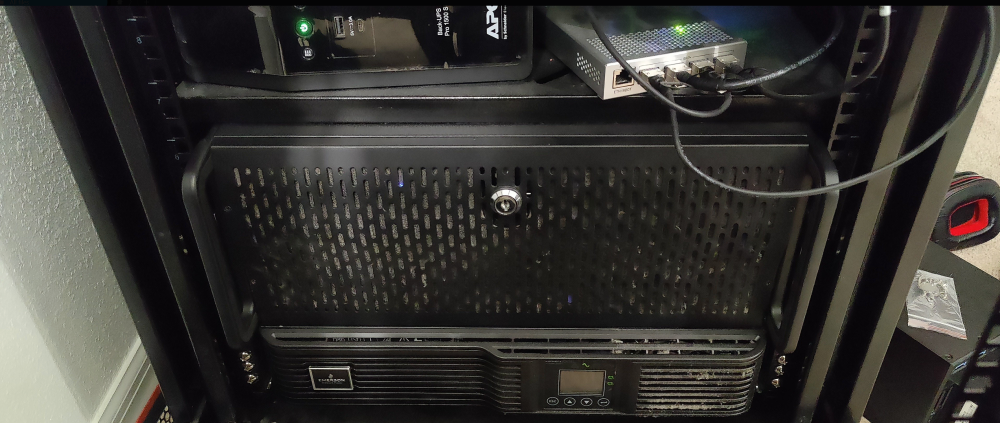
Chassis: RSV-L4500U Chassis Fans: 3x Noctua F12 PWM 54.97 CFM 120mm Fan Motherboard: MSI MEG X399 CREATION CPU: Threadripper 2990WX CPU Cooler: NH-U12S TR4-SP3 (Originally purchased NH-U14S TR4-SP3 -- Didnt fit) RAM: 8 x Corsair Vengeance RGB Pro 8 GB DDR4-3000 CL15 (had 4 sticks from previous build, reused and purchased additional) GPU: EVGA FTW GAMING ACX 3.0 GeForce GTX 1080 8 GB (Originally ASUS GTX1060 -- 1080 actually fits better!) PSU: Silverstone Strider 1500W 80+ Gold (Free from work many years ago) NIC: Mellanox MCX311A HBA: LSI LSI00244 9201-16i (Upgraded to LSI 9300-16i -- Putting this in tomorrow!) NVMe Expansion: ASUS HYPER M.2 X16 GEN 4 Card HDD Bay: 3 x : Kingwin SSHD HD Enclosure Internal Five Hot Swap Bay (upgraded to SST-FS305-12G -- why upgrade? because SAS3 > SAS2) Rack: SYSRACKS 12U? I dont actually recall which one it is! If you do look at SYSRACK racks, I 100% recommend. It's worth the price for an enclosed rack. I recently purchased a home and decided to go open rack ( 27U -- also going in tomorrow!) Current Array: 9 Drives, 1 Parity (90 TB Array) -- Still have 6 bays free. Eventually will upgrade parity to SAS drives and migrate the drives over to array. Cache Pools: 2 x 500GB SN570 (Docker/apps) , 2 x 2 x Sabrent Rocket Q 1TB (Download cache/VM) Overall, I would definitely like to go 3rd gen threadripper but the price was WAY too high at the time of purchase (still too high IMO) I will likely go with an Asrock Rack board once I do upgrade though! Primary Usecase: Nextcloud, Overseerr, Radar/Sonarr, Mastodon, Home Assistant -- Generally anything I want to use a computer for I will throw on BigChungus What really started me on this was the video on LTT's channel where they demo'd a machine learning application utilizing an ASUS coral AI accelerator. Eventually I will 100% purchase one of those and will feed my current UI cameras into some program that identifies people (this requires more PCI lanes/ports than my current setup offers though -- sounds like I need more upgrades!) EDIT: I forgot to mention, when I went from 32GB - 64GB RAM, I had to Purchase new 2 x 15MM ( 1 x NF-A12x15 and 1 x NF-A12x15 PWM chromax.black.swap -- why different ones? BECAUSE 2 OF THE NON-CHROMAX.BLACK ONES WOULDNT ARRIVE AT THE SAME TIME) noctua fans as the ones that came with the CPU cooler were too thick..
-
If anything, they'll sleep faster, it's a white noise generator! 🤣
-
Looks like it locked up even after disabling C-states globally. Will enable syslog server tonight before I go to bed and will re-share diag and syslogs tomorrow!
-
Thanks for the heads up! I was unable to find the power supply idle control setting (even though its listed in the manual) but I went ahead and disabled Global C-States. If it continues to crash, I will enable syslog server as mentioned and will re-share diag and syslogs. Thank you so much for your help, I really appreciate it!
-
Hey guys! So I've run into a weird issue recently. I've noticed my unraid instance has been going offline overnight and it requires my to press the reset button on the server. So far it's happened two nights in a row. The only thing I've done differently in this time frame is install redis, postgres, elasticsearch and mastodon via the apps module. I also noticed that the screen on the pikvm I have hooked up to the machine was blanked out the first night, so I've disabled screen blanking by following this post. After the second night I checked pikvm and noticed that the cli didnt seem frozen (cursor was still blinking where you enter the username). I noted that I could not type anything via pikvm and could not type anything via a USB keyboard I plugged in... I've attached diagnostics. Thank you so much for the help! diagnostics-20230216-0857.zip
-
seems like "./elasticsearch-reset-password -u elastic" command no longer works as its missing from that dir. is there any work around for this?
-
Is this docker still being updated with new github commits?
-
I'm wondering if anyone has gotten the lancache to work with origin. It works for steam just fine, but I get the following error from origin (I disabled the safe download thing): The download server is not responding. Please give it a few moments and try again. If the problem persists, please contact Origin Help. EDIT: I had my upstream DNS set to my pihole which has the DNS records pointing to the lancache IP... obviously that didnt work... but I'm not sure how steam was working with that then.
-
I figured out the issue with the device getting disconnecting and also showing up in HA but not being able to pick up devices in pairing mode. Looks like it doesnt like the front USB ports on my rosewill 4U chasis... Thanks for all your help!!
-
Question here, does this bit need to match the bus/port in unraid? <address type='usb' bus='0' port='4'/> My HA VM keeps disconnecting from the conbee2 (like it disappears from the hardware list and the only way to fix is to reboot the host)
-
Can you tell me where exactly to add this? Within the <hostdev mode=subsystem section? Or should I add it at the very end of the file? Thanks! EDIT: I figured it out, this replaces the existing USB config for the device in the xml... now I'm seeing an error of zigbee-herdsman:deconz:driver no free slots. Delay sending of APS Request Looks like I'm still unable to access the webui for zigbee2mqtt though... not sure what the deal is
-
Thanks, that did it for me!!
-
Are you also getting the "The "documentType" parameter for the config object is invalid. Please correct it." error?
-
This corrected my issue as well, thank you!!

