RiDDiX
Members
-
Joined
-
Last visited
Everything posted by RiDDiX
-
Hello everyone, I’m seeking some help with an issue I’m having with my MinisForum NAB7 system. My server keeps freezing intermittently, and I’m unable to determine the cause. The problem seems to occur mostly during the night. Here’s what I’ve tried so far: Swapped out RAM modules Replaced hard drives Despite these efforts, the system continues to freeze. I suspect there may be a deeper issue at play. Could someone please take a look at my diagnostics and offer any insights or recommendations? I’d greatly appreciate any help or guidance on how to resolve this. I’ve attached the diagnostic logs to this post for your reference. Thank you in advance for your support! Best regards unraid-media-diagnostics-20240913-1056.zip
-
It is also advantageous to purchase the product, unRAID, if you find it valuable and continue to use it, especially when you require support for its extensions. Please note that assistance will not be provided for pirated versions of the product. This community and the future of unRAID depend on the support of its legitimate users.
-
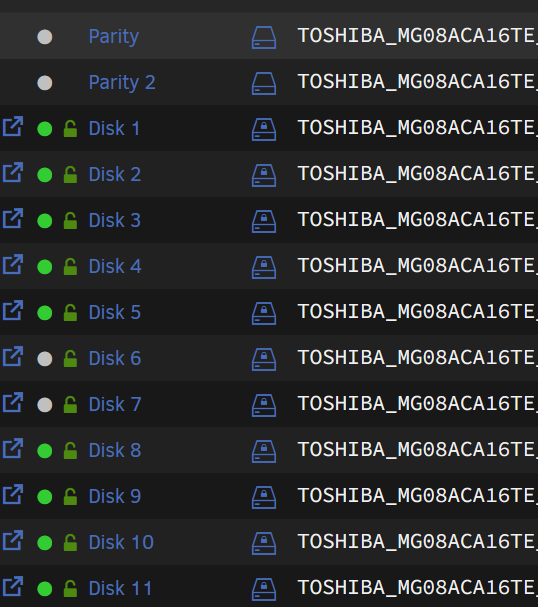
Hi, auch wenn der Thread was älter ist. Ich nutze ebenfalls Toshibas MAG Serie und kann mich nicht beschweren beim anlaufen / Parity-Sync ja etwas laut, aber P/L ist hier einfach abartig gut.
-
For sure a few watts more arent that bad at all... The main problem with Realtek is Realtek itself. If they dont provide working drivers for Linux it wont work as expected. So nothing to change. Since a decade of time its always suggested to avoid Realtek with Linux...
-
Are you sure that your bus is 0x00? <alias name='hostdev0'/> <rom file='/mnt/user/isos/NVIDIA.GTX1050Ti.4096.170620.rom'/> <address type='pci' domain='0x0000' bus='0x00' slot='0x05' function='0x0'/> I am very sure that there is something wrong.
-
Have you installed the Nvidia Drivers Plugin from within CA?
-
You are able to do so. Install the Nvidia-Plugin which ich777 maintains. Then you should be able to use this GPU also for Dockers, when the VM is completely off.
-
Unfortunately, it's not that simple. You could install / set up a VM or realise this via Docker. However, the traffic will still run via the LAN interface. Even 1GB should be sufficient, but what do you expect in terms of faster transfer when most hard disks hardly provide any more?
-
<?xml version='1.0' encoding='UTF-8'?> <domain type='kvm'> <name>Windows 11 Gaming</name> <uuid>6a35707d-748d-840c-6626-cd8dd3f28536</uuid> <description>Windows 11 Gaming VM</description> <metadata> <vmtemplate xmlns="unraid" name="Windows 11" icon="windows11.png" os="windowstpm"/> </metadata> <memory unit='KiB'>16777216</memory> <currentMemory unit='KiB'>16777216</currentMemory> <memoryBacking> <nosharepages/> </memoryBacking> <vcpu placement='static'>12</vcpu> <cputune> <vcpupin vcpu='0' cpuset='4'/> <vcpupin vcpu='1' cpuset='14'/> <vcpupin vcpu='2' cpuset='5'/> <vcpupin vcpu='3' cpuset='15'/> <vcpupin vcpu='4' cpuset='6'/> <vcpupin vcpu='5' cpuset='16'/> <vcpupin vcpu='6' cpuset='7'/> <vcpupin vcpu='7' cpuset='17'/> <vcpupin vcpu='8' cpuset='8'/> <vcpupin vcpu='9' cpuset='18'/> <vcpupin vcpu='10' cpuset='9'/> <vcpupin vcpu='11' cpuset='19'/> </cputune> <os> <type arch='x86_64' machine='pc-q35-7.1'>hvm</type> <loader readonly='yes' type='pflash'>/usr/share/qemu/ovmf-x64/OVMF_CODE-pure-efi-tpm.fd</loader> <nvram>/etc/libvirt/qemu/nvram/6a35707d-748d-840c-6626-cd8dd3f28536_VARS-pure-efi-tpm.fd</nvram> </os> <features> <acpi/> <apic/> <hyperv mode='custom'> <relaxed state='on'/> <vapic state='on'/> <spinlocks state='on' retries='8191'/> <vendor_id state='on' value='1234567890ab'/> </hyperv> <kvm> <hidden state='on'/> </kvm> <vmport state='off'/> <ioapic driver='kvm'/> </features> <cpu mode='host-passthrough' check='none' migratable='on'> <topology sockets='1' dies='1' cores='6' threads='2'/> <cache mode='passthrough'/> </cpu> <clock offset='localtime'> <timer name='hypervclock' present='yes'/> <timer name='hpet' present='no'/> </clock> <on_poweroff>destroy</on_poweroff> <on_reboot>restart</on_reboot> <on_crash>restart</on_crash> <devices> <emulator>/usr/local/sbin/qemu</emulator> <disk type='file' device='cdrom'> <driver name='qemu' type='raw'/> <source file='/mnt/user/isos/virtio-win-0.1.229-1.iso'/> <target dev='hdb' bus='sata'/> <readonly/> <address type='drive' controller='0' bus='0' target='0' unit='1'/> </disk> <disk type='file' device='disk'> <driver name='qemu' type='raw' cache='writeback'/> <source file='/mnt/disks/S1D5NSAF299083N/Gaming Machine/vdisk1.img'/> <target dev='hdc' bus='sata'/> <boot order='1'/> <address type='drive' controller='0' bus='0' target='0' unit='2'/> </disk> <controller type='pci' index='0' model='pcie-root'/> <controller type='pci' index='1' model='pcie-root-port'> <model name='pcie-root-port'/> <target chassis='1' port='0x8'/> <address type='pci' domain='0x0000' bus='0x00' slot='0x01' function='0x0' multifunction='on'/> </controller> <controller type='pci' index='2' model='pcie-root-port'> <model name='pcie-root-port'/> <target chassis='2' port='0x9'/> <address type='pci' domain='0x0000' bus='0x00' slot='0x01' function='0x1'/> </controller> <controller type='pci' index='3' model='pcie-root-port'> <model name='pcie-root-port'/> <target chassis='3' port='0xa'/> <address type='pci' domain='0x0000' bus='0x00' slot='0x01' function='0x2'/> </controller> <controller type='pci' index='4' model='pcie-root-port'> <model name='pcie-root-port'/> <target chassis='4' port='0xb'/> <address type='pci' domain='0x0000' bus='0x00' slot='0x01' function='0x3'/> </controller> <controller type='pci' index='5' model='pcie-root-port'> <model name='pcie-root-port'/> <target chassis='5' port='0xc'/> <address type='pci' domain='0x0000' bus='0x00' slot='0x01' function='0x4'/> </controller> <controller type='pci' index='6' model='pcie-root-port'> <model name='pcie-root-port'/> <target chassis='6' port='0xd'/> <address type='pci' domain='0x0000' bus='0x00' slot='0x01' function='0x5'/> </controller> <controller type='pci' index='7' model='pcie-to-pci-bridge'> <model name='pcie-pci-bridge'/> <address type='pci' domain='0x0000' bus='0x01' slot='0x00' function='0x0'/> </controller> <controller type='virtio-serial' index='0'> <address type='pci' domain='0x0000' bus='0x02' slot='0x00' function='0x0'/> </controller> <controller type='sata' index='0'> <address type='pci' domain='0x0000' bus='0x00' slot='0x1f' function='0x2'/> </controller> <controller type='usb' index='0' model='ich9-ehci1'> <address type='pci' domain='0x0000' bus='0x00' slot='0x07' function='0x7'/> </controller> <controller type='usb' index='0' model='ich9-uhci1'> <master startport='0'/> <address type='pci' domain='0x0000' bus='0x00' slot='0x07' function='0x0' multifunction='on'/> </controller> <controller type='usb' index='0' model='ich9-uhci2'> <master startport='2'/> <address type='pci' domain='0x0000' bus='0x00' slot='0x07' function='0x1'/> </controller> <controller type='usb' index='0' model='ich9-uhci3'> <master startport='4'/> <address type='pci' domain='0x0000' bus='0x00' slot='0x07' function='0x2'/> </controller> <interface type='bridge'> <mac address='52:54:00:21:3f:c8'/> <source bridge='br0'/> <model type='virtio-net'/> <address type='pci' domain='0x0000' bus='0x03' slot='0x00' function='0x0'/> </interface> <serial type='pty'> <target type='isa-serial' port='0'> <model name='isa-serial'/> </target> </serial> <console type='pty'> <target type='serial' port='0'/> </console> <channel type='unix'> <target type='virtio' name='org.qemu.guest_agent.0'/> <address type='virtio-serial' controller='0' bus='0' port='1'/> </channel> <input type='tablet' bus='usb'> <address type='usb' bus='0' port='1'/> </input> <input type='mouse' bus='ps2'/> <input type='keyboard' bus='ps2'/> <tpm model='tpm-tis'> <backend type='emulator' version='2.0' persistent_state='yes'/> </tpm> <audio id='1' type='none'/> <hostdev mode='subsystem' type='pci' managed='yes'> <driver name='vfio'/> <source> <address domain='0x0000' bus='0x02' slot='0x00' function='0x0'/> </source> <rom file='/mnt/user/isos/vbios/2023/GeForce GTX 970.rom'/> <address type='pci' domain='0x0000' bus='0x04' slot='0x00' function='0x0' multifunction='on'/> </hostdev> <hostdev mode='subsystem' type='pci' managed='yes'> <driver name='vfio'/> <source> <address domain='0x0000' bus='0x02' slot='0x00' function='0x1'/> </source> <address type='pci' domain='0x0000' bus='0x04' slot='0x00' function='0x1'/> </hostdev> <memballoon model='none'/> </devices> </domain> Try this one. Maybe your Bios File wont work as excepted.
-
I am extremely attached to my server. Watching TV in the evening on the couch with my girlfriend or loading my retro "consoles" with ROMs and running them. Currently I have a Ryzen 5900X with an X570 board from "ASUS". I also have a spare 5900X and an MSI X570 Godlike. As I said, I am very attached to the comfort of the server and do not want to wait long for a replacement. Although this also runs for over 2 years without problems but you never know unfortunately. My TV exactly 2 years old is broken exactly 2 months after the warranty expired. This was from now on just broken and no longer goes on. This unfortunately shows that hardware no matter which, can go defective.
-
Yeah you are right. But even copper cables are working as they should. Anyway as usually many people wont cap 1G at all. I am a lazy technician, why I should rip out all my cat 7-8 cables and change them to fiber. More E-Waste then needed. So I got also a X540-T2. They are usually available at an affordable price and most of them work perfectly. Fiber optic cable is getting cheaper, but there are still too many options. With fiber optic cables, you have to pay attention to which loop you take as well as then the respective "switch adapters". Anyway fiber will be the goal overall in the future. You should just think about the direction of your own possibilities and those of the hardware. After that, you should decide how and where to invest in something. Time, patience and money as well.
-
RAM Einstellungen ebenfalls prüfen. Am besten kein XMP aktivieren. bzw. RAM bei deiner Ryzen CPU auf 2133Mhz stellen ggf. sogar niedriger.
-
When something will be added or needed (For the purpose to detect failures / errors) Made it just as opt-in not as opt-out perse 🙂 If you decide to send statistics about every option within your plugin. This will maybe disliked a lot. Maybe include something for error reportings / script errors / permission errors. I would like to see the benefits when you just "overwatch" the function usage.
-
Maybe try to set permissions for appdata and your jdownloader2 folders. I updated my container without any problems. Fluid as always
-
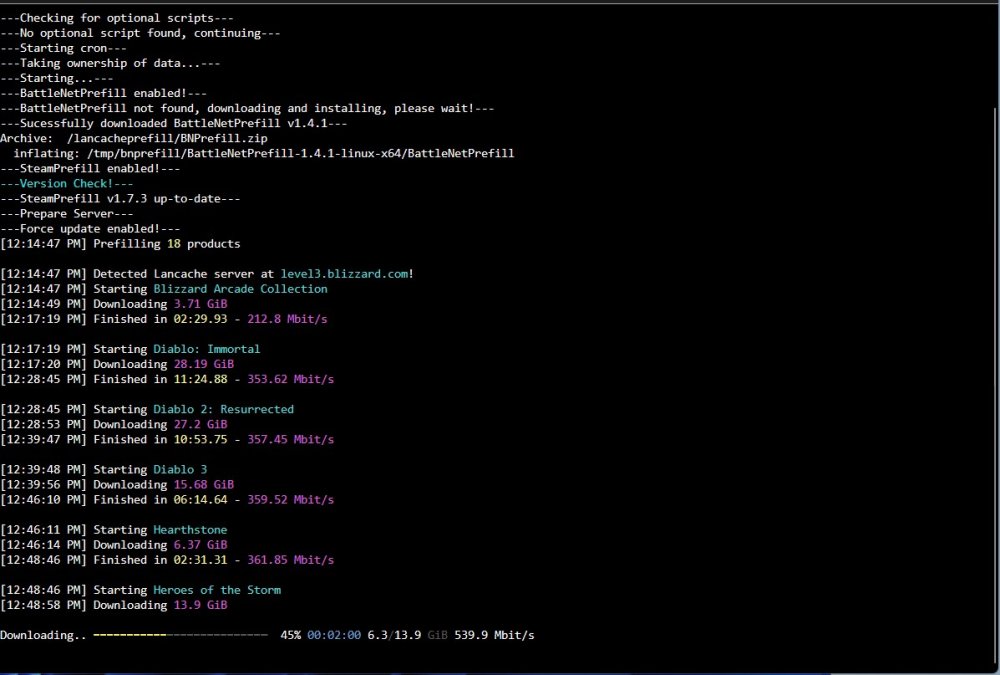
Depending on your internet connection speeds and also how fast your HDDs/SSDs are it could take to long before able to start a new cron. This will interrupt the already running prefill as ich777 already mentioned. [5:08:47 AM] Finished in 3:13:02.14 - 58.93 Mbit/s [5:08:47 AM] Starting WoW Classic Up to date! [5:08:48 AM] Starting Call of Duty: Black Ops 4 Up to date! [5:08:49 AM] Starting Call of Duty: Black Ops Cold War Up to date! [5:08:49 AM] Starting Call of Duty: Modern Warfare Up to date! [5:08:50 AM] Starting Call of Duty: Modern Warfare 2 Up to date! [5:08:51 AM] Starting Call of Duty: Vanguard Up to date! [5:08:52 AM] Starting Crash Bandicoot 4: It's About Time Up to date! [5:08:52 AM] Prefill complete! Prefilled 18 apps in 4:08:50.33 I have 18 apps / games which will be prefilled with updates and so on. This take already 3 Hours and 13 Minutes. If you may lets say got 20 apps / games it will take longer. I limited my docker half of the speed from my internet connection (1GB).
-
HeyHo possible to add IPv4 and IPv6 at the same time? Like it set up the Enviroment variable two times?
-
To say something more. I added ipv6 to all of my lancache dockers (dns and normal lancache) within the Extra Parameters and for my router. Because I found that without ipv6 my xbox'ses and Windows Systems with GamePass arent downloading at all. May I did something wrong with the offical lancache Docker because my folders are owned by "sshd". Maybe this is a problem? Maybe we could chat within Discord or something? PM me when ok. Even when not it is also ok
-
Your container cleaned my mess It works flawlessly beside my problem with the redownloads. I hope now that I fixed my redownload bug. It works as excepted and really nice. I also like the fact, that the Docker "View Log" show the actual downloads. This is just nice. Also that you included that we are able to set up parameters directly for the Steam-/BattleNet-Prefillers within the Docker template. May I just want to say thank you for all your work (Nvidia Plugins, Dockers and so on). Appriciate it and love to use them. I am still nearly new to docker and the templates within Unraid. So I love it when someone did the trick 🙂
-
I did. I readed everything carefully and set everything the right way up. --restart=unless-stopped --dns=192.XXX.XXX.XXX (Just as mask I dont X the ip within the parameters xD)
-
Hm. I used your container since yesterday. First I just downloaded the PreFill-executables from the github directly into the lancache container. Ill start now fresh. I removed the cache completely and now I redownload everything. I hope this may fix it. Because it is a mess, when my Internet Speed is just used for the lancache prefill stuff when it downloads everything again and again.
-
HeyHo, just wanted to ask here because I cant talk to tpill90 within Discord (# Info missing). Did you / him fixed the probleme where SteamPreFill always loads the game completly fresh? For me it nevers uses the lancache / not just update the game itself. Always a complete redownload of the whole games. Would be nice to know if I missed something. nslookup for nearly all tested domains give my lancache ip back. The cache is filling but I think itll overfill overtime because as mentioned it redownloads the game completely.
-
Sorry to say this but EAC wont allow to play within a VM. There isnt a good work-around for this. Some may work but you can be banned...
-
Sorry for the late reply.... I dont know what you need or what you even already have tested. Maybe post here your xml?Thank you for your help. I cant say what happend but I restarted my server now a few times and still no more errors... I dont know what caused this. Thanks anyway. Will write back when it happens again.