





SmokeyColes
Members
-
Joined
-
Last visited
Everything posted by SmokeyColes
-
@MowMdown Cheese and Crackers - I would have been there for months!!!! Working a treat over the subnet. I'm so impressed. Now I just got to work out communication with (PLEX br0 + tailscale) and (SONARR within Gluetun).
-
Firstly tonight I found tail scale. Oh My Gosh - WOW. It has blown my mind. I clearly missed the memo !! Ok so UNRAID I am using the Limetech latest tailscale plugin and I want my subnet 192.168.1.0/24 shared. It is enabled. I also am using it as an exit node. My iPhone is also on my tail net. When I disconnect from WiFi and onto 4G: I type in 192.168.1.50 and up pops my UNRAID server. I type 192.168.1.1 and up pops my router - this confirms the subnet is working correctly. My ISSUE: I have a PLEX container running in Docker with a custom: br0 I am using the IP 192.168.1.51. When I type http://192.168.1.51:32400/web into the phone it does not show. It is working on my LAN. Why is it not working if it shows on my LAN, and what do I need to do to make it work; do I need either tunnel or serve enabled; if so which one, and why. Assuming I want to go via the subnet.
-
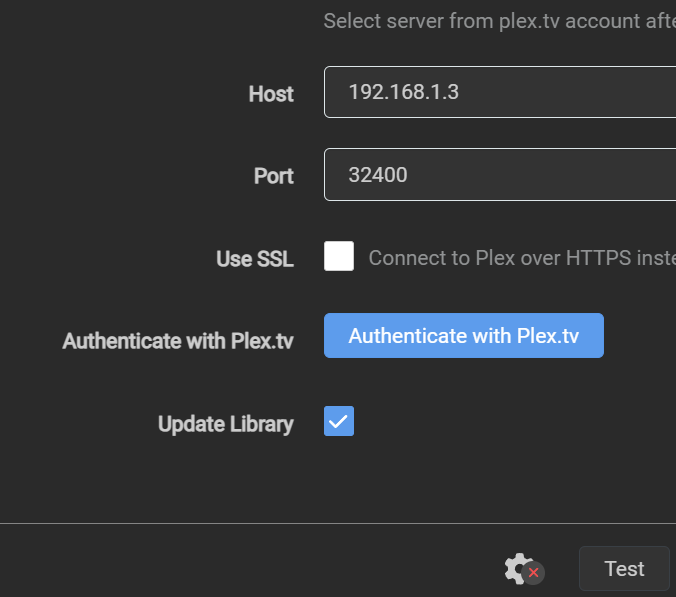
I am self closing this one as resolved in the hope that it may help someone else :) So hitting authenticate allows server access and will display your remote login - it auto populates host and port. Starlink Issue This didn't work for me as I use Starlink CGNET - but will work for others who have that normal WAN access. As I understand this gives 2 options - either tailscale or VPN. Both are equally good. Tailscale is a plugin which allows UNRAID to be used for remote access in CGNET at which point the dockers external to the VPN should also work - though I suspect I'm likely to do another post asking for help! However I believe this is the solution. Going VPN - should also work; the difference is that it wont resolve the UNRAID disallowing remote access with CGNET. It does however expose it to the internet. In this case two plex containers would have the same IP but need different ports configured.
-
Ok will do tomorrow, just about to restart.
-
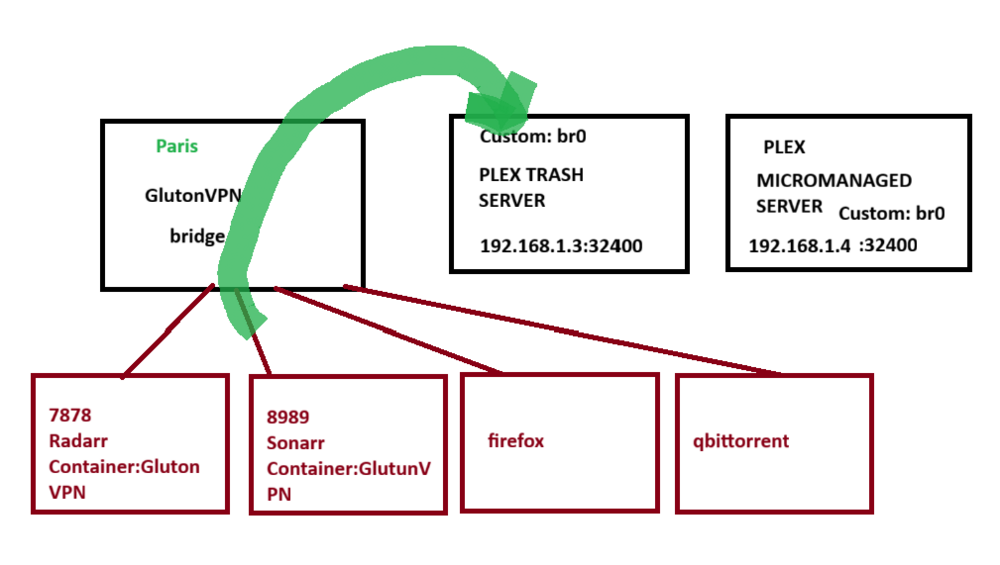
Hi, please can I request help - so this is my setup and I have a network problem; where it's doing what its meant to do. I have an OSI level 8 error 😅 I suppose the fix would be to put the plex in the same area as the GlutunVPN however I would prefer that it does not. How is this best approached? In the example below I can connect to Sonarr by going to 192.168.1.2:8989 however it cannot see 192.168.1.3. The glutun vpn has a container IP of 152.13.0.3 (not sure if that's helpful) Thanks in advance. Sonarr:
-
nvme2: nvme1:


-
Nov 2 15:31:53 CSC-NAS kernel: nvme1n1: p1 Nov 2 15:31:53 CSC-NAS kernel: BTRFS: device fsid da5398ac-c763-4b3b-aa28-8b396e61ad3f devid 1 transid 2441919 /dev/nvme1n1p1 (259:3) scanned by udevd (1571) Nov 2 15:32:33 CSC-NAS rc.local: SMART: /dev/nvme1n1 ACTIVE (43588cacbe) done in 74ms. Nov 2 15:32:42 CSC-NAS emhttpd: online: Seagate_FireCuda_510_SSD_ZP1000GM30031_7W1003HT (nvme1n1) 512 1953525168 Nov 2 15:32:43 CSC-NAS emhttpd: /bin/lsblk -lnbo TYPE,NAME,START,SIZE,PARTLABEL /dev/nvme1n1 2>&1 Nov 2 15:32:43 CSC-NAS emhttpd: disk nvme1n1 1000204886016 Nov 2 15:32:43 CSC-NAS emhttpd: part nvme1n1p1 2048 1000203837440 Nov 2 15:32:43 CSC-NAS emhttpd: device nvme1n1 data partition: nvme1n1p1 type: dos start: 2048 size: 976761560, code: 0x83 (4) Nov 2 15:32:43 CSC-NAS emhttpd: import 30 pool device: (nvme1n1) Seagate_FireCuda_510_SSD_ZP1000GM30031_7W1003HT Nov 2 15:32:43 CSC-NAS emhttpd: read SMART /dev/nvme1n1 Nov 2 15:32:53 CSC-NAS emhttpd: /bin/lsblk -lnbo TYPE,NAME,START,SIZE,PARTLABEL /dev/nvme1n1 2>&1 Nov 2 15:32:53 CSC-NAS emhttpd: disk nvme1n1 1000204886016 Nov 2 15:32:53 CSC-NAS emhttpd: part nvme1n1p1 2048 1000203837440 Nov 2 15:32:53 CSC-NAS emhttpd: device nvme1n1 data partition: nvme1n1p1 type: dos start: 2048 size: 976761560, code: 0x83 (4) Nov 2 15:32:53 CSC-NAS emhttpd: import 30 pool device: (nvme1n1) Seagate_FireCuda_510_SSD_ZP1000GM30031_7W1003HT Nov 2 15:33:01 CSC-NAS emhttpd: #011devid 1 size 931.51GiB used 595.03GiB path /dev/nvme1n1p1 Nov 2 15:33:01 CSC-NAS kernel: BTRFS info (device nvme1n1p1): first mount of filesystem da5398ac-c763-4b3b-aa28-8b396e61ad3f Nov 2 15:33:01 CSC-NAS kernel: BTRFS info (device nvme1n1p1): using crc32c (crc32c-intel) checksum algorithm Nov 2 15:33:02 CSC-NAS kernel: BTRFS info (device nvme1n1p1): enabling ssd optimizations Nov 2 15:33:02 CSC-NAS kernel: BTRFS info (device nvme1n1p1): enabling free space tree Nov 2 15:33:02 CSC-NAS kernel: BTRFS info (device nvme1n1p1 state M): turning on async discard Nov 2 15:37:31 CSC-NAS emhttpd: read SMART /dev/nvme1n1 Nov 2 15:37:44 CSC-NAS kernel: BTRFS info (device nvme1n1p1): last unmount of filesystem da5398ac-c763-4b3b-aa28-8b396e61ad3f Nov 2 15:37:44 CSC-NAS emhttpd: /bin/lsblk -lnbo TYPE,NAME,START,SIZE,PARTLABEL /dev/nvme1n1 2>&1 Nov 2 15:37:44 CSC-NAS emhttpd: disk nvme1n1 1000204886016 Nov 2 15:37:44 CSC-NAS emhttpd: part nvme1n1p1 2048 1000203837440 Nov 2 15:37:44 CSC-NAS emhttpd: device nvme1n1 data partition: nvme1n1p1 type: dos start: 2048 size: 976761560, code: 0x83 (4) Nov 2 15:37:44 CSC-NAS emhttpd: import 30 pool device: (nvme1n1) Seagate_FireCuda_510_SSD_ZP1000GM30031_7W1003HT Nov 2 15:41:44 CSC-NAS emhttpd: /bin/lsblk -lnbo TYPE,NAME,START,SIZE,PARTLABEL /dev/nvme1n1 2>&1 Nov 2 15:41:44 CSC-NAS emhttpd: disk nvme1n1 1000204886016 Nov 2 15:41:44 CSC-NAS emhttpd: part nvme1n1p1 2048 1000203837440 Nov 2 15:41:44 CSC-NAS emhttpd: device nvme1n1 data partition: nvme1n1p1 type: dos start: 2048 size: 976761560, code: 0x83 (4) Nov 2 15:41:44 CSC-NAS emhttpd: import 30 pool device: (nvme1n1) Seagate_FireCuda_510_SSD_ZP1000GM30031_7W1003HT Nov 2 15:41:55 CSC-NAS emhttpd: /bin/lsblk -lnbo TYPE,NAME,START,SIZE,PARTLABEL /dev/nvme1n1 2>&1 Nov 2 15:41:55 CSC-NAS emhttpd: disk nvme1n1 1000204886016 Nov 2 15:41:55 CSC-NAS emhttpd: part nvme1n1p1 2048 1000203837440 Nov 2 15:41:55 CSC-NAS emhttpd: device nvme1n1 data partition: nvme1n1p1 type: dos start: 2048 size: 976761560, code: 0x83 (4) Nov 2 15:41:55 CSC-NAS emhttpd: import 30 pool device: (nvme1n1) Seagate_FireCuda_510_SSD_ZP1000GM30031_7W1003HT Nov 2 15:42:38 CSC-NAS emhttpd: /bin/lsblk -lnbo TYPE,NAME,START,SIZE,PARTLABEL /dev/nvme1n1 2>&1 Nov 2 15:42:38 CSC-NAS emhttpd: disk nvme1n1 1000204886016 Nov 2 15:42:38 CSC-NAS emhttpd: part nvme1n1p1 2048 1000203837440 Nov 2 15:42:38 CSC-NAS emhttpd: device nvme1n1 data partition: nvme1n1p1 type: dos start: 2048 size: 976761560, code: 0x83 (4) Nov 2 15:42:38 CSC-NAS emhttpd: import 31 pool device: (nvme1n1) Seagate_FireCuda_510_SSD_ZP1000GM30031_7W1003HT Nov 2 15:42:56 CSC-NAS emhttpd: /bin/lsblk -lnbo TYPE,NAME,START,SIZE,PARTLABEL /dev/nvme1n1 2>&1 Nov 2 15:42:56 CSC-NAS emhttpd: disk nvme1n1 1000204886016 Nov 2 15:42:56 CSC-NAS emhttpd: part nvme1n1p1 2048 1000203837440 Nov 2 15:42:56 CSC-NAS emhttpd: device nvme1n1 data partition: nvme1n1p1 type: dos start: 2048 size: 976761560, code: 0x83 (4) Nov 2 15:42:56 CSC-NAS emhttpd: import 31 pool device: (nvme1n1) Seagate_FireCuda_510_SSD_ZP1000GM30031_7W1003HT Nov 2 15:43:22 CSC-NAS emhttpd: /bin/lsblk -lnbo TYPE,NAME,START,SIZE,PARTLABEL /dev/nvme1n1 2>&1 Nov 2 15:43:22 CSC-NAS emhttpd: disk nvme1n1 1000204886016 Nov 2 15:43:22 CSC-NAS emhttpd: part nvme1n1p1 2048 1000203837440 Nov 2 15:43:22 CSC-NAS emhttpd: device nvme1n1 data partition: nvme1n1p1 type: dos start: 2048 size: 976761560, code: 0x83 (4) Nov 2 15:43:22 CSC-NAS emhttpd: import 31 pool device: (nvme1n1) Seagate_FireCuda_510_SSD_ZP1000GM30031_7W1003HT Nov 2 15:43:41 CSC-NAS emhttpd: /bin/lsblk -lnbo TYPE,NAME,START,SIZE,PARTLABEL /dev/nvme1n1 2>&1 Nov 2 15:43:41 CSC-NAS emhttpd: disk nvme1n1 1000204886016 Nov 2 15:43:41 CSC-NAS emhttpd: part nvme1n1p1 2048 1000203837440 Nov 2 15:43:41 CSC-NAS emhttpd: device nvme1n1 data partition: nvme1n1p1 type: dos start: 2048 size: 976761560, code: 0x83 (4) Nov 2 15:43:41 CSC-NAS emhttpd: import 31 pool device: (nvme1n1) Seagate_FireCuda_510_SSD_ZP1000GM30031_7W1003HT Nov 2 15:43:55 CSC-NAS emhttpd: /bin/lsblk -lnbo TYPE,NAME,START,SIZE,PARTLABEL /dev/nvme1n1 2>&1 Nov 2 15:43:55 CSC-NAS emhttpd: disk nvme1n1 1000204886016 Nov 2 15:43:55 CSC-NAS emhttpd: part nvme1n1p1 2048 1000203837440 Nov 2 15:43:55 CSC-NAS emhttpd: device nvme1n1 data partition: nvme1n1p1 type: dos start: 2048 size: 976761560, code: 0x83 (4) Nov 2 15:43:55 CSC-NAS emhttpd: import 31 pool device: (nvme1n1) Seagate_FireCuda_510_SSD_ZP1000GM30031_7W1003HT Nov 2 15:44:55 CSC-NAS emhttpd: /bin/lsblk -lnbo TYPE,NAME,START,SIZE,PARTLABEL /dev/nvme1n1 2>&1 Nov 2 15:44:55 CSC-NAS emhttpd: disk nvme1n1 1000204886016 Nov 2 15:44:55 CSC-NAS emhttpd: part nvme1n1p1 2048 1000203837440 Nov 2 15:44:55 CSC-NAS emhttpd: device nvme1n1 data partition: nvme1n1p1 type: dos start: 2048 size: 976761560, code: 0x83 (4) Nov 2 15:44:55 CSC-NAS emhttpd: import 31 pool device: (nvme1n1) Seagate_FireCuda_510_SSD_ZP1000GM30031_7W1003HT Nov 2 15:44:59 CSC-NAS emhttpd: #011devid 1 size 931.51GiB used 595.03GiB path /dev/nvme1n1p1 Nov 2 15:44:59 CSC-NAS kernel: BTRFS info (device nvme1n1p1): first mount of filesystem da5398ac-c763-4b3b-aa28-8b396e61ad3f Nov 2 15:44:59 CSC-NAS kernel: BTRFS info (device nvme1n1p1): using crc32c (crc32c-intel) checksum algorithm Nov 2 15:45:00 CSC-NAS kernel: BTRFS info (device nvme1n1p1): enabling ssd optimizations Nov 2 15:45:00 CSC-NAS kernel: BTRFS info (device nvme1n1p1): enabling free space tree Nov 2 15:45:00 CSC-NAS kernel: BTRFS info (device nvme1n1p1 state M): turning on async discard NVME 2 Nov 2 15:31:53 CSC-NAS kernel: nvme0n1: p1 Nov 2 15:31:53 CSC-NAS kernel: BTRFS: device fsid da5398ac-c763-4b3b-aa28-8b396e61ad3f devid 2 transid 2441919 /dev/nvme0n1p1 (259:2) scanned by udevd (1556) Nov 2 15:32:33 CSC-NAS rc.local: SMART: /dev/nvme0n1 ACTIVE (6491e21d43) done in 91ms. Nov 2 15:32:42 CSC-NAS emhttpd: online: Seagate_FireCuda_510_SSD_ZP1000GM30031_7W1002WN (nvme0n1) 512 1953525168 Nov 2 15:32:43 CSC-NAS emhttpd: /bin/lsblk -lnbo TYPE,NAME,START,SIZE,PARTLABEL /dev/nvme0n1 2>&1 Nov 2 15:32:43 CSC-NAS emhttpd: disk nvme0n1 1000204886016 Nov 2 15:32:43 CSC-NAS emhttpd: part nvme0n1p1 2048 1000203837440 Nov 2 15:32:43 CSC-NAS emhttpd: device nvme0n1 data partition: nvme0n1p1 type: dos start: 2048 size: 976761560, code: 0x83 (4) Nov 2 15:32:43 CSC-NAS emhttpd: import 31 pool device: (nvme0n1) Seagate_FireCuda_510_SSD_ZP1000GM30031_7W1002WN Nov 2 15:32:43 CSC-NAS emhttpd: read SMART /dev/nvme0n1 Nov 2 15:32:53 CSC-NAS emhttpd: /bin/lsblk -lnbo TYPE,NAME,START,SIZE,PARTLABEL /dev/nvme0n1 2>&1 Nov 2 15:32:53 CSC-NAS emhttpd: disk nvme0n1 1000204886016 Nov 2 15:32:53 CSC-NAS emhttpd: part nvme0n1p1 2048 1000203837440 Nov 2 15:32:53 CSC-NAS emhttpd: device nvme0n1 data partition: nvme0n1p1 type: dos start: 2048 size: 976761560, code: 0x83 (4) Nov 2 15:32:53 CSC-NAS emhttpd: import 31 pool device: (nvme0n1) Seagate_FireCuda_510_SSD_ZP1000GM30031_7W1002WN Nov 2 15:33:01 CSC-NAS emhttpd: #011devid 2 size 931.51GiB used 595.03GiB path /dev/nvme0n1p1 Nov 2 15:37:31 CSC-NAS emhttpd: read SMART /dev/nvme0n1 Nov 2 15:37:44 CSC-NAS emhttpd: /bin/lsblk -lnbo TYPE,NAME,START,SIZE,PARTLABEL /dev/nvme0n1 2>&1 Nov 2 15:37:44 CSC-NAS emhttpd: disk nvme0n1 1000204886016 Nov 2 15:37:44 CSC-NAS emhttpd: part nvme0n1p1 2048 1000203837440 Nov 2 15:37:44 CSC-NAS emhttpd: device nvme0n1 data partition: nvme0n1p1 type: dos start: 2048 size: 976761560, code: 0x83 (4) Nov 2 15:37:44 CSC-NAS emhttpd: import 31 pool device: (nvme0n1) Seagate_FireCuda_510_SSD_ZP1000GM30031_7W1002WN Nov 2 15:41:44 CSC-NAS emhttpd: /bin/lsblk -lnbo TYPE,NAME,START,SIZE,PARTLABEL /dev/nvme0n1 2>&1 Nov 2 15:41:44 CSC-NAS emhttpd: disk nvme0n1 1000204886016 Nov 2 15:41:44 CSC-NAS emhttpd: part nvme0n1p1 2048 1000203837440 Nov 2 15:41:44 CSC-NAS emhttpd: device nvme0n1 data partition: nvme0n1p1 type: dos start: 2048 size: 976761560, code: 0x83 (4) Nov 2 15:41:44 CSC-NAS emhttpd: import 31 pool device: (nvme0n1) Seagate_FireCuda_510_SSD_ZP1000GM30031_7W1002WN Nov 2 15:41:55 CSC-NAS emhttpd: /bin/lsblk -lnbo TYPE,NAME,START,SIZE,PARTLABEL /dev/nvme0n1 2>&1 Nov 2 15:41:55 CSC-NAS emhttpd: disk nvme0n1 1000204886016 Nov 2 15:41:55 CSC-NAS emhttpd: part nvme0n1p1 2048 1000203837440 Nov 2 15:41:55 CSC-NAS emhttpd: device nvme0n1 data partition: nvme0n1p1 type: dos start: 2048 size: 976761560, code: 0x83 (4) Nov 2 15:41:55 CSC-NAS emhttpd: import 31 pool device: (nvme0n1) Seagate_FireCuda_510_SSD_ZP1000GM30031_7W1002WN Nov 2 15:42:38 CSC-NAS emhttpd: /bin/lsblk -lnbo TYPE,NAME,START,SIZE,PARTLABEL /dev/nvme0n1 2>&1 Nov 2 15:42:38 CSC-NAS emhttpd: disk nvme0n1 1000204886016 Nov 2 15:42:38 CSC-NAS emhttpd: part nvme0n1p1 2048 1000203837440 Nov 2 15:42:38 CSC-NAS emhttpd: device nvme0n1 data partition: nvme0n1p1 type: dos start: 2048 size: 976761560, code: 0x83 (4) Nov 2 15:42:38 CSC-NAS emhttpd: import 32 pool device: (nvme0n1) Seagate_FireCuda_510_SSD_ZP1000GM30031_7W1002WN Nov 2 15:42:56 CSC-NAS emhttpd: /bin/lsblk -lnbo TYPE,NAME,START,SIZE,PARTLABEL /dev/nvme0n1 2>&1 Nov 2 15:42:56 CSC-NAS emhttpd: disk nvme0n1 1000204886016 Nov 2 15:42:56 CSC-NAS emhttpd: part nvme0n1p1 2048 1000203837440 Nov 2 15:42:56 CSC-NAS emhttpd: device nvme0n1 data partition: nvme0n1p1 type: dos start: 2048 size: 976761560, code: 0x83 (4) Nov 2 15:42:56 CSC-NAS emhttpd: import 32 pool device: (nvme0n1) Seagate_FireCuda_510_SSD_ZP1000GM30031_7W1002WN Nov 2 15:43:22 CSC-NAS emhttpd: /bin/lsblk -lnbo TYPE,NAME,START,SIZE,PARTLABEL /dev/nvme0n1 2>&1 Nov 2 15:43:22 CSC-NAS emhttpd: disk nvme0n1 1000204886016 Nov 2 15:43:22 CSC-NAS emhttpd: part nvme0n1p1 2048 1000203837440 Nov 2 15:43:22 CSC-NAS emhttpd: device nvme0n1 data partition: nvme0n1p1 type: dos start: 2048 size: 976761560, code: 0x83 (4) Nov 2 15:43:22 CSC-NAS emhttpd: import 32 pool device: (nvme0n1) Seagate_FireCuda_510_SSD_ZP1000GM30031_7W1002WN Nov 2 15:43:41 CSC-NAS emhttpd: /bin/lsblk -lnbo TYPE,NAME,START,SIZE,PARTLABEL /dev/nvme0n1 2>&1 Nov 2 15:43:41 CSC-NAS emhttpd: disk nvme0n1 1000204886016 Nov 2 15:43:41 CSC-NAS emhttpd: part nvme0n1p1 2048 1000203837440 Nov 2 15:43:41 CSC-NAS emhttpd: device nvme0n1 data partition: nvme0n1p1 type: dos start: 2048 size: 976761560, code: 0x83 (4) Nov 2 15:43:41 CSC-NAS emhttpd: import 32 pool device: (nvme0n1) Seagate_FireCuda_510_SSD_ZP1000GM30031_7W1002WN Nov 2 15:43:55 CSC-NAS emhttpd: /bin/lsblk -lnbo TYPE,NAME,START,SIZE,PARTLABEL /dev/nvme0n1 2>&1 Nov 2 15:43:55 CSC-NAS emhttpd: disk nvme0n1 1000204886016 Nov 2 15:43:55 CSC-NAS emhttpd: part nvme0n1p1 2048 1000203837440 Nov 2 15:43:55 CSC-NAS emhttpd: device nvme0n1 data partition: nvme0n1p1 type: dos start: 2048 size: 976761560, code: 0x83 (4) Nov 2 15:43:55 CSC-NAS emhttpd: import 32 pool device: (nvme0n1) Seagate_FireCuda_510_SSD_ZP1000GM30031_7W1002WN Nov 2 15:44:55 CSC-NAS emhttpd: /bin/lsblk -lnbo TYPE,NAME,START,SIZE,PARTLABEL /dev/nvme0n1 2>&1 Nov 2 15:44:55 CSC-NAS emhttpd: disk nvme0n1 1000204886016 Nov 2 15:44:55 CSC-NAS emhttpd: part nvme0n1p1 2048 1000203837440 Nov 2 15:44:55 CSC-NAS emhttpd: device nvme0n1 data partition: nvme0n1p1 type: dos start: 2048 size: 976761560, code: 0x83 (4) Nov 2 15:44:55 CSC-NAS emhttpd: import 32 pool device: (nvme0n1) Seagate_FireCuda_510_SSD_ZP1000GM30031_7W1002WN Nov 2 15:44:59 CSC-NAS emhttpd: #011devid 2 size 931.51GiB used 595.03GiB path /dev/nvme0n1p1 Nov 3 19:19:28 CSC-NAS kernel: block nvme0n1: the capability attribute has been deprecated.
-
USB: text error warn system array login Nov 2 15:31:53 CSC-NAS kernel: sd 6:0:0:0: [sda] 60088320 512-byte logical blocks: (30.8 GB/28.7 GiB) Nov 2 15:31:53 CSC-NAS kernel: sd 6:0:0:0: [sda] Write Protect is off Nov 2 15:31:53 CSC-NAS kernel: sd 6:0:0:0: [sda] Mode Sense: 43 00 00 00 Nov 2 15:31:53 CSC-NAS kernel: sd 6:0:0:0: [sda] Write cache: disabled, read cache: enabled, doesn't support DPO or FUA Nov 2 15:31:53 CSC-NAS kernel: sda: sda1 Nov 2 15:31:53 CSC-NAS kernel: sd 6:0:0:0: [sda] Attached SCSI removable disk Nov 2 15:32:42 CSC-NAS emhttpd: online: SanDisk_Ultra_Fit_0101a620f4f6428130f2a6b068fbfd2bc64adf0bb8e1ced8814de91aaa709 (sda) 512 60088320 Nov 2 15:32:43 CSC-NAS emhttpd: /bin/lsblk -lnbo TYPE,NAME,START,SIZE,PARTLABEL /dev/sda 2>&1 Nov 2 15:32:43 CSC-NAS emhttpd: disk sda 30765219840 Nov 2 15:32:43 CSC-NAS emhttpd: part sda1 2048 30763122688 Nov 2 15:32:43 CSC-NAS emhttpd: device sda data partition: sda1 type: dos start: 2048 size: 30042112, code: 0xc (7) Nov 2 15:32:43 CSC-NAS emhttpd: /sbin/blkid /dev/sda1 2>&1 Nov 2 15:32:43 CSC-NAS emhttpd: /dev/sda1: LABEL_FATBOOT="UNRAID" LABEL="UNRAID" UUID="3C15-098F" BLOCK_SIZE="512" TYPE="vfat" PARTUUID="0328b4fd-01" Nov 2 15:32:43 CSC-NAS emhttpd: import 32 flash device: (sda) Nov 2 15:32:43 CSC-NAS emhttpd: read SMART /dev/sda Nov 2 15:32:53 CSC-NAS emhttpd: /bin/lsblk -lnbo TYPE,NAME,START,SIZE,PARTLABEL /dev/sda 2>&1 Nov 2 15:32:53 CSC-NAS emhttpd: disk sda 30765219840 Nov 2 15:32:53 CSC-NAS emhttpd: part sda1 2048 30763122688 Nov 2 15:32:53 CSC-NAS emhttpd: device sda data partition: sda1 type: dos start: 2048 size: 30042112, code: 0xc (7) Nov 2 15:32:53 CSC-NAS emhttpd: /sbin/blkid /dev/sda1 2>&1 Nov 2 15:32:53 CSC-NAS emhttpd: /dev/sda1: LABEL_FATBOOT="UNRAID" LABEL="UNRAID" UUID="3C15-098F" BLOCK_SIZE="512" TYPE="vfat" PARTUUID="0328b4fd-01" Nov 2 15:32:53 CSC-NAS emhttpd: import 32 flash device: (sda) Nov 2 15:37:31 CSC-NAS emhttpd: read SMART /dev/sda Nov 2 15:37:44 CSC-NAS emhttpd: /bin/lsblk -lnbo TYPE,NAME,START,SIZE,PARTLABEL /dev/sda 2>&1 Nov 2 15:37:44 CSC-NAS emhttpd: disk sda 30765219840 Nov 2 15:37:44 CSC-NAS emhttpd: part sda1 2048 30763122688 Nov 2 15:37:44 CSC-NAS emhttpd: device sda data partition: sda1 type: dos start: 2048 size: 30042112, code: 0xc (7) Nov 2 15:37:44 CSC-NAS emhttpd: /sbin/blkid /dev/sda1 2>&1 Nov 2 15:37:44 CSC-NAS emhttpd: /dev/sda1: LABEL_FATBOOT="UNRAID" LABEL="UNRAID" UUID="3C15-098F" BLOCK_SIZE="512" TYPE="vfat" PARTUUID="0328b4fd-01" Nov 2 15:37:44 CSC-NAS emhttpd: import 32 flash device: (sda) Nov 2 15:41:44 CSC-NAS emhttpd: /bin/lsblk -lnbo TYPE,NAME,START,SIZE,PARTLABEL /dev/sda 2>&1 Nov 2 15:41:44 CSC-NAS emhttpd: disk sda 30765219840 Nov 2 15:41:44 CSC-NAS emhttpd: part sda1 2048 30763122688 Nov 2 15:41:44 CSC-NAS emhttpd: device sda data partition: sda1 type: dos start: 2048 size: 30042112, code: 0xc (7) Nov 2 15:41:44 CSC-NAS emhttpd: /sbin/blkid /dev/sda1 2>&1 Nov 2 15:41:44 CSC-NAS emhttpd: /dev/sda1: LABEL_FATBOOT="UNRAID" LABEL="UNRAID" UUID="3C15-098F" BLOCK_SIZE="512" TYPE="vfat" PARTUUID="0328b4fd-01" Nov 2 15:41:44 CSC-NAS emhttpd: import 33 flash device: (sda) Nov 2 15:41:55 CSC-NAS emhttpd: /bin/lsblk -lnbo TYPE,NAME,START,SIZE,PARTLABEL /dev/sda 2>&1 Nov 2 15:41:55 CSC-NAS emhttpd: disk sda 30765219840 Nov 2 15:41:55 CSC-NAS emhttpd: part sda1 2048 30763122688 Nov 2 15:41:55 CSC-NAS emhttpd: device sda data partition: sda1 type: dos start: 2048 size: 30042112, code: 0xc (7) Nov 2 15:41:55 CSC-NAS emhttpd: /sbin/blkid /dev/sda1 2>&1 Nov 2 15:41:55 CSC-NAS emhttpd: /dev/sda1: LABEL_FATBOOT="UNRAID" LABEL="UNRAID" UUID="3C15-098F" BLOCK_SIZE="512" TYPE="vfat" PARTUUID="0328b4fd-01" Nov 2 15:41:55 CSC-NAS emhttpd: import 33 flash device: (sda) Nov 2 15:42:38 CSC-NAS emhttpd: /bin/lsblk -lnbo TYPE,NAME,START,SIZE,PARTLABEL /dev/sda 2>&1 Nov 2 15:42:38 CSC-NAS emhttpd: disk sda 30765219840 Nov 2 15:42:38 CSC-NAS emhttpd: part sda1 2048 30763122688 Nov 2 15:42:38 CSC-NAS emhttpd: device sda data partition: sda1 type: dos start: 2048 size: 30042112, code: 0xc (7) Nov 2 15:42:38 CSC-NAS emhttpd: /sbin/blkid /dev/sda1 2>&1 Nov 2 15:42:38 CSC-NAS emhttpd: /dev/sda1: LABEL_FATBOOT="UNRAID" LABEL="UNRAID" UUID="3C15-098F" BLOCK_SIZE="512" TYPE="vfat" PARTUUID="0328b4fd-01" Nov 2 15:42:38 CSC-NAS emhttpd: import 34 flash device: (sda) Nov 2 15:42:56 CSC-NAS emhttpd: /bin/lsblk -lnbo TYPE,NAME,START,SIZE,PARTLABEL /dev/sda 2>&1 Nov 2 15:42:56 CSC-NAS emhttpd: disk sda 30765219840 Nov 2 15:42:56 CSC-NAS emhttpd: part sda1 2048 30763122688 Nov 2 15:42:56 CSC-NAS emhttpd: device sda data partition: sda1 type: dos start: 2048 size: 30042112, code: 0xc (7) Nov 2 15:42:56 CSC-NAS emhttpd: /sbin/blkid /dev/sda1 2>&1 Nov 2 15:42:56 CSC-NAS emhttpd: /dev/sda1: LABEL_FATBOOT="UNRAID" LABEL="UNRAID" UUID="3C15-098F" BLOCK_SIZE="512" TYPE="vfat" PARTUUID="0328b4fd-01" Nov 2 15:42:56 CSC-NAS emhttpd: import 34 flash device: (sda) Nov 2 15:43:22 CSC-NAS emhttpd: /bin/lsblk -lnbo TYPE,NAME,START,SIZE,PARTLABEL /dev/sda 2>&1 Nov 2 15:43:22 CSC-NAS emhttpd: disk sda 30765219840 Nov 2 15:43:22 CSC-NAS emhttpd: part sda1 2048 30763122688 Nov 2 15:43:22 CSC-NAS emhttpd: device sda data partition: sda1 type: dos start: 2048 size: 30042112, code: 0xc (7) Nov 2 15:43:22 CSC-NAS emhttpd: /sbin/blkid /dev/sda1 2>&1 Nov 2 15:43:22 CSC-NAS emhttpd: /dev/sda1: LABEL_FATBOOT="UNRAID" LABEL="UNRAID" UUID="3C15-098F" BLOCK_SIZE="512" TYPE="vfat" PARTUUID="0328b4fd-01" Nov 2 15:43:22 CSC-NAS emhttpd: import 34 flash device: (sda) Nov 2 15:43:41 CSC-NAS emhttpd: /bin/lsblk -lnbo TYPE,NAME,START,SIZE,PARTLABEL /dev/sda 2>&1 Nov 2 15:43:41 CSC-NAS emhttpd: disk sda 30765219840 Nov 2 15:43:41 CSC-NAS emhttpd: part sda1 2048 30763122688 Nov 2 15:43:41 CSC-NAS emhttpd: device sda data partition: sda1 type: dos start: 2048 size: 30042112, code: 0xc (7) Nov 2 15:43:41 CSC-NAS emhttpd: /sbin/blkid /dev/sda1 2>&1 Nov 2 15:43:41 CSC-NAS emhttpd: /dev/sda1: LABEL_FATBOOT="UNRAID" LABEL="UNRAID" UUID="3C15-098F" BLOCK_SIZE="512" TYPE="vfat" PARTUUID="0328b4fd-01" Nov 2 15:43:41 CSC-NAS emhttpd: import 34 flash device: (sda) Nov 2 15:43:55 CSC-NAS emhttpd: /bin/lsblk -lnbo TYPE,NAME,START,SIZE,PARTLABEL /dev/sda 2>&1 Nov 2 15:43:55 CSC-NAS emhttpd: disk sda 30765219840 Nov 2 15:43:55 CSC-NAS emhttpd: part sda1 2048 30763122688 Nov 2 15:43:55 CSC-NAS emhttpd: device sda data partition: sda1 type: dos start: 2048 size: 30042112, code: 0xc (7) Nov 2 15:43:55 CSC-NAS emhttpd: /sbin/blkid /dev/sda1 2>&1 Nov 2 15:43:55 CSC-NAS emhttpd: /dev/sda1: LABEL_FATBOOT="UNRAID" LABEL="UNRAID" UUID="3C15-098F" BLOCK_SIZE="512" TYPE="vfat" PARTUUID="0328b4fd-01" Nov 2 15:43:55 CSC-NAS emhttpd: import 34 flash device: (sda) Nov 2 15:44:55 CSC-NAS emhttpd: /bin/lsblk -lnbo TYPE,NAME,START,SIZE,PARTLABEL /dev/sda 2>&1 Nov 2 15:44:55 CSC-NAS emhttpd: disk sda 30765219840 Nov 2 15:44:55 CSC-NAS emhttpd: part sda1 2048 30763122688 Nov 2 15:44:55 CSC-NAS emhttpd: device sda data partition: sda1 type: dos start: 2048 size: 30042112, code: 0xc (7) Nov 2 15:44:55 CSC-NAS emhttpd: /sbin/blkid /dev/sda1 2>&1 Nov 2 15:44:55 CSC-NAS emhttpd: /dev/sda1: LABEL_FATBOOT="UNRAID" LABEL="UNRAID" UUID="3C15-098F" BLOCK_SIZE="512" TYPE="vfat" PARTUUID="0328b4fd-01" Nov 2 15:44:55 CSC-NAS emhttpd: import 34 flash device: (sda)
-
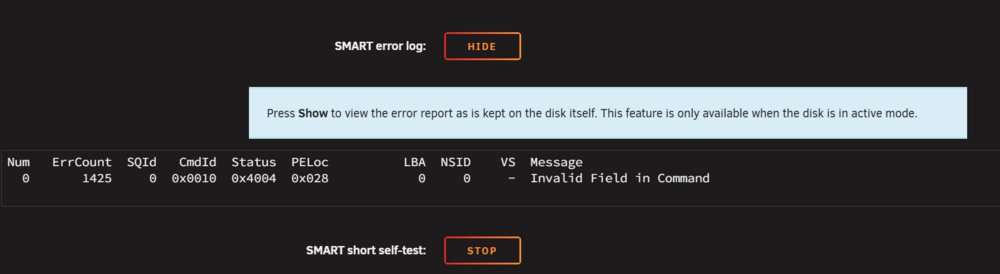
I did reinstall the vdisk deleting all my previous dockers and installed on just the array - which gave the same issue. Where would I find the drive logs? Thank you for your help.eui.6479a7462f0012ff-2025-06-18 system_cache (nvme1).txteui.6479a7462f000f7e-2025-06-18 system_cache2 (nvme0).txt I cant extract the USB, the filename is to long!
-
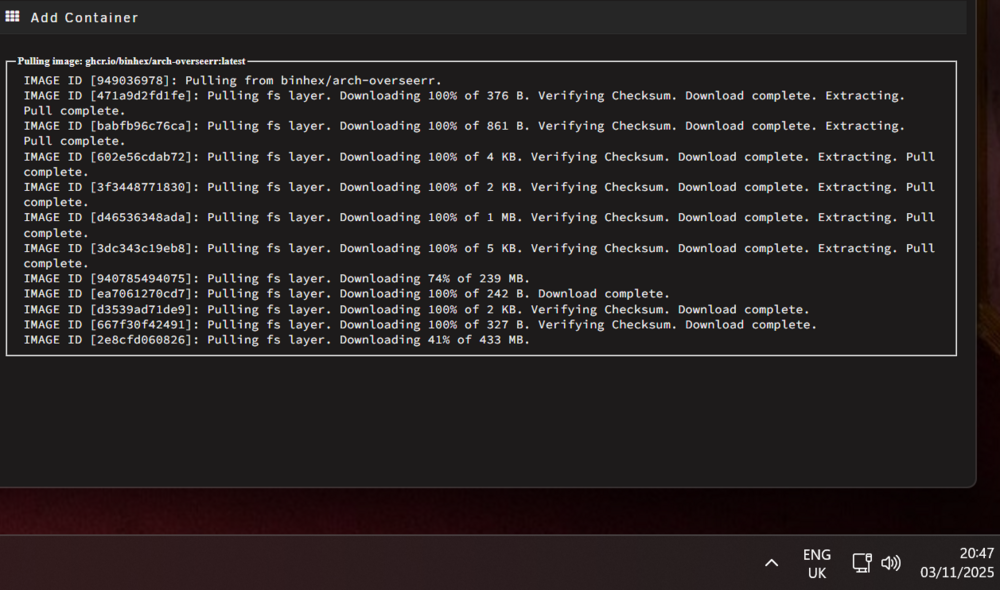
All docker containers - firefox was linuxserver, plex was original, binhex was overseer, radarr, sonarr, and qbittorrent, and good question I will do a reboot after this overseer has downloaded (32minutes in and I am getting 70mbps download when doing a speed test through firefox and glutonvpn). Its soul destroying slow.
-
Ok well I've fixed the script @MowMdown thankyou, but the docker speed issue: This was with all dockers switched off: Logs: Nov 3 20:23:19 CSC-NAS nginx: 2025/11/03 20:23:19 [error] 10624#10624: *77743 upstream timed out (110: Connection timed out) while reading response header from upstream, client: 192.168.2.244, server: , request: "GET /webGui/styles/bitstream-bold.woff?v=20220513 HTTP/2.0", subrequest: "/auth-request.php", upstream: "fastcgi://unix:/var/run/php-fpm.sock", host: "ip:port", referrer: "https://ip:port/Apps/AddContainer?xmlTemplate=default:/tmp/community.applications/tempFiles/templates-community-apps/BinhexsRepository/binhex-binhexoverseerr-latest.xml" Nov 3 20:23:19 CSC-NAS nginx: 2025/11/03 20:23:19 [error] 10624#10624: *77743 auth request unexpected status: 504 while sending to client, client: 192.168.2.244, server: , request: "GET /webGui/styles/bitstream-bold.woff?v=20220513 HTTP/2.0", host: "ip:port", referrer: "https://ip:port/Apps/AddContainer?xmlTemplate=default:/tmp/community.applications/tempFiles/templates-community-apps/BinhexsRepository/binhex-binhexoverseerr-latest.xml" Nov 3 20:23:48 CSC-NAS nginx: 2025/11/03 20:23:48 [error] 10624#10624: *77743 upstream timed out (110: Connection timed out) while reading response header from upstream, client: 192.168.2.244, server: , request: "GET /webGui/include/OpenTerminal.php?tag=syslog&name=syslog&more= HTTP/2.0", subrequest: "/auth-request.php", upstream: "fastcgi://unix:/var/run/php-fpm.sock", host: "ip:port", referrer: "https://ip:port/Apps/AddContainer?xmlTemplate=default:/tmp/community.applications/tempFiles/templates-community-apps/BinhexsRepository/binhex-binhexoverseerr-latest.xml" Nov 3 20:23:48 CSC-NAS nginx: 2025/11/03 20:23:48 [error] 10624#10624: *77743 auth request unexpected status: 504 while sending to client, client: 192.168.2.244, server: , request: "GET /webGui/include/OpenTerminal.php?tag=syslog&name=syslog&more= HTTP/2.0", host: "ip:port", referrer: "ip:port/Apps/AddContainer?xmlTemplate=default:/tmp/community.applications/tempFiles/templates-community-apps/BinhexsRepository/binhex-binhexoverseerr-latest.xml"

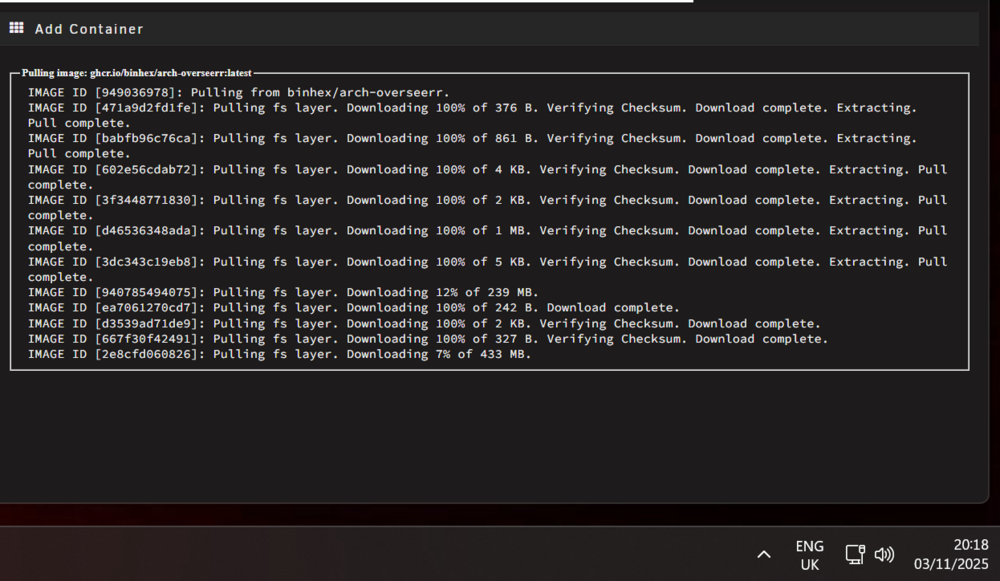
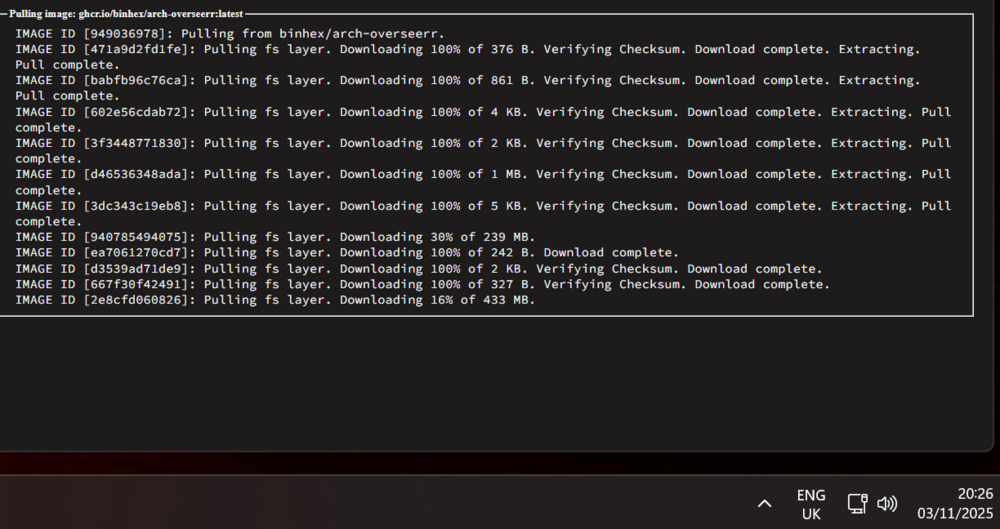
-
I'm not really smart enough to understand it. I am getting a lot of errors transferring data Downloading Plex docker took over an hour but I cant see anything in the system log csc-nas-diagnostics-20251103-1918.zip Nov 3 17:51:13 CSC-NAS nginx: 2025/11/03 17:51:13 [error] 10624#10624: *72350 auth request unexpected status: 504 while sending to client, client: 192.168.2.254, server: , request: "GET /webGui/styles/clear-sans-italic.woff?v=20220513 HTTP/2.0", host: "my ip:port", referrer: "https://my ip:port/Apps/AddContainer?xmlTemplate=default:/tmp/community.applications/tempFiles/templates-community-apps/BinhexsRepository/binhex-binhexplexpass-latest.xml"
-
I can confirm deleting the vdisk and starting fresh back on my nvme, unfortunately have not resolved the painfully slow downloads.
-
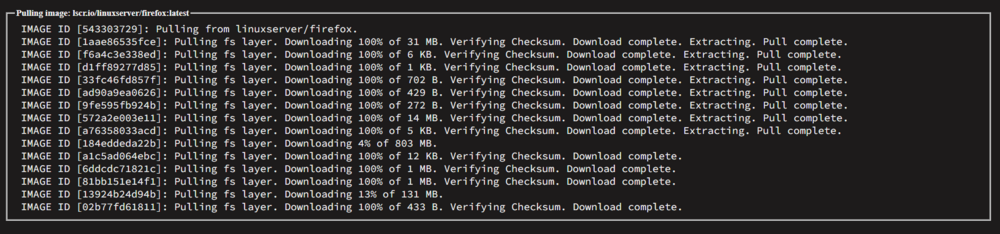
I am also having this problem with large files being pulled over 200MB. A 800MB Firefox took just shy of two hours. I moved the system folder from the nvme to the array; turned off the docker, turned on the docker, rebooted and even deleted a couple old and unused containers with no luck in fixing. For me this just started happening after I upgraded my HBA and RAM though I’m not sure it’s related. I also upgraded to 7.2. So who knows what caused it! It locks up my browser too. I may delete the docker tomorrow and redownload all the things I have installed though I’m not keen on that idea either. I’m having a lot of problems with deluge so reinstalling and it taking over an hour at a time is so frustrating trying to troubleshoot.
-
Ok I will look for the mediated devices. Ok so the end goal is I want a Plex server capable of transcoding. Without a gpu or igpu it states the hardware is not sufficient to transcode; it’s an error which pops up on the client. The problem is I have no PCI ports. As far as I can work out I have two options. A GPU either intel or Nvidia connected by thunderbolt as a egpu. Using IGPU as I have a series 10 intel cpu. Truthfully I’ve no idea what I’m doing but I am learning a little about it being a lot of effort to get something set up. I’m inexperienced with dockers. That said I’m getting better by doing this hence the tests with VMs and dockers. If you have any ideas I’d greatly appreciate it. My motherboard is fairly OK. It has 3x PCIx16 which I use for 3x sas controllers to run 3 lots of 8 drives. I think it would also be confined with room if I considered upgrading one controller to something which supports 16 hdds. I’m also reluctant as that bit of the server works well. I’m thinking the docker and the intel driver seems to be my best option. Thunderbolt still feels a bit problematic when it comes to gpu’s in there. But I have proven I can get it working in both VMs and Docker. This is a big learning curve. Your comments replies are helping. Thank you Chris
-
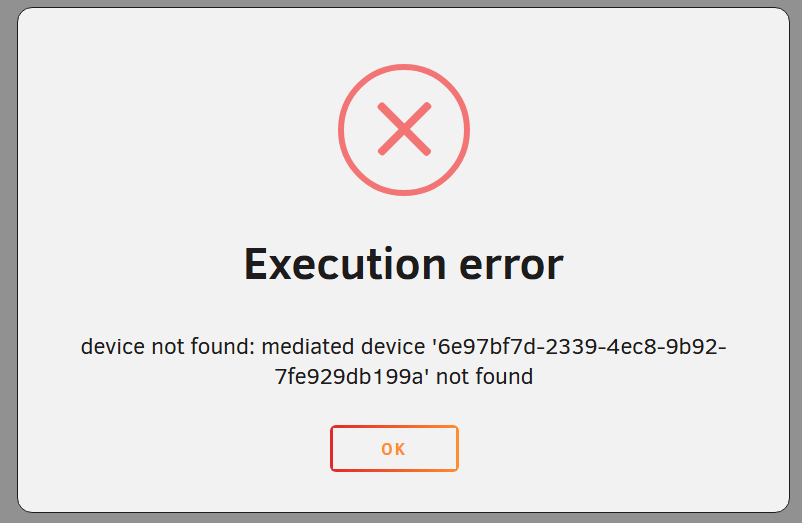
Update: After removing the assignment, I can reuse VM again. So I ended the VM, and reapplied the assignment. I think I broke it... 🙃 UUID failed to delete or out of VRAM. I will reboot and try again.
-
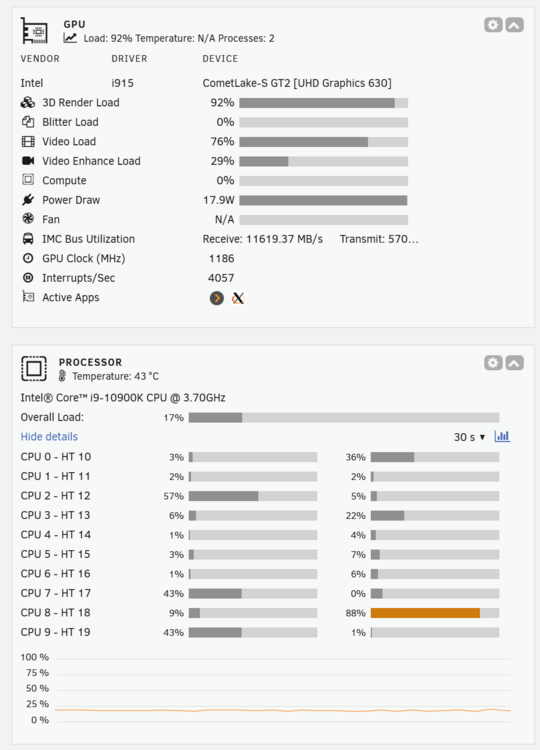
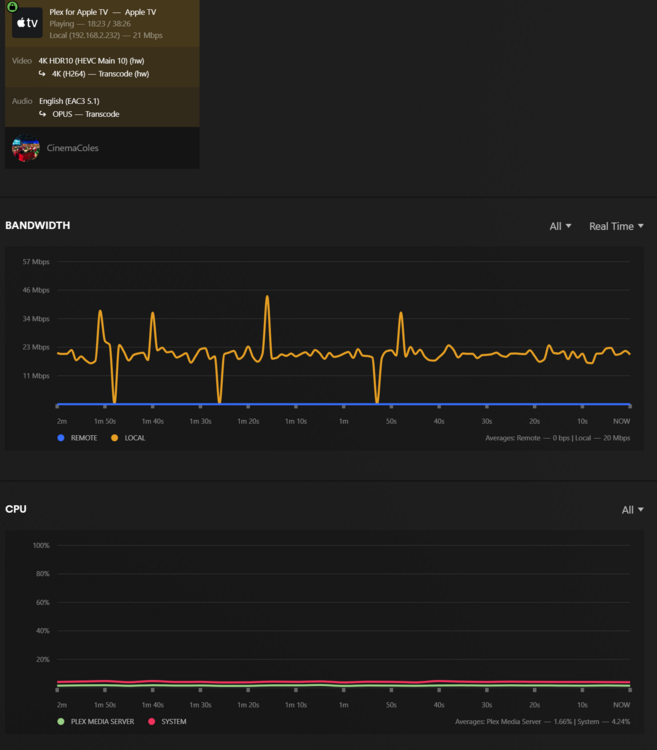
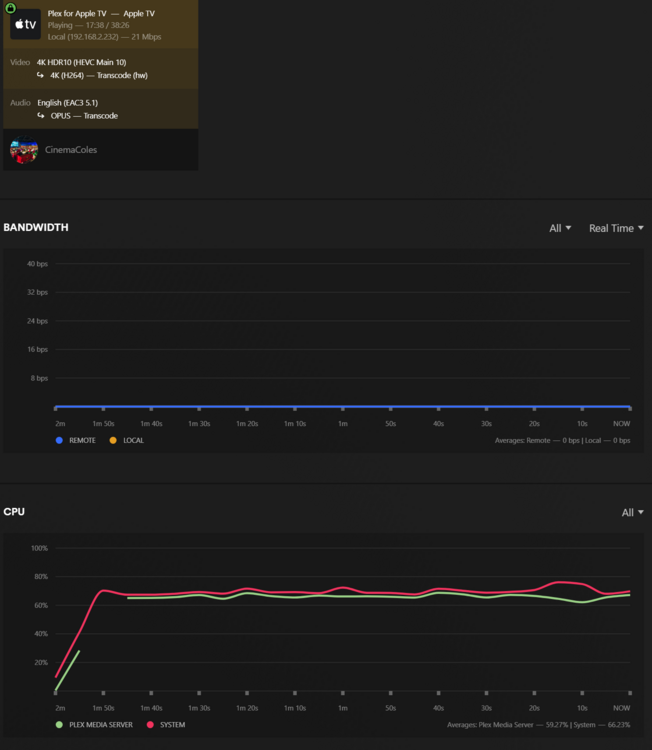
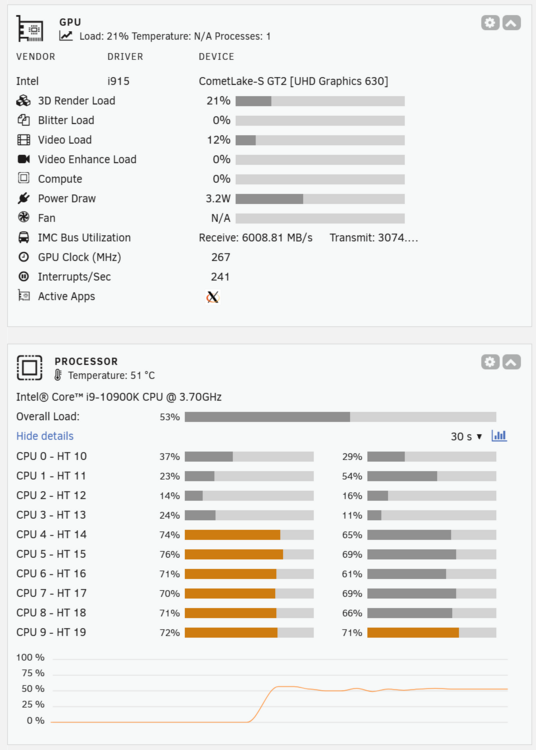
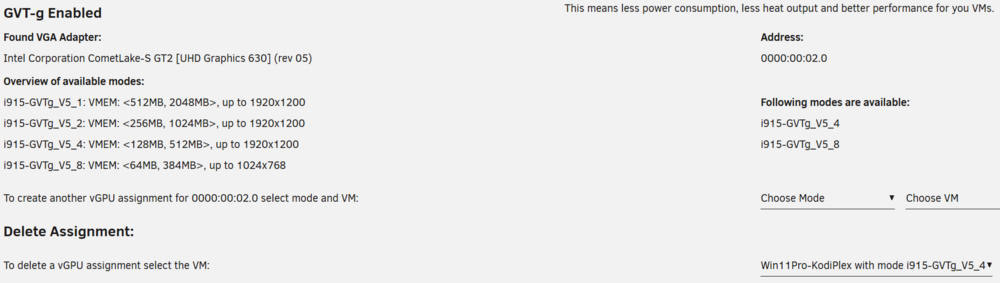
Hi Apologies I know I've commented on a few different driver posts. So I have experimented with NVIDIA and now I'm trying out IGPU driver. https://forums.unraid.net/topic/98978-plugin-nvidia-driver/page/207/ This is a screenshot from a DOCKER container using IGPU: So still OPUS transcoding audio and yes you were right there are hard encoded subtitles. IGPU is working significantly less hard than the CPU with the NVIDIA old GT750ti GPU (in docker). I do however have a question. So I am also testing environments, and below is a Win11 VM (unlike the docker above): You can see that the VM the GPU is working less hard and the CPU is working harder than the docker. I did see the intel come up under GPU in the task manager performance; I also saw the 2nd display in hardware devices. When I open Youtube I didn't really notice anything. Also now if I Ctrl+Alt+Del in the VNC - my VNC screen just turns black. Also start menu doesn't open so its not liking it at all. I'm a little lost tbh I still want to compare all my options using a GPU or IGPU. I want both to be compatible in VM and Docker Environments. Could you advise what I should do to try and correct the iGPU VM issues encountered? Cheers Chris
-
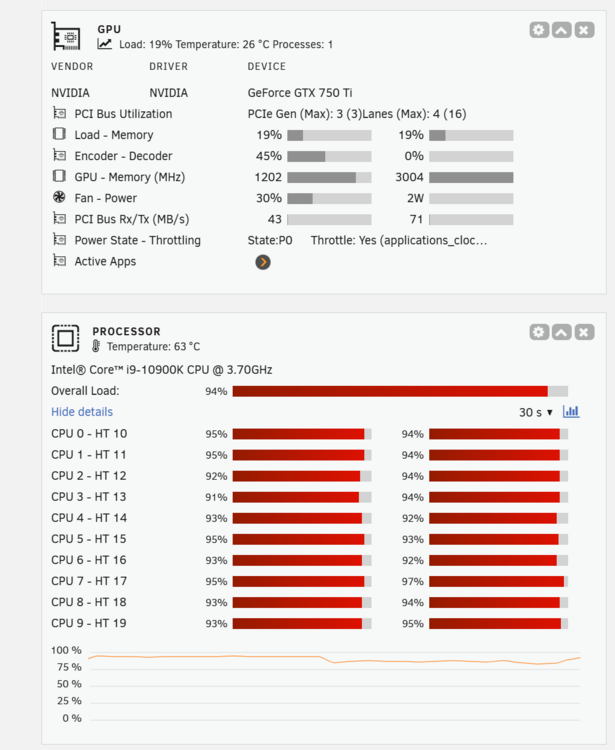
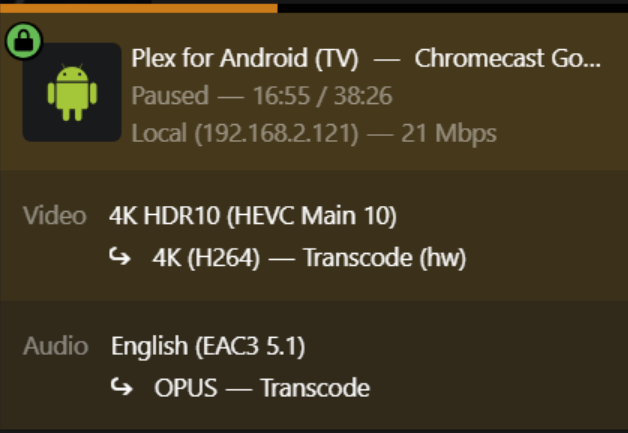
Hi Can I have some advice. My CPU seems to be working very hard. I had assumed the hardware transcoding would put the strain onto the GPU. I appreciate its not a good GPU, this was a functional proof test prior to buying a Arc A380 GPU today (also dependent on whether I can get Intel IGPU working in unraid). Anyhow the transcode quality is set to automatic, x264 background transcoding to very fast. GTX 750ti selected and its my only transcode. When I look at NVidia Encode Decode support matrix, the 750ti supports H264 encoding (45% on stats) but it does not support 265 decoding (0% on stats). Is this the reason the CPU is working so hard playing back the movie? Please forgive my limited knowledge - it just looks like the GPU is slacking. I just want to confirm I have indeed set it up correctly. Cheers Chris
-
Hi A couple of years back I tried using a Nvidia GPU in a Legion and Razor GPU enclosure connected with a Thunderbolt 3 cable. It was a complete nightmare to get working and often failed as it involved lots of reboots etc and sort of hoping it would recognise. The idea was to pass through to dockers or VMs for hardware transcoding due to no PCIe slots free. I spoke with the developers and pretty much I think they told me there's not much of a need to develop it in UNRAID as its not a common use case they would normally consider. Nor could they test as they didn't have the hardware. I am wondering if there has been any success stories recently or progress made into eGPUs and VMs? Especially as I see more and more motherboards with thunderbolt. Thanks Chris
-
Hello Please can I ask for some help. I have a Intel® Core™ i9-10900K CPU @ 3.70GHz When I run intel_gpu_top :- I get no device filter specified and no discrete/integrated i915 devices found I am trying to pass the hardware through to a plex docker container for hardware acceleration. I also want to see it in GPU statistics on my dashboard. I've no idea really where to begin with this. Any idea why it doesn't recognise the intel igpu?
-
Hello I am somewhat confused by splitting in the shares. I have read a few posts, a couple of guides and space invaders shares video. My folder structure Movies (SHARE) 720p Horror 720p SciFi 1080p SciFi 1080p Other move name.mp4 movie name.nfo movie name.fanart movie name 2.mp4 movie name 2.nfo movie name 2. fanart 2160p Comedy 2160p Action I use this setup for kodi and plex as I prefer a movie having a primary genre, and I create smart playlists using locations. Its been my style for some time, and it may not be everyone's choice. OK so I have these shares over four disks, lets say disk 1, 2, 3, 4 I have manually put all the 2160p in disk1\ Movies\ The same with 1080p folders in disk2\Movies\ And 720p in disk3\Movies I have then manually created folders in disk4 - 2160p Comedy and 2160p Action but inside they are blank. Now in the future when I goto my smb share and copy a new movie into the combined share. I want a 2160p to go to 2160p drive, and 1080p to go to 1080p. Then when the 2160p has reached capacity, it puts the next movie into disk 4. The Settings I have chosen: Allocation: Fill Up Split level: Split only the top level directory as required Have I got this right? Please note I've upgraded my drives and added a couple hence the change. What I do not want to do is break the share e.g. break movies to say 2160p Movies. I want the share to remain as movies. Thank you for any help and advice, Chris
-
@JorgeB I rebooted into Safe Mode, and opened Edge and Chrome (default) side-by-side. The delay was apparent in Safe Mode in Chrome. After updating Chrome via help > about, and relaunching - it looks like the problem has been corrected (in normal mode and with a couple of plugins reinstalled apart from Connect) everything is loading at the same speed as Edge. Thank you for your help. Immediately after saying this, I installed Connect, logged in - and I witnessed it crippling both browsers "connect icon said something like loading". Removing it again I have it functioning as expected. That plugin I think I am leaving off for now. Fault finding for me looked like this (may help others): (1) Try another browser side by side and compare. (2) Update affected browser. (3) Reboot to Safe Mode. (4) Reboot to Normal. (5) Disable Connect App if safe mode works.
-
I am running 7.1.2 - I have a delay in both my Main, and Dashboard (with all dockers and VMs switched off). Where array HDDs take 10-15seconds to show. If I got to update/uninstall a plugin; the popup shows immediately and no text shows.
-
I maybe having a similar issue; I am using PLEX Server in a Win11 VM. I have manually selected an IP address in Windows to 192.168.1.10 and my main router as the gateway, in the VM using the bridge "br". Unfortunately PlexStreams plugin does not see this server; but the rest of the network does (e.g. running firefox in an UNRAID docker, and on another PC on the network). Dynamix ActiveStreams plugin does seem to work. In PlexStreams I have tried selecting and deselecting SSL. I have typed in 192.168.1.10:32400 and all I see is the spinning searching for server. If there's a way to get it working; that would be good :) I have used the plugin in the past, its so handy to have.
-
Hi all I maybe getting a slow transfer speed (20MB/s in windows) though I'm not sure this is slow but I think it is? The files are 1-2GB video files - mkv/mp4 and its a file COPY. Its the standard windows SMB file share found in Network and the copy was initiated from the windows PC (drag, right click copy). The network looks like this: UNRAID server (EXOs HDDs with 2 Parity) > Orbi SXS80 > Orbi SXR80 > Media Converter Fiber > Media Converter Copper > TPLink Gigabit Switch > Geekcom MiniPC (SSD 2TB). All connections are wired and all components should have a gigabit connection. Windows says the link aggregation is 1000/1000mbps. UNRAID dashboard says eth0 1000Mbps, full duplex, mtu 1500 outbound approx 200Mbps. My question is; I feel like I should be seeing higher file transfer speeds. Transfers are irregular so I don't really want to take the GeekCom inside and sort of half split fault find, as I will need to setup keyboard, monitor etc. Could there be an easy fix or is this just normal? This is a big transfer just above 1TB. The rest of my network isn't really working that hard so I don't think other things are impacting it. On further inspection: My UNRAID CPU had an overall load <4% with no core working any harder than 12%. And the GeekCom I don't believe is struggling. The files are all stored in one HDD on the UNRAID array with 2 parity drives. In the STATs tab, it looks like a read speed on the disks of 20ish MB/s. Thank you in advance for your thoughts. Chris



