Elmojo
Members
-
Joined
-
Last visited
Everything posted by Elmojo
-
No way! I'll check it out, thanks!
-
I guess that's cool, but I don't install RCs or Betas, only full stable versions, so I didn't know anything about that. Thanks for the update. I hope they release a full version of unraid before too long, so that this feature will finally be part of our lives! I look forward to my home dashboard not being a hot mess. lol
-
That's good to know, thanks! However, this thread isn't really about the number of columns showing, but rather the wish to have the ability to move individual "modules" from one column to the other. Someone said maybe it was coming in a future release, but I'm not sure quite what they meant, and so far I haven't seen it in my version. Thanks for sharing your tips, though. I'm sure it'll help someone who was stuck at 2 columns!
-
So here we go again. I was unable to access ZT this morning, so I went to check the dockers, and sure enough, ZT has turned itself off again. I pulled up the logs, and the only thing I see that's suspect is several lines similar to this: "WARNING: unable to write to file: /var/lib/zerotier-one/peers.d/7f7e78d63e.peer (unable to open)" followed by about 10-15 lines of "200 join ok" Any of this help anyone?
-
Quick question: how do I use a .dump file? It's expecting a .rom file for the vBIOS.
-
@ghost82 Oh man, thanks so much for that super detailed response! I'll be honest, my eyes crossed about halfway through, but I'm gonna go back and try to follow it all step by step as soon as I get a little time to focus. I have a crazy week ahead, but as soon as I get a some free time I'll see if any of those steps you outlined make any difference. As you noted, quite a bit of it looks like things I've already tried, but some of it was new, so maybe that will be the ticket. I think the vBIOS might be the sticking point. As I noted in the OP, I was unable to dump mine by any of the methods available to me, so that might be roadblocking me right there, who knows? Thanks again for taking the time to put all that together. I'll do my best to make good use of it, and will report back as soon as I have a chance to try it out!
-
Ok, awesome! I'm trying that now.... Bummer, no-go. I created a brand new VM with the following specs: 4 logical CPUs 4GB RAM Machine: Q35-7.1 SeaBIOS Hyper-V: Yes USB: 2.0 (EHCI) Graphics: Virtual (VNC) Graphics2: GT710 GPU (no BIOS file) Sound: GK208 HDMI (on GPU) All of this was selected in the GUI. I fired up the VM, installed Windows, and once I got to the desktop, opened Device Manager. It shows only the "Microsoft Basic Display Adapter". There's no mention of the nVidia GPU at all, just like before. The dummy plug and the physical monitor are still connected to the GPU. I'm stumped.
-
Okaay... I'm not sure how I'd do that. I've never seen that mentioned in any of the tutorials or videos about passthrough, and I only have the option to select VNC or physical GPU when creating a VM. Do you have any info about how to proceed? This may be the whole issue...
-
Any further thoughts on this? I'd really like to get this working if possible. I've tried all as noted above, but I'm kinda stuck... Any assistance appreciated. If I've failed to try something that's been suggested, please point it out and I'll get right on it!
-
Doesn't seem to be. ZT had been stable the past couple weeks. Maybe it was just a glitch? I'll keep an eye on it.
-
Thanks @JonathanM. As noted previously, I have both a dummy plug, and a physical monitor installed, and have since the beginning. Whatever is going on, it's not that.
-
So my next option I guess is to start a new VM from scratch (I was reusing the disk images on that last one), but I'm still not sure how I'll connect to it after creation, if I'm passing through the video from the GPU, assuming it even works. Do I need to use virtual hardware at first, then switch it over to the physical GPU after things are set up? That strikes me as being the same boat I'm in now, and not really testing any new conditions. I'm sure I'm missing something....
-
I feel stupid. I've created a new VM, using SeaBIOS. I attached the GPU and started it, but now I have no way to connect to the VM to view it, as I don't know the IP or credentials for RDP, and there is no option for VNC obviously. How do I connect to this machine? 🤨 EDIT: So I edited the VM to remove the GPU temporarily and switched back to the virtual VNC driver, so I could get the IP and such. When I start it, I get "Booting from Hard Disk.... No bootable device." It seems that it doesn't like that BIOS switch.
-
I can't select SeaBIOS now, I guess because the VM is already created? 🤷♂️
-
I haven't, because everything I've read says that SeaBIOS isn't suitable for PCIe devices. I guess it wouldn't hurt to try...
-
So I tried something.... I attached the GPU to a different VM entirely, a Win11 machine. I used your suggested method above, of only selecting it via the GUI. It's still not recognized at all via Device manager in the Win11 machine. This is making me wonder if perhaps the card itself might be faulty? It was sitting in my box of PCIe cards, so it's possible that it's just no good. I'll try a different card in the next day or so and report back. It would be silly if this whole thing was faulty hardware! 🙄 The other thing is that I can't dump the vBOIS using the user script from SIO. I get an error, even after stubbing. This kinda leads me to believe that hardware failure might be the culprit indeed....
-
I believe I did that once before, but it can't hurt to try again, thanks. Standby...
-
Thanks! Not sure how I missed that. 🤦♂️ Unfortunately, that made no difference. It's still not showing either the GPU or sound in Device Manager. EDIT: I also plugged in an HDMI dummy plug that just came in the mail to see if that helped, but no change. I had previously had it connected to a physical monitor. Neither made any difference.
-
Any new thoughts on this? @SimonF or anyone else? I'm at a loss here, and I really need to get this working so I can determine if this might be a viable option as a remote workstation for our office. My boss is waiting for an answer...
-
Ok, thanks. At least I'm not losing my mind here. lol
-
I have. When I try to view the VM logs, I just get a "502 Bad Gateway" page. It's always done this, so I assumed it was just an unRAID bug, since this happens for any of my VMs. Diagnostics attached. Thanks! tower-diagnostics-20230317-1323.zip
-
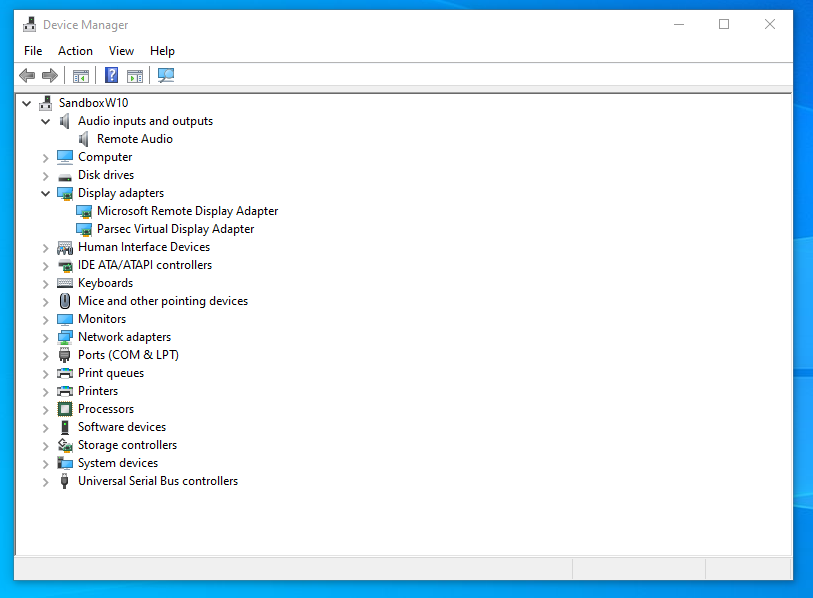
Hi all, So I have a bit of an odd issue. I'm trying to pass my nvidia GT 710 to an existing Win10 VM. I'm on unRAID 6.11.5. I'm generally following this guide, along with some additional tips by SpaceInvaderOne, and some other things I've found here and there. The VM itself is running just fine, and I can RDP into it with no issues. The trouble is that the VM doesn't see the GPU at all. I'm unable to find a vBIOS for my exact card (It's a Zotac GT 710 1GB silent). I've tried SIO's script to dump the vBIOS from unRAID directly, but it just throws an error, even after stubbing through the System Devices tab. I don't know what else to try on that front, so I'm having to try it without a vBIOS file. My XML is posted below, and I've added “video=efifb:off” to my syslinux.cfg. When I boot the VM, it all works just fine, except that Device Manager doesn't show any nvidia hardware, just the regular virtual display device. What else could it be? I'm at a loss here. VM Device Manager attached as well. XML: <?xml version='1.0' encoding='UTF-8'?> <domain type='kvm' id='4'> <name>Sandbox (W10 )</name> <uuid>6eee4b38-2964-616c-20e2-b7ce678ba076</uuid> <description>Windows 10 isolated Sandbox</description> <metadata> <vmtemplate xmlns="unraid" name="Windows 10" icon="windows.png" os="windows10"/> </metadata> <memory unit='KiB'>16777216</memory> <currentMemory unit='KiB'>16777216</currentMemory> <memoryBacking> <nosharepages/> </memoryBacking> <vcpu placement='static'>12</vcpu> <cputune> <vcpupin vcpu='0' cpuset='16'/> <vcpupin vcpu='1' cpuset='52'/> <vcpupin vcpu='2' cpuset='17'/> <vcpupin vcpu='3' cpuset='53'/> <vcpupin vcpu='4' cpuset='18'/> <vcpupin vcpu='5' cpuset='54'/> <vcpupin vcpu='6' cpuset='19'/> <vcpupin vcpu='7' cpuset='55'/> <vcpupin vcpu='8' cpuset='20'/> <vcpupin vcpu='9' cpuset='56'/> <vcpupin vcpu='10' cpuset='21'/> <vcpupin vcpu='11' cpuset='57'/> </cputune> <resource> <partition>/machine</partition> </resource> <os> <type arch='x86_64' machine='pc-q35-7.1'>hvm</type> <loader readonly='yes' type='pflash'>/usr/share/qemu/ovmf-x64/OVMF_CODE-pure-efi.fd</loader> <nvram>/etc/libvirt/qemu/nvram/6eee4b38-2964-616c-20e2-b7ce678ba076_VARS-pure-efi.fd</nvram> </os> <features> <acpi/> <apic/> <hyperv mode='custom'> <relaxed state='on'/> <vapic state='on'/> <spinlocks state='on' retries='8191'/> <vendor_id state='on' value='none'/> </hyperv> </features> <cpu mode='host-passthrough' check='none' migratable='on'> <topology sockets='1' dies='1' cores='6' threads='2'/> <cache mode='passthrough'/> </cpu> <clock offset='localtime'> <timer name='hypervclock' present='yes'/> <timer name='hpet' present='no'/> </clock> <on_poweroff>destroy</on_poweroff> <on_reboot>restart</on_reboot> <on_crash>restart</on_crash> <devices> <emulator>/usr/local/sbin/qemu</emulator> <disk type='file' device='disk'> <driver name='qemu' type='raw' cache='writeback' discard='unmap'/> <source file='/mnt/cache/domains/Win10 Sandbox/vdisk1.img' index='1'/> <backingStore/> <target dev='hdc' bus='virtio'/> <boot order='1'/> <alias name='virtio-disk2'/> <address type='pci' domain='0x0000' bus='0x03' slot='0x00' function='0x0'/> </disk> <controller type='usb' index='0' model='nec-xhci' ports='15'> <alias name='usb'/> <address type='pci' domain='0x0000' bus='0x00' slot='0x07' function='0x0'/> </controller> <controller type='pci' index='0' model='pcie-root'> <alias name='pcie.0'/> </controller> <controller type='pci' index='1' model='pcie-root-port'> <model name='pcie-root-port'/> <target chassis='1' port='0x8'/> <alias name='pci.1'/> <address type='pci' domain='0x0000' bus='0x00' slot='0x01' function='0x0' multifunction='on'/> </controller> <controller type='pci' index='2' model='pcie-root-port'> <model name='pcie-root-port'/> <target chassis='2' port='0x9'/> <alias name='pci.2'/> <address type='pci' domain='0x0000' bus='0x00' slot='0x01' function='0x1'/> </controller> <controller type='pci' index='3' model='pcie-root-port'> <model name='pcie-root-port'/> <target chassis='3' port='0xa'/> <alias name='pci.3'/> <address type='pci' domain='0x0000' bus='0x00' slot='0x01' function='0x2'/> </controller> <controller type='pci' index='4' model='pcie-root-port'> <model name='pcie-root-port'/> <target chassis='4' port='0x13'/> <alias name='pci.4'/> <address type='pci' domain='0x0000' bus='0x00' slot='0x02' function='0x3'/> </controller> <controller type='pci' index='5' model='pcie-root-port'> <model name='pcie-root-port'/> <target chassis='5' port='0x14'/> <alias name='pci.5'/> <address type='pci' domain='0x0000' bus='0x00' slot='0x02' function='0x4'/> </controller> <controller type='virtio-serial' index='0'> <alias name='virtio-serial0'/> <address type='pci' domain='0x0000' bus='0x02' slot='0x00' function='0x0'/> </controller> <controller type='sata' index='0'> <alias name='ide'/> <address type='pci' domain='0x0000' bus='0x00' slot='0x1f' function='0x2'/> </controller> <interface type='bridge'> <mac address='52:54:00:3c:3f:ce'/> <source bridge='br0'/> <target dev='vnet2'/> <model type='virtio-net'/> <alias name='net0'/> <address type='pci' domain='0x0000' bus='0x01' slot='0x00' function='0x0'/> </interface> <serial type='pty'> <source path='/dev/pts/1'/> <target type='isa-serial' port='0'> <model name='isa-serial'/> </target> <alias name='serial0'/> </serial> <console type='pty' tty='/dev/pts/1'> <source path='/dev/pts/1'/> <target type='serial' port='0'/> <alias name='serial0'/> </console> <channel type='unix'> <source mode='bind' path='/var/lib/libvirt/qemu/channel/target/domain-4-Sandbox (W10 )/org.qemu.guest_agent.0'/> <target type='virtio' name='org.qemu.guest_agent.0' state='connected'/> <alias name='channel0'/> <address type='virtio-serial' controller='0' bus='0' port='1'/> </channel> <input type='tablet' bus='usb'> <alias name='input0'/> <address type='usb' bus='0' port='1'/> </input> <input type='mouse' bus='ps2'> <alias name='input1'/> </input> <input type='keyboard' bus='ps2'> <alias name='input2'/> </input> <audio id='1' type='none'/> <hostdev mode='subsystem' type='pci' managed='yes'> <driver name='vfio'/> <source> <address domain='0x0000' bus='0x04' slot='0x00' function='0x0'/> </source> <alias name='hostdev0'/> <address type='pci' domain='0x0000' bus='0x04' slot='0x00' function='0x0' multifunction='on'/> </hostdev> <hostdev mode='subsystem' type='pci' managed='yes'> <driver name='vfio'/> <source> <address domain='0x0000' bus='0x04' slot='0x00' function='0x1'/> </source> <alias name='hostdev1'/> <address type='pci' domain='0x0000' bus='0x05' slot='0x00' function='0x1'/> </hostdev> <memballoon model='none'/> </devices> <seclabel type='dynamic' model='dac' relabel='yes'> <label>+0:+100</label> <imagelabel>+0:+100</imagelabel> </seclabel> </domain>
-
That page is what I used to get me where I am now, which is working fairly well. I use those IPMI commands to set a manual fan value, based on the time of year and how hot it's likely to be in my server room at the time. What I haven't done is try the stuff where they talk about chron tasks and scripts. They kinda lost me there....
-
That may be true for the R-series servers, but the T-series (Tower) servers are nothing like that. As I noted above, my T630 has 4 fans in the front and 2 in the rear, all connected to a single plastic shroud that forms a tunnel, blowing across both CPUs equally. There's no need to control the fans separately on this type of system, since it would only reduce the cooling by some of the fans and create an imbalance. Like this:
-
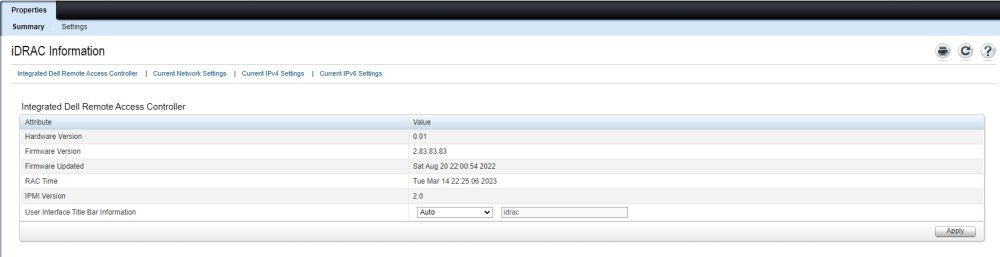
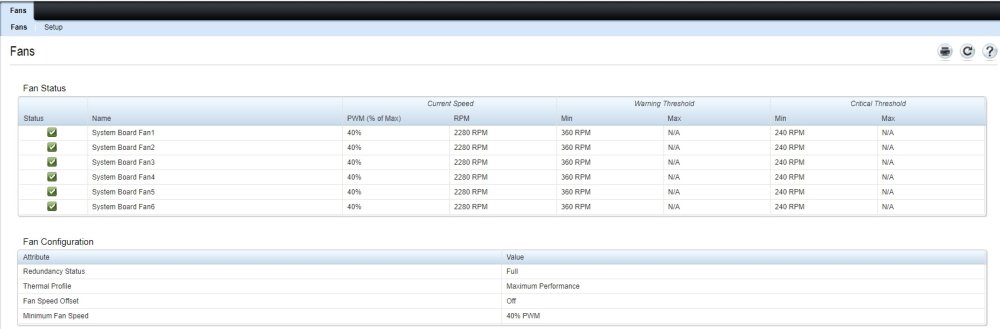
Well, when I log into my iDRAC, I can pull all sorts of info. (see example screens, below) My current firmware version is 2.83.83.83 Under the Fans tab, it doesn't say which one is the CPU, because there isn't one. There are 6 chassis fans, 4 in the front and 2 in the rear that all run together. They make sort of a wind tunnel effect that blows across the CPUs and cools them, along with other components. I think you can control them as one, no need to vary them individually.