





Elmojo
Members
-
Joined
-
Last visited
Everything posted by Elmojo
-
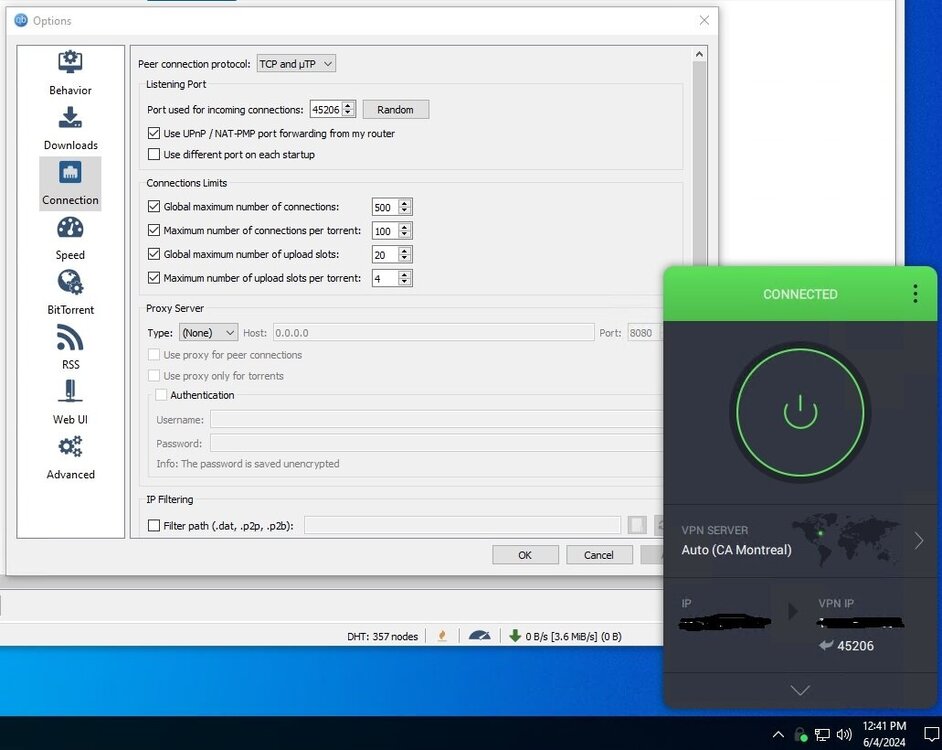
Correct. I'm not doing any forwarding in the router. My VM setup looks like this...
-
Here's my Docker run and log file again. Seems to maybe have gotten lost in the shuffle. Anyone have suggestions for helping clear the firewalled status of my qBT? I did figure out that my VM isn't really involved, although it's firewalled as well. I'm actually running 2 instances of qBT. One is the one that's hosted by this docker, and is accessed via the webUI. It's connected to my *arrs. The other is a desktop client I have installed within a VM, that I use for various random manual downloads like Linux distros and such. I had confused myself by forgetting that I had it set up that way. lol Regardless, they are both listed as 'firewalled' now, so something has changed recently on the backend. I'm guessing it might be related to my change over from Mullvad to PIA, except that it's been working with PIA just fine for the past couple weeks, and the firewall icon has only appeared in the last couple days. The only changes I'm aware of have been container updates to this docker. Docker Run Command execution docker run -d --name='binhex-qbittorrentvpn' --net='bridge' --privileged=true -e TZ="America/New_York" -e HOST_OS="Unraid" -e HOST_HOSTNAME="Tower" -e HOST_CONTAINERNAME="binhex-qbittorrentvpn" -e 'VPN_ENABLED'='yes' -e 'VPN_USER'='----' -e 'VPN_PASS'='----' -e 'VPN_PROV'='pia' -e 'VPN_CLIENT'='wireguard' -e 'VPN_OPTIONS'='' -e 'STRICT_PORT_FORWARD'='yes' -e 'ENABLE_PRIVOXY'='no' -e 'WEBUI_PORT'='8080' -e 'LAN_NETWORK'='192.168.11.0/24' -e 'NAME_SERVERS'='84.200.69.80,37.235.1.174,1.1.1.1,37.235.1.177,84.200.70.40,1.0.0.1' -e 'VPN_INPUT_PORTS'='45206' -e 'VPN_OUTPUT_PORTS'='' -e 'DEBUG'='false' -e 'UMASK'='000' -e 'PUID'='1001' -e 'PGID'='100' -l net.unraid.docker.managed=dockerman -l net.unraid.docker.webui='http://[IP]:[PORT:8080]/' -l net.unraid.docker.icon='https://raw.githubusercontent.com/binhex/docker-templates/master/binhex/images/qbittorrent-icon.png' -p '6881:6881/tcp' -p '6881:6881/udp' -p '8080:8080/tcp' -p '8118:8118/tcp' -v '/mnt/user/downloads/':'/data':'rw' -v '/mnt/user/appdata/binhex-qbittorrentvpn':'/config':'rw' --sysctl="net.ipv4.conf.all.src_valid_mark=1" 'binhex/arch-qbittorrentvpn' 684f731f8e6dbd0002b0a66958de5b7dd1b130baad6e8b790c809907c8cd432e The command finished successfully! supervisord.log EDIT: OK, super weird. I just checked, and the webUI for this container is now showing connected, no firewalled icon. However, the one on my VM is still firewalled. I've checked that I have the correct forwarded port (from PIA) entered into qBT. Not sure what else I'd need to do...
-
thanks for catching that supervisord.log
-
Good call! Here's the fresh log...
-
Docker Run Command execution docker run -d --name='binhex-qbittorrentvpn' --net='bridge' --privileged=true -e TZ="America/New_York" -e HOST_OS="Unraid" -e HOST_HOSTNAME="Tower" -e HOST_CONTAINERNAME="binhex-qbittorrentvpn" -e 'VPN_ENABLED'='yes' -e 'VPN_USER'='----' -e 'VPN_PASS'='----' -e 'VPN_PROV'='pia' -e 'VPN_CLIENT'='wireguard' -e 'VPN_OPTIONS'='' -e 'STRICT_PORT_FORWARD'='yes' -e 'ENABLE_PRIVOXY'='no' -e 'WEBUI_PORT'='8080' -e 'LAN_NETWORK'='192.168.11.0/24' -e 'NAME_SERVERS'='84.200.69.80,37.235.1.174,1.1.1.1,37.235.1.177,84.200.70.40,1.0.0.1' -e 'VPN_INPUT_PORTS'='45206' -e 'VPN_OUTPUT_PORTS'='' -e 'DEBUG'='false' -e 'UMASK'='000' -e 'PUID'='1001' -e 'PGID'='100' -l net.unraid.docker.managed=dockerman -l net.unraid.docker.webui='http://[IP]:[PORT:8080]/' -l net.unraid.docker.icon='https://raw.githubusercontent.com/binhex/docker-templates/master/binhex/images/qbittorrent-icon.png' -p '6881:6881/tcp' -p '6881:6881/udp' -p '8080:8080/tcp' -p '8118:8118/tcp' -v '/mnt/user/downloads/':'/data':'rw' -v '/mnt/user/appdata/binhex-qbittorrentvpn':'/config':'rw' --sysctl="net.ipv4.conf.all.src_valid_mark=1" 'binhex/arch-qbittorrentvpn' 684f731f8e6dbd0002b0a66958de5b7dd1b130baad6e8b790c809907c8cd432e The command finished successfully! My Supervisord log is stupid long, so here's just a clip of the most recent couple days. If you need more for any reason, I can post the whole 9MB file. lol I tried to post just a clip of it, but it was still silly long, and didn't drop into a scrolling box like I expected it to. Any suggestions?
-
Perhaps I don't! I only tried that as a troubleshooting step, when I noticed that qBT was reporting that it was firewalled. I'm not really running the docker in a VM, I'm just accessing the UI through a VM. Is that not the normal way? It's been working great for quite a while, but recently I noticed that after changing from Mullvad to PIA, which is supposed to be easier and 'plug and play', it hasn't been connecting properly. I'm sure I have something configured wrong, I just don't know enough to begin tracking down what that may be.
-
I apologize if my question was forbidden. Please tell me where I should ask for help...
-
Hi all, Please bear with me, because I'm certain this has been covered many times before. I'm struggling with getting my qBT unfirewalled. I'm using PIA VPN, running this docker on my unraid (of course), and running qBT UI in a VM, which is running the PIA app. I (think) I have the port forwarding set up correctly in my pfsense firewall/router, but I still can't get the little orange flame "firewalled" icon to go away in qBT. Also, if I open a browser in the VM, and check the forwarded port at canyouseeme.org, it comes up as not open. I'm not really sure where to go from here. I know I'm missing something obvious...
-
Hey Dmitry, can we can a container update to v1.14 please? I'm speaking with ZT support, they are recommending that I update "all devices involved to v1.14 so we’re not fighting any already solved issues". I see that this docker is on v1.12 still.
-
You did indeed. Apologies. I should have added the caveat that there's a time factor involved. I didn't think I need to specify that all equipment fails eventually. I was referring to premature failure. On unraid? Quite the feat! Regardless, It seems we have differing opinions on this, which is fine. I, for one, have already expended more time and energy on this thread than I'd hoped to. I apologise for taking up your time, and if I caused you any distress. Have a beautiful day!
-
Which is precisely my point. Because as with all products, you generally only hear from the complaint department. Happy customers are quiet customers. I have no doubt that some drives fail, but I highly doubt it's a widespread problem affecting a significant portion of the user base. You should not be using unraid for such things. Or if you do, you should also have backup a server(s) in place to serve as failover, just as in a real production environment.
-
That's an absolutely insane price for a 4GB flash device, regardless of whether it's "industrial" or not. The fact is, flash devices are fairly robust, as long as they're not bottom-tier garbage to begin with. When (not if) they fail, you just replace it using the rather simple process built into unraid. I think folks (myself included) are making a bigger deal than necessary about the flash boot drive needing to be rock solid nuclear proof. I just don't see it being needed. Buy a decent drive, run it until it dies, replace it, move on. Is there a hidden danger of data loss here I'm not seeing? Does the LimeTech replacement process not work well? I've only had to do it twice, and both times, it worked just fine.
-
So USB3 is okay? The docs say to use USB2 only. That would certainly make it easier to find a new drive... lol To be clear, I have a server of my own that's been running great for about 2 years now, but the drive is on an internal header, and I can't recall what it is. Also, the server itself is remote, so I can't just go pop the cover and look. I'm asking because I'm seeting a new one up for my office, and I want to do it right from the start.
-
Sorry, poor choice of words. I was just frustrated last night after about 30 minutes of searching and not being able to find a clear answer on which drives are good choices for unraid, that are actually available retail today. Still friends?
-
Hi all, I have a Dell T440 with the "Internal Dual SD module (IDSDM)". For any not familiar, it's a PCIe card that (per Dell site): "provides you with a redundant SD card solution. You can configure the IDSDM for storage or as the OS boot partition. In modular servers, you can choose either a redundant SD module mode or share one slot with the iDRAC module and the remaining slot can be used for storage or as the OS partition. The Internal Dual SD Module (IDSDM) card provides two SD card slots and a USB interface dedicated for the embedded hypervisor. This card offers the following features: Dual card operation—maintains a mirrored configuration by using SD cards in both slots and provides redundancy. Single card operation—single card operation is supported, but without redundancy." Anyway, I was wondering if it would be possible (or advisable) to install unraid on one or both cards of this module? If not, then what flash disk are we recommending now? This thread has gotten way off in the weeds, and I don't see any discussion of actual USB flash drives in the last several pages. If I was to go buy a new USB drive today, what would be a good choice? I was wondering about the whole USB 2.0 vs 3.0 thing as well. I'm having trouble even finding 2USB2 drives on Amazon right now.
-
OK, got a real dumb Q, I think... I'm able to access individual dockers/services with no issue, using the managed IP:port with ZT on, from my phone. So how do I access the entire unraid dashboard? Just entering the IP comes up with an nginx error, and I don't know what the (or if) port would be for the main dashboard. How does this work? Or does it? EDIT: No one knows? I feel better! lol
-
Yeah, I already added the archive folder to my Root Folders list. It's not picking them up. I did discover that you can edit the paths of multiple shows at once by going to Series, choosing "select series" at the top, selecting all the series that need to be updated (moved), then at the bottom, choose [edit]. On the popup dialog, there's an option to select a new root folder. This has helped a lot, but it's still manual, and means I have to remember which shows I've moved to the archive, and go move them manually in Sonarr. Not a huge deal, but extra steps, and I'm all about the steamlining. lol It's funny that Plex, being as finicky as it is about some things, seems to pick this change up with no problems, while Sonarr really struggles. Oh well, at least everything is mostly working again now. Thanks so much to everyone who got me back on my feet, so to speak!
-
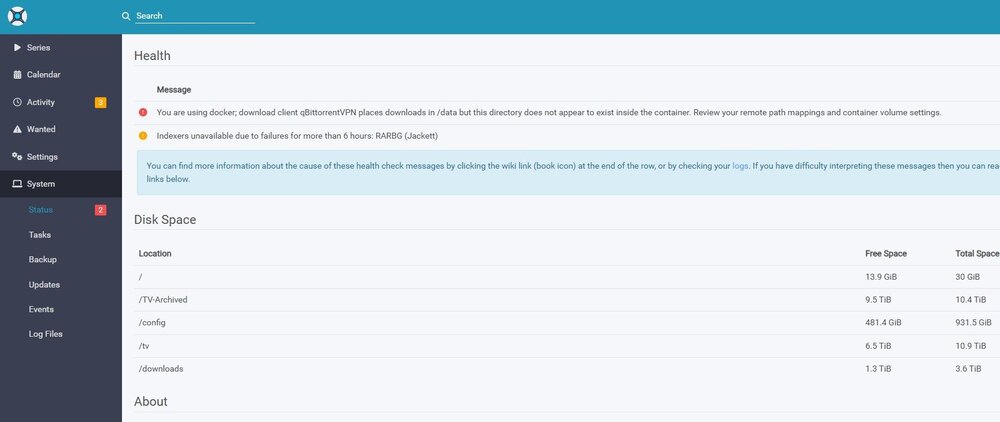
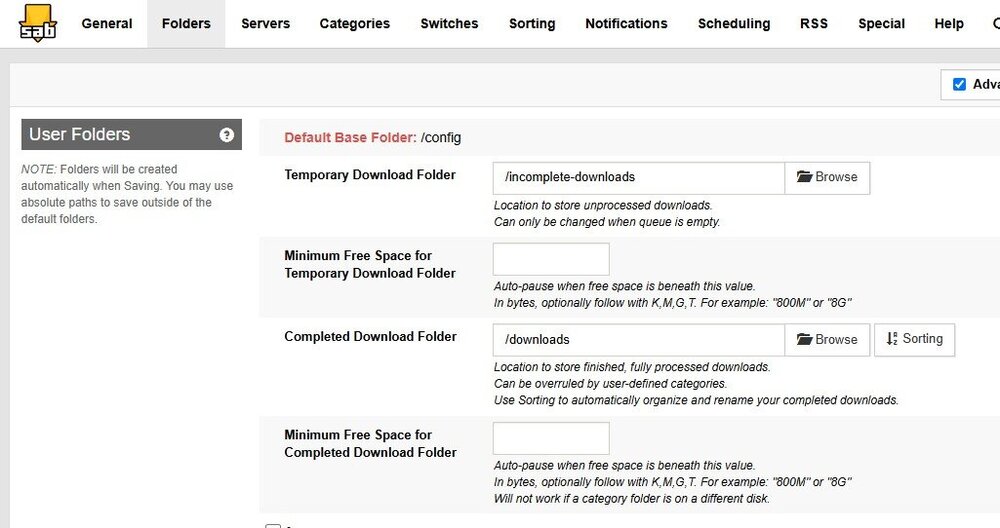
Well DANG! In all the time I've been using unraid and dockers, I don't think I've ever clicked the [EDIT] buttons. *facepalm* Changing those to /data and editing my SABnzb webUI settings to match fixed all the errors, but now I have nested duplicate download folders within my mnt/user/download directory. This isn't a huge deal, but it's odd. Anyway, on to step two.... The shows that I've moved to my external drive.... I added that path to the Sonarr container, and added that path to the root in the WebUI. What else do I need to do to get it to see them? They all show up as "missing episodes" right now. EDIT: So I think I figured out how to get the archived shows to show up correctly in Sonarr, but it's super tedious. I'm hoping one of you gurus has a better way. Basically, I go to the show, click edit, change the path to the archived path, save it, then refresh the show. That makes all the episodes show up correctly, but I really hope I won't have to do that for every show that I've moved, since that would take forever. lol
-
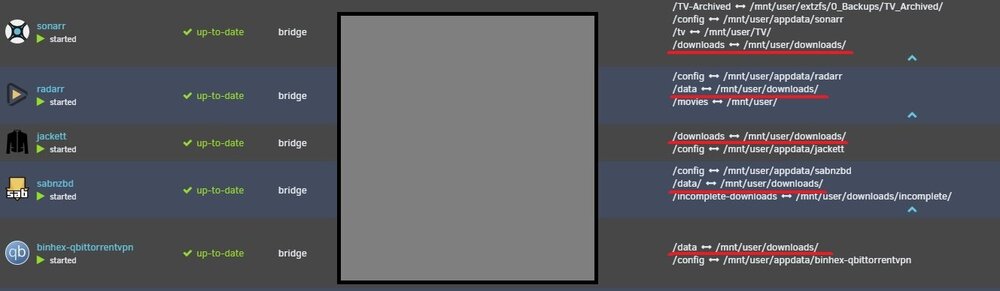
Unless I'm missing something (likely!), then this screenshot will confirm that I've set all the paths the same, no?
-
I think I did, but I'll check again. It's confusing, since they don't all use the same nomenclature for the templates. So where does this come in? Where would I use the "/downloads" path instead of the full "mnt/user/downloads/"?
-
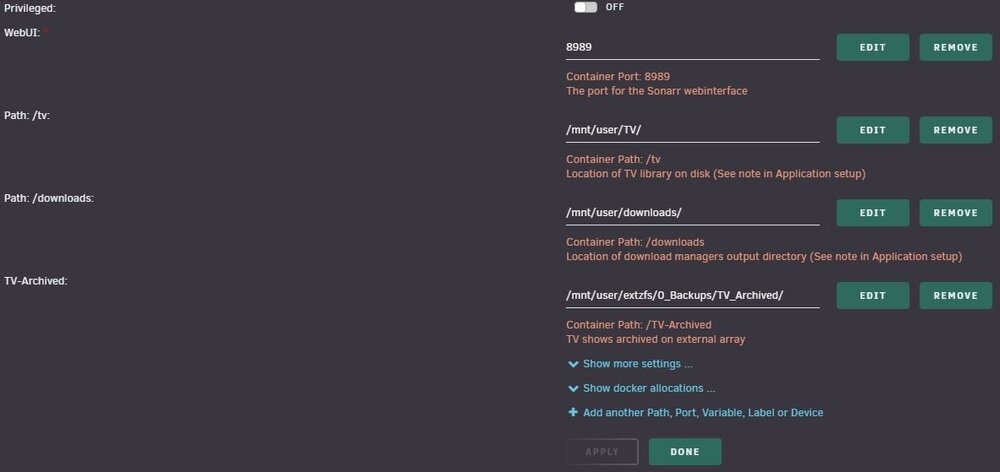
Would this be specified in the template or within the WebUI of the app itself? If in the template, then see the last screenshot above and tell me if that looks correct for the example of Sonarr. Those are the only options I have. If you mean within the webUI, then I'm not really sure where that needs to be set, sorry.
-
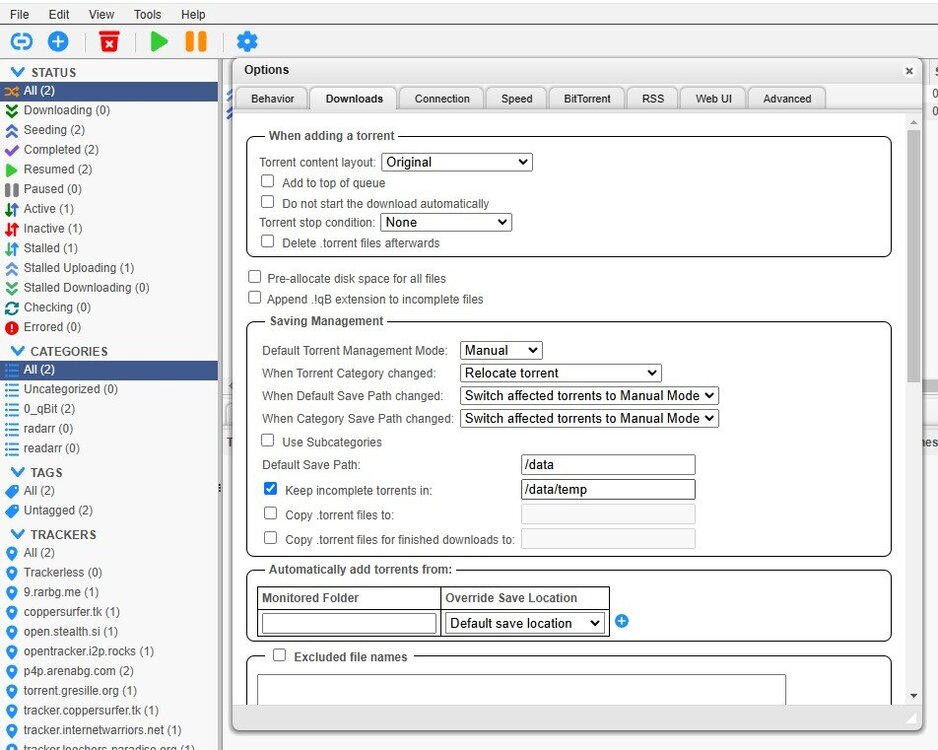
This is where I get lost. My template just doesn't look like that. Mine is like this: I don't see what else mine could be, other than what I currently have, which is not working. EDIT: I've gone back through all my *arrs and downloaders, and they all use /mnt/user/downloads. It seems I'm being consistent with the path, which is the main thing, right? I told you I struggled... lol
-
Sorry, I don't follow. I have no folder on my host system called "/data", to my knowledge. I know that's the preferred root structure, but as I mentioned, I set mine up before having the benefit of TRaSH's guides or any of the other tutorials that advocate that structure. At this point, it would be a huge issue to switch over, I think. If I'm reading correctly, this is saying basically the same as @Hogwind, right? The problem is, I don't see an option to set some of the parameters the way they're shown in all the examples and guides I read, including Q4. For example, it says... WORKING EXAMPLE sabnzbdvpn Host path is set to:- /mnt/cache/appdata/data/completed Container path is set to:- /data sonarr Host path is set to:- /mnt/cache/appdata/data/completed Container path is set to:- /data My Sab and Sonarr look very different. My host path isn't "cache/appdata" at all. For Sonarr, the template doesn't even ask for a /data location, it asks for "Path: /downloads:", which in my case is /mnt/user/downloads/ For Sab it's asking for "Container Path: /data/", and this one I've also always had as /mnt/user/downloads/ I realize I (obviously) have something wrong, I just can't seem to wrap my head around what it is, or why everything is suddenly broken, when it's all been working perfectly up until I tried to add that 2nd path into Sonarr. If someone is willing to do a little handholding here, and take into account that I struggle with understanding of mappings and paths, then I'd be very grateful.
-
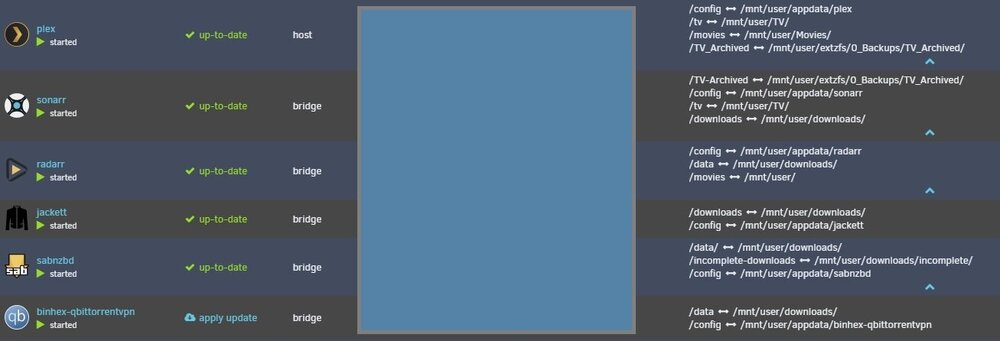
I'm so friggin' lost and confused right now... lol I had everything working great for almost a year, then I needed to move some older shows to my secondary (external) array. When I did, Sonarr (obviously) couldn't find those shows any more, and flagged them as missing. So I thought I was clever, and added an extra path to the container, pointing to the external share, then added that path as a root path. Well, during all that, I somehow broke something, and not only are my archived shows still showing up as missing, but now none of my *arrs work anymore, nor does SABnzb or qBT! I went back through the mappings and container settings, but I just can't figure out what I've done wrong. I know my structure isn't set up ideally, but at this point I think it would be a nightmare to set up "right" (ie using DATA as the "base" for all the shares), so I can't really use TRaSH's guide to help. I've tried all sorts of different combinations, but they all either throw errors, or fail to import downloads, or both. My current hot mess shows the following.... What else would you need to see to rescuse me? What else might you need to see/know in order to rescue me from myself? lol One of the oddest things is that when downloads complete, they just...vanish. I have searched all over, and I can't figure out where they're going. Neither can Sonarr.
-
Oh, sorry. I misunderstood. You said earlier "Please pull latest image at your convenience and switch back to openvpn." That implied WG in my mind, since it was the only alternative to OpenVPN, my mistake. Thanks for the awesome container and 1st class support!







