





FreeMan
Members
-
Joined
-
Last visited
Everything posted by FreeMan
-
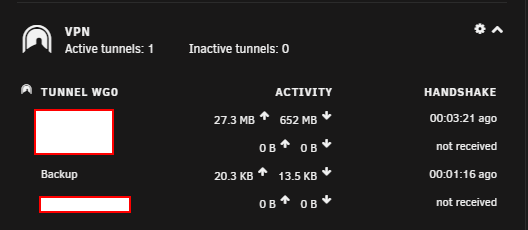
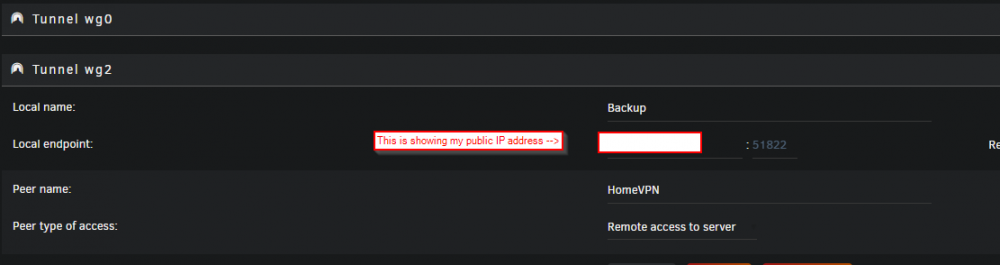
Thanks. Been a bit hectic lately so I'm just now getting back to this. After looking at my main server and thinking about it for a minute, I realize it says "Tunnel wg0" and that all my connections are listed there, so I do get it now. In my head, each device gets its own privately encrypted connection and I thought that was the "tunnel" - I guess I applied the wrong term. It doesn't really matter if everything's working, so I'll live with my current level of knowledge. It's not important enough to me today to get any deeper. I think I may have it working correctly now! This is what's showing on my main server: And this is what I have on Backup: I added a second tunnel on the Backup server and imported the config file, enabled the tunnel and immediately had a connection on my main "HomeVPN" side. It does show my public IP address in the Local endpoint, not the DNS name - do I want to change that? Also, I ended up adding the tunnel because when I first imported the config, it was "server to server" and that's not what I was after. I tried to delete the peer and import the new one, but it didn't seem to change the settings. I added the new tunnel (actually, 2, obviously, though I'm not sure why), imported the config file and it seems to be working. I just took a look at the wg0 tunnel and it's got no settings in it at all. I may try deleting wg2 and importing the config file into wg0 to see if it'll work. It seems that it would be cleaner with just the one tunnel instead of one unused one and the 2nd functional one. Thoughts on that?
-
Hmm... will have to look at that and scratch my head to see if/how/when I can understand that one. I was under the impression that each device connecting via VPN created its own tunnel to the host, I didn't realize that tunnels could be shared. Obviously, this young (that's my story and I'm sticking with it!) padawan has much to learn.
-
This makes sense and explains why it wasn't going to work the way I expected... Perfect, I'll do this! Can I edit the existing connection parameters to change that and have it Just Work™ or will I have to send a new connection config file from Main to Backup? (Or, if necessary, manually edit both ends to indicate "remote access to 'x'")? Not 100% sure I understand this: * Is the implication that there is but one tunnel into the system for all "Remote access to LAN" connections and that they all share it, or does each device get its own tunnel and I'm trying to read too much into your statement? * Also, by "router" I presume you meant "server" and that's just a typo, or do I really need to do something with the router at the far end?
-
I'm using rsync as detailed here: Working very well for me running it by hand. I need to get a nice little script set up and schedule it cron.
-
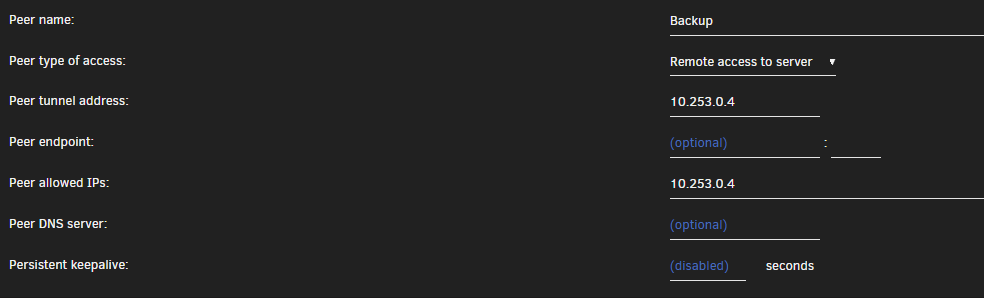
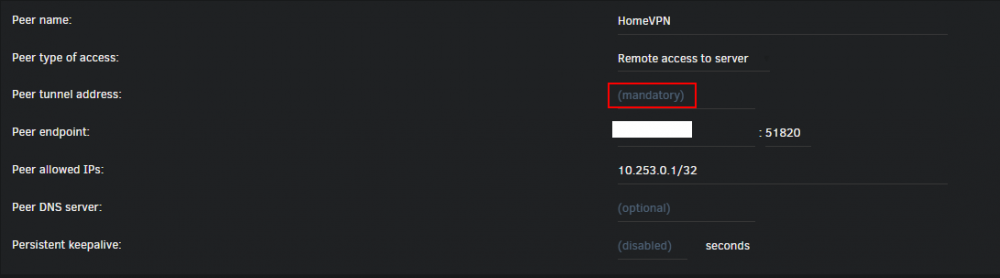
Which side initiates the connection request? i.e. for my phone, the phone initiates the connection and I have to have the port forwarded at home. Can I force the Backup machine to initiate the connection so the same port forward at home will cover all VPN connections, or is it somewhat of a lottery which server starts the server-to-server connection, thus ports have to be forwarded at both ends? I'm pretty certain I can get to the router at the other end to do the forward, but I'd prefer not to if I can avoid it. On the main server there's a 10.253.x.x IP address in the "peer tunnel address" and the same IP address is in the "Peer allowed IPs" entry. On the peer setup on Backup, which will be the "remote" box, I have the peer endpoint set to my DynDNS URL. There's a "peer tunnel address" which I have not configured, but the prompt text says it's mandatory. Do I put the "Peer allowed IPs" from the main server into the "peer tunnel address" on Backup? Here's the Backup server side of the config: And here's the main side: With this setup, it appears that they are talking to each other via the VPN, as shown on the VPN section of the Dashboard:

-
I got this set up on my main server and connected from my phone in no time! Very happy. I've added access for my laptop (I'll have to test this next time I leave my house) and will be adding in other family members soon, as well. My next step is to use this to connect to my off-site Backup server. I've used the ZeroTier docker, but frankly, I'd rather use this as everything will reside in my own server and it will be baked into the base OS sooner or later. I've created a "Backup" peer on my main server and set it up as "Server to Server" access. I clicked the eye and downloaded the config file. On the Backup server, I installed WG and added a peer by importing the config file from my main server. I can't test at the moment since the two boxes are sitting side by side while the initial backup completes. Was this the right process? Is there anything else that I'd need to do once Backup is back off-site? I remain impressed, overwhelmed and extremely pleased with the incredible support and features being built into unRAID, added via Dockers and plugins and the incredible support that I get here. Thanks!
-
I'm looking to start dabbling into home automation and I'm probably going to need a bit of hand holding, @balloob are you still maintaining things here? It seems there have been quite a few questions and people helping each other out, but that you've gone a bit silent. I'm not blaming you - taking on the support role is a huge commitment, I'm just wondering if you're still around.
-
I saw a link to this guy's site one one of the WireGuard install or support threads (don't recall which at the moment - I've been reading a fair bit). That links to another page on his site about setting up for being on vacation, including having multiple ways of sending a WOL packet to get the server back up and running should it be shut down by the UPS when the power goes out. Plus, plugins auto start when the server boots, so once it's rebooted, you'll have your VPN back.
-
Excellent point! I'm using Brave with "Shields" down. I just tested on both Chrome and FF and also had no issue. Very interesting... Brave is supposed to be built on the latest version of Chromium (minus all the tracking "features" built in by Google). TBH- this isn't a showstopper for me that will prevent me from using Brave. The items that won't expand are ones I almost never look at and if I do need to see them, I'll go look at the specific menus. Carry on, nothing significant to see here, though it may be an additional testing point for @bonienl for future releases.
-
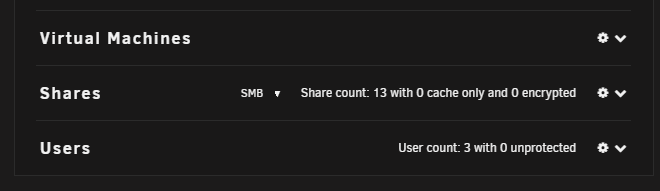
After my previous glowing report, I've noticed a small glitch. On the dashboard, several of the sections won't expand, for example: Clicking the down chevrons there has no effect. I can click the gears and it will go to the appropriate settings page, but no response to the chevrons. In addition to the three shown in the image, this is happening on these sections: * Main server (top left item) * Motherboard * Power * Airflow None of these are items that I normally have expanded and they were collapsed on 6.7.2 before I started the upgrade. The only one that wasn't expanded prior to the upgrade that does work now is the VPN section - it didn't exist under 6.7.2. nas-diagnostics-20191213-1100.zip
-
Reinstalled without issue. My SMB share to my backup server is there (even thought the backup server isn't plugged in at the moment). It's like magic... Thanks for continuing to support this and all the hard work you put in! If only every bit of software worked as well and were supported as well as unRAID and all its plugins and dockers are this would be a better world.
-
You know, you'd think I'd know that by now. Sorry 'bout that. Not going to do a reinstall until someone's perused this, just in case there's some trouble shooting to try first. nas-diagnostics-20191213-0711.zip
-
I just updated from unRAID 6.7.2 to 6.8.0 and discovered there's a nifty Plugin File Install Errors tab! Unfortunately, UD is currently listed there. I'm pretty sure that I was running the latest release of UD (whatever that one was). I'd had to power off the system due to a weird WebUI 504 error. When it came back up (yesterday morning), I got all sorts of notifications that plugins and dockers were updating (there had been about 3 days of notifications that updates were available, but none were updating - probably related to the general weirdness that had been going on) so I'm mostly certain UD was updated to a release as of yesterday. This is what I'm seeing now: Do I just go to the CA Apps "store" and reinstall it? Is there some trouble shooting that I can/should do first?

-
6.7.2 -> 6.8.0 smooth as silk! I did notice that there's a new Plugins | Plugin Install Errors tab. Oddly Unassigned Devices is listed there. I'll take that to the UD support thread.
-
Thanks, @TechMed. I've looked through that thread a couple of times. I've wanted the "Oh, carp. I just realized I made changes and now I need to go back to an older version" version of backup. But, in the last 10 years or so, I don't think I've ever gone back to recover an old version of a file, so maybe it's time to give rsync a 2nd look.
-
I set up a Backup server sitting right next to my Primary server. From Primary, I used UD to SMB mount a share on Backup, and I'm using Duplicati to run the backups from Primary to Backup. Backup had been assigned a static IP address and all was good. In preparation for moving Backup off-site I switched it from static to DHCP (I'm not sure of networking at its new home-to-be) and now Primary cannot access it via the UD mount point. This makes some sense to me since its IP address changed (though I'd specified the UD mount by name, not IP) - I believe this is because the DNS cache has not yet updated to recognize Backup at its new IP address. Having done this yesterday evening, this morning (about 12 hours later) it still wasn't properly recognizing the server at its new IP. (in UD, I clicked the mount point to browse and all it showed me was "parent folder"). This morning I unmounted and remounted the share (it took quite a while to unmount, but the remount went very quickly), and now I can properly browse the directory structure via UD's mount point share. A couple of questions: 1) Is it normally necessary to unmount/remount when an IP address changes or should I normally just have to wait out the DNS cache update? 2) Was it something else totally that was the issue here? 3) Once the server goes to its remote location, it will be on a totally different subnet as I will be using the great ZeroTier plug in to get the two of them to talk to each other, I presume that going from a 192.168.* address to a 172.29.* address will not have any impact on UD's ability to map this, correct? 4) Is SMB the best option for having the 2 servers talk to each other, or would I be better off using an NFS mount? (If so, I'd probably keep the SMB mount in order to be able to browse via Windows, just because I can.) Thanks (again, I hope) for picking this up and continuing to run with it!
-
Thanks for digging into it - this seems like a good option. To the uninformed and/or uninitiated, "start on sector boundary 64" instead of "start on sector boundary 1" screams "OhMerGersh I'm not getting full use of my disk!!!". Considering it's an 8TB drive, even if that is true, it's a minor loss at worst... This sounds really handy and I'll be sure to use it for my next preclear! I know you're not after bells and whistles, so let's just call this "a random glitter that worked its way in, cause that's what glitter does".
-
Awesome! Thanks for the links and the reassurances. I'm going to say that the new docker is a success! The only thing you may want to recommend is using the -A flag on larger (i.e. currently normal sized) drives.
-
Even before the post-read completed, Unassigned Devices is reporting: I'd take that as a positive sign! It seems that the `-A` parameter made the difference. This time it was 40:44:43. Sooooooo much slower. ========================================================================1.18 == invoked as: /usr/local/bin/preclear_binhex.sh -f -A /dev/sdc == ST8000NM0055-1RM112 ZA1FS9VW == Disk /dev/sdc has been successfully precleared == with a starting sector of 1 == Ran 1 cycle == == Using :Read block size = 1000448 Bytes == Last Cycle's Pre Read Time : 14:02:00 (158 MB/s) == Last Cycle's Zeroing time : 12:17:22 (180 MB/s) == Last Cycle's Post Read Time : 14:24:22 (154 MB/s) == Last Cycle's Total Time : 40:44:43 == == Total Elapsed Time 40:44:43 == == Disk Start Temperature: 31C == == Current Disk Temperature: 32C, == ============================================================================ ** Changed attributes in files: /tmp/smart_start_sdc /tmp/smart_finish_sdc ATTRIBUTE NEW_VAL OLD_VAL FAILURE_THRESHOLD STATUS RAW_VALUE Raw_Read_Error_Rate = 66 83 44 near_thresh 3626020 Seek_Error_Rate = 79 78 45 ok 74098720 Spin_Retry_Count = 100 100 97 near_thresh 0 End-to-End_Error = 100 100 99 near_thresh 0 Airflow_Temperature_Cel = 68 69 40 ok 32 Temperature_Celsius = 32 31 0 ok 32 Hardware_ECC_Recovered = 66 83 0 ok 3626020 No SMART attributes are FAILING_NOW 0 sectors were pending re-allocation before the start of the preclear. 0 sectors were pending re-allocation after pre-read in cycle 1 of 1. 0 sectors were pending re-allocation after zero of disk in cycle 1 of 1. 0 sectors are pending re-allocation at the end of the preclear, the number of sectors pending re-allocation did not change. 0 sectors had been re-allocated before the start of the preclear. 0 sectors are re-allocated at the end of the preclear, the number of sectors re-allocated did not change. ============================================================================ All looks good to me, but what does "near_thresh" mean: Raw_Read_Error_Rate = 66 83 44 near_thresh 3626020 Spin_Retry_Count = 100 100 97 near_thresh 0 End-to-End_Error = 100 100 99 near_thresh 0 And out would these counts be near threshold this early in the disk's life? Is that something to be concerned about? They're the exact same numbers as in the report from the 1st preclear. (Well, the first one to complete...) Actually, I just realized that the "Raw_Read_Error_Rate" was OK after the first run and is now "near_thresh" after this 2nd run. I've added it to the call-out. Is that something to be concerned about?

-
We'll see what happens... The drive does not show up in Unassigned Devices - is that to be expected? I was going to look there to see what it thought of the drive, but no love.
-
40 hours 37 minutes 3 seconds later... ========================================================================1.18 == invoked as: /usr/local/bin/preclear_binhex.sh -f /dev/sdc == ST8000NM0055-1RM112 ZA1FS9VW == Disk /dev/sdc has been successfully precleared == with a starting sector of 1 == Ran 1 cycle == == Using :Read block size = 1000448 Bytes == Last Cycle's Pre Read Time : 14:00:01 (158 MB/s) == Last Cycle's Zeroing time : 12:18:43 (180 MB/s) == Last Cycle's Post Read Time : 14:17:20 (155 MB/s) == Last Cycle's Total Time : 40:37:03 == == Total Elapsed Time 40:37:03 == == Disk Start Temperature: 31C == == Current Disk Temperature: 32C, == ============================================================================ ** Changed attributes in files: /tmp/smart_start_sdc /tmp/smart_finish_sdc ATTRIBUTE NEW_VAL OLD_VAL FAILURE_THRESHOLD STATUS RAW_VALUE Raw_Read_Error_Rate = 83 82 44 ok 217697608 Seek_Error_Rate = 77 76 45 ok 55541351 Spin_Retry_Count = 100 100 97 near_thresh 0 End-to-End_Error = 100 100 99 near_thresh 0 Airflow_Temperature_Cel = 68 69 40 ok 32 G-Sense_Error_Rate = 99 100 0 ok 2432 Temperature_Celsius = 32 31 0 ok 32 Hardware_ECC_Recovered = 83 82 0 ok 217697608 No SMART attributes are FAILING_NOW 0 sectors were pending re-allocation before the start of the preclear. 0 sectors were pending re-allocation after pre-read in cycle 1 of 1. 0 sectors were pending re-allocation after zero of disk in cycle 1 of 1. 0 sectors are pending re-allocation at the end of the preclear, the number of sectors pending re-allocation did not change. 0 sectors had been re-allocated before the start of the preclear. 0 sectors are re-allocated at the end of the preclear, the number of sectors re-allocated did not change. ============================================================================ Also: parted -l Model: ATA ST8000NM0055-1RM (scsi) Disk /dev/sdc: 8002GB Sector size (logical/physical): 512B/4096B Partition Table: msdos Disk Flags: Number Start End Size Type File system Flags So it does recognize that it's an 8TB drive. The partition table of "msdos" is a little disconcerting, the others are showing gpt. The others also show partitions under the table listing at the bottom and a file system of "xfs". I would presume at this point that these differences are due to the fact that the disk hasn't been formatted yet. Any thoughts, comments or concerns, or should I just shove it in the array now with a variety of lessons learned?
-
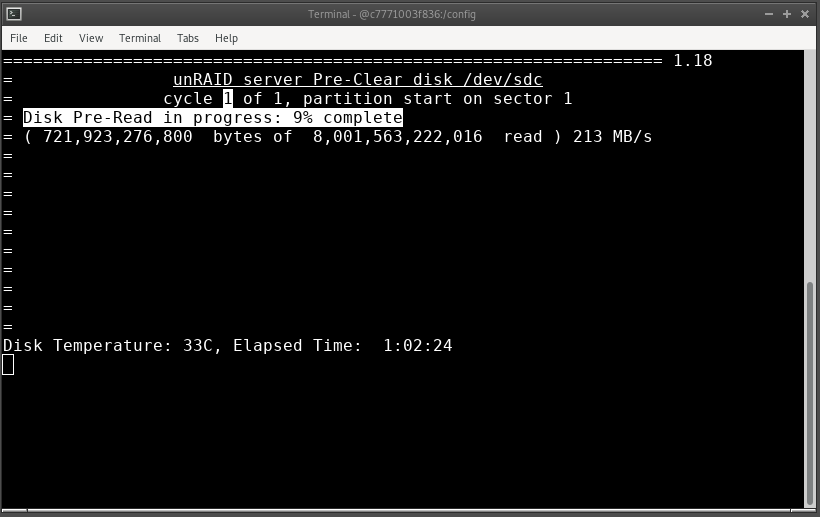
Well, the docker updated on me last night in the middle of a preclear - when last I looked, it was 98% done with the preread. On the bright side, I got to run sfdisk -l /dev/sdX as you suggested, and this is what it gave me: [root@b377c9e81bea /]# sfdisk -l /dev/sdc Disk /dev/sdc: 7.3 TiB, 8001563222016 bytes, 15628053168 sectors Disk model: ST8000NM0055-1RM Units: sectors of 1 * 512 = 512 bytes Sector size (logical/physical): 512 bytes / 4096 bytes I/O size (minimum/optimal): 4096 bytes / 4096 bytes Disklabel type: dos Disk identifier: 0x00000000 Device Boot Start End Sectors Size Id Type /dev/sdc1 1 4294967295 4294967295 2T 0 Empty Partition 1 does not start on physical sector boundary. It still shows a 2TB partition. Starting the preclear for the... 3rd(?) time...
-
too late...
-
Slightly more disturbing is the output of preclear_binhex.sh -f /dev/sdc Why does it have one partition of 2TB? I've got 2.4TB of free space left in my data array, so I'm restarting the preclear again. This will be finished before I manage to fill that up.
-
Just because I had read it once did not mean that this little detail stuck with me several days later when the drive arrived and it was actually time to kick off the preclear. OK. The not-so-comedy of errors continues... It was nearly done - about 30% into the post-read. Honestly, this is the fastest I've ever had a disk preclear (in my memory). It was around 29 hours for an 8TB drive and it was doing the post read at about 200MB/s. I was trying to capture the whole text output to paste here to brag. Instead of hitting ctrl-shift-c to copy the selected text, it seems I hit ctrl-c and aborted the script. I did preclear_binhex.sh -t /dev/sdc to confirm that it was, in fact, precleared. At the end of the output, I get this: With the "Partition 1..." message highlighted in red. Obviously, the disk is cleared. Should I have any concern about the "Partition 1..." message? The original invocation was preclear_binhex.sh -f /dev/sdc exactly as specified in the instructions. I didn't set any other parameters or options.




