





okkies
Members
-
Joined
-
Last visited
Everything posted by okkies
-
perhaps because this patch needs to be included in the kernel? https://lore.kernel.org/lkml/[email protected]/T/ i have the same issue
-
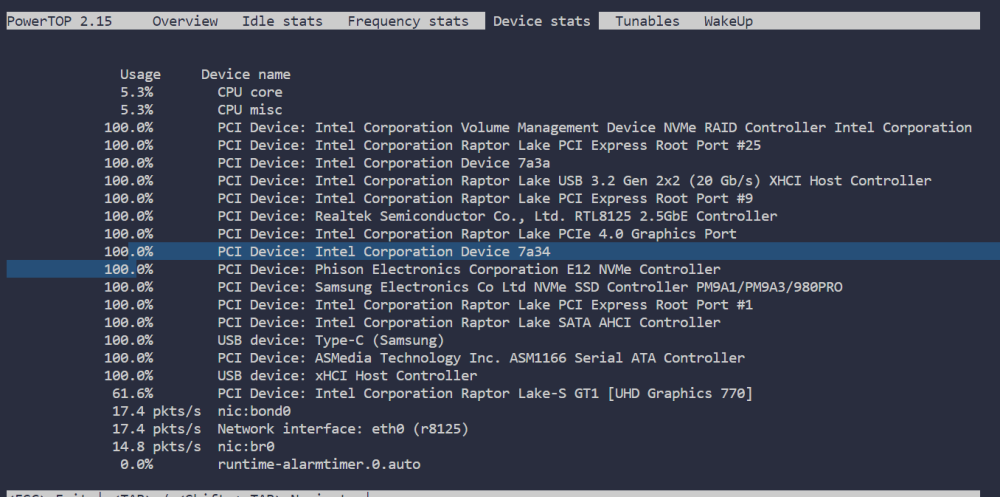
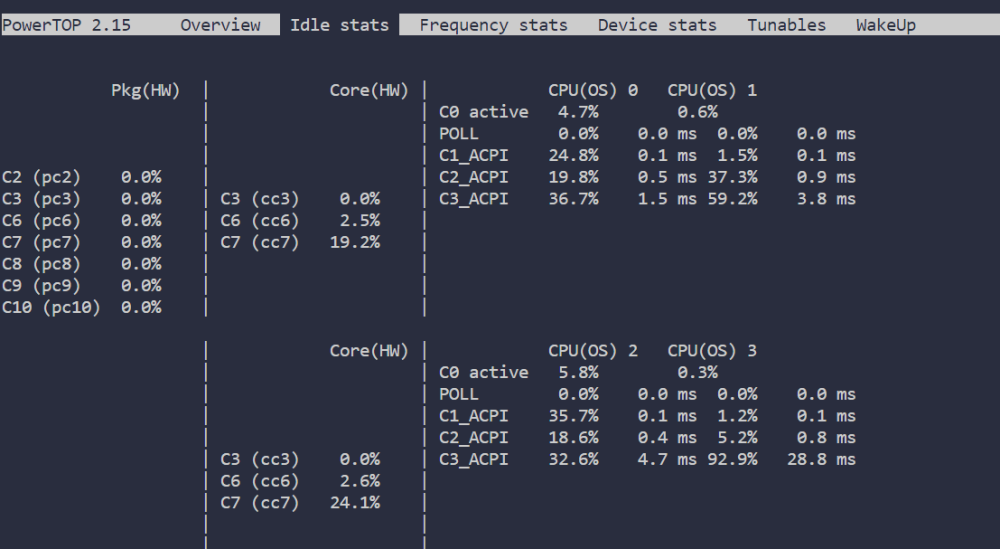
root@Unraid:~# powertop --auto-tune modprobe cpufreq_stats failed Loaded 0 prior measurements Cannot load from file /var/cache/powertop/saved_parameters.powertop File will be loaded after taking minimum number of measurement(s) with battery only RAPL device for cpu 0 RAPL Using PowerCap Sysfs : Domain Mask 5 RAPL device for cpu 0 RAPL Using PowerCap Sysfs : Domain Mask 5 Devfreq not enabled glob returned GLOB_ABORTED Cannot load from file /var/cache/powertop/saved_parameters.powertop File will be loaded after taking minimum number of measurement(s) with battery only Leaving PowerTOP i keep getting this if i do anything with powertop: Q1: modprobe cpufreq_stats fail <-- is this an issue? Q2 100% is bad right? Q2.2 but this is all good right ? root@Unraid:~# lspci -vv | awk '/ASPM/{print $0}' RS= | grep --color -P '(^[a-z0-9:.]+|ASPM )' 00:06.0 PCI bridge: Intel Corporation Raptor Lake PCIe 4.0 Graphics Port (rev 01) (prog-if 00 [Normal decode]) LnkCap: Port #5, Speed 16GT/s, Width x4, ASPM L0s L1, Exit Latency L0s <4us, L1 <16us LnkCtl: ASPM L1 Enabled; RCB 64 bytes, Disabled- CommClk+ 00:1a.0 PCI bridge: Intel Corporation Raptor Lake PCI Express Root Port #25 (rev 11) (prog-if 00 [Normal decode]) LnkCap: Port #25, Speed 16GT/s, Width x4, ASPM L0s L1, Exit Latency L0s <1us, L1 <4us LnkCtl: ASPM L0s L1 Enabled; RCB 64 bytes, Disabled- CommClk- 00:1b.0 PCI bridge: Intel Corporation Raptor Lake PCI Express Root Port #17 (rev 11) (prog-if 00 [Normal decode]) LnkCap: Port #17, Speed 8GT/s, Width x1, ASPM L0s L1, Exit Latency L0s <1us, L1 <4us LnkCtl: ASPM L0s L1 Enabled; RCB 64 bytes, Disabled- CommClk- 00:1c.0 PCI bridge: Intel Corporation Raptor Lake PCI Express Root Port #1 (rev 11) (prog-if 00 [Normal decode]) LnkCap: Port #1, Speed 8GT/s, Width x1, ASPM L0s L1, Exit Latency L0s <1us, L1 <4us LnkCtl: ASPM L0s L1 Enabled; RCB 64 bytes, Disabled- CommClk- 00:1c.2 PCI bridge: Intel Corporation Device 7a3a (rev 11) (prog-if 00 [Normal decode]) LnkCap: Port #3, Speed 8GT/s, Width x1, ASPM L1, Exit Latency L1 <64us LnkCtl: ASPM L1 Enabled; RCB 64 bytes, Disabled- CommClk+ 00:1d.0 PCI bridge: Intel Corporation Raptor Lake PCI Express Root Port #9 (rev 11) (prog-if 00 [Normal decode]) LnkCap: Port #9, Speed 16GT/s, Width x4, ASPM L1, Exit Latency L1 <64us LnkCtl: ASPM L1 Enabled; RCB 64 bytes, Disabled- CommClk+ 00:1d.4 PCI bridge: Intel Corporation Device 7a34 (rev 11) (prog-if 00 [Normal decode]) LnkCap: Port #13, Speed 16GT/s, Width x4, ASPM L1, Exit Latency L1 <64us LnkCtl: ASPM L1 Enabled; RCB 64 bytes, Disabled- CommClk+ 01:00.0 Non-Volatile memory controller: Samsung Electronics Co Ltd NVMe SSD Controller PM9A1/PM9A3/980PRO (prog-if 02 [NVM Express]) pcilib: sysfs_read_vpd: read failed: No such device LnkCap: Port #0, Speed 16GT/s, Width x4, ASPM L1, Exit Latency L1 <64us LnkCtl: ASPM L1 Enabled; RCB 64 bytes, Disabled- CommClk+ 05:00.0 Ethernet controller: Realtek Semiconductor Co., Ltd. RTL8125 2.5GbE Controller (rev 05) LnkCap: Port #0, Speed 5GT/s, Width x1, ASPM L0s L1, Exit Latency L0s unlimited, L1 <64us LnkCtl: ASPM L1 Enabled; RCB 64 bytes, Disabled- CommClk+ 06:00.0 SATA controller: ASMedia Technology Inc. ASM1166 Serial ATA Controller (rev 02) (prog-if 01 [AHCI 1.0]) LnkCap: Port #0, Speed 8GT/s, Width x2, ASPM L0s L1, Exit Latency L0s <4us, L1 <64us LnkCtl: ASPM L1 Enabled; RCB 64 bytes, Disabled- CommClk+ 07:00.0 Non-Volatile memory controller: Phison Electronics Corporation E12 NVMe Controller (rev 01) (prog-if 02 [NVM Express]) LnkCap: Port #0, Speed 8GT/s, Width x4, ASPM L1, Exit Latency L1 <64us LnkCtl: ASPM L1 Enabled; RCB 64 bytes, Disabled- CommClk+ sometimes i see it go into C2. but mostly its all on 0.0
-
hi, maybe im just a docker-compose noob. but could we ad a functionality to add a dockerfile to a project ? or am i doing it wrong anyways ?dockerfile.dockerfile docker-compose.yml
-
sure to the dockers and all its easy and fine, but how do you forward that same cloudflared tunnel to unraid itself ? i had it working in the cloudflared app via home assistant. but now im trying to fully move to unraid. Everything works, except a tunnel to unraid itself, not even the server addon generated url's work
-
sure, fine, but i want to do all that via the cloudflared tunnel. even if its the myservers long url. fine with me. how do i do that? i had an cloudflared app running trough home assistant, there the cloudflared tunnel to unraid worked fine. but as a docker within unraid it does not
-
Maybe forward Zigbee2mqtt towards an raspberry pi solution ? now i understand the format of these kind of things... https://uzg.zig-star.com/ https://zig-star.com/projects/ https://mind.in.ua/ (support for ukraine <3) (not affiliated)
-
(i got here while my mind wandered during learning for AZ-800 :P) cool concept. but how does Refs handle power effeciency ? will it spin down disks? at the moment unraid is more or less a fight against power usage
-
if anyone would make a youtube video for this or unraid would build something for this to make it Way easier i would be soooooo happy.... @SpaceInvaderOne ... wink wink nudge nudge....
-
found the error: as posted above i did it like this: kernel /bzimage append initrd=/bzroot pcie_aspm=off append isolcpus=8-11 initrd=/bzroot i changed it to this: kernel /bzimage append isolcpus=8-11 pci=noaer initrd=/bzroot makes more sense tbh
-
it came back in version 6.12.2, regardless of what i entered in the flass boot ... thingy
-
kernel /bzimage append initrd=/bzroot pcie_aspm=off append isolcpus=8-11 initrd=/bzroot i still get the same errors Jun 16 23:12:03 Unraid kernel: pcieport 0000:00:01.0: AER: Multiple Corrected error received: 0000:01:00.0 Jun 16 23:12:03 Unraid kernel: vfio-pci 0000:01:00.0: PCIe Bus Error: severity=Corrected, type=Data Link Layer, (Transmitter ID) Jun 16 23:12:03 Unraid kernel: vfio-pci 0000:01:00.0: device [10de:1c82] error status/mask=00001000/0000a000 (pci device is an working nvidia gpu, im using it as we speak to write) unraid-diagnostics-20230616-2318.zip
-
I cant really find what error i have after updating. something with a pci device Jun 16 11:05:05 Unraid kernel: vfio-pci 0000:01:00.0: AER: Error of this Agent is reported first Jun 16 11:05:05 Unraid kernel: vfio-pci 0000:01:00.1: PCIe Bus Error: severity=Corrected, type=Data Link Layer, (Transmitter ID) Jun 16 11:05:05 Unraid kernel: vfio-pci 0000:01:00.1: device [10de:0fb9] error status/mask=00001000/0000a000 Jun 16 11:05:05 Unraid kernel: vfio-pci 0000:01:00.1: [12] Timeout - after reboots, it takes about 20/30 minutes for the error log to fill up to 100% unraid-diagnostics-20230616-1213.zip
-
Hope everything's going great on your end. I've got a tiny feature request that I think would make a big difference for us Unraid users. It would be super cool if we could add SMBIOS configuration options to the Unraid GUI. That way, we can easily set custom info like the manufacturer, product name, version, and serial number for our VMs. Right now, we have to manually edit the libvirt XML config and use <qemu:commandline> elements, which can be a bit of a pain. Here's an example of the current situation: <domain type='kvm' xmlns:qemu='http://libvirt.org/schemas/domain/qemu/1.0'> ... (rest of the configuration) ... <qemu:commandline> <qemu:arg value='-smbios'/> <qemu:arg value='type=1,manufacturer=NotApple,product=Testmachine,version=1.000,serial=343434-1234-5678-9123'/> </qemu:commandline> </domain> A simple GUI section for SMBIOS options would make life so much easier and let us set up our VMs in a snap. Ideally, the Unraid GUI could include fields for entering the manufacturer, product name, version, and serial number, and the resulting XML would look something like this: <domain type='kvm'> ... (rest of the configuration) ... <smbios> <type1 manufacturer='NotApple' product='Testmachine' version='1.000' serial='80533-1234-5678-9123'/> </smbios> </domain> Since it's a small feature, I'm guessing it wouldn't take too long to implement. It'd be amazing to see this in the next Unraid update (pretty please?). Thanks for considering this idea, and keep up the awesome work on Unraid! XOXO,
-
to find your docker container id docker ps to kill or stop the container docker stop container <container number> docker kill container <container number> remotely run the script using SSH ssh root@<remoteserverip> "docker stop container <containerID>" Sause: https://www.cyberciti.biz/faq/linux-unix-osx-bsd-ssh-run-command-on-remote-machine-server/ you have to setup ssh to login without the password tough, forgot how to do that, but google/ chatgpt is your friend: for windows: ssh-keygen type C:\Users\username\.ssh\id_rsa.pub | ssh user@hostname 'mkdir -p ~/.ssh && cat >> ~/.ssh/authorized_keys'
-
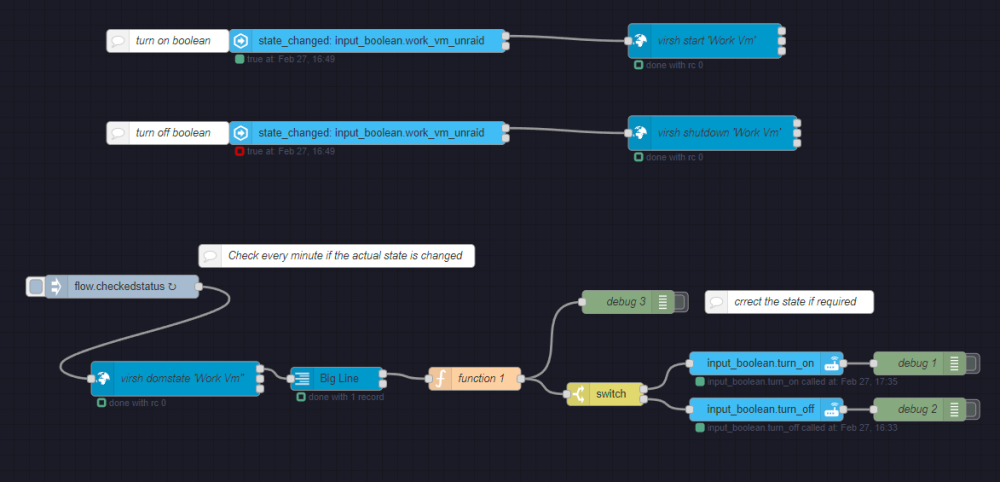
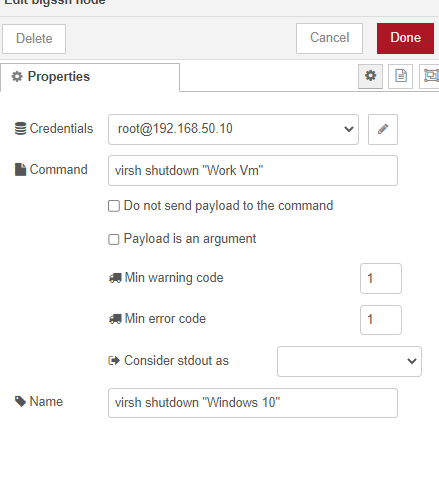
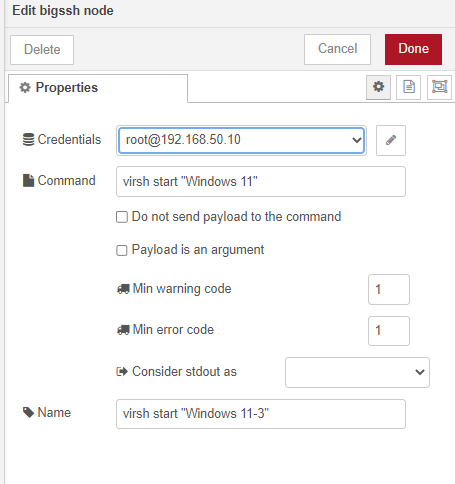
we can start an array with: #!/bin/bash emcmd cmdStart=Start and stop an array with #!/bin/bash emcmd cmdStop=Stop (source) https://forums.unraid.net/topic/79924-startstop-array-via-cli/ i dont know how you can see the current status. if you can figure out the current status of the array. perhaps it you can find it here. https://wiki.unraid.net/Console beside that, i done something remotely similair just now. ive made an node-red automation in home assistant that checks if a VM is active, and if its active using Virsh domstate it sets the state. (bottom part) Or when i manually change the state the VM will turn itself on or off (top 2 smaller parts) Ive exported what i made, you can directly import this in Node-red, also install these pallets "node-red-contrib-bigssh" "node-red-contrib-bigline" then you can import this module to set it up. [{"id":"143dd69542798222","type":"tab","label":"Set state of VM workstation","disabled":false,"info":"","env":[]},{"id":"d3b7983c.c97908","type":"bigssh","z":"143dd69542798222","name":"virsh domstate 'Work Vm\"","commandLine":"virsh domstate 'Work Vm'","commandArgs":"","minError":1,"minWarning":1,"noStdin":false,"format":"","payloadIsArg":true,"myssh":"3a26c7d9be25c952","x":270,"y":1240,"wires":[["477828b0.0ecb68"],[],[]]},{"id":"7a7fdea4.2ec13","type":"inject","z":"143dd69542798222","name":"","props":[{"p":"payload"},{"p":"topic","vt":"str"}],"repeat":"120","crontab":"","once":false,"onceDelay":0.1,"topic":"","payload":"checkedstatus","payloadType":"flow","x":200,"y":1120,"wires":[["d3b7983c.c97908"]]},{"id":"477828b0.0ecb68","type":"bigline","z":"143dd69542798222","name":"","filename":"","format":"utf8","keepEmptyLines":false,"x":480,"y":1240,"wires":[["57e4f6a28403bb1c"],[]]},{"id":"57d1bc03d78f8cc6","type":"debug","z":"143dd69542798222","name":"debug 1","active":false,"tosidebar":true,"console":false,"tostatus":false,"complete":"payload","targetType":"msg","statusVal":"","statusType":"auto","x":1240,"y":1220,"wires":[]},{"id":"c0f2ca54619b43a6","type":"api-call-service","z":"143dd69542798222","name":"","server":"424d958a.550f6c","version":5,"debugenabled":false,"domain":"input_boolean","service":"turn_on","areaId":[],"deviceId":[],"entityId":["input_boolean.work_vm_unraid"],"data":"","dataType":"jsonata","mergeContext":"","mustacheAltTags":false,"outputProperties":[],"queue":"none","x":1040,"y":1220,"wires":[["57d1bc03d78f8cc6"]]},{"id":"69e280abb4bb2501","type":"api-call-service","z":"143dd69542798222","name":"","server":"424d958a.550f6c","version":5,"debugenabled":false,"domain":"input_boolean","service":"turn_off","areaId":[],"deviceId":[],"entityId":["input_boolean.work_vm_unraid"],"data":"","dataType":"jsonata","mergeContext":"","mustacheAltTags":false,"outputProperties":[],"queue":"none","x":1040,"y":1280,"wires":[["2918880847aead4b"]]},{"id":"2918880847aead4b","type":"debug","z":"143dd69542798222","name":"debug 2","active":false,"tosidebar":true,"console":false,"tostatus":false,"complete":"payload","targetType":"msg","statusVal":"","statusType":"auto","x":1240,"y":1280,"wires":[]},{"id":"57e4f6a28403bb1c","type":"function","z":"143dd69542798222","name":"function 1","func":"var state = msg.payload.trim(); // trim the output to remove any extra whitespaces\nif (state === 'running') {\n msg.payload = 'Running';\n} else if (state === 'shut off') {\n msg.payload = 'Shut off';\n} else {\n msg.payload = 'Unknown';\n}\nreturn msg;\n","outputs":1,"noerr":0,"initialize":"","finalize":"","libs":[],"x":660,"y":1240,"wires":[["074f53b1651d9286","a7a8ce0300c31706"]]},{"id":"074f53b1651d9286","type":"debug","z":"143dd69542798222","name":"debug 3","active":false,"tosidebar":true,"console":false,"tostatus":false,"complete":"payload","targetType":"msg","statusVal":"","statusType":"auto","x":860,"y":1140,"wires":[]},{"id":"a7a8ce0300c31706","type":"switch","z":"143dd69542798222","name":"","property":"payload","propertyType":"msg","rules":[{"t":"eq","v":"Running","vt":"str"},{"t":"eq","v":"Shut off","vt":"str"}],"checkall":"true","repair":false,"outputs":2,"x":830,"y":1260,"wires":[["c0f2ca54619b43a6"],["69e280abb4bb2501"]]},{"id":"ed1f89c48c5cd42c","type":"bigssh","z":"143dd69542798222","name":"virsh start 'Work Vm'","commandLine":"virsh start 'Work Vm'","commandArgs":"","minError":1,"minWarning":1,"noStdin":false,"format":"","payloadIsArg":true,"myssh":"3a26c7d9be25c952","x":960,"y":800,"wires":[[],[],[]]},{"id":"aa22a57b149a4984","type":"bigssh","z":"143dd69542798222","name":"virsh shutdown 'Work Vm'","commandLine":"virsh shutdown 'Work Vm'","commandArgs":"","minError":1,"minWarning":1,"noStdin":false,"format":"","payloadIsArg":true,"myssh":"3a26c7d9be25c952","x":970,"y":920,"wires":[[],[],[]]},{"id":"ba95c1fa3e19dec9","type":"server-state-changed","z":"143dd69542798222","name":"","server":"424d958a.550f6c","version":4,"exposeToHomeAssistant":false,"haConfig":[{"property":"name","value":""},{"property":"icon","value":""}],"entityidfilter":"input_boolean.work_vm_unraid","entityidfiltertype":"exact","outputinitially":true,"state_type":"habool","haltifstate":"false","halt_if_type":"bool","halt_if_compare":"is","outputs":2,"output_only_on_state_change":true,"for":"0","forType":"num","forUnits":"minutes","ignorePrevStateNull":false,"ignorePrevStateUnknown":false,"ignorePrevStateUnavailable":false,"ignoreCurrentStateUnknown":true,"ignoreCurrentStateUnavailable":true,"outputProperties":[{"property":"payload","propertyType":"msg","value":"","valueType":"entityState"},{"property":"data","propertyType":"msg","value":"","valueType":"eventData"},{"property":"topic","propertyType":"msg","value":"","valueType":"triggerId"}],"x":520,"y":920,"wires":[["aa22a57b149a4984"],[]]},{"id":"42e9f73e317e6bbf","type":"server-state-changed","z":"143dd69542798222","name":"","server":"424d958a.550f6c","version":4,"exposeToHomeAssistant":false,"haConfig":[{"property":"name","value":""},{"property":"icon","value":""}],"entityidfilter":"input_boolean.work_vm_unraid","entityidfiltertype":"exact","outputinitially":true,"state_type":"habool","haltifstate":"true","halt_if_type":"bool","halt_if_compare":"is","outputs":2,"output_only_on_state_change":true,"for":"0","forType":"num","forUnits":"minutes","ignorePrevStateNull":false,"ignorePrevStateUnknown":false,"ignorePrevStateUnavailable":false,"ignoreCurrentStateUnknown":true,"ignoreCurrentStateUnavailable":true,"outputProperties":[{"property":"payload","propertyType":"msg","value":"","valueType":"entityState"},{"property":"data","propertyType":"msg","value":"","valueType":"eventData"},{"property":"topic","propertyType":"msg","value":"","valueType":"triggerId"}],"x":520,"y":800,"wires":[["ed1f89c48c5cd42c"],[]]},{"id":"663084b0f96e0085","type":"comment","z":"143dd69542798222","name":"Check every minute if the actual state is changed","info":"","x":480,"y":1080,"wires":[]},{"id":"948684c228ff774f","type":"comment","z":"143dd69542798222","name":"crrect the state if required","info":"","x":1070,"y":1140,"wires":[]},{"id":"f13982d83493ba22","type":"comment","z":"143dd69542798222","name":"turn on boolean","info":"","x":260,"y":800,"wires":[]},{"id":"983a68fed78f959e","type":"comment","z":"143dd69542798222","name":"turn off boolean","info":"","x":260,"y":920,"wires":[]},{"id":"3a26c7d9be25c952","type":"SSH_Credentials","host":"192.168.30.14","port":"22","userlabel":"[email protected]"},{"id":"424d958a.550f6c","type":"server","name":"Home Assistant","addon":true}]
-
im also in the same boat. but i wanted to keep my IPGU for plex due to intel quicksync. i have an Nvidia gtx 1050TI in idle with the VM that utalises this gpu it gives me a tax of 15 KWH on top of my normal system. i might look arround for another device with lower a lower idle tax im thinking of down/upgrading to a GTX 1630 to maybe lower this idle power consumption
-
temps, i dunno i got an corsair H115I or something like that. it just works. its not that high. your current cooler will probaly be fine. the powerconsumption is actually pretty high for me on idle. something like 100/150 KWH. using 8 disks and 3 SSD's. i currently have a gaming/nas rig. and thinking of splitting the machine back to 2 machines. and giving the NAS some Intel 13 or 12 gen CPU. just to save on idle power consumption. but cant find any numbers on this forum
-
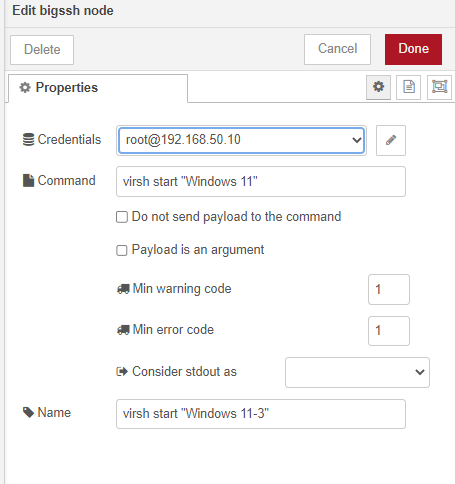
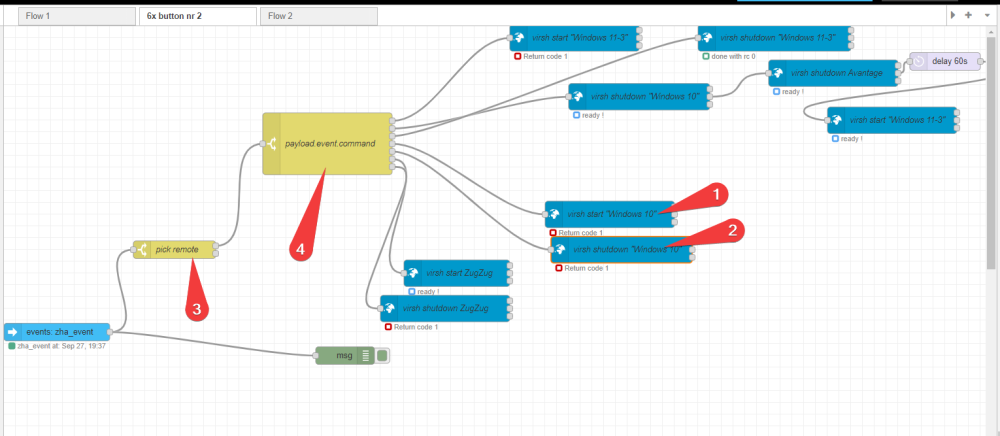
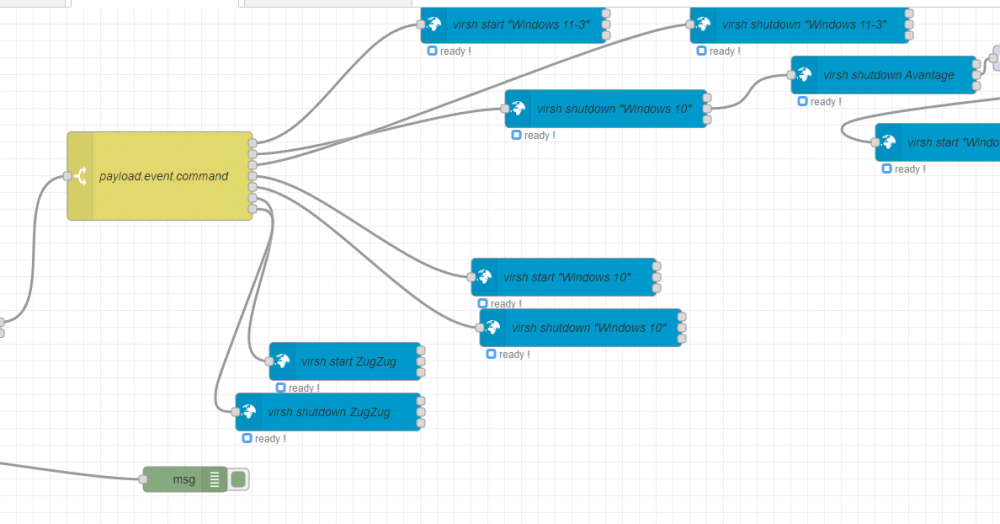
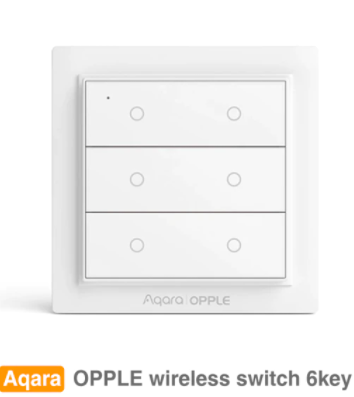
no i ditched this, and solved my problem using nodered and some zigbee buttons:
-
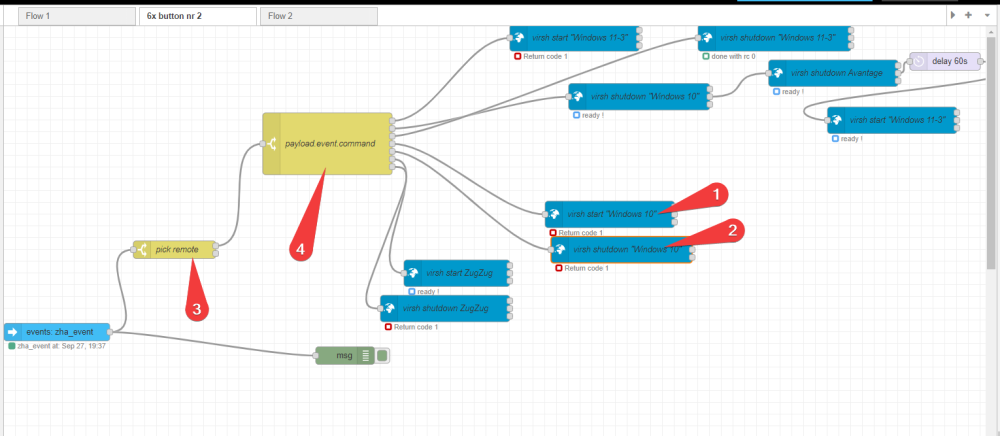
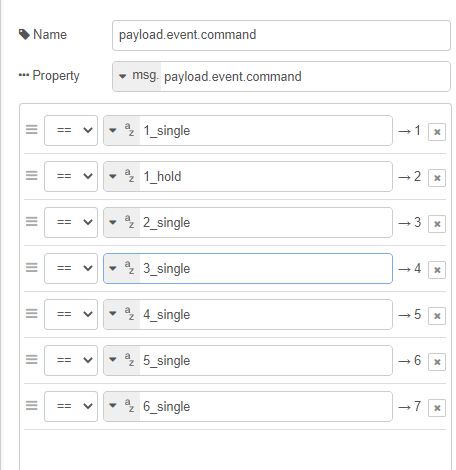
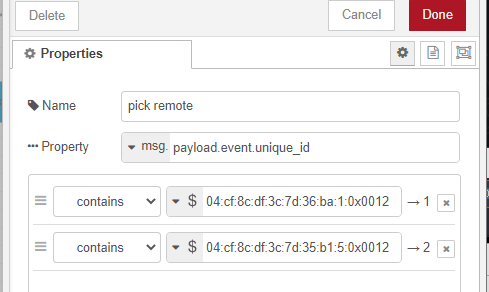
This is how i set it up in nodered trough home assistant.
-
So im guessing you finnished the server. How is the i7-12th gen holding up? How is plex 4k transcoding going? What are the powerconsumptions? On idle and on general load? Im thinking of splitting up my 5950x + 3080 server to lower the powerconsumption especially on idle (180 kwh)
-
so complicated. just run home assistant and a zigbee buttons. Zigbee buttons i use here i got a simple nodered assigned to the buttons.
-
Perhaps time to start looking for an UPS then, tnx
-
No i dont have qn ups
-
For some reason my system rebooted, cant seem to find the source of this reboot found the part below this in the logs (diagnostics attached) what went wrong ? anything wrong with my hardware? Dec 11 19:49:59 Unraid kernel: mce: [Hardware Error]: Machine check events logged Dec 11 19:49:59 Unraid kernel: mce: [Hardware Error]: CPU 12: Machine Check: 0 Bank 0: bc00080001010135 Dec 11 19:49:59 Unraid kernel: mce: [Hardware Error]: TSC 0 ADDR 105e2c0 MISC d012000000000000 IPID 1000b000000000 Dec 11 19:49:59 Unraid kernel: mce: [Hardware Error]: PROCESSOR 2:a20f10 TIME 1639248561 SOCKET 0 APIC 18 microcode a201016 Dec 11 19:49:59 Unraid kernel: mce: [Hardware Error]: Machine check events logged Dec 11 19:49:59 Unraid kernel: mce: [Hardware Error]: CPU 12: Machine Check: 0 Bank 1: bc800800060c0859 Dec 11 19:49:59 Unraid kernel: mce: [Hardware Error]: TSC 0 ADDR 105e2c0 MISC d012000000000000 IPID 100b000000000 Dec 11 19:49:59 Unraid kernel: mce: [Hardware Error]: PROCESSOR 2:a20f10 TIME 1639248561 SOCKET 0 APIC 18 microcode a201016 unraid-diagnostics-20211211-2116.zip
-
Tnx for the reply btw never knew monthly bandwith allocations is still a thing in 2021 on landlines . unless you mean the usenet allocations, just get newsdemon and a coupon from reddit, i think i pay 35 usd +- for 1.5 year or something, its nothing (with the note in mind we can afford these machine's) transcoding hogs up your system, especially if you go down from 4k to 1080p. it will go slow and people stop using it, and you get the annoying call "plex isnt working blablabla" Most of the times they use shitty clients anyway (some build in samsung TV plex app on an already outdated TV sock when the tv was released) (this helps btw https://community.home-assistant.io/t/automatic-sabnzbd-download-pausing/330196) i give people with an Nvidia shield access to my 4k content, if i know u use a stupid client, all they get is the 1080P access. it saves up those annoying calls where you have to tell them it isnt you, its their crappy stuff that isnt working. Besides transcoding from 1080p > 720p is alot lighter. exacly, multiple transcodes is a hell. especialy if you have sabnzbd repairing / unpacking. Just seperate the 4k content from the 1080p give the plebs access to the 1080P content and the masterrace nvidia shield people access to both (again, this helps https://community.home-assistant.io/t/automatic-sabnzbd-download-pausing/330196) repairing parity vs redownloading, both take alot of time. from experience i can say redownloading was faster then repairing my parity. Also im greedy with my terabytes i wanna use it all. Radarr: Use it together with Prowler or nzbhydra2+jackett as indexer. here u add the providers like rarbg or any else thats in the list 1: Setup Radarr 4k (deny 1080P in the profile, maybe play with the max size aswell) 2: Setup Radarr 1080p (deny 4k in the profile) 3: Setup prowlerr or nzbhydra2 with Jackett for the torrents 4: Make Radarr 4k import the from radarr 1080p in settings> lists > program lists > Radarr (due to the more availability of 1080p content) some guides you requested




