






Harro
Members
-
Joined
-
Last visited
Everything posted by Harro
-
Updated both servers. All went smoothly. Thank you
-
-n is just a check file system but the -L will force log zeroing, which will then look for the next super block. May lose some meta data but if successful you should be able to mount your disk again.
-
I know you did the xfs repair but with which command? xfs_repair -L /dev/device? Or xfs_repair -n /dev/device?
-
Have you tried to mount that disk(1) on the onboard controller? Something just looks off with a 20MB/s difference compared to your other drive tests.
-
Have you run multiple tests on that drive with the same results? If so and comparable test, I would replace it. On a side note, I replaced my two HP220 controllers with a new LSI 16i and have jumped 38MB/s in mt parity check. Decreasing my time by 5.5 hours. 23 hrs old 17.5 hrs new. I am hoping to shave off another couple of hours once all my 8TB drives are replaced with 10's. Thanks to @jbartlett for this diskspeed test, it gave me a graphic view on where my slow downs were occurring and on what controllers.
-
Sorry You know you focus so hard on what your mind set is, you forget to see what is right in front of you.
-
I mean my plex server running now I transcode the files local , on the cloud the clients would be transcoding or direct stream of those same files not my server local. Why would my upload speed affect the clients? They would be downloading from the cloud. My files would be on that cloud, What would I be uploading?
-
One other thing, will a plex pass be needed for setting this up?
-
Thanks for the replies. I use Kodi for my front end and would like to keep my files but with setting this up, I imagine I would have less buffering on my server once all files are on cloud and family members start to access those files instead of on my server. Missing the steps in here for set up and skipping to my concerns. In order to preserve my files I could just copy them to the upload folder correct? Then point Plex to the cloud drive. This would then take the load off of my server and place it on the clients. Correct on this?
-
Just finished reading every post in this thread and a big thumbs up to @DZMM for creating these scripts. Before I start on this a few questions: 1) Since Plex is running on your server, and you might share your content with family members, the path in plex goes to your google drive, does that mean that your family members now will get the content from the cloud share or does your server download it first and then send it to the family members? 2) If the cloud drive downloads right to the family members, couldn't they set their own Plex up if you gave them access to the shared folder? 3) Would trans coding be a thing of the past, since everything would now becoming from the cloud only dictated by family download speeds? I /myself might not use this but is very interesting for a combining of media on multiple plex servers.
-
Thanks Johnnie, I had been looking on server supply website and came across that one. Little pricey but I can then sell both my other cards.
-
Wondering is @johnnieblack would have any recommendations on a card
-
Do not have a card yet. Do you have a recommendation on a good one? Thanks
-
Thank you for that info. I guess I will go and find out. Will post some info once I have everything re-adjusted to the new controller.
-
You should be fine. I have the same drive but the 250 one and have over 90TB lbas written in 21/2 years. Mine shows no signs of slow down or errors.
-
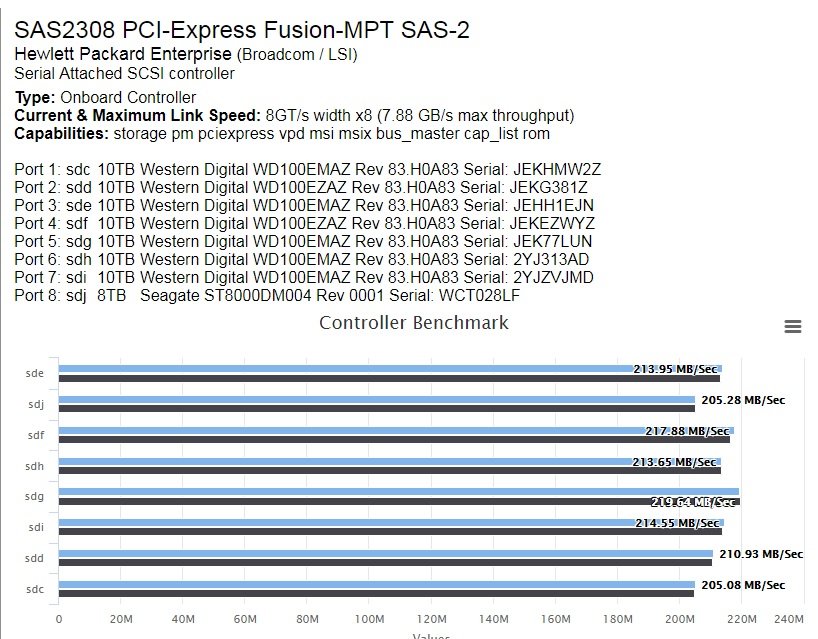
Thank you for this. I like how I can determine how many drives on which controller I can saturate, while maintaining a descent speed for a parity check. Question I have is, how do I know if I can replace a 8 controller with a 16 controller and still maintain my speed before the 16 get saturated? I am looking at placing 12 or 13 drives on the 16 but would like to keep the 200+ speed. This would be on my 1 x PCI Express 3.0 x16 slot. Would this be possible? My specs are in my signature.
-
Why not just move data right to the array instead of using the cache drive and mover do that? Might have a little buffering while that is going on but shouldn't become unresponsive.
-
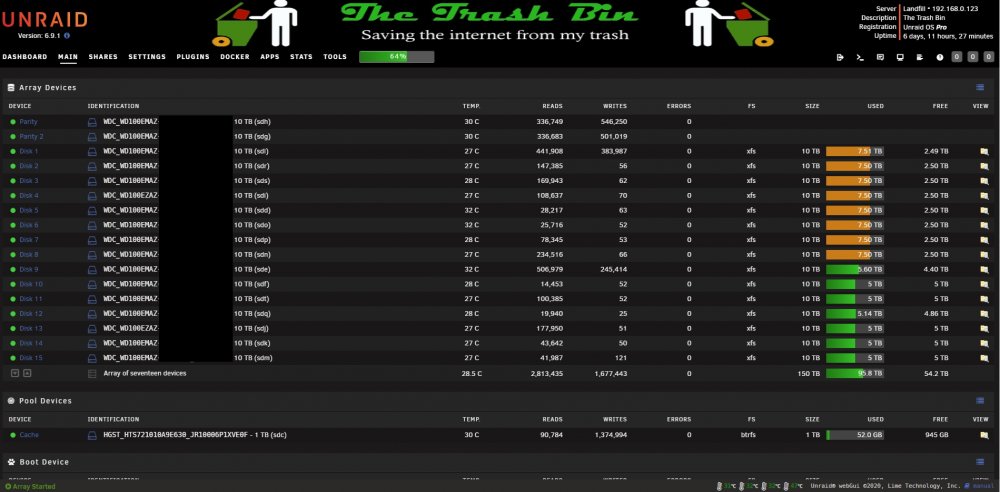
Currently at 114 TB. Starting to replace my 8 TB with 10's. Once complete 150 TB, but that will take the rest of the year I believe. Update 12-16-2019 Finished upgrading hard drives to 10 TB's. With my old 8 TB drives created a second server. 230 total TB's between the 2. I now am done. Specs are in signature. added picture of my 150 server..AKA Landfill Edit : This is my current storage and as you can see , I have upgraded to the 10 TB drives. If I do go larger next step would be to the 16TB drives.
-
-
It's not really necessary but makes a nice polished look IMO. Thanks
-
Is there a way to remove the overlay and choose a font color?

-
My first run was aborted because I forgot to turn dockers off. Still got through a few drives before I noticed this.
-
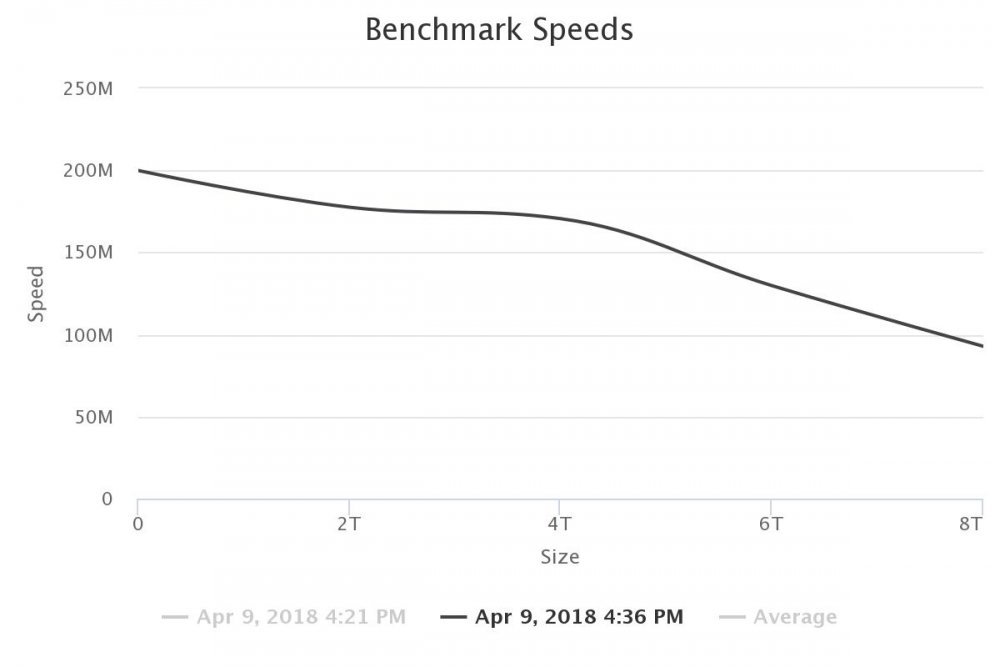
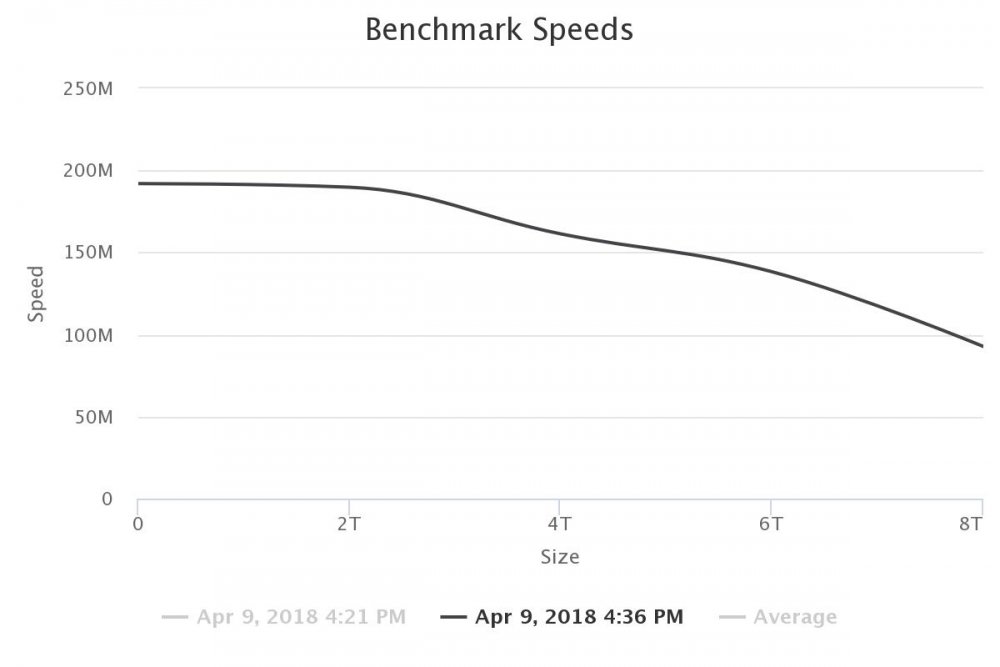
Both of these drives are Seagate Archive 8TB drives. Don't see much of a hump in any other drive on the array. I should also say the benchmark was done at the 25% so may not be real accurate.
-
Does this picture help you any?
-
I have uploaded mine yesterday after a purge because I forgot to turn off my dockers and had 3 users on my Plex server. After getting a complete benchmark I am wondering how to interpret the graphs? I have a few drives that are not a smooth gradual slope but have a hump in them. Does this mean I should be looking to replace those drives? Great work on this docker I really can see the benefit from using it on the controllers.




