





Nodiaque
Members
-
Joined
-
Last visited
Everything posted by Nodiaque
-
AH, ok. I do like having it on the side, allow for better db backup
-
Hello, I just saw unifi unraid reborn on the new app page. What is the difference with the unifi network app that already exist here: https://github.com/linuxserver/docker-unifi-network-application ?
-
I'll recheck. I reconnected everything about 2 weeks ago when I cleaned the place (took the server down and vacuumed the dust in and out).
-
that'S weird. I switch the power cable for a new one about 3 months (new psu) and the sata cable is a new cable from HBA card. hmmmm
-
Was wondering if you can explain what is the error with my disk. I got a discord alert telling me disk 5 is in error. I ran smart, xfs repair and found no problem. Thank you servraid-diagnostics-20250201-0054.zip
-
Haha, I'm renovating my basement so all my time is on that. No time to play.
-
Try changing only FLASK PORT. I haven't really tried to change port but this should work. If you change FLASK_PORT, you must change other parameter too.
-
Safe thing, just delete the container, delete the steam appdata (if you have other docker using it, maybe skip that step), rename your enshrouded appdata folder so it create a new one. After it has started once properly, you can shutdown, put back save data and modify the json (I suggest you just modify instead of restoee since your config file might be from the old version of the game before they changed some stuff like admin password)
-
I've seen it sometime. I would suggest starting a new container with new data then migrate your old data. It is a steam issue. If you are using the proton version, I would also create a new config file since it has change. Also, be sure to start from the new template for proton that was created not long ago to address the change.
-
Hello, I'm using it without any problem. What are the problem you are getting? I didn't create the docker container itself, it's the official one, I purely made a template so we don't have to do docker compose. But it is used by a lot of people. I can try to help or you can also check on the Github and post your issue. The dev are very responsive
-
OK so I talked with Calibrain. What happen is aa doesn't host book directly, they are all hosted somewhere like libgen / zlib. The CF bypass work with the installation of my template. You must also change the variable for the cf proxy url to your server ip. https://github.com/calibrain/calibre-web-automated-book-downloader/issues/45#issuecomment-2576954564
-
It is something I've seen many time on that particular server. I honestly cannot say why since it's a bug reported also on Windows OS. You might have better chance asking in the official forum for the game. You can check the log to see if it's looping on something, but this game has been a mess with performance since it's release, the server isn't very optimized.
-
I've put up the template for the scraper. But according to login, with or without the scrapper, it still goes to alternate download website. Bug ticket open on the github. I've also updated the template a bit, you might want to redownload the template
-
I fixed it by adding the variables for rate per changelog on gitlab. It is now mandatory
-
it seems the cf scrapper doesn't work. I see it receiving the request for slow download but it does nothing. I won't publish it since it's not working. I've open a bug report on it
-
Ok I've checked the log and with the current template, it faile to bypass CF because it cannot find the bypass container. Then it goes to an alternate website. I'll check what happen if I disable CF bypass edit: I'm also in talk with calibrain. I added a new value in the template for appdata that point to container /var/logs/cwa-book-downloader and on your unraid server into appdata folder you normally use i.e. /mnt/user/appdata/calibre-web-automated-book-downloader/ edit: ok, without CF bypass, it just failed cause I'm not a donator. I'll create a template for the cd bypass and test
-
It's exactly the one from ghcr that is linked on the github. It's just a template, I'm using the already existing docker made by calibrain. ghcr.io/calibrain/calibre-web-automated-book-downloader:latest True, I do see in the docker-compose that he put another docker, ghcr.io/sarperavci/cloudflarebypassforscraping:latest. It's not the same configuration based on the readme.md (readme put localhost as address for cloudfarebypass and the other one put the actual cf bypass docker). I can spin a second template just for the bypass if you want, shouldn't be long
-
they change many thing in 2.0.0 and the template doesn't work anymore
-
If you already have one, you can change the ip and port for it in the variable. I run it as is and it seems to work (as per the doc on github, it seems to have it's own).
-
Summary: Support Thread for Nodiaque Calibre-Web-Automated-Book-Downloader Application: Calibre-Web-Automated-Book-Downloader Github: https://github.com/calibrain/calibre-web-automated-book-downloader/ This template use the official image from calibrain (ghcr.io/calibrain/calibre-web-automated-book-downloader:latest) I only provide a template for the docker image, I do not maintain the image. For any issue with the software itself, please go to the official github. If you don't have a AA Donator Key and want to use cloudflare bypass, you must set USE_CF_BYPASS to true (default). If you set USE_CF_BYPASS to false, it will either try to use the AA Donator Key (if present) or Alternative URL (if present). If none are present, it will use other alternative like zlib that have way less books, which will often result in finding books in the search but failing to download. Discontinued This app was rebranded and replaced by a new one called shelfmark. Support thread available here: https://forums.unraid.net/topic/196495-support-nodiaque-shelfmark/. Please use the new shelfmark template
-
Hello, Comming here for 2 templates, Calibre-Web and Calibre-Web-Automated. I'm a bit loss. Do I need to have both running to use calibre-web with the automation or just Calibre-Web-Automated give all the feature of the first one plus the automated? Thank you
-
for me, lyrion doesn't work right now so I'm still on Logitech. I still have both docker, once the new one work properly, I'll switch. Project is still new but very active, just have to wait a bit
-
Hello everyone, I have something weird happening on my dockers. When I reboot my server, for instance after an update, when all dockers are getting started, the DNS ip for my server get either resolved for the external ip or the internal ip. When they have the external ip, if I reboot the docker, it will then have the internal ip. For some context, my network is as follow: PFSense as router, firewall and dns resolver. In PFSense, I have multiple alias for my domain: DNS Server for unraid is set to my pfsense. I also have 2 pihole, one on this unraid and one on another unraid server. Both pihole are synced together and resolve to my router. Devices on the network received these 2 pihole as DNS. Looking at my docker configuration, they all use unraid server host as the DNS (except for those on eth0 but that's ok). Now, when my docker boot, if I ping into a terminal session, some will resolved to the external ip, others to the internal ip. For exemple, authelia on left, mosquitto on right Both are using my-bridge as connection The order in which they boot doesn't seems to change anything. PiHole is already up and running in the stack, but it's also already running on the 2nd server. Even there, I can close piholes on both server and dockers will still work since I'm not using pihole for the dockers but my pfsense. So I don't get why it resolved to the internet ip when everything point to a local ip...
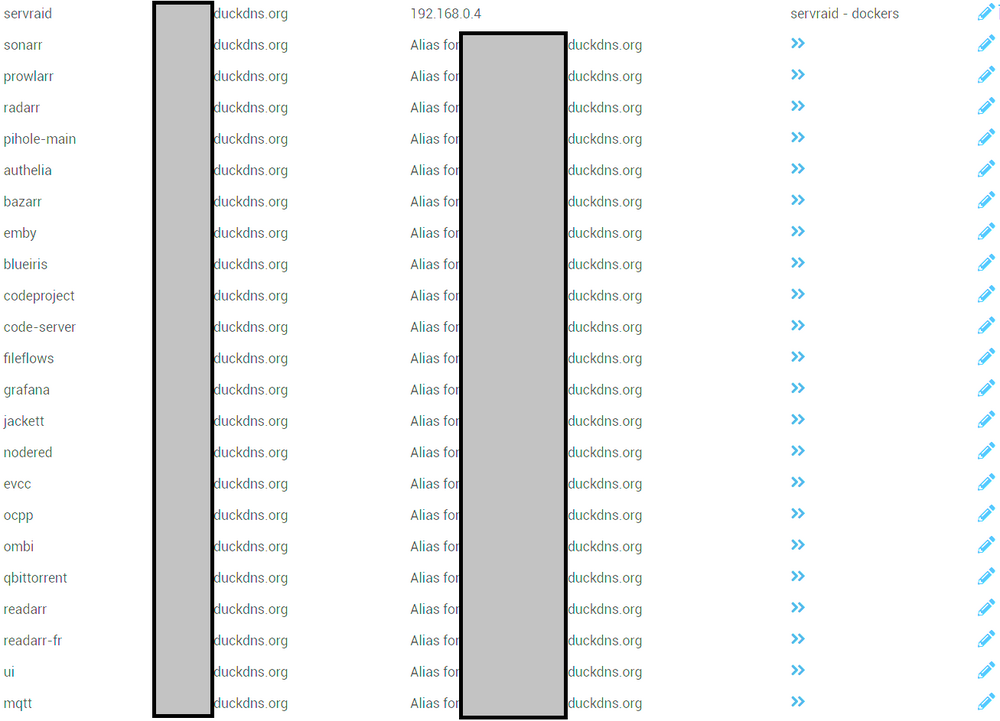



-
-
UPDATE TO ENSHROUDED_PROTON I have updated the docker (finally, sorry for the delay). There is a new unraid templates (that will sooner or later appear). Breaking change: In the templates, the following value are removed / unused if you still have them: SERVER_PASSWORD GAME_PORT UDP - GAMEPORT (port forward) You can safely remove them Right now, if you had a server_password set, it was automatically put in a new usergroup and gave the permission level 2 (Friend in default file). To prevent future problem, all usergroup must be created directly in the config file. The only value that will still be set by the template are: SERVER_NAME QUERY_PORT SLOTS Everything else must be edited when docker isn't running directly in the config file. Sooner or later, Community App will update the template which you can then download. The query port is now 15637 per default




