





HomerJ
Members
-
Joined
-
Last visited
Everything posted by HomerJ
-
Hi all This is my first ever bug report…. I just selected 4 Docker Containers to update within the Community Applications tab. All updates failed. I then tried updating them separately, one after the other, and this time the updates worked as expected. Attached is my Diagnostic zip created after the successful updates. I hope this report is found to be useful. Cheers! tower-diagnostics-20220920-2122.zip
-
I have marked the reply I received above as the solution to the issue I had, but I can't verify it. I have installed Highsierra as suggested, but I want to install Garageband and unfortunately it won't work unless I upgrade the OS to the next version, and if I did that I would have no way to use the GPU. Damn.... so close! Anyways I appreciate the help!
-
Thank you for that info. Do you know if I can get the igpu to work? I'm running the latest Intel i5 processor. If I can't use the igpu, then trying out High Sierra sounds like a good idea!
-
Hi all I have done heaps of searching but haven't been able to find much of a solution. I am sorry if this has been discussed before... Using the Macinabox, I have Monterey running as a VM. I have believe that I have successfully passed through my Nvidia 1070 video card. I say 'believe', because I have a monitor plugged into the GPU and I can see the OS, but I downloaded Nvidia software in the VM and it says that there is no GPU. If someone can share a solution, it would be much appreciated. If no good solution is available, could someone point me in the right direction? The other issue with this is that using the VM with the GPU attached, is painfully slow; is it possible to do a fix while using VNC and then attaching the GPU once the fix has been applied? Anyways, I'll be thankful for any help! Cheers!!
-
But it's working fine now, and has been running great prior to this. I'm worried that maybe something is on its way out and/or something serious could occur...
-
I just reinstalled the second video card, and it's started up fine. I'm therefore a little concerned. The latest diagnostics zip is attached. tower-diagnostics-20220908-2030.zip
-
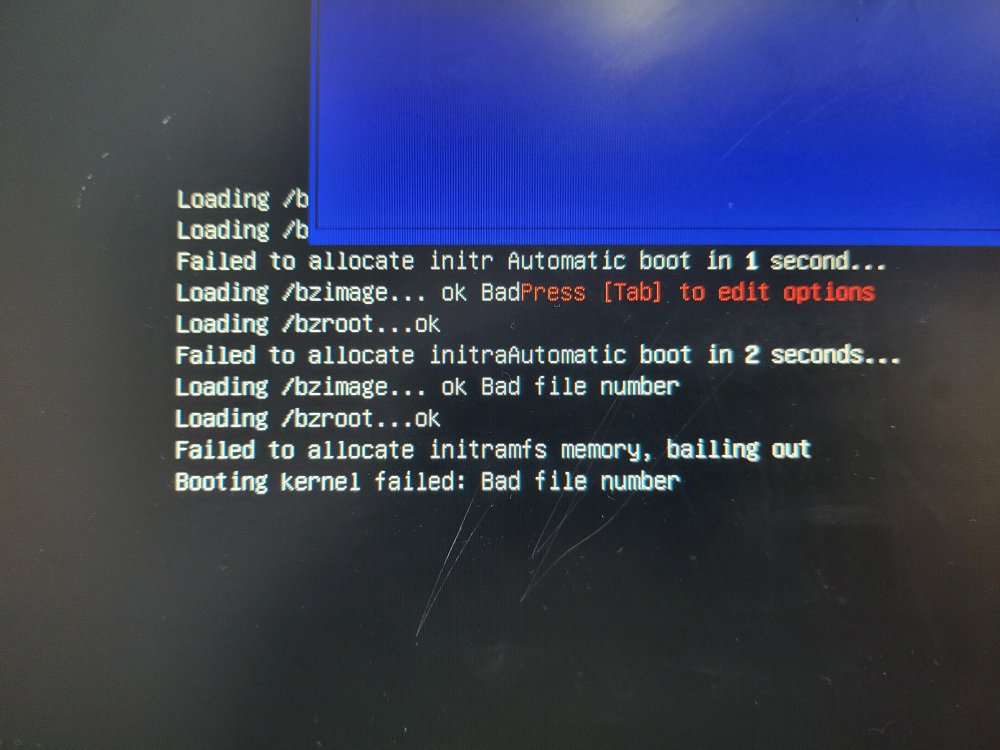
Hi again, I just finished installing another power supply that I had lying around which is bigger and more efficient than the one I was using. I also installed another graphics card; I already had a 1080ti installed which handles Plex work, so the additional video card (1080) I was planning send through a couple VM's that I use. After doing all this, I go to start it up, and I get a message on the screen (which was plugged into the internal graphics port and which I don't usually have connected) saying it had detected over current in a USB drive and would shut down. So it shuts down and I disconnect the 2 USB drives that were connected, and I try and start it up again. I then get a different message that it keeps repeating: Thinking it might be the thumb drive, I put it in a windows machine, but it doesn't detect any errors. Just to be certain, I grab a copy of the config file and the licence, and I use the USB creator to write a new system onto it, and then I copy back on to it the config folder and the licence. I then attempt to start it again, but I get the same message as before. I then decide to remove the second video card, and after doing so it starts up. Could this second video card really cause this issue? I'll attached the diagnostics zip in case it shows something useful. unRAID also failed to see one of my drives, which is probably due to one of the cables slipping out. While I wait for greater minds than mine to look at the zip and share their thoughts, I'm going to reinstall the second video card to see if it happens again. If it does, I have a 1070 video card that I'll install and see what happens. As always, thank you all in advance!! tower-diagnostics-20220908-1953.zip
-
Thought I'd have a bit of a read of this thread in case I might learn something. I have to say that I am super impressed with the support given!! As I was reading through, I felt really bad for the OP, but thanks to some fantastic help it looks like he'll be able to salvage some of his data. One of the big reasons I personally started the unRAID journey was the help and support you find here!
-
Just want to add that my son was the only person trying to watch a video, and Plex wasn't doing anything in the background. The only extra work the server was doing was downloading some torrents.
-
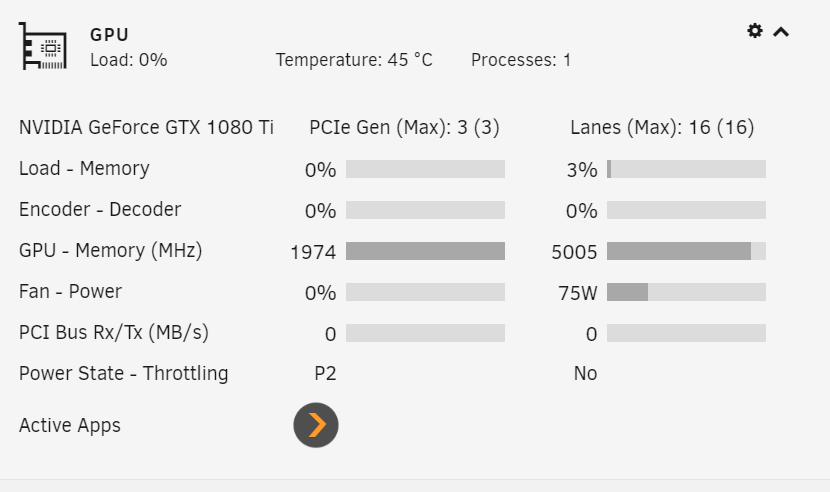
Hi all I'm not sure of the best place to post this, so I've decided to post it here in the General section.... I have Plex setup in a Docker, and I believe I have correctly managed to set it up so my Nvidia GTX 1080ti does the transcoding. The problem I am having is difficulty playing back most video media. It's usually so bad that it's impossible to play unless I change the Plex player to play at 720. Sometimes the video will work, but the audio comes and goes; sometimes I can't even get the video to play. I took the below screenshot when my son was trying to play a video on his tv: Shouldn't it be showing more action in the 'Encoder - Decoder' section? What does 'Power State - Throttling' mean? It says this all the time. I haven't done anything regarding unlocking the card, as I used to use the card a couple years ago to mine Ethereum and I always got good hash rates which has always led me to believe that the card isn't locked. How would I find out for sure if it is locked? I have learned a lot from this forum. I haven't been using unRaid for very long, but thanks to the help I've received here I have my server running very nicely. All that I need to do now is to sort this out. Thank you all in advance!
-
Hi Any update on this? cheers
-
UPDATE - I decided to try and sort this out myself.... what's the worst that can happen?? haha I used Krusader to move files on the drives that they should be on. I then changed my shares so I have the one share where I keep my media, and I am now using the 'downloads' drive as my cache drive for my media.
-
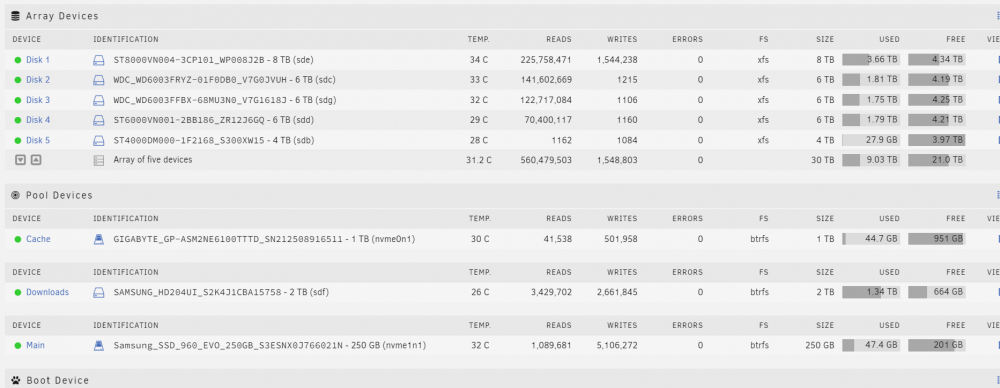
Hi again everyone A few days ago I finished backing up my unRAID server and I've only recently finished returning all my data back onto it. I have 5 drives which form the array, then I have 3 cache pools. 2 of the cache drives are used for appdata, vm's etc, and the 3rd one is for any downloading. I have been downloading a few torrents and I have had issues with Sonarr and Radarr not importing, so while I sort this out I have been using Krusader to move these media files into my library. What I couldn't work out was why I haven't been gaining space back on my Downloads drive.... well, I have figured that out; they are still there! NOTE: none of my media shares have a cache drive. In the above example, the share is only allowed to use disks 1 to 4, and this has always been the case. This issue has occurred only because I used Krusader. I am hoping I can get some assistance on what I need to do to remove the data from my Downloads disk. I am also hoping to get some help with the best way moving forward..... should I actually make my Downloads disk the cache for my media shares? Then when MOVER runs it will clear the drive for me. Would actually making the disk the cache drive right now before moving any files, resolve this issue? Please let me know if more info is required from me. Thanks in advance everyone!

-
Thanks for your reply. I managed to find a couple old internal drives, which I've installed. I am currently transferring data to one of them now, and I'm getting between 100 and 200 MB/s, so it's pretty clear to me that the issue was the drive. Thank you all again for your help. I have managed to solve so many questions due to the support I've read from this forum. Cheers!
-
I'm trying to copy over a little over 3.5TB of tv episodes. I don't know whether or not it is a SMR drive, but from everything I've read about SMR and CMR drives, is leading me to believe that it's highly likely that the drive is an SMR drive. The drive is a brand new drive that I bought for one of my kids. When I realized that I needed an external drive, I went looking in my son's bedroom for it, and found it completely out of it's box and in his old toy chest, so he probably didn't look after it all that well. I think I'm going to need to find another solution to this. Maybe I can sign up to a trial cloud storage....
-
That's correct. Initially it was transferring close to 200MB, but I haven't seen that sort of speeds for a long time. Am I probably correct in assuming that the issue is with the actual external drive?
-
Hi, thanks for replying, but I don't quite understand.... It's that info somewhere in the diagnostics zip?
-
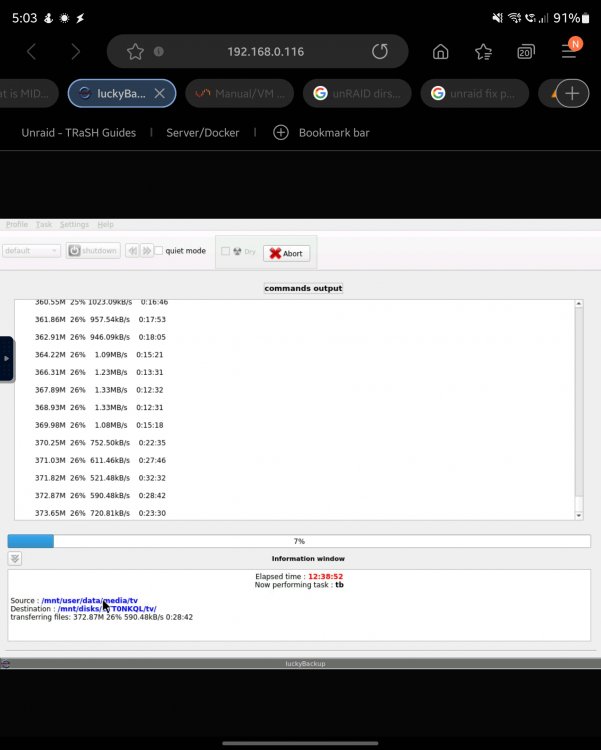
Hi again! I'm in the process of moving heaps of stuff off my unRAID server. At the moment I'm trying to copy my tv shows from my media share to a USB 3 external drive. The issue is that occasionally I get good transfer speeds, but most of the time the speed is appalling! I just took a screenshot of my current transfer using Luckybackup. I've tried Krusader and I have the same issue. I decided to try and stick it out with Luckybackup because I'd read that it uses rsync and that apparently using rsync helps. My guess is it's an issue with the actual external drive, but I thought I'd ask you all here anyways because I have a lot to transfer and this has already been going for over 12 hours. In case it helps, I've attached my diagnostics zip which I downloaded immediately after I took the above screenshot. Thanks in advance!! server-diagnostics-20220821-1704.zip
-
Thanks. I'll also be changing the folder split too because I think this is what contributed greatly to my original issue.
-
Thank you for your post. I've decided to basically start again. The way I originally set up my shares and how iset up their allocation methods was something I was never entirely happy with. I currently have one particular share which is very large, so I'll be able to break it apart and then better manage the allocation methods to better suit each time system in the shares. I think this will help resolve my original issue which was one drive filling up much sooner than the others. Thanks again for your help. Your thoughts and ideas have helped me better understand how unRAID works and has encouraged me to read up more to better understand not just what to do, but why.
-
Had to turn the computer off and back on to get access to it again. I've decided to do the transfers within a VM so I can be aware of the progress. I'm getting around 180Mib/s which will do.
-
Now my unRAID server has decided to drop off my network entirely.....
-
Hi all. First time using MIDNIGHT COMMANDER. I'm using it to transfer heaps of my files to an unassigned disk. I'm using the browser on my phone to access my server. I started the copy, then had other stuff to do, so I turn the screen off on my phone. After some time I picked up my phone to check on the progress, but I've had to use the command prompt to open MIDNIGHT COMMANDER back up. I now can't see the progress of the copy, though I know it's still happening because I can see the drive filling up in the MAIN tab of unRAID. Is there a way to bring up the progress of the copy again? Cheers!
-
I've found a couple support threads which explain the couple steps required to achieve a new install of unRAID without losing data, but there are a couple things that lead me to be concerned that I could just end up transferring the old issues to the new install, or losing shares. I understand what to do in regards to disk assignment. If I don't physically remove any drives, there is no reason for them to not line up, so that's good. What I'm concerned about is this; I'm assuming (because I can't remember) that the new install create a couple shares at the onset. How do I ensure that these shares line up with what's been laid down on my drives, like the SYSTEM and the APPDATA shares? And when I created my own personal shares, how do they 'attach' themselves to what's already been laid down? One support thread that I read suggested copying over to the USB the file that details the shares, but I don't feel doing this would be in my best interest as it's the shares that are the issue in my current setup. Keen to hear the thoughts of others. I'm planning to action this in the next few hours, but I'm hesitant due to the above reasons and don't want to be making such a big change without knowing for certain that all will be fine. I also have another question regarding the creation of the USB stick; seeing that once it boots it's all in the computer's memory, can I create the USB drive on my unRAID computer using a VM, transfer the files over that need to be restored, and then reboot it? The response I'll probably get will be no, but I thought I'd ask. It's times like these that I wish I paid more attention at school lol
-
Again I have to say thank you so much for all your assistance! I promise you that it's very much appreciated!! What concerns me is with these errors being in place now, that I will end up having serious issues in the future, but by that time things might be in such a big mess that I end up at a point where I will lose data. Rather than you spending too much more in helping me, would you happen to have a link handy that will help me reinstall unRAID so I have a freshly running system without losing any data? By the way, I hope the above is clear without too many mistakes; it's currently just after 2am here and I should be sleeping lol





